1
Noin Seitsemän Veljestä
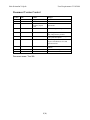
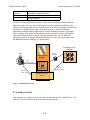
Basic Sequence
Post Conditions
Exceptions and
extensions
Priority Importance
Architecture
Effort
Status
Test Cases
Open Issues
User Requirements 23.10.2006
Conditional
High
High
Proposed, scope inclusion still open
Should this Use Case be included in the scope of the system?
6.4 System functionality and error situations
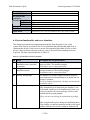
This chapter presents the most important functionality from the point of view of the
system in the form of an extensive list of error situations and problems that might arise in
combination with this. It also acts as a means of documenting what kind of errors to show
the user, and is a natural extension to the use cases to be used for determining what error
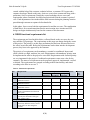
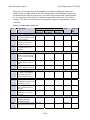
to present. The data is presented below in Table 14.
Table 14 - System failure and error situations
ID Error
E1 Unable to connect to
installation source provided
by installer.
E2 Interrupted connection to
installation source
E3 Missing data package
E4 Corrupted data package
Description and user presentation
An installation source that has been added earlier is no
longer available. The installer prompts:
“Installation source connection failed”
An installation source that has been added earlier fails
during a transaction. The installer prompts:
“Installation source connection failed”
The installer has read the supplied metadata from the
source and expected a data package to be found, but it is
missing. It prompts:
“Error in package information: Package not found from
installation source”
A corrupted data package can have serious consequences.
If the corruption is to be detected by the installer, a sort
of checksum would have to be implemented. In the case
of an error like this, the source package will have to be
disabled and the system prompts:
“There was an error during the installation of package
X”
If the corruption takes place during the installation phase
of the package, so that the corruption resides in the actual
database data, the error will be caught by Medicels DB
17(20)