1
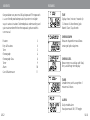
KEYS & FUNCTIONS
TIME
S1
S2
S2|Split/Reset
S1|Mode
+ Enter Settings
+ Scroll Modes
+ Split
+ Confirm
+ Clear chronograph data
+ Decrease Digits
UK-4
S3
S3|Start/Stop
+Start/Stop/End chronograph
+ Start/Stop alarm
+ Store chrono data
+ Toggle
+ Increase Digits
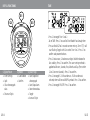
- Press S3 to toggle Time 1 and 2.
- To set TIME: Press S1 to scroll to Time Mode if not already there.
- Press and hold S2 for 2 seconds to enter settings. Time 1(T1) will
start flashing. Toggle with S3 to select Time 1 or 2. Press S1 to
confirm and proceed to hours.
- Press S3 to increase, S2 to decrease digits. Hold the button for
fast scrolling. Press S1 to confirm. The same setting method is
applied to Minutes, Seconds, Year, Month and Day (Press either
S2 or S3 to reset Seconds). Press S1 to confirm.
- Press S3 to toggle 12/24 hour formats. If 24 hour format is
selected, there will be no AM/PM symbols. Press S1 to confirm.
- Press S3 to toggle ON/OFF. Press S1 to confirm.
UK-5