1
Ver.1.1
Before Use
• Thank you for purchasing V200HD.
• This Manual contains important information about the proper use and cautions in use of the product. Please
read carefully before use.
• V200HD is an auxiliary product to alert users for safe driving and prevent accidents, by recording video
during driving. Also purpose for evidence of an accident.
• V200HD does not however guarantee that all accidents are recorded. Minor shock may not detect sensor to
record.
• WinyTechnology shall not be liable for any loss or damage to data or to the product which may be caused
by accident or impact.
• All rights vested in the design and software of V200HD are the property of Winy Technology Co., Ltd. and
protected by the Copyright Law.
• V200HD may change without notice for further function improvement.
• This User Manual is published based on the current state of the product, and may contain typographical
errors or omissions.
• Contents of this User Manual may be modified, changed or supplemented without notice for further
improvement.
Contents
•
Safety Precautions
•
REC Time
•
Product Feature
•
Specification
•
Standard Package
•
FAQ
•
Product Parts
•
Warranty
•
Front Camera Installation
•
Rear Camera Installation
•
GPS/TV-OUT Cable Installation
•
How to record
•
LED Operation
•
Voice Guide
•
LCD Configuration
•
PC Original Viewer Program Installation
•
PC Original Viewer – Screen Configuration
•
PC Original Viewer – Viewer Configuration
•
PC Original Viewer – Configuration
•
Configuration Default Setting
•
Playback
•
To save video file on your PC
•
To separate recorded video files
•
Video File Recovery
•
Firmware Upgrade
•
Firmware Upgrade – Touch Calibration
•
SD card format & Set breaking voltage
Safety Precautions
Operational and Security Precaution
•
•
•
•
•
•
•
•
•
•
•
•
•
•
•
•
•
•
•
•
•
•
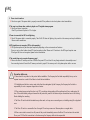
Do not operate the product during driving. It may cause accident.
The product must be installed at a point which would not obstruct the driver’s view.
Do not allow unauthorized disassembly or alteration to the product. It may cause malfunction, and the consequent
product damage will not be covered under the warranty.
If the product is damaged or power is cut off by a serious accident, the product may not be able to record such event
Always keep the windshield clean to enable clear recording.
Since the product is purpose to record video data during driving, video quality may be deteriorated when in/out the tunnel,
and at night or by contrast and backlight.
Contaminated camera lens may deteriorate the video quality. Keep the lens clean.
Do not place the product under direct sunlight or inside the closed vehicle as it may cause malfunction.
Do not use chemicals or detergent to clean the product. Clean gently with soft cloth.
Use of the product at temperature below -20℃ or above 60℃ may cause malfunction or breakdown.
(This caution should be applied when product is unused.)
Do not use the product in places in high temperature/humidity.
Do not exert excessive force to the product (especially to LCD buttons and to bracket) as it may cause breakdown.
Operate the product for 3-5 minutes to check for correct recording, before each use.
Extended exposure to sunlight and high temperature in the summer may cause malfunction.
Do not turn off power, or remove the SD card during firmware upgrading as it may cause malfunction.
Do not touch the cigar lighter cable with wet hand as it may cause electric shock.
Do not use a damaged cigar lighter cable as it may cause electric shock or fire.
Do not place the cigar lighter cable in near heating devices.
Do not leave the product connected to the cigar lighter if not in use for a long period of time.
Remove the cable from the product.
Insert the cigar lighter securely.
Do not bend or pull the cigar lighter cable by excessive force, or place heavy objects on the cable.
(It may damage the cord and as a result it may cause electric shock or fire.)
Do not touch the LCD excessive force as it may cause malfunction.
Safety Precautions
SD Card Precaution in use
•
•
•
In order to confirm normal operation of the product, please check the image of a SD card and format it on a regular basis.
(PC format needed one to two times per month)
Because an SD card is consumables, if it is used for a long time, you may lose the data or may not record due to an error,
so please check it periodically.
•
When the product is in recording or the power is on, do not eject the SD card forcibly. It may cause a failure of the SD card
and data loss.
•
If temperature gets too high in the vehicle, data storing may be disabled, or data may be damaged. Park your vehicle in the
shade in the summer.
•
When identify the car's accident or damage, please keep the SD card separately. Due to overwrite, important data may be
deleted.
•
When turn off the power of the body and remove the SD card before LED is turned off, the last recording file may not be
saved, so please be careful.
•
When turn off the power of the body and remove the SD card before LED is turned off, the last recording file may not be
saved, so please be careful.
•
When driving a car, do not remove the SD card. Make sure to remove it safely when a car is in parking or stop.
•
After turning on the power, make sure that it is in normal operation.
•
Please note that the warranty period of an SD card is six (6) months, and replace it at the time of more than six (6) months.
•
Please purchase and use SD Card that manufacture recommended specification.
•
The SD card randomly purchased other than the one we provide, shall be excluded from the warranty, and we shall not take
any responsibility for loss and damage of the data recorded in the SD card in any case.
Product Feature
High Quality Lens and High Image Quality / Resolution support
• 2 Mega Pixel image sensor mounting in Front / Rear.
• Wide mega lens
• HD(1280×720) High Image Quality Resolution and total 30fps(Front 20 + Rear 10).
Various Recording Function and Video Data Acknowledgement
• Touch LCD display apply, recording image and recorded image can be confirmed on LCD
• Normal, Manual, Event, Motion and auto change to Parking recording mode
• Driving records can be stored with GPS data. (optional)
• G sensor built-in Automatic parking recording mode change and event recording mode.
• External video output. (real-time video image can be checked in another monitor)
• Configuration setting is available on LCD menu.
• PC viewer program are provided to change various setting values and map data can be checked when using GPS.
• (In the general video player (e.g. Windows media player), recorded video can be played)
• SD card can be formatted as the product itself, without connecting to a PC.
• Each capacity of a normal / event/ motion folder can be set in PC Viewer.
High Quality Voice Record and Voice Guidance
• Operating instructions service by voice guidance
• Voice recording On/Off function and speaker output On/Off function.
• High performance microphone built-in
Back-up battery and Car constant power discharge protection function
• Stored recorded image safety by built-in high-capacity capacitor when power is off.
• Car constant power discharge protection function
• (Selectable ON/OFF on viewer, Not required another equipment for this function)
• Consume less than 2mA when power shutdown (Based on 12V)
• When using car constant power discharge protection functions, If user car voltage is 12V and the voltage of less than 11.8V
is maintained for more than 30 seconds the product power will be shuts-off
(Note: Shutdown time depend on the Type of Car and car condition.)
Other
• Soft look and emotional design. (easy removable body)
• Security LED light are mounted on front body (LED Lighting function On/Off can be set in PC viewer / LCD menu)
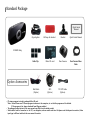
Standard Package
Quick Guide
Manual
Cigar Lighter
3M tape for bracket
Bracket
Quick Guide Manual
Micro SD card
Rear Camera
Rear Camera Video
Cable
GPS
(Option)
TV OUT Cable
(Option)
V200HD Body
Cable Clip
Option Accessories
Null Cable
(Option)
•
•
•
PC viewer program is stored in packaged Micro SD card.
*Note : Viewer Please save PC Viewer program in advance in the computer, etc. so that the program can’t be deleted.
(If the program is lost, please download from Winycam website.)
The packaged product picture of the user manual may differ from the actual product.
Video cable is used for connection to the TV / car navigation, and can monitor real-time. But please note that depend on monitors, Video
input type is인증번호
different and
check the userKCC-REM-DIO-CD-6500L
manual of monitor.
: 전방카메라
/ 후방카메라 KCC-REM-DIO-CD-RC06
Product Parts
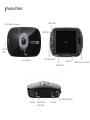
Power LED
Front camera
MIC LED
샘플 이미지
LCD
SD Card
Slot
Security LED
GPS Signal LED
Reset
Microphone
TV-OUT
Rear Camera
Connection
DC Jack
GPS Connection
REC Button by manual
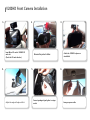
V200HD Front Camera Installation
2.
1.
Insert Micro SD card to V200HD SD
card slot.
(Check the SD card direction)
4.
3.
6.
5.
Adjust the angle of body and fix it.
Attach the V200HD in place on
windshield.
Remove the protect sticker.
Connect packaged cigar lighter to a cigar
socket.
Arrange a power cable.
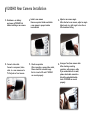
V200HD Rear Camera Installation
1. Shutdown a car battery
2. Install a rear camera
3. Adjust a rear camera angle
4. Connect video cable
5. Check an operation
6. Arrange a front/rear camera cable
and power off 200HD first
before installing a rear camera.
Connect a rear power /video
cable to a rear camera and a
TV-Out jack on front camera.
Remove a protect sticker and attach
a rear camera in proper location
in windshield.
After connecting a power/video cable,
Please check the recorded image
that is stored in SD card if V200HD
can record properly.
After attached a rear camera, adjust an angle.
Adjust angle is e right angle to lens face or
little downward facing.
After checking recording
operation, well-arrange a cable.
If you embed cable to car wall ,
please check cable connection.
Also after embedded doublecheck if V200HD can record
properly.
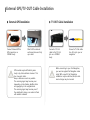
External GPS/TV-OUT Cable Installation
▶ External GPS Installation
▶ TV OUT Cable Installation
Connect External GPS to
GPS connection on
V200HD body.
Connect a TV-Out
cable to the TV-Out
jack on a V200HD
body.
Attach GPS module at
well visual place and tidy
up a cable.
GPS module may be affected by main
body or by other electronic devices if it is
too close each other.
Keep a distance as much as possible.
The receiving signal may become poor
depending on the climate, satellite status
and geography in the neighborhood.
The receiving signal may become poor if
the windshield is heavy sun-coated or fixed
with metallic materials.
Connect a TV-Out cable
to a AV-in jack you car
navigation.
When connecting to your Car Navigation,
you need an applied Car Navigation video
cable. With a specific Car Navigation,
installation may be restricted, and/or extra
service charge may be incurred.
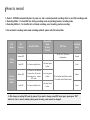
How to record
1. Record : V200HDis automatically boot at power on, and a constant(normal) recording starts as an initial recording mode.
2. Recording Mode : it is classified into driving recording mode and parking (motion) recording mode
3. Recording Method: it is classified into a Normal recording, event recording, motion recording.
※ For automatic recording and manual recording methods, please refer the below table.
REC
Mode
Driving
Mode
Parking
(Motion)
Mode
REC
Method
Auto REC Mode
Manual REC
Mode
(Button
Control)
Normal REC
-
-
Event REC
In G-sensor detect shock
One short press
button
Motion REC
In G-Sensor is not detected
for more than 10 minutes
Auto change to a motion
REC mode.
3 sec long press
button
Event REC
In G-sensor detect shock
One short press
button
REC Time
Recording
folder
Set 30 / 60 / 120 sec in
configuration
Normal
Event
10 sec before Event/Motion detect.
20 sec after Event/Motion detect
Motion
Event
※ After change to parking REC mode by manual, if you want to change normal REC mode again, please press “REC”
button for 3 sec in motion standby. (during event recording, mode cannot be changed.)
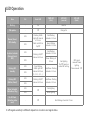
LED Operation
PWR LED
(first)
MIC LED
(second)
Item
CH
Front LED
Booting
-
On
Red On
FW update
-
Off
Orange On
Normal, Event,
REC standby
In detect a shock
(Normal, Event
REC)
Parking REC
standby
1CH
2CH
1CH
2CH
1CH
2CH
Parking REC
(Motion, Event)
1CH
Menu (included
Calibration, Play)
1CH
No SD Card
(Including other
error)
2CH
2CH
-
Flashing 3LEDs
right-left interval
at 1.5 sec.
Flash mid LED as
On/Off
Flashing On/Off
interval at 0.5 sec
Red flashing
interval at 1.5 sec
Green flashing
interval at 1.5 sec
Red flashing
interval at 0.5 sec
Green flashing at
0.5 sec
Cross flashing
3LEDs right-left
interval at 0.5 sec
(1, 2, 3, 3, 2, 1, …)
Red/Green flashing
interval at 1.5 sec
Flashing On/Off
interval at 0.5 sec
Red/Green flashing
interval at 0.5 sec
Off
Off
GPS LED
(third)
Red lighting
On/Off based on
audio REC setting
GPS signal
received Green
lighting
Non-received : Off
Red lighting
Green lighting
Red flashing interval at 0.5 sec
※ GPS signal sensitivity is different depend on a location and signal status.
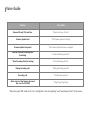
Voice Guide
Situation
Voice Guide
Remove SD card / SD card Error
“Please check your SD card.”
Firmware Update Start
“The firmware update is starting.”
Firmware Update Completed
“The firmware update has been completed.”
Constant (Normal) Recording Start
(In booting)
“Constant Recording will start.”
* Event Recording Start (In booting)
“Event Recording will start.”
Parking Recording start
“Parking Recording will start.”
Recording end
“The Recording will end.”
Alarm tone in a Rear Camera disconnect
(the error for 2CH REC)
“Ding-Dong, Ding-Dong”
* Only when event REC mode is set in the configuration, the voice guiding "event recording will start" will announce
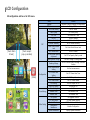
LCD Configuration
All configuration cab be set in LCD menu.
REC
[Touch Main
Screen]
[Touch except
pop-up window]
Menu
Playback
REC List
REC Mode Setting
Video Quality
REC Time
REC CH
Motion Sensitivity
G-Sensor Sensitivity
Voice Guide Volume
Level
REC Volume Level
SD Card Folder Capacity
Adjustment
Parking Mode Change
Breaking Voltage
Configuration
[Mute]
Time Setting
Other Setting
Front Camera Sensor
Setting
LCD Screen Saver
Setting
TV out
LCD Video Format
OSD Setting
Front LED Setting
Time Setting
Standard Time
Summer Time
FW Update
SD Card Format
Touch Calibration
Configuration
Initialization
System Information
Function
Playback by setup condition on configuration
Display REC list
Set REC Mode
REC Video Quality
Set Normal REC Time
Set REC Channel
Set Motion Sensitivity
Set 3D Sensor Sensitivity
Set Voice Guide Volume Level
Set REC Volume
Set SD Car Capacity Rate by mode
Set Auto Change to Parking mode
Set Car Constant Power Discharge Protection
Function
Set front camera sensor
Set LCD Screen Save Time
Set TV Output Format
Set LCD Video Format
Set OSD output on LCD
Set Security LED
Set Time
Set Standard Time
Set Summer Time
FW Upgrade Function
SD Card Format Function
LCD Touch Screen Calibration
Initialize Configuration
Display System Information
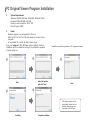
PC Original Viewer Program Installation
1.
-
System Requirements
Windows XP(32bit), Windows Vista(32bit), Window7(32/64)
Pentium4 2.8GHz & RAM over 1GB.
Display monitor resolution: 1024 * 768
DirectX Support (WPF)
2.
Install
- Playback program is in packaged Micro SD card.
- Insert this SD card into the USB card reader and connect to the
computer.
- An executable file is in the SD card as below figure.
If you run “setup.exe”, Winy BB Viewer will be installed. And then,
installation will be continued according to the installation sequence
of setup dialog box.
2
1
3
Select file location
and click “Next”
Next
* Installation may tale long depend on PC Usage environment.
Next
5
4
※ If viewer program is lost
accidentally, please visit our
website winycam-eng and
download to the SD card
Installing
Complete installation
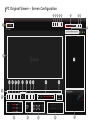
PC Original Viewer – Screen Configuration
2
3
4
5
6
7
28 29
1
8
10
9
13
14
15
16
17
18
19
20
21
22
11
12
23
24
25
26
27
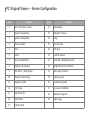
PC Original Viewer – Screen Configuration
Item
Function
Item
Function
1
1CH / 2CH select screen
16
Fast-Rewind
2
Viewer Configuration
17
Playback or Pause
3
System Configuration
18
Stop
4
Screen Capture
19
Fast-Forward
5
Print
20
File Skip
6
Zoom
21
Control Volume
7
Play List/Map Button
22
Total File Time/Playback Time
8
Playback File Location
23
Brightness/Contrast/Chroma
9
REC file list / Map Display
24
GPS signal condition
10
Playback Video Image
25
Driving speed
11
Playback Control
26
Latitude/Longitude
12
Full Screen
27
G-sensor information
13
Flip Horizontal
28
Restored image file
14
Flip Vertical
29
Split image
15
File Skip Back
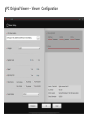
PC Original Viewer – Viewer Configuration
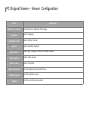
PC Original Viewer – Viewer Configuration
Item
JPEG stores location
Language
Playback mode
Repeat
Description
Set location for captured JPEG image.
Select language.
Select display channel.
Select repeated playback.
App location
Select App is always the top of another window.
Video reverse
Select video reverse.
Device select
Select the model.
Video adjustment
Playback speed
Volume
Control Brightness/Contrast/Chroma
Control playback speed
Control recording volume level
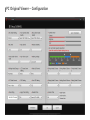
PC Original Viewer – Configuration
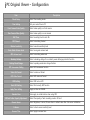
PC Original Viewer – Configuration
Item
Description
Mode Setup
Select the recording mode
Time Setting
Set your current time in PC
Front Camera Video Quality
Select video quality in a front camera
Rear Camera Video Quality
Select video quality in a rear camera
REC Time
REC Channel
Select recording time for each file
Select a recording channel
Motion Sensitivity
Select a motion sensitivity level
Voice Guide Volume Level
Select voice guide volume level
REC Volume Level
Select a recording audio level
Breaking Voltage
Select a breaking voltage for a constant power discharge protection function
Parking Mode Change
LCD Screensaver Setting
Select a parking mode auto-change function
Select LCD screensaver function
Video Out Format
Select a video out format
LCD Video Format
Select LCD video out format
OSD Setting
Front LED Setting
Apply Time Setting
Standard time
SD Card Folder Capacity Adjustment
Camera Sensor
G-Sensor
Summer Time
Select OSD out on LCD
Select front security LED function
Apply set time to V200HD
Auto-apply an actual location when using GPS
Select the capacity of each recording mode in SD card
Select Brightness, Contrast, Chroma. Back to default value after click sensor initialization
Select a shock sensor sensitivity level
Select apply a summer time
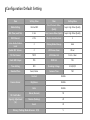
Configuration Default Setting
Item
Setting Value
Item
Setting Value
Mode Setting
Normal REC
Front Camera Video
Quality
Super High Video Quality
REC Time (each file)
1 min
Rear Camera Video Quality
Super High Video Quality
REC Channel
2 CH
Motion Sensitive level
3
Voice Guide Volume
Level
2
Parking Mode Change
Auto
Audio REC Volume
2
LCD Screen Saver
30 sec
TV-Out Format
NTSC
LCD Video Out
Front + Rear
Front LED Output
YES
OSD Out
YES
Time Setting
NO
Breaking Voltage
12.1(24.2)V
Standard Time
Seoul, Korea
Summer Time
NO
Camera Sensor
SD Card Folder
Capacity Adjustment
(%)
Contrast
Middle
Brightness
Middle
Color
Middle
Movie (Normal)
50
Motion (Parking)
20
Event
30
Driving / Parking Mode G-Sensor X,Y,Z
5
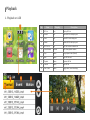
Playback
1. Playback on LCD
1
2
3
No
Item
Display
Description
1
REC List
Icon
Display REC List
2
Normal
Tab
Normal REC file list display tab
3
Event
Tab
Event REC file list display tab
4
Motion
Tab
Motion REC file list display tab
5
REC File List
List
REC File list that is selected tab
6
Video Window
Window
REC video playback window
7
Stop
Button
Stop playback video [Default]
8
Back
Button
Skip REC file back
9
Playback
Button
Playback REC file
10
Forward
Button
Skip REC file
11
Front / Back
Button
Toggle front / rear video diplay
4
5
6
7
8
9
10
11
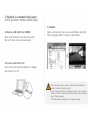
2. Playback in a standard video player
(GOM, Quicktimer, Window Media Player)
3) Playback
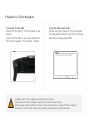
1) Remove a SD Card from V200HD
Open a SD Card slot cover and press softly,
then a SD Card can be removed easily.
Open a removal disc, you can see each folders. And click
files to playback which is stored in each folders.
2) Connect a SD Card to PC
Insert a SD card to SD Card Reader or adapter,
and connect it to PC.
- Each recorded video is saved in below folder automatically.
Normal : Normal (Constant) record
Event : Event record which is detected a shock by shock sensor.
- Motion : Motion record which is detected by motion detection
sensor. (Parking mode)
- GPS Information is displayed in the original viewer.
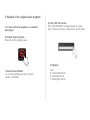
3. Playback in the original viewer program
1~2) Same method to playback as a standard
video player.
4) Find a REC file location
Click “FILE LOCATION” in original viewer on upper
right. Choose file location, video file list will be shown
3) Original Viewer Program
Click icon for the original viewer.
5) Playback
4) Select Product Model
Go to Viewer Setting and select “product
Model” as V200HD.
Click
N : Normal REC file list
E : Event REC file list
P : Parking REC file list
4. Playback in a TV/Car Navigation
1) Connect TV Out cable
Connect TV Out cable to TV-OUT terminal on the
product.
Connect TV Out cable to video input terminal on
the TV /Car navigation. (TV Out cable : Option)
2) Set the video input mode
Set the video input mode on TV/Car navigation
first and playback video for real-time monitoring.
Real-time recording image ONLY.
AV1(external input mode)
Available only TV/ Car navigation has external input terminal.
Please check the TV/Car navigation supplier for an external monitor cable.
Mode change method is different for each modes, please refer user manual of TV/Car navigation.
If remove or insert TV Out cable during recording, recording will end and start reboot.
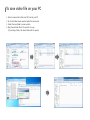
To save video file on your PC
1.
2.
3.
4.
Enter to removal disc after insert SD card to your PC.
Go to the folder where recorded video files are stored.
Create the new folder in same location.
Drag the particular file to the new file to copy.
(If you drag a folder, the whole folder will be copied.)
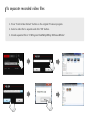
To separate recorded video files
1. Press “Front & Rear Extract” button on the original PC viewer program.
2. Select a video file to separate and click “OK” button.
3. Stored separated file in “C:\Program Files\Winy\Winy BB Viewer\Video”
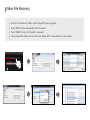
Video File Recovery
1. Press the “File Recovery” button on the original PC viewer program.
2. Press “OPEN” button and specify the file to recover.
3. Press “REPAIR” button, the file will be recovered.
4. The recovered file will be stored as file name “Repair.3GP” in same folder as it was located.
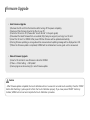
Firmware Upgrade
• Auto Firmware Upgrade
1)
2)
3)
4)
5)
6)
7)
Remove the SD card from the black box after turning off the power completely.
backup all files that are stored in the files to your PC.
Format a SD card on PC. (Please refer “how to format” in the quick guide)
Download the latest firmware from our website (http://winycam-eng.com) and copy to a SD card.
Insert the SD card to V200HD. After power ON then firmware will be updated automatically.
During firmware updating, a voice guide will be announced and updating massage will be displayed ion LCD.
When the firmware update is completed, V200HD will be initialized and a voice guide will be announced
• Manual Firmware Upgrade
1) Insert a SD card which new firmware is stored to V200HD.
2) “Menu > Other Setting > FW Update”
3) Same progress as above step (6) in auto firmware update.
Caution
- After firmware update completed, the touch calibration will run to ensure for accurate touch sensitivity. Press the “DONE”
button after thatching 4 yellow points to finish the Touch Calibration properly. If you have pressed “RESET” button by
mistake, V200HD will re-boot and complete the Touch Calibration procedure.
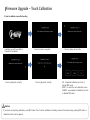
Firmware Upgrade – Touch Calibration
1. How to calibrate scree after booting
Loading Logo will be up after a
firmware is completed.
Touch a yellow dot correctly.
Touch a screen in any point.
Touch a yellow dot correctly.
Touch a yellow dot correctly.
- OK : Completed calibration and turn to
Normal REC mode.
- RESET : Go back to a test calibration screen.
- CANCEL : uncompleted a calibration and turn
to Normal REC mode.
Caution
- If you touch wrong during calibration, press REC button. Then it will be initialized and loading screen will be shown. Keep pressing REC button, a
calibration button can be skipped.
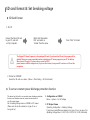
SD card format & Set breaking voltage
▶ SD Card Format
1. On PC
Connect the Micro SD card
to your PC, and click
on ‘My Computer’.
Right-click ‘Removable
Disc’ and select on
‘Format’ from the menu.
Press “Start” to format.
The Original PC Viewer Program is in the packaged SD card. If you format the SD card, this program will be
deleted. Please save a user manual data and an original viewer PC viewer program to your PC for backup.
When format SD card in PC, please select a system as FAT32.
please format as 64KB for assigned unit, if you set other format, it may cause SD card error or SD card disrecognition.
2. Format on V200HD
Format the SD card on a device. (Menu > Other Setting > SD Card Format)
▶ To set car constant power discharge protection function
This device has the built-in car constant power discharge protection
function, and therefore does not require an extra device to
cut off constant power.
Set a breaking voltage value on V200HD or PC viewer.
(Please note to set value based on a type of car or
An age of car.)
1. Configuration on V200HD
Menu > System > Cut off voltage
2. PC Original Viewer
Operating Configuration > Breaking Voltage
It may have some differences depend on a type of car or an age of car.
(Breaking Voltage Value : 11.8V, 11.9V, 12.0V, 12.1V, 12.2V, Deactivate)
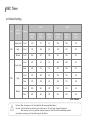
REC Time
▶ Default Setting
CH
1CH
16GB
Video
Quality
Camera
Super High
32GB
Normal
(50%)
Event
(30%)
Motion
(20%)
Normal
(50%)
Event
(30%)
Motion
(20%)
Front
130
78
51
266
158
105
High
Front
174
105
69
353
212
141
Normal
Front
262
157
104
531
318
212
Front
141
83
55
285
168
111
Rear
141
83
55
285
168
111
Front
176
104
69
356
211
140
Rear
176
104
69
356
211
140
Front
265
161
107
535
325
126
Rear
265
161
107
535
325
216
Super High
2CH
High
Normal
(Unit : Minute)
By time: When the memory is full, the oldest file will be automatically deleted.
By mode: Total record files are stored by your setting rate on “SD card Folder Capacity Adjustment”.
When memory is full on a particular recording mode, the oldest file will be automatically deleted
on particular recording mode. Stored file may also be deleted.
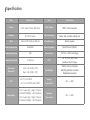
Specification
Item
Specification
Item
Specification
Camera
Front / Rear Camera 2M Pixels
Video Output
NTSC / PAL Composite
G-Sensor
3D Shock Sensor
Voice Recording
Built-in high sensitive microphone
GPS
External GPS Module (Option)
Voice Guidance
Built-in speaker
Video Compression
H.264/AVC
Recording Media
Micro SD Card (SDHC)
Audio Compression
AAC
Power Input
DC 12V ~ 24V Free Voltage
Recording Channel
2 Channel
LCD
3.0” TFT LCD, 400 X 240
Resistive Touch Display
Recording
Resolution
Front : HD (1280 x 720)
Rear : HD (1280 x 720)
Size/Weight
106(W) x 53(H) x 25(D)mm
ARO 88g (Bracket excluded)
98g(Bracket included)
FPS
1CH : Front 30FPS
2CH : Front 20FPS /Rear 10FPS
Storage
Temperature
-40℃ ~ +85℃
Image Quality
1CH : Super High / High / Normal
(bitrate 8/6/4Mbps – HD Standard)
2CH: Super High / High / Normal
(bitrate 4/3/2Mbps – HD Standard)
Operating
Temperature
-20℃ ~ +60℃
FAQ
1.
Power is not turned on.
※ Check once again if the power cable is properly connected. If the problem is not solved, please contact manufacture.
2. The map is not shown when a video is played on a PC original viewer program.
※ Check your Internet connection.
Check if your Internet Explorer is v7.0 or higher.
3. Power is connected, but LED is not lightning.
※ Check if the power cable is connected properly. Then if still LED dose not lightning, the product or the memory card may be defective.
Please contact manufacture.
4. GPS signal dose not recognize. (GPS is sold separately.)
※ GPS signal reception may be interrupted temporarily depending on the environment and locations.
Drive your car to other location where GPS signal reception is abled. Please wait 3-5 minutes in the GPS signal reception area.
If the signal still dose not recognized, please contact manufacture
5. The product does not recognize the memory card.
※ Remove the Micro SD memory card from V200HD after power OFF, and check for any foreign material or abnormality around
the connecting terminal. Format the SD memory card and try again. If the memory card is old, please replace with a new one.
Precaution before use
1. Please check for any defect on the product before installation. The Company shall not take responsibility for any cost or
expense incurred as a result of the failure to check before installation.
2. If installation was held at a service center other than those designated by the Company, the Company shall not take a
responsibility for cost or expense charged at such center.
3. If the constant power protect function is set ‘OFF’, monitoring during parking will be performed only for a certain period of
time. If the vehicle battery voltage is lowered for self-protection, power to the device may be disconnected even in the Parking
Mode disabling the recording.
4. The Micro SD card should be formatted every other week, as it may cause a recording error, a disabling saving file or playback
error.
5. The Micro SD card is a consumable. Use of an aged SD card may cause error. Please replace on a regular basis.
6. When a car accident occurred, turn off power of the product immediately, remove the Micro SD card and save the accident
file on your PC. If the file is erased due to the times away, the Company shall not take responsible.
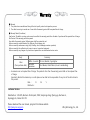
Warranty
■ Warranty
1. The products are manufactured through the strict quality control and inspection process.
2. The defect occurring in normal use of user within the warranty period will be repaired free of charge.
■ Warranty Details (Conditions)
Free Service: The defect occurring under normal use within the warranty period from the date of purchase will be repaired free of charge.
Paid Service: If the warranty period has passed.
Even within the warranty period, following cases shall be repaired at cost:
Failures caused by natural disasters (fire, lightning, flood damage, etc.)
Failures caused by carelessness using (drop, flooding, shock, breakage, excessive operation)
Failures caused by the malfunction of power in use and connected equipment.
Failures caused by any changes of a product and repaired from an unauthorized service center.
.
Body
1 Year
(from purchase date)
•
Accessory
Within 6 months
Excluded
warrantee
SD card, Bracket, Cigar Lighter
Card Reader, Vided Cable (cut user’s mishandling)
Accessories are not repaired free of charge. The products other than the warranty period shall not be replaced free
of charge.
Important data shall be backed-up in a safe place and we shall not be responsible for any loss of the data stored in
the product.
Date :
D.
M.
Y.
Distributor :
Customer Service
Manufacture : 303-305, Bucheon Technopark, #365, Samjeong-dong, Ojeong-gu, Bucheon-si,
Gyeonggi-do , Korea 421-741
Please download the user manual, program from below website
http://winycam-eng.com
WinyTechnology Co., Ltd.