1
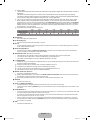
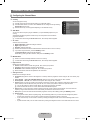
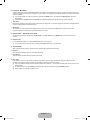
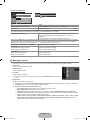
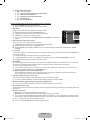
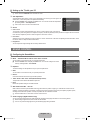
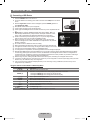
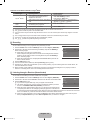
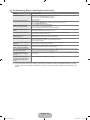
¦ Troubleshooting for Anynet+
Problem
Anynet+ does not work.
I want to start Anynet+.
I want to exit Anynet+.
The message
‘Connecting to Anynet+
device...’ appears on the
screen.
The Anynet+ device does
not play.
The connected device is
not displayed.
The TV programme
cannot be recorded.
The TV sound is not
output through the
receiver.
Possible Solution
● Check if the device is an Anynet+ device. The Anynet+ system supports Anynet+
devices only.
● Connect only one receiver (home theatre).
● Check if the Anynet+ device power cord is properly connected.
● Check the Anynet+ device’s Video/Audio/HDMI 1.3 cable connections.
● Check whether Anynet+ (HDMI-CEC) is set to On in the Anynet+ setup menu.
● Check whether the TV remote control is in TV mode.
● Check whether it is Anynet+ exclusive remote control.
● Anynet+ doesn’t work in certain situations. (Searching channels, Operating
Plug & Play, etc.)
● When connecting or removing the HDMI 1.3 cable, please make sure to search devices
again or turn your TV off and on again.
● Check if the Anynet+ Function of Anynet+ device is set on.
● Check if the Anynet+ device is properly connected to the TV and check if the Anynet+
(HDMI-CEC) is set to On in the Anynet+ Setup menu.
● Press the TV button on the TV remote control to switch to TV. Then press the TOOLS
button to show the Anynet+ menu and select a menu you want.
● Select View TV in the Anynet+ menu.
● Press the SOURCE button on the TV remote control and select a device other than
Anynet+ devices.
● Press P >/<, CH LIST, PRE-CH, and FAV.CH to change the TV mode. (Note that
the channel button operates only when a tuner-embedded Anynet+ device is not
connected.)
● You cannot use the remote control when you are configuring Anynet+ or switching to a
view mode.
● Use the remote control when the Anynet+ setting or switching to view mode is
complete.
● You cannot use the play function when Plug & Play is in progress.
Check whether or not the device supports Anynet+ functions.
Check whether or not the HDMI 1.3 cable is properly connected.
Check whether Anynet+ (HDMI-CEC) is set to On in the Anynet+ setup menu.
Search Anynet+ devices again.
You can connect an Anynet+ device using the HDMI 1.3 cable only. Some HDMI cables
may not support Anynet+ functions.
● If it is terminated by an abnormal situation such as disconnecting the HDMI cable or
power cord or a power failure, please repeat the device scan.
● Check whether the antenna jack on the recording device is properly connected.
●
●
●
●
●
● Connect the optical cable between TV and the receiver.
English - 33
BN68-01895D.indb 33
2009-04-10 �� 5:27:01