1
Owner’s Manual | Model A702 Aviation Light with Switch
4.0 Maintenance / Product Care
Although the light is designed to be maintenance free, large performance gains can be
made with clean solar panels and lenses. Clean the solar panels on a regular basis
(monthly). Use water and a soft sponge or cloth for cleaning and a mild non-abrasive
cleaning agent for more stubborn residue. Rinse well.
The following other maintenance precautions should also be taken:
•
Clean solar panels and lenses more frequently during drier months, as they may
become soiled more quickly. A pressure washer may be used, but avoid direct
spray onto the switch at close proximity.
•
Visual inspection – check the exterior assembly for cracks, missing or broken
hardware or other potential problems.
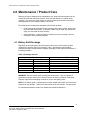
4.1 Battery Self-Discharge
Depending on the temperature where the light is stored, the unit will require periodic
recharging to maximize the life of its battery. Table 1 provides the recommended
maximum storage intervals between charging, depending on the ambient temperature of
the storage location.
Table 1: Recharge Intervals
Storage Temperature
o
C
F
20 or lower
68 or lower
25
77
30
86
35
95
40
104
45 or more
113 or more
Recharge Interval [Months}
o
9
6
4
2.5
1.5
1
WARNING: Exercise caution when handling the battery packs. They are capable of
generating enormous short-circuit currents. Remove all jewelry (bracelets, metal-strap
watches, rings) before attempting to handle or remove the battery packs.
NOTE: If the battery pack is replaced after its useful lifespan has ended, do not throw the
old pack into the garbage. Lead is toxic and harmful to the environment. Please recycle.
For replacement batteries contact your Authorized Carmanah Distributor.
8
Carmanah Technologies Inc. Copyright © 2005
Document: 39945_RevB_A702 with Switch_OwnersManual
Last revised: August 23, 2005