1
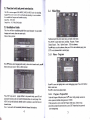
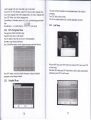
Pressa/vto move cursor to select display picture.
The cursor will stay about 2 seconds on the selected file ( in the menu Slide Time
setting to decide the time length ), then enter to scan mode automatic.
Press OK can change to full screen play.
Press RETURN back to previous menu, press PLAY : pictures display fiom tiom
top to down.
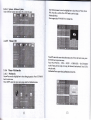
2.4.63 Movie Configure
NOte:
1
) Only support USB storage device,
can't support mobile phone or camera
such multimedia devices. Support removable hard disk, maximum
support 400G. Support NTFS and FAT32 format.
2) The ma,ximum depth of the USB folder support : 308
3) The maximum numbor offiles for each folder.support : 5000
4) Only support single and dual channel audio formats.
2.1.6.2
Subtitle Specific :
Subtitle BG
Sutrtitle Font color
2.4.6.4 PVR Configure
Photo Configure
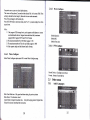
Under Photo Configure option press OK to enter Photo Configure page.
Record Device : Checking record device
Format : format of record device
2.5 Other menus
2.5.1
Slide Time Slide time : Play speed and time setting for preview picture
Slide Mode : This function closed.
Aspect Ratio is Images broadcast ratio, Keep for keeping picture Original ratio,
Discard for picture stretching full screen play.
l4
L-
Audio Languages