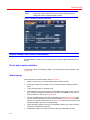
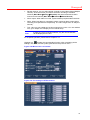
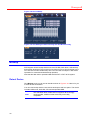
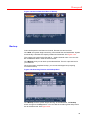
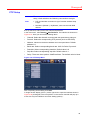
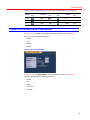
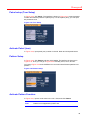
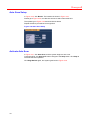
1
Honeywell Honeywell HSVR-16 Digital Video Recorder User Manual © 2009 Honeywell International Inc. All rights reserved. http://www.security.honeywell.com/ Rev. A Honeywell Contents Welcome ........................................................................................................................................................ i Important Safeguards and Warnings.......................................................................................................... ii 1 Features and Specifications......................................................................................................................1 Overview............................................................................................................................................1 Features ............................................................................................................................................1 Specification ......................................................................................................................................2 2 Overview and Controls..............................................................................................................................5 Front Panel ........................................................................................................................................5 Rear Panel.........................................................................................................................................6 Connection Sample ...........................................................................................................................7 Remote Controller..............................................................................................................................8 Mouse Control ...................................................................................................................................9 3 Installation and Connections...................................................................................................................12 Check Unpacked DVR.....................................................................................................................12 About Front Panel and Rear Panel ..................................................................................................12 HDD Installation...............................................................................................................................12 Connecting Power Supply ...............................................................................................................13 Connecting Video Input and Output Devices ...................................................................................13 Connecting Video Input ............................................................................................................13 Connecting Video Output .........................................................................................................14 Connecting Audio Input & Output ....................................................................................................14 Audio Input ...............................................................................................................................14 Audio Output.............................................................................................................................14 Alarm Input and Output Connection.................................................................................................15 Alarm Input and Output Details.................................................................................................15 Alarm Input Port........................................................................................................................15 Alarm Output Port.....................................................................................................................16 RS232..............................................................................................................................................17 RS485..............................................................................................................................................17 USB .................................................................................................................................................17 4 Overview of Navigation and Controls......................................................................................................18 Login, Logout & Main Menu.............................................................................................................18 Login.........................................................................................................................................18 Main Menu................................................................................................................................18 Logout ......................................................................................................................................19 i Honeywell Auto Resume after Power Failure.............................................................................................20 Replace Button Battery.............................................................................................................20 Manual Record ................................................................................................................................20 Live Viewing .............................................................................................................................20 Manual Record .........................................................................................................................20 Search & Playback ..........................................................................................................................22 Search Menu ............................................................................................................................22 Basic Operation ........................................................................................................................23 Calendar ...................................................................................................................................24 Schedule..........................................................................................................................................25 Schedule Menu.........................................................................................................................25 Detect ..............................................................................................................................................26 Go to Detect Menu ...................................................................................................................26 Motion Detection.......................................................................................................................26 Video Loss................................................................................................................................29 Camera Masking ......................................................................................................................29 Alarm Setup and Alarm Activation ...................................................................................................30 Go to alarm setup interface ......................................................................................................30 Alarm setup ..............................................................................................................................30 Backup.............................................................................................................................................32 Detect Device ...........................................................................................................................32 Backup .....................................................................................................................................33 PTZ Control and Color Setup ..........................................................................................................34 Cable Connection .....................................................................................................................34 PTZ Setup ................................................................................................................................35 PTZ Trace.................................................................................................................................36 Preset/Tour/Pattern/Scan Operations..............................................................................................37 Preset Setup.............................................................................................................................38 Activate Preset .........................................................................................................................38 Patrol setup (Tour Setup) .........................................................................................................39 Activate Patrol (tour).................................................................................................................39 Pattern Setup............................................................................................................................39 Activate Pattern Function .........................................................................................................39 Auto Scan Setup.......................................................................................................................40 Activate Auto Scan ...................................................................................................................40 5 Understanding of Menu Operations and Controls...................................................................................41 Menu Tree .......................................................................................................................................41 Main Menu.......................................................................................................................................42 Setting .............................................................................................................................................42 General.....................................................................................................................................42 Encode .....................................................................................................................................44 ii Honeywell Schedule ..................................................................................................................................45 RS232 ......................................................................................................................................45 Network ....................................................................................................................................46 Alarm ........................................................................................................................................53 Detect .......................................................................................................................................53 Pan/Tilt/Zoom ...........................................................................................................................53 Display......................................................................................................................................54 Default ......................................................................................................................................56 Search .............................................................................................................................................57 Advanced.........................................................................................................................................57 HDD Management....................................................................................................................58 Abnormity .................................................................................................................................59 Alarm Output ............................................................................................................................59 Manual Record .........................................................................................................................60 Account ....................................................................................................................................60 Auto Maintain............................................................................................................................61 TV Adjust ..................................................................................................................................61 Information.......................................................................................................................................62 HDD Information.......................................................................................................................62 BPS ..........................................................................................................................................63 Log ...........................................................................................................................................64 Version .....................................................................................................................................65 Online Users.............................................................................................................................65 Shutdown.........................................................................................................................................66 6 Web Client Operation..............................................................................................................................67 Network Connection ........................................................................................................................67 Login................................................................................................................................................67 Real-Time Monitor ....................................................................................................................71 PTZ...........................................................................................................................................73 Color .........................................................................................................................................75 Picture Path and Record Path ..................................................................................................76 Configure .........................................................................................................................................77 System Information...................................................................................................................77 System Configuration ...............................................................................................................79 Advanced .................................................................................................................................95 Search ...........................................................................................................................................100 Alarm .............................................................................................................................................103 About .............................................................................................................................................104 Log out...........................................................................................................................................104 Un-install Web Control...................................................................................................................105 7 FAQ ......................................................................................................................................................106 iii Honeywell 8 Appendix...............................................................................................................................................111 HDD Capacity Calculation .............................................................................................................111 Compatible USB Drive List ............................................................................................................112 iv Honeywell Welcome Thank you for purchasing our DVR! Please refer to this user’s manual for the installation and operation of HSVR-16. Here you can find information about this series DVR features and functions, as well as a detailed menu tree. Before installation and operation please read the following safeguards and warnings carefully! i Honeywell Important Safeguards and Warnings 1. Electrical safety All installation and operation here should conform to your local electrical safety codes. We assume no liability or responsibility for all the fires or electrical shock caused by improper handling or installation. 2. Transportation security Heavy stress, violent vibration or water splash are not allowed during transportation, storage and installation. 3. Installation Keep upwards. Handle with care. Do not apply power to the DVR before completing installation. Do not place objects on the DVR. 4. Qualified engineers needed All the examination and repair work should be done by the qualified service engineers. We are not liable for any problems caused by unauthorized modifications or attempted repair. 5. Environment The DVR should be installed in a cool, dry place away from direct sunlight, inflammable, explosive substances and etc. 6. Accessories Be sure to use all the accessories recommended by manufacturer. Before installation, please open the package and check all the components are included. • Software CD • USB mouse • Network cable • 12VDC power adapter • Power cord • SATA data cable and screws for HDD installation • User manual • Remote controller • 16 BNC connectors • 1.5 meter HDMI cable Contact your local retailer ASAP if something is broken in your package. ii Honeywell 1 Features and Specifications Overview HSVR-16 is an excellent digital video surveillance product. It adopts embedded Linux OS to maintain reliable operation. Popular H.264 compression algorithm and G.711 audio compression technology realize high quality, low bit stream. Unique frame by frame play function is suitable for detail analysis. It has various functions such as record, playback, monitor at the same time and can guarantee audio video synchronization. This series product has advanced technology and strong network data transmission function. This series device adopts embedded design to achieve high security and reliability. It can work standalone with local Graphic User Interface, and can also be accessed by IE web client through Ethernet for remote surveillance. This series product can be widely used in various areas such as intelligent resident zone, banking, telecommunication, electric power, interrogation, transportation, factory, warehouse, resources, and water conservancy. Features This series product has the following features: • Real-time monitoring It has analog (CVBS), VGA and HDMI output port for real-time surveillance by a monitor or TV set. The system supports the three outputs at the same time. • Storage function Special data format guarantees data security and avoids vicious data modification. • A/V compression Support multi-channel audio and video. Independent hardware codecs encodes and decodes the audio and video signal from each channel to maintain video and audio synchronization. • Backup function Local backup via USB port for flash disks and portable HDDs IE web client can download the file to local HDD to backup via network. • Recording and playback function Support simultaneous real-time recording, record search, forward/backward playback, network monitoring, record download in all channels. Support various playback modes: slow, fast, backward and frame by frame playback. Support time title overlay for accurate event occurrance time display Support zoom of specified zone in the picture. 1 Honeywell • Network operation Support remote real-time monitoring, remote record search and remote PTZ control via network. • Alarm interlock function Three relay alarm outputs to realize alarm interlock and on-site light control. • Communication port RS485 port for PTZ control. RS232 port for system upgrade and maintenance with PC COM connection, and matrix control. Standard Ethernet port for network access function. • PTZ control Support PTZ decoder via RS-485 communication. Support Pelco-D protocol to allow the PTZ to control the speed dome. • Intelligent operation Support USB Mouse operation function In the menu, support copy and paste for settings. Specification System Compression Standard Video monitor Parameter HSVR-16 Main Processor High-performance industrial embedded micro controller OS Embedded LINUX System Resources Interface Multiplex operations: simultaneous 16-channel recording, 16-channel playback and network operation User-friendly graphical user interface Input Devices Front panel, USB mouse, remote control Input Method Shortcut Function Numbers, letters, symbols and extensible Chinese Copy/paste operation, USB mouse right-key shortcut menu, double click USB mouse to switch screen. Video Compression H.264 Audio Compression G.711A Video Input 16-CH composite video input: (NTSC/PAL) BNC (1.0VP- P, 75Ω) Video Output 1-ch PAL/NTSC BNC (1.0VP- P, 75Ω) composite video signal output 1-ch VGA output; 1-ch HDMI output Support TV/VGA/HDMI video output at the same time. Video Standard PAL (625 line, 50f/s), NTSC (525 line, 60f/s) Record Speed PAL 1f/s to 25f/s per channel and NTSC 1f/s to 30f/s per channel Video Partition 1/16 windows Support monitor touring modes: alarm triggered, motion detection triggered, and manual control. Monitor Touring 2 Honeywell Resolution (PAL/NTSC) PAL/NTSC Real-time monitor: D1 704×576/704×480 Playback: Channel1: D1 704×576/704×480, CIF 352×288/ 352×240, QCIF 176×144/176×120 Channel9 : D1 704×576/704×480, CIF 352×288/ 352×240, QCIF 176×144/176×120 Other channels: CIF 352×288/ 352×240, QCIF 176×144/176×120 Support dual streams: extra stream resolution QCIF 176×144/176×120 Motion Detection Zone setup: support max 396(22×18) zones. Support various sensitivity levels. Image Quality 6-level image quality adjustable Privacy mask Support max 4 user defined zones of privacy mask in each display window. OSD in record Channel information, time information and privacy mask zone. TV Adjust Adjust TV (CVBS) output zone for monitors of display distortion. Channel Lock Audio Hard disk Live Channel Status OSD Color Configuration Audio Input Audio Output Hard Disk Hard Disk Space Consumption Recording Mode Recording Length Cyclic mode Record Search Record and playback Playback Mode Various File Switch Ways Multi-channel Playback Display Modes Zoom Backup function Backup Mode Network Function Network control Cover secret channel with blue screen though system is encoding normally. Screen -lock function to prevent unauthorized user seeing secret video Channel name, recording status, screen lock status, video loss status and motion detection status are shown on the bottom left of display screen. Hue, brightness, contrast, saturation and gain setup for each channel 4-ch 200-2000mv10KΩ(BNC) 1-ch audio output 200-3000mv 5KΩ(BNC) 1 built-in SATA port; support 1 HDD. Audio: 28.8MByte/h per channel Video: 56-900MByte/h per channel Manual recording, motion detection recording, schedule recording and alarm recording Priority: Manual recording> alarm recording>motion detection recording>schedule recording 1 to 120 minutes single record duration (Default 60 minutes) When hard disk is full, system can overwrite previous video file. Various search engines such as time, type and channel. Various fast play, slow play speeds, manual frame by frame playback and reverse play mode. Can switch to previous or next file or any file in current play list. Can switch to file on other channel of the same time (if existing). Support continuous file playback, when a file is ended, system automatically plays the next file in the current channel Support maximum 16-channel simultaneous playback. Switch between adaptive window/full screen when playback When in one-window full-screen playback mode, you can select any zone to zoom in. HDD backup Support peripheral USB backup device. (Flash disk, portable HDD and etc.) Support USB burner (extension function). Support network download and backup Remote live view of all channels. DVR configuration through web browser client Upgrade or maintenance via web browser client View alarm information such as external alarm, motion detection and video loss Support network PTZ control File download backup and playback 3 Honeywell Motion Detection Motion Detection and Alarm Interface Video Loss External Alarm Manual Alarm Control Alarm Input Alarm Output Alarm Relay USB Interface Network connection RS485 RS232 System Information Hard Disk Information Data Stream Statistics Log statistics Version On-line user User Management User Management Password Authentication Upgrade Login, Logout and Shutdown General Parameter 4 Power Power Consumption Working Temperature Working Humidity Air Pressure Duplex transparent COM Intercom Zone setup: support 396(22×18) detection zones. Various sensitivity levels Can activate recording or external alarm or screen message prompt in specified period. Alarm can activate external alarm or screen message prompt. Can activate recording or external alarm or screen message prompt in specified period. Enable or disable alarm input channel. Support manual alarm output. 16-ch alarm input(Normal open or normal close) 3-channel relay output 30VDC 2A,125VAC 1A(activation alarm ) 2 USB 2.0 ports RJ45 10M/100M self-adaptive Ethernet port PTZ control port Support Pelco-D PTZ control protocols. Ordinary serial port (for upgrade and maintenance) and transparent serial port (COM input and output via network ) Display HDD current status Data stream statistics for each channel (in wave mode) Display maximum1024 logs. Support various search engines such as time and type. Display version information: channel amount, alarm input and output amount, system version and published date. Display current on-line user Multi-lever user management; various management modes Integrated management for local user and network user Configurable user power Support user /group and its corresponding rights modification. No limit to the user or group amount Password modification Administrator can modify other user’s password. Account lock strategy Five times login failure in thirty minutes may result in account lock. Web browser, client-end and specific update tool. Password login protection to guarantee safety User-friendly interface when login. Provide the following options: Logout /shutdown/ restart. Authentication when shut down to make sure only those proper people can turn off DVR DC +12V/3.3A 12W (Exclude HDD) 0℃-+55℃ 10%-90% 86kpa-106kpa Dimension 375x285x45mm Weight 3.25KG(Exclude HDD) Installation Mode Desktop installation Honeywell 2 Overview and Controls This section provides information about front panel and rear panel. When you install this series DVR for the first time, please refer to this part first. Front Panel The front panel is shown in Figure 2-1. Figure 2-1 The Front Panel of HSVR-16 Please refer to the following sheet for front panel button information. Name Icon Power button, press this button for three seconds to boot up or shut down DVR. Power button Shift Function Shift In textbox, click this button to switch between numeral, English(Small/Capitalized),donation and etc. Activate current control, modify setup, and then move up and down. Up/1 Down/4 S T Increase/decrease numeral. Assistant function such as PTZ menu. In text mode, input number 1/4. Shift current activated control, Left/2 Right/3 W ESC ESC X When playback, click these buttons to control playback bar. In text mode, input number 2/3. Go to previous menu, or cancel current operation. When playback, click it to restore real-time monitor mode. Confirm current operation Enter ENTER Go to default button Go to menu Record REC Multiple slow play speeds or normal playback. In text mode, input number 8. Slow play/8 Assistant Manually stop/start recording, working with direction keys or numeral keys to select the recording channel. Fn One-window monitor mode, click this button to display assistant function: PTZ control and image color. 5 Honeywell In PTZ menu, shift PTZ control menu. Backspace function: in numeral control or text control, it can delete the previous character before the cursor. In motion detection setup, working with Fn and direction keys to realize setup. In preview mode, click it for three seconds to switch between TV.VGA. For HD1 series DVR, there are three modes: TV, VGA, VGA_LCD (60Hz LED output). In text mode, click it to switch between numeral, English character(small/capitalized) and etc. Realize other special functions. Fast play/7 Various fast speeds and normal playback. In text mode, input number 7. Play previous/0 │W In playback mode, playback the previous video In text mode, input number 0. Reverse/Pause/6 W In normal playback or pause mode, click this button to reverse playback In reverse playback, click this button to pause playback. In text mode, input number 6. Play Next/9 f│ In playback mode, playback the next video In menu setup, go to down ward of the dropdown list. In text mode, input number 9. Play/Pause /5 f In normal playback click this button to pause playback In pause mode, click this button to resume playback. In text mode, input number 5. To connect USB storage device, USB mouse. USB port Network abnormal indication light Net Network error occurs or there is no network connection, the light becomes red to alert you. HDD abnormal indication light HDD HDD error occurs or HDD capacity is below specified threshold value, the light becomes red to alert you. Record light Alarm System is recording or not. It becomes on when system is recording. IR Receiver IR It is to receive the signal from the remote control. Rear Panel HSVR-16 rear panel is shown as below. See Figure 2-2. Figure 2-2 The Rear Panel of HSVR-16 6 Honeywell Please refer to the following table for detailed information. No. Description 1 Video input 2 Audio input 3 Video CVBS output 4 Audio output 5 Network port 6 USB port 7 HDMI port 8 RS232 port 9 Video VGA output 10 Alarm input/alarm output/RS485 port 11 Power input port 12 Power button When connect the Ethernet port, please use straight cable to connect the PC and use the crossover cable to connect to the switcher or router. Connection Sample Please refer to Figure 2-3 for connection sample. 7 Honeywell Figure 2-3 Device Connection Remote Controller The remote controller interface is shown as in Figure 2-4. Figure 2-4 Remote Controller 8 Honeywell Serial number Function 1 Record search 2 Multiple-window switch 3 0-9 number keys 4 ESC, Cancel 5 Reserved, not effective for HSVR-16 6 Confirm /menu key 7 Direction keys 8 Auxiliary function key 9 Remote address switch 10 Previous 11 Backward playback 12 Slow play 13 Play/Pause 14 Fast play 15 Next 16 Record Mouse Control Left click mouse System pops up password input dialogue box if you have not logged in. In real-time monitor mode, you can go to the main menu. When you have selected one menu item, left click mouse to view menu content. Implement the control operation. Modify checkbox or motion detection status. Click combo box to pop up drop down list 9 Honeywell In input box, you can select input methods. Left click the corresponding button on the panel you can input numeral/English character (small/capitalized). Here ← stands for backspace button. _ stands for space button. In English input mode: _stands for input a backspace icon and ← stands for deleting the previous character. In numeral input mode: _ stands for clear and ← stands for deleting the previous numeral. When inputting special symbols, you can click corresponding numeral in the front panel to input. For example, click numeral 1 you can input“/” , or you can click the numeral in the on-screen keyboard directly. Implement special control operation such as double click one item in the file list to playback the video. Double left click mouse In multiple-window mode, double left click one channel to view in fullwindow. Double left click current video again to go back to previous multiple-window mode. In real-time monitor mode, pops up shortcut menu: one-window, fourwindow, nine-window and sixteen-window, Pan/Tilt/Zoom, color setting, search, record, alarm input, alarm output, main menu. Among which, Pan/Tilt/Zoom and color setting applies for current selected channel. If you are in multiple-window mode, system automatically switches to the corresponding channel. Right click mouse Exit current menu without saving the modification. Press middle button In numeral input box: Increase or decrease numeral value. Switch the items in the check box. 10 Honeywell Page up or page down Move mouse Drag mouse Select current control or move control Select motion detection zone Select privacy mask zone. 11 Honeywell 3 Installation and Connections Note All the installation and operations here should conform to your local electrical safety rules Check Unpacked DVR When you receive the DVR from the forwarding agent, please check whether there is any visible damage. The protective materials used for the package of the DVR can protect most accidental clashes during transportation. Then you can open the box to check the accessories. Please check the items in accordance with the list on the warranty card. Finally you can remove the protective film of the DVR. About Front Panel and Rear Panel For detail information of the function keys in the front panel and the ports in the rear panel, please refer to the User’s Manual included in the resource CD. The model in the front panel is very important; please check according to your purchase order. The label in the rear panel is very important too. Usually we need you to represent the serial number when we provide the service after sales. HDD Installation This series DVR has only one SATA HDD. Please use HDD of 7200rpm or higher. You can refer to the user guide for recommended HDD brand. Please follow the instructions below to install hard disk. 1. Loosen the screws of the upper cover. 12 2. Remove upper cover. 3. Turn four screws for three rounds to fix HDD bracket. Honeywell 4. Place the HDD in accordance 5. Turn the device upside down with the four holes in the chassis. and then turn the screw in firmly. 6. Fix the HDD firmly. 7. Connect the HDD cable and 8. Place the upper cover back power cable. and screw firmly. After completing HDD installation, please check connection of data ribbon and power cord. Connecting Power Supply Please check input voltage and device power button match or not. We recommend you use UPS to guarantee steady operation, DVR life span, and other peripheral equipments operation such as cameras. Connecting Video Input and Output Devices Connecting Video Input The video input interface is BNC. The input video format includes: PAL/NTSC BNC(1.0VP- P , 75Ω). The video signal should comply with your national standards. The input video signal should have high SNR, low distortion, low interference, natural color and suitable lightness. Guarantee the stability and reliability of the camera signal: The camera should be installed in a cool, dry place away from direct sunlight, inflammable, explosive substances, etc. The camera and the DVR should have the same grounding to ensure normal operation of the camera. Guarantee the stability and reliability of the transmission line Please use high quality, sound shielded BNC. Please select suitable BNC model according to the transmission distance. 13 Honeywell If the distance is too long, you should use twisted pair cable, and you can add video compensation devices or use optical fiber to ensure video quality. You should keep the video signal away from the strong electromagnetic interference, especially the high tension current. Keep connection lugs in well contact The signal line and shielded wire should be fixed firmly and in well connection. Avoid dry joint, lap welding and oxidation. Connecting Video Output Video output includes BNC (CVBS PAL/NTSC, 1.0VP-P, 75Ω), VGA and HDMI. The system supports the three kinds of outputs at the same time. When you are using PC monitor to replace standard CCTV monitor, please pay attention to the following points: • To extend the product’s life, do not run the pc monitor for a long time. • Regular demagnetization will keep device maintaining proper status. • Keep it away from strong electromagnetic interference devices. Using TV as video output device is not a reliable substitution method. You also need to reduce the working hour and control the interference from power supply and other devices. The low quality TV may result in device damage. Connecting Audio Input & Output Audio Input Use the BNC connector to connect the audio channel. Due to high impedance of audio input, please use active sound pick-up. Audio transmission is similar to video transmission. Try to avoid interference, dry joint, loose contact and it shall be away from high tension current Audio Output The audio output signal parameter is usually over 200mv 1KΩ (BNC). It can directly connect to low impedance earphone, active sound box or amplifier-drive audio output device. If the sound box and the pick-up cannot be separated spatially, it is easy to arouse squeaking. In this case you can adopt the following measures: 14 • Use better sound pick-up with better directing property. • Reduce the volume of the sound box. • Using more sound-absorbing materials in decoration can reduce voice echo and improve acoustics environment. • Adjust the layout to reduce happening of the squeaking. Honeywell Alarm Input and Output Connection Please refer to the following sheet for alarm input and output connection. There are two alarm input types for you to select: normal open (NO) and normal close (NC). 1. Alarm input a Please make sure alarm input mode is grounding alarm input. b Grounding signal is needed for alarm input. c When you are connecting two DVRs or you are connecting one DVR and one other device, please use a relay to separate them 2. Alarm output The alarm output port should not be connected to high power load directly (It shall be less than 1A) to avoid high current which may result in relay damage. Please use the co contactor to realize the connection between the alarm output port and the load. 3. Please make sure the front-end devices have been well earthed. Improper grounding may result in chip damage. Alarm Input and Output Details You can refer to the following sheet and Figure 3-1 for alarm input and output information. Figure 3-1 Alarm Input and Output Information AB Connection port Parameter Grounding Alarm Ground line Alarm Input 1, 2, 3, 4. 5, 6, 7, 8. 9, 10, 11, 12, 13, 14, 15, 16. They become valid in low voltage. Relay Output 1-NO C, 2-NO C, 3-NO C Three NO activation outputs. 485 A/B 485 communication port. They are used to control devices such as PTZ. Please parallel connect 120Ω between A/B cables if there are too many PTZ decoders. Alarm Input Port Please refer to the following sheet for more information. 16-ch grounding alarm inputs. (Normal open or Normal close type) Please parallel connect COM end and GND end of the alarm detector (Provide external power to the alarm detector). 15 Honeywell Please parallel connect the Ground of the DVR and the ground of the alarm detector. Please connect the NC port of the alarm sensor to the DVR alarm input(ALARM) Use the same ground with that of DVR if you use external power to the alarm device. Note Only indoor devices are recommended being connected to HSVR-16 alarm inputs. Figure 3-2 Sample of Alarm Input (Normal Close Type) Alarm Output Port • 3 ways relay alarm output (NO contact). Provide external power to external alarm device. • To avoid overloading, please read the following relay parameters sheet carefully. • RS485 A/B cable is for the A/B cable of the PTZ decoder. Relay Specification: Model JRC-27F Material of the touch Silver Rated switch capacity 30VDC 2A, 125VAC 1A Maximum switch power 125VA 160W Maximum switch voltage 250VAC, 220VDC Maximum switch currency 1A Between touches with same polarity 1000VAC 1minute Between touches with different polarity 1000VAC 1minute Between touch and winding 1000VAC 1minute Surge voltage Between touches with same polarity 1500V (10×160us) Length of open time 3ms max Length of close time 3ms max Rating (Resistance Load) Insulation Longevity 16 Mechanical 50×106 times (3Hz) Electrical 200×103 times (0.5Hz) Honeywell Temperature -40℃ ~ +70℃ RS232 RS232 port is reserved for technical support diagnosis and upgrade. RS485 When the DVR receives a camera control command, it transmits that command up the coaxial cable to the PTZ device. RS485 is a single-direction protocol; the PTZ device can’t return any data to the unit. To enable the operation, connect the PTZ device to the RS485 (A,B) input on the DVR. See Figure 3-3. Since RS485 is disabled by default for each camera, you must enable the PTZ settings first. This series DVRs support multiple protocols such as Pelco-D, Pelco-P. To connect PTZ devices to the DVR: 1. Connect RS485 A,B on the DVR rear panel. a. Ensure the decoder has the same grounding with DVR, otherwise you may not control the PTZ. Shielded twisted wire is recommended and the shielded layer is used to connect to the grounding. b. Avoid high voltage. Ensure proper wiring and some thunder protection measures. c. For too long signal wires, 120Ω should be parallel connected between A, B lines on the far end to reduce reflection and guarantee the signal quality. d. “485 A, B” of DVR cannot parallel connect with “485 port” of other device. e. The voltage between of A,B lines of the decoder should be less than 5v. 2. Connect the other end of the cable to the proper pins in the connector on the camera. 3. Please follow the instructions to configure a camera to enable each PTZ device on the DVR. Figure 3-3 PTZ Connection Port 485 Port USB The USB port is for USB storage device and USB mouse. For USB Backup, please refer to 4.7 for detailed operation. 17 Honeywell 4 Overview of Navigation and Controls Before operation, please make sure you have properly installed HDD and all the cable connections. Login, Logout & Main Menu Login After system booted up, default video display is in multiple-window mode. Click Enter or left click mouse, you can see the login interface. See Figure 4-1. System consists of four accounts: • Username: admin. Password: admin. (administrator, local and network) • Username: 888888. Password: 888888. (administrator, local only) • Username: 666666. Passwords: 666666(Lower authority user who can only monitor, playback, backup and etc.) • Username: default. Password: default(hidden user) You can use USB mouse, front panel, remote controller or keyboard to input. About to switch between numeral, English character input method: Click (small/capitalized) and denotation. Note For security reasons, please modify the password after your first login. Within 30 minutes, three times login failure will result in system alarm buzz and five times login failure will result in account lock! Figure 4-1 Menu Login Main Menu After you logged in, the system main menu is shown as below. See Figure 4-2. 18 Honeywell There are total six icons: search, information, setting, backup, advanced and shutdown. You can move the cursor to highlight the icon, and then double-click mouse to enter the sub-menu. Figure 4-2 Main Menu Logout There are two ways for you to log out. One is from menu option: In the main menu, click shutdown button, you can see an interface is shown as below. See Figure 4-3. Figure 4-3 Logout Menu There are several options for you. See Figure 4-4. Figure 4-4 Options for Logout The other ways is to press power button on the front panel for at least 3 seconds, system will stop all operations. Then you can click the power button in the rear panel to turn off the DVR. 19 Honeywell Auto Resume after Power Failure The system can automatically backup video and resume previous working status after power failure. Replace Button Battery Please make sure to use the same battery model if possible. We recommend replace battery regularly (such as one-year) to guarantee system time accuracy. Manual Record Live Viewing After you logged in, the system is in live viewing mode. You can see system date, time and channel name. If you want to change system date and time, you can refer to general settings (Main MenuÆSettingÆGeneral). If you want to modify the channel name, refer to the display settings (Main MenuÆSettingÆDisplay). 1 Recording status 3 Video loss 2 Motion detection 4 Camera lock Note Live audio will only be played under single channel video display mode. Note You need to have proper rights to implement the following operations. Please make sure the HDD has been properly installed. Manual Record Manual Record Menu There are two ways for you to go to manual record menu. • Right-click mouse or in the main menu, AdvancedÆManual Record. • In live viewing mode, click record button in the front panel or record button in the remote control. Manual record menu is shown in Figure 4-5. Basic Operations There are three modes: schedule/manual/stop. Please highlight icon”○” to select corresponding channel. • 20 Manual: The highest priority. After being set to manual mode, all selected channels will start regular (continuous) recording. Honeywell • Automatic: Channel recording follows the set in recording schedule setup (Main MenuÆSettingÆSchedule) • Closed: the channel stops recording. Figure 4-5 Recording Control Menu Enable/disable recording in specified channels Please check current channel status: “○” means it is not in recording status, “●” means it is in recording status. You can use mouse or direction key to highlight channel number. See Figure 4-6. Figure 4-6 Different Status of Manual Record Enable/disable recording in all channels Highlight ○ below All, you can enable all channel recording. • Automatic recording in all channels Highlight “ALL” after “Automatic”. See Figure 4-7. When system is in automatic recording, all channels will be recorded as you set in Main menuÆSettingÆSchedule. The corresponding indication light in front panel will turn on. Figure 4-7 Automatic Recording in All Channels 21 Honeywell • Manual recording in all channels Highlight “ALL” after “Manual.” See Figure 4-8. When system is in manual recording, all scheduled set up you have set in will be null (Main menuÆSettingÆSchedule). You can see indication light in front panel turns on, system begins manual record now. Figure 4-8 Start Manual Record in All Channels Stop all channel recording Please highlight “ALL” after “Closed”. See Figure 4-9. System stops all channel recording no matter what mode you have set in the menu (Main menu->Setting->Schedule). Figure 4-9 Stop Recording in All Channels Search & Playback Search Menu Click search button in the main menu, search interface is shown as below. See Figure 4-10. Usually there are three file types: • R: Regular recording file. • A: External alarm recording file. • M: Motion detection recording file There are several playback windows. Usually system supports 1/2/3/4/all-ch playback. 22 Honeywell Figure 4-10 Record Search Menu Please refer to the following sheet for more information. Serial Number Function 1 Play 2 Backward 3 Stop 4 Slow play 5 Fast play 6 Previous frame 7 Next frame 8 Volume 9 Previous file 10 Next channel 11 Next file 12 Previous channel 13 Search 14 Backup Basic Operation Playback There are various search modes: video type, channel number or time. The system can max display 128 files in one screen. You can use page up/down button to view if there are more than one page. Select the file name and double click mouse (or click enter button), you can view file content. Accurate playback 23 Honeywell Input time (h/m/s) in the time column and then click playback button, system can operate accurate playback. Synchronized playback function when playback During playback process, click numeral key, system can switch to the corresponding channel video of the same time. Digital zoom When the system is in full-screen playback mode, drag your mouse in the screen to select a section and then left click mouse to realize digital zoom. You can right click mouse to exit. File backup System supports backup operation during search. You can draw a √ before file name (multiple choices). Then click backup button (Button 14 in Figure 4-10). Slow playback and fast playback Please refer to the following sheet for slow play and fast playback function. Button Illustration Fast play button In playback mode, click this button to switch between various fast play modes such as fast play 1, fast play 2 and more. Slow play button ► In playback mode, click this button to switch between various slow play modes such as slow play 1 or slow play 2. Play/Pause ►/ In slow playback mode, click this button to switch between play/pause modes. Previous/next In playback mode, you can click │W and X│ to view previous or next video in current channel. Remarks Frame rate may vary due to different versions. Backward playback and frame by frame playback Button Illustration Backward play: _ in playback interface. In normal playback mode, left click backward play button _, system begins backward playback. Double click backward play button again, system goes to pause mode. Manual playback frame by frame. Click pause button in normal playback mode, you can use W│ and │X to view frame by frame. Note Remarks When system is in backward play or frame by frame playback mode, you can click play button►/ to go to normal playback. All the operations here (such as playback speed, channel, time and progress) have relationship with hardware version. Some series DVRs do not support some functions or playback speeds. Calendar Click calendar icon reference. 24 in Figure 4-10, system pops up a calendar for your Honeywell The highlighted date means there are record files in that day. You can click blue date to view file list. In Figure 4-11, there are video files in March 13th and 14th. Double-click the date to view file list. Figure 4-11 Sample of the Calendar Schedule After system booted up, it is in default 24-hour regular mode. You can set record type and time in schedule interface. Schedule Menu In the main menu, from setting to schedule, you can go to schedule menu. See Figure 4-12. • Channel: Please select the channel number first. You can select “all” if you want to set for the whole channels. • Week day: There are eight options: ranges from Saturday to Sunday and all. • Pre-record: System can pre-record the video before the event occurs into the file. The value ranges from 1 to 30 seconds depending on the bit stream. • Redundancy: Please note redundancy function does not applies to 1U series since there is only one HDD, • Record types: There are three types: regular, motion detection (MD) and Alarm. to select the corresponding function. After completing all Please highlight icon the setups please click save button, system goes back to the previous menu. At the bottom of the menu, there are color bars for your reference. Green color stands for regular recording, yellow color stands for motion detection and red color stands for alarm recording. 25 Honeywell Figure 4-12 Schedule Menu Quick Setup This function allows you to copy one channel setup to another. After setting one channel, you can click Copy button and switch to another channel and then click Paste button. You can finish setting one channel and then click Save button to keep the setting of that channel, or you can finish all setup and then click Save button to keep all the modified settings. Detect Go to Detect Menu In the main menu, from Setting to Detect, you can see motion detect interface. See Figure 4-13. There are three detection types: motion detection, video loss, camera masking. Motion Detection Detection menu is shown as below. See Figure 4-13. 26 • Event type: From the drop-down list you can select the “Motion Detection” type. • Channel: Select the video channel for motion detection setting. • Record Channel: Select the channel to activate recording function once alarm occurred. Please make sure you have set MD recording in schedule interface(Main MenuÆSettingÆSchedule) and automatic recording in manual record interface(Main Menu->Advanced->Manual Record) • Delay: when detected motion is completed, system continues alarm output and recording for a specified time respectively. The value ranges from 10-300(Unit: second). • Region: Click Select, the interface is shown as in Figure 4-14. Here you can set motion detection zone. There are 396(PAL)/330(NTSC) small zones. • Sensitivity: System supports 6 levels. The sixth level has the highest sensitivity. The fifth or lower levels are recommended to avoid false alarm. Honeywell • Show message: System can pop up a message to alarm you in the local host screen if you enabled this function. • Send email: System can send out email to alert you when alarm occurs. • PTZ activation: Here you can set PTZ movement (of any video channels) such as going to a preset when motion is detected in current video channel. Click Select, and you can see an interface is shown as in Figure 4-15. • Period: Click Set to set the period for the channel to be armed for motion detection, you can see an interface is shown as in Figure 4-16. Here you can set for business day and non-business day. In Figure 4-16, click Set, and you can see an interface is shown as in Figure 4-17. Here you can set your own business day and non-business day. • Alarm output: When motion detection occurred, system enables peripheral alarm devices. • Tour: Here you can enable tour function when alarm occurs. It is a onewindow tour. Please go to chapter 5.3.9 Display for tour interval setup. Note If there’re record channels selected, only the record channels will be displayed in the tour. Highlight icon to select the corresponding function. After all the settings, click Save, and the system goes back to the previous menu. Note In Figure 4-14, you can left click mouse and then drag it to set a region for motion detection. Click Fn to switch between arm/withdraw motion detection. After setting, click enter button to exit. Figure 4-13 Motion Detection Menu 27 Honeywell Figure 4-14 Motion Detection Zone Setting Figure 4-15 PTZ Activation Setting Figure 4-16 Armed Period Setting 28 Honeywell Figure 4-17 Business Day and Non-Business Day Setting Video Loss In Figure 4-13, select “Video Loss” from the type list. You can see the interface is shown in Figure 4-18. This function allows you to be informed when video loss phenomenon occurred. You can enable alarm output channel and then enable the show message function. Tips: You can enable preset activation operation when video loss occurs. See Motion Detection on page 26 for detailed information. Figure 4-18 Menu of Video Loss Camera Masking When someone viciously masks lens, the system can alert you to guarantee video continuity. Camera masking interface is shown as in Figure 4-19. Tips: You can enable preset/tour/pattern activation operation when video loss occurs. See Motion Detection on page 26 for detailed information. 29 Honeywell Note In “Detect” interface, copy/paste function is only valid for the same type, which means you can not copy a channel setup in video loss mode to camera masking mode. Figure 4-19 Menu of Camera Masking Alarm Setup and Alarm Activation Before operation, make sure you have properly connected alarm devices such as buzzer. Go to alarm setup interface On the main menu, from Setting to Alarm, you can see alarm setup interface. See Figure 4-20. Alarm setup Alarm interface is shown as below. See Figure 4-20. 30 • Alarm in: Here is for you to select alarm input channel number. • Event type: There are two types. One is local input and the other is network input. • Type: Normally open or normally close. • PTZ activation: Here you can set PTZ movement when alarm occurs. Such as go to preset, tour& pattern when there is an alarm. Click Select, and you can see an interface is shown as in Figure 4-24. • Period: Click Set, and you can see an interface is shown in Figure 4-22. Here you can set for business day and non-business day. In Figure 4-25, click Set, and you can see an interface shown in Figure 4-26. Here you can set your own setup for business day and non-business day. • Show message: System can pop up a message to alarm you in the local host screen if you enabled this function. • Send email: System can send out email to alert you when alarm occurs. Honeywell • Record channel: You can select proper channel to record alarm video (Multiple choices). At the same time you need to set alarm recording in schedule interface (Main MenuÆSettingÆSchedule) and select automatic record in manual record interface (Main MenuÆAdvanceÆManual Record). • Alarm output: When alarm occurred, system enables peripheral alarm devices. • Delay: When input alarm is completed, system continues alarm output and/or recording for a specified time respectively. The value ranges from 10-300(Unit: second) • Tour: Here you can enable tour function when alarm occurs. It is a one-window tour; go to chapter 5.3.9 Display for tour interval setup. Note If there are record channels selected, only the record channels will be displayed in the tour. For snapshot operation, please refer to chapter 4.4.2. Highlight icon to select the corresponding function. After completing all the settings, click Save, and the system goes back to the previous menu. Figure 4-20 Menu of the Local Alarm Figure 4-21 The settings of PTZ Activation 31 Honeywell Figure 4-22 Period Setup Figure 4-23 The Settings of Business Day and Non-Business Day Backup DVR support various backup devices such as CD-RW, DVD driver, USB backup and network download. The records can be played in PC by Record Player in the CD. Here we introduce USB backup first. You can refer to Chapter 7 Web Client Operation for network download backup operation. Note that the flash disk or portable HDD shall be FAT or FAT 32 file system. Detect Device Click Backup, and you can see an interface shown in Figure 4-24. Here is for you to view devices information. You can view backup device name and its total space and free space. The device includes USB burner, flash disk, SD card and portable HDD. Note 32 The USB Flash Disk models listed in Appendix B are strongly recommended, models of other brand may not be fully compatible. Honeywell Figure 4-24 Device Detection Menu of Backup Backup Select backup device and then set channel, file start time and end time. Click Add, and system begins searching. All matched files are listed below. System automatically calculates the capacity needed and remained. See Figure 4-25. The system only backs up the files with a √ before channel name. You can click Fn or Cancel to delete √ after file serial number. Click Backup, and you can back up the selected files. There is a process bar for you reference. When the system completes backup, you can see a dialogue box prompting successful backup. Figure 4-25 Searching Results and Backup Menu Click Backup, and the system begins burning. At the same time, the Backup button changes to the Stop button. You can view the remaining time and process bar at the bottom left. See Figure 4-26. 33 Honeywell Figure 4-26 Searching Results and Backup Menu (fig error) The file name format usually is: SN_CH+channel number+time Y+M+D+H+M+S. In the file name, the YDM format is the same as you set in general interface (Main MenuÆSettingÆGeneral). The file extension name is “.dav”. You can visit our website to view listed CD-ROM brand. Tips: During the backup process, you can click ESC to exit current interface for other operation. The system will not terminate backup process. Note When you click Stop during the burning process, the stop function becomes activated immediately. For example, if there are ten files, when you click Stop, the system just backup five files, system only save the previous 5 files in the device (But you can view ten file names). PTZ Control and Color Setup Note The operations described here are mainly based on PELCO-D protocol for Honeywell HSPT-120 speed dome. For other protocols, there might be a little difference. Cable Connection Please follow the procedures below to go on cable connection 34 • Connect the dome RS485 port to DVR 485 port. • Connect dome video output cable to DVR video input port. • Connect power adapter to the dome. Honeywell PTZ Setup The camera video should be in the current screen. Before setup, check whether the following connections are right: Note • PTZ and decoder connection is right. Decoder address setup is right. • Decoder A (RS485 +) / B (RS485 -) line connects with DVR A/B line. Boot up the DVR, and input the user name and password. In the main menu, select SettingÆPan/Tilt/Zoom. The interface is shown as in Figure 4-27. Here you can set the following items: • Channel: Select the channel connected with the speed dome video port. • Protocol: Select the corresponding PTZ protocol (such as PELCOD) • Address: Identical to the device address set in the speed dome. Default address is 1. • Baud rate: Select corresponding baud rate. 2400 for Pelco-D protocol. • Data bits: Select corresponding data bits. Default value is 8. • Stop bits: Select corresponding stop bits. Default value is 1. • Parity: There are three options: Odd/Even/None. The default value is None. Figure 4-27 PTZ Setup Menu After completing all the setting click Save. In single window display (View 1) mode, right-click to open the interface shown in Figure 4-28 (clicking Fn in the front panel or in the remote controller will pop up a menu with only Pan/Tilt/Zoom and Color Setting options). . 35 Honeywell Figure 4-28 The Context Menu Click Pan/Tilt/Zoom, and the interface is shown as below. See Figure 4-29. Here you can set the following items: • Step: value ranges from 1 to 8. • 8 direction arrows for PTZ position adjustment • Zoom • Focus • Iris Click the buttons Note and to adjust zoom, focus and iris. Zoom, Focus and Iris are not supported by HSPT-120. Figure 4-29 PTZ Control Menu PTZ Trace Please make sure your protocol supports this function and you need to use mouse to control. Click PTZ Trace in Figure 4-29, and the system goes back to the single window display. Drag the mouse in the screen to Pan and Tilt automatically. 36 Honeywell Here is a table of front panel key functions in PTZ operation for your reference. Name Function key function Shortcut key Function key function Shortcut Key Far Zoom Near Focus Near │W Far ►│ Iris close W Open ► Preset/Tour/Pattern/Scan Operations In Figure 4-29, click Set. The interface is shown as below. See Figure 4-30. Here you can set the following items: • Preset • Tour • Pattern • Border Figure 4-30 PTZ Setup Menu In Figure 4-29, click Page Switch, and the interface is shown in Figure 4-31. Here you can activate the following functions: • Preset • Tour • Pattern • Auto scan • Auto pan 37 Honeywell Figure 4-31 Function Menu • Preset, tour and pattern all need the value to be the control parameter. You can define it as you require. • You need to refer to your speed dome user’s manual for auxiliary function definition. In some cases, it can be used for special process. • The following setups are usually performed in the interfaces shown in Figure 4-29, Figure 4-30 and Figure 4-31. Note Preset Setup In Figure 4-29, use eight direction arrows to adjust camera to the proper position. In Figure 4-30, click Preset and input the preset number. Clicking Set will save the preset. Now you can add this preset to one tour. Figure 4-32 Preset Setup Activate Preset In Figure 4-31, input the preset number in the “No.” field, and click Preset. 38 Honeywell Patrol setup (Tour Setup) In Figure 4-30, click Patrol. The interface is shown in Figure 4-33. Input the preset number and add this preset to a patrol (tour). For each patrol (tour), you can input 80 presets at most. Figure 4-33 Tour Setup Activate Patrol (tour) In Figure 4-30, input patrol (tour) number in the No. blank and click patrol button Pattern Setup In Figure 4-30, click Pattern and then click “begin. The interface is shown as in Figure 4-34. Then you can go to Figure 4-29 to modify zoom, focus, and iris. Go back to Figure 4-34 and click End. You can memorize all these operations as pattern 1. Figure 4-34 Pattern Setup Activate Pattern Function In Figure 4-31, input a mode value in the “No.” field, and click Pattern. Note Pattern is not supported by HSPT-120. 39 Honeywell Auto Scan Setup In Figure 4-30, click Border. The interface is shown in Figure 4-27. Please go to Figure 4-29, use direction arrows to select camera left limit. Then please go to Figure 4-35 and click left limit button Repeat the above procedures to set right limit. Figure 4-35 Auto Scan Setup Activate Auto Scan In Figure 4-31, click Auto Scan, and the system begins to auto scan. Correspondingly, the Auto Scan button changes to the Stop button. Click Stop to terminate the scan operation. Click Page Switch again, and system goes back to Figure 4-29. 40 Honeywell 5 Understanding of Menu Operations and Controls Menu Tree This series DVR menu tree is shown as below. Search Information HDD Info BPS Log Version Online Users Setting General Encode Schedule RS232 Menu Network Alarm Detect Pan/ Tilt/Zoom Display Default Backup Advanced HDD Management Alarm Output Abnormity Manual Record Account Auto Maintain TV Adjust Shutdown 41 Honeywell Main Menu After you logged in, the system main menu is shown as below. See Figure 5-1. There are totally six buttons: Search, Info, Setting, Backup, Advanced, and Shutdown. Move the cursor to highlight the icon, then double-click to enter the sub-menu. Figure 5-1 The Main Menu – Setting Setting In main menu, highlight setting icon and double click mouse. System setting interface is shown as below. General General setting includes the following items. See Figure 5-2. 42 • System time: Here is for you to set system time • Date format: There are three types: YYYYY-MM-DD: MM-DD-YYYYY or DDMM-YYYY. • Date separator: There are three denotations to separate date: dot, beeline and solidus. • DST: Here you can set DST time and date. Please enable DST function and then click set button. You can see an interface is shown as in Figure 5-2. Here you can set start time and end time by setting corresponding week setup. In Figure 5-3, enable date button, you can see an interface is shown as in Figure 5-4. Here you can set start time and end time by setting corresponding date setup. • Time format: There are two types: 24-hour mode or 12-hour mode. • Language: System supports various languages: Chinese (simplified), Chinese (Traditional), English, Italian, Japanese, French, Spanish (All languages listed here are optional. Slight difference maybe found in various series.) • HDD full: Here is for you to select working mode when hard disk is full. There are two options: Stop recording or Overwrite. Honeywell • Pack duration: Here is for you to specify maximum length of each record file from 1 to 120 minutes. Default value is 60 minutes. The change will take effect in the new record file. • DVR No: When you are using one remote control to control several DVRs, you can give a name to each DVR for your management. • Video standard: There are two formats: NTSC and PAL. • Auto logout: Here is for you to set auto logout interval once login user remains inactive for a specified time. Value ranges from 0 to 60 minutes. Note • Since system time is very important, do not modify time casually unless there is a must! • Before your time modification, please stop record operation first! After completing all the setups click Save, and system goes back to the previous menu. Figure 5-2 General Setup Menu Figure 5-3 DST Setup Menu (Weel) Figure 5-4 DST setup menu (Date) 43 Honeywell Encode Encode setting includes the following items. See Figure 5-5. Note that some series do not support extra stream. • Channel: Select the channel you want. • Compression: System supports H.264. • Resolution: System supports various resolutions, you can select from the dropdown list. For this model, we can support D1/CIF/QCIF. • Bit rate: System supports two types: CBR and VBR. Video quality is better under higher bit rate. In CBR mode, bit rate is limited by the setting value. In VBR mode, video quality level can be set. • Quality: There are six levels ranging from 1 to 6. The sixth level has the highest image quality. • Frame rate: there are six levels: 1 f/s, 2f/s, 3f/s, 6f/s, 12f/s, 25f/s. • Video/audio: You can enable or disable the video/audio. • Overlay: Click Overlay, and you can see an interface shown in Figure 5-6. Cover area (Privacy mask): Here is for you to set privacy mask section. You can drag you mouse to set proper section size. In one channel video, system supports maximum 4 zones. Preview/monitor: privacy mask has two types. Preview and Monitor. Preview means the privacy mask zone can not be viewed by user when system is in preview (live view) mode. Monitor means the privacy mask zone can not be viewed by the user in record playback or network remote monitoring. Time display: You can select system displays time or not when you playback. Please click set button and then drag the title to the corresponding position in the screen. Channel display: You can select system displays channel number or not when you playback. Click Set and then drag the title to the corresponding position on the screen. Please highlight icon 44 to select the corresponding function. Honeywell Figure 5-5 Encode Menu Figure 5-6 Overlay Menu Schedule Refer to Schedule on page 25. RS232 RS232 interface is shown as follows. There are five items. See Figure 5-7. • Function: There are two modes for you to select. Console is for serial port or min-end platform to upgrade program. Adaptor is reserved for system integration or function enhancement. • Baud rate: You can select proper baud rate. • Data bit: You can select proper data bit. • Stop bit: There are three values: 1/1.5/2. • Parity: there are three choices: none/odd/even. System default setup is: • Function: Console • Baud rate:115200 45 Honeywell • Data bit:8 • Stop bit:1 • Parity: None After completing all the settings, click Save, and the system goes back to the previous menu. Figure 5-7 The RS232 Setup Menu Network Here is for you to input network information. See Figure 5-8. • IP address: Here you can input IP address. • DHCP: It is to auto search IP. When enable DHCP function, you can not modify IP/Subnet mask /Gateway. These values are from DHCP function. If you have not enabled DHCP function, IP/Subnet mask/Gateway display as zero. You need to disable DHCP function to view current IP information. Besides, when PPPoE is operating, you can not modify IP/Subnet mask /Gateway. • TCP port: Default value is 37777. • UDP port: Default value is 37778. • HTTP port: Default value is 80. • Max connection: system support maximal 10 users. 0 means there is no connection limit. • Transfer mode: Here you can select the priority between fluency/video qualities. • Network download: System can process the downloaded data first if you enable this function. After completing all the settings, click Save, and the system goes back to the previous menu. 46 Honeywell Figure 5-8 Network Setup Menu Advanced Setup Advanced setup interface is shown as in Figure 5-9. Draw a circle to enable the corresponding function and then double-click the current item to go to the setup interface. Figure 5-9 Advanced Settings IP Filter IP filter interface is shown as in Figure 5-10. You can add IP in the following list. The list supports max 64 IP addresses. Note that after you enabled this function, only the IP listed below can access current DVR. If you disable this function, all IP addresses can access the current DVR. 47 Honeywell Figure 5-10 IP Filter Menu PPPoE PPPoE interface is shown in Figure 5-11. Input “PPPoE name” and “PPPoE password” you get from your ISP (Internet service provider). Click Save, you need to restart to activate your configuration. After rebooting, DVR will connect to internet automatically. The IP in the PPPoE is the DVR dynamic value. You can access this IP to visit the unit. Figure 5-11 The PPPoE Setup Menu NTP Setup You need to install SNTP server (Such as Absolute Time Server) in your PC first. In Windows XP OS, you can use command “net start w32time” to boot up NTP service. NTP setup interface is shown as in Figure 5-12. • Host IP: Input your PC address. • Port: This series DVR supports TCP transmission only. Port default value is 123. • Update interval: minimum value is 1. Max value is 65535. (Unit: minute) • Time zone: select your corresponding time zone here. Here is a sheet for your time zone setup. 48 Honeywell City/Region Name Time Zone London GMT+0 Berlin GMT+1 Cairo GMT+2 Moscow GMT+3 New Deli GMT+5 Bangkok GMT+7 Beijing (Hong Kong) GMT+8 Tokyo GMT+9 Sydney GMT+10 Hawaii GMT-10 Alaska GMT-9 Pacific Time(P.T) GMT-8 American Mountain Time(M.T) GMT-7 American Central Time(C.T) GMT-6 American Eastern Time(E.T) GMT-5 Atlantic Time GMT-4 Brazil GMT-3 Middle Atlantic Time GMT-2 Figure 5-12 The NTP Setup Menu DDNS Setup DDNS setup interface is shown as in Figure 5-13. You need a PC of fixed IP in the internet and there is the DDNS software running in this PC. In other words, this PC is a DNS (domain name server). In network DDNS, please select DDNS type and highlight enable item. Then please input your domain name, user name and password you get from you ISP and server IP (PC with DDNS ) . Click Save button and then reboot system. After rebooting, open IE and input as below: http://(Domain Name) e.g.: http://site.3322.org) 49 Honeywell Now you can open DDNSServer web search page. Figure 5-13 The DDNS Setup Menu Note that the NNDS type includes: CN99 DDNS、NO-IP DDNS、Private DDNS、Dyndns DDNS and sysdns DDNS. Private DDNS function is reserved for integration, and currently is not effective on HSVR-16 FTP You need to download or buy FTP service tool (such as Ser-U FTP SERVER) to establish FTP service. Install Ser-U FTP SERVER first from StartÆProgramÆServ-U FTP Server ÆServ-U Administator. Now you can set the user password and FTP folder. Please note that you need to grant write right to FTP upload user. See Figure 5-14. Figure 5-14 The FTP Server Setup Menu You can use a PC or FTP login tool to test setup is right or not. For example, you can login user ZHY to FTP://10.10.7.7 and then test it can modify or delete folder or not. See Figure 5-15. 50 Honeywell Figure 5-15 The FTP Login Window System also supports upload multiple DVRs to one FTP server. You can create multiple folders under this FTP. In Figure 5-8, select FTP and then double-click mouse. You can see the following interface. See Figure 5-16. Figure 5-16 The FTP Setup Menu Please highlight the icon in front of Enable to activate FTP function. Here you can input FTP server address, port and remote directory. When remote directory is null, system automatically create folders according to the IP, time and channel. User name and password is the account information for you to login the FTP. File length is upload file length. When setup is larger than the actual file length, system will upload the whole file. When setup here is smaller than the actual file length, system only uploads the set length and auto ignore the left section. When interval value is 0, system uploads all corresponding files. After channel and weekday setup, you can set two periods for one each channel. Email The following figure shows the email interface. 51 Honeywell Figure 5-17 The Email Setup Menu Refer to the following table for detailed information. Parameter Function SMTP Server Input server address and then enable this function. Port Default value is 25. You can modify it if necessary. User Name The sender email account user name. Password The sender email account password. Sender Sender email address. Subject Input email subject here. Address Input receiver email address here. Max input three addresses. The SMTP server IP address can be got by Ping command under Windows Command Prompt. Take Google Mail for example: the Gmail SMTP server URL is known as smtp.google.com. 52 • On a PC of Windows OS in the same LAN of HSVR-16, open the Windows Command Prompt by entering “cmd” in StartÆRun and click OK. • Under Windows Command Prompt, input ping smtp.google.com then return. • The displayed IP address 74.125.45.25 is the SMTP server IP address. Honeywell Figure 5-18 The Command Window Alarm Refer to Alarm Setup and Alarm Activation on page 30. Detect Refer to Detect on page 26. Pan/Tilt/Zoom The pan/tilt/zoom setup includes the following items. Please select channel first. See Figure 5-19. • Protocol: Select corresponding PTZ protocol such as PELCOD. • Address: input corresponding PTZ address. • Baud rate: Select baud rate. • Data bit: Select data bit. • Stop bit: Select stop bit. • Parity: There are three choices: none/odd/even. After completing all the setups click Save, and the system goes back to the previous menu. For detailed setup, refer to Preset/Tour/Pattern/Scan Operations on page 37. 53 Honeywell Figure 5-19 The PTZ Setup Menu Display Display setup interface is shown as below. See Figure 5-20. • Transparency: Here is for you to adjust transparency. The value ranges from 128 to 255. • Channel name: Here is for you to modify channel name. System max support 25-digit (The value may vary due to different series). Please note all your modification here only applies to DVR local end. You need to open web or client end to refresh channel name. • Time display: You can select to display time or not when system is playback. • Channel display: You can select to channel name or not when system is playback. • Overlay information: System displays some information in the screen for your reference. • Display mode: you can select from the dropdown list: self-adaptive/VGA/TV. • Enable tour: activate tour function. • Interval: Input proper interval value here. The value ranges from 5-120 seconds. In tour process, you can use mouse or click Shift to turn on window switch function. function. Stands for opening switch function, stands for closing switch • Motion tour type: System support 1/8 window tour. • Alarm tour type: System support 1/4/9/16 window tour. Please highlight icon to select the corresponding function. After completing all the setups click Save, and the system goes back to the previous menu. 54 Honeywell Figure 5-20 The Display Setup Menu In Figure 5-20, click Modify after channel. You can see an interface shown in Figure 5-21. Note that all your modification here applies to local end only. You need to refresh web or client-end to get the latest channel name. System max support 25-digital character. Figure 5-21 The Channel Name Setup Menu In tour mode, you can see the following interface. On the right corner, right-click mouse or click Shift, and you can control the tour. There are two buttons: stands for enabling window switch and See Figure 5-22. stands for enabling window function. 55 Honeywell Figure 5-22 The Sample of Tour Mode Default Click Default, the system pops up a dialogue box. You can highlight default factory setup. See Figure 5-23. • Select all • General • Encode • Schedule • RS232 • Network • Alarm • Detect • Pan/tilt/zoom • Display • Channel name Please highlight icon to restore to select the corresponding function. After all the setups please click save button, system goes back to the previous menu. Warning! System menu color, language, time display mode, video format, IP address, user account will not maintain previous setup after default operation! 56 Honeywell Figure 5-23 The Default Setup Menu Search Refer to Search & Playback on page 22. Advanced Double-click Advanced on the main window, and the interface is shown as follows. See Figure 5-24. There are totally seven function keys: HDD management, alarm output, abnormity, manual record, account, auto maintenance, and TV adjust. Figure 5-24 The Advanced Menu 57 Honeywell HDD Management Here is for you to view and implement hard disk management. See Figure 5-25. You can see current HDD type, status, capacity and record time. You can select HDD mode from the dropdown list such as read-only or you can erase all data in the HDD. Please note that the system needs to reboot to get all the modification activated. Figure 5-25 The HDD Management Setup Menu Click Alarm Set, and the interface is shown as follws. See Figure 5-26(this interface is just like the abnormity setup). Refer to chapter 5.5.2 for detailed information. Please highlight icon to select the corresponding function. Figure 5-26 The Abnormity Setup Menu 58 Honeywell Abnormity Abnormity interface is shown as in Figure 5-27. • Event type: There are several options for you such as disk error, no disk and etc. • Alarm output: alarm activation output port (multiple choices). The 3-ch is controllable 12V output. • Delay: here you can set corresponding delaying time. The value ranges from 10s-300s. System automatically delays specified seconds in turning off alarm and activated output after external alarm cancelled. • Show message: system can pop up the message in the local screen to alert you when alarm occurs. • Send email: System can send out email to alert you when alarm occurs. Figure 5-27 The Sample of No Disk Abnormity Alarm Output Here is for you to set proper alarm output. Please highlight icon to select the corresponding alarm output. After all the setups please click OK, and the system goes back to the previous menu. See Figure 5-28. 59 Honeywell Figure 5-28 The Alarm Output Setup Menu Manual Record Refer to Manual Record on page 20. Account Here is for you to implement account management. See Figure 5-29. Here you can: • Add new user • Modify user • Add group • Modify group • Modify password. For account management please note: • System account adopts two-level management: group and user. No limit to group or user amount. • For group or user management, there are two levels: admin and user. • The user name and group name can consist of eight characters of letters, numbers and/or 3 symbols (“_”, “-” “.”). SPACE is not recommended, and SPACE at the start or end of user name will be ignored. One name can only be used once. • There are four default users: admin/888888/666666 and hidden user “default”. User 888888 and admin have administrator right. • Hidden user “default” is for system interior use only and can not be deleted. When there is no login user, hidden user “default” automatically login. You can set some rights such as monitor for this user so that you can view some channel view without login. • One user should belong to one group. User right can not exceed group right. • About reusable function: this function allows multiple users use the same account to login. After all the setups please click Save, and the system goes back to the previous menu. 60 Honeywell Figure 5-29 The Account Management Menu Auto Maintain Here you can set auto-reboot time and auto-delete old files setup. See Figure 5-30. You can select proper setup from dropdown list. After all the setups please Save, and the system goes back to the previous menu. Figure 5-30 The Auto Maintain Setup Menu TV Adjust Here is for you to adjust TV output setup. See Figure 5-31. Please drag slide bar to adjust each item. After all the setups please click OK button, system goes back to the previous menu. 61 Honeywell Figure 5-31 The TV Adjust Menu Information Here is for you to view system information. There are total five items: HDD (hard disk information), BPS (data stream statistics), Log and version, and online user. See Figure 5-32. Figure 5-32 The Info Menu HDD Information Here is to list hard disk type, total space, free space, video start time and status. See Figure 5-33. ○ means current HDD is normal. X means there is error. - means there is no HDD. If disk is damaged, system shows as “?”. Please remove the broken hard disk before you add a new one. 62 Honeywell Once there is a hard disk confliction, please check hard disk time and system time is the same or not. Please go to setting then general to modify system time. At last, reboot the system to solve this problem. After system booted up, if there is any confliction, system goes to HDD information interface directly. Please note, system does not ask you to deal with it forcedly. When HDD confliction occurs, you can check system time and HDD time are identical or not. If they are not identical, please go to General (Chapter 5.3.1) to adjust system time or go to HDD Management (Chapter 5.5.1) to format HDD and then reboot the DVR. Figure 5-33The HDD Info Menu Tips: Click Fn or left click mouse button to view the HDD record time and HDD type and time. BPS Here is for you to view current video data stream (KB/s) and occupied hard disk storage (MB/h). See Figure 5-34. 63 Honeywell Figure 5-34 The BPS Display Menu Log Here is for you to view system log file. System lists the following information. See Figure 5-35. Log types include system operation, configuration operation, data management, alarm event, record operation, log clear and etc. Select the start time and end time, and then click Search. You can view the log files. Click Page Up or Page Down to view if there are more than ten files. Figure 5-35 The Log Search Menu 64 Honeywell Version Here is for you to view some version information. See Figure 5-36. • Channel • Alarm in • Alarm out • System version: • Build Date Figure 5-36 The Version Menu Online Users Here is for you manage online users. See Figure 5-37. You can disconnect one user or block one user if you have proper system right. Max disconnection setup is 65535 seconds. 65 Honeywell Figure 5-37 The Online Users Menu Shutdown Double click shutdown button, system pops up a dialogue box for you to select. See Figure 5-38. • Logout menu user: log out menu. You need to input password when you login the next time. • Restart application: reboot DVR. • Shutdown: system shuts down and turns off power. • Restart system: system begins rebooting. • Switch user: you can use another account to log in. Figure 5-38 The Shutdown Menu 66 Honeywell 6 Web Client Operation Note • All the operations here are based on our 16-ch DVR. • There might be slightly difference in the interface due to different series. Network Connection Before the web client operation, please check the following items: • Network connection is right • DVR and PC network setup is right. Please refer to network setup(main menuÆsettingÆnetwork) • Use order ping ***.***.***.***(* DVR IP address) to check connection is OK or not. Usually the return TTL value should be less than 255. • Open the IE and then input DVR IP address. • System can automatically download latest web control and the new version can overwrite the previous one. • If you want to un-install the web control, please run uninstall webrec2.0.bat. Or you can go to C:\Program Files\webrec to remove single folder. Please note, before you un-install, please close all web pages, otherwise the un-installation might result in error. Login Open IE and input DVR address in the address column. For example, if your DVR IP is 10.10.3.16, then please input http:// 10.10.3.16 in IE address column. See Figure 6-1 67 Honeywell Figure 6-1 Sample of IE Login Input your IP address here. System pops up warning information to ask you whether install webrec.cab control or not. Please click yes button. If you can’t download the ActiveX file, please modify your settings as follows. See Figure 6-2 and Figure 6-3. Figure 6-2 The Internet Options Window 68 Honeywell Figure 6-3 The Settings for ActiveX After installation, the interface is shown as below. See Figure 6-4. Please input your user name and password. Default factory name is admin and password is admin. Note For security reasons, please modify your password after you first login. Figure 6-4 The Web Login Window After you logged in, you can see the main window. See Figure 6-7. This main window can be divided into the following sections. 69 Honeywell • Section 1: there are five function buttons: configuration (chapter 7.3), search (chapter 7.4), alarm (chapter 7.5), about (chapter 7.6), log out (chapter 7.7). • Section 2: there are channel number and three function buttons: start dialog and local play, refresh. • Section3: there are PTZ (chapter 7.2.2), color (chapter 7.2.3) button and you can also select picture path and record path. • Section 4:real-time monitor window. Please note current preview window is circled by a green rectangle zone. • Section 5: Here you can view window switch button. You can also select video priority between fluency or real-time. o System monitor window switch supports full screen/1-window/4-window/6window/8-window/9-window/13-window/16-window/20-window/25window/36-window. See Figure 6-5. Figure 6-5 The Window Switch Menu o Preview window switch. System support 1/4/8/9/16-window real-time preview. Please you need to have the proper rights to implement preview operation. You cannot preview if you have no right to preview the either channel. See Figure 6-6. Figure 6-6 The Preview Window Switch Menu Figure 6-7 The Main Menu of Web Client Section1 Section 2 Section 3 Section 4 Section 5 70 Honeywell Real-Time Monitor In section 2, left click the channel name you want to view, you can see the corresponding video in current window. On the top left corner, you can view device IP, channel number, network monitor bit stream. Figure 6-8 Status Information 1 2 3 On the top right corer, there are six unction buttons. See Figure 6-9. Figure 6-9 Control Setup 1 2 3 4 5 6 • 1: Digital zoom: Click this button and then left drag the mouse in the zone to zoom in. right click mouse system restores original status. • 2: Change show mode: resize or switch to full screen mode. • 3: Local record. When you click local record button, the system begins recording and this button becomes highlighted. You can go to system folder RecordDownload to view the recorded file. Clicking the highlighted button will stop local recording, and the button will resume original status. • 4: Capture picture. You can snapshoot important video. All images are memorized in system client folder \download\picture (default). • 5: Audio :Turn on or off audio.(It has no relationship with system audio setup ) • 6: Close video. Please refer to Figure 6-10 for the main stream and extra stream switch information. 71 Honeywell Figure 6-10 Switch between the Main Stream and Extra Stream Open All You can click it to open all channels. Refresh You can use button to refresh camera list. Start Dialogue You can click this button to enable audio talk. Local Play Click Local Play, and the system pops up the following interface for you to select local play file. See Figure 6-11. 72 Honeywell Figure 6-11 Selection Menu of Local Play File PTZ Before PTZ operation, make sure you have properly set PTZ protocol. (Please refer to chapter 6.3.2 Setting-> Pan/Tilt/Zoom). Click PTZ, and the interface is shown as in Figure 6-12 . Figure 6-12 PTZ Control Menu You can click this icon to display or hide the PTZ control platform. Direction key and 3D positioning key In Figure 6-12, there are eight direction keys. In the middle of the eight direction keys, there is a 3D intelligent positioning key. Click the 3D intelligent positioning key, system goes back to the single screen mode. Drag the mouse in the screen to adjust section size. It can realize PTZ automatically. 73 Honeywell Speed System supports eight-level speed. You can select from the dropdown list. Speed 2 is faster than speed 1. Zoom/Focus/Iris Here is a sheet for you reference. Name Function key Function Function key Function Zoom Near Far Focus Near Far Iris close Open In Figure 6-12, click PTZ setup button you can see the following interface. See Figure 6-13. Figure 6-13 The PTZ Setup Menu Auto Scan In Figure 6-13, move the camera to your desired location and then click Left Limit. Then move the camera again and then click Right Limit to set a right limit. Pattern In Figure 6-13, you can input pattern value and then click start record button to begin PTZ movement. Please go back to Figure 6-12 to implement camera operation. Then you can click stop record button. Now you have set one pattern. Preset In Figure 6-13, move the camera to your desired location and then input preset value. Click add button, you have set one preset. 74 Honeywell Auto tour In Figure 6-13, input auto tour value and preset value. Click add button, you have added one preset in the tour. Repeat the above procedures you can add more presets in one tour. Assistant You can select the assistant item from the dropdown list. See Figure 6-14. Figure 6-14 The Assistant Setup Menu Color Click “Color” in section 3, and the interface is shown as Figure 6-15. Here you can select one channel and then adjust its brightness, contrast, hue and saturation. (The Current channel border becomes green). Or you can click the default button to use the system default setup. Figure 6-15 The Color Setup Menu 75 Honeywell Picture Path and Record Path Click “More” in Figure 6-15, and you can see an interface shown in Figure 6-16. Figure 6-16 The More Setup Menu Click PIC Path, and you can see an interface shown in Figure 6-17. Please click Choose to modify the path. Figure 6-17 The Path Setup Menu (for Picture) Click REC Path, and you can see an interface shown in Figure 6-18. Please click Choose to modify the path. Figure 6-18 The Path Setup Menu (for Record) Click Reboot, and the system pops up the following dialog box. See Figure 6-19, Please click OK to reboot. Figure 6-19 The Reboot Dialog Note 76 If there’s an administrator (e.g. 888888) logged in DVR local menu, or web user doesn’t have device reboot privilege, DVR won’t be rebooted and a warning message box will be prompted. Honeywell Configure System Information Version Information Here you can view device hardware feature and software version information. See Figure 6-20. Figure 6-20 Version Information Menu HDD information Here you can view local storage status and network status including, free capacity and total capacity. See Figure 6-21. 77 Honeywell Figure 6-21 HDD Information Menu Log Here you can view system log. See Figure 6-22. Figure 6-22 Log Information Menu Click Backup, and the interface is shown in Figure 6-23. 78 Honeywell Figure 6-23 Log Backup Menu Please refer to the following sheet for log parameter information. Parameter Function Type Log types include: system operation, configuration operation, data management, alarm event, record operation, user management, log clear and file operation. Search You can select log type from the drop-down list and then click Search to view the list. Clear You can click this button to delete all displayed log files. Please note system does not support clear by type. Backup You can click this button to backup log files to current PC. System Configuration Please click Save to save your current setup. General Setup Here you can set system time, record length, video format, etc. See Figure 6-24. 79 Honeywell Figure 6-24 General Setup Menu Figure 6-25 DST Setup Menu (Date) Figure 6-26 DST Setup Menu (Week) Please refer to the following table for detailed information. 80 Honeywell Parameter Function System Time Here is for you to modify system time. Please click Save after your completed modification Sync PC You can click this button to save the system time as your PC current time. Data Format Here you can select data format from the dropdown list. Data Separator Please select separator such as – or /. Time Format There are two options: 24-H and 12-H. DST Here you can set day night save time begin time and end time. See Figure 6-25 and Figure 6-26. Language You can select the language from the dropdown list. Device needs to reboot to get the modification activated. After reboot, please press F5 in IE or open a new IE window to update web client language. HDD Full There are two options: stop recording or overwrite the previous files when HDD is full. Pack Duration Here you can select file size. Default setup is 60 minutes. Device No. When you are using one remote control to manage multiple devices, you can give a serial numbers to the device. Video Standard Display video standard information: PAL/NTSC. Video standard can only be changed in local DVR GUI. Encode Encode interface is shown as in Figure 6-27. Figure 6-27 The Encode Menu 81 Honeywell Figure 6-28 The Color Setting Menu Please refer to the following table for detailed information. 82 Parameter Function Channel Here is for you to select a monitor channel. Channel Name Here is to display current channel name. You can modify it. Compression H.264 Main Stream It includes main stream, motion stream and alarm stream. You can select different encode frame rates form different recorded events. System supports active control frame function (ACF). It allows you to record in different frame rates. For example, you can use high frame rate to record important events, record scheduled event in lower frame rate and it allows you to set different frame rates for motion detection record and alarm record. Extra Stream Select extra stream if you enabled the extension stream to monitor. Audio/Video Recorded file only contains video by default. You need to draw a circle here to enable audio function. Resolution For 16ch series: Main stream of channel 1 and channel 9 support D1/CIF/QCIF. Main stream of channel 2 to 8 and channel 10 to 16 support CIF only. Extra stream of channel 1 to channel 16 support QCIF only. Frame Rate PAL:1~25f/s;NTSC:1~30f/s Bit Rate Type There are two options: VBR and CBR. Please note, you can set video quality in VBR mode only. Quality The value ranges from 1 to 6. The level 6 is the best video quality. Bit Rate In CBR mode, actual bit rate is limited by this value The value only affect average bit rate in VBR mode. Please refer to recommend bit rate for the detailed information. Recommended Bit Rate Recommended bit rate value according to the resolution and frame rate you have set. Color Setting Here you can set video brightness, contrastness, hue, saturation and gain. The value ranges from 0 to 100.Default value is 50. See Figure 7-27. Cover area (privacy mask) Here you can privacy mask the specified video in the monitor video. System max supports 4 privacy mask zones. Time Title You can enable this function so that system overlays time information in video window. OSD transparent value is not applicable in current DVR version. You can use the mouse to drag the time tilte position. Honeywell Parameter Function Channel Title You can enable this function so that system overlays channel information in video window. OSD transparent value is not applicable in current DVR version. You can use the mouse to drag the channel title position. Copy It is a shortcut menu button. You can copy current channel setup to one or more channels. The interface is shown as in Figure 6-29. Save You can click save button after you complete setup for one channel, or you can complete the whole setups and then click save button. Refresh Click this button to get device latest configuration information. Click copy interface, the interface is shown as in Figure 6-29. If you have completed the setup for channel 1, you can click 3 to copy the current setup to channel 3. Or you can click 2, 3, and 4 to copy the current setup to channel 2, channel 3 and channel 4. Figure 6-29 The Copy To Menu Schedule Here you can set different periods for various days. There are max six periods in one day. See Figure 6-30. 83 Honeywell Figure 6-30 The Schedule Setup Menu Figure 6-31 The Date and Time Setup Menu Please refer to the following sheet for detailed information. 84 Parameter Function Channel Please select a channel first. Pre-record Please input pre-record value here. System can record the three to five seconds video before activating the record operation into the file. (Depends on data size). Setup In Figure 6-30, click Set, and you can go to the corresponding setup interface. Please set schedule period and then select corresponding record or snapshot type: schedule motion detection and alarm. Please select date (Current setup applies to current day by default. You can draw a circle before the week to apply the setup to the whole week.) After complete setup, please go back to Figure 6-30 and then click Save to save Honeywell Parameter Function the current time period setup. Copy It is a shortcut menu button. You can copy current channel setup to one or more (all) channels. The interface is shown as in Figure 6-29. Save You can click Save after you complete setup for one channel, or you can complete the whole setups and then click Save. Refresh Click this button to get device latest configuration information. RS232 The RS232 interface is shown in Figure 6-32. Figure 6-32 The RS232 Setup Menu Please refer to the following sheet for detailed information. Parameter Function RS232 COM 01 Function Console is for debug and upgrade. Adapter is for system integration and function enhancement Data Bit The value ranges from 5 to 8. Stop Bit There are two options: 1/2. Baud Bit You can select corresponding baud bit here. Parity There are five options: none/odd/even/mark/space. System default setup • Function: Console. • Data bit: 8 • Stop bit: 1 • Baud bit: 115200 85 Honeywell • Parity: None. Network The network interface is shown as in Figure 6-33. Figure 6-33 The Network Setup Menu Please refer to the following sheet for detailed information. Parameter Function Ethernet Please select the network card first. DHCP Dynamically get IP address. You can get the device IP from the DHCP server if you enabled this function. TCP Port Default value is 37777. HTTP Port Default value is 80. Max Connection Network user max amount. The value ranges from 0 to 10. 0 means there is no user can access current device. Remote Host Input the PPPoE user name and password you get from the IPS (internet service provider) and enable PPPoE function. Please save current setup and then reboot the device to get the setup activated. Device connects to the internet via PPPoE after reboot. You can get the IP address in the WAN from the IP address column. Please note if you want to reboot the device please make sure you have proper reboot authority and there is no local login user in the current device. PPPOE Email The email interface is shown in Figure 6-33. 86 Honeywell Figure 6-34 The Email Setup Menu Please refer to the following sheet for detailed information. Parameter Function SMTP Server Input server address and then enable this function. Port Default value is 25. You can modify it if necessary. User Name The sender email account user name. Password The sender email account password. Sender Sender email address. Subject Input email subject here. Address Input receiver email address here. Max input three addresses. DDNS The DDNS interface is shown in Figure 6-35. 87 Honeywell Figure 6-35 The DDNS Setup Menu Please refer to the following sheet for detailed information. Parameter Function Server Type You can select DDNS protocol from the dropdown list and then enable DDNS function. The private DDNS protocol means you use your selfdefined private protocol to realize DDNS function. Server IP DDNS server IP address Server Port DDNS server port. Domain Name Your self-defined domain name. User The user name you input to log in the server. Password The password you input to log in the server. Interval Device sends out alive signal to the server regularly. You can set interval value between the device and DDNS server here. NAS The NAS interface is shown as in Figure 6-36. 88 Honeywell Figure 6-36 The NAS Setup Menu Please refer to the following sheet for detailed information. Parameter Function NAS enable Please select network storage protocol and then enable NAS function. Server IP Input remote storage server IP address. Port Input Remote storage server-port number. User Name Log in user account. File length The file length you upload to the FTP. When setup is larger than the actual file length, system will upload the whole file. When setup here is smaller than the actual file length, the system only uploads the set length and auto ignore the left section. When interval value is 0, system uploads all corresponding files. Password The password you need to log in the server. Remote Path Remote storage file path. Save You can click Save after you complete setup for one channel, or you can complete the whole setups and then click save button. Refresh Click this button to get device latest configuration information. NTP The NTP interface is shown in Figure 6-37. Here you can realize network time synchronization. Please enable current function and then input server IP, port number, time zone and update interval. 89 Honeywell Figure 6-37 The NTP Setup Menu Alarm Alarm setup interface is shown as in Figure 6-38. Figure 6-38 The Alarm Setup Menu Please refer to the following sheet for detailed information. 90 Parameter Function Event Type It includes local alarm/network alarm. Local alarm: Device detects alarm from input port. Network: Device detects alarm from network. Alarm in Select corresponding alarm channel. Honeywell Parameter Function Enable You need to draw a circle here so that system can detect the alarm signal. Type There are two options: normal open and normal close. NO becomes activated in low voltage, NC becomes activated in high voltage. Period Alarm record function becomes activated in the specified periods. There are six periods in one day. Please draw a circle to enable corresponding period. Select date. If you do not select, current setup applies to today only. You can select all week column to apply to the whole week. Click OK button, system goes back to alarm setup interface, please click save button to exit. Anti-dither Not effective in current DVR version. Normal Out Enable alarm activation function. You need to select alarm output port so that system can activate corresponding alarm device when alarm occurs. Alarm Latch System can delay the alarm output for specified time after alarm ended. The value ranges from 10 seconds to 300 seconds. Record Channel System auto activates current channel to record once alarm occurs (working with alarm activation function). Please note current device shall be in auto record mode (Chapter 4.4 Schedule). Record Latch System can delay the record for specified time after alarm ended. The value ranges from 10s to 300s. Email Please draw a circle to enable email function. System can send out email to alert you when alarm occurs and ends. Tour Display video in local monitor window by tour. if there’re record channels selected, only the record channels will be displayed in the tour. PTZ activation Here you can set PTZ movement when alarm occurs. Such as go to preset x when there is an alarm. The PTZ configuration events include preset, auto-tour, and pattern. Copy It is a shortcut menu button. You can copy current channel setup to one or more (all) channels. Save You can click save button after you complete setup for one channel, or you can complete the whole setups and then click save button. Refresh Click this button to get device latest configuration information. Detect Analysis the video, the system enables motion detection alarm when it detects the motion signal reached the specified sensitivity. The detection interface is shown as in Figure 6-39. 91 Honeywell Figure 6-39 The Detection Setup Menu Figure 6-40 The Detection Zone Setup Please refer to the following sheet for detailed information. 92 Parameter Function Event Type There are three types: Motion detection/video loss/Camera Masking. Channel Select channel name from the dropdown list. Enable You need to draw a circle to enable motion detection function. Sensitivity There are six levels. The sixth level has the highest sensitivity. Region There are six levels. The sixth level has the highest sensitivity. Region: If you select motion detection type, you can click this button to set motion detection zone. The interface is shown in Figure 6-40. There are PAL 22X18/NTSC 22X15 zones. Right-click and you can go to the full-screen display mode. Do remember to click OK to save your motion detection zone setup. Honeywell Period Motion detection function becomes activated in the specified periods. There are six periods in one day. Please draw a circle to enable corresponding period. Select date. If you do not select, current setup applies to today only. You can select all week column to apply to the whole week. Click OK, and the system goes back to motion detection interface; please click Save to exit. Anti-dither Not Effective in the current DVR version. Normal out There is 3-channel alarm output. Corresponding to motion detection alarm output port(multiple choices) Enable alarm activation function. You need to select alarm output port so that system can activate corresponding alarm device when alarm occurs. Alarm latch System can delay the alarm output for specified time after alarm ended. The value ranges from 10s to 300s. Record channel System auto activates motion detection channel (multiple choices) to record once alarm occurs (working with motion detection function). Please note you need to go to Chapter 4.4 Schedule to set motion detection record period and go to chapter 4.2 Manual Record to set current period as auto record. Record latch System can delay the record for specified time after alarm ended. The value ranges from 10s to 300s. Email If you enabled this function, System can send out email to alert you when alarm occurs and ends. Tour Display video in local monitor window by tour. if there’re record channels selected, only the record channels will be displayed in the tour. PTZ Activation Here you can set PTZ movement when alarm occurs. Such as go to preset x when there is an alarm. Copy It is a shortcut menu button. You can copy current channel setup to one or more (all) channels. Save You can click save button after you complete setup for one channel, or you can complete the whole setups and then click save button. Refresh Click this button to get device latest configuration information. PTZ PTZ interface is shown as in Figure 6-41. Please note that before operation make sure you have set speed dome address, and DVR and speed dome connection is OK. 93 Honeywell Figure 6-41 The PTZ Setup Menu Please refer to the following sheet for detailed information. Parameter Function Channel You can select monitor channel from the dropdown list. . Protocol Select the corresponding dome protocol.(such as PELCOD) Address Set corresponding dome address. Default value is 1. Please note your setup here shall comply with your dome address; otherwise you can not control the speed dome. Baud Rate Select the dome baud rate. Default setup is 9600. Data Bit Default setup is 8. Please set according to the speed dome dial switch setup. Stop bit Default setup is 1. Please set according to the speed dome dial switch setup. Parity Default setup is none. Please set according to the speed dome dial switch setup. Save You can click save button after you complete setup for one channel, or you can complete the whole setups and then click save button. Refresh Click this button to get device latest configuration information. Default & Backup Default: Restore the factory default settings. You can select corresponding items. Backup: Export current configuration to local PC or import configuration from current PC. Please refer to Figure 6-42. Please note that the system cannot restore some information such as network IP address. 94 Honeywell Figure 6-42 The Default Setup Menu Please refer to the following sheet for detailed information. Parameter Function Select All Restore the factory default settings. Export Configuration Export system configuration to the local PC. Import Configuration Import configuration from PC to the system. Advanced HDD Management HDD management includes net storage management and local storage management. Please note that if you want to use local storage function, your storage device need to support the current function. Please select the storage device first and then you can see the items on your right become valid. You can check the corresponding item here. See Figure 6-43. 95 Honeywell Figure 6-43 The HDD Management Menu Please refer to the following sheet for detailed information. Parameter Function Format Clear data in the disk. Read/write Set current SD card as read/write Read only Set current card as read. Recover Recover dada after error occurs. Please note system needs to reboot to activate current setup. Alarm I/O Here you can search alarm output status. See Figure 6-44. 96 Honeywell Figure 6-44 The Alarm Out Menu Please refer to the following sheet for detailed information. Parameter Function Alarm output There are three output channels. Save You can click save button after you complete Refresh Search alarm output status. Record Record control interface is shown as in Figure 6-44. Figure 6-45 The Record Control Menu Please refer to the following sheet for detailed information. 97 Honeywell Parameter Function Schedule (Auto) System enables the auto record function as you set in record schedule setup. Manual Enable corresponding channel to record no matter what period applied in the record setup. Stop Stop current channel record no matter what period applied in the record setup. Operation here is the same to chapter 4.2 Manual Record. Please refer to chapter 4.2 for detailed information. Account Here you can add, remove user or modify password. See Figure 6-46. Figure 6-46 The Account Management Menu Auto Maintenance Here you can select auto reboot and auto delete old files interval from the dropdown list. See Figure 6-47. 98 Honeywell Figure 6-47 The Auto Maintain Menu Abnormity The abnormity interface is shown as below. Figure 6-48 The Abnormity Setup Menu Please refer to the following sheet for detailed information. Parameter Function Event Type The abnormal events include: no disk,disk no space, disk error, net eeror. You need to draw a circle to enable this function. Normal Out The corresponding alarm activation output channel when alarm occurs, There are three channels. The 3-ch is the controllable 12V output. 99 Honeywell Latch The alarm output can delay for the specified time after alarm stops. Then system disables alarm and corresponding activation output. The value ranges from 10s to 300s. Send email If you enable this function, system can send out email to alarm the specified user. Show message System can display alarm information in local DVR screen. Search Click Search, and you can see an interface shown in Figure 6-49. Please select record playback mode, and then select start time, end time and channel. Then please click search button, you can see the corresponding files in the list. Figure 6-49 The Record Search Menu Select the files you want to download and then click Download, and the system pops up a dialogue box shown in Figure 6-50. Then you can specify file name and path to download the files to your local pc. 100 Honeywell Figure 6-50 The Record Save Menu Now you can see the system begins to download and the Download button changes to the Stop button. You can click it to terminate current operation. At the bottom of the interface, there is a process bar for your reference. See Figure 6-51. Figure 6-51 The Record Search Menu (Saving) When download completed, you can see a dialogue box shown in Figure 6-52. Please click OK to exit. Figure 6-52 The Message Box after Download Completed Please refer to the following table for detailed information. 101 Honeywell Type Type Item Parameter Function Record Search general record, alarm record and motion detection record. Alarm Search alarm record. Motion Detection Search motion detection record. Local Search local record. Snapshot Search snapshot file. Card This function is not available in current device. Begin time Set the file start time. You can select from the dropdown list. End time Set the file end time. You can select from the dropdown list Channel Select the channel from the dropdown list. Search Click this button you can view the recorded file matched your requirements. Playback Select the file first and then click Playback to view the video. Download type Download by file: Select the files and then click Download. Download by time: Download the recorded files within your specified period. Download Select the file you need (multiple choices) and then click Download, and you can see system pops up a dialogue box. See Figure 6-50. Input the downloaded file name, specify the path and then click OK. You can see system begins download and the download becomes stop button. There is a progress bar for your reference. Open local record Select local record to play. Operation Multiplechannel playback The system supports playback one file in several monitor channels. During the playback process, you can see there are control buttons such as play, pause, stop. slow play and fast play in the play process bar. You can view current playback file channel name, time and data statistics. In the search result interface, you can select one or more files to download to your local PC. The playback control bar is shown as below. See Figure 6-53. 102 • Play • Pause • Stop • Slow play • Fast play Honeywell Figure 6-53 The Playback Menu The IP address of playback device and channel number. Playback control bar Alarm Click alarm function, and you can see an interface is shown in Figure 6-54. Here you can set device alarm type and alarm sound setup. Figure 6-54 The Alarm Function Menu 103 Honeywell Please refer to the following table for detailed information. Type Alarm Type Parameter Function Video loss System alarms when video loss occurs. Motion detect System alarms when motion detection alarm occurs, Disk full System alarms when disk is full. Disk error System alarms when disk error occurs. Video mask Camera mask. System alarms when camera is viciously masked. External alarm Alarm input device sends out alarm. Listen alarm System notifies web when alarm occurs (you select from the above event type), and then web can notify user. Video pop-up When alarm occurs, system auto enables video monitor. This function only applies to video detection alarm (motion detection, video loss and camera masking). Prompt Automatically pops up alarm dialogue box. Sound pop-up System sends out alarm sound when alarm occurs. You can specify as you wish. Sound Path Here you can specify alarm sound file path. Operation About Click About, and you can view the current web client information. See Figure 6-55. Figure 6-55 The Web Client Information Log out Click Log out, and the system goes back to log in interface. See Figure 6-56. You need to input user name and password to login again. 104 Honeywell Figure 6-56 The Logout Interface Un-install Web Control You can use web un-install tool “uninstall webrec.bat” in the CD to un-install web control. Note Before un-installation, please close all web pages, otherwise the un-installation might result in error. 105 Honeywell 7 FAQ 1. DVR can not boot up properly. There are following possibilities: • Input power is not correct. • Power connection is not correct. • Power switch button is damaged. • Program upgrade is wrong. • HDD malfunction or something wrong with HDD ribbon. • Front panel error. • Main board is damaged. 2. DVR often automatically shuts down or stops running. There are following possibilities: • Input voltage is not stable or it is too low. • HDD malfunction or something wrong with the ribbon. • Button power is not enough. • Front video signal is not stable. • Working environment is too harsh, too much dust. • Hardware malfunction. 3. System can not detect hard disk. There are following possibilities: • HDD is broken. • HDD ribbon is damaged. • HDD cable connection is loose. • Main board SATA port is broken. 4. There is no video output whether it is one-channel, multiple-channel or allchannel output. There are following possibilities: 106 • Program is not compatible. Please upgrade to the latest version. • Brightness is 0. Please restore factory default setup. • There is no video input signal or it is too weak. • Check privacy mask setup or your screen saver. • DVR hardware malfunctions. Honeywell 5. Real-time video color is distorted. There are following possibilities: • When using BNC output, NTSC and PAL setup is not correct. The realtime video becomes black and white. • DVR and monitor resistance is not compatible. • Video transmission is too long or degrading is too huge. • DVR color or brightness setup is not correct. 6. Can not search local records. There are following possibilities: • HDD ribbon is damaged. • HDD is broken. • Upgraded program is not compatible. • The recorded file has been overwritten. • Record function has been disabled. 7. Video is distorted when searching local records. There are following possibilities: • Video quality setup is too low. • Program read error, bit data is too small. There is mosaic in the full screen. Please restart the DVR to solve this problem. • HDD data ribbon error. • HDD malfunction. • DVR hardware malfunctions. 8. There is no audio when monitor. There are following possibilities: • It is not a power picker. • It is not a power acoustics. • Audio cable is damaged. • DVR hardware malfunctions. 9. There is audio when monitor but there is no audio when system playback. There are following possibilities: • Setup is not correct. Please enable audio function • Corresponding channel has no video input. Playback is not continuous when the screen is blue. 107 Honeywell 10. Time display is not correct. There are following possibilities: • Setup is not correct • Battery contact is not correct or voltage is too low. • Crystal is broken. 11. DVR can not control PTZ. There are following possibilities: • Front panel PTZ error • PTZ decoder setup, connection or installation is not correct. • Cable connection is not correct. • PTZ setup is not correct. • PTZ decoder and DVR protocol is not compatible. • PTZ decoder and DVR address is not compatible. • When there are several decoders, please add 120 Ohm between the PTZ decoder A/B cables furthest end to delete the reverberation or impedance matching. Otherwise the PTZ control is not stable. • The distance is too far. 12. Motion detection function does not work. There are following possibilities: • Period setup is not correct. • Motion detection zone setup is not correct. • Sensitivity is too low. • For some versions, there is hardware limit. 13. Can not log in client-end or web. There are following possibilities: • For Windows 98 or Windows ME user, please update your system to Windows 2000 sp4. Or you can install client-end software of lower version. Please note right now, our DVR is not compatible with Windows VISTA control. • ActiveX control has been disabled. • No dx8.1 or higher. Please upgrade display card driver. • Network connection error. • Network setup error. • Password or user name is invalid. • Client-end is not compatible with DVR program. 14. There is only mosaic no video when preview or playback video file remotely. There are following possibilities: • 108 Network fluency is not good. Honeywell • Client-end resources are limit. • There is multiple-cast group setup in DVR. This mode can result in mosaic. Usually we do not recommend this mode. • There is privacy mask or channel protection setup. • Current user has no right to monitor. • DVR local video output quality is not good. 15. Network connection is not stable. There are following possibilities: • Network is not stable. • IP address conflict. • MAC address conflict. • PC or DVR network card is not good. 16. Burn error /USB back error. There are following possibilities: • Burner and DVR are in the same data cable. • System uses too much CPU resources. Please stop record first and then begin backup. • Data amount exceeds backup device capacity. It may result in burner error. • Backup device is not compatible. • Backup device is damaged. 17. Keyboard can not control DVR. There are following possibilities: • DVR serial port setup is not correct . • Address is not correct . • When there are several switchers, power supply is not enough. • Transmission distance is too far. 18. Alarm signal can not been disarmed. There are following possibilities: • Alarm setup is not correct. • Alarm output has been open manually. • Input device error or connection is not correct. • Some program versions may have this problem. Please upgrade your system. 19. Alarm function is null. There are following possibilities: 109 Honeywell • Alarm setup is not correct. • Alarm cable connection is not correct. • Alarm input signal is not correct. • There are two loops connect to one alarm device. 20. Remote control does not work. There are following possibilities: • Remote control address is not correct. • Distance is too far or control angle is too small. • Remote control battery power is low. • Remote control is damaged or DVR front panel is damaged. 21. Record storage period is not enough. There are following possibilities: • Camera quality is too low. Lens is dirty. Camera is installed against the light. Camera aperture setup is not correct. • HDD capacity is not enough. • HDD is damaged. 22. Can not playback the downloaded file. There are following possibilities: • There is no media player. • No DXB8.1 or higher graphic acceleration software. • There is no DivX503Bundle.exe control when you play the file transformed to AVI via media player. • No DivX503Bundle.exe or ffdshow-2004 1012 .exe in Windows XP OS. 23. Forget local menu operation password or network password Please contact your local service engineer or our sales person for help. We can guide you to solve this problem. Slight difference may be found in user interface. All the designs and software here are subject to change without prior written notice. Please visit our website for more information. 110 Honeywell 8 Appendix HDD Capacity Calculation Calculate total capacity needed by each DVR according to video recording (video recording type and video file storage time). 1. According to formula (1), calculate storage capacity qi that is the capacity of each channel needed for each hour, unit Mbyte. qi = d i ÷ 8 × 3600 ÷ 1024 (1) In the formula: d i means the bit rate, unit Kbit/s 2. After video time requirement is confirmed, according to Formula (2) to calculate the storage capacity mi , which is storage of each channel needed unit Mbyte. mi = qi × hi × Di (2) In the formula: hi means the recording time for each day (hour). Di means the number of days for which the video should be kept. 3. According to formula (3), calculate the total capacity (accumulation) that is needed for all channels in the DVR during scheduled video recording. qT c qT = ∑ mi (3) i =1 In the formula: c means total number of channels in one DVR 4. According to formula (4), calculate the total capacity (accumulation) is needed for all channels in DVR during alarm video recording (including motion detection). qT that c qT = ∑ mi ×a% (4) i =1 In the formula:a% means alarm occurrence rate. 111 Honeywell Compatible USB Drive List Note 112 Please upgrade the DVR firmware to latest version to ensure the accuracy of the table below. If you use the USB drive, please confirm the format FAT or FAT32. Manufacturer Model Capacity Sandisk Cruzer Micro 512M Sandisk Cruzer Micro 1G Sandisk Cruzer Micro 2G Sandisk Cruzer Micro 4G Sandisk Cruzer Micro 8G Kingston DataTraveler 2G Kingston DataTraveler 4G Kingston DataTraveler 8G Honeywell Security Honeywell Security Asia Pacific 35F Tower A, City Center, 100 Zun Yi Road, Shanghai 200051, China TEL +86 21 52574568 FAX +86 21 62370740 Honeywell Security (China) Co., Ltd. Building 9 Tower B, Huaide Industrial Zone, Fuyong Town, Baoan District, Shenzhen, China TEL +86 0755 27326500 FAX +86 0755 27391736 © 2009 Honeywell International Inc. http://www.security.honeywell.com