1
E30 manual USA B 18/11/02 12:26 Page 1
Contents
Heart Rate Monitor
Heart Rate Monitor
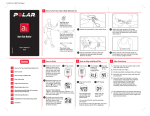
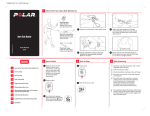
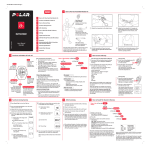
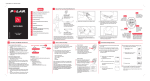
1. How to Put Your Heart Rate Monitor (HRM) On
Additional Tips for Working with Children:
1.
How to Put Your Heart Rate Monitor On
2.
How to Start and Stop Your HRM
3.
How to Recall Data from the E30
4.
Uploading Settings from Your Computer
5.
Post Exercise Care
6.
Finding your Target Heart Rate Zone
7.
Changing the Battery
8.
Precautions
9.
Frequently Asked Questions
10. Technical Specifications
11. Limited Polar International Guarantee
1. In small children or children with concave
chests, etc., you might find you get a better
heart rate reading if you put the transmitter
across their backs, with the Polar logo upside
down.
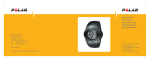
The Polar E30™
wrist receiver
displays your heart rate
during exercise.
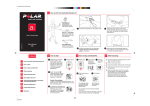
1. Attach one side of elastic strap
to the transmitter.
3. Lift the transmitter off your chest and
moisten the two oval electrode areas
on the backside of the transmitter.
The Polar coded
transmitter
detects your heart rate
and transmits it to the
wrist receiver.
2. Have your students put the transmitter on
and adjust the straps, over their t-shirts.
Then they can slide the straps down and
wiggle them up under their shirts.
3. It may be possible to wear the transmitter
over a T-shirt as long as the area under the
electrodes is thoroughly wetted. If the
E30 does not pick up heart rate, the transmitter
will have to be worn directly against the skin.
179349 USA B
12. Disclaimer
Manual
User’s Manual
USA
Note: Your E30 comes preprogrammed with the
audible out of zone alarm activated and with a target
heart rate zone of 135-180 bpm. Please use the
calculation in the "Finding Your Target Zone" section
and reset the target heart rate zone, if necessary,
before using the E30 with your students or exercising
with the E30 yourself.
2. How to Start and Stop Your HRM
1. With the watch within
3 feet / 1 meter of your
transmitter, press the red
button to start.
2. First the upper and lower limit of your target
zone will be displayed. Then the
heart rate symbol
will flash to the beat of your
heart. Your heart rate will
appear in 5 seconds. If you
go above or below your zone,
the heart rate display will flash
and an alarm will beep
(See section 4).
Note: When starting the monitor, have your
students stay at least 3 feet / 1 meter apart
so that the watch can lock onto its wearer's
heart rate signal. This helps to minimize
interference when the students come close
together during exercise. See section 8 for
specifics.
2. Adjust the strap length so that it is snug
The elastic strap
holds the transmitter in
the correct position.
but not uncomfortable. Position the
transmitter so that it is just below the
chest muscles, across the sternal notch,
and buckle it.
3. How to Recall Data from the E30
Time in Zone Indicators
1 solid block = 5 minutes spent
in target zone (a flashing
block is incomplete), 6 solid
blocks = 30 minutes. After 30
minutes, when all the blocks are
solid, the cycle will start again but
will read from right to left.
3. To check your exact
time in zone while
exercising, bring the
watch near the Polar
logo on the
transmitter. Your
exact time in zone
will appear for 3 seconds and
then the display will
automatically revert to
showing heart rate.
4. To stop recording, press the red button.
The display will read OFF.
1. From the OFF display, press and
hold the red button. The display
will briefly show "File" and then
display the average heart rate
for the exercise.
5. Press the red button. The display will show the
lower target zone limit. If you keep making
short presses of the red button, you will keep
scrolling through the data.
button. The display will read OFF.
will show the total time in
target zone.
3. Press the red button. The display
will show the total exercise time.
against your skin and the Polar logo is in a
central upright position.
4. Uploading Settings from Your Computer to the E30
6. To exit the file mode, press and hold the red
2. Press the red button. The display
4. Check that the wet electrode areas are firmly
If you want to recall your file later, start with
step 1. The E30 saves one complete file. When
a new exercise recording is started, the new
information will be recorded over the old. As
a safety, if the red button is accidentally pushed,
and either no heart rate is picked up, or if the
recording is interrupted within 5 minutes, no
new information will be saved and the old file
will still be intact.
The E30 allows you to program a target zone and turn
the audible out of zone alarm on or off, right from
your computer.
3. From the OFF mode on the E30 HRM, press and hold
Note: To upload settings you will need a PC with a
sound card (compatible with Sound Blaster™) and
dynamic loudspeakers. ‘Dynamic’ speakers are also
referred to as magnetic or acoustic speakers. These
are common on desktop PC's, but some laptops have
ceramic speakers, and these will not work. In this case,
you can buy inexpensive dynamic speakers or
headphones and plug them in. (Before purchasing,
check with your tech people, they may have some.)
4. Hold the E30 less than 7”/18cm from the speaker.
Installing the software:
1. Ask your technology person for assistance. You may
need an authorization password to install the software
on a school computer.
2. Place the E30 CD in your CD drive and close.
4. Press the red button. The display
will show the upper target zone
limit.
Note: At any point in the file recall, you can
return to OFF by pressing and holding the red
button.
3. Wait for the setup screen to appear automatically.
4. Follow the instructions on your screen.
Uploading settings:
1. Click on the E30 software icon on your desktop.
2. Set the target zone limits and choose to have the
audible alarm either on or off.
the button so the file recall starts and the average
heart rate is displayed.
5. Click the Set HRM button on your computer and hold
the E30 steady. You will hear a series of chirps. If
uploading is successful, the E30 will read Set and OK.
6. Press and hold the button on the E30 to return to the
OFF mode.
Note: If you are unsuccessful (the HRM does not show
Set and OK), turn the HRM sideways to speaker with
the watch face up, so that the ‘P’ in ‘Polar’ is closest to
the speaker, and try again. You can also try adjusting
the volume up or down and varying the distance of
the HRM to the speaker. Louder and closer is not always
better.
Advanced:
If you change the target zone regularly, click the
Advanced button. You can name the zone and save
it for later use.
E30 manual USA B 18/11/02 12:26 Page 2
5. Post Exercise Care
1. Carefully wash the transmitter with a mild
soap and water solution.
2. Rinse it in clean water and gently dry the
Finding your Target
6. Heart Rate Zone
7. Changing the Battery
8. Precautions
To find the target heart rate zone for your
students, you'll need to estimate their
maximum heart rate (HRmax). To do this, use
the following formula.
We recommend having all service done by an
authorized Polar Service Center. However, if you
wish to change the battery yourself, please follow
these instructions.
220 - the age of the student = (HRmax)
Note: If you use your Polar heart rate monitor in
water, the rubber seal may have to be replaced and
the unit should be tested for water resistance every
time the seal is broken. If an unauthorized service
agent services the monitor, or if you change the
battery yourself, the Polar warranty does not cover
damage or consequential damage that may occur.
1. Put the watch face down on a clean, dust
free pad (mouse pads work well). Remove
the back cover by removing the screws and
gently pry it off with a thin blade.
Throughout these directions, do not turn
the watch over while the back cover is
loosened or removed because the contents
may spill out of the module.
transmitter with a soft towel.
3. Keep the watch clean and wipe off any
moisture.
4. The elastic strap can be machine washed in
cold water and detergent, but should be hung
up to air dry.
5. Store the HRM in a clean and dry place (like
your Class Management System). Dirt impairs
the elasticity and functioning of the
transmitter. Sweat and moisture can keep the
electrodes wet and the transmitter activated,
which shortens battery life.
For the general activities of children, a zone
of 70 to 85% of HRmax has a positive effect
on their hearts and aerobic fitness, without
being too strenuous.
To find the correct zone:
0.70 x HRmax = (lower limit)
0.85 x HRmax = (upper limit)
Note: If you teach children of different ages,
use the average to estimate their HRmax , as
long as their ages do not vary by more than
three or four years.
gently and remove the clip.
3. Remove the old battery and replace it with
You need the following equipment:
• Battery type: Panasonic CR 2025, 3V Li
• Dust-free pad
• Small Phillips or standard screwdriver
• Plastic tweezers (recommended)
SPRING END
2. (Illustration A) Push the tab of the spring
a new battery, positive side up. Because dirt
and oils from your fingers can contaminate
the battery and weaken the contact, we
recommend using plastic tweezers. Do not
use metal tweezers as they may short circuit
the new battery.
CLIP
A.
B.
4. Reattach the clip and press the spring gently
6. Without turning the E30 over, lift it up and
make sure that OFF is clearly displayed on its
face.
7. (Illustration B) Make sure the sealing ring is
not damaged and is in its groove all around
the housing.
8. Replace the back cover. The Polar logo on the
cover should be upright in respect to the
buckle end of the wrist strap (In other words,
if you were to pick up the E30 by the buckle
end of the wrist strap, the Polar logo would
be right side up.)
9. Replace the screws being careful not to crossthread them. Tighten the screws from opposite
corners. Make sure the sealing ring has not
come out of its groove, and is not hanging
out the side. If it is, take off the back cover
and re-seat the ring.
so that it locks the battery in place.
The combined impact of moisture and intense
abrasion may cause a black colour, which
might stain light-coloured clothes especially,
to come off the transmitter's surface.
10. Test your E30: put on the transmitter, wet the
5. (Illustration B) Reset the E30 by pressing the
reset tab against the round golden pad for
one second.
SEALING RING
8. Precautions
Note that in addition to exercise intensity,
medications for heart, blood pressure, psyche,
asthma, breathing etc. as well as some energy
drinks, alcohol and nicotine, can affect heart rate.
It is important to be sensitive to your body’s
reactions during exercise. If you feel unexpected
pain or excessive fatigue when exercising, it is
recommended to stop the exercise or continue at
a lighter intensity.
If you are allergic to any substance that comes
into contact with the skin or if you suspect
an allergic reaction due to using the product,
check the listed materials in the "Technical
Specifications" chapter. To avoid any skin reaction
risk with the transmitter, wear it over a shirt.
However, moisten the shirt well under the
electrodes to ensure flawless operation.
Notice to persons with pacemakers,
defibrillators or other implanted electronic
devices.
Persons who have a pacemaker use the Polar heart
rate monitor at their own risk. Before starting use,
we always recommend an exercise test under
doctor’s supervision.
The test is to ensure the safety and reliability of
the simultaneous use of the pacemaker and the
heart rate monitor.
9. Frequently Asked Questions
What should I do if…
… there is no heart rate reading or the heart
symbol flashes irregularly?
Check to make sure the transmitter is on tight
enough, its electrodes are wet, and that it is in
the correct position. Check that the wrist receiver
is within 3 feet / 1 meter of the transmitter.
…there is interference between the heart
rate monitors of two students?
The two students may have exactly the same heart
rate transmission code. Separate the two by at
least 3 feet / 1 meter and have them continue
exercising as before.
Or
Separate the students and have at least one of
them stop the recording and remove his or her
transmitter for 30 seconds. Put the transmitter
back on and restart the recording. This will cause
the E30 to search for a new code.
Note: To help minimize interference between
monitors, have your students stand at least
3 feet / 1 meter apart when they start their
recordings. This allows the E30 to lock onto a
single heart rate signal and transmission code.
10.
...the heart rate reading becomes
erratic or extremely high?
Technical Specifications
All Polar heart rate monitors are designed to indicate the level
of physiological strain and intensity in sports and exercise. No
other use is intended or implied. Heart rate is displayed as the
number of heartbeats per minute (bpm).
Polar Transmitter
You may have come within range of strong
electromagnetic signals, which cause erratic
readings. Check your surroundings and
move further away from the source of
disturbance. Interference is much more
likely if the HRM is receiving a non-coded
heart rate signal. In the Measure mode,
look at the heart at the top of the display.
A heart with a frame indicates coded
transmission of heart rate . A heart
without a frame indicates a non-coded
transmission. If non-coded, move away
from the disturbance and remove the
transmitter for 30 seconds, put it back on,
and stop and restart the recording.
Battery type: Built-in Lithium Cell
Battery life: Average 2500 hours of use
Operating temperature: 14 °F to 122 °F / -10 °C to +50 °C
Material: Polyurethane
Waterproof
Elastic Strap
Buckle material: Polyurethane
Fabric material: Nylon, polyester and natural rubber including
a small amount of latex
Wrist Receiver
Battery type: CR 2025
Battery life: Average 2 years (2h / day, 7 days / week)
Operating temperature: 14 °F to 122 °F/-10 °C to +50 °C
Water resistance: to 100 feet / 30 meters
Wrist strap: Polyurethane
Wrist strap buckle: Polyoxymethylene
Back cover: Stainless steel complying with the EU Directive
94/27/EU and its amendment 1999/C 205/05 on the release
of nickel from products intended to come into direct and
prolonged contact with the skin.
Accuracy of heart rate measurement: ±1% or ±1 bpm,
whichever larger, definition applies to steady state
conditions
Total exercise time:.............................................9 h 59 min
Exercise time display < 1 h: ................................mm:ss
Exercise time display > 1 h: ................................h:mm
Minimum duration of recorded exercise: .........5 min
electrodes, and make sure the E30 picks up
your heart rate and that all the digit segments
are visible. If you do not get a heart rate
reading or if some digits are only partially
displayed, remove the back cover and reset
the E30 as you did in step 5.
11. Limited Polar International Guarantee
• This limited Polar international guarantee is issued by Polar
Electro Inc. for the consumers who have purchased this
product in the USA or Canada. This limited Polar international
guarantee is issued by Polar Electro Oy for the consumers
who have purchased this product in other countries.
• Polar Electro Inc. / Polar Electro Oy guarantees to the original
consumer/ purchaser of this product that the product will
be free from defects in material or workmanship for two
years from the date of purchase.
• Please keep the receipt or International Guarantee
Card, which is your proof of purchase!
• The guarantee does not cover the battery, damage due to
misuse, abuse, accidents or non-compliance with the
precautions; improper maintenance, commercial use, cracked
or broken cases.
• Guarantee does not cover any damage/s, losses, costs or
expenses, direct, indirect or incidential, consequential or
special, arising out of, or related to the product. During the
guarantee period the product will be either repaired or
replaced at an authorized service center free of charge.
• This guarantee does not affect the consumer’s statutory
rights under applicable national or state laws in force, or
the consumer’s rights against the dealer arising from their
sales/ purchase contract.
Copyright © 2001, 2002 Polar Electro Oy, 90440 Kempele, Finland
All rights reserved. No part of this manual may be used or reproduced
in any form or by any means without prior written permission of Polar
Electro Oy.
Polar logotype is a registered trademark and Polar E30 is a trademark
of Polar Electro Oy.
This product is protected by one or several of the following patents:
FI 88223, DE 4215549, FR 92.06120, GB 2257523, HK 113/1996,
SG 9591671-4, US 5491474, FI 88972, DE 9219139.8, FR 92.09150,
GB 2258587, HK 306/1996, SG 9592117-7, US 5486818, FI 96380,
US 5611346, EP 665947, DE 69414362, FI 68734, DE 3439238, GB 2149514,
HK 812/1989, US 4625733, FI 100924, FI 100452, US 5840039, FI 4150,
DE 20008882.3, FR 0006504, FI 4069, US 6272365, FR 9907823, GB 2339833,
DE 29910633, FI 104463, US 6183422, FI 4157, DE 20008883.1, FR 0006778,
WO 97/33512, GB 2326240.
Other patents pending.
Electromagnetic Interference
Disturbances may occur near high voltage power lines,
traffic lights, overhead lines of electric railways, electric
bus lines or trams, televisions, computers, cars, electric
motors, bike computers, some motor driven exercise
equipment, cellular phones, antennas, invisible fences,
or when you walk through electric security gates.
Interference or "crosstalk" can also be caused by the
heart rate signal from another Polar HRM wearer.
Minimizing Possible Risks in Exercising with Heart
Rate Monitor
Exercise may include some risk, especially for those who
have been sedentary.
Before starting a regular exercise program an individual
is recommended to answer to the following questions
for health status checking. If the answer is yes to any of
the questions, we recommend to consult a doctor before
starting an exercise program.
•
•
•
•
•
•
•
Have you not exercised for the past 5 years?
Do you have high blood pressure?
Do you have high blood cholesterol?
Do you have symptoms of any disease?
Are you taking any blood pressure or heart medication?
Do you have a history of breathing problems?
Are you recovering from a serious illness
or medical treatment?
• Do you use a pacemaker or another implanted
electronic device?
• Do you smoke?
• Are you pregnant?
12. Disclaimer
• The material in this manual is for informational purposes
only. The products it describes are subject to change
without prior notice, due to the manufacturer’s
continuous development program.
• Polar Electro Inc. / Polar Electro Oy makes no
representations or warranties with respect to this manual
or with respect to the products described herein. Polar
Electro Inc. / Polar Electro Oy shall not be liable for any
damages, losses, costs or expenses, direct, indirect or
incidental, consequential or special, arising out of, or
related to the use of this material or the products
described herein.
Polar Electro Inc.
370 Crossways Park Drive
Woodbury, NY 11797-2050
U.S.A.
Polar Service Center:
1-800-227-1314
Polar Electro Canada
c/o Lanco Logistics Inc.
4330 Joseph Dubreuil
Lachine, Quebec
CANADA, H8T 3C4
1-888-918-5043
www.polarusa.com
[email protected]