1
18
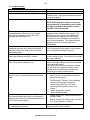
G. Troubleshooting:
Situation
No audio output through vehicle speakers
Radio does not mute after placing a call
Audio quality in vehicle may not sound very good
Correction
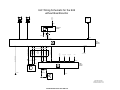
Check SES module jumper plug
Check connections at rear of radio for Tel On and
Tel Mute signal. Verify that connectors and pins
are properly seated.
•
Recode ULF Control Module.
NOTE: Audio quality in vehicle or at person
being contacted, is dependent on the quality
and signal strength of the wireless service
provider in the area traveled.
Customer complains that the person being
contacted hears a “Buzzing” noise, at times
during their conversation or on voice mail
message that he/she has left.
Driver is told that the person being contacted
complains that there is an echo/reverberation in
the audio; person can hear his/her voice back
through the phone.
A second call is received while in a call, and call
cannot be accepted using MFL controls.
The radio audio does not come back immediately
if the “other” person hangs up first.
Customer is not able to pair phone to system, not
able to locate ULF passkey/password reference
card.
Intermittently a “Buzzing” noise is noticeable to
the person being called from the vehicle. The
“Buzzing” noise is a result of the GSM signal
being feedback through the microphone, this
usually occurs if the GSM phone is located too
close to the microphone. The customer should
change the location of where the phone is
placed/stored.
Audio volume in vehicle during a call may be a bit
to loud, causing the other person to hear his/her
voice coming back through the phone.
Use handset to expect second call and place
previous called on hold. Call waiting is functional
only via the handset.
It takes approximately 15 seconds for the ULF
system to recognize that the call was terminated
from outside the vehicle.
If the call is terminated from outside the vehicle
first, the driver can depress the button on the
steering wheel to terminate the call from the
vehicle and un-mute the radio quicker.
•
The “Bluetooth® Passkey” is identified on the
label of the ULF Control Module located in
the rear of the vehicle.
•
The “Bluetooth® Passkey” for the installed
control module can be obtained by
connecting the DISPlus or GT1and
accessing the diagnostics for the ULF
system:
- select “Diagnostic requests”
- select “Bluetooth code”
Intermittently a popping noise is audible through
the vehicles speaker and there is no Bluetooth®
wireless communication established between the
ULF module and the phone.
•
Vehicle and /or ULF Control Module are not
correctly coded.
•
Recode module and vehicle (refer to Coding
ULF Control Module to Vehicle)
After installation of ULF system the speedometer
and odometer do not work.
Remove pin 7 & 8 from the 54-pin connector
going to the ULF Control Module.
Install Manual P/N 01 29 0 404 219