1
2.2.1.2.6
Configuration Mode Imbalance
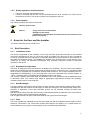
By pressing the key combination
and
for at least 3 sec, the configuration mode imbalance is
and
, the imbalance of the
activated, and the LED’s L10 and L12 are flashing. With the keys
fan speed which is active during the activation of the configuration mode can be adjusted in steps of 5%.
The adjustment of the imbalance of each fan speed is not effected separately, but in a combined manner
for groups of fan speeds: group fan speed <1+2>, group fan speed <3+4+5> and group fan speed <6+7>.
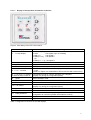
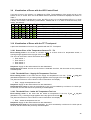
The LED’S L1 to L7 indicate the selected imbalance. The adjustable range is between -15 % (L1) and
+15 % (L7). In the central position (L4), the supply air fans and the exhaust air fans are running with the
same rotation speed. After the repeated actuation of the key combination
value is transferred and the configuration mode imbalance is closed.
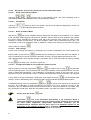
Always push this button
and
, the adjusted
first!
2.2.1.2.7 Configuration of Frost Protection
The frost protection for devices with LED control panel complies with the frost protection mode “safe“ and
is configured in compliance with the type of the device. If the outside air temperature falls below < -0.5 °C
(type of device: focus 200) or < -7.5 °C (type of device: focus F 200), or if the supply air temperature falls
below < 4.5 °C (applies to both device types), the supply air fan and the exhaust air fan are switched off,
start again after one hour and run for 2 min. If one of the possible thresholds is still undershot after this,
the process is repeated.
2.2.2
TFT Touchpanel
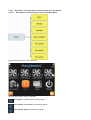
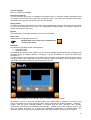
Figure 4: TFT Touchpanel with stainless steel frame
The 3.5 inch TFT display of the Touchpanel comprises 320x240 pixels and can be operated by touching it
with the fingers (touch screen).
In the upper status line of the start screen, the time, the respective menu speed in the form of a headline,
as well as the remaining run-time of the filter, which is currently existent, are indicated. Directly below this
line, the eight basic functions of the ventilation device and the respective icons are represented in 2 lines.
On the left side of the footer, a help function is implemented, in the middle a so called short help text can
be found, and on the right side of the footer, a keypad lock is implemented.
9