Transcript
Introduction
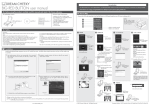
MAIL BOX FRIENDS ALERT user manual
This demonstrates how to use the Mail Box Friends Alert. Load the Mail Box Friends Alert software provided and use these instructions to maximize your
playing capability.
Note: Please be sure to plug your Mail Box Friends Alert into a USB port in your PC prior to playing with the unit.
Before using the product, carefully read this manual and retain it for future reference.
• Windows 7/ Vista / XP SP2 or later
• One available USB port
• 50 MB available hard disk space
• VGA or higher-resolution monitor
• Sound card
• CD-ROM drive
Mail Box Friends Alert x 1
How to Play
Minimum system requirements:
This packaging contains:
Connect the USB Mail Box Friends Alert to a USB port located on your PC prior to playing with it.
1 TO ADD AN ACCOUNT:
3 FOR USER USING
i)
Enter your email address,
services
provider
and
password, then press
.
ii)
The Software will check the
information that you just put
in. Please wait for few
seconds.
Instruction x 1
Install CD x 1
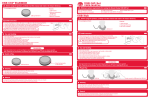
Safety
i)
Precautions:
Before using this product, carefully read this manual and retain it for future reference.
Safety:
This product has been designed with the highest concern for safety.
However, any electrical device, if used improperty, has the potential of causing fire, electrical
shock or personal injury. To help ensure accident-free operation, follow these guideline:
Stop use, unplug the USB cord, immediately if the device functions in an abnormal
manner, produces unusual sounds or smells or becomes too hot.
Use and Handling
1. Do not expose the Mail Box Friends Alert to high temperatures, high humidity,or direct sunlight.
2. Do not expose the Mail Box Friends Alert to dust, smoke or steam.
3. Do not allow small particles to get into the Mail Box Friends Alert.
4. Do not place the Mail Box Friends Alert on surfaces that are unstable or subject to vibration.
5. Do not throw or drop the Mail Box Friends Alert or subject it to physical shock.
Cleaning:
1. For safety reasons, unplug the USB cord from your computer before cleaning.
2. Wipe gently with a damp cloth, and then dry the surface.
3. Do not use solvents or other chemicals to clean the exterior off the Mail Box Friends Alert.
Press the
ii) Then press the
button first.
button to add an account.
iii) Choose the email services that you are using,
then press
to move to next step.
install program will show up automatically. (If not manually
click "setup.exe" on the CD drive). On the Set up window, click
"Start Install".
2 Installation
Outlook Express/Windows Live/ Live Mail /etc
i)
complete window will show up after file are cpoied.
Click “Close” to finish.
4
You will get a successful
message, if your information
is correct, press
to finish
the setup.
5
You will get a fail message,
if your password is wrong,
press
to edit it.
2 FOR USER USING
1 The
2
3
iii)
Note: See www.dreamcheeky.com for full online support link and trouble shooting
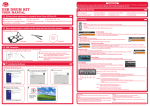
Installing the Mail Box Friends Alert program into your PC couldn't be easier. Just follow these simple instructions and you will be ready
to go in no time!
Now twitter will complie a
pin code on the pop-up
window, now please copy
the pin code on the friends
alert interface, then press
to finish the setup.
6 ACCOUNT OPTION
1
General:
1. Should the product perform unexpected function, unplug the unit and then restart the
computer.
Installation
ii)
Gmail/Yahoo mail/Y!mail/AOL/Hotmail/Windows Live
Select your account on the
list, then press
to next
step.
6
4 FOR USER USING
POP3/IMAP
i)
7
Enter your POP3/IMAP
server information, email
address, services provider
and password, then press
.
1. Add account- you can add 20 different accounts
2. Delete account- you can delete the account by press
this button when your accounts checkbox is been tick
3. You can edit your account and check the status at anytime.
4. You can personlize your account alert colour here.
ii)
Enter your email password
into the password field, then
press
.
5. You can personlize your account alert sound here.
ii)
The Software will check the
information that you just put
in. Please wait for few
seconds.
6. Edit your checking period in here or press CHECK NOW
to check the alert at anytime.
8
iii)
3 i.) Connect the USB cable attached to the Mail Box Friends Alert to
a USB port located on your PC prior to playing with it.
4
Press the Desktop Icon to run the Mail Box Friends Alert software. (If
on a network system, this may not appear. Please find the software
under start menu.)
Tray Icon will be appear when the software is running.
iv)
Desktop Icon
The Software will check the
information that you just put
in. Please wait for few
seconds.
You will get a successful
message, if your information
is correct, press
to finish
the setup.
You will get a fail message,
if your password is wrong,
press
to edit it.
ii.) Double click on the Mail Box Friends Alert program on your desktop.
Tray Icon
You will get a successful
message, if your information
is correct, press
to finish
the setup.
10
11
You will get a fail message,
if your password is wrong,
press
to edit it.
13
Note: Using a USB HUB or docking station may result in the loss of power to the Mail Box Friends Alert. This could create the Unit to not work properly. Please plug
it directly into the USB port on your computer.
© 2010 Dream Cheeky Ltd. All Rights Reserved.
12
5 FOR USER USING
FACEBOOK/TWITTER
i)
On facebook, you will
require to input your
facebook login email and
password on the pop-up
window, then press “Login”
to finish the setup.
On twitter, you will require
to input your twitter login
email and password on the
pop-up window, then press
“Allow” to move to next
step.
Note: Install the software before connecting your Mail Box Friends Alert.
www.dreamcheeky.com
9
iii)
8. Choose your interval when the new updates arrive.
9. Tick the auto dismiss to limit the alert show only once.
10. Tick the alert pop-up screen which will appear at the
bottom righthand of your desktop screen.
11. Check this to mute the software sound
12. Select between new mail or total mails
13. The maximum mail of your mail box
Company Address: 1207, Peninsula Centre, 67 Mody Road, TST East, Hong Kong