1
EAGLE
Deliverable D5.3.1
First release of the flagship mobile application and SDK
3.4
HISTORY
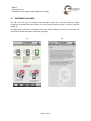
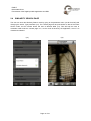
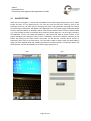
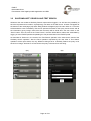
By clicking on the 3rd tab of the bottom menu (26), a logged in user can access the last N requests
(and their results) that have been saved using the Save operation. The number N is settable between
5 and 20 (see Section 2.2) A History page will be displayed, with three types of items: saved pictures
(described in Section 3.1); saved Similarity Search or Text Search queries and their results (described
in Section 3.2); saved Exact Match queries and their results (described in section 3.3). All the
displayed items are identified by their type (Picture, Query, Item) and the mandatory Title that was
assigned by the user when saving the item. The thumbnail associated with the displayed items are the
saved picture for type Picture, a simple pictogram for the type Query and the recognized image for the
type Item.
(26)
Page 21 of 31