1
Pairing your phone
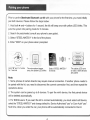
Prior to use ttie Steelmate Bluetooth car kit with your phone for the first time, you must initially
pair both devices. Please follow the steps below:
1. Hold both + and - buttons for 1 second, the kit will beep once with yellow LED blinks. This
puts the system into pairing mode for 3 minutes.
2. Search for peripherals (consult your phone's user guide).
3. Select "STEEL-MATEOI" in the list of the phone.
4. Enter "0000" on your phone when prompted.
Hold "+" and " - " button
for 1 second
The microptione beeps
once, the yellow LED blinks
Select "STEEL-MATEOI"
in the list
The yellow LED turns
on solid. Both devices
are paired
Note:
1. Some phones of certain brands may require manual connection. If another phone needs to
be paired with the kit, you need to disconnect the current connection first, and then repeat the
operations above.
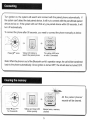
2. The system can be paired up to 8 devices. To pair the ninth device, the first paired device
will be deleted automatically.
3. For NOKIA users: If you want the kit to connect automatically, you must select edit device,
select the "STEEL-MATEOI" and change default to: Device Authorised "yes" or Conn Auth "yes".
Next time, when you enter the car, your phone will be automatically connected to the kit.
4