1
OVERVIEW
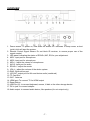
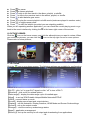
1. Power Button: To power on, hold down the button for 5 seconds. In sleep mode, a short
(quick) click will start the system.
2. Remote Control Signal Sensor: Do not block IR receiver, to ensure proper use of the
remote control.
3. LED panel: indicating the status of ECHO+,MIC, EQ for your adjustment.
4. MIC1: input port for microphone
5. MIC2: input port for microphone
6. MIC+/-: adjust the volume of microphones
7. AUX 2: input port for audio
8. ECHO+/-: adjust the reverb
9. VOL+/-: adjust the volume of the whole system
10. RJ45: External Lan port
11. L/R OUT: output port for Mic and device audio (combined)
12. TF Card Slot
13. Wi-Fi Antenna
14. HDMI port: To connect TV for HDMI output
15. Reset Button
16. USB Port (2): to connect keyboard, mouse, U-disk or the other storage device.
17. DC-in jack: to connect adaptor
18. Audio output: to connect audio device, like speakers (for mic output only)
-7-