1
Reference Guide
Please read this manual before using the scanner.
After you finish reading this manual, keep it in a safe place
for future reference.
READ CAREFULLY BEFORE OPENING THE
SEALED DISK PACKAGE
CANON SOFTWARE LICENSE AGREEMENT
IMPORTANT-READ THIS AGREEMENT BEFORE
OPENING THE SEALED DISK PACKAGE! BY
OPENING THE SEALED DISK PACKAGE, YOU ARE
DEEMED TO AGREE TO BE BOUND BY THIS
AGREEMENT.
This legal document is a license agreement between you and
Canon Electronics Inc. (“Canon”). BY OPENING THE
SEALED DISK PACKAGE, YOU ARE DEEMED TO AGREE
TO BE BOUND BY THE TERMS OF THIS AGREEMENT. IF
YOU DO NOT AGREE TO THE TERMS OF THIS
AGREEMENT, DO NOT OPEN THE SEALED DISK
PACKAGE AND PROMPTLY RETURN THE CANON
SCANNER, THE DISK PACKAGE CONTAINING SCANNER
DRIVER SOFTWARE PROGRAMS AND/OR SCANNER
UTILITY SOFTWARE PROGRAM PROPRIETARY TO
CANON OR ITS LICENSOR (THE “SOFTWARE”) AND THE
ACCOMPANYING DOCUMENTATION AND OTHER
ITEMS TO THE PLACE WHERE YOU OBTAINED THEM
FOR A REFUND BEFORE THEY ARE USED OR OPENED
OR UNPACKED.
In consideration of the right to use the SOFTWARE, you agree
to abide by the terms and conditions of this Agreement.
1. GRANT OF LICENSE: Canon grants you the personal, nonexclusive right to use the SOFTWARE only on a single
computer. You shall need to obtain multiple licenses separately
from Canon when you shall install the SOFTWARE on multiple
computers.
You shall not assign, sublicense, sell, rent, lease, loan, convey or
transfer to any third party, or send or bring the SOFTWARE out
of the country where you originally obtain it to other countries
without required authorization of applicable governments, or
copy, duplicate, translate or convert to another programming
language the SOFTWARE or accompanying documentation,
except as expressly provided herein.
i
Except as expressly permitted under the applicable law, you shall
not alter, modify, disassemble, decompile or otherwise reverse
engineer the SOFTWARE or accompanying documentation and
you also shall not have any third party do so.
2. BACK-UP COPY: You may make one copy of the
SOFTWARE solely for a back-up purpose or copy the
SOFTWARE onto the permanent storage device (e.g. a hard
disk) of your computer and retain the original for a back-up
purpose. Except as expressly permitted under the applicable law,
any other copying of the SOFTWARE is a violation of this
Agreement. You must reproduce and include the copyright
notice on the back-up copy.
3. SUPPORT AND UPDATE: Canon, Canon’s affiliate, their
distributor or dealer is not responsible for maintaining or helping
you to use the SOFTWARE. No updates, fixes or support will be
made available for the SOFTWARE.
4. LIMITED WARRANTY AND DISCLAIMER OF
INDEMNITY: Canon, Canon’s affiliate, their distributor or
dealer will not guarantee uninterrupted service, or absence or
correction of errors. Therefore, the SOFTWARE is licensed on
an “AS IS” basis without warranty of any kind. The diskette on
which the SOFTWARE is recorded is warranted against
defective material or workmanship under normal use for a period
of ninety (90) days from the date you purchased the same as
evidenced by a receipt or otherwise. The limited warranty does
not apply if the failure of the diskette resulted from accident,
abuse or misapplication of the SOFTWARE and shall not extend
to anyone other than the original user of the SOFTWARE.
CANON, CANON’S AFFILIATE, THEIR DISTRIBUTOR OR
DEALER DISCLAIMS ALL IMPLIED WARRANTIES,
INCLUDING ANY WARRANTY OF MERCHANTABILITY
OR FITNESS FOR A PARTICULAR PURPOSE, WITH
RESPECT TO THE SOFTWARE OR ACCOMPANYING
DOCUMENTATION.
CANON, CANON’S AFFILIATE, THEIR DISTRIBUTOR OR
DEALER SHALL HAVE NO OBLIGATION TO INDEMNIFY
YOU AGAINST ANY CLAIM OR SUIT BROUGHT BY A
THIRD PARTY ALLEGING THAT THE SOFTWARE,
ACCOMPANYING DOCUMENTATION OR THE USE
THEREOF INFRINGES ANY INTELLECTUAL PROPERTY
OF SUCH THIRD PARTY.
8. ACKNOWLEDGEMENT: BY OPENING THE SEALED
DISK PACKAGE, YOU ACKNOWLEDGE THAT YOU HAVE
READ THIS AGREEMENT, UNDERSTOOD IT, AND
AGREE TO BE BOUND BY ITS TERMS AND
CONDITIONS. YOU ALSO AGREE THAT THIS
AGREEMENT IS THE COMPLETE AND EXCLUSIVE
STATEMENT OF AGREEMENT BETWEEN YOU AND
CANON CONCERNING THE SUBJECT MATTER HEREOF
AND SUPERSEDES ALL PROPOSALS OR PRIOR
AGREEMENTS, VERBAL OR WRITTEN, AND ANY
OTHER COMMUNICATIONS BETWEEN YOU AND
CANON RELATING TO THE SUBJECT MATTER HEREOF.
NO AMENDMENT TO THIS AGREEMENT SHALL BE
EFFECTIVE UNLESS SIGNED BY A DULY AUTHORIZED
REPRESENTATIVE OF CANON.
THE ABOVE IS CANON’S ENTIRE LIABILITY AND YOUR
EXCLUSIVE REMEDY IN CONNECTION WITH THE
SOFTWARE AND ACCOMPANYING DOCUMENTATION.
Should you have any questions concerning this Agreement, or if
you desire to contact Canon for any reason, please write to
Canon’s local affiliate.
NEITHER CANON, CANON’S AFFILIATE, THEIR
DISTRIBUTOR NOR DEALER IS LIABLE FOR ANY LOSS
OR DAMAGE INCLUDING CONSEQUENTIAL OR
INCIDENTAL LOSS OR DAMAGE SUCH AS LOSS OF
PROFITS, EXPENSE OR INCONVENIENCE,
WHATSOEVER CAUSED BY OR ARISING OUT OF THE
SOFTWARE, ACCOMPANYING DOCUMENTATION OR
THE USE THEREOF.
5. TERM: This Agreement is effective upon opening the sealed
disk package and remains in effect until terminated. You may
terminate this Agreement by destroying the SOFTWARE and
any copy thereof. This Agreement will also terminate if you fail
to comply with any of the terms of this Agreement. In addition to
Canon enforcing its respective legal rights, you must then
promptly destroy the SOFTWARE and any copy thereof.
6. U.S. GOVERNMENT RESTRICTED RIGHTS NOTICE:
The SOFTWARE is provided with RESTRICTED RIGHTS.
Use, duplication or disclosure is subject to restrictions as set
forth in either subparagraph (c) (1) (ii) of the Rights in Technical
Data and Computer Software clause at DFARs 252.227-7013 or
subparagraph (c) (1) and (2) of the Commercial Computer
Software Restricted Rights Clause at FAR 52.227-19, as
applicable.
7. SEVERABILITY: In the event that provision of this
Agreement is declared or found to be illegal by any court or
tribunal of competent jurisdiction, such provision shall be null
and void with respect to the jurisdiction of that court or tribunal
and all the remaining provisions of this Agreement shall remain
in full force and effect.
ii
FCC REGULATIONS (For 120 V model)
Document Scanner, Model M11063
This device complies with Part 15 of the FCC Rules.
Operation is subject to the following two conditions: (1) This
device may not cause harmful interference, and (2) this device
must accept any interference received, including interference
that may cause undesired operation.
Note: This equipment has been tested and found to comply
with the limits for a Class B digital device, pursuant to Part 15
of the FCC Rules. These limits are designed to provide
reasonable protection against harmful interference in a
residential installation. This equipment generates, uses, and
can radiate radio frequency energy and, if not installed and
used in accordance with the instructions, may cause harmful
interference to radio communications. However, there is no
guarantee that interference will not occur in a particular
installation. If this equipment does cause harmful interference
to radio or television reception, which can be determined by
turning the equipment off and on, the user is encouraged to try
to correct the interference by one or more of the following
measures:
– Reorient or relocate the receiving antenna.
– Increase the separation between the equipment and
receiver.
– Connect the equipment into an outlet on a circuit different
from that to which the receiver is connected.
– Consult the dealer or an experienced radio/TV technician
for help.
Use of shielded cable is required to comply with class B limits
in Subpart B of Part 15 of FCC Rules.
Do not make any changes or modifications to the equipment
unless otherwise specified in the manual. If such changes or
modifications should be made, you could be required to stop
operation of the equipment.
Canon U.S.A. Inc.
One Canon Plaza, Lake Success NY 11042, U.S.A.
Tel. No. (516)328-5000
iii
RADIO INTERFERENCE REGULATIONS (For 120 V
models)
This digital apparatus does not exceed the Class B limits for
radio noise emissions from digital apparatus as set out in the
Interference-causing equipment standard entitled “Digital
Apparatus”, ICES-003 of the Industry Canada.
RÈGLEMENT SUR LE BROUILLAGE
RADIOÉLECTRIQUE (For 120 V models)
Cet appareil numérique respecte les limites de bruits
radioélectriques applicables aux appareils numériques de
Classe B prescrites dans la norme sur le matériel brouilleur:
“Appareils Numériques”, NMB-003 édictée par l’Industrie
Canada.
International ENERGY STAR® Office Equipment
Program
As an ENERGY STAR® Partner, Canon
Electronics Inc. has determined that this
machine meets the ENERGY STAR®
Program guidelines for energy efficiency.
The International ENERGY STAR® Office
Equipment Program is an international program that promotes
energy saving through the use of computers and other office
equipment. The program backs the development and
dissemination of products with functions that effectively
reduce energy consumption. It is an open system in which
business proprietors can participate voluntarily. The targeted
products are office equipment, such as computers, monitors,
printers, fax, machine, copiers, and scanners. The standards
and logos are uniform among participating nations.
European Union (and EEA) only.
This symbol indicates that this product is not to be
disposed of with your household waste, according
to the WEEE Directive (2002/96/EC) and your
national law. This product should be handed over
to a designated collection point, e.g., on an
authorized one-for-one basis when you buy a new similar
product or to an authorized collection site for recycling waste
electrical and electronic equipment (EEE). Improper handling
of this type of waste could have a possible negative impact on
the environment and human health due to potentially
hazardous substances that are generally associated with EEE.
At the same time, your cooperation in the correct disposal of
this product will contribute to the effective usage of natural
resources. For more information about where you can drop off
your waste equipment for recycling, please contact your local
city office, waste authority, approved WEEE scheme or your
household waste disposal service. For more information
regarding return and recycling of WEEE products, please visit
www.canon-europe.com/environment.
(EEA: Norway, Iceland and Liechtenstein)
Für EMVG
Dieses Produkt ist zum Gebrauch im Wohnbereich,
Geschäfts-und Gewerbebereich sowie in Kleinbetrieben
vorgesehen.
Für 3. GPSGV
“Maschinenlärminformations-Verordnung 3. GPSGV: Der
höchste Schalldruckpegel beträgt 70 dB(A) oder weniger
gemäß EN ISO 7779”
Model Names
The following names may be provided for the safety
regulations in each sales region of the Document Scanner.
DR-X10C: Model M11063
Trademarks
• Canon and the Canon logo are registered trademarks of
Canon Inc. in the United States and may also be trademarks
or registered trademarks in other countries.
• imageFORMULA is a trademark of Canon Electronics Inc.
• Microsoft and Windows are either registered trademarks or
trademarks of Microsoft Corporation in the United States
and other countries.
• Adobe, Acrobat, and Adobe Reader are registered
trademarks or trademarks of Adobe Systems Incorporated in
the United States and other countries.
• ISISTM is a trademark of EMC Corporation in the United
States.
• Other product and company names herein are, or may be,
the trademarks of their respective owners.
Copyright
Copyright 2007 by CANON ELECTRONICS INC. All rights
reserved.
No part of this publication may be reproduced or transmitted
in any form or by any means, electronic or mechanical,
including photocopying and recording, or by any information
storage or retrieval system without the prior written
permission of CANON ELECTRONICS INC.
Disclaimers
The information in this document is subject to change without
notice.
CANON ELECTRONICS INC. MAKES NO WARRANTY
OF ANY KIND WITH REGARD TO THIS MATERIAL,
EITHER EXPRESS OR IMPLIED, EXPECT AS
PROVIDED HERE IN, INCLUDING WITHOUT
LIMITATION, THEREOF, WARRANTIES AS TO
MARKETABILITY, MERCHANTABILITY, FITNESS
FOR A PARTICULAR PURPOSE OF USE OR NONINFRINGEMENT. CANON ELECTRONICS INC. SHALL
NOT BE LIABLE FOR ANY DIRECT, INCIDENTAL, OR
CONSEQUENTIAL DAMAGES OF ANY NATURE, OR
LOSSES OR EXPENSES RESULTING FROM THE USE
OF THIS MATERIAL.
iv
Introduction
Thank you for purchasing the Canon imageFORMULA DR-X10C Document Scanner. Please read this and the following manuals
thoroughly before using the scanner to become acquainted with its capabilities and make the most of its many functions.
After reading the manuals, store them in a safe place for future reference.
Manuals for the Scanner
The documentation for the scanner consists of the Easy Start
Guide and the Reference Guide (this manual) (supplied with
the scanner), the User Manual, and the CapturePerfect3.0
Operation Guide, which are provided in electronic form and
registered in the menu during software installation.
Easy Start Guide
This manual describes the procedures for setting up the
scanner for use. Please follow the procedures in the Easy
Start Guide to set up the scanner.
Hint
• The User Manual and the CapturePerfect 3.0 document files
are installed in the following locations during software
installation.
User Manual
CapturePerfect 3.0 Operation Guide
Reference Guide (This Manual)
This manual consists of the basic scanner operating
instructions extracted from the User Manual.
User Manual (Electronic Manual)
This manual consists of two sections: Hardware and
Software.
The Hardware section provides general information about
the scanner operational settings, maintenance, and
troubleshooting.
The Software section describes how to use the ISIS/
TWAIN driver with the scanner, and how to set up job
registration tools.
CapturePerfect 3.0 Operation Guide
(Electronic Manual)
This is the operation guide for CapturePerfect 3.0, the
Canon document scanner application program.
v
• Electronic versions of all manuals are available for viewing
from the Setup CD.
Symbols Used in This Manual
How This Manual is Organized
The following symbols are used in this manual to explain
procedures, restrictions, handling precautions, and
instructions that should be observed for safety.
This manual consists of the following chapters.
WARNING
Indicates a warning concerning operations that may lead to
death or injury to persons if not performed correctly. To
use the scanner safely, always pay attention to these
warnings.
CAUTION
Indicates a caution concerning operations that may lead to
injury to persons, or damage to property if not performed
correctly. To use the scanner safely, always pay attention
to these cautions.
Chapter 1 Before You Start Using the Scanner
Provides an overview of the DR-X10C
Chapter 2 Basic Operation
Describes the basic uses of the DR-X10C
Chapter 3 Maintenance
Describes routine cleaning and roller replacement
Chapter 4 Practical Examples
Describes displayed messages and troubleshooting
solutions
Chapter 5 Appendix
Provides a list of specifications and support information
IMPORTANT
Indicates operational requirements and restrictions. Be
sure to read these items carefully to operate the scanner
correctly, and avoid damage to the scanner.
Hint
Indicates a clarification of an operation, or contains
additional explanations for a procedure. Reading these
notes is highly recommended.
vi
Table of Contents
Introduction ............................................................. v
Manuals for the Scanner ..........................................v
Symbols Used in This Manual ................................. vi
How This Manual is Organized................................ vi
Chapter 1 Before You Start Using the Scanner
1. Important Safety Instructions .............................. 2
Installation Location................................................. 2
Power ...................................................................... 2
Moving the Scanner................................................. 3
Handling .................................................................. 3
Disposal................................................................... 5
2. Features .............................................................. 6
3. Names and Functions of Parts .......................... 10
Front View, Feeder Inlet, and Eject Outlet............. 10
Rear View .............................................................. 11
Control Panel......................................................... 11
Chapter 2 Basic Operation
1. Turning the Power ON and OFF ....................... 14
1. Regular Maintenance........................................ 34
Cleaning the Scanner ............................................ 34
Cleaning the Glass and Rollers ............................. 35
Opening and Closing the Upper Unit..................... 35
Cleaning Rollers with a Cleaning Sheet ................ 36
Cleaning the Glass ................................................ 37
Cleaning the Platen Rollers ................................... 38
Cleaning the Pickup and Feed Rollers .................. 39
Cleaning the Retard Roller .................................... 41
2. Replacing the Transport Rollers ....................... 44
Roller Replacement Cycle ..................................... 44
Chapter 4 Practical Examples
1. Messages.......................................................... 46
Status Display........................................................ 46
Error Messages ..................................................... 47
2. Troubleshooting ................................................ 49
Trouble Categories ................................................ 49
Problem and Solution ............................................ 49
Chapter 5 Appendix
About the Power Switch ........................................ 14
1. Specifications.................................................... 54
2. Documents ........................................................ 15
Unit Specifications ................................................. 54
Consumables......................................................... 56
External Dimensions.............................................. 57
Acceptable Documents.......................................... 15
3. Document Feed and Eject Trays....................... 17
Preparing the Document Feed Tray ...................... 17
Adjusting the Document Guides ............................ 18
Preparing the Document Eject Tray ...................... 20
4. Document Feeding Methods ............................. 22
Selecting the Document Feeding Method ............. 22
5. Scanning ........................................................... 24
About the Job Function.......................................... 24
CapturePerfect 3.0 ................................................ 25
6. Clearing a Paper Jam or Double Feed Error..... 29
Paper Jam Handling .............................................. 29
Handling a Double Feed........................................ 30
vii
Chapter 3 Maintenance
2. Index ................................................................. 58
Chapter 1 Before You Start Using the Scanner
1. Important Safety Instructions .............................. 2
Installation Location .................................................2
Power .......................................................................2
Moving the Scanner .................................................3
Handling ...................................................................3
Disposal ...................................................................5
2. Features.............................................................. 6
3. Names and Functions of Parts.......................... 10
Front View, Feeder Inlet, and Eject Outlet .............10
Rear View...............................................................11
Control Panel .........................................................11
1. Important Safety Instructions
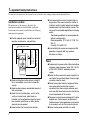
To ensure the safe operation of this scanner, be sure to read the safety warnings and precautions described below.
Installation Location
The performance of this scanner is affected by the
environment in which it is installed. Make sure that the
location where the scanner is installed meets the following
environmental requirements.
● Provide adequate space around the scanner for
operation, maintenance, and ventilation.
37.8" (960 mm) or more
25.98" (660 mm)
or more
3.9" (100 mm) or more
● Avoid installing the machine in direct sunlight. If
this is unavoidable, use curtains to shade the
scanner.
● Avoid locations where a considerable amount of
dust accumulates.
● Avoid warm or humid locations, such as in the
vicinity of a water faucet, water heater, or
humidifier, and avoid locations where the fumes
from ammonia, paint thinner, or other volatile
chemicals may be present.
● Avoid locations that are subject to vibration.
2
● Avoid exposing the scanner to rapid changes in
temperature. If the room in which the scanner is
installed is cold but rapidly heated, water droplets
(condensation) may form inside the scanner. This
may result in a noticeable degradation in scanning
quality.
The following conditions are recommended for
optimal scanning quality:
Room temperature: 10 °C to 32.5 °C (50 °F to
90.5 °F)
Humidity: 20% to 80% RH
● Avoid installing the scanner near equipment that
generates a magnetic field (e.g. speakers,
televisions, or radios).
Power
● Connect only to a power outlet of the rated voltage
and power supply frequency (either 120 V, 60 Hz
or 220-240 V, 50/60 Hz, depending on your
region).
● Do not use the scanner with a power supply that is
not rated for the specified voltage. Doing so might
cause fire or electric shock.
● Do not connect other electrical equipment to the
same power outlet to which the scanner is
connected. Also, when using an extension cord,
make sure that the extension cord is rated for the
current requirements of the scanner.
● The power cord may become damaged if it is often
stepped on or if heavy objects are placed on it.
Continued use of a damaged power cord can lead
to an accident, such as a fire or electrical shock.
● Do not use the power cord while it is coiled.
Moving the Scanner
● The scanner weights about 86 lbs (39 kg).
To lift or move the scanner, always use two
people, one on each side. Never attempt to lift the
scanner by yourself. You could drop the scanner or
pinch your fingers, resulting in personal injury or
damage to the scanner. Remember to be extra
careful when moving it.
● Make sure to disconnect the interface cable and
power cord when moving the scanner. If the
scanner is carried with these items connected, the
plugs and connectors may be damaged or cause
the scanner to fall and result in personal injury or
damage to the scanner.
Handling
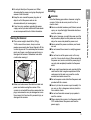
WARNING
Note the following precautions whenever using the
scanner. Failure to do so may result in a fire or
electric shock.
■ Never use alcohol, benzene, paint thinner, aerosol
sprays, or any other highly flammable substance
near the scanner.
■ Do not cut, damage, or modify the power cord. Do
not place heavy objects on the power cord, and do
not pull or excessively bend the power cord.
■ Never connect the power cord when your hands
are wet.
■ Do not connect the scanner to a multiplug power
strip.
■ Do not knot or coil the power cord, as this may
result in a fire or electric shock. When connecting
the power cord, make sure that the power plug is
securely and completely inserted into the power
outlet.
■ To use a reel-type extension cord, unwind all of the
cord from the reel. Long-term operation with the
cord wound on the reel may cause the cord to
overheat and could cause a fire.
■ Do not use power cords other than the power cord
provided with this scanner.
■ Never try to take the scanner apart or modify it in
any way, as this is dangerous and may lead to a
fire or electric shock.
■ Do not use flammable aerosol sprays products
near the scanner.
■ When cleaning the scanner, turn the power switch
OFF and disconnect the power cord from the
power supply.
3
1
Before You Start Using the Scanner
● Do not pull directly on the power cord. When
disconnecting the power cord, grasp the plug and
remove it from the outlet.
● Keep the area around the power plug clear of
objects so that the power cord can be
disconnected easily in an emergency.
● If you have any questions regarding the power
supply, contact your local authorized Canon dealer
or service representative for further information.
■ Some parts can only be cleaned when the power
is turned ON. In these cases, be careful to avoid
electric shock.
■ Clean the scanner using a slightly dampened cloth
which has been well wrung out. Never use alcohol,
benzene, paint thinner, or any other flammable
substances.
■ If the scanner makes strange noises, or gives off
smoke, heat, or strange odors, or the scanner
does not function or other abnormalities occur
when you use the scanner, immediately turn the
power switch OFF, and disconnect the power plug
from the power outlet. Then, contact your local
authorized Canon dealer or service representative
for further information.
■ Do not drop the scanner, or subject it to impact or
strong shock. Should the scanner ever become
damaged, immediately turn the power switch OFF,
and disconnect the power plug from the power
outlet. Then, contact your local authorized Canon
dealer or service representative to have the unit
serviced.
■ Before moving the scanner, make sure to turn the
power switch OFF, and disconnect the power plug
from the power outlet.
CAUTION
■ Do not install the scanner on a surface that is
unstable or tilted, or in an area subject to
excessive vibrations, as this may cause the
scanner to fall, resulting in personal injury or
damage to the scanner.
■ Do not block the ventilation openings. Doing so
could case the scanner to overheat, creating a risk
of fire.
4
■ Never place small metal objects such as staples,
paper clips, or jewelry on the scanner. These items
may fall into the scanner, and cause a fire or
electric shock. Should such objects ever fall inside
the scanner, immediately turn the power switch
OFF, and disconnect the power plug from the
power outlet. Then, contact your local authorized
Canon dealer or service representative to have the
unit serviced.
■ Do not locate the scanner in a humid or dusty
location. Doing so may cause a fire or electric
shock.
■ Do not place objects on top of the scanner. Such
objects may tip or fall over, resulting in personal
injury.
■ When unplugging the power cord, grasp it firmly by
its plug. Do not pull directly on the power cord, as
this may damage or expose the cord’s internal
wiring, resulting in a fire or electric shock.
■ Leave sufficient space around the power plug so
that it can be unplugged easily. If objects are
placed around the power plug, you will be unable
to unplug it in an emergency.
■ Do not allow water or flammable substances
(alcohol, paint thinner, benzene, etc.) to spill into
the scanner, as this may result in a fire or electric
shock.
■ Turn OFF the power switch for safety when not
using the scanner for a long period of time, such as
overnight. Also, turn OFF the power switch, and
disconnect the power cord from the power outlet
for safety when the machine will not be used for an
extended period of time, such as during
consecutive holidays.
■ Do not wear loose clothing or jewelry that may get
caught in the scanner while you are using it. This
may result in personal injury. Be extra careful of
neckties and long hair. If anything becomes caught
in the scanner, immediately disconnect the power
cord to stop the scanner.
■ Be careful when placing paper in the scanner and
when removing jammed paper. It is possible to cut
your hand on the edge of a sheet of paper.
1
Before You Start Using the Scanner
Disposal
● When disposing of this scanner, make sure to
follow all local ordinances and laws or consult with
the retailer who sold you the scanner.
5
2. Features
The main features of the DR-X10C are described below. Refer to the User Manual for detailed information.
Scanner Features
● Fast Document Feeding
The scanner can scan up to 100 document sheets per
minute of LTR/A4-size paper in black and white,
grayscale, and color scanning modes.
* Scanning conditions: LTR/A4 portrait, duplex, 200 dpi
● Variety of Scanning Modes
The scanner is equipped with six scanning modes:
Black and White, Error Diffusion, Advanced Text
Enhancement, Advanced Text Enhancement II, 256Color Grayscale, and 24-Bit Color.
* Advanced Text Enhancement can clarify scanned text by
processing background or foreground colors.
● 500-Sheet Feeder
Up to 500 plain paper document sheets can be loaded in
the document feed tray.
● USB-Linked Power Switch
This User Mode setting enables the scanner’s power to
be automatically switched ON and OFF according to
the connected computer’s power state. (See “About the
Power Switch” on p. 14.)
● Count-Only Mode
When operating the scanner as a stand-alone device,
this mode counts the number of loaded document
sheets.
● Adjustable Document Feed Tray
The home position height of the document feed tray can
be adjusted up or down according to the number of
document sheets to be loaded. (See “Preparing the
Document Feed Tray” on p. 17.)
6
● Long Document Mode
Document sheets up to three meters (118.1 inches) long
can be scanned with Paper Size Detection.
● Job Function
Scanning conditions and the saving destination for
image files are registered with the job, so you can scan
using only control panel key operations. (See “About
the Job Function” on p. 24.)
● Selectable Background
Black or white background can be selected for
document scanning.
● Freely Adjustable Document Guides
The left and right document guides can be adjusted so
that documents can be positioned to scan either the left
or right side. (See “Adjusting the Document Guides” on
p. 18.)
● User Mode
The User Mode functions can be employed to set the
scanner for practically any condition. For details on the
User Mode settings, refer to the User Manual.
Fixed-Size Scanning
Auto-Size Detection
Scanning
● Skew Detection Function
The scanner stops feeding when a skewed document is
detected as it touches the edge of the feeder inlet.
● Staple Detection
The scanner stops feeding when it detects the presence
of stapled documents.
● Ultrasonic Double-Feed Detection Function
The scanner stops feeding when the ultrasonic sensor
detects that two or more document pages are feeding at
the same time.
* A non-detection zone can be specified to avoid doublefeed detection in areas such as those containing adhesive
labels.
● Double-Feed Detection by Document Length
The scanner stops feeding when a double feed is
detected by comparing document lengths.
* Using the length of the first document page as a reference,
the scanner detects a double feed when a page of a
different length is fed.
● Prescan
At the start of scanning, this function prescans the first
page of a document and pauses so that you can use the
first image to adjust the brightness and contrast before
resuming scanning.
● Verify Scan
While scanning, the count of document pages scanned
is verified against a pre-specified count or the count
obtained from Count-Only Mode.
● Text Orientation Detection
The text orientation on each page is detected, and the
scanned image is rotated in 90-degree increments as
necessary for normalization.
Image Processing
● Prevent Bleed Through/Remove Background
Prevents the background or original image on the
reverse side of thin originals from appearing in scanned
images.
● Image Rotation
The scanner can rotate scanned images in 90°
increments, or detect the text orientation and rotate the
image in 90° increments to correct its orientation.
● Deskew
The scanner straightens an image when it recognizes
from the image that the document page was fed askew.
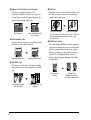
Skewed Image
Deskewed Image
7
1
Before You Start Using the Scanner
Detection Functions
● Auto Image Type Detection
The scanner automatically detects whether documents
are in black and white or color.
● Auto Paper Size Detection
The document page size is detected before scanning.
● Dropout and Color Enhancement Functions
The scanner is equipped with drop-out and
enhancement functions that enable you to specify one
color (red, blue, or green) to be omitted (dropped out) or
enhanced when scanning, respectively.
● Folio Scan
Documents that are too large to fit in the feeder inlet can
be folded and scanned on both sides, and the images
combined into a single image.
Front and Back Images
Color Document
Image with Red Drop-Out
set (red filtered)
● Remove Binder Holes
Erases the shadows that appear on scanned images form
binding holes on the original document.
Monthly Report
Image with Binding Holes
Monthly Report
Image with Binding Holes
Reconstructed Image
* Folio Scan supports up to A1-size (23.4" × 33.1" (594 × 841
mm)) documents when used together with the Long
Document Mode.
● MultiStream Function
The scanner supports MultiStream, which, depending
on the software application, can create two images with
different scanning conditions from a single scan pass.
However, this function is only available when using
CapturePerfect 3.0 (supplied with the scanner) or
another application program that supports the MultiStream function.
● Skip Blank Page
The scanner scans both sides of a document and skips
saving the image of any side it determines to be a blank
page.
Monthly Report
Monthly Report
Two-Sided Documents
with a Blank Side
8
Monthly Report
Monthly Report
Monthly Report
Images with Blank Page
Skipped
Document to be
Scanned
(150 dpi, Color)
(300 dpi, Black & White)
Two Types of Output Image
* The Rapid Recovery System is effective when feeding
stops as a result of detection of a Paper Jam, Double Feed,
Skew, or Staple.
● Dust Countermeasures
The following functions are provided to prevent dust or
paper particles from adhering to the scanning glass and
affecting images.
Blower: Airflow from a fan inside the scanner blows
paper particles from the scanning glass.
Dust Wiper: Before scanning, a brush mounted on a
roller on the opposite side of the scanning glass rotates
to remove paper particles from the glass.
Dust Evasion Mechanism: When a sensor detects dust
on the scanning glass, the sensor is repositioned to
avoid appearing in scanned images.
Options
● Imprinter (Option)
The optional imprinter includes a Pre-Imprinter to print
on documents before scanning, and a Post-Imprinter to
print on documents after scanning.
* The Pre-Imprinter and Post-Imprinter can be used
together.
● Barcode Detection (Option)
Barcodes on documents can be detected by installing
the optional barcode module.
● Patchcode Support (Option)
By installing the optional patchcode decoder, patch
code sheets inserted between document pages can be
detected for batch separation.
9
1
Before You Start Using the Scanner
Other Functions
● Rapid Recovery System
When this function is activated and a sensor detects a
misfeed due to a paper jam or double feed, which causes
feeding to stop, scanning pauses to allow you to correct
the cause of the misfeed, after which scanning continues
from the document page on which the abnormality was
detected. (See “Clearing a Paper Jam or Double Feed
Error” on p. 29.)
3. Names and Functions of Parts
The names and functions of the DR-X10C parts are shown below.
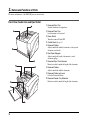
Front View, Feeder Inlet, and Eject Outlet
a Document Eject Tray
Scanned documents are output here.
b Document Feed Tray
Load documents to be scanned.
c Power Switch
Turns the scanner ON and OFF.
d Control Panel (See p. 11.)
e Document Guides
Adjust to match the width of documents, so that ejected
documents stack neatly.
f Eject Paper Stoppers
Adjust to match the length of documents, to avoid
document spillage.
g Document Eject Tray Extension
Extend as needed to match the length of the documents.
h Document Guides
Adjust to match the width of documents.
i Document Guide Lock Lever
Locks the Document Guides.
j Document Feeder Tray Extension
Extend as needed to match the length of the documents.
10
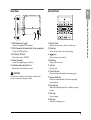
Control Panel
a USB Connector (Type B)
Connect the supplied USB cable here.
b SCSI Connector (50-pin half-pitch D-sub receptacle)
Connect the SCSI cable here.
c DIP Switch (SCSI ID)
Selects the scanner’s SCSI ID.
d Power Connector
Connect the supplied power cord here.
e Ventilation Holes (Exhaust Fan)
Exhausts heat from inside the scanner.
a Display Panel
Displays the user mode, job info, and messages.
b Enter Key
Selects the user mode, and accepts settings.
c
Keys
Selects the user mode and job.
d Menu Key
Displays the user mode.
e Job Key
Displays jobs.
f Count Only Key
Feeds and counts the number of document pages.
g Bypass Mode Key
Raises the document holder for the non-separating
(manual) mode.
h New File Key
When Batch Separation by Key is enabled, separates
batches.
i Start Key
Starts scanning.
j Stop Key
Stops the scanning process.
CAUTION
Do not block the ventilation holes. Doing so could cause the
scanner to overheat, creating a fire hazard.
1
Before You Start Using the Scanner
Rear View
11
12
Chapter 2 Basic Operation
1. Turning the Power ON and OFF ....................... 14
About the Power Switch .........................................14
2. Documents........................................................ 15
Acceptable Documents ..........................................15
3. Document Feed and Eject Trays ...................... 17
Preparing the Document Feed Tray.......................17
Adjusting the Document Guides.............................18
Preparing the Document Eject Tray .......................20
4. Document Feeding Methods............................. 22
Selecting the Document Feeding Method ..............22
5. Scanning ........................................................... 24
About the Job Function ..........................................24
CapturePerfect 3.0 .................................................25
6. Clearing a Paper Jam or Double Feed Error .... 29
Paper Jam Handling...............................................29
Handling a Double Feed ........................................30
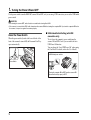
1. Turning the Power ON and OFF
Use the power switch to turn the DR-X10C scanner ON and OFF, or if you are using a USB connection, you can set the USB-linked
power switch.
CAUTION
• After turning the scanner OFF, wait at least ten seconds before turning it back ON.
• If the scanner is connected via SCSI cable, always turn the scanner ON before turning the computer ON. If you turn the computer ON before
the scanner, it may not recognize the scanner properly.
About the Power Switch
When the power switch (located at the lower left side of the
front of the scanner) is turned ON, the Document Feed Tray
opens automatically.
■ USB-Linked Switch Setting (with USB
connection only)
To set to have the computer’s power switch turn the
scanner ON and OFF as well, you can enable the Auto
USB Power Off function.
You can change the “Auto USB Power Off” setting using
the User Mode. For details, refer to the User Manual.
<USB-linked power switch>
Power Switch
Turning the computer ON or OFF turns the scanner ON
(document feed tray opens) or OFF.
14
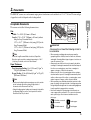
2. Documents
The DR-X10C scanner can scan documents ranging in size from business cards and checks to 11" × 17"/A3 size. The size and type
of paper that can be fed depends on the feeding method.
2
Acceptable Documents
The scanner can feed the following document sizes.
Hint
When the Long Document Mode is selected, Paper Size
Detection can be used for scanning documents up to 118.1".
(3 m) long. For details, refer to the User Manual.
Paper Thickness
Page Separation Feeding: 14 to 32 lb bond (52 g/m2 to
128 g/m2) (0.06 mm to 0.15 mm)
Bypass Feeding: 11 lb to 64 lb bond (42 g/m2 to 255 g/m2)
(0.05 mm to 0.30 mm)
Hint
• Continuous feeding feeds document pages one after another
by the feed and retard rollers after placing a batch of
documents in the Document Feed Tray.
• Manual feeding requires feeding one document at a time while
the [Bypass Mode] key on the control panel is lit and the
Document Feed Tray is raised.
Bypass Mode Key
IMPORTANT
A document must meet the following criteria to
be scannable:
• When scanning a multipage document, pages must be
grouped together so that they have the same size, thickness,
and weight. Scanning different types of paper at one time can
cause the scanner to jam.
• Always make sure that the ink on a document is dry before
scanning it. Scanning documents with the ink still wet may soil
the rollers or scanning glass, cause lines or smudges to
appear on images, or dirty other documents.
• Always clean the rollers or scanning glass after scanning a
document written in pencil. Scanning documents with pencil
written on them may soil the rollers or scanning glass, cause
stripes to appear in images, or dirty other documents.
• When scanning a two-sided document that is printed on thin
paper, the image on the opposite side of each page may show
through. Adjust the background color and scanning brightness
from the application program before scanning.
• Note that scanning the following types of documents can
cause a paper jam or malfunction. To scan such a document,
make a photocopy of the document and then scan the
photocopy.
Wrinkled or creased
documents
Carbon paper
Curled documents
Coated paper
15
Basic Operation
Size
Width: 2" to 12.01" (50.8 mm to 305 mm)
Length: 2.76" to 17.01" (70.0 mm to 432 mm) (without
using the Long Document Mode)
2.76" to 39.37" (70.0 mm to 1m) (using [ON1] in the
Long Document Mode)
2.76" to 118.11" (70.0 mm to 3m) (using [ON2] in the
Long Document Mode)
Torn documents
Extremely thin,
translucent paper
Documents with
paper clips or staples
• To scan bound multi-page documents such as invoice
booklets, place the bound edge against the feeder inlet and
scan by manual feeding.
• To use the Long Document Mode, feed document pages
manually, one after another.
16
3. Document Feed and Eject Trays
Before scanning, prepare the Document Feed and Eject Trays for the desired paper size.
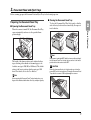
Preparing the Document Feed Tray
■ Opening the Document Feed Tray
To close the Document Feed Tray, lift it gently so that the
sides of the tray hook into the scanner body, then press it
in at both sides.
Hint
The height of the home position can be adjusted in three
steps according to the number of document pages to be
loaded at once (up to 500, 300, or 100 sheets). The default
setting is the lowest position, which accepts up to 500
sheets. For details, refer to the User Manual.
Hint
2
Basic Operation
When the scanner is turned ON, the Document Feed Tray
opens automatically and moves to the specified home
position height.
■ Closing the Document Feed Tray
When power is switched OFF while the home position setting of
the Document Feed Tray is high, the tray moves to the lowest
position before the scanner turns OFF.
CAUTION
When the home position is set to high, make sure to turn the
power OFF before closing the tray. Closing the Document Feed
Tray while the scanner is ON may damage the scanner.
When opening the Document Feed Tray by hand, place your
fingers in the indents at both sides of the tray, and open it gently.
17
■ Document Guides
Unlock the document guides by gently pressing both sides
of either guide (a), and sliding the document guides to
match the width of your document (b).
Adjusting the Document Guides
The document guides normally extend at equal distances from
the left and right of the center of feeding so that your
documents are centered in the feed inlet.
However, each document guide has its own lock lever, so you
can load documents to the left or right of center by locking the
document guides at the appropriate positions.
Locking the Document Guides
Hint
The positions of the left and right document guides can also be
locked independently for off-center loading. For details, see
“Adjusting the Document Guides” (p. 18).
■ Document Feed Tray Extension
Pull out the tray extension as needed for the length of your
document.
■ Loading Documents at the Left Side
This example shows the procedure for loading documents
at the left side of the feeder.
1. Spread the document guides all the way to the left
and right.
18
2. Load your documents against the left feed guide.
5. Slide the left document guide to the left edge of your
documents.
2
lock lever, then slide the right document guide to the
right edge of your documents (b).
■ Resetting the Document Guides
To reset the guides so that they are equidistant from the
center, perform the following procedure to spread the
guides to the left and right as far as they will go.
1. Confirm that the right document guide is locked (a),
and slide the left guide all the way to the left (b).
4. Lock the right document guide (a), and unlock the
left document guide (b).
2. Lock the left document guide (a), and unlock the
right document guide (b).
19
Basic Operation
3. Lock the left document guide (a) by pulling out the
3. Slide the right document guide all the way to the right.
Preparing the Document Eject Tray
The Eject Tray includes two Document Eject Guides, the
Eject Tray Extension and Eject Paper Stopper, to be adjusted
to match the length of your documents.
■ Document Guides
Slide the document eject guides to match the width of your
documents.
4. Unlock the left document guide.
Hint
• The position of the document eject guides can be shifted to the
left or right by holding one guide in place while moving the
other.
• To reset the guides so that they are equidistant from the
center, spread the guides all the way to the left and right.
20
■ Document Eject Tray Extension
Pull out the tray extension to match the length of your document.
2
Basic Operation
■ Eject Paper Stoppers
Raise the appropriate Eject Paper Stopper to stop ejected
documents from spilling out of the eject tray.
Hint
The eject paper stoppers are attached to the document tray
extension, so you can adjust their positions by moving the tray
extension to suit your document length.
21
4. Document Feeding Methods
Two document feeding methods are available: Continuous Feeding, which feeds documents automatically from the document tray
by the pickup roller; and Manual Feeding, which requires one document at a time to be positioned manually for transport by the
feed roller, while the pickup roller is disabled.
Selecting the Document Feeding Method
Continuous Feeding is the default feeding method, but
Manual Feeding can be enabled by selecting Manual Feeding
as the Feeding Option for the ISIS/TWAIN driver, or by
pressing the Bypass Mode key on the control panel. A
Continuous Manual Feeding Mode is also provided as a way
to scan a batch of document pages that cannot be
automatically transported.
Continuous Feeding
With Continuous Feeding, documents loaded in the
Document Feed Tray are picked up automatically by the
pickup roller and transported by the feed roller, while the
retard roller separates each page to avoid double feeding.
Pickup
Roller
Feed
Roller
Retard
Roller
22
Manual Feeding
The Bypass Mode key lights and the Document Feed Tray
rises so that documents can be fed manually one at a time.
When manual feeding, you must insert each document
page far enough to be pulled in by the feed roller (because
the pickup roller is disabled).
Bypass Mode Key
IMPORTANT
• Because pages are not separated by the retard roller during
manual feeding, a paper jam will occur if multiple pages are
loaded together.
• To scan bound multi-page documents such as invoice
booklets, place the bound edge against the feed inlet and scan
using manual feeding.
Hint
• The [Bypass Mode] key is linked to the [Manual Feeding] Feed
Option setting of the ISIS/TWAIN driver.
• When the [Bypass Mode] key on the control panel is pressed
or the [Manual Feeding] Feed Option is selected, the [Bypass
Mode] key lights and the Document Feed Tray rises.
2
Basic Operation
Bypass Mode Key
23
5. Scanning
Scanning operations can be controlled by a scanning application program such as the CapturePerfect 3.0 software included with the
scanner, or directly from the control panel of the DR-X10C, using the Job Function.
This section describes the Job Function and provides an overview of CapturePerfect 3.0.
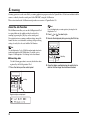
About the Job Function
The Job Function enables you to use the Job Registration Tool
to register different jobs which can then be selected for
scanning by pressing the [Job] key on the control panel.
Job registration stores scanning condition settings, image file
format selection, save destination, and image data processing
settings for each job to be used with the Job Function.
Hint
If no job is displayed, you must register a job using the Job
Registration Tool.
2. Press [
] or [
] to select a job.
3. Execute the displayed job by pressing the Start key.
Hint
The Job Registration Tool is a TWAIN-compliant application that is
installed along with the ISIS/TWAIN driver. For details, refer to
Chapter 9 "Job Registration Tool Settings" in the User Manual.
Start Key
■ Executing Jobs
Use the following procedure to execute jobs that have been
registered by the Job Registration Tool.
1. Press the Job key on the control panel.
Job Key
Registered jobs are displayed.
24
4. Open the folder specified during job registration to
confirm that the image files have been created.
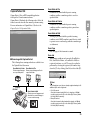
CapturePerfect 3.0
CapturePerfect 3.0 is an ISIS-compatible application
developed for Canon document scanners.
CapturePerfect 3.0 includes the following modes. Select the
desired scan mode from the Scan menu to perform scanning.
For more information on CapturePerfect 3.0, refer to the
CapturePerfect 3.0 Operation Guide.
Scan Batch to File
Documents are scanned with the preset scanning
conditions, and the scanned image data is saved to a
specified folder.
Scan Batch to Printer
Documents are scanned with the preset scanning
conditions, and the scanned image data is printed on a
specified printer.
2
Scan Page
Only one page of the document is scanned.
■ Scanning with CapturePerfect
The following three scanning methods are available from
the CapturePerfect Scan menu.
Scan Batch to Printer
Prints scanned images
on a specified printer
Scan Batch to File
Saves scanned images as files in
a specified folder
Scan Job
The scanning conditions and scan mode (Scan Batch to
File, Scan Batch to Printer, or Scan Batch to Mail) are
registered in advance as a job. The scan job can then be
performed by selecting the registered job from the dropdown list (a) or by clicking (Scan Job) on the toolbar (b).
b
a
Hint
(Network)
DR-X10C
Scan Batch to Mail
Starts your e-mail program and
attaches the scanned image to
a new e-mail message
The following two scan jobs are already registered and up to 99
additional jobs can be registered.
• Color Document
Scan the document using 24-bit color, simplex, at 300 dpi
resolution, and save the file in the folder [My Pictures] under
the folder [My Documents].
• Binary Document
Scan the document in black-and-white, simplex, at 200 dpi
resolution, and save the file in the folder [My Pictures] under
the folder [My Documents].
25
Basic Operation
Scan Batch to Mail
Scanning is performed with the specified scanning
conditions, and a MAPI-compliant e-mail client is started
to generate a new e-mail message with the scanned images
as attachments.
Scan To Presentation
This mode is convenient when a compact scanner is used
in an environment such as a conference hall, where it is
connected to a large display or projector. By setting
CapturePerfect for full-screen display before scanning,
scanned images are displayed at full size on the screen.
CapturePerfect 3.0 starts.
Hint
This is not usually practical for large scanners such as the DRX10C.
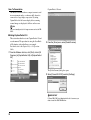
■ Using CapturePerfect 3.0
This section describes how to start CapturePerfect 3.0 and
scan documents. The procedure for using the Scan Batch
to File function is described here as an example.
For details, refer to the CapturePerfect 3.0 Operation
Guide.
2. From the [Scan] menu, select [Select Scanner].
1. From the Windows task bar, click [Start] ➔ click [All
Programs] ➔ [CapturePerfect 3.0] ➔ [CapturePerfect
3.0].
The [Select Scanner] dialog box opens.
3. Select [Canon DR-X10C] and click [Settings].
IMPORTANT
If [Canon DR-X10C] is not displayed in the list of scanners, you
must re-install the ISIS/TWAIN driver.
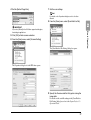
26
4. Set the [Default Page Size].
7. Set the scan settings.
Hint
For details on the Properties dialog box, refer to the User
Manual.
8. From the [Scan] menu, select [Scan Batch to File].
2
IMPORTANT
Basic Operation
If you select [Default] in the ISIS driver properties dialog box,
that setting is applied here.
5. Click [OK] to finish scanner selection.
6. From the [Scan] menu, select [Scanner Setting].
The [Scan Batch to File Setting] dialog box opens.
The Properties dialog box for the ISIS driver opens.
9. Specify the file name and the file type for saving the
image data.
For details on the available settings in the [Scan Batch to
File Setting] dialog box, refer to the CapturePerfect 3.0
Operation Guide.
27
10. Place your document and click [Save] to start
scanning.
IMPORTANT
You must load your documents as described below, depending
on the specified Feed Option setting.
• If the [Standard Feeding] Feed Option is enabled, load your
documents before scanning. When all of the documents have
been scanned, the Continue Scanning dialog box appears.
• If the [Automatic Feeding] Feed Option is enabled, scanning
is performed automatically whenever a sensor in the
Document Feed Tray detects a loaded document, and
pressing the Stop key causes the Continue Scanning dialog
box to appear.
• If the [Panel-Feeding] Feed Option is enabled, the Start key
lamp is lit. You must load a document and press the Start key
to scan. Pressing the Stop button causes the Continue
Scanning dialog box to appear.
Start Key (Lamp lights green)
11. When the [Continue Scanning] dialog box appears,
• If the [Manual Feeding] Feed Option is enabled, the Bypass
Mode key is lit and the Document Feed Tray is raised. You
must insert one page at a time to be scanned, and press the
Stop button to display the Continue Scanning dialog box.
verify that a document is loaded, and click either
[Continue Scanning] or [Stop Scanning].
IMPORTANT
If Use Continue Scanning dialog in the [Scan] menu is not
checked, scanning finishes without displaying the Continue
Scanning dialog box.
Bypass Mode Key
• If a Feed Option other than [Standard Feeding] or [Manual
Feeding] is selected, once you have started scanning, each
document placed in the Document Feed Tray is scanned, and
when no document is loaded, the scanner enters the standby
state.
28
12. When scanning is complete, select [Exit] from the
[File] menu to quit CapturePerfect 3.0.
6. Clearing a Paper Jam or Double Feed Error
If a paper jam or double feed occurs during scanning, a paper jam message appears on the PC and on the scanner’s display panel.
Use the following procedure to clear the paper jam.
CAUTION
• When removing jammed paper, take care not to cut your hands on the edges of the paper
• Make sure to remove all of the jammed paper. Torn paper remaining in the scanner may cause future jams or damage to the scanner.
• When opening and closing the upper unit, be careful not to get your fingers caught, as this may result in personal injury.
When a paper jam occurs during scanning, the following
message appears on the display panel, and transport stops.
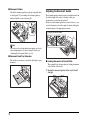
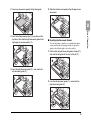
• To remove paper that has stopped inside the scanner, open
the upper unit as far as it will go.
4. Close the upper unit slowly (a). Make sure that the
upper unit is completely closed by pushing on both
edges with both hands until you hear a click (b).
Hint
The displayed error code indicates the location of the paper jam.
1. Remove any documents that remain in the eject tray.
2. Press the Open/Close button and gently raise the
upper unit.
5. Check to verify the last saved image, and resume
scanning.
■ When “Press Start Key” Appears
Open/Close Button
When the Rapid Recovery System is enabled in the ISIS/
TWAIN driver settings, the following message appears on
the display panel after you remove the jammed paper.
3. Remove the jammed paper.
IMPORTANT
• If paper has stopped in the midst of ejecting to the eject tray,
raise the upper unit slightly to remove it.
29
Basic Operation
Paper Jam Handling
2
IMPORTANT
The Rapid Recovery System setting in the ISIS/TWAIN driver
causes the following process to occur after a paper jam.
• When the Rapid Recovery System is disabled, images
scanned before the paper jam occurs are saved as files,
scanning finishes, finished and an error message is displayed.
In this case, restart scanning from the document page where
the paper jam occurred, or from the beginning.
• When the Rapid Recovery System is enabled, scanning
pauses when a paper jam is detected, and an error message
is displayed.
Return the jammed document page to the top of the
document stack yet to be scanned, and press the Start key
to resume scanning.
Start Key
IMPORTANT
• When you press the Start key, the image of the document
page that caused the paper jam is deleted before scanning
resumes.
• Pressing the Stop key saves the images that were scanned
before the paper jam was detected to a file, and ends the scan
process. In this case, restart scanning from the document
page where the paper jam occurred, or from the beginning.
30
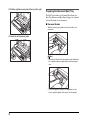
Handling a Double Feed
When a double feed is detected while scanning, the document
pages for which double feeding was detected are ejected at the
eject outlet, an error message appears on the PC and on the
display panel, and transport stops.
IMPORTANT
When a double feed is detected, the following process occurs, and
messages appear according to the Rapid Recovery System setting
in the ISIS/TWAIN driver.
• When the Rapid Recovery System is disabled, images scanned
before the double feed are saved as files, scanning finishes, and
the following error message is displayed.
When detecting double feeds by document length
When detecting double feeds ultrasonically
• When the Rapid Recovery System is enabled, scanning pauses
when a double feed is detected, and the following error message
is displayed.
■ When the Rapid Recovery System is Disabled
When detecting double feeds by document length
■ When the Rapid Recovery System is Enabled
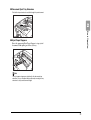
1. Check the rejected document page(s).
2
Basic Operation
Return the document pages ejected as a result of doublefeed detection to the top of the document stack yet to be
scanned, and resume scanning.
IMPORTANT
• Press the Start key the erase the image that was being
scanned when double feeding was detected, and resume
scanning.
• Pressing the Stop key saves the images that were scanned
before the double feed was detected to a file, and ends the
scan process. In this case, restart scanning from the
document page where the double feed occurred, or from the
beginning.
When detecting double feeds ultrasonically
Hint
• If attached paper, such as a label on the document page,
appears to be the cause of the double-feed detection, ignore
the detection.
• If two document pages were fed together, rescan the doublefed pages.
2. Press [
] or [ ] to select [IGNORE] or [RETRY]
and press the [Enter] key.
[IGNORE]:
Saves the image of the page that was detected as a double
feed, and resumes scanning.
[RETRY]:
The display panel appears as below. Return the double-fed
document pages to the tray and press the Start key.
31
32
Chapter 3 Maintenance
1. Regular Maintenance........................................ 34
Cleaning the Scanner............................................. 34
Cleaning the Glass and Rollers..............................35
Opening and Closing the Upper Unit .....................35
Cleaning Rollers with a Cleaning Sheet.................36
Cleaning the Glass.................................................37
Cleaning the Platen Rollers....................................38
Cleaning the Pickup and Feed Rollers...................39
Cleaning the Retard Roller.....................................41
2. Replacing the Transport Rollers ....................... 44
Roller Replacement Cycle......................................44
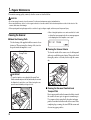
1. Regular Maintenance
To maintain scanning quality, routinely clean the scanner as described below.
CAUTION
• Do not use spray cleaners to clean the scanner. Precision mechanisms may get wet and malfunction.
• Never use paint thinner, alcohol, or other organic solvents to clean the scanner. Such solvents may deform or discolor the exterior of the
scanner, and cause other damage.
• When opening and closing the upper unit, be careful not to get you fingers caught, as this may result in personal injury.
Cleaning the Scanner
■ About the Cleaning Cloth
Use the cleaning cloth supplied with the scanner to clean
its interior. When not using the cleaning cloth, store it in
the pocket inside the imprinter’s cover.
Cleaning Cloth
Storage Pocket
• When closing the imprinter cover, make sure that it is locked
so that will not open unexpectedly. An error message appears
on the display panel if the imprinter cover is open.
■ Cleaning the Scanner Exterior
To clean the outside of the scanner, use a cloth dampened
with water or mild detergent solution. Wring out the cloth
thoroughly, and use a clean dry cloth to wipe the scanner
dry.
IMPORTANT
• To open the imprinter cover, adjust the Document Feed
Guides outward and press the tab (indicated by the arrow in
the illustration) to unlock the cover. When closing the cover,
press the same tab with your finger to lock it.
■ Cleaning the Document Feed Inlet and
Transport Path
Dust or paper particles in the document feed inlet or inside
the scanner can cause spots to appear in scanned images.
Use compressed air to periodically clean dust and paper
particles from the inlet and the inside of the scanner. After
completing large scanning jobs, turn OFF the scanner and
clean out any paper particles.
34
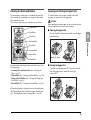
Cleaning the Glass and Rollers
Opening and Closing the Upper Unit
If scanned images contain spots or documents become dirty
after scanning, the scanning glass or transport rollers inside
the scanner may be dirty.
The locations of the main glass and rollers are as follows.
To clean the inside of the scanner, carefully follow this
procedure to open and close the upper unit.
Pickup Rollers
Feed Rollers
Platen Roller
CAUTION
When opening and closing the upper unit, be careful not to get your
fingers caught, as this may result in personal injury.
■ Opening the Upper Unit
Press the Open/Close button and carefully raise the upper
unit until it stops.
3
Scanning Glass
Maintenance
Platen Roller
Scanning Glass
Sensor Glass
Open/Close Button
Retard Rollers
For instructions on cleaning the glass and rollers, refer to the
following pages.
• Scanning Glass and Sensor Glass (See “Cleaning the
Glass” on p. 37)
• Platen Rollers (See “Cleaning the Platen Rollers” on p. 38)
• Pickup and Feed Rollers (See “Cleaning the Pickup and
Feed Rollers” on p. 39)
• Retard Roller (See “Cleaning the Retard Roller” on p. 41)
■ Closing the Upper Unit
Carefully lower the upper unit (a). Press down on both
sides of the upper unit to ensure that it is closed
securely.(b)
Rollers other than those described above are cleaned by using
the Cleaning Mode of the User Mode, using a cleaning sheet.
(See “Cleaning Rollers with a Cleaning Sheet” on p. 36.)
35
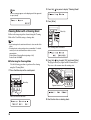
2. Press the [
Hint
] key once to display “Cleaning Mode”.
An error message appears on the display panel if the upper unit
is open (raised).
3. Press [Enter].
Cleaning Rollers with a Cleaning Sheet
Enter Key
Rollers in the transport path are cleaned using the Cleaning
Mode of the User Mode, using a cleaning sheet.
Hint
• Each cleaning sheet is used several times to clean one side of the
rollers.
• Cleaning sheets can be purchased as consumables. For details,
contact your local authorized Canon dealer or service
representative.
Product Name: Cleaning Sheets (package of 30)
Product Code: 2418B002
■ Performing the Cleaning Mode
Use the following procedure to perform roller cleaning
using the Cleaning Mode.
The Cleaning Mode is enabled.
4. Press the [
] key to select [OK], and press [Enter].
The [Bypass Mode] key lights and the Document Feed
Tray rises as the scanner enters the waiting state.
1. Press the Menu key on the control panel.
Menu Key
Bypass Mode Key
The User Mode is activated.
5. Peel the liner from a cleaning sheet.
36
6. Insert the cleaning sheet adhesive-side up into the
feed inlet.
Cleaning the Glass
The scanner has two types of glass: the sensor glass for
document detection, and the scanning glass for actual
scanning.
Scanning Glass
Sensor Glass
3
The cleaning sheet feeds through the scanner, and the
Cleaning Mode exits.
7. Inspect the cleaning sheet for dust.
8. Repeat steps 3 to 6 several times using the same
cleaning sheet to clean the same side of the rollers.
9. Prepare a new cleaning sheet, and clean the other
side in the same way.
IMPORTANT
• When placing the adhesive side down, make sure to support
the cleaning sheet while inserting it into the feed inlet so that
it does not touch the Document Feed Tray.
• Dust that is not removed by the cleaning sheet should be
wiped off with a moistened and thoroughly wrung-out cloth.
IMPORTANT
Scratches on the scanning glass may cause spots or streaks on
scanned images, as well as feeding errors. If you find a scratch on
the scanning glass, contact your local authorized Canon dealer or
service representative to have the glass replaced.
1. Carefully raise the upper unit until it stops.
2. Press and hold the Start key on the control panel for
approximately two seconds.
Start Key
The lamp beneath the scanning glass lights.
37
Maintenance
Hint
• The appearance of extraneous spots or streaks in scanned
images may indicate a dirty scanning glass.
• To clean the scanning glass, turn ON the lamp beneath the glass
so that any dust can be easily seen and wiped away.
3. Wipe any dust off the scanning glass with a clean, dry
cloth.
4. Press the Stop key to turn off the lamp.
Hint
The platen rollers are cleaned by wiping while rotating the rollers in
three stages.
1. Carefully raise the upper unit until it stops.
2. Press and hold the Stop key on the control panel for
approximately seconds.
Stop Key
5. Carefully lower the upper unit (a). Press down on
Stop Key
both sides of the upper unit to ensure that it is
securely closed. (b)
Each time you press the Stop key, the upper and lower
platen rollers rotate in the following order: black ➔ white
➔ brush.
Platen Rollers (Black/White
Background Rollers)
Black
White
Cleaning the Platen Rollers
The platen rollers are located near the upper and lower sides
of the scanning glass to brush away dust as the rollers turn
before scanning, and to provide the selected background
(white or black) for document images.
Clean the platen rollers periodically using the following
procedure.
38
Brush
IMPORTANT
• Be careful not to touch the platen roller while it is turning.
• Always use the Stop key to turn the platen roller. Attempting
to turn the roller by hand may cause damage.
3. Clean the black and white surfaces of the rollers by
wiping horizontally with a moistened, wrung-out
cloth.
IMPORTANT
When cleaning, be careful not to bend the sheet over the roller.
The location of the sheet for the lower platen roller is in front of
the roller.
Sheet (avoid bending)
Cleaning the Pickup and Feed Rollers
Use the following procedure to remove and reinstall the
pickup and feed rollers during cleaning or replacement.
CAUTION
Do not use excessive force when removing or reinstalling the
rollers. Doing so may damage the rollers, resulting in feed errors.
■ Removing and Cleaning the Pickup and Feed
Rollers
3
1. Carefully raise the upper unit until it stops.
2. Lift the roller cover and pull out and downwards.
Maintenance
4. Use a soft object such as a cotton swab to remove
any dust adhering to the brushes, and any dust that
may have fallen from them.
IMPORTANT
Be careful not to bend the brush bristles when cleaning. If the
bristles are bent, their cleaning ability is degraded.
5. Carefully lower the upper unit (a). Press down on
both sides of the upper unit to ensure that it is
securely closed. (b)
IMPORTANT
When opening and closing the roller cover, be careful not to
touch the glass (staple detection window). If the glass gets dirty,
staple detection accuracy is degraded.
39
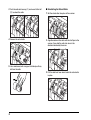
3. Lift the pickup roller mounting lever, and remove the
roller.
4. Pull the feed roller lock lever down (a) and move it to
the right (b) to unlock the feed roller.
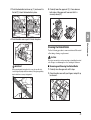
6. Use a moistened, well wrung-out cloth to wipe off any
dust from the rollers.
■ Reinstalling Pickup and Feed Rollers
1. Set the pickup roller (a) in place and push the
mounting lever (b) back to secure it.
5. Remove the feed roller.
2. Align the notches in the shaft of the feed roller with
the pins on the shaft in the scanner, and place the
feed roller into position.
40
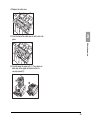
3. Push the feed roller lock lever up (a) and move it to
the left (b) to lock the feed roller in place.
5. Carefully lower the upper unit (a). Press down on
both sides of the upper unit to ensure that it is
securely closed.(b)
3
4. Push the roller cover up until it clicks into place.
Use the following procedure to remove and reinstall the retard
roller during cleaning or replacement.
CAUTION
Do not use excessive force when removing or reinstalling the retard
roller. Doing so could damage the roller, resulting in feed errors.
IMPORTANT
When opening and closing the roller cover, be careful not to
touch the glass (staple detection window). If the glass gets dirty,
staple detection accuracy is degraded.
■ Removing and Cleaning the Retard Roller
1. Carefully raise the upper unit until it stops.
2. Grasp the roller cover with your fingers, and pull it up
to remove it.
41
Maintenance
Cleaning the Retard Roller
3. Push the roller lock lever up (a) and move it to the left
(b) to unlock the roller.
4. Remove the retard roller.
■ Reinstalling the Retard Roller
1. Set the retard roller into place in the scanner.
2. Align the notches in the roller with the shaft pins in the
scanner, then slide the roller lock lever in the
direction indicated by the arrow.
5. Use a moistened, well wrung-out cloth to wipe off any
dirt from the roller.
3. Pull the roller lock lever down to lock the retard roller
in place.
42
4. Replace the roller cover.
3
5. Push the front of the roller cover in until it clicks into
place.
Maintenance
6. Carefully lower the upper unit (a). Press down on
both sides of the upper unit to ensure that it is
securely closed.(b)
43
2. Replacing the Transport Rollers
As the rollers start to wear out, feeding quality declines, and document feed errors, such as paper jams, become more likely.
If document feed errors continue to occur after cleaning the rollers, purchase the Roller Replacement Kit and replace the transport
rollers (pickup, feed, and retard rollers).
Roller Replacement Cycle
The feeding rollers are consumables that must be replaced
after feeding about every 500,000 pages.
When the rollers have fed more than 500,000 pages, a roller
replacement message appears on the display panel whenever
the scanner is turned ON. When the scanner is configured to
reboot with the computer, a roller replacement message also
appears on the computer screen.
■ Roller Replacement Kit
The Roller Replacement Kit consists of replacement
pickup, feed, and retard rollers. For details, contact your
local authorized Canon dealer or service representative.
Product Name: Roller Replacement Kit
Product Code: 2418B001
Pickup Roller
Feed Roller
IMPORTANT
• When the roller replacement message appears, purchase the
Roller Replacement Kit and replace the rollers by following the
relevant steps in the cleaning procedures.
– (See “Cleaning the Pickup and Feed Rollers” on p. 39.)
– (See “Cleaning the Retard Roller” on p. 41.)
• When the rollers start to wear out, problems such as paper jams
and document misfeeds may occur more frequently. If this
happens, replace the rollers, regardless of the page count of the
roller usage counter.
• Messages on the display panel can be cleared by pressing the
Stop key. However, the messages will continue to be displayed
each time the scanner is turned ON until the roller counter is
reset.
• Make sure to reset the roller counter when replacing the rollers.
For details on resetting the counter, refer to “Checking and
Resetting the Page Counter” of the User Manual.
44
Retard Roller
Chapter 4 Practical Examples
1. Messages.......................................................... 46
Status Display ........................................................46
Error Messages......................................................47
2. Troubleshooting ................................................ 49
Trouble Categories.................................................49
Problem and Solution............................................. 49
1. Messages
There are two types of display panel messages: “status indicator messages” and “error messages” that appear when the scanner
encounters a problem.
Status Display
■ Scanning...
The following messages appear on the display panel to
indicate the scanner’s operating state:
■ Counting...
Status: Scanning is in progress.
■ Sleeping...
Status: Operating in Count-Only mode.
■ Insert the Sheet
Status: The scanner is entering the Sleep mode. Press any
key to recover.
■ Wait...
Status: In the Cleaning Mode, waiting for the cleaning
sheet to be inserted.
■ Press Start Key
Status: The scanner is busy processing. Wait until the
display changes.
■ Verifying…
Status: Waiting. Load a document and press the Start key.
■ Ready
Status: The scanner is verifying a scan.
■ Replace Roller
Status: The scanner is ready to use.
Status: It is time to replace the rollers (the number of fed
pages has exceeded 500,000). (See “Roller Replacement
Cycle” on p. 44.)
46
Error Messages
When one of the following messages appears on the display
panel, an error has occurred in the scanner. Follow the
indicated procedure to resolve the error.
■ Check Imprinter
■ Jam
Error Code: Pxxx
Problem: Paper has jammed.
Solution: Open the upper unit and remove the jammed
paper. (See p. 29.)
■ Dust Detected
■ Cover Open
Error Code: C001
Problem: The scanner’s upper unit is open.
Solution: Close (lower) the upper unit. (See p. 35.)
Error Code: C009
Problem: The imprinter cover is open.
Solution: Close the imprinter cover. (See p. 34.)
Error Code: J050
Problem: Dust detected on the scanning glass could not be
avoided.
Solution: Clean the scanning glass. (See p. 37.)
4
Practical Examples
Error Code: H001
Problem: No ink cartridge is installed in the postimprinter.
Solution: Install an ink cartridge.
Error Code: H008
Problem: No ink cartridge is installed in the preimprinter. Or the pre-imprinter ink cartridge is not secured.
Solution: Install the ink cartridge and turn the lock lever
upwards to secure the ink cartridge.
■ Dust Detected (appears alternately with
normal display)
Problem: Dust was detected and scanning proceeds.
Solution: When scanning finishes, clean the scanning
glass.
■ Call for Service
Error Code: Exxx (excluding E021)
Problem: Internal scanner error.
Solution: Turn the power OFF, and restart the scanner. If
this does not solve the problem, make a note of the error
code, and contact your Canon service representative.
47
■ Skew Detected
Error Code: J018
Problem: A skewed document page contacted the wall of
the transport path.
Solution: Remove and reposition the document page.
■ Double Feed
Error Code: D002
Problem: A double feed was detected by the document
length.
Solution: Remove the double fed document page(s) from
the eject outlet, return them to the Document Feed Tray,
and scan again. (See p. 30.)
Error Code: D004
Problem: A double feed was detected ultrasonically.
Solution: Remove the double fed document page(s) from
the eject outlet, return them to the Document Feed Tray,
and scan again. (See p. 30.)
■ Double Feed (Rapid Recovery System)
Problem: Double feeding of document pages has been
detected while scanning with the Rapid Recovery System
enabled.
Solution: Remove the double fed document page(s) from
the eject outlet, return them to the Document Feed Tray,
and scan again. (See p. 30.)
48
■ Staple Detected
Error Code: J001
Problem: A stapled document has been detected.
Solution: Remove the staple(s), and rescan the document.
■ Tray Error
Error Code: E021
Problem: An error has occurred with the Document Feed
Tray.
Solution: Turn the power OFF, and restart the scanner.
■ Count Mismatch
Error Code: U001
Problem: The specified count has not yet been reached.
Solution: Check the document count, and scan again.
Error Code: U002
Problem: Scanning finished without reaching the
specified count.
Solution: Check the document count, and scan again.
2. Troubleshooting
This section describes the problems that may occur during use of the scanner and how to solve them.
Trouble Categories
Solution
■ The Scanner Is Not Recognized (Connecting
via USB)
If the scanner’s USB connection is not recognized, first
confirm the following:
✔ Are the scanner and PC connected correctly using the
proper cable?
✔ Is the scanner’s power switch turned ON?
If this does not solve the problem, consider the following
possible causes:
Cause
Problem and Solution
Solution
■ The Scanner Does Not Turn ON
If the scanner does not turn ON, first confirm the
following:
✔ Is the power cord connected correctly?
✔ Is the power cord inserted into the power outlet?
If this does not solve the problem, consider the following
possible problems and causes:
Problem
Cause
Solution
With Auto USB Power switching is
enabled, but the scanner does not turn ON
when the computer is turned ON.
The SCSI connection is also being used.
The SCSI connection does not support Auto
USB Power switching. Use only the USB
connection if you want to use Auto USB
Power switching.
Auto USB Power has been disabled
([OFF] is selected in the User Mode).
Enable Auto USB Power (select [ON] in the
User Mode).
Cause
Solution
Cause
Solution
The scanner does not support your USB
interface.
This product is not guaranteed to operate with
all types of USB interfaces. Contact your local
authorized Canon dealer or service
representative for more information.
The scanner does not support the USB
cable.
Use the USB cable provided with the scanner.
The USB hub is not compatible with the
scanner.
Remove the USB hub.
49
4
Practical Examples
The following trouble categories are addressed:
• The Scanner Does Not Turn ON (See p. 49)
• The Scanner Is Not Recognized (Connecting via USB)
(See p. 49)
• The Scanner Is Not Recognized (Connecting via
SCSI) (See p. 50)
• Scanning Is Not Performed (See p. 50)
• Slow Scanning Speed (See p. 50)
• Documents Do Not Feed Properly (See p. 51)
• Saved Image Files Do Not Open (See p. 51)
• Scanning Results Are Not as Expected (See p. 51)
It you cannot resolve a problem, contact your local authorized
Canon dealer or your service representative.
Cause
■ The Scanner Is Not Recognized (Connecting
via SCSI)
If the scanner’s SCSI connection is not recognized, first
confirm the following:
✔ Are the scanner and PC connected correctly using the
proper cable?
✔ Is the scanner’s power switch turned ON?
✔ Is the SCSI card in the PC operating properly?
✔ Was the PC turned ON before the scanner?
IMPORTANT
When using the SCSI connection, if the scanner is turned ON
after the PC, it may not be properly recognized by the PC.
If this does not solve the problem, consider the following
possible causes:
Cause
Solution
Cause
Solution
Cause
Solution
Cause
Solution
50
The SCSI card is not compatible with the
scanner.
Use a recommended SCSI card.
The scanner’s SCSI ID is identical to the
SCSI ID of another device.
Check the SCSI IDs of all SCSI devices
connected to the system and set a unique SCSI
ID for the scanner.
The terminator is not set correctly.
When another SCSI device is connected
between the scanner and the PC, that device’s
terminator must be disabled (set to OFF).
There is a problem with another SCSI
device that is connected in the daisy
chain.
Do not use the daisy chain connection
configuration.
■ Scanning Is Not Performed
If scanning does not start when it should, first confirm the
following:
✔ Are the scanner and PC correctly connected with the
proper cable?
✔ Is the scanner’s power switch turned ON?
If this does not solve the problem, consider the following
possible causes:
Cause
Solution
The ISIS/TWAIN driver and Job
Registration Tool are not installed
correctly
Uninstall and then reinstall the ISIS/TWAIN
driver and Job Registration Tool.
IMPORTANT
• It the scanner does not operate because of a system error,
turn the scanner OFF and wait at least 10 seconds before
turning it back ON. If errors continue to occur, reboot the
scanner and computer.
• When scanning with configurations that use a large amount of
the computer’s memory, scanning will be performed properly
for the first scan. However, if a second scan is performed with
the same configurations, an error may occur due to insufficient
memory and scanning may not be possible. In such cases,
restart the application you are using and change the
configurations before scanning again.
■ Slow Scanning Speed
If the scanning speed is slow, first confirm the following:
Scanning may be slow if the USB interface does not
support Hi-Speed USB 2.0.
✔ Does the PC’s USB interface support only Full-Speed
USB 1.1?
✔ Is the USB cable you are using the one that was
supplied with the scanner (Hi-Speed USB 2.0
compliant)?
✔ Is a USB 1.1-compliant device connected to the USB
hub at the same time?
If this does not solve the problem, consider the following
possible causes:
Cause
Solution
Cause
Solution
Cause
Solution
■ Saved Image Files Do Not Open
Other applications are running in the
background on your PC.
Quit all other applications that are running.
If image files saved by CapturePerfect 3.0 cannot be
opened by another application, first confirm the following:
✔ Does the application you are using support
CapturePerfect 3.0 image file types (*.bmp, *.tif, *.jpg
and *.pdf)?
Resident applications, such as anti-virus
software, are draining memory resources.
Quit all resident applications.
If this does not solve the problem, consider the following
possible causes:
Temporary files cannot be created in the
TEMP folder, as there is not enough free
space on the hard disk.
Delete unnecessary files on the hard disk to
increase free space.
■ Documents Do Not Feed Properly
IMPORTANT
• Double feeding occurs when document pages stick together,
and incompatible paper thickness or quality can cause paper
jams. Check your documents carefully before loading.
• Replacement rollers can be purchased as consumables. If
performance is not improved after cleaning the rollers, contact
your local Canon dealer or service representative to purchase
a Roller Replacement Kit, and replace the rollers (pickup, feed
and retard rollers). (See “Replacing the Transport Rollers” on
p. 44.)
Solution
Cause
Solution
The application does not support multipage TIFF files.
Open the files using an application that
supports multi-page TIFF files, or save the
images as single-page TIFF files using
CapturePerfect 3.0.
The compression format used by
CapturePerfect 3.0 is not supported.
Open the image file with CapturePerfect 3.0,
set the compression format to [None], and save
it again.
■ Scanning Results Are Not as Expected
If the scanned images do not appear as expected, one or
more ISIS/TWAIN driver settings may be incorrect, or
your application may not support certain scanner
functions.
Problem
Cause
Solution
The scanned image is too dark (or faint).
The [Brightness] setting is not set to an
appropriate value.
If the image is too dark, set a higher brightness
setting, or if the image is too faint, set a lower
brightness setting.
51
4
Practical Examples
If a document does not feed properly, first confirm the
following:
✔ Are pages sticking together because of static electricity
or another cause?
✔ Are you attempting to scan a document with size, paper
thickness or quality that is not supported by the
scanner? (See “Documents” on p. 15.)
✔ Are the feed rollers dirty?
✔ Are the feed rollers worn out?
Cause
Problem
Cause
Solution
Cause
Solution
Text or images from the back side of your
document appear in the scanned image.
Brightness may be set too low.
Increase the Brightness setting. Or, enable the
[Prevent Bleed Through/Remove
Background] setting.
The paper is too thin.
Photocopy the document, and scan the copy.
Problem Double-sided scanning is not possible.
Cause
Scanning Side is set to [Simplex].
Solution Set Scanning Side to [Duplex].
If the Scanning Side is set to [Skip Blank
Page], images of blank pages are not saved.
Problem
Cause
Solution
A black margin appears around the
scanned document.
A document smaller than the preset paper
size has been scanned. Or, the loaded
document has shifted out of position.
Choose one of the following:
(1) Set [Page size] to [Auto-detection].
(2) Select the [White] background.
(3) Enable Border Removal if you want to use
the [Black] background setting.
Problem The scanned image is skewed.
Cause
The document has been fed at an angle.
(skew)
Solution Slide the document guides to match the width
of your document.
52
Problem
Cause
Solution
Problem
Cause
Solution
Problem
Cause
Solution
Lines, smudges, or dirt appear on the
scanned image.
The scanning glass or rollers inside the
scanner are dirty.
Clean the scanning glass and rollers. (See
“Regular Maintenance” on p. 34.)
If lines still appear on the image even after you
clean the scanning glass and rollers, the
scanning glass inside the scanner may be
scratched. Contact your local authorized
Canon dealer or service representative.
The scanned image is abnormal for
certain documents.
A detection function such as border
removal is enabled when scanning a
document that includes text or photos
extending to the edge of the page (the
scanner cannot accurately process the
edges of documents).
When a page has text or photos extending to its
edges, turn the detection functions off or scan
that page individually.
The scanned image is abnormal in some
applications.
A function not supported by the
application was used.
Some applications do not support functions
such as auto-detection of page size, so
scanning with such applications will produce
abnormal scanned images.
If abnormal image appearance seems to be
application-dependent, try scanning with autodetection disabled.
Chapter 5 Appendix
1. Specifications.................................................... 54
Unit Specifications..................................................54
Consumables .........................................................56
External Dimensions ..............................................57
2. Index ................................................................. 58
1. Specifications
Unit Specifications
Type
Desktop sheet-fed scanner
Scannable Document Requirements
Width: 2" to 12.01" (50.8 mm to 305 mm)
Length: 2.76" to 17.01" (70 to mm 432 mm)
Weight: Page Separation Feeding: 14 lb to 32 lb bond
(52 g/m2 to 128 g/m2) (0.06 mm to 0.15 mm)
Bypass Feeding: 11 lb to 64 lb bond (42 g/m2
to 255 g/m2) (0.05 mm to 0.30 mm)
Document Feeding Methods
Continuous, Manual, and Continuous Manual
Document Page Count
Up to 500 pages of good quality paper
Scanning Sensor
Contact image sensor
Light Source
LED
Scanning Sides
Simplex/Duplex
Scanning Modes
Black and White, Error Diffusion, Advanced Text
Enhancement, Advanced Text Enhancement II, 256Level Grayscale, and 24-Bit Color
Scanning Resolution
100, 150, 200, 240, 300, 400 and 600 dpi
Scanning Speed (LTR/A4 portrait)
Black and White
200 dpi
Simplex
100 pages/min.
Duplex
200 images/min.
300 dpi
Simplex
100 pages/min.
Duplex
200 images/min.
400 dpi
Simplex
82 pages/min.
Duplex
82 images/min.
54
600 dpi (speed priority)
Simplex
82 pages/min.
Duplex
82 images/min.
600 dpi (image quality priority)
Simplex
25 pages/min.
Duplex
50 images/min.
Grayscale
200 dpi
Simplex
100 pages/min.
Duplex
200 images/min.
300 dpi
Simplex
100 pages/min.
Duplex
200 images/min.
400 dpi
Simplex
84 pages/min.
Duplex
84 images/min.
600 dpi (speed priority)
Simplex
82 pages/min.
Duplex
82 images/min.
600 dpi (image quality priority)
Simplex
25 pages/min.
Duplex
50 images/min.
Color
200 dpi
Simplex
100 pages/min.
Duplex
200 images/min.
300 dpi
Simplex
100 pages/min.
Duplex
170 images/min.
400 dpi
Simplex
76 pages/min.
Duplex
76 images/min.
600 dpi (speed priority)
Simplex
46 pages/min.
Duplex
46 images/min.
600 dpi (image quality priority)
Simplex
25 pages/min.
Duplex
18 images/min.
600 dpi (image quality priority)
Simplex
32 pages/min.
Duplex
18 images/min.
Other
Double-Feed Detection function, Deskew, Selectable
Background, Dust Countermeasures, Auto USB Power
Switching, User Mode, Long Document Mode, and Folio
Scan
External Dimensions
20.79" (W) × 22.17" (D) × 14.77" (H)
528 mm (W) × 563 mm (D) × 375 mm (H)
Maximum External Dimensions (with Document Feed
Tray and Eject Tray Open)
20.79" (W) × 33.90" (D) × 17.01" (H)
528 mm (W) × 861 mm (D) × 432 mm (H)
Weight
Approx. 86 lbs (39 kg)
Power Supply
120 V model
AC 120 V (60 Hz), 1.4 A
220-240 V model
AC 220-240 V (50/60 Hz), 0.8 A
Power Consumption
120 V model
Scanning: 125 W
Stand-by Mode (Sleep Mode): 4.2 W
220-240 V model
Scanning: 125 W
Stand-by Mode (Sleep Mode): 4.5 W
Noise
Not more than 72 dB
Operating Environment
Temperature: 10 to 32.5°C (50 to 90.5°F)
Humidity: 20 to 80% RH
* The operating environment requirements when using an
imprinter are those of the ink cartridge.
* Specifications are subject to change without notice.
55
5
Appendix
Scanning Speed (LTR/A4 landscape)
Black and White
200 dpi
Simplex
130 pages/min.
Duplex
260 images/min.
300 dpi
Simplex
130 pages/min.
Duplex
256 images/min.
400 dpi
Simplex
82 pages/min.
Duplex
82 images/min.
600 dpi (speed priority)
Simplex
80 pages/min.
Duplex
80 images/min.
600 dpi (image quality priority)
Simplex
32 pages/min.
Duplex
64 images/min.
Grayscale
200 dpi
Simplex
130 pages/min.
Duplex
260 images/min.
300 dpi
Simplex
130 pages/min.
Duplex
256 images/min.
400 dpi
Simplex
84 pages/min.
Duplex
84 images/min.
600 dpi (speed priority)
Simplex
82 pages/min.
Duplex
82 images/min.
600 dpi (image quality priority)
Simplex
32 pages/min.
Duplex
64 images/min.
Color
200 dpi
Simplex
130 pages/min.
Duplex
260 images/min.
300 dpi
Simplex
130 pages/min.
Duplex
170 images/min.
400 dpi
Simplex
76 pages/min.
Duplex
76 images/min.
600 dpi (speed priority)
Simplex
46 pages/min.
Duplex
46 images/min.
Consumables
Roller Replacement Kit (Product Code: 2418B001)
Replacement kit for transport rollers (pick-up roller, feed
rollers, and retard roller). (See “Replacing the Transport
Rollers” on p. 44.)
IMPORTANT
• Rollers are consumable parts. When the rollers start to wear out,
problems, such as paper jams and misfeeds, are more likely to
occur. If this happens, replace the rollers, regardless of the page
count.
• For information about the roller replacement kit, contact your local
authorized Canon dealer or service representative.
Cleaning Sheets (Product Code: 2418B002)
This is a package of cleaning sheets for cleaning the transport
rollers. (See “Cleaning Rollers with a Cleaning Sheet” on
p. 36.)
56
20.79" (528 mm)
External Dimensions
22.17" (563 mm)
5
14.77" (375 mm)
5.51"
(140 mm)
17.01" (432 mm)
Appendix
21.10" (536 mm)
33.90" (861 mm)
57
2. Index
C
J
CapturePerfect 3.0 ..........................................................25
Cleaning
feed roller ..................................................................39
glass ....................................................................35, 37
pickup roller ..............................................................39
platen rollers .............................................................38
retard roller ...............................................................41
rollers ........................................................................35
scanner ......................................................................34
Cleaning Cloth ................................................................34
Cleaning Mode ................................................................36
Cleaning Sheet ................................................................36
Control Panel ..................................................................11
Job Function ................................................................... 24
M
Maintenance ................................................................... 34
Manuals ............................................................................v
Messages .........................................................................46
Moving the Scanner ..........................................................3
O
Opening/Closing the Upper Unit ....................................35
P
Paper Jams ......................................................................29
Part Names and Functions ..............................................10
Power ................................................................................ 2
turning ON/OFF .......................................................14
Power Switch ..................................................................14
Problems and Solutions ..................................................49
D
Disposal ............................................................................5
Document Eject Tray ......................................................20
extension ...................................................................21
Document Feed Tray ......................................................17
extension ...................................................................18
home position ...........................................................17
Document Feeding Methods ...........................................22
continuous feeding ....................................................22
manual feeding .........................................................22
Document Guides .....................................................18, 20
adjusting ....................................................................20
Documents ......................................................................15
Double-Feed Errors .........................................................30
E
Eject Paper Stoppers .......................................................21
Error Messages ...............................................................47
H
Handling ............................................................................3
I
Installation Location .........................................................2
Introduction .......................................................................v
58
R
Rapid Recovery System .................................................31
Replacing the Transport Rollers .....................................44
replacement cycle .....................................................44
Roller Replacement Kit ..................................................44
S
Safety Instructions ............................................................ 2
Scanning .........................................................................24
Status Display .................................................................46
T
Troubleshooting ..............................................................49
trouble categories .....................................................49
U
USB-Linked Switch ........................................................14
CANON ELECTRONICS INC.
1248, SHIMOKAGEMORI, CHICHIBU-SHI, SAITAMA 369-1892, JAPAN
CANON U.S.A. INC.
ONE CANON PLAZA, LAKE SUCCESS, N.Y. 11042, U.S.A.
CANON CANADA INC.
6390 DIXIE ROAD, MISSISSAUGA, ONTARIO L5T 1P7, CANADA
CANON EUROPA N.V.
BOVENKERKERWEG 59-61, P.O.BOX 2262, 1180 EG AMSTELVEEN, THE NETHERLANDS
CANON LATIN AMERICA, INC.
703 WATERFORD WAY, SUITE 400 MIAMI, FLORIDA 33126, U.S.A.
CANON AUSTRALIA PTY. LTD.
1 THOMAS HOLT DRIVE, NORTH RYDE, SYDNEY. N.S.W, 2113. AUSTRALIA
CANON SINGAPORE PTE. LTD.
1 HARBOUR FRONT AVENUE #04-01, KEPPEL BAY TOWER, SINGAPORE 098632
CANON HONGKONG COMPANY LTD.
19TH FLOOR, THE METROPOLIS TOWER, 10 METROPOLIS DRIVE, HUNGHOM, KOWLOON, HONG KONG.
PUB. CE-IE-590-01
© CANON ELECTRONICS INC. 2007