1
4.1.2. Get position from vehicle - way 2:
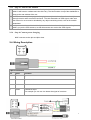
Apply for one position service by another way: you need pre-storage the phone number in SIM
card:
Step1
Step2
Step3
Make a cell phone call to 900C
After listening the ring of 900C, it will hold off after two rings.
Then, after 10 second, the cell phone will receive the Position SMS. (its means is
900C will send Position Data every 5 minute.)
4.2. Tracking Function
Tracking report function can be turned on or off according to the requirements of the user.
Tracking function will continually report vehicle position until it get stop command .In this tracking
mode, 900C will send one position message at a preset time interval.
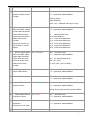
Step1. Edit a message as following format, then send it to 900C
Command
Remark
Send Format:
A+Password+,+003,+XXX
Note: XXX , if XXX=000 it is
STOP tracking
Unit: preset minute interval
Command code : 003
For example:
A000000,003,003
003:
command code
000000: password, default
000000
003:
3 minute interval
It means is 900C will send
Position Data every 3 minute.
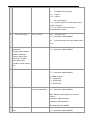
Step2. 900C will send back one SMS-----Set Time OK.
This SMS means that 900C is in tracking mode now and preset time interval is 3 minutes.
Step3. 900C will send back position SMS at preset time interval.
In this example, the SMS will send back at preset time interval: 3 minute
4.3. Stop tracking function.
11