1
User Manual
Contents
Part 1 – Gamebreaker – An Introduction
Overview of SportsCode Gamebreaker
1
Gamebreaker Set–up Requirements
2
Current Gamebreaker Version
2
Registration of Gamebreaker
3
Before You Start Using Gamebreaker .....................................................................................................................3
Online Registration .......................................................................................................................................................3
Dongle Registration......................................................................................................................................................4
Change the Registration Mode ................................................................................................................................4
Choosing Language
4
Gamebreaker Preferences
6
Gamebreaker Terms
7
Capture .............................................................................................................................................................................. 7
Code ................................................................................................................................................................................... 7
Code Button .................................................................................................................................................................... 7
Code Window.................................................................................................................................................................. 7
Database ........................................................................................................................................................................... 7
Instance............................................................................................................................................................................. 7
Lag Time............................................................................................................................................................................ 7
Lead Time ......................................................................................................................................................................... 7
Movie ................................................................................................................................................................................. 7
Package .............................................................................................................................................................................8
Timeline .............................................................................................................................................................................8
Title .....................................................................................................................................................................................8
The Gamebreaker Main Toolbar
9
Gamebreaker Button Types
10
Code Button ................................................................................................................................................................ 10
Title Button.................................................................................................................................................................... 10
Graphic Button ............................................................................................................................................................ 10
Keyboard Shortcuts
Part 2 – Gamebreaker – Code
Launch Gamebreaker
11
16
17
The Code Window
17
Create a New Code Window Choose File > New > Code window from the main menu bar. ..........17
The Code Window Toolbar
17
Enter .................................................................................................................................................................................17
Clear..................................................................................................................................................................................17
Reset................................................................................................................................................................................ 18
Contents
Button ............................................................................................................................................................................. 18
Keys ................................................................................................................................................................................. 18
Links * ............................................................................................................................................................................. 18
Create/Add New Button ........................................................................................................................................... 18
Capture Mode
19
Code Mode
19
Editing Buttons
20
Edit a Button................................................................................................................................................................. 20
Change A Button Name ............................................................................................................................................21
Change A Button Color..............................................................................................................................................21
Use A Picture As A Graphic Button ........................................................................................................................21
Change the Position of a Button Name .............................................................................................................. 22
Change the Text Color of a Button Name .......................................................................................................... 22
Change the Visibility of a Button Name.............................................................................................................. 22
Change the Font Size of a Button Name ............................................................................................................ 22
Frame a Button ........................................................................................................................................................... 22
Lock a Button Position ............................................................................................................................................. 22
Wrap Button Text ........................................................................................................................................................ 22
Change a Button Function ...................................................................................................................................... 22
Populate Rows in Timeline Automatically ......................................................................................................... 23
Resize a Button ............................................................................................................................................................ 24
Delete a Button .......................................................................................................................................................... 24
Move a Button ............................................................................................................................................................ 24
Move a Group of Buttons......................................................................................................................................... 24
Duplicate a Button ..................................................................................................................................................... 25
Duplicate a Group of Buttons ................................................................................................................................ 25
Button Layers ............................................................................................................................................................... 25
Code Window Transparency
26
Code Button History
26
Set Lead And Lag Times
26
Lead Time ...................................................................................................................................................................... 26
There are Two Types of Lead Time ........................................................................................................................ 26
Program a Default Lead Time ..................................................................................................................................27
Program a Custom Lead Time ................................................................................................................................27
Lag Time..........................................................................................................................................................................27
Customize a Lag Time .............................................................................................................................................. 28
Defining Customized Hot Keys
29
Assign Hot Keys ........................................................................................................................................................... 29
Change the Hot key Text Color .............................................................................................................................. 29
Hide Hot Keys............................................................................................................................................................... 29
Button Links *
30
Exclusive Links – Code Button to Code Button................................................................................................ 30
Remove a Link.............................................................................................................................................................. 30
Contents
Saving Code Windows
31
Create a New Code Window Using an Existing One
31
Coding Instances
32
Stop Coding .................................................................................................................................................................. 32
Pause / Restart Coding ............................................................................................................................................. 32
The Timeline
33
The Timeline Displays ................................................................................................................................................ 33
Create a New Timeline
34
Movie Packaging ........................................................................................................................................................ 34
Place front movie and timeline inside a movie package ............................................................................. 35
The Timeline Timecode ............................................................................................................................................. 35
Importing Files
36
Champion Data * ........................................................................................................................................................ 36
Edit List ............................................................................................................................................................................37
Website Imports *....................................................................................................................................................... 38
XML Edit List ................................................................................................................................................................. 39
Set Directory for Auto XML Import .......................................................................................................................41
Fairplay Data * ..............................................................................................................................................................41
GPSports Data *............................................................................................................................................................41
Prowess Data * ............................................................................................................................................................. 42
Part 3 – Gamebreaker – Capture
44
Capture
45
Making the connections .......................................................................................................................................... 45
Signal Flow .................................................................................................................................................................... 46
Basic capture
46
Setting Video and Audio Sources
47
Compression Options
48
Video Codecs................................................................................................................................................................ 48
Audio Codecs ............................................................................................................................................................... 49
Quick Capture
49
Update Capture
50
View Capture Ratio
50
Full Screen Capture
50
Capture Preferences
50
Add Capture Event to iCal
51
Synchronizing Sound and Video
53
Contents
Delete a Movie
55
Relinking Movies
55
Link a Re–Captured Movie to a timeline: ........................................................................................................... 55
Align Instances after Re–Capturing a Movie – Nudge Right Or Left ....................................................... 56
Fine Aligning ................................................................................................................................................................ 56
Adjust Placement of Selected Instances ............................................................................................................ 56
Part 4 – Gamebreaker – Review/Analysis
58
Movie Playback
59
View the Movie Frame by Frame .......................................................................................................................... 60
Play a Movie in Slow or Fast Motion .................................................................................................................... 60
Go to a Specific Part of the Movie......................................................................................................................... 60
Movie Playback Keyboard Control
60
Creating Instance Movies
61
Play a Single Instance ................................................................................................................................................61
Play All Instances in a Single Row ..........................................................................................................................61
Merge Rows, Sequential Rows, and Selection Order
61
Merge Rows .................................................................................................................................................................. 62
Sequential Rows.......................................................................................................................................................... 62
Selection Order............................................................................................................................................................ 62
Presenting Instance Movies In Full Screen
63
Stop Presenting a Movie in Full Screen .............................................................................................................. 63
Loop Instance Playback............................................................................................................................................ 63
Adjust the Movie Volume ........................................................................................................................................ 63
Resize Movie Window ............................................................................................................................................... 63
Exporting Movies
64
DV Video Export .......................................................................................................................................................... 64
Video Out Export ........................................................................................................................................................ 64
Using Instance Movies Chapter Markers
65
Manipulating Movies
66
Overlay Two Movies .................................................................................................................................................. 66
Align Two Overlaid Movies ...................................................................................................................................... 66
Change Transparency Level of Movie Windows .............................................................................................. 66
Flip an Instance Movie .............................................................................................................................................. 66
Stacking Instance Movies .........................................................................................................................................67
Stacking Timeline Movies ........................................................................................................................................ 68
Stack Movie Zooming ............................................................................................................................................... 69
Changing Stack movie view locations in the grid .......................................................................................... 69
Changing Stack movie grid layout. ...................................................................................................................... 69
Stack movie playback preferences. ...................................................................................................................... 70
Contents
Editing Instance Movies
71
Delete a Segment in an Instance Movie..............................................................................................................71
Copy and Paste Instance Movie Segments ........................................................................................................71
Drag and Drop Instance Movie Segments .........................................................................................................71
Combining Instance Movies
72
Saving Instance Movies
72
Working with Code Rows
73
Move a Row .................................................................................................................................................................. 73
Select Multiple Rows ................................................................................................................................................. 73
Duplicate a Row .......................................................................................................................................................... 73
Delete a Row ................................................................................................................................................................ 73
Edit Code Row Names............................................................................................................................................... 73
Change Code Name Colors ..................................................................................................................................... 73
Add a New Blank Row to the Timeline ................................................................................................................ 74
Create a New Row from Selected Instances using New Row +* ............................................................... 74
Create a Combination of Rows .............................................................................................................................. 74
Sorting Code Rows
75
Sort Rows by Name .................................................................................................................................................... 75
Sort Rows by Color ..................................................................................................................................................... 75
Sort Rows by Color then by Name........................................................................................................................ 75
Sort Rows by Number of Instances ...................................................................................................................... 75
Sort Rows in Reverse Order..................................................................................................................................... 75
Editing Instances in the Timeline
76
Manually Creating a New Instance ...................................................................................................................... 76
Adjust the Length of an Instance ......................................................................................................................... 76
Delete an Instance ..................................................................................................................................................... 78
Copy or Move an Instance from One Row to Another .................................................................................. 78
Databasing Instances *
78
The Find Window
79
Recent Searches
80
Databasing from Find
80
Search Modes
80
Where to Search
81
Establishing Search Criteria
81
Instance Notes *
84
Adding an instance note .......................................................................................................................................... 84
Viewing instance notes in a movie....................................................................................................................... 84
Setting the amount of lines of notes displayed .............................................................................................. 84
Timeline Note
85
Contents
Gamebreaker Drawing Toolbar
86
Drawing Tools
87
Changing a Drawing Object ....................................................................................................................................87
Using the Text Tool ......................................................................................................................................................87
Customizing the Drawing Tool Bar ........................................................................................................................87
Drawing Window *
88
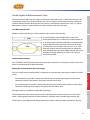
Create Angles and Measurement Lines
89
Line Measurement Tool ............................................................................................................................................ 89
Set the Line Parameters............................................................................................................................................ 89
Setting the Scale Factor for the Line Length .................................................................................................... 89
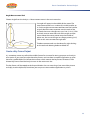
Angle Measurement Tool ......................................................................................................................................... 90
Create a Key Frame Output
90
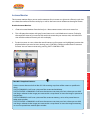
Instance Monitor
91
Use the Instance Monitor .........................................................................................................................................91
Using a Remote Control
92
Exporting Data Files
93
Export an Edit List....................................................................................................................................................... 93
Export an XML Edit List ............................................................................................................................................ 94
Export Final Cut XML ................................................................................................................................................. 94
Instance Frequency ................................................................................................................................................... 95
Frequency Reports ..................................................................................................................................................... 96
Part 5 – Gamebreaker – Distribute
Converting Movies
98
99
Direct Movie Exports
102
iPod movie to iTunes ...............................................................................................................................................102
Selected instances in each Timeline row as an iPod movie to iTunes ...................................................102
Movie as Apple TV to Desktop .............................................................................................................................102
Flatten movie .............................................................................................................................................................102
Part 1 - Gamebreaker
An Introduction
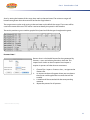
This manual will help you find your way around SportsCode Gamebreaker. The manual includes descriptions for Gamebreaker Plus and Gamebreaker. Gamebreaker Plus* only features are noted by an
asterisk next to the feature description. This manual assumes you have already seen a demonstration
or been trained in using Gamebreaker and therefore have some knowledge base of how it works.
If you are unfamiliar with the Gamebreaker suite of products, or require more information, please
email Sportstec at [email protected].
An Introduction
Welcome to SportsCode Gamebreaker – The Ultimate Game Plan
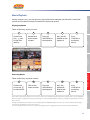
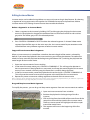
Overview of SportsCode Gamebreaker
1.
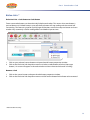
Click on the Gamebreaker icon in the dock or on your desktop.
2.
Create a new Code window. This is the window where you can edit and utilize code buttons
which are designed to categorize the events in the performance.
3.
Decide which actions in the performance (the movie) you want to categorize (code) for future
analysis. Create and name code buttons for all the actions. For example you may want to code a
particular player, a particular move, or each time a goal is scored. Each button will code instances
for the actions in the timeline.
4.
Capture (record) the movie to the hard drive and at the same time code the information you
need using the code window.
5.
You now have the movie captured and the information about the movie coded in a timeline. The
movie and the timeline are linked together and are a chronological record of the instances you
have coded.
6.
You can now analyze performance according to the information on the timeline. If you want to
change the information, add to it or delete from it, it’s easy. Gamebreaker is completely flexible
to fit your needs.
Review / Analysis
Here’s a quick guide how the Gamebreaker process works for a new movie. You’ll find step by step
instructions in the following pages.
Capture
Code
Gamebreaker is very user friendly– just follow some simple steps and you’ll be on your way.
Distribute
Welcome to Gamebreaker – You’ll wonder how you ever did without it!
1
Part 1 Gamebreaker - An Introduction
Gamebreaker Set-up Requirements
The minimum recommended computer requirements for Gamebreaker are:
1.
Apple 5Ghz G4 computer with 1GB RAM and 80 GB hard drive space. We highly recommend
getting the latest available Apple computer.
2.
Mac OS X 10.4.11 (Tiger)
t
DV video camera. Look for models with AV-DV IN/OUT features.
t
Firewire analog to digital video convertor. These devices are used when the camera does not
support AV-DV IN/OUT. Canopus or Datavideo product lines are recommended.
t
Composite RCA video or s-video cables and RCA audio cables to connect the video source (VHS
player or DVD player) to a convertor and to output movie presentations to a display or recording
device.
t
Firewire cables to plug in the camera or convertor to the computer. 4 to 6 pin and 6 to 6 pin for
FW 400 and 4 to 8 pin for FW 800 are recommended.
Current Gamebreaker Version
The current version which this manual relates to is Gamebreaker Version 8.0
To check which version of Gamebreaker you are operating, click on “SportsCode Gamebreaker” in
the Main Menu. The first item in the drop down menu “About SportsCode Gamebreaker n.nn.nn”
displays the Gamebreaker version you have.
2
An Introduction
Registration of Gamebreaker
Before You Start Using Gamebreaker
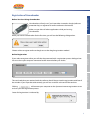
Gamebreaker will only run if you have either inserted a dongle (software
protection key) or registered an online code over the internet.
Make sure you close all other applications while you’re using
Gamebreaker.
Code
When you launch Gamebreaker for the first time, you will see the following dialogue box.
Choose online to register online or dongle to use the dongle registration method.
Online Registration
Review / Analysis
Capture
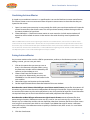
If you select to register online you will then be presented with a registration process dialogue box.
You must have your computer connected to the internet before you do this.
The serial code that you received with the software should be put into the registration code box of
the window. If you input the code correctly you will see a red tick at the end of the text box.
Clicking
will connect your computer to the Sportstec internet registration server
and carry out the registration process.
Distribute
Successful registration is indicated by:
3
Part 1 Gamebreaker - An Introduction
Dongle Registration
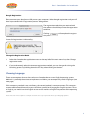
Please connect your dongle to a USB port on your computer. Select dongle registration and you will
then be presented with a registration process dialogue box.
The registration code that you received with
the software should be put into the registration
code line.
Clicking
tion process.
will complete the registra-
Successful registration is indicated by:
Change the Registration Mode
1.
Select the Gamebreaker application menu on the top left of the main menu bar, then Change
registration code...
2.
If you inadvertently select the incorrect registration method, you can change this during the
launching process by holding down the ESC key when clicking on the icon.
Choosing Language
There are two options that can be used to run Gamebreaker on a non-English operating system.
Method 1 is probably the easiest to implement and allows you to temporarily switch languages (see
next page).
If this temporary method is not satisfactory, the second method is more permanent. This more permanent method would mean that you could have specific local language or English versions. To run
in English, you would start the English version and it would use English irrespective of the operating
system.
Please note: We will use Japanese examples to outline the steps required to choose your language options.
4
An Introduction
Choosing Language...
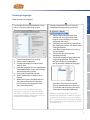
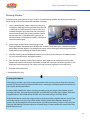
There are two ways to do this:
2
Forcing Gamebreaker to run in English irrespective of the Operating System (OS).
3.
4.
5.
1.
2.
3.
Quit Gamebreaker if it is running.
Go to System Preferences.
Choose International in the personal
settings area.
4. Click the language tab. Your preferences
should look like this if you are running a
Japanese operating system.
5. Drag English to the top position.
6. Start Gamebreaker. It should start in
English.
7. When the session is finished, the user
should reset the order of languages
found prior to changing them in the
steps described above.
Please note: This order can affect the operating
system if the user logs out or reboots. For example,
if the order in step 5 was used, and the user logged
out and logged in again, or rebooted the system, the
operating system would run in English.
Code
Capture
2.
Make a copy of Gamebreaker and
rename it to distinguish it from the
original. In this example, it has been
appended with ‘(Eng)’.
Hold down the control key and click on
the duplicated version, and select ‘Show
Package Contents’.
Click the list view so that it is easier to
see the contents.
Expand the view until you see
something like this.
The folders ending in ‘.lproj’ define the
language preferences. You can see
that this version of Gamebreaker is
set up to handle 5 different languages.
Review / Analysis
1.
(Australian English.lproj is used for
testing.) Gamebreaker uses this list to
try to match the language used in the
international language preferences.
If all but the ‘English.lproj’ folder is renamed (or
removed) then Gamebreaker should boot in English
irrespective of the operating system. Our recommendation is that you place an ‘x’ in front of the languages
that you don’t want so that the operating system does
not recognize them.
Distribute
1
For Example: Running Gamebreaker in English on a Japanese Operating System.
5
Part 1 Gamebreaker - An Introduction
Gamebreaker Preferences
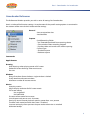
The Preferences Window provides you with a series of settings for Gamebreaker.
Here’s an index of the function settings. An explanation of the specific setting options is contained in
the sections of the manual which relate to those settings.
t
General
Auto save timeline data
Auto load files
t
Capture
Quick Recording Folder
- Use Timecode produced from capturing device
- Close window when recording stopped
- Equalize video and sound tracks when capturing
Capture Type
- Standard capture
- Realtime capture
Commando
Apple Remote
Drawing
Hide drawings when playing movie at full screen
Delete full screen drawings when movie starts
Pen size
Windows
Bring all windows forward when a single window is clicked
Group timeline and movie windows
Maximum number of instance movies
Movies
Auto play movies
Adjust display resolution for full screen movie
Full screen movies
Use single field
Use both fields
Duration of text movie for instances
Limit chapter track text to nnn characters
Don’t play sound if movie playback speed is greater then nnn percent
Timeline stack movie lead time when view is switched
Instance movie plays from previous chapter marker when view is switched
Multiview hotkeys
6
An Introduction
Gamebreaker Terms
Many terms in this manual are specific to Gamebreaker. Here’s a brief explanation of the most common terms.
Capture
To record a movie to a file on the hard disk drive.
Code
Code Button
Code buttons are used to define an action by its name and time when it occurred in a
movie. For example you may name a code button “X Cut” to mark every time an opponent
executes a certain play. Code buttons are toggle buttons, up or down, except when you
have a lag time programmed which creates a fixed-length instance.
Code
A category for information in your movie. When you want to keep a piece of action from a
movie for later reference/analysis you code that snippet with a code button.
Code Window
The file for creating and using code buttons to categorize events in a timeline.
Capture
Database
A database is a timeline created by exporting selected instances from one or multiple
timelines. The database process only exports the specified code and movie data. This
process removes all the unwanted code and movie data and allows you to compile information in one file.
Lag Time
Lag time automatically adds a specific time to the end of an instance when it is being
coded. When you click on the code button to code the instance, Gamebreaker automatically adds the lag time to its end. Lag time creates a button that only needs to be pressed
once. The beginning of the instance is marked when the button is pressed down and the
end is marked when the lag time runs out.
Lead Time
Lead time automatically adds a specific time to the beginning of an instance when it is
being coded. When you click on the code button to code the instance Gamebreaker adds
the time to its beginning.
Movie
The performance you are using as the source of your information.
7
Distribute
An instance is a coded segment of a movie. An instance becomes part of the timeline for
that movie (also see code).
Review / Analysis
Instance
Part 1 Gamebreaker - An Introduction
Package
A special type of folder that contains timeline and movie data.
Timeline
The window that displays a timeline showing each instance of all code buttons chronologically recorded.
Title
A title button is an inactive rectangle used to title a set of buttons. Title buttons can also
be graphics in the window that do not perform any actions.
8
An Introduction
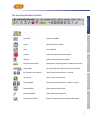
The Gamebreaker Main Toolbar
Removes the last action.
Save
Saves the file.
Capture
Opens the capture movie window.
Volume
Selects the speaker volume level.
Playback rate control
Temporarily sets the playback speed for all movies.
Loop mode
Sets the playback mode for play once or repeat.
Fast forward/Fast rewind
Steps forward or backwards 1 second.
Play/Pause
Plays or pauses the movie.
Forward/Back
Steps forward or backwards 1 frame at a time.
Present Movie
Plays the movie full screen.
Drawing Toolbar
Opens the drawing tool bar.
Export to DV Device
Export DV format movie to external DV device.
Capture
Undo
Review / Analysis
Opens saved files.
Distribute
Open file
Code
The Stopwatch
9
Part 1 Gamebreaker - An Introduction
Gamebreaker Button Types
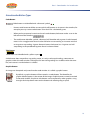
Code Button
Code buttons are identified with a diamond symbol.
t
Name a code button to define an event which will become an instance in the timeline, for
example you may name a code button “Slam dunk” for a basketball game.
t
When you have captured a movie and used a code button, the button makes a row in the
left column of the timeline.
t
The code button identifier symbol, a diamond, will be either red or green. A red diamond
means it has a toggle action that must be clicked on to start coding an instance and click
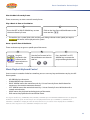
on it again to stop coding. A green diamond means the button has a lag time and will
stop coding at the predefined lag time after it has been clicked.
Title Button
Title Buttons are identified with a yellow square.
A title button does not perform any coding action, it is only used to put headings, comments or
graphics within the code window. Clicking on this item during coding has no effect within the timeline, no instance is marked when it is clicked.
Graphic Button
An image can be copied and pasted into the code window. It is called a graphic button.
t
By default, a graphic button will be created as a code button. The identifier of a
graphic button appears in the center of the image. Graphic buttons cannot be resized
in the code window. Graphic or title buttons can be replaced by other graphics using
the right click drop down menu on the button and selecting copy or paste.
10
!"#$%&'!"
COMMAND
!
CONTROL
"
OPTION
#
SHIFT
$
LEFT RIGHT UP DOWN ARROWS
%&'&(&)
PAGE UP PAGE DOWN
*+((((*+)
CLICK
!
Code
MENU ITEM - FUNCTION
An Introduction
Keyboard Shortcuts
Open
!,
Open all timelines in folder
#!,
Save
!-
Save as
$!-
Print
!.
Quit
!/
Combine timeline windows
!0
Capture
FILE
!2
Copy
!3
Paste
!4
Select all
!5
Cut movie segment
"!2
Copy movie segment
"!3
Paste movie segment
"!4
Delete movie segment
"!6
Distribute
!1
Cut
Review / Analysis
EDIT
Undo
11
Part 1 Gamebreaker - An Introduction
EDIT
Instance edit
"7
Instance trim
"8
Nudge all instances left
$!0
Nudge all instances right
$!9
Fine and replace
#!:
Nudge sound track left
"#!0
Nudge sound track right
"#!9
Contract sound track
#!0
Expand sound track
#!9
Delete Drawing Items
"!6
Edit Timeline Note
#!7
Find
!:
WINDOWS
Present movie (Full screen)
!;
Make movie
#!;
Full screen coding
$!:
Play backwards
"<
Stop movie
"=
Play movie
"0
Stack instance movies
!>
Overlay movies
#!>
Reduce movie size
!?&@ABC&$D&*EF&?G
Increase movie size
!H&@ABC&$D&*EF&HG
Reduce transparency
"#I
Increase transparency
"#J
Close all instance movies
!K
Close window
!L
Hide / Show drawing tool bar
$#M
Quit full screen presentation
7-3
Measurement > Line
$!N
Measurement > Angle
$!O
12
Add row
An Introduction
ROWS
!P
CAPTURE
Open capture window
!9
Quickstart capture
"!9
Stop capture
!Q&@.CFRES&T&:UVV&BWEXG
Pause / Resume capture
!=
-XYZC&[YF
Slow motion forward play
\EVS&SE]+&'
Smooth rewind play
\EVS&SE]+&%
Fast forward play (1/10 sec steps)
!'
Fast rewind play (1/10 sec steps)
!%
Faster forward play (1/4 sec steps)
$'
Faster rewind play (1/4 sec steps)
$%
Fastest forward play (1 sec steps)
#'
Fastest rewind play (1 sec steps)
#%
Turbo forward play (10 sec steps)
"'
Turbo rewind play (10 sec steps)
"%
Play stack movie angle full screen
"#!&!&E+&^E_RC&Y+`VC
Move movie angle in stack
!&!&a&MFY`
Select segment of instance movie
$&!&a&MFY`&R+BWY+ZC&^E_RC&XVYbcCYS
Capture
Play / Stop
Review / Analysis
(&&)
Code
MOVIE WINDOW & PLAYBACK
Play / Stop
Create an instance in selected row
#!&!&a&MFY`&R+BWY+ZC&^E_RC&XVYbcCYS
Create an instance in any row
"#!&!&a&MFY`
Extend or shorten instance
#!&!&a&MFY`&E+&VCYSR+`&EF&WFYRVR+`&
CS`C&E*&R+BWY+ZC
Duplicate instance
#&!&a&MFY`&*FE^&R+BWY+ZC&WE&EWcCF&FE]
Distribute
TIMELINE WINDOW
CODE WINDOW
Duplicate button
!(!&a&MFY`&*FE^&Y&dUWWE+
13
Part 1 Gamebreaker - An Introduction
Move selected button
%('((()
Edit button window, apply button property to
selected buttons
"!(E+&dUWWE+&XFEXCFWb&WCeW
Move group of buttons
!!(E+&BCVCZWCS&dUWWE+B
Move selected button to top layer
"(
Move selected button to bottom layer
")
Move selected button up 1 layer
"'
Move selected button down 1 layer
"%
Toggle Code/Edit mode
!(&EF&!)
Stop all code buttons
85[
Deactivate last code button pressed
7-3
GENERAL
Preferences
!)
Hide Gamebreaker
!\
Hide Others
#!\
MAC OS X
Screen snap shot to file
$!f
Selection snap shot to file
$"!f
Screen snap shot to memory
$!g&&&&!4&WE&XYBWC&WE&Y+EWcCF&]R+SE]
Selection snap shot to memory
$"!g&&&&!4&WE&XYBWC&WE&Y+EWcCF&]R+!
SE]
Enable display zoom
!#h
Zoom out display
!#i
Zoom in display
!#j
14
Part 2 - Gamebreaker
Code
The Code Window
The Gamebreaker code window is the starting point for coding your movies. It will contain all the
categories (buttons) you want to analyze such as set pieces in a field hockey game. Code buttons are
used to categorize and mark the time of events in your movie. These events, or instances, become
your own personal study of performance-specific information. You can save time by coding instances
as you capture your movie. Then if you want to change, add or delete information, it’s easy to go
back and do so later.
Code
Click on the icon in the Dock; double click on the Gamebreaker icon on your desktop or in
the Applications folder.
An Introduction
Launch Gamebreaker
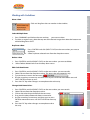
Enter
Pressing the Enter button while engaged in Code or Capture mode will end all active
code buttons. The short cut for this is the TAB key. This is a very convenient feature
while live coding especially when multiple code buttons are active.
Clear
Pressing the Clear button while engaged in Code or Capture mode will depress the last
code button pressed down, stopping the marking of an instance. The short cut for this
in the ESC key. This is mostly used when accidently hitting a code button during live
coding.
17
Distribute
The Code Window Toolbar
Review / Analysis
Capture
Create a New Code Window
Choose File > New > Code window from the main menu bar.
Part 2 Gamebreaker - Code
Reset
Pressing the Reset button while engaged in Code or Capture mode will remove the last
instance that was ended.
Button
Clicking and dragging from this button into the canvas below will create a new code button. Holding down OPTION will create a new text label button.
Keys
Pressing the keys button will reveal all the hotkeys that are set for each button when show
keys option is unselected for the button and the hotkeys are not visible.
Links *
Pressing the links button will reveal all hidden links between buttons. By right clicking on
this button, you can choose to show or hide all links in the code window. Hiding all the
links will tidy up the appearance of the code window.
Create/Add New Button
To create a code button, click and drag from the code button icon
area below.
in the tool bar to the blank
* Gamebreaker Plus Only
18
An Introduction
Capture Mode
This mode is only used during the movie capture. Instances are coded based on the
movie being captured in the Capture window, new instances will appear at the end of
the timeline as it grows in length. This is the default mode when capture is initiated.
During capture, any of the 4 modes can be used.
Distribute
Review / Analysis
During capture, this can be used to code behind the capturing movie, a great option for live coding.
Instances can be coded very accurately and precisely. There is a small time gap between the capture
and the timeline movie that cannot be coded during capture. This time gap is roughly 5 seconds.
Capture
Code Mode inserts instances according to the position of the playhead on the
timeline. When a code button is clicked to start marking an instance, the instance
will start at the playhead if no lead time is set for the button. After the movie is
captured and available in a timeline, coding can be done by dragging the playhead
to any location or using the movie transport controls such as fast forward, even the
playback speed can be set faster in the main toolbar.
Code
Code Mode
19
Part 2 Gamebreaker - Code
Editing Buttons
Edit a Button
1.
In the code window, double click on the button you want to edit. This opens the edit button
window. You can also right click on the button and select edit button from the drop down menu.
2.
Change the button properties. Click OK to commit changes or cancel to close window and not
save changes.
3.
To speed up the editing process, leave the edit button properties window open and click on
another button in the code window. This saves the previous button properties and switches to
the selected button. Click OK to commit changes and close the window.
20
Code
Double click on the button you want to change.
In the edit button window, change its name in
the text box.
An Introduction
Change A Button Name
Review / Analysis
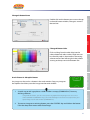
Click and drag from the color chip into the
color palette and select a color. Code rows can
be sorted by color in the timeline. The sorting
scheme moves from left to right in the palette
starting at the top row to the bottom row.
Use A Picture As A Graphic Button
Any image can be used as a button in the code window. Copy any image to
the clipboard and then paste the image into the code window.
1.
A quick way to add a graphic to a code window is to copy (COMMAND+C) from any
drawing software.
Distribute
Using a Mac OS feature, you can select a picture or graphic from anything on the screen. Press
SHIFT+CONTROL+COMMAND+4 keys, then click and drag over the area to be copied. Paste your
copied image into the code window (COMMAND+V).
2.
Capture
Change A Button Color
To paste an image to an existing button, press the CONTROL key and click on the button.
From the drop down menu select Paste image.
21
Part 2 Gamebreaker - Code
Change the Position of a Button Name
1.
Click on the points of the text positioning tool.
2.
Click in the center box to reset the position to the center of the button.
Change the Text Color of a Button Name
Click on the color chip to the left of Show name and drag into the color palette to
select the color.
Change the Visibility of a Button Name
Check the Show name check box to display the name of the button.
Change the Font Size of a Button Name
Select the Size from the drop down menu to set the font size for the name.
Frame a Button
Check the Frame button check box to show a black frame around the button.
Lock a Button Position
Check the Lock position check box to lock the button in place.
Wrap Button Text
Check the Wrap text check box to wrap the text to the shape of the button.
Change a Button Function
1.
Double click on the button you want to change.
2.
In the Edit Button Window, change the selection from code to title or text label.
22
Distribute
Review / Analysis
Capture
Code
Check the populate box to automatically
populate the timeline with code rows upon
code or capture mode activation.
An Introduction
Populate Rows in Timeline Automatically
23
Part 2 Gamebreaker - Code
Resize a Button
1.
Click and drag on any side or corner of the
button.
2.
Drag the button to the desired size.
Note: Graphical buttons cannot be resized. Make them the
required size in your graphics program of choice, then copy
and paste them into the window.
Delete a Button
Click on the button and press DELETE on the keyboard.
Move a Button
Click on the button and drag it to the required
location in the window or use the arrow keys to
move more precisely.
Note: When using the arrow keys, be sure to close the edit
button properties window.
Move a Group of Buttons
1.
Press the COMMAND key and select the
buttons you want to move, or click and drag
over the group using the lasso bounding box
to make the selections.
2.
Click and drag the buttons to the required
position while holding down the COMMAND
key.
24
An Introduction
Duplicate a Button
To duplicate a button and its properties, highlight the button by clicking on it once.
2.
Press the OPTION key and click and drag the duplicate to another location within the Code
window.
3.
Name the new button. All the properties will be the same as the original except for the Hot Key
and the linking. Hot keys can only be used once per code window.
4.
To duplicate a button from one code window to another, press the OPTION key and click and
drag the duplicate to the new window.
Code
1.
Duplicate a Group of Buttons
To duplicate a group of selected buttons from one code window to another, press and hold the
COMMAND key and click on each button in the group, next press the OPTION+COMMAND key and
click and drag the group to the new window.
Every button created in the code window is on a separate layer. It is sometimes useful to overlap
buttons or hide them.
1.
To move a button to the top layer, highlight the button, press CONTROL and the RIGHT ARROW
key.
2.
To move a button to the bottom layer, highlight the button, press CONTROL and the LEFT
ARROW key.
3.
To move one layer at a time, press the CONTROL key and press ARROW UP to move the layer up
1 level at a time or press CONTROL key and press ARROW DOWN to shift the layer down 1 level
at a time.
Review / Analysis
Capture
Button Layers
Distribute
Alternatively, right click (CONTROL+CLICK) on the button and select the action
from the drop down menu.
25
Part 2 Gamebreaker - Code
Code Window Transparency
t To decrease the transparency of the code window, click on the down arrow in the top left
hand corner of the window next to the capture button.
t To increase the transparency of the code window, click on the up arrow in the top left
hand corner of the window next to the capture button.
Code Button History
To see a record of the buttons you’ve used, take
a look at the history line. The most recent button
activation is shown to the right of the line. A triangle
pointing down indicates a code button being
activated. A triangle pointing up indicates that code
button being turned off.
Set Lead And Lag Times
You have complete control over the duration of each instance you code. Using lead and lag times
means you can program code buttons to automatically add a specific time to the beginning or end
of an instance when the button is pressed.
Lead Time
Lead Time automatically adds a specific time to the beginning of an instance when it is being coded.
When you click on the code button to code the instance, the specified lead time is added to the time
from when the button is pressed down.
For example: You are watching a basketball movie
and have a six second lead time for a code button,
when you see a play by “11 Williams” and click to
code it, the instance will appear on the timeline
starting six seconds before the mouse click. This
guarantees that the play will be in the instance
when you review later.
There are Two Types of Lead Time
t
Default lead time applies to all code buttons
that you have not programmed with a custom
lead time.
t
Custom lead time allows you to program a specific lead time to individual buttons.
26
An Introduction
Program a Default Lead Time
In the code window, enter the default time you
want to use in the default time text box.
Program a Custom Lead Time
In the code window, double click on the code button for which you want to set custom lead
time. This will open the edit button properties window.
2.
In the edit button window, check the custom lead time box and enter the number of seconds of
lead time you need
Code
1.
Lag Time automatically adds a specific time to the end of an instance when it is being coded. When
you click on the code button to code the instance, Gamebreaker adds the lag time to the end of the
Instance.
For example; You are coding a movie and have a six-second lead time and a two-second lag time for
a code button named “Goal”. When you see the “Goal” and click onf the button, the instance in the
timeline will be eight seconds.
Distribute
Review / Analysis
This becomes a fixed Iength instance and requires that you only click on the button once which
makes the coding process faster and easier.
Capture
Lag Time
27
Part 2 Gamebreaker - Code
Customize a Lag Time
In the code window double click on the code button for which you want to set custom lead time.
This will open the edit button properties window.
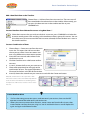
1. Check the Lag time box and enter the required
lag time.
2. Code Buttons that use a lag time have a green
diamond identifier.
During coding, if a fixed length instance
button is reactivated, the lag time will be
reinitialised.
Note: If no lag time is entered, the button will have a toggle action and you must click the button to stop coding. Lead
and lag times can be set using decimal places to increase frame accurate coding.
Re-activate Lag Time
When this option is ticked, the lag time of the button will be re-activated to extend the length of
the instance if the button is pressed again before the lag time has expired.. This is to make provision
for more accurate statistical counting of instances when ticked instances are extended, so 2 events
of the same type will merge into one event. If this is not ticked, an activated Code Button which is
counting down lag time when clicked on again will stop coding the current instance and a new one
will be created with the new lag time count down intitiated
1.
2.
3.
Double click on the Code Button in the Code window to open the Edit Button
Properties window.
Set the Lag time for the button and the option will become available.
Tick or untick the box next to “re-activate lag time”
Applying properties to multiple buttons
You can apply any property to a group of selected buttons. Select a group of buttons with the
edit button window open, then right click on the property and select apply to selected buttons
from the drop down menu. The property will be copied to all the selected buttons. All properties
can be copied to another button except the hot key and any button links.
28
An Introduction
Defining Customized Hot Keys
Assign Hot Keys
1.
2.
Click on the Hot Keys box in the edit button properties window.
Press the key or key combination you want to use. Combinations can be configured using the
modifier keys COMMAND, OPTION, CONTROL, and SHIFT.
Press the modifier keys first, then the character you want to assign.
3.
Code
Note: You can use up to three modifier keys at once plus one character. This allows for over one thousand individual hot
key combinations. There are some combinations reserved for the system, most of these use the COMMAND key.
Change the Hot key Text Color
Click on the color chip next to the Show keys check box and select a color from the palette.
Capture
Hide Hot Keys
Review / Analysis
Uncheck the Show keys check box to hide the hot key text in the button.
1.
To keep a tidy window, uncheck the show key box next to the hot key text box in the button
properties window. Then press the keys button in the code window to show them.
2.
Use USB peripheral devices such as remote controls or number keypads to make use more
flexible, especially if you are running a camera and trying to code at the same time.
Distribute
Hot Keys
29
Part 2 Gamebreaker - Code
Button Links *
Exclusive Links - Code Button to Code Button
Two or more code buttons can be exclusively linked to each other. This means when one button is
pressed down and a linked button is pressed, the first button will stop coding and the second will
start coding. This feature is great for rapid change of direction, one click to stop one button and start
another. Very commonly used for coding offense and defense possessions.
1.
2.
Click on your selected source button and open the edit button properties window.
Click on the Exclusive link drop down menu and select a code button to link to, (the target
button) . An arrow will appear in the code window to show where to the button is linking.
Remove a Link
1.
2.
Click on the source button and open the edit button properties window.
Click on the Exclusive link drop down menu and click on the button link indicator to be removed
* Gamebreaker Plus Only
30
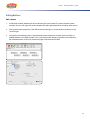
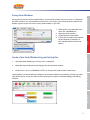
1. Choose File > Save from the main
menu bar (COMMAND+S)
2. Name the code window.
3. Target where to save the file.
4. If you have saved the code window
to your desktop, it becomes an
icon. Double click on the icon to
open it.
Open the code window you want to use as a template.
2.
Make the required button name changes for the new code window.
3.
Choose File > Save as (COMMAND+SHIFT+S) and give the code window a new name.
Distribute
Code windows can be moved from computer to computer without any problems just like any other
type of file. You can share your work and have everyone using the same terminology and coding
schemes.
Review / Analysis
1.
Capture
Create a New Code Window Using an Existing One
Code
Once you have created all your code buttons, save the code window. You can use this as a template
for other windows or use it to code any movie. This saves time as you will not have to create all the
buttons again and you can have as many code windows as you like.
An Introduction
Saving Code Windows
31
Part 2 Gamebreaker - Code
Coding Instances
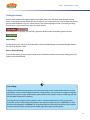
Open a code window and movie linked to a timeline, then press the Code mode button and the
movie should begin to play. When you see an event in your movie that you want to code, click on the
relevant code button or use your preset hot key. The button highlights while it is actively marking
and will have a red frame if it was the last button closed.
If the button has a lag time, you will see a green bar fill the button until the lag time runs out.
Stop Coding
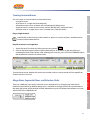
To stop coding your movie, (halt Code mode,) click on the Edit Button in the Code Window Toolbar.
This will also stop the movie.
Pause / Restart Coding
To pause the coding (and pause the movie,) of the Timeline and then to restart the coding press the
Space bar on the keyboard.
Live Coding
Coding can be done during capture, press the capture icon in the code window tool bar to start
the process. You can code using the mouse or using hot keys. To save time, we suggest using hot
keys because you can type while watching the performance, whereas if you are mousing you will
have to look where you are clicking.
Pausing the movie capture during breaks (such as advertisement breaks) will save your computer disk space. Click on the pause button in the capture window or press COMMAND+K. Click
on the resume button or COMMAND+K to continue capture. Use the pause option if you need to
fast forward dvds/tapes or interrupt the video signal during the movie capture.
32
Code row names that are populated from code buttons or created manually.
t
Instances and where they happen within your movie.
t
A tool bar to conveniently access all the tools for editing and presenting your instances.
Distribute
t
Review / Analysis
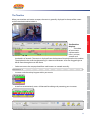
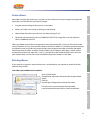
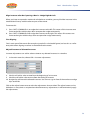
The Timeline
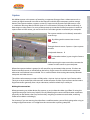
Displays
t
A timeline
of your movie
represented in
hours, minutes,
seconds and
hundredths of seconds. The movie is displayed from the location of the playhead in this timeline.
The playhead is the small triangle pointing in a downward direction. It can be dragged right or
left to move through time in the movie.
Capture
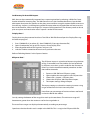
When your timeline and movie are open, the movie is generally displayed in the top of the screen
and the attached timeline below it.
Code
An Introduction
The Timeline
33
Part 2 Gamebreaker - Code
Create a New Timeline
Timelines are always created during capture. However, there are times when you will want to link a
new timeline to the movie so you can code a different aspect, or multiple users are coding the same
movie and you want to keep the data separated.
1.
2.
3.
Choose File > New > Timeline from the main menu bar.
Select the movie you wish to link the new timeline to.
Save the new timeline by pressing COMMAND+S or choose File > Save from the main menu bar.
You can now press the Code mode button
in the code window toolbar to code the movie. Alternatively you can create and modify instances manually.
Movie Packaging
We recommend always packaging movies. A package is really just a folder with files inside, Mac OS
X simply recognizes it as a single file. This makes it very convenient to move around and not lose any
necessary files. We use packages because it is solid way of protecting the source movie and handy to
store timeline and edit list files inside.
A definite trend is users are acquiring video files over the internet. While this is a great convenience,
the quality and creation process is largely unknown. What you download is what you get, in most
situations there is no knowledge on how the video was created and what tools were used to compress, etc. Some of these movies will have different movie data containers that may be corrupted
by Quicktime when there are attempts to write data back into the file. This is why it is best to always
package the movies. The packaging process places the source movie in a movie data folder, then
creates a reference movie that points to the source movie. Any changes to aspect ratio or text track
information of the movie is saved in the reference movie and we never have to touch the actual
source movie.
If a new timeline is linked to a free standing movie, a prompt will appear asking whether or not you
wish to package the movie. We highly recommend answering yes to this question. The process is
very quick, it simply wraps up the movie and timeline inside a package. It does not copy any data like
the Save as standalone package does.
34
In previous versions of Gamebreaker, it was common practice to have a free standing movie and
timeline file. If you have this situation, package them. Open the timeline and choose File > Place
front movie and timeline inside a movie package. It will package them up together.
Note: Timeline files can still be free standing as long as the movie is packaged. You can have as many timelines pointing
at a single package as you wish.
An Introduction
Place front movie and timeline inside a movie package
The Timeline Timecode
t
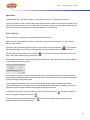
Use Timecode, this option displays the timecode in terms of 24 hour time as in the time of day.
The numbers will be displayed in blue. This is useful for setting the time of day of an event, so
the ability to when an instance occurred. NOTE: Changing the counter to display this might
show the time at which the capture was done. This can be read from the camera or capture
hardware that is connected. Be sure to set the camera time, so the correct time is captured.
Presenting, breaking the timecode up segments along the timeline is not possible. The timecode
will roll over to 00:00:00.00 when the playhead is dragged past 23:59:59.99. This means the
playhead was dragged past midnight.
t
Set movie time to zero, this option resets the movie time to 00:00:00.00
t
according to the location of the playhead. The time will be displayed in red when the numbers
are “negative” or the playhead is set before the new zero point.
t
Set TimeCode, this option reveals a menu from the timeline title bar. The time can be set here
t
Delete TimeCode track, this option removes the Timecode track. It can be readded by using the
Set TimeCode function, but the original one that may have been done during capture cannot be
brought back.
t
Use frames for TimeCode, this option will display the hundredths of seconds in frames.
t
Use seconds for TimeCode, this option will display the Timecode to the hundredths of seconds.
35
Capture
Use movie time, this option displays standard movie time hh:mm:ss:hshs. The “hs” is hundredths
of seconds.
Review / Analysis
t
Distribute
A new preference has been added in movies panel of the Preferences, “Use Timecode produced
from capturing device”. When this is ticked, a Timecode track will be created in the movie from the
data that the device is outputting. Remember to set the correct time on the camera or device that is
being used to capture from. The Timeline timecode can be altered by right clicking on the Timeline
timecode counter situated above the row column in the Timeline window. Right clicking on the
counter will reveal a Pop up menu, these are the options:
Code
This function is to help integrate specific time based imports, (such as GPSports and NHL EVS.) into a
Gamebreaker Timeline.
Part 2 Gamebreaker - Code
Importing Files
Gamebreaker can import a vast array of textual data. Most of the imports are sport specific and are
very straight forward. However, if there is a problem please let Sportstec know as it is likely the third
party data source has changed its data structure.
An important item to note about importing is movie and data synchronization, it is very likely that
adjustments will have to made on the instances after the import. We recommend getting familiar
with the Instance Adjustments and nudging features in the Edit menu.
Each export has a specific format and data structure. Only the Edit List and Gamebreaker XML will
be explained in great detail as we export both of these types of files. These are also commonly used
in third party solutions to feed data into Gamebreaker. There are quite a few users generating or
converting data from external sources beyond Gamebreaker.
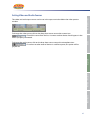
Champion Data *
The Champion data import imports an AFL match data file supplied by the stats provider Champion
Data. This import creates instances with labels for player involvements, stoppages and possessions.
It is designed to be used with 4 complete quarters of AFL video. The entire match must be in the
video in its entirety. If there are missing sections of the video, the instances will not match up to the
footage. We suggest breaking the match up into 4 separate movies, then linking the resulting timelines to each video, combining the 4 timelines in order, then save as a standalone package.
1.
2.
3.
4.
5.
The steps for importing are:
Choose File > Import > Champion data..., navigate to
the Champion data file.
An import window will appear where you can choose
the quarter and length of the instances that will be
created.
A timeline will be created to link the corresponding
movie to.
Repeat the process for all quarters.
For better statistical representation in the matrix unselect
Merge overlapping instances, this will create instances
that are counted in the matrix accurately to a stat sheet.
By default, this selected because it creates instances that
are longer and easier to view passages of play.
* Gamebreaker Plus Only
36
This import is mostly used in conjunction with a spreadsheet editor like Excel. Try exporting an edit
list from Gamebreaker and look at its structure.
Note that Excel might insert hidden characters, so use the export as tab delimited file if creating an
edit list in excel.
An Introduction
Edit List
The file to be imported must be tab delimited file with the following columns in order and included
as the first line:
Code
start time
end time
category
Nth instance
#descriptors
descriptors...
# descriptors indicates how labels are in the instance.
descriptors... are the label names that are in the instances. The amount should match the # descriptors and each label should be separated by a tab.
Capture
The start time and end time must be in 00:00:00:00 format. These columns set the start and end time
for the instance.
The category column represents the timeline row.
Nth instance is the number of the instance in the row.
END TIME
CATEGORY
NTH INSTANCE
# DESCRIPTORS
DESCRIPTORS...
00:00:01:60
single blows
1
2
straight right jab
00:00:01:80
00:00:03:30
single blows
2
1
straight right
00:00:03:50
00:00:05:00
single blows
3
1
left hook
00:00:05:68
00:00:07:18
single blows
4
1
left hook
00:00:07:38
00:00:08:88
single blows
5
1
left hook
00:00:09:08
00:00:10:58
single blows
6
1
left hook
00:00:10:78
00:00:12:28
single blows
7
1
left hook
00:00:12:48
00:00:13:98
single blows Foot view
1
1
straight right
00:00:14:18
00:00:15:68
single blows Foot view
2
1
straight right
00:00:15:88
00:00:17:38
single blows Foot view
3
1
right cross
Distribute
START TIME
00:00:00:10
Review / Analysis
Each instance must be on a separate line. Here is an example of some lines
To use this import, open a timeline and choose File > Import > Edit list... The instances will be imported into the front most timeline.
37
Part 2 Gamebreaker - Code
Website Imports *
There are two imports that use play by play data posted on websites to generate data in a timeline.
These imports rely on the official game clock to calculate where the instances should be created in
the movie. So, creating a video file that matches the length of the official game time is critical. It is
often difficult to tell when the official game is running or stopped, so practice is necessary to master
creating an edited video file that will match the game clock events in the play by play.
a) StatCrew Web Stats
1.
This import is designed to be used with the StatCrew play by play report generated by the
StatCrew scoring software. This is a very common game stat package in the United States.
2. Create a row of instances that mark exactly when the game clock is running. Name the row
something that indicates what is, i.e. 40 MIN. When a movie is made for the row, it should be
precisely 40 minutes long, 20 minutes per half.
3. Open a browser and navigate to a StatCrew play by play on a website. The raw data file can also
be used if is accessible. In the United States, often the Sports Information Director can get this
file.
4. Select all the play by play text beginning from the first tip to end of the game.
5. Press COMMAND+C to copy the text.
6. Select the row in the timeline with the 40 minutes of instances, 40 MIN.
7. Choose File > Import > Paste StatCrew web stats...
b) ESPN web stats
The ESPN website stats import works exactly the same as the StatCrew import. The only difference
is the play by play information must be copied from the ESPN college basketball website where the
data structure is slightly different from the StatCrew import. The steps to import and results of the
import are the nearly the same.
38
Similar to the Edit list, an XML file can be exported for Gamebreaker, so the data structure can be
studied. We recommend using the XML import over the Edit List because it is offers more options
and is easily extended. The XML export can handle instance notes, label groups and row colors
where the edit list does not offer this.
Here is a short example of an XML edit list. We have added indenting to better display the nesting of
the tags. All open tags must be closed, i.e. </TAGNAME>.
Review / Analysis
Capture
Code
!"#$%!
& !'(()*+,-'+./,%!
& & !0123415$%!
& & & !*6%7!8*6%!
& & & !23493%:;<=>?<@>:A<>?!823493%!
& & & !$1B%C7C=;C:>?A@7?>!8$1B%!
& & & !5DB$%'#$E02&F9D53D9!85DB$%!
& & & !#4G$#%!
& & & & !3$E3%H9$43&ID9J!83$E3%!
& & & !8#4G$#%!
& & & !#4G$#%!
& & & & !K9DLM%/ND93!8K9DLM%!
& & & & !3$E3%,D#0B!83$E3%!
& & & !8#4G$#%!
& & & !O9$$)3$E3%/E5$##$13&$E4PM#$&DO&KDDB&ODD3QD9J=!8O9$$)3$E3%!
& & !80123415$%!
& !8'(()*+,-'+./,%!
& !RSI,%!
& & !9DQ%!
& & & !5DB$%'#$E02&F9D53D9!85DB$%!
& & & !R%CTA@?!8R%!
& & & !H%C>>?>!8H%!
& & & !U%:?T>T!8U%!
& & !89DQ%!
& !8RSI,%!
!8"#$%
An Introduction
XML Edit List
<ALL_INSTANCES> declares the section for all the instances in the timeline will follow until closed
with </ALL_INSTANCES> tag.
<instance> declares an instance and all information following will describe the instance until closed
with </instance>
<ID>1</ID> tag is a unique identifier for the instance. Each instance must have a unique identifier.
39
Distribute
The XML must start with <file> and end with </file>.
Part 2 Gamebreaker - Code
<start>279.5398520953</start> sets the start time for the instance.
<end>616.7625308135</end> sets the end time for the instance.
<code>Alexis Proctor</code> Is the row name where the instance will be created.
The next section describes the labels that will contained in the instance. The first label does not have
a group, the second does. There can be as many label tags as desired.
<label>
<text>Great Work</text>
</label>
<label>
<group>Effort</group>
<text>Solid</text>
</label>
The <label> tag indicates that the following tags will describe the label. There are only two tags used
to describe the label, <text> and <group>. The <text> tag is the name of the label and the <group>
tag is the group that name belongs to.
Instance notes are indicated by the <free_text> tag.
<free_text>Excellent example of good footwork.</free_text>
</instance> closes the instance.
</ALL_INSTANCES> closed the instances section.
The following section describes each rows color in the similar text rhythm as the <ALL_INSTANCES>
section.
<ROWS>
<row>
<code>Alexis Proctor</code>
<R>64083</R>
<G>65535</G>
<B>23454</B>
</row>
</ROWS>
The <R>, <G>, <B> tags make up the color of row. Black is (0,0,0) and white is (65535,65535,65535)
</file> ends the xml data.
Note: use DigitalColor Meter to figure colors, use the RGB As Actual Value, 16-bit option.
To use this import, open a timeline and choose File > Import > XML edit list... The instances will be
imported into the front most timeline.
40
XML data can be automatically imported into a capturing timeline by selecting a folder for Gamebreaker to look for incoming data. The XML format must in the Gamebreaker format. See the XML
edit import description for specifics on the data structure. When using this option the file name must
have the tag <import> in the beginning of the file name otherwise Gamebreaker will not insert the
data in the timeline. A file name might be “<import>Collingwood.xml”. The directory needs to be set
prior to capture and needs to be reset if capture is ended and restarted.
An Introduction
Set Directory for Auto XML Import
Fairplay Data *
1.
2.
3.
4.
Code
Fairplay data may be presented in either a Text Edit or XML file format.Open the Fairplay file using
the relevant program.
Press COMMAND A ,(to select all,) then COMMAND C (to copy the entire file.)
Open Gamebreaker and go to File >Import >Paste Fairplay Data
Enter the preferred lead and lag times and press OK
Link the Timeline created to the movie and synchronise the two
Refer to “Relinking Movies” in the Capture Section.
1.
2.
3.
4.
5.
Export an XML file from GPSports system.
Open timeline that corresponds with GPSport data
Choose File > Import > GPSports data...
Choose the GPSports XML data file to import.
The import settings dialog will open.
The import seetings are based on creating instances using
ranges of data found in heart rate and speed.
Review / Analysis
The GPSports import is a time based import using the time
of day as timecode base. The timeline and xml produced
by GPSports must be in synch in order for the instances to
match up. Use the timeline timecode procedures to alter
the timeline timecode.
Capture
GPSports Data *
Distribute
Heart Rate uses percentage of maximum heart rate found
in the data file for the athlete.
Start by setting the bottom of the range, then work up the text boxes. The minimum range will
become one greater than the maximum set for the range below it.
The actual heart ranges are displayed automatically according to percentage.
Speed uses the data found in each sample in the XML file. This is a tag in the GPSports XML file.
41
Part 2 Gamebreaker - Code
Start by setting the bottom of the range, then work up the text boxes. The minimum range will
become one greater than the maximum set for the range below it.
The range names can be set by typing in the text boxes to the left of the ranges. The names will be
used in the name of the row. This makes it easier to identify the speeds in the timeline.
The results produce a gross timeline graph of the Speed and HR changes throughout the game.
Prowess Data *
Prowess data is a basketball import for data generated by
Prowess, a stats and solution provider in Australia. This
import works similar to the Champion Data import. It
requires 4 quarters of video that are continuous.
1.
2.
3.
4.
Choose File > Import > Prowess data..., navigate to the
Prowess file.
An import window will appear where you can choose
the quarter and length of the instances that will be
created.
A timeline will be created to link the corresponding
movie to.
Repeat the process for all quarters.
* Gamebreaker Plus Only
42
Part 3 - Gamebreaker
Capture
An Introduction
Capture
We define capture as the process of recording a sequence of images from a video source such as
camera or digital convertor into a file on the internal hard disk of the computer or other storage
device. The capture windows supports various PCI capture cards, firewire and USB cameras such
as a webcam. Warning: Most hard disk drive or SD card cameras USB port is for file transfer only, it
does output a video stream. So, many of these cameras cannot be used for live capture. In order to
capture from an HDV source, you must have Final Cut Pro 0 or greater installed on your computer.
The capture window can be directly accessed in
several ways:
Code
By clicking on the camera icon in main
toolbar .
Through the main menu: Capture > Open capture
window.
When the capture window is opened, it will search for any connected video sources. If it does not
find an attached sources, it will default to the built-in iSight camera if available on the computer
otherwise it will indicate none available. This is useful to know when testing connectivity between
computer and video sources.
The cable used to connect a camera is likely to be a 9-pin to 4-pin or 6-pin to 4-pin Firewire cable.
The 9-pin or 6-pin end of the cable connects to the computer and the 4-pin connects to the camera.
Digital converters generally have a 6-pin connector, some have both 4-pin and 6-pin.
Making the connections
When connecting any video devices for capture, try to visualize the video signal flow. Drawing the
signal flow on paper can be very helpful. Start by identifying the source and destination connectors
physically on the devices, then map out how they are going to connect to each other, matching
video out to video in accordingly.
For instance, if you are sourcing the video from a satellite receiver, you are likely going to be using an
analog to digital convertor as a bridge from the source to the capturing computer.
45
Review / Analysis
Before opening the capture window, connect the
camera or video source to your computer.
Distribute
In the code window, by pressing the Camera
icon.
Capture
A keyboard shortcut: R
Part 3 Gamebreaker - Capture
Signal Flow
Satellite Video Out > Convertor Video In > Convertor Firewire Out > Computer Firewire In
So, the signal flow will start at the video out connector of the satellite box, travel to the video in connector on the convertor using a rca cable, then travel to the computer using a firewire cable. Set the
convertor settings to analog input if automatic detection is not enabled.
Basic capture
Start to learn how to capture by stepping through the basics first.
Make sure the capture source, camera or convertor is connected and turned on. Or try using the
Built-in iSight camera.
Open the capture window by clicking on the Capture icon in the main toolbar
. This will open
the capture window and an image should appear in the window from the camera or convertor.
Press the red capture button to start capture
click is held down while pressing the button.
. This button will reveal a drop down menu if the
Name the file and choose a destination folder. The desktop is a good place to start capturing files to
as you will not lose them as easily.
Once capture has begun, a timeline window will pop up. This timeline allows live access to the capturing file, all the features of the timeline can be used live during capture. This timeline will continue
to grow in length during the capture.
In the capture window, the status section in the bottom of the capture window will indicate:
captured file length, size and data rate. It will also indicate disk information: available space and approximate capture length available according to remaining disk space.
At any time, the capture can be paused by clicking on the Pause button
after pausing press the Resume button
.
To stop the capture, press the stop button
timeline and movie window will remain.
. To continue capture
. The capture window will dissappear and the
46
An Introduction
Setting Video and Audio Sources
The video and audio input sources can be set in the capture window below the video preview
window.
To change the video source, click on the drop down menu next to the camera icon
. Choose the source from the list. A camera or other device should appear in the
menu if properly connected.
Distribute
Review / Analysis
Capture
Code
To change the audio source, click on the drop down menu next to the microphone icon
. If a camera or other external device is used for capture, this option will be
greyed out.
47
Part 3 Gamebreaker - Capture
Compression Options
The capture window has options to change the encoding method that is used while capturing the
movie. The encoding method is referred to as a codec. Codec stands for compression / decompression and is the way in which the data is stored (compressed) and presented (decompressed).
For many capture workflows, the native codec used by the source might not produce the optimal
results, so a different codec might be chosen to use during capture. This is common to reduce the file
size. For example, the DV codec produces very good quality video, but the file size is quite large. So,
as a way of reducing the file size, capture using the H.264 or MPEG-4 codec option. While the quality
is not as good, it is much easier to transfer and store the smaller files.
While choosing different codecs from the native ones is a great option, be aware that it requires
more CPU to recompress the files on the fly. We recommend doing a lot of testing to guarantee that
the options used during capture will work through the entire span of the video workflow. You might
find that your computer is not powerful enough to handle capture, recompression and coding at
the same time. You could also find that the chosen video codec will not work in some third party
software involved in your workflow.
Video Codecs
There are 5 codec choices for the video component of capture apart from the device’s native video
codec. These are designed by Apple to produce the best results possible. The video codec options
can be accessed by click on the drop down menu to the right of the video source drop down.
Device Native - The capture will use the settings that are coming from the source. We recommend
using this option in most cases as it reduces the load on the cpu and results in the highest quality
possible. A common native codec is DV. DV files will be 13.76GB per hour.
Apple Intermediate - This is a codec designed by Apple to be an intermediate format in an HDV
workflow. This codec produces very large and high quality video files while not requiring a lot of
cpu work to do so. Files are roughly 20GB per hour. This is a great codec to use when you want a
high quality master that will be used to create other videos such as for iPod or streaming over the
internet.
Animation Best Quality - This codec is commonly used for screen capture movies. This codec creates
exceptionally large files and should not be used in most workflows. We have included it in the menu
for possible future features.
48
JPEG High Quality - Like the Animation codec, JPEG High Quality setting should be rarely used.
It produces very high quality movies that are quite large. One benefit of this codec is that it works natively with Window Media. So, files can be easily moved to the Windows platform without installing
any matching codecs.
An Introduction
MPEG-4 - This option compresses into the MPEG-4 codec. Like H.264, there are 3 options, each one
uses a different frame thus resulting in a smaller file. This has traditionally been the codec of choice
for capturing good quality files with relatively small file sizes. Files will be roughly 2GB per hour.
H.264 will supercede this codec in the future.
Code
H.264 - This option compresses the video into the H.264 codec, a derivative of MPEG- There are 3
options while using this codec, the options only change the frame size thus reducing the file size. We
recommend using the H.264 SD option for most occasions. This creates a H.264 encoded movie with
a frame size of 640x480. One hour of video will be approximately 2GB per hour. The data rate will
fluctuate according to images being processed.
And there are 3 choices for the audio component of capture apart from the device’s native audio
codec. Generally speaking, audio codec settings are largely ignored as when compared to video,
mainly because the size of the audio component is insignificant to that of video. For the most part
using the Device Native settings will be perfect. However to save a little space, using AAC High Quality is a good option.
Review / Analysis
Next to the audio source drop down menu are the compression options. By default, the menu selection is set to Device Native.
Capture
Audio Codecs
Device Native - This will capture using whatever the device is outputting.
AAC High Quality - This delivers a CD quality audio track at 128kbps.
AAC Voice Quality - This delivers a low quality audio track at 32kbps.
Distribute
Apple Lossless - This delivers a very high quality audio track that is quite large in size depending on
the audio that is being recorded. This is a good option to use if recording using external microphones and audio is really important to the video.
Quick Capture
The quick capture feature is used to initiate capture instaneously forgoing any save options. By
pressing CONTROL+COMMAND+R, capture will start immediately and the movie will be saved in
the quick recording folder with a date stamp as the name. This feature can also be accessed in the
49
Part 3 Gamebreaker - Capture
drop down menu of the red capture button in the capture window toolbar. While this is a convenient
feature for rapidly starting capture, it is mainly employed through the remote communications and
iCal event captures.
Update Capture
During capture, a new file is written approximately every 5 seconds, then from these files a
continuous reference movie is created on the fly. This automatic update process can be manually
made to occur by pressing the update button in the capture toolbar. Pressing update will start a
new file. This is useful when using timeline share* or when exporting movies through the matrix
web export*.
Note: Pressing the update button does not drop frames during capture.
View Capture Ratio
The ratio that the video is presented in the capture window can be adjusted by clicking on the
View Ratio button in the capture toolbar. The setting for the ratios are:
Camera. This displays the native image ratio of the source.
Window. This displays the image to fit the size of the capture window.
1. 4x This displays the source image in a 4 by 3 ratio.
2. 16x This displays the source image in a 16 by 9 ratio.
Full Screen Capture
Capture can be viewed in full screen by pressing the Full Screen button in the capture toolbar.
To exit full screen capture press the ESC key.
Capture Preferences
Quick Recording Folder sets the folder where quick capture files will be saved.
“Close window when recording stopped”. This option either closes or leaves the capture window open after capture is stopped.
50
Choose Capture > Add capture event to iCal from the main menu bar to open the iCal Capture
window.
2.
In the iCal Capture window, choose a date for the event by clicking on the graphical calendar.
3.
Set the start and end time using the appropriate controls.
As a convenience, set the start time and use the slider to set the end time. If a longer end time is
required, increase the end time manually.
4.
Input a name in the File name text box to be used for the captured file.
5.
Press the Add to iCal button in the toolbar.
Review / Analysis
1.
Capture
Code
Movies can be captured using iCal events. Follow these steps to set up movie to be captured. This is
useful when you are not going to be at your computer when the performance is happening and you
want to setup of queue of movies to be captured consequetively.
An Introduction
Add Capture Event to iCal
Distribute
iCal will launch and a new calendar will be created called Gamebreaker if one does not already exist.
An event will be added to the calendar using the settings from the iCal Capture window.
The event has a specific naming convention that must used.
!54M3L9$%VWSX*/&+'W/V
The movie file name will become the text inside the quotes. For instance, if the the file name in the
51
Part 3 Gamebreaker - Capture
iCal Capture window was “World Champs”, the iCal event will be named, <capture>”World Champs”.
The resulting captured file name will be World Champs.SCpkg. If this naming convention is not used,
Gamebreaker will not capture properly. If you want to rename the event, change only the name
between the quotes in the iCal event.
The event will trigger Gamebreaker to open 1 minutes prior to the start of the event. Then using the
start and end times set in the event of the Gamebreaker calendar, the capture will start and end.
Note: Simultaneous events cannot be captured at the same time. Also, if using MobileMe synching and mulitple capture
computers, be careful not to sync the same calendars to all the machines.
52
An Introduction
Synchronizing Sound and Video
When capturing or downloading video from the internet you may occasionally find inaccurate
sound and video synchronization in captured movies.
Most Common Problems that Occur are:
The sound is offset by the same amount throughout the movie file.
2.
When capturing a long movie, the sound and video synchronization can be good at the start of
the video, but the further one goes, the more the sound and video synchronization becomes
a problem. In this case the scale of the video and sound is different and is a known problem in
Quicktime.
1
2
In preferences, under Capture, select Equalize
video and sound tracks when capturing. This
will equalize the length of the sound and video tracks during the movie capture process
(even if the pause button is used). In general,
the sound track tends to be shorter than the
video track, so this function attempts to keep
them the same length. This setting is turned
on as a default.
In the main menu bar select Edit > Equalize
track times. This can only be done after the
movie capture. However, it is not as accurate
as equalizing during capture if your movie
is made from more than one file. You can
choose to make the equalization permanent if your movie is attached to a timeline
window. This procedure stretches or contracts
the length of the sound track to equal the
length of the video track. This feature is also
useful for resetting the tracks when you
have nudged, expanded, or contracted the
sound track and lost a synchronization point
altogether.
53
Review / Analysis
The problem of the gradual drift is most likely to occur when the pause/resume button in the capture window is not used for extended periods of capture. These buttons start a new video file each
time they are used, so they can re-synchronize the video and sound. This is less common as the capture window breaks the files up in 5 second chunks. But, video might be acquired from other sources
that exhibit the problem. Using the procedures below may not be very useful in this situation, since
there are variable length sections of video and sound and synchronization in one area may lead to
slight miss alignment in others. Fortunately, the contracting and expanding procedures work best
for movies created when the pause/resume button are not used because any drift is constant across
a single movie file.
Distribute
When Do Synchronization Problems Occur?
Capture
Code
1.
Part 3 Gamebreaker - Capture
3
A. Synchronization of audio that is offset the same amount throughout a movie.
1. Move the timeline cursor to a section in the movie, near the start of the movie that can be
used to evaluate the synchronization.
2. Zoom in the timeline, turn on movie looping and play the timeline movie.
3. If the sound is slightly ahead of the video, select Edit > Nudge sound track left
(CONTROL+OPTION+COMMAND+L). This nudges the sound track one frame to the left. Hold
down the keys to repeat the nudge continuously.
4. If the sound is slightly behind the video, select Edit > Nudge sound track right
(CONTROL+OPTION+COMMAND+R). This nudges the sound track one frame to the right.
Hold down the keys to repeat the nudge continuously.
5. When you use these features the video and sound will pause, move in the direction specified
and resume play. If the video is attached to a timeline then Gamebreaker will try to update
the movie resource, so the change is permanent.
6. Save timeline.
B. Synchronization of audio that is gradually drifting throughout a movie.
7. Move the timeline cursor to a point near the end of the movie.
8. Zoom in the timeline, turn on movie looping and play the timeline movie.
9. If the sound is slightly behind the video, select Edit > Contract sound track
(OPTION+COMMAND+L).
10. If the sound is slightly ahead the video, select Edit > Expand sound track
(OPTION+COMMAND+R).
11. When you use these features the video and sound will pause, move in the direction specified
and resume play. If the video is attached to a timeline then Gamebreaker will try to update
the movie resource, so the change is permanent.
12. Save timeline.
Note: The anchor point for contracting and expanding the sound track is the beginning of the sound track at the
start of the movie. Contracting and expanding acts on the whole length of sound track.
Reset the sound and video tracks by choosing Edit > Equalize track times.
54
Movie files are generally quite large, so space on your hard drive must be managed and organized
especially if you do not have any external storage.
1.
Drag the movie package to the trash can in the dock.
2.
Make sure Finder is the active by clicking on the desktop.
3.
Select Finder from the main menu bar and choose Empty Trash.
4.
The Finder shortcut to trash a file is COMMAND+DELETE. To empty the trash, the shortcut is
SHIFT+COMMAND+DELETE.
When you delete a movie file, we recommend saving the timeline file, so you can link it back to the
movie. Timelines are very small data files, often no more than 20KB. It is a common practice to export
the video to a dvd or tape for archiving purposes, then recapture the video and match the coded
information back to movie. To do this, create a folder, call it Timelines, then open a movie, click on
the timeline window and select File > Save as. Save the file in the Timelines folder. Now, you have
your timeline data saved and it can be matched back up to the video at a later date.
Capture
Relinking Movies
Code
An Introduction
Delete a Movie
If you want to re-capture a movie and link it to a saved timeline, you need to re-establish the link
between the two files.
Link a Re-Captured Movie to a timeline:
Review / Analysis
Open a timeline file.
Gamebreaker will not be able to find the original linked
movie.
Click OK.
Use the open dialogue box to locate the movie.
Distribute
This links the re-captured movie with the codes.
Save the timeline once the link has been established.
55
Part 3 Gamebreaker - Capture
Align Instances after Re-Capturing a Movie – Nudge Right Or Left
When you have re-captured a movie and re-linked it to a timeline, you may find the instances in the
timeline don’t line up with the relevant parts of the movie.
To correct this:
5.
6.
Press SHIFT+COMMAND+L to nudge the instances to the left. This moves all the instances one
frame to the left. Hold the keys down to repeat the nudge continuously.
Press SHIFT+COMMAND+R to nudge the instances to the right. This moves all instances one
frame to the right. Hold the keys down to repeat the nudge continuously.
Fine Aligning
Find a static part of the movie (for example a jump ball in a basketball game) and use this as a reference point when aligning instances in the timeline to the movie.
Adjust Placement of Selected Instances
Instance adjustments can add or subtract time to any selected instances in a timeline.
7.
In the main menu bar, choose Edit > Instance adjustments.
8. Mark In will add or subtract time from the beginning of an instance.
9. Mark Out will add or subtract time from the ending of instance.
10. Nudge clips will move the selected instances. Use a minus sign in front of the number to nudge
clips to the left.
Click on the adjust button once to make the adjustments that are ticked. The adjust button can be
clicked on as many times as required to make the necessary adjustments. It will continuously apply
the adjustments.
56
Part 4 - Gamebreaker
Review/Analysis
An Introduction
Movie Playback
Playing a movie is easy, you can go to any part of the movie whenever you like with a click of the
mouse. You’ll be there instantly, no need to fast forward or rewind.
Playing any Movie
There are five ways to play a movie:
Double click
on the movie
window.
3
4
Press the
SPACE BAR on
the keyboard
Press the UP
ARROW on the
keyboard.
4
5
Press
CONTROL+L
on the keyboard.
Capture
Click on the
play
icon
on the main
tool bar.
2
Code
1
There are five ways to pause a movie:
1
2
3
Click on the
pause icon
on the tool bar.
Click on the
movie window.
Press the
SPACE BAR on
the keyboard.
Press the
DOWN ARROW on the
keyboard
5
Press
CONTROL+K
on the keyboard.
Note: With a roller mouse place your cursor over any movie window and roll up or down to play or pause movie playback.
With two finger scrolling turned on, put two fingers on the track pad and push fingers up to play and pull fingers down to
pause movie.
Change the playback speed of a movie by holding down COMMAND, place the mouse over the window and two finger
scroll on the track pad or use the wheel mouse.
The state of play, whether the movie is paused or playing, will re-engage after any rewind or fast forward action.
59
Distribute
Review / Analysis
Pause any Movie
Part 4 Gamebreaker - Review/Analysis
View the Movie Frame by Frame
There are two ways to view a movie frame by frame:
Play a Movie in Slow or Fast Motion
1.
1
2
Press the LEFT or RIGHT ARROW keys to view
the movie frame by frame.
Click on the Step Forward/Back Button on the
main tool bar.
The tool bar has a speed slider, click and drag the sliding indicator to the speed you require.
All movies will be played at this speed.
Go to a Specific Part of the Movie.
There are three ways to go to a specific part of the movie:
1
Drag the
playhead in the
timeline to the
required point in
the movie.
2
3
Use the Fast Forward or Fast
Rewind Buttons on the main
tool bar.
Press the RIGHT or LEFT
ARROW keys to move the
playhead though the movie.
Movie Playback Keyboard Control
Once a movie is created or linked to a timeline, you can use many key combinations to play it at different speeds.
t
t
t
t
t
t
UP ARROW plays the movie.
DOWN ARROW stops the movie.
RIGHT ARROW moves the movie forwards by 1/10 sec frame by frame. Hold it down for
continuous slow motion movement forward.
LEFT ARROW moves the movie backwards by 1/10 sec frame by frame. Hold it down for a
smooth rewind action.
HOME moves the playhead to the beginning of the movie.
END moves the playhead to the end of the movie.
Pressing the modifier keys; COMMAND, SHIFT, OPTION, & CONTROL plus LEFT OR RIGHT ARROW will move the playhead
at different increasing speeds. Another way to move the playhead around is press CONTROL+L, CONTROL+K, or
CONTROL+J. CONTROL+L will play the video forward, each time it is pressed the movie will play faster. CONTROL+J
works the same way, but in reverse. CONTROL+K will pause the video.
60
An Introduction
Creating Instance Movies
You can create an instance movie in the timeline from:
t A single instance.
t All instances in a single row chronologically.
t Selected instances across multiple rows chronologically (Merge rows).
t Sequential rows in order of row number and the selected rows (Sequential rows).
t Selection order in a single row or across multiple rows (Selection order).
Play a Single Instance
Code
Double click on the instance in the timeline or select an instance and press the Make movie
button in the timeline tool bar.
Play All Instances in a Single Row
Select the row of instances by clicking on the row number.
Click on the Make movie button in the timeline tool bar. All instances in the row will play in
chronological order. Alternatively, after selecting the instances, press OPTION+COMMAND+M on
the keyboard to create the instance movie.
To make it even easier, double click on the row number and an instance movie will be created from
all the instances in the row.
Merge Rows, Sequential Rows, and Selection Order
Distribute
There are 3 different ways to play instances across multiple rows by changing the make movie
method in the timeline. By default, Merge rows is selected. To change, click on the square button in
the upper left corner of the timeline window. Remember to press the Make movie button or use the
shortcut OPTION+COMMAND+M.
Review / Analysis
Capture
1.
2.
61
Part 4 Gamebreaker - Review/Analysis
Merge Rows
Merge row creates instance movies in chronological order of the timeline. When multiple instances
are selected in different rows, the merge rows feature will merge the instances and create chapter
markers where instances overlap.
3.
4.
Hold down COMMAND to select multiple rows. Select the row of instances by clicking on the
row number.
Click on the Make movie button on the timeline tool bar. The instances will play in chronological
order, alternatively use the shortcut, OPTION+COMMAND+M.
Sequential Rows
Sequential rows creates instance movies in row order of the timeline for all selected instances. When
multiple instances are selected in different rows, the sequential rows feature will start from the lowest row number and proceed to the highest row number. All instances in each row will be played in
chronological order.
5.
6.
7.
8.
Organize the timeline rows by dragging on the row number.
Select the Sequential rows feature in the timeline.
Hold down the COMMAND key and click on the row number to select multiple rows.
Click on the Make movie button on the timeline tool bar. The instances will play according to
their row order.
Selection Order
Selection order creates instance movies in the order that instances are selected in the timeline.
9. Select the Selection order feature in the timeline.
10. Hold down the COMMAND key and click on the instances in the order you want them to play in
the instance movie. As each instance is selected, it is labeled with a number [1], [2], [3]...
11. Click on the Make movie button on the timeline tool bar. The instances will play according to
their selected order.
62
Presenting Instance Movies In Full Screen
An Introduction
Any timeline movie or instance movie can be presented in full screen.
There are three ways to present a movie in full screen:
1
On the main tool bar, click
on Present movie button.
3
Select Windows from the
main menu bar and choose
Present movie.
This will present the movie
full screen.
Code
To play the movie in
full screen presentation
mode, select the movie
window, and press the
COMMAND+M keys on the
keyboard.
2
Stop Presenting a Movie in Full Screen
To stop presenting a movie in full screen press the ESC key on the keyboard.
Looping an instance repeats it continuously
1. On the main tool bar, select the Loop button. It will change from
2. Play the movie.
to
Capture
Loop Instance Playback
.
Adjust the Movie Volume
t
t
t
On the main tool bar, click on the Volume button.
Drag the control button to the desired
volume.
In an instance movie, click on the speaker icon in the bottom left of the movie window. Drag the
control button to the desired volume.
Use the Function keys on the keyboard to increase or decrease volume.
Review / Analysis
NOTE: When the looping feature is turned on, the timeline movie will loop also. If the timeline is zoomed in, it will loop
within the zoomed range.
1.
2.
Select the movie window.
Choose Reduce movie size or Increase movie size from the Windows menu in the main menu
bar, or use the shortcut keys, SHIFT+COMMAND+, or SHIFT+COMMAND+. .
Note: A timeline movie has 2 rectangle icons in the bottom left of the window. These can be clicked to change the movie
size also. If CONTROL is held down when these are clicked, the timeline and movie will arrange automatically.
63
Distribute
Resize Movie Window
Part 4 Gamebreaker - Review/Analysis
Exporting Movies
DV Video Export
If a movie is in the DV format, then you can export using the DV export feature in the main tool bar.
This will export the selected movie to a camera or an analog/digital convertor. If the movie is in a
different format like MPEG-4, it will not export to the external devices.
3.
4.
5.
6.
7.
Create the instance movie you wish to export.
Select the instance movie, so it is the active window.
Set your device to accept digital input.
Click on the Export to... button in the main tool bar. If the movie is exporting properly, the arrow
in the icon will change from yellow
to red
. The video will appear in the camera or the
device connected to the convertor.
Play your instance movie. If you are exporting to a tape recorder or DVD burner, queue the
movie to the beginning on the computer, press record on the recorder or burner, then hit play
on the computer. For presentation, you can use all the fast forward, fast rewind, frame by frame,
and slow motion features. If you switch instance movies, press the Export to... button again
to begin exporting.
Video Out Export
When movies are not DV format, the only way to export full screen video to a recorder, burner, or
projector/tv monitor is to use the video out port of the Apple computer. Plug in the external device
using the DVI, Mini-DVI, or Video Out port on the computer. You may need to use a convertor cable
to match the input of the external devices. With the hardware connected, follow these steps to enable the video to be exported.
1.
2.
3.
4.
5.
Open the Display preferences in the System Preferences of the computer. Click on the blue apple
in the upper left corner of the screen, choose System Preferences from the menu.
Click on the Displays icon in System Preferences.
In the Display preferences, click on the detect display button. This will export the desktop to the
external device. The image will appear on the external device.
There are two ways to export using the display settings. The first is mirroring the desktop, so
that what is on the main screen of the computer is presented. There is a check box in the display
preferences that will turn mirroring off or on. The second is extended mode where a secondary
monitor is available to use as another screen for video export. The secondary display position
can be moved in relation to the primary screen in the display preferences.
If mirroring is enabled, the exact image on the computer will be displayed on the secondary
monitor. This is a common way to set this up as users tend to lose the mouse on the secondary
monitor and find it difficult to manage two monitors especially when they are not side by side. If
extending the desktop to a secondary monitor is used, an instance movie when presented in full
screen will be exported in full screen to that monitor.
64
An Introduction
Using Instance Movies Chapter Markers
1.
In the instance movie, press the TAB key
to move forward to the next chapter
marker. SHIFT+TAB moves backwards to
the previous chapter marker.
2.
Click on the chapter menu in the bottom
right corner of the instance movie. A drop
down list of chapter markings will appear.
Click on the instance you want to view.
Code
When an instance movie is created from multiple instances in a timeline, each instance in the
instance movie is marked by a chapter marker. There are two ways to jump through the chapter
markers.
Distribute
Review / Analysis
Capture
NOTE: A similar feature is in the timeline. Select a row of
instances, press CONTROL+TAB to jump to the beginning of each instance. SHIFT+CONTROL+TAB will move
to the previous instances.
65
Part 4 Gamebreaker - Review/Analysis
Manipulating Movies
Overlay Two Movies
Using the overlay feature you can take two
instances and put them on top of each other
to analyse the differences in the movies.
1.
2.
Create two separate instance movies.
Choose Overlay instance movies from the
Windows menu in the main menu bar or
press the shortcut OPTION+COMMAND+Y.
Align Two Overlaid Movies
1.
2.
3.
Create the overlaid movies as above.
Press the SHIFT+OPTION keys, click in the
movie frame and drag the top movie to
align the area of interest with that of the
second (lower) movie.
When you play the movie the top and lower movies will stay in this aligned position.
Change Transparency Level of Movie Windows
Choose Reduce transparency or Increase transparency from the Windows menu in the main menu
bar. Use the shortcut keys CONTROL+OPTION+9 or CONTROL+OPTION+0, by pressing these repeatedly you can vary levels.
Flip an Instance Movie
1.
2.
Create an instance movie.
Choose Flip movie horizontally from the Windows menu in the main menu bar. The movie frame
will be flipped horizontally, so a left handed player appears as a right handed player would.
66
4.
5.
6.
7.
To make viewing angles in the stack easier and avoiding constant rewinding of the movies, there are
some playback features built in.
For an instance movie with chapter markers.
1. If the movie is playing and it is zoomed, the movie jumps back to the previous chapter marker.
2. If the movie is stopped and it is zoomed, the movie only changes views and does not jump.
For an instance movie without chapter markers or a timeline movie.
1. If the movie is playing and it is zoomed, the movie jumps back 10 seconds by default. This time
can be adjusted in the movies preference panel.
2. If the movie is stopped and it is zoomed, the movie only changes views and does not jump.
NOTE: If you wish to use this feature, we recommend using the most powerful computer that is available. When stacking
4 or more DV movies together, plan on using a desktop computer not a portable. Playing multiple movies simultaneously
is very cpu and hard disk use intensive.
67
Code
3.
Capture
2.
Open a Timeline with some coded Instances. Find three similar Instances to view and make 3
separate Instance movies from each one.
Set the playhead on each movie to a point at which all three movies will be in sync. This might
be one second prior to a particular motion or play.
With all the sync points set in each instance movie, press COMMAND+Y or choose “Stack
Instance Movies” from the Windows menu in the Main Menu bar.
A stacked movie will open up with all three Instances in a 3x1 configuration.
To change the stack movie configuration, press CONTROL+COMMAND and click in the stack
movie window. Select 1x3 or 3x1 from the pop up menu.
To move a camera angle location in the configuration, press down COMMAND and click and
drag the angle to another location in the window.
To zoom an individual camera angle, press OPTION+COMMAND and double click on the camera
angle in the movie window. Use the same procedure to zoom out to viewing all angles at once
or press the stack movie button
located at the top of the zoomed movie window. The
keystroke and mouse clicks work in full screen also.
Review / Analysis
1.
Distribute
Two or more Instance movies can be stacked in various configurations in one movie window. The
only limiting factors to how many movies can be stacked are the computer’s processing speed and
screen size. Each camera angle in the stack movie can be moved around the stack. The stack configuration can be changed; 1x2, 2x2, 4x1, etc. Any camera angle in the stack can be zoomed but in doing
so the other movies in the stack are hidden from view.
An Introduction
Stacking Instance Movies
Part 4 Gamebreaker - Review/Analysis
Stacking Timeline Movies
Multiple timelines can be stacked to create a single timeline and linked stack movie. After capturing
and coding multiple synchronous camera angles of an event, each timeline can be merged into a
single stacked timeline.
Stacking timelines merges all the coded instances in the timelines that are being stacked. If the same
rows exist in each timeline, the instances and rows will be merged into one in the new timeline.
Stacking timelines requires synchronous video. So, it is important that all captures are continuous
through the whole event. Pausing and resuming capture will cause the movies to be out of sync.
We recommend starting capture 1-2 minutes prior to the start of the event. It is also a good idea to
capture audio.
Audio is a great way to find the synchronization point of a movie. If all cameras are not pointed at the
same thing when the event starts, audio can provide solid clues to find a worthy sync point.
Stacking timelines is basically the same process as stacking instance movies.
1.
Close all windows except for the timeline and movie windows that are going to be stacked.
2.
Find the sync point in each timeline and position the playhead on each timeline to that point.
It is a good idea to move the playhead back a couple of seconds by pressing OPTION+LEFT
ARROW on each timeline after setting the sync point. This will give a little extra movie time prior
to the first event that might need to be coded.
3.
Choose File > Stack timeline movies.
4.
Name the file and save it. Remember to check what type of package is being created when
you save. Standalone, reference and compressed are all options. We recommend creating a
reference package first, so the results can be checked quickly. Do not delete the original movies
until you have saved it as a stand alone package.
When saving standalone packages, check the file size, stacked timelines can create some very large
files.
68
The stack can be zoomed in a Timeline, Instance, or full screen movie. By simply holding down
OPTION+COMMAND and clicking on the view you want to zoom, all other views will be hidden until
you zoom back out.
t
To zoom out back to the stack, press OPTION+COMMAND and double click on the zoomed in
view.
An Introduction
Stack Movie Zooming
1.
2.
Access the Preferences for Multiview Hotkeys in the Movies panel of the Gamebreaker
Preference. Choose Gamebreaker > Preferences, then press the Movies Icon In The Toolbar
Tick the Multiview hotkeys tick box to turn the feature on, then set the Hotkeys for the switching.
When a stack movies is open and a multiview Hotkey is pressed the view will zoom. To unzoom back
to the stack view, press the Hotkey again. This can also be done by clicking on the grid icon in the
top of the movie. The movie views are numbered from left to right, top down in the grid.
Review / Analysis
Capture
There are 12 possible views available for zooming using Hotkeys.
t Click in the empty buttons to the right of the Movie numbers. Then press a key on the keyboard
to set the Hotkey.
Code
Multiview Hotkeys can be configured so the zooming can be done by pressing keys on the keyboard.
Hold down COMMAND while clicking and dragging on the view. Drop the view in the approximate
location of the grid to relocate.
Changing Stack movie grid layout.
Hold down CTRL+COMMAND and click on the Stack movie. Choose the grid layout from the popup
menu. If using a right click mouse, hold down COMMAND, then right click on the stack movie and
choose the grid layout from the popup menu.
69
Distribute
Changing Stack movie view locations in the grid
Part 4 Gamebreaker - Review/Analysis
Stack movie playback preferences.
For an Instance movie with chapter marks.
t If the movie is playing and it is zoomed in or out, the movie time jumps to the previous chapter
marker.
t If the movie is stopped and it is zoomed in or out, the movie only changes view and does not
jump to an chapter marker.
For an Instance movie without chapter marks or a Timeline movie.
t If the movie is playing and it is zoomed in or out, the playhead does not jump back 10 seconds.
t If the movie is stopped and it is zoomed in or out, the movie only changes view and the
playhead does not jump back 10 seconds.
70
Instance movies can be edited using delete, cut, copy and paste or drag & drop features. By selecting
a segment of an instance movie, the segment can be deleted or copied and pasted into another
instance movie. NOTE: Editing instance movies does not edit the timeline.
1.
Select a segment in the instance by holding SHIFT and dragging the playhead in the instance
movie. As the playhead is dragged, the timeline of the instance movie will fill in with a darker
grey color. The darker grey area is the selected portion.
2.
Press CONTROL+COMMAND+DELETE to clear the selected segment. Or choose Delete movie
segment from the Edit menu in the main menu bar. An instance movie for presentation can be
assembled from many different segments of other instance movies.
Code
Delete a Segment in an Instance Movie.
An Introduction
Editing Instance Movies
1.
2.
3.
4.
Open two instance movies from a timeline.
In the second instance movie, press CONTROL+COMMAND+C. This will copy the selection in
the instance movie. If the playhead was not moved, it will copy the entire length of the instance
movie. If it was moved, it will only copy the frame that is currently being displayed.
In the first instance movie, move the playhead to the end and press CONTROL+COMMAND+V.
This will paste the second instance movie segment at the end of the first instance movie.
Repeat this process to continue adding segments to the end of the instance movie.
Note: Segments can be pasted into any part of an instance movie. Position the playhead where you want the segment to
be inserted and when you copy and paste, it will be inserted at that point.
Drag and Drop Instance Movie Segments
Review / Analysis
When an instance movie is created from a timeline, the entire length of the movie is selected by
default. If you move the playhead in the instance movie, you will lose the selection. To reselect the
whole instance, move the playhead to the beginning, hold down SHIFT, and drag the playhead the
entire length of the instance movie.
Capture
Copy and Paste Instance Movie Segments
1. Open two instance movies from a timeline.
2. Position the playhead in the beginning of the first
instance.
3. Click and drag from the middle of the movie frame of the
second instance and drop into the first instance movie.
The first instance movie will highlight with zebra stripes
around the movie frame.
4. The segment will insert at the beginning of the first
instance.
71
Distribute
To simplify the process, you can drag and drop movie segments from one instance movie to another.
Part 4 Gamebreaker - Review/Analysis
Combining Instance Movies
A simple way to combine instances in a specific order is to use the Combine instance movie feature.
This feature creates a new instance movie from all open instance movies in the order that they are
layered on the screen.
1.
2.
Open 2 or more instance movies in reverse order for which you want them combined. Create the
second instance first, then the first one. This will layer them correctly without having to click on
the movie windows to layer them.
Choose Windows > Combine instance movies in main menu bar. A third movie window will
open that will have both instances in the movie in the order that they were layered on the
screen.
NOTE: To add another instance to the beginning or end of the new combined movie, close the first 2 instance movies
used to create the newly combined one. Do not close the newly combined instance movie. Open another instance from
the timeline, layer it in front or behind the open combined instance movie, then choose Combine instance movies. If the
new instance was in front of the combined one, it will be added to the beginning, if it was behind, it will be added to the
end. Repeat this process to assemble a full length movie for presentation.
Saving Instance Movies
Any instance movie can be saved as a file for presentation, archive, or distribution purposes. So, after
editing a movie, you can save your work.
1.
2.
3.
4.
Click on the movie that you want to save so
that it is the front most window. When saving,
the front most window will be selected by the
software as the window to save.
Choose Save from the File menu in the
main menu bar. Alternatively, you can press
COMMAND+S or click on the save button in the
main tool bar.
Select the target save location and name the file.
Set the required movie format from the bottom of the save window.
Gamebreaker stand-alone or MoviePlayer stand alone movie formats create files that contain all
the necessary data to view the movie independent of the original movie file. Since stand alone movies contain all the necessary data to be played on its own, they tend to be large files. Stand alone files
are required when you wish to share the movie with other people on their computers.
Gamebreaker or MoviePlayer reference to original movie formats create reference files that
point to original movies. Reference movies are very small in size and save very fast as they do not
contain any raw video data and thus do not duplicate video data. However, the file must have access
to it’s original raw movies from which it was created. If you delete the original movie, a reference
movie will not play. Use reference movies to quickly assemble an edit, then save it as a stand alone
when you are done.
5.
Click the Save button.
72
An Introduction
Working with Code Rows
Move a Row
Click and drag from the row number in the timeline.
Select Multiple Rows
Press COMMAND and click on the row numbers you want to select.
To select a range of rows, select the top row of the desired range, then select the bottom row
while holding down SHIFT.
Code
1.
2.
Duplicate a Row
1. Press CONTROL and click (RIGHT CLICK) on the row number you want to
duplicate.
2. Select Duplicate selected rows from the drop down menu.
1.
2.
Capture
Delete a Row
Press CONTROL and click (RIGHT CLICK) on the row number you want to delete.
Select Delete selected rows from the drop down menu.
Edit Code Row Names
5.
Press CONTROL and click (RIGHT CLICK) on the row number you want to edit.
Select Edit row from the drop down menu. This opens the row properties strip.
Type in the new name in the text area.
Use the arrow keys to move up and down rows or press ENTER to move down rows and
SHIFT+ENTER to move up rows.
Press the ESC key when changes are complete to close the strip.
Review / Analysis
1.
2.
3.
4.
Change Code Name Colors
6.
Press CONTROL and click (RIGHT CLICK) on the row number you want to edit.
Select Edit row from the drop down menu.
Click on the color chip to the left of the row name.
Drag into the color palette and choose a new color.
Use the arrow keys to move up and down rows or press
ENTER to move down rows and SHIFT+ENTER to move up
rows.
Press the ESC key when changes are complete to close
the strip.
Distribute
1.
2.
3.
4.
5.
73
Part 4 Gamebreaker - Review/Analysis
Add a New Blank Row to the Timeline
Choose Rows > Add row from the main menu bar. The new row will
be created below the selected row in the timeline. Alternatively, you
can press the New row icon in the timeline tool bar or press
COMMAND+N.
Create a New Row from Selected Instances using New Row +*
Select the instances that you wish to include in a new row, press COMMAND and select the
instances one by one or click and drag in the timeline to select a group of instances. You can
also select rows of instances too. With the instances selected, click on the New row + icon in
the timeline tool bar.
Create a Combination of Rows
1.
Choose Rows > Create new row from the main
menu bar. This opens the Add row window
where you can select 2 rows to create a new
one using different time intersection options.
Name the new row and select where in the
timeline to insert it.
Click the Combine rows radio button to form
new row.
In row A, choose the first row you want to use.
Choose the operation that will apply to the
combination of rows. The type of operation is
illustrated in the box at the left of the window.
In row B, choose the second row you want to use and click the Create row button.
2.
3.
4.
5.
6.
AND, OR, or NOT can be used as operators. AND
will create instances where A and B overlap. OR will
create instances from both rows combining where
overlaps occur. NOT creates instances where A does
not exist.
Create New Row Hints
1.
2.
For fast alternating possession sports, code one team’s possessions, then use the NOT
operator, to create the other team’s possession row.
When you want to use more than two rows, create a new row from the first 2 rows, then
create another row from that row using it as row A and the third row as row B. Repeat this
again and again to drill down further.
74
Rows can be sorted in a variety of ways, manual dragging up and
down being the most common. However, using name and color can
automate the process and make organizing the timeline a lot quicker.
Sort Rows by Name
An Introduction
Sorting Code Rows
Choose Rows > Sort rows by name from the main menu bar. All rows will sort by alphabetical order.
Choose Rows > Sort rows by color from the main menu bar. Colors are sorted in order of the palette
from left to right descending from lighter to darker. The color palette has 600 colors and each color
has an (X,Y) coordinate. White in the upper left most corner (1,20) and the darkest red in the lower
right most corner (30,1) define the sorting pattern from left to right, top to bottom.
Code
Sort Rows by Color
Sort Rows by Color then by Name
Capture
Choose Rows > Sort rows by color then by name from the main menu bar. All rows will sort by color
and then within each color sort by name.
Sort Rows by Number of Instances
Review / Analysis
Choose Rows > Sort rows by number of instances from the main menu bar. All rows will sort according to how many instances are in each row. The row with the most amount of instances will move to
the first row. The row with the second most amount of instances will move to the second row and so
on.
Sort Rows in Reverse Order
Choose Rows > Sort rows in reverse order from the main menu bar. All rows will arrange in reverse
order from top to bottom to bottom to top.
Code Button Colors and Sorting
Distribute
A great way to make organizing the timeline a quick job is to consider your button colors and
how they will affect sorting. Use colors with the X coordinates from 1-30 and same Y coordinates
for similar code buttons categories. Then, use descending Y coordinates from 1-20 for grouping different categories. The code window will look like a rainbow, but you can quickly sort the
timeline using the Sort rows by color feature. So, player action buttons might range from (1,16)
to (30,16) and team action buttons might range from (1,7) to (30,7). In this example, the player
actions will sort to the top of the timeline and the team actions will sort below them.
75
Part 4 Gamebreaker - Review/Analysis
Editing Instances in the Timeline
Manually Creating a New Instance
1.
2.
3.
Highlight a row by clicking on the code row name or row number.
Position the playhead at the point in the timeline where you want the instance to start or end.
Press down OPTION+COMMAND and drag the playhead in the timeline to the required end or
starting point.
Note: Using a 2 button mouse, you can hold down OPTION+COMMAND+RIGHT CLICK and drag in any row
to create an instance. Pressing CONTROL and clicking activates the right mouse click. So, you can press
CONTROL+OPTION+COMMAND and click & drag in any row to create an instance too.
Adjust the Length of an Instance
Click and Drag
1
Press OPTION+COMMAND, position the mouse cursor over the beginning
or ending of an instance. When the cursor changes to arrows pointing to
the left & right, click and drag the instance to the required length.
2
Instance Edit
1. Select an instance in the timeline.
2. Choose Edit > Instance edit from the main menu bar or press
CONTROL+E. A movie window will open with left & right
arrows in each of its upper corners.
3. Press the arrows in the direction required to lengthen or shorten the clip. The upper left
arrows will adjust the start of the instance and the upper right arrows will adjust the end.
The Trim feature can be used by pressing CTRL+T ,see below.
76
An Introduction
3
The trim feature can be used to quickly adjust start and end times for a row of existing instances.
It is a sequential process: trim start > end > start > end > start and so on. The process starts by
setting the first point, if the playhead is set before the midpoint of the instance, it will begin
by adjusting the start time to the playhead location. When it is set beyond the midpoint it will
adjust the end time. Once the adjustment is made, it will jump to the end time of the selected
instance or the start of the next instance.
3.
4.
Instance Adjustments
Code
2.
Highlight the instance and position the playhead to the required start time of the instance,
not beyond the midpoint or the end point will be trimmed.
Press CONTROL+T, the start time will be adjusted and the playhead will jump to the end
time of the instance.
Position the playhead to where the adjustment of the end point should be made and press
CONTROL +T. The playhead will jump to the next instance in the row.
Position the playhead for the new start time and press CONTROL+T. The playhead will jump
to the end of the instance. Repeat, until all adjustments are made.
4
Capture
1.
5.
Select an instance or range of instances by
clicking and dragging over the instances in the
timeline.
6. Select Edit > Instance adjustments... from the main
menu bar.
7. Input the time in seconds for the amount to be
adjusted.
8. Select whether the time will be added or subtracted from the instance marks.
9. Check the mark in or mark out check boxes to apply the adjustments to one or both.
10. Click the adjust button.
Distribute
Note: If you make a mistake, simply make the opposite adjustment. If you added 3 seconds to the mark in time of an
instance, change the add to a subtract and adjust it back. Adjustments can be made up to hundredths of seconds, so
this can make some very finite adjustments to an instance, hardly possible with a mouse.
Review / Analysis
Trim
77
Part 4 Gamebreaker - Review/Analysis
Delete an Instance
Highlight the instance by clicking on it, then press the DELETE key.
Copy or Move an Instance from One Row to Another
1.
2.
Press OPTION and click & drag on the instance you want to copy.
Drag it to the new row.
Combining Timelines
Two or more timelines can be combined back to
back, so analysis over multiple movies can be
performed very quickly. The combine timeline
process creates a reference package. A reference
package takes up very little space, but remember
do not delete the original movies until the project
is finished or saved as a stand alone package.
1. Choose Combine timeline movies from the
File menu in the main menu bar.
2. Locate the timelines you want to combine.
3. Select and add each one in the order you
want them to appear into the new timeline.
4. With all the timelines added, press the
Combine button.
5. Name the file and save.
Databasing Instances *
Databasing provides an easy method to group specific coded instances into one timeline. Gamebreaker creates stand alone databases that hold all the code information and video data for each
instance that is exported to it. Databases are a great way to keep only the information that you code.
A neat way to use databases is to create one for each player, as a season progresses, highlights can
be exported into their personal database. By the end of the season, each player has a highlight reel
already made and ready for a dvd.
1.
2.
3.
4.
5.
Create a new empty database by choosing Database from the File > New menu in the main
menu bar.
Name the database and save it.
Open a timeline with the instances you want to export. Select all the instances to be
exported, then press the database button in the timeline tool bar.
Target the database to export to, and hit the Export to button.
Open a second timeline, select instances, and export them into the same database. These
instances will append to the database. Continue this process until complete.
* Gamebreaker Plus Only
78
The Find Window enhances the users capacity to search metadata across folders, external drives,
locations and user accounts.
The user can search for instances or look to find and replace data within the timeline, code window
or database. If used effectively the Find Window will save the user countless amounts of time and
improve an analysts ability to create video based reports across extensive longitudinal data.
An Introduction
The Find Window
after the criteria has been
Saving Searches
After doing a search, the search can then be saved for future use so that if the machine has multiple
users, each operator can save their specific search characteristics.
1.
Once the search has been conducted => save the search by pressing the save button on the
right top of the window.
2.
The search is then saved in the Saved Searches drop down menu on the left of the window.
3.
This search can then be re-named based on what title you wish to give it by double clicking on
the Saved search text and then click the return key when you have finished.
79
Distribute
Searches are initiated by clicking on the search icon
established in the search mode.
Review / Analysis
Capture
Code
From the Main Menu, select Edit > Find or keyboard shortcut Command F
Part 4 Gamebreaker - Review/Analysis
Recent Searches
The Global Find function also remembers recent searches that have been recently done and you can
re-use these. These can be activated by clicking on the triangle to the left of the “RECENT SEARCHES”
and a drop down menu is then created. The search is represented as the date and time of when the
search was conducted. This date and time stamp can also be re-named if desired by the user.
Making movies from found instances
Search results can be made into movies by selecting the Make Movie icon
clicking into the search results list that is displayed.
or by double
Databasing from Find
Searches results can be databased by selecting the instances in the results and clicking on the database icon found in the toolbar.
Search Modes
There are 2 search modes available in the find window: Instances or Find and Replace. These modes
can be switched by clicking on the search mode and that is highlighted in grey as below.
Further criteria can be added, nested or subtracted by using the
added criteria.
buttons to the right of the
When searching across instances the following selection box is used to add or subtract search
criteria.
80
An Introduction
Where to Search
You have the ability to search across the following windows or timelines as part of the selection
criteria
Capture
When selecting “all timelines in folder” you have the following drop down options to choose from.
The ability to search across particular folders is very useful for the analyst as they can direct the
search to a particular competition folder or opposition file. The ability to search the users within the
computer that you are operating from also gives added searching capabilities if multiple users operate from the one computer.
Code
.
Review / Analysis
Note: When searching across a folder or user, timelines are then opened behind the Find window
based upon your search results.
Establishing Search Criteria
Once the search location has been determined the next step is looking at establishing searching
criteria
Establishing searching criteria for a code is created using the following steps:-
Distribute
1. Select Any, All or None of the following are true from the drop down menu
81
Part 4 Gamebreaker - Review/Analysis
2. Select from either Instance note or Code in the 1st drop down menu to start to establish your
initial criteria. In this case select Code.
3. Establish the second tier of searching criteria by selecting from the following drop down menu
4. Select from a third tier of search options from the window below
Find and Replace
When performing a Find and Replace in the Find Window the following steps need to be undertaken:1. Determine the search location by using the following selection box
2. Once the search location has been determined the next step is looking at establishing the Find
and Replace text.
82
An Introduction
You need to type the text that you firstly wish to find and then below it type when you wish to
replace it with.
Code
Note: If you make a mistake with using this function you can always select the switch tool and it
changes the Find and Replace with order.
This will undo the changes that you have made.
Distribute
Review / Analysis
Capture
3. Add the 3rd tier of selection criteria in the search options box. This is where you determine exactly
where you wish to find and replace text from eg. Just Timelines, Spreadsheets and Code Windows
83
Part 4 Gamebreaker - Review/Analysis
Instance Notes *
Notes can be added directly to an instance in the timeline. Instance notes are designed to add
information that speaks to those viewing the movie or as a method to record special information
regarding the instance. The instance note will appear in the text track at the bottom of an instance
movie when instance notes is checked in the timeline tool bar.
Adding an instance note
1.
2.
3.
Select the instance in the timeline to add text to in the
timeline.
Open the Edit instance note window by pressing on
the Note button in the timeline tool bar.
Add the text in the Edit instance window. When all the text is
added, click on the red button to close the window and save
the note.
The Edit instance window can be left open to easily add notes to an instance. Select any instance and
the edit instance window will change to that instance. The text will be saved in the instance when
the next instance is selected after adding the text. This makes adding notes a quick job and saves on
mouse clicks.
Viewing instance notes in a movie
Enable instance notes in the timeline by checking
the instance notes check box.
When a movie is made from instances in the timeline, a text track will appear at the bottom of the
movie window.
Setting the amount of lines of notes displayed
Click on the lines drop down menu in the timeline tool bar. Select the amount of lines of text that
will appear in the movie at the bottom of movies. If there is a lot of text that is required to display, set
this to match the lines required to display the text. Otherwise, the instance note text will scroll the
length of the movie.
* Gamebreaker Plus Only
84
A note about the timeline can be added using the timeline note window. Timeline note can be used
in many ways, the note could be about the game video and conditions, official statistics can be
pasted here, or information regarding the file itself like credits for those who coded.
Distribute
Review / Analysis
Capture
Code
The timeline note window is accessed by pressing COMMAND+OPTION+E or selecting Edit > Edit
timeline note in the main menu bar. Add the information to the Timeline note window, close the
window to save the information in the timeline.
An Introduction
Timeline Note
85
Part 4 Gamebreaker - Review/Analysis
Gamebreaker Drawing Toolbar
Drawing visibility turned on.
Drawing visibility turned off.
Selection Tool – Select, move, or change drawing objects
Sets the color of the drawing objects.
Type text directly into drawing or video window.
Sets the size of the text when text tool is used.
Draws a straight line from point to point.
Draws a straight dashed line from point to point.
Draws a straight line from point to point with an arrow head at the end of the line.
Draws a straight dashed line from point to point with an arrow head at the end of the line.
Draws a zig-zag line from point to point.
Draws a zig-zag line from point to point with an arrow head at the end of the line.
Draws freehand according to mouse position.
Draws an angle between three points.
Draws a rectangle with no fill color
Draws a rectangle with fill color
Draws an ellipse with no fill color
Draws a dashed ellipse with no fill color
Draws an ellipse with fill color
Sets the thickness of the selected drawing tool or object.
86
1.
2.
3.
4.
5.
Select the pencil
from the Main Toolbar to open the drawing toolbar.
To draw a straight line, select
. Click on the point of the movie frame where you want the
line to start and drag the line to the desired end point.
To create an angle click on the
. Click on the point of the movie frame where you want the
line to start and drag the line to the desired mid point of the angle and then move to the desired
end point.
To change the colour of the line or angle click on the
.
To change the width of the line click on the
.
An Introduction
Drawing Tools
3.
4.
5.
6.
7.
Select a color from the Color palette.
Select the tool you wish to use by clicking on it. This tool will remain active until another tool is
selected or the ESC key is pressed. When the ESC key is pressed the default selection tool
will
become active.
Click & drag to draw in a Movie with the active tool.
To resize or change a drawing object, click the selection tool
then click & drag on the
handles of the drawing object. (Handles are the squares at the ends of the line.)
To move a drawing object, click on the selection tool and click & drag on the object.
To change the color of an object select the object, then click on the Color Palette tool
and
select the desired color in the palette.
To change the thickness of an object, select the object and click the Line Thickness tool
and
select the desired thickness from the list.
Capture
1.
2.
Code
Changing a Drawing Object
1.
2.
3.
4.
Select a color and font size
for the text.
Click on the text tool
, then click on the location in a movie where you want to type the text.
Type the text in the text box.
To edit the text, double click on the text using the selection tool.
Customizing the Drawing Tool Bar
Distribute
Most of the drawing tools you may find that you do not use and the wide tool bar can get in the way
when presenting and drawing in full screen. To customize the appearance of the tool bar, click on the
button in the upper right corner of the tool bar. This will reveal a check box below each tool. Uncheck
any tools that you do not wish to see in the tool bar. Click on the button in the upper right corner to
close and save customization.
Review / Analysis
Using the Text Tool
87
Part 4 Gamebreaker - Review/Analysis
Drawing Window *
To create movies from pictures of your analysis use the drawing window. The drawing window will
create movies that can be combined with other instances.
1.
Open a timeline with video, create a new drawing
window by choosing Drawing window from the File
> New from the main menu bar. The new drawing
window will open up in the same size as the front
most movie window. The drawing window should
be the same size as the video that is going to be
combined with it. If they do not match, a portion of
the movie will be grey.
2.
Paste images, movie frames and drawings in the
drawing window. Remember to CONTROL click on items to set their layers. Sometimes objects
will be behind other objects. The background can be set by clicking on the background button
in the tool bar and selecting the color in the palette.
3.
Save the drawing, set the length of the movie you wish to create, then press the Movie button.
This will save the movie in the target location.
4.
From the open timeline, create a few instances. Then, open the drawing movie and use the
Combine instance movie feature. Remember to layer the instances and drawing movies in the
order you want them to play. Cut, Copy, and Paste, instance segments can be used also.
5.
Save the combined movie.
* Gamebreaker Plus Only
Creating Title Movies
The drawing window is great for creating title movies that you can paste in front of an instance
movie. This lets the viewing audience know what is coming up and helps keep them focused on
the subject of the presentation.
Create a folder called Titles. Open a drawing window, paste your logo in the window, set the
background color, add some drawing objects and color them to match your scheme. Add some
large bold text in the middle of the window and save the drawing in the Titles folder.
Edit the bold text to match the subject of the instance movie, this might be the row name. Then,
create the movie and save it in the Titles folder with the name of the bold text. Repeat this
process for all the categories of instance movies you will be presenting. Since it is very common
that you will need to use these titles over and over, they are now created and saved in the Titles
folder for future use.
88
An Introduction
Create Angles and Measurement Lines
The measurement tools, line and angle, can be found under the Analysis > Measurement menu. By
using known distances in a frame of video, you can accurately measure other distances relative to
a known distance. Known distances that can used in a video frame are landmarks such as a goal or
field marker. You can use the landmark to set the relative scale of the line tool.
Line Measurement Tool
1
2000
3
2000
2
A line will appear in the middle of the screen. The
measurement tool has a number of invisible handles on
it. On the line measurement tool there are three handles
to grab. Move the mouse pointer over the ends of the
line tool, the cursor changes to a cross-hair (1+2). Click
on these areas to move that end of the line. Move the
mouse pointer over the center of the line tool, the cursor
changes to a finger pointing (3). Click on this area to
move the line tool.
Set the Line Parameters
Press CONTROL and click on one of the lines to set the Line Color, Line Thickness, Vertical Scale, Horizontal Scale, Make Vertical, Make Horizontal.
Capture
1.
Code
Choose Line from the Analysis > Measurement menu in the main menu bar.
You can use the vertical and horizontal scale option to scale the lines and angles to reflect real world
values.
t
To set the Vertical scale for a movie, move the line over a known measurement in the movie,
select the “Vertical Scale Option” and type in the real world value.
t
To set the horizontal scale for a movie, move the line over a known measurement in the movie,
select the “Horizontal Scale Option” and type in the real world value.
Review / Analysis
Setting the Scale Factor for the Line Length
All angles and lines should be recalibrated accordingly.
Distribute
The biomechanical measurement tool can be used either on the preview movies or in full screen
mode – where greater precision of measurement is available, because of the larger picture size.
The line tool is most effective for movies where the camera is fixed and does not zoom in and out.
89
Part 4 Gamebreaker - Review/Analysis
Angle Measurement Tool
Choose Angle from the Analysis > Measurement menu in the main menu bar.
An angle will appear in the middle of the screen. The
measurement tool has a number of invisible handles on
it. On the angle measurement tool there are five handles
to grab. Move the mouse pointer over the ends of the
line tool, the cursor changes to a cross-hair (1+2+3). Click
on these areas to move the ends of the angles and the
vertex. Move the mouse pointer over the middle of
either arm, the cursor changes to a finger pointing (4+5).
Click on this area to move the angle tool.
1
4
900
3
5
2
The Measurement tools can be cleared by right clicking
on the tool and selecting delete or delete all.
Create a Key Frame Output
It is sometimes necessary to find the middle frame of an instance for timing purposes and analysis
of an action. If you want to analyze these key frames and use them in another application, or print
them for a profile folder, first locate the instances which contain the key frames of interest. Then
choose Key frames from the Analysis menu in the main menu bar.
The Key frames will be copied to the Output Window. You can now drag a box around the picture
and copy it to the clipboard, from there you can paste it into another application or print it.
90
Use the Instance Monitor
Choose Instance Monitor from the Analysis > Measurement menu in the main menu bar.
2.
This will open the monitor with grey frames because it is not linked to an instance. To display
the required frames of an instance, click on the instance that you want to view, and select the
size and the number of frames you wish to display.
3.
To view instances in a row, select the row of interest so all instances are highlighted, position the
playhead where you want to start viewing, press CONTROL+TAB key to move from instance to
instance. You can move in reverse by pressing SHIFT+CONTROL+TAB.
Here are some shortcuts built in Mac OS X for creating snapshots of the screen or specific windows.
SHIFT+COMMAND+3 will save a picture of the screen to the desktop.
SHIFT+CONTROL+COMMAND+3 will turn the mouse cursor into cross hairs where you can click
and drag a selector on the image you want to take a snapshot of. It saves the image as picture on
the desktop.
SHIFT+COMMAND+4 will save a picture of the screen to memory, so it can be pasted into another open window.
SHIFT+CONTROL+COMMAND+4 will turn the mouse cursor into cross hairs where you can click
and drag a selector on the image you want to take a snapshot of. It saves the image to memory,
so it can be pasted into another open window.
91
Distribute
Mac OS X Snapshot Features
Review / Analysis
Capture
1.
Code
The Instance monitor allows you to see the contents of an instance at a glance in a filmstrip style. You
can select the number of frames to display as well as the frame size in relation to the original movie.
An Introduction
Instance Monitor
Part 4 Gamebreaker - Review/Analysis
Using a Remote Control
The Commando Pro USB remote control and the Apple Remote can be used in various ways. These
peripheral products are great tools for the locker room or boardroom presentations of coded video.
Each of these remotes can be customized in the software preferences.
Each button on the remote can be assigned a movie, drawing tool, or code button hot key function.
Click on the button type drop down and select from Code, Movie, or Drawing button.
Code buttons can be assigned to match hot keys in a code window. When the code window is open
and in code mode, the button can be pressed on the remote and it will push that button in the code
window.
Movie buttons are the various playback features of the software that can be
performed in a movie window using the keyboard shortcuts.
Drawing buttons will enable different drawing tools in the drawing tool bar.
This is very handy when presenting in full screen.
NOTE: The Commando Remote must be plugged in prior to launching the software and should not be unplugged until
after the software is quit.
92
Export an Edit List
An edit list generates a complete list of events in play order. It creates a tab delimited file that is
easy to manipulate in a spreadsheet editor like Excel. Using the edit list data, graphs, functions and
macros can create some very informative reports.
The export is simple to perform. Open a timeline and choose File > Export > Edit list... The file that is
exported will likely have an excel icon and can be opened by Excel immediately. Since this is a tab
delimited file, it can also be opened by many simple text editors or can be used a data source for
other workflows.
Code
Timeline data can be easily exported and used in other applications such as Excel and Final Cut Pro.
An Introduction
Exporting Data Files
Distribute
Review / Analysis
For more information, see the Import section of this manual. There is a more in depth explanation of
the data structure of the file.
Capture
The export will appear like this in Excel.
93
Part 4 Gamebreaker - Review/Analysis
Export an XML Edit List
Like the Edit List, the XML edit list generates a list of events in play order, but in an XML structure.
The XML edit list is generally used for transferring timeline information from timeline to timeline.
However, since it is common file structure, it can be used in hundreds of ways.
To export an XML edit list, open a timeline with coded data and choose File > Export > XML Edit list...
The file will contain all the descriptions of the instances including: start and end times, row names
and colors, label groupings, text labels, and instance notes. A file will look this in a simple test editor.
<file>
<ALL_INSTANCES>
<instance>
<ID>1</ID>
<start>279.5398520953</start>
<end>616.7625308135</end>
<code>Alexis Proctor</code>
<label>
<text>Great Work</text>
</label>
<label>
<group>Effort</group>
<text>Solid</text>
</label>
<free_text>Excellent example of good footwork.</free_text>
</instance>
</ALL_INSTANCES>
<ROWS>
<row>
<code>Alexis Proctor</code>
<R>64083</R>
<G>65535</G>
<B>23454</B>
</row>
</ROWS>
</file>
For more information, see the Import section of this manual. There is a more in depth explanation of
the data structure of the file.
Export Final Cut XML
The Final Cut export creates an XML file with instance edit information that can be imported into
Final Cut Pro 6.0 or greater.
To use this export, select some instances in a timeline, choose File > Export > Final Cut XML... The
94
Note: The XML file references to the movie data, movie the source movies will disconnect the media
and the clips will have to be relinked in Final Cut.
An Introduction
file that is created will have all the clip information including row, instance number and instance
note information. The row name and instance number will appear as the name of the clip in Final
Cut. The timeline file name will appear in the master comment 1 section of the bin and the instance
notes will appear in the clip comment section of the bin.
While one the most basic exports, the instance frequency is a very effective gauge for finding
percentages and overall lengths of coded instance rows. It also show instance count and calculates
mean time. The export can be quickly viewed in an output window or saved to an The following is a
good example on how to use this export.
1. Import some GPSports data into a timeline. (See GPSports import for more information on this
import process)
Code
Instance Frequency
2. Select the range of speed rows for the athlete.
3. Choose File > Export > Instance Frequency...
Distribute
5. The results show a quick summary of the athletes speed rows from the timeline. This export while
very simple is really quite powerful if the instances are accurately coded.
Review / Analysis
Capture
4. Set the Summary statistics panel to use Selected rows and to send output to Output window.
95
Part 4 Gamebreaker - Review/Analysis
Frequency Reports
This feature allows you to view:
t
t
t
t
the number of times each Timeline code was used in the performance.
how much time those actions took.
the percentage of the total performance time those actions took.
the mean time for each action.
1.
2.
3.
4.
Choose Frequency from the Analysis menu
in the main menu bar.
In the Summary statistics window, select
either All rows or Selected rows. If you
want to analyse selected codes, make
sure you have preselected the rows in the
timeline before you start.
Select the destination for the information
in Send output radio buttons, to the
Output Window or to an Excel File.
Click OK.
96
Part 5 - Gamebreaker
Distribute
Any movie can be converted to another format using the convert movies feature in this software. If
Gamebreaker can view the file, it can be converted in some way to another format using this system.
The standard format for captured movies is DV. The DV format creates very large files, approximately
18GB of hard disc storage per hour of video. These files will fill up an internal hard disk very quickly.
To save space, we recommend converting the files into an alternate format. Follow these instructions
for a simple and fast method of converting any movie to a MPEG-4 format that is suitable for coding,
editing, analysis, and presentation.
An Introduction
Converting Movies
Choose Convert movie from the File > Export
menu in the main menu bar. This opens the
Save exported file as... window where you can
set-up all the options for the conversion.
3.
Choose Movie to Quicktime Movie from the
Export drop down menu in the window. Then,
press the Options button to configure the
specific movie conversion settings. The Movie
Settings window will open and the Video,
Audio, and Internet settings can be changed.
4.
In the Video area of the Movie Settings
window, click on the Settings button. The
Standard Video Compressor Settings window
will open. In this window, configure the
following:
Frame Rate = Current
Key Frames = All
Compressor Quality = Medium
Data Rate = Automatic
Capture
2.
Review / Analysis
Open an instance movie from a timeline that
has a DV video linked to it. Set the video
window size to half of its natural size. So, if
your video is 720x480, set the movie size to
360x240.
NOTE: Frame rate will be the same as the original. Every frame will be a key frame which converts a file that can be easily
edited. Compressor quality at medium and the data rate at automatic will produce an acceptable movie where the
algorithm will determine how to best convert the movie from various frame samples from the entire movie.
5.
Click OK to save the settings.
99
Distribute
1.
Code
NOTE: Converting is commonly referred to as compressing since the purpose in most cases is to reduce (compress) the size
of the file. Converting the movie creates a stand alone movie.
Part 5 Gamebreaker - Distribute
Next, configure the Audio settings.
6.
In the Audio area of the Movie Settings window,
click on the Settings button. This will open the
Sound Settings window.
7.
Set the Format to AAC, the Channels to Stereo (L R),
the Rate to 48,000khz, Render Settings to Normal,
and Target Bit Rate to 128kbps.
NOTE: These audio settings will create a CD quality audio track in
the converted movie. If audio is not important, uncheck this option
in the Movie Settings window and no audio will be exported. This
will make the resulting file smaller, but when compared to video
tracks, audio tracks are extremely small in size. So, in the long run,
not choosing to use audio saves negligible hard disk space.
8.
The last area in the Movie Settings window are
the internet streaming options. If you are going to
use the movie to stream from a file server on the
internet, then you should select the appropriate
settings as defined by the host of the server.
For this example, uncheck Prepare for Internet
Streaming options. For general use these settings
should be turned off.
9.
With the Video and Audio check boxes checked
and the Prepare for Internet Streaming unchecked
click the OK button in the Movie Settings window.
10. In the Save exported file as window, type in a name
and target location to export the file.
11. Click OK to start the conversion process.
After the conversion is complete, these settings will be
saved as the default settings. So, in most cases, they do
not need to be set up again.
100
Using the settings described, you will likely find varying results over time. Some movies will be
smaller in file size even though they are similar in length. Other times you will see quality differences
in two similar movies. Because each movie is different in shot, composition and length, you will
have varying results when translated by the compressor’s algorithm automatic settings. But using
automatic settings is a good way to start understanding how to convert movies.
An Introduction
This movie conversion example is very basic and does not fully explore all the options that are available. This is a very complex topic and for the purposes of this manual, we will not offer an explanation for every compressor and its various options.
Here are a few tips to experiment and find what will work for you best for your particular purpose.
Use a short instance to experiment with different settings. Waiting for long conversions is
tedious and you will not always get the desired results.
2.
Set the frame size of the movie first. In most situations, 360x240 NTSC or 360x288 PAL is
the right frame size to use. Gamebreaker will use the instance movies window size for the
conversion size. There is a great difference in time to convert a movie that is twice that frame
size.
3.
If file size is most important, try setting manual data rates. This will guarantee the file size
and forces the conversion to use the same amount of data per frame. Start with 6400 kbps.
Automatic settings will find the best data rate which can vary greatly from movie to movie.
4.
Try using different compressors. Use H.264 or Sorenson Video to convert a small clip and
compare the results. Some compressors are better for different types of video. MPEG-4, H.264
and Sorenson are popular compressors, so sharing these formats will be compatible with any
system running Quicktime 7.0 or greater.
5.
Adjusting the key frame intervals can make a big difference when video quality and size are
concerned. Try setting the keyframes to 25 instead of all or 1 frame. Key frame settings greater
than one every frame creates movies that will not be suitable for coding, editing, and slow
motion analysis. Spreading out the key frame intervals, is recommended when the video will be
distributed for playback only via internet or email.
6.
Video acquisition is probably the most important aspect to converting movies. If the video is
poor quality to begin with, converting it will not make it better. Try to get the best copy of the
video possible or get proper training on how to use your camera. Fast panning or zooming can
cause conversion results to look very pixelated. To achieve the best results, avoid quick camera
motions.
101
Review / Analysis
Distribute
Drag and Drop Reference Movies
A quick and easy way to create reference movies for batch converting is to drag from the video in
the movie window and drop onto the desktop. This will create a movie clipping on the desktop.
As you drag and drop, rename the movies, so you don’t forget what video is in each one. Remember to select the segment of the movie in the instance movie timeline for which you want to
create a movie clipping.
Capture
Code
1.
Part 5 Gamebreaker - Distribute
Direct Movie Exports
Beyond the standard convert movie export, there are 4 direct movie export features found in the
File > Export > Movies menu. To export a movie using one of these options, create an instance movie
and select the export from the menu. The export will automatically take place. Each of these direct
exports do not have any customizable options.
iPod movie to iTunes
This export converts the instance movie to an iPod ready format and sends it to the iTunes library.
Depending on the iTunes preferences, it could be added to the library or be copied into the library.
Selected instances in each Timeline row as an iPod movie to iTunes
Upon export, each row will be exported as an individual movie with the selected instances in time
sequence, selection order cannot be used. The movie name will be the row name. Once the export is
complete the movies are sent to the iTunes library.
A trick to using this feature, is to duplicate rows and change their names, the movie will take the
name of row and will appear nicely organized in iTunes. Another clever way of using this feature is to
make new timeline rows from label columns in the matrix.
Movie as Apple TV to Desktop
If you use an Apple TV device, this export will create an Apple TV ready file that can be synched to
the device. When chosen, the file will be automatically exported to the desktop. This export also
produces very high quality video.
Flatten movie
The flatten movie export is used when you wish to have the overlay text burned into the movie. The
overlay text is a Gamebreaker feature only and will not be recognized by any other editors or players. Use this feature when creating content that will be distributed to an audience that do not have
Gamebreaker or if you want to use it in a DVD project or other editing software.
The movie is compressed using the identical codec of the source movie. Some codecs will work
better than others when rendering the text. It is possible that when using MPEG-4 or H.264, the text
may not look as good as the original.
102
Notes
Notes
Notes
Part 5 Gamebreaker - Distribute
Index
A
Activation 23, 26
Adjustments 36, 56, 77
Aligning 56
Angle 12, 13, 86, 87, 89, 90
Apple Remote 6, 92
Apple TV 102
Auto save 6
B
Button
Code 1, 7, 10, 14, 17 - 42, 75, 92
Duplicate 13, 25, 73
Edit 20, 21, 27, 28, 30,
Graphic 8, 10, 21, 24
Layers 25
Title 8, 10
C
Camera 2, 45, 46, 47, 50, 64
Capture 1, 6, 7, 9, 13, 19, 34, 45 - 56,
Capture Ratio 50
Chapter Marks 70
Clear 17
Code 1, 3, 4, 7, 10, 14, 16, 17 - 42, 82, 83
Code Button 7, 10, 14, 17, 18, 26, 27, 28, 30, 75, 92
Codec 48, 49, 102
Code Window 1, 7, 13, 17, 20, 30, 31, 32, 92
Coding 10, 12, 17 – 42
Color 21, 22, 29, 39, 40, 73, 75, 86, 87, 88, 89, 94
Combine 11, 72, 74, 78
Combining Timelines 78
Commando 6, 92
106
Compression 48
An Introduction
Converting 99
Customize 28, 87
Custom Lead Time 26, 27, 28
D
Database 7, 78, 79, 80
Default Lead Time 26, 27
Dongle 3, 4
Code
Drawing Tool Bar 9, 12, 87
Drawing Window 88
Duplicate 13, 25, 73
DV 2, 9, 48, 64, 99
E
Edit 1, 11, 12, 20, 21, 22, 27, 28, 29, 30, 71, 73, 76,
Capture
Editing Buttons 20
Edit List 37, 39, 40, 93, 94
Enter 17
Equalize video and sound 6, 53
Excel 37, 93, 96
Exclusive 30
Review / Analysis
Export 9, 39, 64, 78, 93, 94, 95, 102
F
Find 12, 79, 80, 81, 82, 83
Find Window 79, 82
Firewire 2, 45, 46
Flip 66
Distribute
Font 22, 87
Frame 22, 60, 90, 99
Frequency Reports 96
Full screen 6, 12, 50, 63
107
Part 5 Gamebreaker - Distribute
G
Graphic 10, 21
H
H.264 48, 49, 101, 102
History 26
Hot Keys 29
I
iCal 50, 51, 52
Importing Files 36
Instance 7, 10, 12, 13, 17, 18, 19, 26, 32, 33, 37, 39, 40, 56, 61, 62, 63, 65, 67, 69, 70, 71, 72, 74, 75, 76,
77, 78, 80, 82, 84, 91, 94, 95, 102
Instance adjustments 56, 77
Instance Edit 76
Instance Frequency 95
Instance Monitor 91
Instance Movie 66, 71
Instance Notes 84
iPod 48, 102
iTunes 102
K
Keyboard Shortcut 11
Key Frame 90
L
Lag Time 7, 27, 28
Language 4, 5
Layers 25
Lead Time 7, 26, 27
Line 12, 87, 89
Lines 89
Links 18, 30
108
Live 32
An Introduction
Loop 9, 63
M
Manipulating Movies 66
Measurement 12, 89, 90, 91
Merge 28, 36, 61, 62
Movie 1, 2, 6, 7, 9, 11, 12, 13, 19, 33, 34, 35, 36, 38, 45 - 56, 59, 60, 61, 63,
64, 65, 66, 67, 68, 69, 70, 71, 72, 80, 84, 88, 92, 99, 100, 101, 102
MPEG-4 48, 49, 64, 99, 101, 102
Code
Multiview Hotkeys 69
N
Nudge 12, 54, 56
Capture
O
Online 3
Output 2, 45, 90, 95, 96
Overlay 12, 66, 102
P
Review / Analysis
Package 5, 8
Pencil 87
Playback 9, 59, 60, 63
Populate 23
Port 4, 45, 64
Preferences 5, 6, 14, 35, 50, 64, 69
Present Movie 9
Distribute
R
Re-activate 28
Reference Movies 101
Registration 3, 4
Relinking 41, 55
109
Part 5 Gamebreaker - Distribute
Remote 6, 92
Reset 18, 54
Resize 24, 63
Row 10, 13, 21, 33, 61, 62, 73, 74, 75, 76, 78, 95, 102
S
Search 45, 79, 80, 81, 82, 83
Segment 7, 11, 13, 71, 101
Selection 14, 61, 62, 86
Sequential 61, 62
Server 3, 100
Sharing 101
Shortcut 11
Signal Flow 45, 46
Snapshot 91
Sort 75
Sound 6, 12, 53, 54, 100
Sources 36, 45, 47, 53
Stack 12, 67, 68, 69, 70
Synchronization 53, 54
T
Timecode 6, 35
Timeline 1, 6, 7, 8, 10, 11, 12, 19, 23, 33, 34, 35, 46, 55, 56, 61, 62, 68, 73, 74, 75, 76, 77, 78, 84, 85, 88, 96
Timeline Note 12, 85
Title 8, 10, 88
Toolbar 9, 17, 86, 87
Transparency 12, 26, 66
Trim 12, 76, 77
U
USB 4, 29, 45, 92
110
An Introduction
V
Video Out 46, 64
Volume 9, 63
X
XML 36, 39, 40, 41, 94, 95
Z
Distribute
Review / Analysis
Capture
Code
Zooming 69
111