1
Connections and Setup
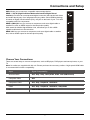
Remote Control Functions
INPUT
Press INPUT repeatedly to select the video input
0-9
(Alphanumeric buttons) Enters a channel number, then
press OK (or let the entry timeout).
•
(dot) To enter a digital channel with a sub-channel,
enter the main channel; then, press the dot (•), the subchannel, and then the OK button.
MENU
▲/▼◄/►
Brings up the main menu or press to return to the
previous menu.
(arrows) Highlights different items in the TV menu and
adjusts the menu controls.
ZOOM+/-
(◄/►) Selects the desired screen format.
SLEEP+/-
(▲/▼) Sets the TV to turn off after a given amount of
time.
PIC
INFO
VOL+/MUTE
FAV
MEDIA
INPUT
GUIDE
Selects picture mode.
If no menus are currently active, press INFO to display
the Channel information.
Increases or decreases the TV volume.
Turns the volume on and off.
Press the FAV button to browse the channels set in
your favorite list. Use ▲/▼ to select one of the favorite
channel to watch. Press CLEAR to exit the menu.
MENU
SLEEP +
ZOOM
ZOOM
-
PIC
+
SLEEP
GUIDE
Toggles the Electronic Programme Guide between on
and off. Only available for digital channels.
CLEAR
Removes any menu or display from the screen and
return to normal viewing.
OK
Displays Channel List menu. When the TV is in the
menu system, press to confirm your selection.
CH+/TV
MTS
◄◄/►►/►
/
-
GO BACK
Goes to the USB menu.
(POWER button) Turns the TV on or standby.
GO BACK
CLEAR
INFO
VOL
CH
MUTE
FAV
MEDIA
MTS
Returns you to the previously viewed channel.
Selects channels and external input mode.
Press to access to the TV mode.
Press to select your desired sound mode.
These buttons can be used for playing music and
photos in the USB menu.
RC3000N02
10
TV