1
GFK-1342H (Version 5.5)
Page 6
July 2001
Introducing HMI for CNC Version 5.5
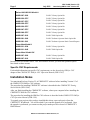
Series 160i/180i/210i Model A
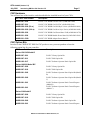
A02B-0207-J800
FANUC Library Option Bit
A02B-0236-S707
FANUC Library Option Bit
A02B-0237-S707
FANUC Library Option Bit
A02B-0238-S707
FANUC Library Option Bit
A02B-0239-S707
FANUC Library Option Bit
A02B-0247-S707
FANUC Library Option Bit
A02B-0248-S707
FANUC Library Option Bit
A02B-0207-J810
FANUC BOP Option Bit
A02B-0201-J960
FANUC Software Operator Panel Option Bit
A02B-0201-J961
FANUC Software Operator Panel General Purpose
Power Mate Model H
A02B-0211-J834
FANUC Library Option Bit
A02B-0211-J845
FANUC BOP Option Bit
Power Mate I Model D/H
A02B-0207-J800
FANUC Library Option Bit
A02B-0207-J810
FANUC BOP Option Bit
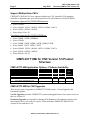
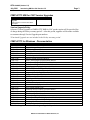
In order to access certain FANUC CNC user interface screens, you must also purchase option
bits related to those screens.
Specific CNC Requirements
For detailed information on specific CNC requirements, see the Introducing HIM for CNC
chapter of the CIMPLICITY HMI for CNC Operation Manual (GFK-1341).
Installation Notes
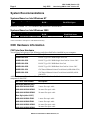
You must install at least Version 5.5 of CIMPLICITY software before installing Version 5.5 of
the CIMPLICITY HMI for CNC software.
The procedure for installing CIMPLICITY software is described in the CIMPLICITY Getting
Started Guide (GFK-1500).
After you finish installing the CIMPLICITY software, reboot your computer before installing the
CIMPLICITY HMI for CNC software.
The procedure for installing the HMI for CNC software is described in the CIMPLICITY HMI for
CNC Operation Manual (GFK-1341).
To upgrade your projects after you have installed this release, open each project from the
CIMPLICITY Workbench. You will be asked if you want the upgrade to be performed. Once
the upgrade is performed, you cannot run the project under previous releases of CIMPLICITY
HMI software.
GE Fanuc Automation of North America, Inc