1
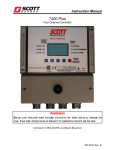
Model 7600 Controller Users Manual
Revision B
AUTHORIZATION MENU feature may be utilized to prevent malicious and accidental
tampering with alarm parameters.
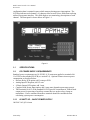
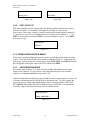
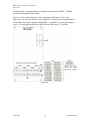
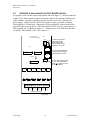
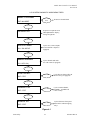
0 PCTLEL
SCANNING ALARMS
Measurement Name
Measurement Name
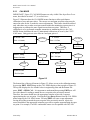
Figure 2a (Normal)
Figure 2b (Alarm
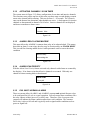
MANUAL SCAN
F=NORM E=EDIT C1
UP/DN SELECTS CH
Measurement Name
Figure 2c (Manual)
Figure 2d (Set-Up)
2.1
SYSTEM CONFIGURATION
Each Controller requires configuration of system and channel variables upon initial
installation. After power up the controller will be in Normal mode or Alarm Priority
mode, depending upon how it was last powered down. Configuration of system and
channel variables requires entering the Set-Up mode by pressing FUNCTION, then
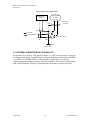
EDIT. A menu tree is provided for each of the 6 channels and another for system
variables. Select the tree to be entered by pressing the UP or DOWN buttons to scroll
through C1, C2, C3, C4, C5, C6 SY and press EDIT to enter the desired tree.
2.1.1 CHANGING VARIABLES USING THE KEYPAD
Each menu contains one or more entries to be configured. Some are simple YES/NO or
ON/OFF entries that are toggled by pressing the EDIT key. Others, such as the
Measurement Name and Engineering Units fields, may have many different ASCII
character possibilities. EDIT is used to modify variables within any menu. If the item
has only limited entries it toggles each time EDIT is pressed. If there are many possible
entries, EDIT begins a flashing cursor over the item and UP/DN scrolls through each
available entry. FUNCTION moves the flashing cursor to the next position within a
field. EDIT discontinues the flashing cursor and loads that entry into non-volatile
memory.
2.2
CHANNEL CONFIGURATION MENUS
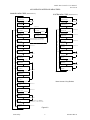
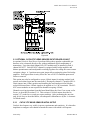
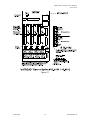
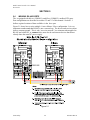
Figure 2.2 shows the menu tree for configuring all channel variables on the left side of
the page. These only affect the specific channel that has been selected. The system menu
tree is shown on the right side of the page and is described in section 2.3.
Scott Safety
4
087-0018 Rev B