1
TABLE OF CONTENTS
1. Unpacking and Installation.......................................................................... 1
1-1.Unpacking..................................................................................................... 1
1-2. Notes about Installation................................................................................ 1
2. Parts Identification and Nomenclature........................................................ 2
3. Setup............................................................................................................. 3
3-1. Connecting the Interface Cable to the PC. . ..................................................... 3
3-2. Connecting the Interface Cable to the Printer................................................ 4
3-3. Connecting the AC Adapter........................................................................... 7
3-4. Turning the Power On . . .................................................................................. 8
3-5. Connecting to a Peripheral Device................................................................. 8
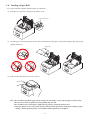
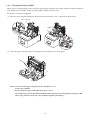
3-6. Loading a Paper Roll.. .................................................................................... 9
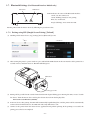
3-7. Bluetooth Setting (For Bluetooth Interface Model only) . . .................................... 12
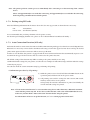
3-8. Setup Precautions........................................................................................ 17
4. Attaching the Accessories........................................................................... 19
4-1. Attaching the Holder Plate . . ......................................................................... 19
4-2. Attaching the Rubber Feet........................................................................... 21
4-3. Switch Cover Installation. . ........................................................................... 21
5. Adjusting the Near-end Sensor.................................................................. 22
6. Error Indicators.......................................................................................... 23
6-1. Recoverable errors....................................................................................... 23
6-2. Unrecoverable errors................................................................................... 23
7. Preventing and Removing Paper Jams....................................................... 24
7-1. Preventing Paper Jams................................................................................. 24
7-2. Removing Paper Jams.................................................................................. 24
7-3. Releasing the Cutter Lock............................................................................ 25
8. Maintenance................................................................................................ 26
8-1. Thermal Head. . ............................................................................................ 26
8-2. Platen Rubber Roller................................................................................... 26
8-3. Paper Holder............................................................................................... 26