1
Frequently asked questions
“Where should I place Ditto Mic
Looper in my signal chain?”
To get the most out of your setup and the loops
you’re recording, place Ditto Mic Looper at the
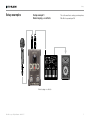
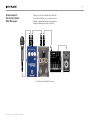
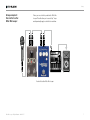
end of your signal chain. This gives you the flexibility to add parts with or without signal processing by simply switching effects on and off
as required. For more information, see “Setup
examples”.
“How much loop time can I get
out of Ditto Mic Looper ?”
Ditto Mic Looper provides five minutes of looping time.
“What’s the maximum number
of overdubs that I can record?”
Our guess is that you will tire out before Ditto Mic
Looper does. Ditto Mic Looper allows an unlimited number of overdubs – so do your worst!
“I made a mistake – how
do I undo a part?”
Press and hold the LOOP footswitch on Ditto
Mic Looper while it is playing back your recorded
loop. The last part you recorded will be removed.
Updating the firmware
Footswitch LED
state reference
Use this section as a reference when you are not
sure what the current LED status means.
LOOP footswitch LED…
Off
Device disconnected or no
loop in memory
Blinking green
Loop in memory, playback/
recording stopped
Green
Loop running (LED will blink
shortly when LOOP end is
reached)
Red
Loop recording
Blinking red
Loop currently being erased
Updating the firmware
TC-Helicon may provide updates for the built-in
software of your pedal, the firmware. Updating
your TC-Helicon pedal’s firmware requires…
►►a computer running Microsoft Windows or
OS X with a standard USB interface
►►the DC power supply that came with the pedal.
Preparing the firmware update
1.Download the newest firmware from
tc-helicon.com/products/
ditto-mic-looper/support/
There are updaters…
– for Microsoft Windows (these are ZIP archives containing the firmware installer)
and
– for OS X (these are disk image files containing the firmware installer).
2.Unplug all cables (including the power supply) from your Ditto Mic Looper.
3.Connect the pedal to your computer using a
USB cable.
4.Hold down the LOOP footswitch.
5.Connect the power supply.
The LED will light solid green.
6.Release the footswitch.
Ditto Mic Looper will now be recognized as
an updatable device.
Ditto Mic Looper English Manual – 2014-11-1711