1
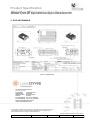
Product Specification MemorEyes HD High Definition Digital Video Recorder JP6 JP5 JP4 JP3 JP9 JP7 JP1 JP8 JP2 Figure 3-2: Connections 3.3 Set-up Procedure CAUTION: User-supplied cables must be correctly wired (see list of Connector/Pin Details). Ensure that external power is within the range specified herein. Ensure that external power is OFF before proceeding with set-up. Mount the unit to the vehicle or platform, using the four Dzus fasteners provided. Connect the required cables to Connectors JP1 to JP6, and to the external imaging system, power source and display (JP7 need only be connected when the Ethernet connection is required, e.g. for download of video files). Ensure that the external memory module is firmly seated into and sealed to JP8. See User’s Manual for other connection configurations. Connect the earth point [if provided (configuration dependent – needed only if video and comms connections are direct to the unit not via a display)] to an appropriate point on the vehicle. Copyright. All Rights Reserved. Laserdyne Pty Ltd File: PS-ME-S-1317-D_1 Author(s): TW Authorised: TW Rev. Date: 9.7.13 Page 3-2