1
Description
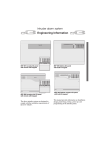
Digital Displays
The displays provide run information, user messages, and
diagnostics.
• During a run, they show the actual (real-time) operating
conditions.
• When the run parameters are being entered, they show the set
values selected. Set values can be recalled during operation by
pressing [SHOW SET]. After 5 seconds, the displays return to actual
conditions.
• Error messages (see Section 4) also appear on the displays, when
applicable. The centrifuge emits a series of audible tones to alert
the user to an error condition. (Instructions for disabling the tones
are in Section 3.)
(SPEED)
Indicates rotor speed in revolutions per minute (rpm) or in relative
centrifugal field, a term describing the ratio of the centrifugal acceleration at a specified radius and speed to the standard acceleration of
gravity (RCF × g).
(TIME)
• In a timed run, indicates the remaining run time in hours
and minutes. The time display begins counting down when
[ENTER/SAVE] then [START] is pressed and continues counting down
to 0. The run automatically ends when the set time reaches 0 and
deceleration begins (a tone sounds when the rotor stops spinning).
If a malfunction shuts down the centrifuge during a run, when the
instrument is turned back on the time will not remain and 00:00
will be displayed in the time window. By comparing this time with
the original set time, you can determine when the run ended.
• In a hold run, indicates the time elapsed since [START] was pressed.
After 99 hours and 59 minutes the timer resets to 0 and continues
counting elapsed time.
• In a pulse (momentary) run, indicates the time (in minutes and
seconds) elapsed since [PULSE] was pressed. Time continues to
count up until the [PULSE] key is released. The total elapsed time is
then displayed until another key is pressed.
(TEMPERATURE)
Indicates rotor temperature in degrees C at thermoequilibrium.
(ROTOR)
Displays the name of the selected rotor.
1-5