1
SAPSAN CONTROL: SETTING of FLS “STRELA” 232 and 485 ( user’s manual v 1.1 от 10-09-2011)
Fuel Level Sensor STRELA
SETTING of FLS “STRELA” 232 and 485
( user’s manual v 1.1 10-09-2011)
www.skontrol.ru
Chelyabinsk, Russia
10.09.2011
p. 1
SAPSAN CONTROL: SETTING of FLS “STRELA” 232 and 485 ( user’s manual v 1.1 от 10-09-2011)
p. 2
1.
THE СONNECTION OF SENSORS STRELA D232 AND D485 TO LAPTOP ............................................................. 3
2.
INSTALLATION OF DRIVERS ............................................................................................................................ 7
3.
CONNECTION TO SOFTWARE ......................................................................................................................... 7
4.
SENSOR CALIBRATION ................................................................................................................................... 8
5.
SETTING OF DATA OUTPUT FORMAT ............................................................................................................. 9
6.
SPECIAL CASE 1. SETTING OF CALIBRATION TABLE IN THE SENSOR FOR THE SQUARED SHAPE TANK ............ 11
7.
SPECIAL CASE 2. SETTING OF CALIBRATION TABLEIN THE SENSOR FOR THE CYLINDRICAL TANK SHAPE ........ 12
8.
Appendix 1. Description of sensor Strela D232 (D485) communication protocol .......................................... 13
SAPSAN CONTROL: SETTING of FLS “STRELA” 232 and 485 ( user’s manual v 1.1 от 10-09-2011)
p. 3
1. THE СONNECTION OF SENSORS STRELA D232 AND D485 TO
LAPTOP
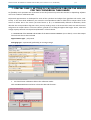
It is necessary to make a sensor calibration according to received length after cutting before installation
of fuel level sensor Strela D232 and D485. To do this you need to connect sensor to PC. The calibration
of other types of sensors is done by manufacturer.
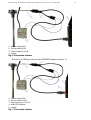
1) Connecting sensor Strela D485 to PC
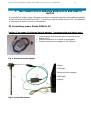
Version 1. by usage of universal service adapter (recommended and simple way)
1. Connect sensor wire to service wire of universal service
adapter (fig.1).
2. Connect service wire to universal service adapter.
3. Connect universal service adapter to PC USB-port.
Fig. 1. Universal service adapter
1-Sensor
2-FLS cable
3-Universal service adapter
4-USB cable
5-Laptop
Fig.2. Connection scheme
SAPSAN CONTROL: SETTING of FLS “STRELA” 232 and 485 ( user’s manual v 1.1 от 10-09-2011)
p. 4
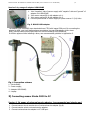
Version 2: by usage of adapter USB-RS485
1. Joint “negative” side of sensor supply with “negative” side and “ground” of
adapter unit USB-RS485
2. Joint sensor output RS-A with adapter pin 1.
3. Joint sensor output RS-B with adapter pin 2.
4. Connect positive side of sensor supply to power source 12 (24) Volts.
Fig. 3. RS485-USB adapter
The adapter unit USB-RS85 uses standard drivers FTDI with image COM-port. By connecting the
adapter to USB- port it will be found as a new device. You can find adapter drivers here:
http:// ftdichip.com/Drivers/CDM/CDM%202.04.16%20WHQL%20Certified.zip
If collision appears while installing a diver, see recommended guideline in Application 3.
Fig. 4 Connection scheme
1
2
3
4
–
–
–
–
Strela D485;
Power supply;
Adapter USB-RS485;
Laptop.
2) Connecting sensor Strela D232 to PC
Version 1. By usage of universal service adapter (recommended and simple way)
1. Connect sensor wire to service wire of universal service adapter (fig.8).
2. Connect service wire to universal service adapter.
3. Connect universal service adapter to PC USB-port.
SAPSAN CONTROL: SETTING of FLS “STRELA” 232 and 485 ( user’s manual v 1.1 от 10-09-2011)
1
2
3
4
5
p. 5
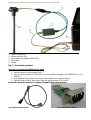
– Sensor Strela D232;
– Sensor cable RS-232;
– Universal service adapter USB-RS232;
- USB-cable;
– Laptop.
Fig. 5. Connection scheme
Version 2: by usage of RS232 service cable
1. Connect sensor to service cable (fig.6).
2. Connect service cable to PC COM-port or through additional adapter unit USB-RS232 (fig.7) to
USB-port.
3. Joint negative side of sensor wire supply with negative side of power supply.
4. Connect positive side of sensor wire supply to power source 12 (24) Volts.
External reference source of voltage is required for this process.
Fig. 6 Service cable RS232
Fig. 7 USB-RS232 adapter
SAPSAN CONTROL: SETTING of FLS “STRELA” 232 and 485 ( user’s manual v 1.1 от 10-09-2011)
1
2
3
4
–
–
–
–
Sensor Strela D232
Service cable RS232
Power supply12 (24) В;
Laptop;
Fig. 6 Connection scheme
If there is no COM-port you can use USB-RS232 adapter (see fig. 7):
1
2
3
4
5
– Sensor Strela D232
– Service cable RS-232
– External supply 12 (24) V;
- USB-RS232 adapter
– Laptop;
Fig. 7 Connection scheme
p. 6
SAPSAN CONTROL: SETTING of FLS “STRELA” 232 and 485 ( user’s manual v 1.1 от 10-09-2011)
p. 7
2. INSTALLATION OF DRIVERS
Driver USB-RS485 uses standard drivers FTDI which can also be used by other devices
connected to the personal computer. Thus working with the device through USB-port can be
done in two modes: directly or through virtual COM-port. If any other installer device runs
through virtual COM-port no problems will arise.
Let's consider a case of operation with Autograph GSM terminals which are also set through the
USB-interface, but in a direct access mode.
In this case before the first connection of the adapter the installer already has driver FTDI
installed and the device is called Autograph:
3. CONNECTION TO SOFTWARE
1. Install the driver.
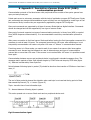
2. Check whether switches on 232 and 485 of Strela are installed in the right way and whether
the light from Strela cable side is lighten.
3. After setting the switches connect the universal service adapter to the computer. The green
light should light up on the universal service adapter box from USB-cable side.
4. Start program DutConfig 2.exe
5. Click the button Sensors with interface output.
6. a) Choose COM-port. You can find its number in the Window Device Manager where it is
given to the universal service adapter driver.
b) Choose MODBUS address. For 232 sensors this parameter can be equal to any number, it
doesn’t matter. For 485 set 0 – search will be done by all addresses. If you know the exact
address (02, 03) set it. By default the sensor address from factory is 99.
c) Standard work speed with the sensor – 19200.
Click CONNECT button
If there is a note WAIT TIME OUT, please check the port and address.
SAPSAN CONTROL: SETTING of FLS “STRELA” 232 and 485 ( user’s manual v 1.1 от 10-09-2011)
p. 8
4. SENSOR CALIBRATION
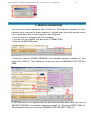
You need to do sensor calibration after its final cut. The calibration purpose is to set a
minimum and a maximum for sensor operation, to divide height into equal intervals, and to
set corresponding values of output signal to each filling level.
1. Sink the sensor in a capacity with fuel completely.
2. Connect it to the computer (see above part 1 CONNECTION).
3. Click on CALIBRATION button.
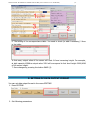
4. Wait till in the box INSTANT FREQUENCY fuel indication becomes invariable (1). Click
button FULL TANK (2). Thus indications will be put in the box FREQUENCY FOR THE FULL
TANK.
5. Take the sensor out of capacity with fuel and let the fuel flow down. Wait till in the box
INSTANT FREQUENCY fuel indication becomes invariable (1). Click button EMPTY TANK (2).
Thus indications will be put in the box FREQUENCY FOR THE EMPTY TANK (3).
SAPSAN CONTROL: SETTING of FLS “STRELA” 232 and 485 ( user’s manual v 1.1 от 10-09-2011)
p. 9
6. The setting of the correspondence table. You need to check (to add if necessary) 2 lines
in the table:
In that case, output value of the sensor will code % from immersing height. For example,
at digit capacity 4096the output value 2000 will correspond to fuel level height 2000/4096
of the sensor height.
7. Save changes by pressing the button SAVE (4).
5. SETTING OF DATA OUTPUT FORMAT
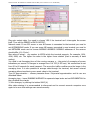
You can set data output format in the menu EDITING
1. Press EDITING
2. Set following parameters:
SAPSAN CONTROL: SETTING of FLS “STRELA” 232 and 485 ( user’s manual v 1.1 от 10-09-2011)
p. 10
Flag auto output data. You need to choose YES if the terminal can’t interrogate the sensor
itself. Then set the PERIOD of DATA OUTPUT.
Network mode. If one 232 sensor or one 485 sensor is connected to the terminal you need to
set AUTONOMOUS mode. If you use some 485 sensors connected to one terminal you need to
set NETWORK mode and to choose MODBUS ADDRESS. MODBUS addresses of the sensors
should differ (01, 02 etc.).
Max value of issued - any number to 65536 which the terminal supports. For example, 1024,
4096, 9999, etc. The higher the value is the higher there solution (that is accuracy of data
coding).
You need to set Averaging time of the running average, s – the period of averaging of sensor
indications per second. It changes in arrange from 0 to 255 (0-255 sec). We recommend to set
from 30 to 60 seconds for usual transport. The worse the traffic conditions are the longer is the
averaging time. It is also possible to average data through the terminal, but sensor internal
averaging allows transferring more exact value to the terminal.
Type of Approximation – choose piecewise-linear. Polynomial approximation and its use are
described below.
Averaging type – leave RUNNING AVERAGE for squared shape tanks and set EXPONENTIAL for
the cylindrical form tanks.
3. Save changes, by clicking the button SAVE (4).
After data entering it is recommended to disconnect and to connect sensorto computer once
again to be sure that settings were saved correctly.
SAPSAN CONTROL: SETTING of FLS “STRELA” 232 and 485 ( user’s manual v 1.1 от 10-09-2011)
p. 11
6. SPECIAL CASE 1. SETTING OF CALIBRATION TABLE IN THE SENSOR
FOR THE SQUARED SHAPE TANK
For flexibility in the operation we recommend to use this function only when the terminal or dispatching software
can’t store inside the calibration table.
The sensor can store inside the calibration table. The sensor will give out at the output value in % from its volume,
instead of % of filling throughout the height. For example, at digit capacity 4096 output value 2000 will
correspond to fuel level height 2000/4096 of the sensor volume.
1. CALIBRATION of the SENSOR and SETTING of the DATA OUTPUT FORMAT (see as above). To set data
output format check that you have selected
Approximation type – piecewise linear.
Averaging type –running average
1. You should enter calibration table in the calibration mode:
Click CALIBRATION button.
Add to the table additional lines of percent correspondence of tank filling tolitres:
The sequence of lines isfree (it doesn’t have to be exactlyascending or descending). Lines entered by mistake can
be deleted.
SAPSAN CONTROL: SETTING of FLS “STRELA” 232 and 485 ( user’s manual v 1.1 от 10-09-2011)
p. 12
7. SPECIAL CASE 2. SETTING OF CALIBRATION TABLEIN THE SENSOR
FOR THE CYLINDRICAL TANK SHAPE
For flexibility in the operation we recommend to use this function only when the terminal or dispatching software
can’t store inside the calibration table.
Polynomial approximation is developed for tanks of the cylindrical and elliptic form (gasoline tank trucks, tanktrucks). In this case while calibration you create the correspondence table for filled fuel to output value of the
sensor as before. But in the sensor you enter factors A, B, C, D mathematically defined at calibration, which
describe this correspondence function. Then you only need to enter in the terminal the tank size and the sensor
will give out an output value in % from its volume, instead of % of filling throughout the height. That is, value 511
at digit capacity 1023 will correspond 511/1023=50 % of tank volume.
1. CALIBRATION of the SENSOR and SETTING of the DATA OUTPUT FORMAT (see as above). To set data output
format check that we have selected
Approximation type – polynomial
Averaging type – exponential (preferably) or running average
1. You should enter calibration table in the calibration mode:
Click CALIBRATION button and enter values that describe function:
SAPSAN CONTROL: SETTING of FLS “STRELA” 232 and 485 ( user’s manual v 1.1 от 10-09-2011)
p. 13
8. Appendix 1. Description of sensor Strela D232 (D485)
communication protocol
Communication protocol of fuel level sensor with peripheral device consists of two parts: general use
open part and private part.
Private part serves to set sensor parameter with the help of application program DYTConfig.exe. Private
part commands can change without additional report and they are not supported by certain type of fuel
level sensors Strela, however they are supported by application program DYTConfig.exe.
Open part commands are supported by all type of sensors Strela that has digital interface. Commands
cannot be changed and will be supported by new type of sensors Strela.
Open part of protocol supports two types of communication protocols; in binary form (HEX) or symbol
form (ASCII-sequence communication). It is recommended to use binary communication protocol to
work.
After power connection to fuel level sensor Strela and before issuing the first interrogation command it is
necessary to wait at least 100 msec. The command issued during 100 msec. after switching on is not
interpreted, communication will restore only after 100 msec. of “silence“ in communication channel.
If working sensor is in Slave-mode, you need to wait for an answer from sensor after interrogation
command is sent. Answer lag time depends on rate of data exchange and type of communication
protocol but no more than 100 msec. If the answer is not received after 100 msec. it is possible to send
issue again.
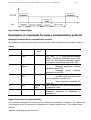
Communication between sensor and peripheral device is performed in standard messages form. The
message read in packets of byte. Byte transfer begins by START-bite and stops by STOP-bite (figure
11). Data are transferred by lower byte first.
Period between following bytes in packet (Tt) should be less than time transfer of 35 bites or less than 1
msec, if:
The end of byte packet is deemed the situation when next byte is not received during period of time
that exceed top interval (Tt) + 1 msec. (Figure 12)
Tbyte - transfer time of one information byte
Tt – timeout between following bytes in packet.
This order spreads out on sensor Strela work and on peripheral device work.
Fig.8 Communication signal
SAPSAN CONTROL: SETTING of FLS “STRELA” 232 and 485 ( user’s manual v 1.1 от 10-09-2011)
p. 14
Fig.9 Communication signal
Description of commands for binary communication protocol
Messages format for binary communication protocol
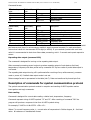
All commands of binary communication protocol have the same standard format presented in table 10:
Tab.10
Field #
Field name
Field width,
byte
1
Prefix
1
2
Network
address
1
3
Operation
code
1
4
Data
5
Control total
Depend
code
1
Description
This field is a beginning-of-massage
marker. Incoming messages must have
prefix 31h and outgoing messages should
be produced by program with prefix 3Eh.
The field contains:
Messages destination network
address for prefix 31h;
Messages
source network
address for prefix 3Eh.
The field contains:
operation code that have to be
run by program for prefix 31h;
return response operation for
prefix 3Eh.
on Data composition and field format depend
on operation code.
The field is used for data integrity control.
Computing algorithm is described in
Application A.
Single-valued scan out (command 06h)
The command is designed for current scan out: relative level, temperature, frequency. The relative level
is produced by sensor in interval set by parameters as ‘Lowest indicated value’, ‘Top indicated value’
settings.
Data are transferred by lower byte first.
SAPSAN CONTROL: SETTING of FLS “STRELA” 232 and 485 ( user’s manual v 1.1 от 10-09-2011)
p. 15
Command format:
Offset value,
byte
0
+1
+2
+3
Field width,
byte
1
1
1
1
Value
Description
31h
00h...FFh
06h
00h...FFh
Prefix.
Destination network address.
Operation code.
Control total.
Field width,
byte
1
1
1
1
2
2
1
Value
Description
3Eh
00h...FFh
06h
-128...127
0000h...FFFFh
0000h...FFFFh
00h...FFh
Prefix.
Source network address.
Operation code.
Temperature in Celsius degree.
Relative level.
Frequency rate.
Control total.
Response format:
Offset value,
byte
0
+1
+2
+3
+4
+6
+8
The results of level measurement are not valid after sensor activation until moment of the set point solid
performance test (time for various sensor models is equal to several seconds). In such case sensor
returns level value LVL that exceeds 0FFFh digit (or 4095d). If you received a packet with such level
value it is recommended to shut down future data processing, wait 1 -2 seconds and repeat request to
sensor.
Repeating data output (command 07h)
The command is designed for turning on the repeating data output.
After command processing sensor begins to produce repeating output of such data as fuel level,
temperature, frequency with time period set by command 13h. By zero value of period data output is
not issued.
The repeating data output turning off is performed after receiving of any valid command, processor
reset or power off, if default data output mode is not set.
Data message format is represented in the table (tab.7). Data are transferred by lowest byte first.
Description of commands for symbol communication protocol
The symbol communication protocol consists in reception and sending of ASCII symbols read as
interrogation and reply commands.
Data reading
Command is designed for current data reading: relative level, temperature, frequency.
Command represent string of ASCII symbols ‘”D” and “O”. After receiving of command “DO” the
program will produce a response in the form of ASCII symbols string.
For example, F=0AF9 t=1A N=03FF.0 <CR><LF>
Where F is current frequency value, t – current value of temperature in Celsius degree, N – fuel level
value. All values are in hexadecimal format.
SAPSAN CONTROL: SETTING of FLS “STRELA” 232 and 485 ( user’s manual v 1.1 от 10-09-2011)
p. 16
If frequency value more than FFFh data is not valid.
Repeating data output
The command is designed for turning on of repeating data output.
After command processing the sensor begins to produce the repeating output of such data as relative
fuel level, temperature and frequency in symbol format (ASCII codes). Data are produced at regular
intervals that were determined by sensor settings (by program DYT Config.exe). If time of data output
equal to zero data output is not issued.
The repeating data output turning on is performed through sending of string of symbol “DP”. After
command processing symbol string will be received.
Algorithm CRC
For CRC with polyniom a^8 + a^5 + a^4 + 1 following algorithm is used (С-language):
U8 CRC8 (U8 data, U8 crc)
{ U8 i = data ^ crc;
crc = 0;
if(i & 0x01) crc ^= 0x5e;
if(i & 0x02) crc ^= 0xbc;
if(i & 0x04) crc ^= 0x61;
if(i & 0x08) crc ^= 0xc2;
if(i & 0x10) crc ^= 0x9d;
if(i & 0x20) crc ^= 0x23;
if(i & 0x40) crc ^= 0x46;
if(i & 0x80) crc ^= 0x8c;
return crc; }
Application 3. The resolution of USB-RS485/RS232 work conflicts.
Driver USB-RS uses standard drivers FTDI which can be used by other equipment connected to PC. In
this case equipment handing to USB-port can be realized in two modes: direct or through image COMport. If another installer’s equipment operates through image COM-port no problems will emerge. In
other cases you will need to switch USB devices to mode “LOAD VCP” through Windows device
manager.
Sapsan Control Co.Ltd
454081, Russia, Chelyabinsk
8 (904) 9751213, 8 (735) 2481830
[email protected] / www.skontrol.ru