1
potentiometer, but is controlled digitally instead of manually. On the Arduino website we found the
Mcp4261 code library, which can be used to control digital potentiometers using SPI (Serial Peripheral
Interface). However, it was not compatible with the Arduino’s standard “SPI.h” library. After a bit more
searching, we found an updated library called “McpDigitalPot.h” (available at
https://github.com/teabot/McpDigitalPot) which is compatible with the standard SPI library, so we
decided to use this library. For digital pots we chose two MCP4161 10kohm single-channel digital pots,
which were easily available and seemed to suit our needs.
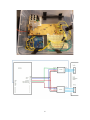
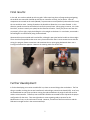
The digital pots were put on a breadboard and connected by wires to the Arduino and the transmitter
circuit. The wires were soldered to the holes in the transmitter circuit where the analog pots originally
were connected. Unlike dual-channel potentiometers, which have different input and output pins, the
MCP4161 have input and output multiplexed onto one pin. We found out that since we will not be
reading any data from the pot, we could ignore the output of the potentiometer and only connect the
input/output pin on the potentiometer to its input (an output pin on the Arduino).
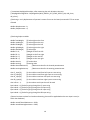
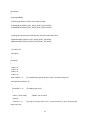
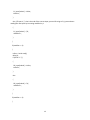
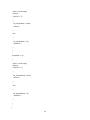
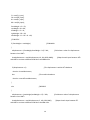
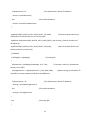
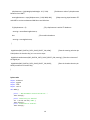
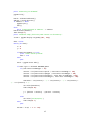
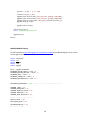
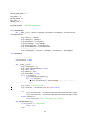
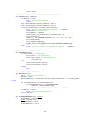
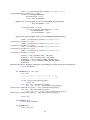
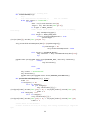
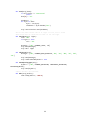
The code for the Arduino works in the following way:
A text string of 4 numbers (weight on every corner of the balance board, in the form “50/20/20/10/”),
separated by '/' is sent to the Arduino. The Arduino saves each number as a variable. Then the sums of
the weight on the front, rear, left and right halves of the board are calculated.Using the calculated sums,
and the sum of all the weight of the board, the displacement of the center of mass on the board is
calculated in x- and y-directions. If the displacement is greater than a certain dead zone value, the
displacement value is mapped to a resistance value between the neutral value and the end value. Finally,
each of the potentiometers is selected in turn, and the resistance value is sent to the currently selected
potentiometer. The potentiometers are connected to the same output pin on the Arduino, but only the
potentiometer with its selection pin currently set to LOW will receive the input data. After the input
data is sent, the potentiometer is unselected.
At first we tried using the same resistance range as the analog potentiometers, but the car did not
respond to this. Instead, we had to test different resistance values to get the desired response. The used
resistance range ended up much bigger than the range of the analog pots. The reason for this is unclear
to us.
It should be noted that the Arduino code is long and ineffective, since our experience in coding was very
limited, and parts of the code where quickly put together in the ending phases of the project, when we
were making the connection between the Arduino and PC. As we got the whole system working in the
ending phase, there was no time for tuning and further development of the program and the control
algorithm. There is probably much room for improvements in the code.
5