1
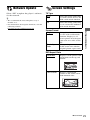
Playing via a Network
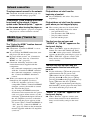
Streaming BRAVIA Internet
Video
Serves as a gateway delivering the selected
Internet content and a variety of on-demand
entertainment straight to your player.
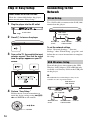
1
Prepare for BRAVIA Internet Video.
Connect the player to a network
(page 14).
2
3
Select
(Video),
(Music), or
(Photo) on the home menu using
</,.
Select an Internet content provider
icon using M/m, and press ENTER.
When an Internet content list has not
been acquired, an unacquired icon or a
new icon is displayed.
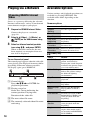
To use the control panel
Available Options
Various settings and playback operations are
available by pressing OPTIONS. The
available items differ depending on the
situation.
Common options
Items
Details
Repeat
Setting
Sets the repeat mode.
Favorites List
Displays the Favorites List.
Play/Stop
Starts or stops the playback.
Play from
beginning
Plays the item from the
beginning.
Add to
Favorites
Adds Internet content to the
Favorites List.
Remove from
Favorites
Removes Internet content
from the Favorites List.
(Video) only
Items
Details
AV SYNC
Adjusts the gap between
picture and sound, by
delaying the sound output in
relation to the picture output
(0 to 120 milliseconds).
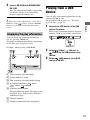
The control panel appears when the video file
starts playing. The displayed items may differ
depending on Internet content providers.
To display again, press DISPLAY.
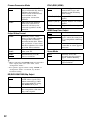
Video Settings Picture Quality Mode:
Selects the picture settings
for different lighting
environments.
A Control display
Press </M/m/, or ENTER for
playback operations.
B Playing status bar
Status bar, Cursor indicating the
current position, Playing time,
Duration of the video file
Play/Pause
Starts or pauses the
playback.
Top Menu
Displays the BD’s or DVD’s
Top Menu.
Menu/Popup
Menu
Displays the BD-ROM’s
Pop-up Menu or DVD’s
menu.
Title Search
Searches for a title on BDROMs/DVD VIDEOs and
starts playback from the
beginning.
Chapter
Search
Searches for a chapter and
starts playback from the
beginning.
Angle
Switches to other viewing
angles when multi-angles
are recorded on BD-ROMs/
DVD VIDEOs.
C The next video file name
D The currently selected video file name
and rating
18