1
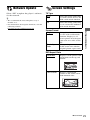
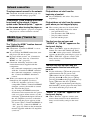
Screen Saver
System Settings
On
Turns on the screen saver
function. The screen saver
image appears when you do
not use the player for more
than 10 minutes while an onscreen display is displayed.
Off
Turns off the function.
OSD
Selects your language for the player onscreen displays.
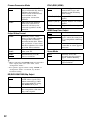
Dimmer
Bright
Bright lighting.
Dark
Low lighting.
On
Off
Turns off the lighting during
playback. Low lighting other
than during playback.
Sets the player to inform you
of newer software version
information (page 21).
Off
Turns off the function.
On
Allows you to use the
“Control for HDMI”
function (page 32).
Off
Turns off the function.
System Information
Displays the player’s software version
information and the MAC address.
Settings and Adjustments
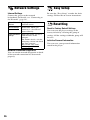
Control for HDMI
Software Update Notification
Quick Start Mode
On
Shortens the startup time
when turning on the player.
Off
Reduces standby power
consumption.
Auto Display
On
Automatically displays
information on the screen
when changing the viewing
titles, picture modes, audio
signals, etc.
Off
Displays information only
when you press DISPLAY.
25