1
STC-I590
Table of Contents
Warranty
Introduction
Camera Kit Contents
Table of Contents
Overview
Battery Power Options
Built-in Memory & SD Card Installation
Description of Features
Programming Your Scout Camera
Using your Camera
Manual Shooting Mode
Viewing Images and Deleting Images
Formatting memory
Using External Power Source
Technical Specifications
Camera Features
General Information
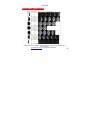
Moon Phase Chart
www.stealthcam.net
Toll Free 877-269-8490
2
3
4
5
6-8
9-10
11-13
14-16
17-23
24-29
30
32-36
37
38
39
40-41
42-43
44
5