1
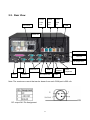
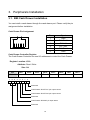
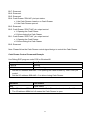
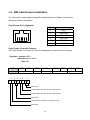
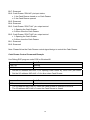
Bit 7: Reserved. Bit 6: Reserved. Bit 5: Reserved. Bit 4: Cash Drawer “DIN bit0” pin input status. = 1: the Cash Drawer closed or no Cash Drawer. = 0: the Cash Drawer opened. Bit 3: Reserved. Bit 2: Cash Drawer “DOUT bit0” pin output control. = 1: Opening the Cash Drawer = 0: Allow closing the Cash Drawer Bit 1: Cash Drawer “DOUT bit1” pin output control. = 1: Opening the Cash Drawer = 0: Allow closing the Cash Drawer Bit 0: Reserved Note: Please follow the Cash Drawer control signal design to control the Cash Drawer Cash Drawer Control Command Example Use Debug.EXE program under DOS or Windows98 Command Cash Drawer O 4B8 04 Opening O 4B8 00 Allow to closing Set the I/O address 4B8h bit2 =1 for opening the Cash Drawer by “DOUT bit0” pin control. Set the I/O address 4B8h bit2 = 0 to allow closing Cash Drawer. Command Cash Drawer I 4B8 Check status The I/O address 4B8h bit4 =1 means the Cash Drawer is closed or no Cash Drawer. The I/O address 4B8h bit4 =0 means the Cash Drawer is open. 11