1
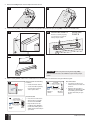
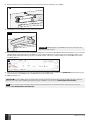
8. Remove the plastic tab inserted between one of the battery terminals and battery slots of EWD2.
17
9. Close EWD2 enclosure. DO NOT use any tools for this action.
18
ATTENTION: DO NOT attempt to close EWD2 enclosure the other way round,
otherwise you might break it.
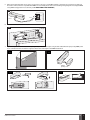
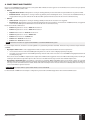
10. Pair the device with the alarm system using ELDES Configuration Tool software. Open Wireless Device Management section and enter
a 8-digit wireless device ID located on the EWD2 enclosure and press Add button. The device can also be paired by sending a corresponding command via SMS text message. For more details, please, refer to the software‘s HELP section and ELDES alarm system
installation manual.
19
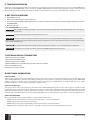
11. Upon the successful pairing process, the message indicated next to EWD2 device icon will turn to CONNECTED. If the attempt to pair is
unsuccessful, try to move EWD2 closer to the ELDES alarm system and pair anew.
12. EWD2 is ready for use.
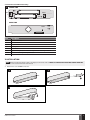
ATTENTION: Ensure that EWD2 device is properly fixed to the wall and the Mounting Point B portrayed in fig. #8A is properly screwed in.
Otherwise, the tamper switch will NOT supervise the back side of EWD2 enclosure (see also 4. EWD2 ZONES AND TAMPERS).
NOTE: If you are unable to pair the wireless device, please restore the parameters of the wireless device to default and try again (see
chapter 7. RESTORING DEFAULT PARAMETERS).
6
EN
EWD2 Manual v1.6