1
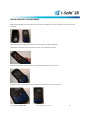
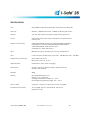
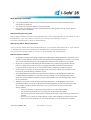
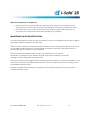
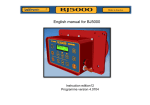
KNOW YOUR HANDSET
1.
LCD Touch Screen
2.
Volume Up/Down Button
3.
Push-To-Talk Button
4.
Rubber Protective Plug *
5.
Earphone Jack **
6.
Soft Reset Button***
7.
USB Power Connector
8.
Microphone
9.
Keypad
1
10
9
2
3
7
12
4
10. LED Indicators
5
11
6
4
11. Battery Cover
12. Camera Aperture
13. Speaker
13
14. Stylus
14
15. Power Button
16. EButton Emergency/Man-Down (Service Requires Agreement)
16
15
* Plug must be closed while in use, to maintain intrinsic safety and waterproofness
** Earphones are not for use in explosive atmospheres
***Soft Reset instructions on page 10
Airo Wireless I-Safe™ 28
User Guide (ARW-DPU-0002-01)
5
8