1
MAP-2000 / MAP-2000R Management Manual
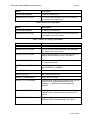
##GATEWAY_LOGIN##
##EXT_IP##
##NAS_ID##
##DOMAIN##
##PORT_HTTPS##
Rev 1.0
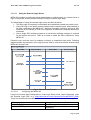
The Access Point’s external login gateway.
(https://<accesspointdomain>:<https_port>/X_Login.cgi)
Where <accesspoint-domain> is the
Common Name (CN) found in the
Webserver Certificates. <https_port> is the
configured Secure login port
Return the WAN IP address of the access
point
Return the NAS Identifier of the access
point
Return the hostname (CN in the
certificates)
Return the secure login port of the access
point
Table – Defined Macros in the external login URL
Note that, the external server hostname must be able to resolve by the Access Point for
proper Access Control Setup. (This could be verified using the Tools->Ping page in the web
based configurations page).
Access Control to the external server is automatically done during startup or after configured
the new server address. Thus, if the external server is using dynamic IP address, the
Access Control will become invalid after the address has changed.
2.3.19.1.2
Gateway Login URL
This is the gateway between the external server and the access point’s radius client.
External server will have to send back the
• USERNAME,
• PASSWORD,
• CLIENT_IP
information to the access point. All information should be encoded according to the RFC
1738 specification. E.g. for the username ‘Donald Duck’, the POST should contain
USERNAME=Donald%20Duck.
2.3.19.1.3
Gateway Logout URL
External server could, forcing a logged-in station to logout using the logout URL.
https://<accesspoint-domain>:<https_port>/X_Logout.cgi?CLIENT_IP=<client ip address>
2.3.19.1.4
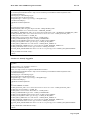
Login Reply
After processing the authentication request, the Access Point will reply the External Server
with the following contents:
2.3.19.1.4.1 Login Success
<HTML>
<!-<?xml version=“1.0” encoding=“UTF-8”?>
<WISPAccessGatewayParam
Page 47 of 80