1
2. Installation
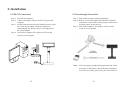
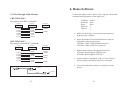
2.1 RS-232 Connection
Step 1: Turn off the computer.
Step 2: Connect the display cable to the RS-232 port of the
computer.
Step 3: Set the connection between the bundled power kit and
the switch power supply inside the computer or
connecting the DC power source by the appropriate
DC power adapter.
Step 4: Turn on the computer. The display will be on and
ready for receiving data.
2.2 Pass-through Connection
Step 1: Turn off the computer, printer and display.
Step 2: Refer to 3.4 Pass-through Cable Pinouts for detailed
information of the cable to make proper connection to
the proper ports on the devices.
Step 3: Turn on the computer. The display will be on and
ready for receiving data.
Note:
-4-
Select the proper peripheral through command, either
the printer or the display, and all the data transmitted
from the host will be processed by the selected device.
-5-