1
Run mode features
Chapter 20. Run mode features
Before we continue with the run mode features, please make sure that you have programmed some
sequences, background scenes and playback scenes. You need at least 5 of each to properly follow
examples in this chapter.
20.1 Sequence transparency across cues.
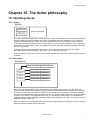
When you are putting sequences behind cue buttons you have to keep in mind that Xciter has sequence
transparency. When there is no sequence in the next cue to take over the sequence in the current cue, the
sequence from the current cue will keep running. But you can still deactivate it.
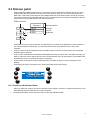
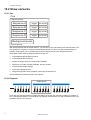
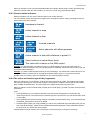
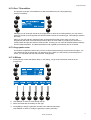
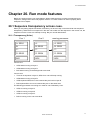
20.1.1 Transparency (Xciter)
Cue 1
Cue 2
running processes
A: SEQ1
A:
A: SEQ1
B:
B: SEQ2
B: SEQ2
C:
C:
C:
D: SEQ3
D: SEQ4
D: SEQ4
BG1
BG2
BG2
Launch cue1:
•
SEQ1 starts running on layer A.
•
SEQ3 starts running on layer D.
•
BG1 starts running on the background scene level.
Launch cue2:
•
There is no sequence in layer A; SEQ1 from cue1 will keep running.
•
SEQ2 starts running on layer B.
•
SEQ4 replaces SEQ3 from cue1 because they are both on layer D.
•
BG2 replaces BG1 from cue1 because they are on the same level.
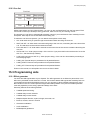
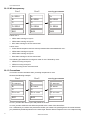
The following processes are running as a result of cue1 followed by cue2:
•
SEQ1 is running on layer A.
•
SEQ2 is running on layer B.
•
SEQ4 is running on layer D.
•
BG2 is running on the cue scene level.
Xciter user manual
69