1
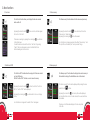
3. Menu functions
3.1 Last scan
3.3 Erase memory
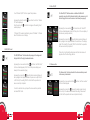
The “Last Scan” function allows you to display the last code scanned
before switch-off.
The “Erase memory” function deletes all of the codes saved previously.
By pressing the Selection button
the function “Last Scans”.
By pressing the Selection button
of menu tree times, the function
“Erase memory” will be displayed.
By pressing the scanning key
, data will be erased.
of menu one time, it will be appear
If there are no readings, by pressing the scanning key
, you will return
to the initial screen.
To read the latest record, enter the function “Last Scan”. By pressing
“Select”, last scans will appear in purple to indicate that this is a
historical reading and not a real one.
3.2 Switch on/off REC
3.4 Memory report
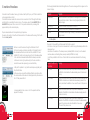
The “Switch on REC” function allows the saving of all of the scans carried
out, max 2045 codes.
With the “Switch off REC” function, no code is saved in memory.
By pressing the Selection button
two times, the function “Switch on
REC” or “Switch off REC” will be displayed.
By pressing the scanning key
mode.
, you will be able to choose or change
As confirmation an image and the written “Done” will appear.
INDUSTRIAL
D I V I S I O N
8
A N I M A L
D I V I S I O N
As confirmation an image appears and the written “Erase memory” and
the symbol Done followed by the “Memory erased“ image.
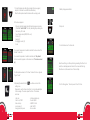
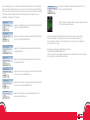
The “Memory report” function allows the display of how much memory is
still available for storing of the identification codes of the animals.
The “Memory report” function will be displayed after pressing the menu
selection button
four times.
By pressing the scan button
, the memory status will be displayed,
and in particular the number of codes scanned, those used, and those
still available.
The image of what the reader displays in this case is reported
to the side.
INDUSTRIAL
D I V I S I O N
A N I M A L
D I V I S I O N
9