1
im Vertrieb von
Control
Type
1: Set
2: Get
CAMBOARD Electronics
Function
Param
(for Set)
Function Description
Comment
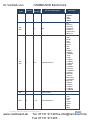
16
0~100
Brightness
17
0~100
Contrast
1: Set
2: Get
25
0~100
Hue
1: Set
2: Get
26
0~100
Sharpness
1: Set
2: Get
29
0~100
Saturation
1: Set
2: Get
33
0~100
Set an absolute volume for Output
For embedded
HDMI inputs, this
does not affect the
embedded output
1: Set
2: Get
34
0~100
Set an absolute volume for Input
For embedded
HDMI inputs, this
does not affect the
embedded output
1: Set
2: Get
41
0~100
OSD Setting :H-Position
1: Set
2: Get
42
0~100
OSD Setting: V-Position
1: Set
2: Get
43
0~100
OSD Timeout
1: Set
2: Get
44
0~8
OSD Background
1: Set
2: Get
50
0~3
NR (Noise Reduction)
1: Set
2: Get
51
0~3
Audio delay
1: Set
2: Get
52
0~2
HDMI AUDIO IN
84
0~1
Auto Sync Off
95
0~1
DROP LINE
1: Set
2: Get
160
0~1
INPUT HDCP Option
0: OFF
1: ON (FW: 6.27)
1: Set
2: Get
161
0~1
OUTPUT HDCP Option
0 : Follow input (FW :
6.29 )
1 : Follow output
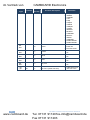
0
1~7
Select Input Source
1: Set
2: Get
1: Set
2: Get
1: Set
2: Get
3: Set
4: Get
20
www.camboard.de
0: Off
1: Low
2: Mid
3: High
0: Off
1: 40ms
2: 110ms
3: 150ms
0 : AUTOMATIC
1 : EMBEDDED
2 : ANALOG
0 : OFF
1 : ON
0 : OFF
1 : ON
1: AV
2: YC
VP-436N - RS-232 Communication Protocol
Tel. 07131 [email protected]
Fax 07131 911203