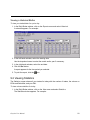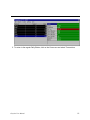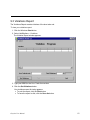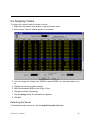
1
Graybox User Manual (19th Edition) Version 2.5.4 Contents 1. Introduction ...........................................................................................................................1 2. Graybox Basics .....................................................................................................................2 2.1 Logging On .......................................................................................................................2 2.2 The Graybox Windows......................................................................................................3 The Active Order Window ...................................................................................................3 Order Entry Area ............................................................................................................3 Active Orders .................................................................................................................4 Column Widths...............................................................................................................4 Message Bar ..................................................................................................................4 Lock / Unlock Button ......................................................................................................4 ECN Status Bar..............................................................................................................5 Refreshing the Data .......................................................................................................5 The Messages Window ......................................................................................................5 View Selections..............................................................................................................5 Column Widths...............................................................................................................6 The Position Window ..........................................................................................................7 Position Covering ...................................................................................................................8 2.3 Order Details ....................................................................................................................9 3. Graybox Quote Display.......................................................................................................11 3.1 The Market Maker Window .............................................................................................13 Market Maker Window – Always On Top ..........................................................................14 Market Maker Window – Round Quotes & Group Quotes.................................................15 Group Quotes...................................................................................................................15 Market Maker Window – Showing/Hiding the Time...........................................................16 Market Maker Window – Sort ...........................................................................................16 Market Maker Window – Changing the Colors for Price Ranges ........................................ 16 Changing Back to the Default Colors ...........................................................................17 Market Maker Window – Highlighting a Market Maker ......................................................18 Market Maker Window – Changing the Display of ECN Books ......................................... 18 Market Maker Window – Consolidate Level 2 .......................................................................19 Market Maker Window – Remove Market Maker ..................................................................20 3.2 The ECN Book Window ..................................................................................................21 ECN Book Window – Always On Top ...............................................................................21 ECN Book Window – Showing/Hiding Executions and Cancels........................................ 22 ECN Book Window – Aggregate by Price .........................................................................22 ECN Book Window – Changing the Colors for Price Ranges ........................................... 22 Changing Back to the Default Colors ...........................................................................23 Adding (or removing) ECNs to the ECN Book (Filter) .......................................................23 3.3 The Island Executions Window .......................................................................................24 Island Executions – Always On Top .................................................................................24 Selecting Stocks for the Island Executions Window (FILTER) .......................................... 24 4. Customizing Graybox .........................................................................................................26 4.1 Setting Up Trading Options .............................................................................................26 4.2 The Super ECN Key .......................................................................................................33 Graybox User Manual i 4.3 Setting Up Smart Order Routing .....................................................................................35 4.4 IGNORE MM LIST ..........................................................................................................36 4.5 THE MULTIPLE SWIPE KEYS .......................................................................................37 4.7 Setting Up Blasting .........................................................................................................39 4.8 Setting Up Keyboard Shortcuts .......................................................................................43 Showing or Hiding Parts of the Graybox Main Windows ...................................................44 Graybox Main Window – Setting the Colors .....................................................................45 Graybox Main Window – Setting the Sounds....................................................................48 4.9 Changing Your Password ...............................................................................................49 4.10 Changing the Server and Router Settings .....................................................................50 4.11 Links .............................................................................................................................51 5. Entering an Order................................................................................................................52 5.1 Launching ECN Orders..............................................................................................53 5.2 Bringing up the Preference box.......................................................................................53 5.3 SUPERSOES .................................................................................................................56 The SOES Order Box .......................................................................................................58 5.4 Listed Trading .................................................................................................................59 5.5 Order Entry bar on MM window ......................................................................................60 6. Changing a Floating Order .................................................................................................64 7. Canceling an Order .............................................................................................................65 Notes:...............................................................................................................................65 8. Advanced Trading ...............................................................................................................68 8.1 Multiple Preference Orders .............................................................................................68 8.2 Crush Orders ..................................................................................................................69 8.3 Blasting......................................................................................................................70 8.4 Multiple Order Entry Using a Basket ...............................................................................73 Position Covering .................................................................................................................74 9. The Back Office ...................................................................................................................76 9.1 Daily Blotter ....................................................................................................................77 Refreshing the Blotter .......................................................................................................77 Changing the Type of a Trade ..........................................................................................78 Highlighting Type Changes ..........................................................................................78 Viewing the Daily Blotter for Another BRSQ .....................................................................78 Printing Your Daily Blotter ................................................................................................78 Exporting to Excel ............................................................................................................79 Viewing a Historical Blotter ...............................................................................................80 9.2 Viewing Statistics ............................................................................................................80 9.3 Violations Report ............................................................................................................82 9.4 Assigning Trades ............................................................................................................83 Refreshing the Screen ......................................................................................................83 9.5 Manual Entry ..................................................................................................................84 9.6 Trashing an Order...........................................................................................................85 Appendix A. Keyboard Reference..........................................................................................86 Notes................................................................................................................................86 OTHER KEYSTROKES ........................................................................................................93 Letter Keys ...........................................................................................................................95 Other Keys on the Main Keyboard ........................................................................................96 Keys on the Number Pad ......................................................................................................96 Graybox User Manual ii 1. Introduction The Graybox trading software application provided by Hold Brothers Online Investment Services Inc, provides revolutionary day trading and SuperSOES trading functionality. The software consists of: • Direct access to the NASDAQ, ECN’s, NYSE and the AMEX • A Position Manager – to monitor your positions • The Graybox quote display – a quote monitor for market makers and ECNs • Comprehensive Analytical tools and Charts to monitor the market This manual is a detailed overview of Graybox. As new versions are released and features added, please refer to the Hold Brothers website for frequent updates. Graybox User Manual 1 2. Graybox Basics 2.1 Logging On To log onto Graybox: 1. Click the Windows Start button. 2. Select Programs – Hold Brothers – Graybox Trader The Graybox Logon box appears: 3. If your Trader ID is not shown, type it in. 4. Type your password. 5. The system automatically shows your default BRSQ account number. If you have two accounts, you can tab to the next field and select the other BRSQ if necessary. 6. Click OK or hit Enter The Graybox main window appears. You can now set up your screen with Market Maker boxes, ECN books, Island executions window and Analytics. Once you have done this you should save your layout. 7. To save your layout once you logon: • Right click on the main window. Click on layout and hit “save”. This will save your current layout for Graybox . To change your layout and save multiple layouts go to “save as”. • When you have multiple layouts saved, you have to go to “load” to bring up the exact layout you want. Remember that when you re-open Graybox it will open on the last layout you used. * To use Graybox in DEMO MODE, log in as TRADER and use DEMO as the password. Now you can use all the features of Graybox without doing real trades. Graybox User Manual 2 2.2 The Graybox Windows The Graybox application consists of three windows: the Active Order window, the Messages window, and the Position Window. You can click on any window and drag it to a new location. The Active Order Window This window displays all floating live orders. Order Entry Area This window shows: • The stock that you currently have the focus on. • The quantity size you want to trade. To change the quantity, you can use the keyboard: 1 = 100, 2 = 200, etc. 0 = 1000 Shift+2 = 2000, Shift+3 = 3000, etc. Shift+~ = Changes your current long or short position quantity in the stock. Example: You are long 1000 DELL and you sell 250 shares. Hitting Shift+~ changes the quantity to 750. ~ Moves the cursor to the Quantity box so you can manually type the number yourself. (Graybox must be unlocked to do this). Graybox User Manual 3 • Cancel Order button – cancels the order you have the focus on. Active Orders All orders that are entered are displayed in this window until they are cancelled, expire or get executed. The columns are: SN Sequence Number S Side: Buy or Sell Type Sym Type of order (limit, market, etc) Symbol Qty The number of shares to buy or sell Price Price Since How long (in hours:minutes:seconds) since the order was accepted by the exchange. Status Status of the order: the exchange and its status: • New indicates that the order has just been entered. • Floating indicates that the order has been entered and is floating. • Partial indicates that the order has been partially filled. • Cancel indicates that your cancel order has been sent. • Auto Cancel indicates that the software is trying to cancel the order. • Once an order has been completely filled or canceled, it moves to the Messages window. • If an order is rejected, it is immediately removed from the Active Order window and shown in the Messages window. For more details on the status of an order, double-click on it to see the Order Details window. Column Widths To change the column widths: 1. Move the cursor onto the line between the two column headings. A symbol will appear. 2. Click the mouse, then drag the column heading to the left or right. Message Bar The message bar, above the lock/unlock bar, shows your position in the currently-selected stock. If you have no position, it is empty. Positions are also displayed in the MM box for that particular stock. Lock / Unlock Button Graybox User Manual 4 If you will be away from your desk, or if you need to switch to another application, click this button (or click Alt+L) to lock Graybox. Otherwise your keyboard will not function properly in other applications. Click this button again to unlock Graybox. When Graybox is locked, no orders can be entered. Note: Minimizing Graybox automatically locks the application. ECN Status Bar Shows the current status of the connection between Graybox and ECNs. If the symbol is green, the connection is up; if it is red the connection is down. Refreshing the Data If the servers are slow due to heavy traffic and you believe your positions may not be correct, Click on position monitor, hit Ctrl+D. This refreshes the data by resynchronizing it with the database. This feature should be used sparingly. The Messages Window This window shows all orders that have been executed, canceled, rejected, or are no longer active for any other reason. For more details on the status of an order, double-click on it. The Order Details window shows the complete text of any error message that may have appeared. View Selections Graybox User Manual 5 To narrow down the incoming messages that are displayed, click a tab: Execs View only executed orders Cancels Has been disabled Other Has been disabled or click the All tab to view all incoming messages. Column Widths To change the column widths: 1. Move the cursor onto the line between the two column headings. A symbol will appear. 2. Right-click the mouse, then drag the column heading to the left or right. Graybox User Manual 6 The Position Window This is your position manager. Long positions are shown in green; short positions are red. If you do not wish to see the columns uncheck the Show Header button above. The columns are: Sym The ticker symbol of the stock you have a positioning. Qty The quantity currently long or short AvgPrice The average price at which the shares were bought. Note: This number does not take sells into account. P/L The total dollar profit or loss on this stock. Abs PB Absolute Pullback. This is a useful feature for position traders. For long positions it shows the high for the day minus the current best bid. For short positions it shows the current offer minus the low for the day. % PB Percentage Pullback. Calculates the percentage of the Pullback to the high/low for the stock. Hedges This will show a trader his open straddle positions. The lower part of the window shows summary information. If you do not want to see the summary, uncheck the Show Summary button from the drop down window. Close P/L The overall P&L up to this time in the trading day, based on closed positions only. Open P/L The potential overall P&L for open positions. (Marked to the bid for long positions and to the offer for short positions.) Buying Power The amount of money you currently have available. Shares Count The number of shares traded up to that point in the trading day. Graybox User Manual 7 Position Covering By right clicking on your position window you bring up the options for covering any open positions. The order is routed using the smart order algorithm. Meaning, the order will be sent out using the choices you have used in your smart order setup. (See Smart Ordering). Therefore if you have no variables in the smart order setup, no orders will be sent out. Also, note that these orders are going to the inside market, and by default the “split order by display size” is turned on. Meaning, if you are covering a large position and a MM is showing 3000 shares, the order will go to him for 3000 shares. Graybox is assuming you want to get out as fast as possible. 1. To cover Selected stock This covers your position in the stock you have the focus on. Defaults to F1+Shift+Ctrl+Alt + Shift + F1 2. To cover all open positions Defaults to Pause+Shift+Ctrl+Alt Ctrl + Alt + Shift + Pause 3. Cover Long Positions Defaults to Ctrl+ L. Covers all long positions Graybox User Manual 8 4.Cover Short Positions Defaults to Ctrl+ K. Covers all short positions. 5. Cover half longs There is no keystroke equivalent for this function 6. Cover half shorts There is no keystroke equivalent for this function 2.3 Order Details To view the details for an order, double-click on the order. The Order Details window appears. For example: For a printout of the order, click the Print button. Graybox User Manual 9 Graybox User Manual 10 3. Graybox Quote Display To open a Market Maker Box click in the shortcut bar at the top of the Active Order window. This will open a MM box and you can type in the symbol. Repeat this process to open multiple MM boxes. (Alt+T will also open a new MM box). Note: A * on an ECN indicates that the quote is coming from the ECN book. Graybox User Manual 11 in the shortcut bar or in the MM box To open a window for ECN Book quotes, click click the same icon. ECN books brought up in this fashion will be automatically linked to the MM box. To open a window for Island executions, click Graybox User Manual in the shortcut bar. 12 3.1 The Market Maker Window When you set the focus on any MM window it will also show you any position you have in that stock. From this box you may also open the ECN book and charts. There is also the option to see the order quantity for the trade you are about to launch. (Go to the trading options and check the Show Qty field box). It will show the same quantity as what is being displayed in the Active Order window. This version of Graybox comes with a new order entry screen that is part of the MarketMaker window. The window can be used to trade both listed and OTC securities and allows orders to be routed to all available ECNs/Exchanges. In addition, the Order Entry window allows users to send new types of orders (Stop, Stop Limit, MOC, LOC) as well as change the Time In Force of an individual order on the fly. This order entry window can be disabled for traders who do not want to see the new window. This can be done in Trading Options under MM Order Entry Display. Graybox User Manual 13 Graybox gives you numerous ways to view the data in this box. Right-clicking anywhere on the Market Maker window shows the Market Maker menu: Market Maker Window – Always On Top To have this Market Maker window always appear on top of any other windows or screens: Graybox User Manual 14 νIn the Market Maker menu, select Always On Top. Minimizing Graybox minimizes all Graybox quote displays windows. Market Maker Window – Round Quotes & Group Quotes In the MM box you have a choice of how you would like to see the quote display. For example, if you do not want to see all the very small quotes listed on the ECN’s then you could round to the nearest penny. Just go to Round Quotes and pick the decimal you want to round to. NOTE: See the Trading Options (chapter 4) to see what style of rounding is available. Group Quotes Graybox allows price levels to be combined in the marketmaker window by placing all market makers & ECN quotes within a price range as a single group. Each group corresponds to a single price level . The SNET preference window also represents each group as one level. The grouping values range from 1 cent to 50 cents. E.g. if the grouping value is chosen as 5 cents, all market makers and ECNs within a 5 cents interval are represented as one level and defined with a single background color. By default, the price intervals for each group is calculated on a sliding scale from the inside market (best bid or offer). If the inside market for a stock is 10.49 – 10.52, all the bids between 10.49 and 10.45 are represented as a single level. Similarly all offers between 10.52 and 10.56 are treated as one level and so on and so forth. To enable grouping, right click on a marketmaker window and select a grouping value. Graybox User Manual 15 Market Maker Window – Showing/Hiding the Time To show the time in the Sales column: In the Market Maker menu, select Show Time, then Actual. This changes the Sales column to “Sales & Time”. To remove the time from the Sales & Time column: In the Market Maker menu, select Show Time, then None. Market Maker Window – Sort This decides how you will see the order of the MM’s and ECN’s in the MM box. By choosing Volume, the MM’s and ECN’s will be in order of greatest volume. Market Maker Window – Changing the Colors for Price Ranges To change the colors for the price ranges: 1. In the Market Maker menu, select Set Colors, then Custom. A window appears: Graybox User Manual 16 2. Click on the color for the price range you want to change. A window appears: 3. Select the color you want to use, then click OK. or click Define Custom Colors>> and select the color on that window, then click OK. 4. Repeat steps 2 and 3 for each price level whose color you want to change. 5. Click OK to save your changes. Changing Back to the Default Colors To change back to the original colors: Graybox User Manual 17 In the Market Maker menu, select Set Colors, then Default. Market Maker Window – Highlighting a Market Maker To highlight a particular market maker so it is displayed in reverse type: 1. In the Market Maker menu, select Hi-Lite MarketMaker. A window appears: 2. Select the market maker, then click Add. 3. Repeat step 2 for each market maker you want to highlight. 4. By clicking on Style you can choose either black or red as the highlighted color. 5. Click OK. Market Maker Window – Changing the Display of ECN Books • The ECN books shown in the Market Maker window can be set to either the inside market, the full market or none. With the inside market setting you will see the best bid and ask on that ECN. With the full book setting you will see a list of all the bids and asks at different levels for all the available ECN’s. • REDI TOB: This version supports REDI Top of the Book feed as and when they are available from our book servers. Graybox User Manual 18 To change the display for the ECN books in the Market Maker window: 1. Go to the Market Maker menu, select ECN Books, then select the setting you want to view for the ECN Book: 2. Repeat step 1 for each ECN book, as necessary. By having none of them checked, you will be seeing the quote data from NASDAQ. 3. What is Instinet TOB setting? This is a separate service that we subscribe to from Instinet which gives us the best bid and ask on INCA. (Top of Book) Market Maker Window – Consolidate Level 2 CONSLIDATED SELECTNET PREFERENCE KEYS when using Graybox quote display to trade, the consolidated SNET keys brings up the preference box pegged to NASDAQ Price levels. The ECN book data is consolidated according to NQDS price levels, displaying an aggregated volume of all ECN quotes between levels. The Market Maker windows also give the ability to display quotes by consolidating ECN book data. This option is usually checked when you do not want to see the small bids and offers between NASDAQ price levels. Graybox User Manual 19 The news keys and their default keystrokes are: FUNCTION M-DEFAULT C-DEFAULT SelectNet Bid (Consolidated Levels) CTRL+F8 CTRL+Z SelectNet Offer (Consolidated Levels) CTRL+F4 CTRL+? SelectNet Preference Bid (Consolidated Levels) CTRL+F9 CTRL+ALT+Z SelectNet Preference Sell (Consolidated Levels) CTRL+F5 CTRL+ALT+? SelectNet Preference Short Sell (Consolidated Levels) CTRL+SHIFT+F5 CTRL+> SelectNet Short Offer (Consolidated Levels) CTRL+SHIFT+F4 CTRL+SHIFT+> Market Maker Window – Remove Market Maker This function allows users to locally clean bad MM’s and ECN’s from their display. This will not remove them permanently. So if you refresh the box they will re-appear. To have them permanently removed, please ask a tech to do this. Graybox User Manual 20 3.2 The ECN Book Window This is a quote montage for the ECN’s that we have access to. It shows all the open bids and offers on the different ECN’s. Different price levels are differentiated by color. Right-clicking anywhere on an ECN Book window shows the ECN Book menu: ECN Book Window – Always On Top Graybox User Manual 21 To have this ECN Book window always appear on top of any other windows or screens: In ECN Book menu, select Always On Top. the ECN Book Window – Showing/Hiding Executions and Cancels To show or hide the Executions column: In the ECN Book menu, select Show Executions. To show or hide the Cancels column: In the ECN Book menu, select Show Cancels. ECN Book Window – Aggregate by Price This allows a user to aggregate the ECN’s by price. For example, instead of seeing all the ISLD bids at a particular price it will show one bid with the volume aggregated. ECN Book Window – Changing the Colors for Price Ranges To change the colors for the price ranges: 1. In the ECN Book menu, select Set Colors, then Custom. A window appears: 2. Click on the color for the price range you want to change. A window appears: Graybox User Manual 22 3. Select the color you want to use, then click OK. or click Define Custom Colors>> and select the color on that window, then click OK. 4. Repeat steps 2 and 3 for each price level whose color you want to change. 5. Click OK to save your changes. Changing Back to the Default Colors To change back to the original colors: In the ECN Book menu, select Set Colors, then Default. Adding (or removing) ECNs to the ECN Book (Filter) To add or remove ECNs to the ECN Book : 1. In the ECN Book menu, select Filter. This window appears: Graybox User Manual 23 2. Type the name of the ECN in the left box, then click Add or Remove. 3.3 The Island Executions Window In its default setting you are seeing all reported trades on ISLD. You can set this to see only certain stocks. See below. You see the price followed by the number of shares traded. If you see a highlighted green bar, it means the execution took place above the ask. A highlighted red bar means the trade took place below the bid. Right-clicking anywhere on an Island Executions window shows the Island Executions menu: Island Executions – Always On Top To have this Island Executions window always appear on top of any other windows or screens: In the Island Executions menu, select Always On Top. Selecting Stocks for the Island Executions Window (FILTER) Graybox User Manual 24 To select only certain stocks to display in the Island Executions window: 1. In the Island Executions menu, select Filter. A window appears: 2. Type the name of the symbol in the left box, then click Add to add it to the list of symbols. 3. To see only executions above a certain price, click the Price check box and type the price. 4. To see only executions at or above a certain size, click the Size check box and type the size. 5. To see only the Buy side or only the Sell side, check the Buy or Sell check box. 6. Click OK. 7. NOTE: In the Lite version of Graybox, you will only see the ISLD executions in the stocks you bring up in your MM box throughout the day. Graybox User Manual 25 4. Customizing Graybox 4.1 Setting Up Trading Options To customize your trading options for Graybox: 1. Right-click on the active order window, to get the Graybox menu. 2. Select Trading Options from the menu. The window above appears: 3. Follow the information below. Graybox User Manual 26 Time in Force Default Quantity Default Display Qty Order Display Mode for ISLD, BRUT, and MKXT The number of seconds orders will float before they time out. The default is set at 180 seconds. For INCA orders, do not set the default below 120 seconds, otherwise the order will get rejected. The default number of shares for each trade that appears in the Quantity box in the Graybox main window Set the display quantity and if remaining quantity exists will be set to reserved quantity • Normal: All orders going to an ECN are marked as “Normal” and they are shown on the NASDAQ Level 2 display as well as the ECN book. However, “Normal” orders cannot lock or cross the market. If you try to do this, the order is rejected. • Subscriber: All orders going to an ECN are marked as “Subscriber Only” (Hidden). They are shown on the ECN book but not on the NASDAQ Level 2 display. These orders can lock or cross the market. • Automatic: Graybox detects which orders can potentially lock or cross the market and sends them out as “Subscriber Only”. All other orders go out as “Normal.” Automatic Close Mode Reset Share Size according to default quantity Graybox User Manual Hidden: Allows you to send hidden Island orders. The SNET preference box, allows users to send hidden orders to Island, by enabling the Hide check box on the preference box. (i.e. the order is not seen on Level 2 or the Island book). Valid for Otrade using Real Tick & Xquotes. Automatically changes the quantity to your current long or short position in that stock when you go to cover your position. However, if the position is greater than your default qty size then the order will go out for the default size. For example, if you were long 375 shares of CSCO, and your default is a 1000, your quantity for CSCO would go out for 375 shares. This feature resets share size taking into account the default quantity and the current position. E.g. if you are long 100 shares of DELL and your default Quantity for DELL is 1000, the next order (and only the next order) will automatically go out for 900. 27 Cancel Retry on Reject Graybox will automatically resend cancel requests for SOES and ECN orders, after the cancel key is hit, once it receives a cancel reject message Smart Order Auto Cover When using Smart Ordering, the Smart Orders detects an open position, if any, for the specified stock, and resets the quantity to cover the position. So, instead of sending out orders for your default quantity size, it sends orders for your open position. Note that, if your open position is greater than your default qty size the order will go out for the default qty size. IOC Mode for Redi, Arca, Inca, Brut, Btrd, ISLD, MKXT, and SuperMontage • • • Graybox User Manual IOC: All Orders go out as Immediate or Cancel. If the ECN has a match in their books, the order gets executed or else the order is automatically cancelled Normal: Orders are sent out with the default Time In Force. This allows the ECN to be proactive in their order matching and forward orders to SNET or other ECNs if they cannot find a match in their books. This feature, at times, can cause cancels to be delayed. Automatic: This allows Graybox to determine whether orders go out as IOC or Normal. The logic followed is to allow all orders that post liquidity to be sent out as Normal and all orders that grab liquidity to be sent out IOC. E.g. all Buy orders above the offer go out as IOC while buy order under the offer go out as Normal. 28 SelectNet Window Override Graybox User Manual Sets how the Selectnet Preference order box appears on your screen. • Open Always – The Preference order box remains open all the time. To close it, click the button. • Smart/Follow MM window – The Preference order box follows the Xquotes MM boxes. In other words it will open for each MM box wherever you last set it. • Smart/Single location – The Preference order box opens where you last set it. It will then remain open while you are entering orders for a stock and then closes when you change the focus to another part of the screen. • Follow MM / stay open – The Preference order box will follow the MM boxes and stay open. • Automatic – Allows you to send SelectNet orders away from the NASDAQ inside market without having to select Override in the Preference order box. (Selects Override automatically.) • Manual – To send a SelectNet order away from the inside market, you must click the Override check box manually. 29 Non Liability Type • • The arrival of SuperSOES is going to turn SelectNet into a non-liability / negotiation system. Marker Makers will not be liable to fill preference orders even if they are displaying a certain size. ECNs, however, will be treated the same way as before. Graybox will automatically send non-liable orders to SNET. A user has three choices as to how he will route these selectnet orders. Go to Trading Options> SNET Non Liability Type. • Oversize: All SNET orders will go out at a quantity 100 greater than what the preferenced market maker is displaying. If the order Qty is less than the minimum oversize requirement, the order qty will be automatically changed to meet the requirement. • Price Negotiation: SNET preference orders will automatically go out at a cent better than the price a market maker is quoting. (E.g. if MSCO is bidding at 45.01, a preference sell order will go out at 45.02. If MSCO is offering at 45.02, a preference buy order will go out at 45.01) Automatic: In this mode, Graybox sends out oversized SNET preferences when the order quantity is less than or equal to a specified threshold amount. If the market maker display size is greater than the threshold quantity, the preference is sent out using the Price negotiation mode. (E.g. suppose the threshold quantity for a user is 2000 and the Order Quantity is 1000. If market maker XXXX is offering 1500 shares of MSFT at 77.83, Graybox will send preference buy order to XXXX for 1600 shares at 77.83. However, if XXXX was offering 3500 shares of MSFT at 77.83, the preference order will go out to XXXX for 1000 shares at 77.82 as 3500 crosses the threshold quantity of 2000). To set the threshold quantity for the Automatic mode, go to Trading Options and set the SNET Auto Threshold Quantity field with the appropriate value Graybox User Manual 30 SNET Box Focus On • This allows users to configure which button will have the focus once they open their SNET Preference window. If you choose an ECN you can use the Tab key to tab through the ECN boxes. If you choose SNET you can use the Tab key to tab through the Market Maker buttons. Hitting the enter key then launches the order. • Enter & Order: This feature allows users to preference various market makers/ECNs at different levels by repeatedly pressing the ENTER key in the SNET Pref. Window. To enable this feature, the user needs to have the SNET Box Focus set to SNET ( in Trading Options). On bringing up the SNET Pref. Window, the focus is set on the first market maker button. Hitting ENTER sends out a preference order for the market maker represented by the button. Automatically, the focus shifts to the next market maker button. Hitting ENTER again sends out a preference to that particular market maker and so on and so forth. At the end of each level, SNET Pref. Window moves to the next price level with the focus on the first market maker button. SelectNet Cancels The type of cancel sent for a SelectNet order (since SelectNet orders cannot be canceled until 10 seconds have passed): • Auto Cancel – Hitting the Cancel function sends cancels until the 10-second delay has passed. You only need to hit the Cancel function once. • Once – Hitting the Cancel function sends one cancel. For SelectNet orders, this means you must hit the Cancel button repeatedly until the 10-second delay has passed. Quote Style Sets how information is updated in the Order Preference box. • Live – Automatically updates the market makers and price in the Preference order box. Note: This can result in executions that are different from the price you sent in a fast moving stock. • Manual – Shows the market makers and price as of the time the Preference order box was opened. As the stock moves, this information can only be updated manually by hitting a Preference Order key again. Graybox User Manual 31 Follow MM Levels on Price Change The MM’s in the Selectnet preference box automatically change with the manual change in price, using the arrow keys. ISLD Execs Sets ISLD orders to be routed directly to ISLD or through SelectNet. INCA Execs Sets INCA orders to be routed directly to INCA or through SelectNet. BTRD Execs Sets BTRD orders to be routed directly to BTRD or through SelectNet. REDI Execs Sets REDI orders to be routed directly to REDI or through SelectNet. ARCA Execs Sets ARCA orders to be routed directly to ARCA or through SelectNet. BRUT Execs Sets BRUT orders to be routed directly to BRUT or through SelectNet. ATTN Execs Sets ATTN orders to be routed directly to ATTN or through SelectNet. FIX Options: Inside Price Check Options: on or off. This feature will be available in a future release. Pegging Options: Last Peg, Peg, None, Mid-Price, or Primary Peg. This feature will be available in a future release. Min. Quantity This feature will be available in a future release. Max. Floor This feature will be available in a future release. Default Qty / Stock Sets the default quantity for individual stocks. (This is the default number of shares that appears in the Quantity box in the Graybox main window). This is used where you want to trade certain stocks in a quantity different from your default qty size. Type the stock and the quantity, then click Add. Scroll Max/Scroll Min Users can set minimum and maximum quantity values while changing their share size using the arrow keys. That is, by increasing you share size using the arrow keys, it will not go above the scroll max. Graybox User Manual 32 Window Style Sets the Position Window to be: • Docked – Attached to the Graybox main window and moves with it. • Floating – Free-floating so you can move it with the cursor Show Firm Position Make sure you are enabled for this feature. Ask one of the techs. Show Quantity Auto Adjust Bullet • • Size Rounding Style The Graybox Marketmaker window comes with an Order Quantity field. The value of the field is the same as what is being displayed by the Quantity field in the Active Orders window. This is for users who want to launch orders and only look at the MM box. Automatically changes your bullet size to the minimum size order. There are four options available as to what style you want the rounding in your MM box to be. i) Into the Market: This rounds down the bid and rounds up the offer. (this is according to the rounding value you pick in your MM box) ii) Away from the Market: This rounds up the bid and down the offer. iii) Always round down bid and offer: This rounds down the bid and the offer. iv) Always round up bid and offer: This rounds up the bid and the offer. NOTE: If you chose the blank option it defaults to the first option above. Don’t forget to choose in the MM box the rounding value. 0.1, 0.005 etc. Also if you choose Consolidate level 2 in the MM box, this rounding function will not work. 4. When you finish making changes, click OK. 4.2 The Super ECN Key The Super ECN key, Alt+1, sends orders out to all ECN’s listed in the setup box below, at the price specified in the Preference order box. You have the option of sending a SOES limit or Graybox User Manual 33 market order for the size specified in this setup box. To launch these orders the preference box must be open. These orders go out for your default qty size. (Except for the SOES order, which will go out for the quantity specified in the setup). You can setup the SuperECN key to exclude certain ECN’s. This feature can be used to go long, sell or go short. To exclude ECNs from the Super ECN key: 1. Right-click on the active order window, to get the Graybox menu. 2. Select Setup, then SuperECNKey. A window appears: 3. Click the ECN(s) you want the Super ECN key to ignore. disables the SOES order) (Putting 0 in the SOES box 4. Choose what type of order you want to send out. 5. Finally, the user can specify at what price he/she wants the order to be sent out at in respect to the inside market (Buying at the offer/selling at the bid). 6. Click OK. • DIRECT SUPER ECN KEY: Version 2.5 and forward provides a new set of SuperECNKeys that work without having the SNET Pref. Window open. The orders go out at the current inside market (best inside ask for buys and the best inside bid for sells/short sells). They use the same setting as used by the other SuperECNKeys. • The keystrokes are disabled by default and can be assigned using the KeyMapConfig. Window by selecting the MarketMaker tab. Graybox User Manual 34 4.3 Setting Up Smart Order Routing This feature allows a trader to set up his smart order keys (default to CTRL + B, CTRL + S, and Shift + S ) for one-key execution with the market maker or ECN of his choice. You set up a list of ECNs and market makers in priority order. If the first choice is not available, the smart feature moves down the list to the next available ECN or market maker. • CTRL + S sends a sell order to the first choice on your smart order routing list. If your first choice is not available the order will go to the next choice, and so on until the order goes out. • CTRL + B sends a buy order to your smart order routing list. • Shift+S sends a short sell order to your smart order routing list. Note: Using SNET as an option, will send the order to the market maker or ECN that displays the highest volume in the inside market. You can also send a SOES limit or market order. To send a SOES limit use “SLMT”. To send a SOES market use “SOES”. To set up Smart Order Routing: 1. Shift focus to the active order window. 2. Right-click on the active order window, to get the Graybox menu. 3. Select Setup in the menu, then Smart Order. A window appears: 4. Type the four-letter market maker or ECN symbol in the top field. 5. Click the Add button (or hit the Enter key). The ECN or market maker appears in the routing list. 6. Repeat steps 4 and 5 for each market maker and ECN you want to include. 7. To change the order of a symbol in the list: a. Select the symbol in the list. Graybox User Manual 35 b. Click the Move Up or Move Dn button as many times as necessary. 8. The split order by display size is a feature that breaks up your order should the volume been shown on level two is less than the size of the order you are sending. Example, you send a sell order for 2000 shares and ISLD is at the inside showing 800 shares. This feature will split the order up so that 800 will go to ISLD and the remaining 1200 will go to the next ECN or SOES and so on. 9. The user can also specify what price the order will be sent out above the inside market by adjusting the delta value. To remove an ECN or market maker from the list: 1. Select the symbol in the list. 2. Click the Delete button. To clear the list and start over: Click the Clear button. DYNAMIC SMART ORDERS – Works with the same settings as the regular smart orders with the exceptions of that the dynamic orders will: - sends out all orders as IOC’s - tries again on cancels and rejects at the same price or better up to 5 times 4.4 IGNORE MM LIST A trader who is launching multiple orders may chose to ignore certain market makers when launching an order. Select setup from the Graybox menu and pick ignore MM list. By checking Ignore all MM’s, a user cannot send preference orders to any NASDAQ MM over selectnet. Graybox User Manual 36 4.5 THE MULTIPLE SWIPE KEYS Go to the Graybox menu and pick setup. Then go to the swipe key. This allows users to configure five sets of ECN swipe keys. These keys need to be enabled separately in the keymap config. These keys are commonly referred to as the Shave Keys. • • • This allows users to send orders at a specified differential (factor) above/below the best Bid/Offer for a specified ECN. Swipe orders do not go by the best NASDAQ bid/offer, but go at the increment based on the best bid/offer for the specific ECN or the Inside Market. The order is placed on top of the specific ECN book or Inside Market. To launch this order the preference box does not have to be open. To enable the swipe keys: Go to “Keymap Configuration” and enable the Swipe Keys. The default values for swipe 1 are CTRL+ I/SHIFT+ I for Swipe Bid and Offer respectively. If required, users can change the keystrokes. Choose a required Swipe ECN (e.g. ISLD) and the Swipe Factor (e.g. 0.001) and if the swipe will be based on the Inside Market or ECN Market. The SOES Delta Keys allow users to send SOES limit orders at a specified increment above the market. To set the increment, on the context menu click on Setup->Swipe. In the SOES Delta Value field, enter the decimal value of the increment for the limit price. By default, SOES Delta key functions are disabled with no keystrokes assigned to them. To use them, go to Keymap config and assign appropriate keystrokes to the key functions and enable them Graybox User Manual 37 Graybox User Manual 38 4.7 Setting Up Blasting “Blasting” is used to send multiple orders to market makers and ECN’s on a pre-selected number of levels. By default, orders are sent out in your default quantity size. So if your Max Share Qty is 5000 and your default is 1000, then five orders of a 1000 will be sent out. It does not automatically preference everyone in each level up to the amount of levels you choose. If it did you would run the possibility of getting filled on more shares than you intended. In the latest version of Graybox, there are three sets of blasting keys. These can all be set up differently. There is also the option to include a SOES market order with each order. Also, orders can be sent out in a quantity different from your default size. (Check the box marked display size to do this). What this does is send an order to a MM for the quantity he is showing. To set up blasting: 1. Right-click on the active order window, to get the Graybox menu. 2. Select Setup in the menu, then Blasting. A window appears: Graybox User Manual 39 3. Fill in the Blasting Setup windows as follows: Maximum Levels The maximum number of price levels that orders can be sent to. Max. Price Differential The maximum difference in price from the inside market, that orders will be sent to. (Levels) This protects you in case the steps between price levels are large. So .25 would be a quarter away from the inside market. Graybox User Manual 40 Max Number Of Orders Maximum number of orders that will be sent out with each key stroke Maximum Share Quantity The maximum number of shares that can be possibly accumulated. Single Order Lot Size Blast Up To GB Order Quantity Send SOES Delta If Qty Remaining Having this option checked will send an additional order for any remaining quantity to SOES with a limit price of the inside plus the delta value that is choosen. Display Size Allow you to send out orders in the size the MM is displaying. Send SOES Sends a SOES market order with every blast order. This is not in addition to your Max Share Qty. Ignore Check off any ECNs or market makers that you do not want your orders to go to. Blasting Buy 1 Defaults to Alt+F9 Blasting Sell 1 Defaults to Alt+F5 Blasting Short Sell 1 Defaults to Shift+Alt+F5 Blast Buy 2 Alt + N Graybox User Manual 41 Blast Sell 2 Ctrl + N Blast SS 2 Ctrl + Alt + N Blast Buy 3 Alt + J Blast Sell 3 Ctrl + J Blast SS 3 Ctrl + Alt + J Graybox User Manual 42 4.8 Setting Up Keyboard Shortcuts • • • • • • • In this version of Graybox the Keystrokes are divided into three lists. Keystrokes for the Graybox main window, Keystrokes for the MarketMaker window, and Keystrokes for the SNET Preference window. (See top left of diagram) All current used keys are in blue. The key combinations for the different functions are in yellow. When you highlight a function the keystroke will come up in yellow. For example when you highlight "cancel all sell orders", the keystroke Alt + F12 gets highlighted. To change a function to another keystroke: Highlight the function you want to change. In the Key column click the keystroke. In the example above that would be F12. It will turn yellow. Suppose you want to change it to F11. Put the cursor on F11 and click. The F12 will change to F11. Now hit apply and you are done. If the new keystroke you choose is already being used for another function a dialog box will appear to let you know this. You must either, change the other keystroke first so there will be no conflict or disable the keystroke. To disable a function double click in the disabled column. There are two default settings on this keyboard. One for MTrade users and one for Cyber users. To go to these defaults click on "Set Default" hit yes and choose which default you want. It is a good idea to have all users disable any keystrokes they do not use, especially for new traders. To print these keystrokes see the tabs at the bottom of the keymap config. (Disabled in 2.5.1, will be enabled in later versions). Graybox User Manual 43 To return to the default key mappings at any time, click the Set Default button. Note that this will delete all the keyboard shortcuts you defined. Showing or Hiding Parts of the Graybox Main Windows To show or hide parts of the Graybox main windows: 1. In the main menu, click View and the following options will appear: Messages Ticker, Positions Monitor, Executions Ticker, Menu, and Status bar. Graybox User Manual 44 2. Select the options you want: Messages Shows or hides the Incoming Messages window Positions Shows or hides the Position Window, which shows your positions and your current available buying power Executions Shows or hides the your executions Menu Shows the menu at the top of the Graybox active order window Status Bar . Shows or hides the ECN Status Bar, which shows the current status of the connection between Graybox and ECN’s Graybox Main Window – Setting the Colors To change the foreground and background colors for the Stock and Quantity boxes and the message bar: 1. Right-click on the active order window, to get the Graybox menu. 2. Select Setup, then Color. A window appears: Graybox User Manual 45 3. Click the button next to Foreground or Background. A window appears: 4. Select the color you want. 5. Click OK. 6. Click OK again to save your changes. Graybox Main Window – Setting the Font To change the font for the column headings and tabs in the Graybox main window: 1. Right-click on the active order window, to get the Graybox menu. 2. Select Setup, then Fonts. A window appears: Graybox User Manual 46 - 3. Select the font, then click OK. Graybox User Manual 47 Graybox Main Window – Setting the Sounds When a trading event occurs – an execution, partial fill, confirmation, cancellation, or error – Graybox can play a sound for confirmation. Graybox has a set of default sounds, or you can use any .wav file of your choice. To set the sound for trading events: 1. Right-click on the active order window, to get the Graybox menu. 2. Select Setup, then Sounds. A window appears: 3. For each event that you want to associate a sound with: button next to the event. a. Click the A list of sounds appears. b. Select the sound. c. Click OK. or If you wish to use your own .wav file, navigate to the directory where it is located, then select it. 4. Repeat this step for each event you want to associate a sound with. 5. When you are finished assigning sounds, click OK. Graybox User Manual 48 4.9 Changing Your Password To change your password for the Graybox application: 1. Right-click on the active order window, to get the Graybox menu. 2. Select Setup, then Change Password. A window appears: 3. Type in your old password. 4. Type the new password you want to use. 5. In the Confirm New Password field, type the new password again. 6. Click OK. Graybox User Manual 49 4.10 Changing the Server and Router Settings 1. Right-click on the active order window, to get the Graybox menu 2. Select Setup, then Servers. A window appears: 3. Set the server and router settings. The Graybox Quotes box must be checked to activate the Graybox quote display. 4. For all the correct settings please ask one of the Techs to set up your application correctly. Graybox User Manual 50 4.11 Links 1. Right-click on the active order window, to get the Graybox menu. 2. Select links. This is a feature that links the Real Tick Charts and MM boxes to the Graybox quote display MM box. Have one of the techs show you how to set up these links. FROM checked: When you change the symbol in a real tick MM box it also changes in the Graybox MM box. TO checked: When you change a symbol in the Graybox MM box it changes in the real tick MM box. TO ON ENTER checked: When you tab between MM boxes in Graybox the real tick MM box will not change until you press enter. Graybox User Manual 51 5. Entering an Order IN this version of Graybox there is a new menu bar, (right where it says file, edit etc,) which displays all functions and their keyboard shortcuts. Just click on the appropriate word and follow the drop down window. Graybox gives a user multiple ways to enter orders. Some of the basic ways are as follows; 1. Select the stock Type the stock in a MM window and press Enter or set the focus on the MM box of the stock you wish to trade. 2. To change the quantity: The quantity will automatically come up as your default size. If you want to change the qty size, use the number keys as follows. 1 = 100, 2 = 200, etc. 0 = 1000 Shift+2 = 2000, Shift+3 = 3000, etc. Shift+~ = Changes your size to your current long or short position in a stock. Example: You are long 1000 DELL and you sell 250 shares. Hitting Shift+~ changes the quantity to 750. ~ 3. Submit the order Graybox User Manual Moves the cursor to the Quantity box so you can manually edit the qty size yourself. See all the ways to do this from the choices below. 52 5.1 Launching ECN Orders 1) Please see the Keyboard Reference at the back of the manual for all the different keystrokes for launching an ECN order. (Remembering that most of these keystrokes are programmable). 2) ECN orders can also be launched by clicking on the individual ECN buttons above or go to the keymap config and enable the orders to be launched using certain letter keys. Like S for ISLD. To send the SuperSOES orders; the INSERT key sends a SOES MKT order and the DELETE key sends a SOES LMT order. 3) The Super ECN key, Alt+1, sends orders out to all ECNs that we have access to at the price specified in the Preference order box. These orders go out for your default qty size. 4) If you want to send your ISLD orders hidden, there is a hot key to do this. Go to the keymap and choose the Selectnet window tab. Select ISLD hidden order and assign it a keystroke. 5.2 Bringing up the Preference box Preference Buy on the Bid Default is F8 Preference Take the Offer Default is F9 Preference Offer Default is F4 Preference Sell Default is F5 Preference Short Offer Default is Shift+F4 Preference Short Sell Default is Shift+F5 Graybox User Manual 53 These orders open the Preference order box: Please see the Trading options section for the different ways the preference box can be setup. 1. To change the price level: Page Up shows the next lower price level. Page Down shows the next higher price level. This will also show the MM’s and ECN’s at that level. or use the + and – keys on the number pad. These keys will only update the MM’s and ECN’s if you check the, Follow MM on price change, box in the trading options setup. or use the next to the Price box. To enable your arrow keys to change the price, go to the keymap config. 2. To change the quantity: 3. To change the step: 1 = 100, 2 = 200, etc. ( On the main keyboard) 0 = 1000. Shift+2 = 2000, Shift+3 = 3000, etc. Shift+~ = Your current long or short position in the stock. Example: You are long 1000 DELL and you sell 250 shares. Hitting Shift+~ changes the quantity to 750. ~ Moves the cursor to the Quantity box so you can manually type the size yourself. End decreases the size of the step by one increment. Shift+End increases the size of the step by one increment. or click the Graybox User Manual next to the Step box and select the step. 54 4. Order Options: Ctrl+M checks/unchecks the Market check box. Not checked = order at the inside market. Checked = market order. Home checks/unchecks the Subscriber check box. Checked = order is not displayed on Level Two. Override check box: Checked = order can cross the inside market. Any check box: Not checked = order is All or Nothing. Checked = accept any amount you get filled with. 5. Submit the order • You can send an order through any of the named ECN’s by clicking on one of the Standard buttons. or • Click the letter that is setup in the keymap config. (click U for BRUT, etc. or • Click one of the Dynamic buttons. or • On the number pad, click the number for one of the Dynamic buttons. (In the above example, click 0 for REDI, etc.) • To send the SuperSOES orders; the INSERT key sends a SOES MKT order and the DELETE key sends a SOES LMT order. (This must be enabled in the keymap) The Buy or Sell button sends a broadcast SelectNet buy order. (The order preference box must be open). Decimal (on the number pad) sends ISLD order at the specified price. Enter (on the number pad) sends an INCA order at the specified price. * (on the number pad) sends a broadcast SelectNet order. This is a non-liability order Graybox User Manual 55 5.3 SUPERSOES • Graybox is SuperSOES compatible. Some features of SuperSOES: o SOES is available for Principal accounts (Prop. Traders) & Customer accounts. o SOES orders can be sent up to a share size of 999,999 (SOES tier limit rules become redundant) o A Market Maker’s display as well as his reserve size will be available for auto execution o SelectNET becomes a non-liability system (except for ECNs.) • SNET Non Liability Type: The arrival of SuperSOES is going to turn SelectNet into a non-liability / negotiation system. Marker Makers will not be liable to fill preference orders even if they are displaying a certain size. ECN’s however, will be treated the same way as before. Graybox will automatically send non-liable orders to SNET. Graybox supports three types of non-liable SNET orders that can be selected by the user in Trading Options-> SNET Non Liability Type. • Oversize: All SNET orders will go out at a quantity 100 greater than what the preferenced market maker is displaying. If the order Qty is less than the minimum oversize requirement, the order qty will be automatically changed to meet the requirement. • Price Negotiation: SNET preference orders will automatically go out at a penny better than the price a market maker is quoting. (E.g. if MSCO is bidding at 45.01, a preference sell order will go out at 45.02. If MSCO is offering at 45.02, a preference buy order will go out at 45.01) • Automatic: In this mode, Graybox sends out oversized SNET preferences when the order quantity is less than or equal to a specified threshold amount. If the market maker display size is greater than the threshold quantity, the preference is sent out using the Price negotiation mode. (E.g. suppose the threshold quantity for a user is 2000 and the Order Quantity is 1000. If market maker XXXX is offering 1500 shares of MSFT at 77.83, Graybox will send preference buy order to XXXX for 1600 shares at 77.83. However, if XXXX was offering 3500 shares of MSFT at 77.83, the preference order will go out to XXXX for 1000 shares at 77.82 as 3500 crosses the threshold quantity of 2000). Graybox User Manual 56 To set the threshold quantity for the Automatic mode, go to Trading Options and set the SNET Auto Threshold Quantity field with the appropriate value. As well as the basic SOES keys listed below, Graybox has incorporated a number of new SOES keystrokes. • SOES Market Buy Default is F7 SOES Limit Buy on Inside Market Default is F6 SOES Limit Buy Default is Ctrl+F6 . Opens the SOES order box. See below for details. SOES Market Sell Default is F2 SOES Limit Sell on Inside Market Default is F3 SOES Limit Sell Default is Ctrl+F3. Opens the SOES order box. See below for details. SOES Short Market Order Default is Shift+F2 SOES Limit Short Sell Default is Shift+F3 CRUSH KEYS: The Crush keys send out orders to everyone in the inside market plus a SOES Market order. This functionality of Graybox has been upgraded to allow users to have the option of ignoring SelectNet market makers and sending the SOES order at a different size from the rest of the orders. In addition, this version comes with two extra sets of Crush keys that can be configured and enabled by the users. To set the Crush parameters, on the context menu click on Setup->Crush Market. The options are: o Super SOES Order Qty: The size of the SOES MKT Order to be sent out. o Send SNET Preference Orders to Market Makers: If this check box is turned on, the Crush keys will send out preference orders to all market makers and ECNs in the inside market. If turned off, only the ECNs are preferenced along with the SOES order. Graybox User Manual 57 o By default, the new set of CRUSH key functions are disabled with no keystrokes assigned to them. To use them, go to Keymap config and assign appropriate keystrokes to the functions and enable them. Also see the Super ECN Key and the Swipe Key for additional SOES keystrokes The SOES Order Box The SOES order box appears when you hit Ctrl+F6 to enter a SOES Limit Buy order or Ctrl+F3 to enter a SOES Limit Sell order. It works like the regular SOES orders but provides a different user interface. All order entry boxes are now color-coded. Green for buy and red for sell. 1. To change the quantity: Type the new quantity in the Qty box. 2. To change the limit: Click the to increase or decrease the limit. 2. To change the step: Click the next to the Step box, then select the step. Graybox User Manual 58 Click the Buy button. 3. Submit the order 5.4 Listed Trading The Listed Order Entry Box allows you to buy or sell NYSE or AMEX listed stocks. Listed Buy Default is F8 or F9 Listed Sell Default is F4 or F5 Listed Short Sell Default is Shift+F4 If the current symbol is a listed stock, these keystrokes open the Listed order box. Graybox allows users to select the way orders are routed to the NYSE and the AMEX. Orders can be specified to use NYSE Direct, NYSE Superdot or AMEX. This applies to orders sent using ABN-AMRO, SLKC,SWEST, or HDOT. This window defaults to the best price in the market not just the Specialist’s quote. 1. To change the quantity: Use the numbers on the main keyboard. 1=100, Shift+1=1000 etc. 2. To change the limit: Click the to increase or decrease the limit price. 3. To change the step: Click the next to the Step box, then select the step. 4. To change the order type: Click on the order type: Market, Limit, Stop, or Stop Limit. Note: The Stop and Stop Limit features will be available in a future release. Graybox User Manual 59 5. To select the stop limit: Click the to increase or decrease the stop limit. Note: This feature will be available in a future release. 6. Submit the order The ABN-AM, INCA, etc. buttons sends an order to the selected destination. Also, each box has an underlined letter , which can be used to launch the order. For example, S for ISLD. 7. Administrative Request: This is a feature that will be available in a later edition. An administrative request is a request to the specialist on the floor of the exchange as to your position in the queue. It only applies to orders on the inside market and orders routed to the NYSE and or AMEX. 8. Listed Direct Keys This version comes with the capability of using direct keys for sending out listed orders (Go to Keyboard Config after you right click in the main Graybox window). 5.5 Order Entry bar on MM window This version of Graybox comes with a new order entry screen that is part of the MarketMaker window. The window can be used to trade both listed and OTC securities and allows orders to be routed to all available ECNs/Exchanges. In addition, the Order Entry window allows users to send new types of orders (Stop, Stop Limit, MOC, LOC) as well as change the Time In Force of an individual order on the fly. Graybox User Manual 60 SALIENT FEATURES: o Users can change the type of a particular order by selecting from the Order Type 1 drop down list. 1 Not all ECNs/Exchanges support all Order Types. Consult the matrix included in the appendix that lists the Order Types supported by various ECNs/Exchanges Graybox User Manual 61 o The order side can be switched by clicking on the BUY/SELL/SHORT buttons o The Limit Price and the Stop Limit is updated live based on the current inside market. By default, for the buy side, the price is based on the best inside ask and for the sell/short side, its based on the best inside ask. However, the quote side can be toggled by clicking on the BID/ASK buttons o Upon manually changing the price, the window stops updating the Limit/Stop Limit entry fields and the LIVE button is pressed up. To return to the live mode, click on the LIVE button again or change the symbol o The routing exchange for ABN-AMRO and SLKC can be changed by selecting from the AMRO and SLKC drop down lists. The options are SDOT, Direct +, and AMEX. (Ability to select the routing exchange for SWEST orders in not available in this version – all orders go over the SDOT line) o The display mode for ISLD orders can be changed on the fly by selecting from the ISLD drop down list. BY default, all ISLD orders will go out based on the option selecting in Trading Options. (Changes do not affect the default selected in Trading Options) o Additionally, the Time In Force 2 for any particular order can be changed by selecting from the TIF drop down list. All orders go out with default settings (as selected in Trading Options) unless manually overridden for the particular order. 2 All ECNs/Exchanges do not support all Time In Force options. Consult the matrix included in the appendix that lists the TIF options supported by various ECNs/Exchanges Graybox User Manual 62 o Also, hot keys are available for the Order Entry window. They can be assigned from the KeyMapConfig. Window by selecting the MarketMaker tab. They are all disabled by default. The currently available hot keys are: Reset Order entry to Buy at the Bid Reset Order entry to Sell at the Bid Reset Order entry to Sell at the Ask Reset Order entry to Short at the Bid Reset Order entry to Short at the Ask Click the INCA Button Click the ISLD Button Click the BTRD Button Click the BRUT Button Click the MKXT Button Click the REDI Button Click the ARCA Button Click the SWEST Button Click the AMRO Button Click the SMART Button Click the SLKC Button Toggle SLKC routing exchange Toggle AMRO routing exchange Toggle SWEST routing exchange Toggle ISLD display mode Add Step to Limit Price Subtract Step from Limit Price Add Step to Stop Limit Subtract Step from Stop Limit o To enable the Order Entry Window, make sure the user selects “Always” for MM Order Entry Display in Trading Options (its selected as “Never” by default). After that, the window properties will be saved as part of the layout. Graybox User Manual 63 6. Changing a Floating Order An order that is floating and that has not been executed or cancelled may be changed. 1. Highlight the order to be changed. 2. Hit one of the following: Defaults to Ctrl+Alt+Shift+/ Increases or decreases floating order by 0.10c Defaults to Ctrl+/ Increases or decreases floating order by 0.05c. (If the order is a Sell, this decreases the order. If the order is a Buy, this increases the order.) Defaults to Shift+/ Increases or decreases floating order by 0.02c. Defaults to Alt+/ Increases or decreases floating order by 0.01c. Defaults to Ctrl+Shift+/ Increases or decreases floating order by 0.005c. Graybox User Manual 64 Defaults to Alt+Shift+/ Increases or decreases floating order by 0.002c. Defaults to Ctrl+Alt+/ Increases or decreases floating order by 0.001c. This cancels the selected order and replaces it with a new order that is increased or decreased. As a result, you lose the priority of the original order. To cancel/replace a floating order: 1. Select the order to be cancelled/replaced. 2. Hit the / key. This replaces an order with one at the same price. This function is mostly used for orders that are about to time out. 7. Canceling an Order Notes: Sending a cancel does not guarantee that the order will be canceled. The order may still be filled. Check the Messages Window to verify that the order has actually been canceled. SelectNet orders must float for 10 seconds before they can be canceled. To cancel an individual order: 1. Select the order in the active order window. 2. Click the Cancel Order button on the Graybox window. or Click the F12 key. To cancel ALL ORDERS: 1) Click Ctrl+F12. (This is the default keystroke). The 0 button on the numpad will cancel all orders in a selected stock. For this to work, the preference box must not be open. To cancel all orders for a selected stock: 1. Set the focus on the stock so it appears in the Graybox window. Graybox User Manual 65 2. Click the F11 key. (This is the default keystroke). 3. See 0 button above. To cancel all BUYS for an individual stock: 1. Select the stock so it appears in the Graybox window. 2. Click Shift+F12. (This is the default keystroke). To cancel all SELLS for an individual stock: 1. Select the stock so it appears in the Graybox window. 2. Click Alt+F12. (This is the default keystroke). Graybox User Manual 66 To cancel all SelectNet orders for a stock: 1. Select the stock so it appears in the Graybox window. 2. Click Shift+F11. To cancel all SOES orders for a stock: 1. Select the stock so it appears in the Graybox window. 2. Click Ctrl+F11. New Cancel Keys • New keys send cancels out for the current active orders which are the highest priced buys and the lowest priced sells. Also, there is an additional key which cancels the last order sent out. They are disabled by default and needs to be enabled by using the KeyMap Config. The keys are: Cancel High Buys: Sends cancels out for the highest priced buy orders in the active order window for the selected stock. Alt+8 (On Numpad) Cancel Low Sells: Sends cancels out for the lowest priced sell orders in the Active Order window for the selected stock . Alt+9 Cancel last Order: Sends a cancel request for the last order entered. Alt+7 Graybox User Manual 67 8. Advanced Trading 8.1 Multiple Preference Orders The keystrokes below send multiple orders when you have your Preference order box open. All MMs & ECNs Defaults to Ctrl+0. Preferences all market makers and ECN’s at the level selected in the preference box. A new addition to this keystroke is the ability to add a SOES limit order. Go to the keymap and choose the Selectnet window tab. Select “Send all MM and SOES lmt” and assign a keystroke. All MMs/ECNs in Smart Order Routing Defaults to Alt+0. Sends an order to each market maker and ECN that you have set up in Smart Order Routing, at the price in the preference box. Note: If you do not have Smart Order Routing set up, this function does nothing. All ECNs (the Super ECN key) Defaults to Alt+1. Sends an order to all ECN’s at the specified price – except any ECN’s you set up to be excluded, in the setup. You can also add a SOES limit or market order. First two levels of MMs/ECNs Defaults to Alt+2. Preferences the first two levels of market makers and ECN’s (the inside market and the next level). Please note that the blasting setup dictates how these orders go out. Note that there is a big difference between Alt+1 and Alt+2. First three or more levels of MMs/ECNs Defaults to Alt+3, Alt+4, and so on. Preferences the first three levels of market makers and ECN’s, the first four levels, and so on. Graybox User Manual 68 First two MMs & ECNs in the current order box Defaults to Ctrl+1. Preferences the market makers/ECN’s in the Dynamic buttons numbered 0 and 1 in the Preference order box. (In the sample screen above, this would be REDI and MONT.) First three or more MMs & ECNs in the current order box Defaults to Ctrl+2, Ctrl+3, and so on. Preferences the market makers/ECN’s in the Dynamic buttons numbered 0, 1, and 2, those in the Dynamic buttons numbered 0, 1, 2, and 3, and so on. 8.2 Crush Orders • CRUSH KEYS: The Crush keys send out orders to everyone in the inside market plus a SOES Market order. This functionality of Graybox has been upgraded to allow users to have the option of ignoring SelectNet market makers and sending the SOES order at a different size from the rest of the orders. In addition, this version comes with two extra sets of Crush keys that can be configured and enabled by the users. To set the Crush parameters, on the context menu click on Setup->Crush Market. The options are: o Super SOES Order Qty: The size of the SOES MKT Order to be sent out. o Send SNET Preference Orders to Market Makers: If this check box is turned on, the Crush keys will send out preference orders to all market makers and ECNs in the inside market. If turned off, only the ECNs are preferenced along with the SOES order. o By default, the new set of CRUSH key functions are disabled with no keystrokes assigned to them. To use them, go to Keymap config and assign appropriate Graybox User Manual 69 keystrokes to the functions and enable them. Crush 1 is the still the same as the old keys. Crush Buy Defaults to Alt+F7 Crush Sell Defaults to Alt+F2 8.3 Blasting “Blasting” is used to send multiple orders to market makers and ECN’s on a pre-selected number of levels. By default, orders are sent out in your default quantity size. So if your Max Share Qty is 5000 and your default is 1000, then five orders of a 1000 will be sent out. It does not automatically preference everyone in each level up to the amount of levels you choose. If it did you would run the possibility of getting filled on more shares than you intended. In the latest version of Graybox, there are three sets of blasting keys. These can all be set up differently. There is also the option to include a SOES market order with each order. Also, orders can be sent out in a quantity different from your default size. (Check the box marked display size to do this). What this does is sends an order to a MM for the quantity he is showing To set up blasting: 1. Right-click on the active order window, to get the Graybox menu. 2. Select Setup in the menu, then Blasting. A window appears: Graybox User Manual 70 3. Fill in the Blasting Setup windows as follows: Maximum Levels The maximum number of price levels that orders can be sent to. Max. Price Differential The maximum difference in price from the inside market, that orders will be sent to. (Levels) This protects you in case the steps between price levels are large. So .25 would be a quarter away from the inside market. Max Number Of Orders Maximum number of orders that will be sent out with each key stroke Graybox User Manual 71 Maximum Share Quantity The maximum number of shares that can be possibly accumulated. Single Order Lot Size Blast Up To GB Order Quantity Send SOES Delta If Qty Remaining Having this option checked will send an additional order for any remaining quantity to SOES with a limit price of the inside plus the delta value that is choosen. Display Size Allow you to send out orders in the size the MM is displaying. Send SOES Sends a SOES market order with every blast order. This is not in addition to your Max Share Qty. Ignore Check off any ECNs or market makers that you do not want your orders to go to. Blasting Buy 1 Defaults to Alt+F9 Blasting Sell 1 Defaults to Alt+F5 Blasting Short Sell 1 Defaults to Shift+Alt+F5 Blast Buy 2 Alt + N Blast Sell 2 Ctrl + N Graybox User Manual 72 Blast SS 2 Ctrl + Alt + N Blast Buy 3 Alt + J Blast Sell 3 Ctrl + J Blast SS 3 Ctrl + Alt + J 8.4 Multiple Order Entry Using a Basket A basket is a set of similar stocks that you buy or sell at the same time, for example a chip basket or a tech basket. This new version of Graybox allows listed trading. A user can choose a listed stock and all our available listed trading exchanges in the basket. He may also choose smart order instead of exchange for stocks in the basket To create a basket: 1. Right-click anywhere on the active order window, to get the Graybox menu. 2. Select Trading Basket. The Basket window appears. 3. To add a stock to the basket: a. Type the stock in the Stock box. b. Type the quantity in the Qty box. next to the Exchange box, then select the exchange to route the order for c. Click the this stock to. Here you have the option of using individual ECN’s or use smart functions in order to get filled. d. Click the Add button. Graybox User Manual 73 4. Repeat step 3 for each stock you want to include in the basket. To remove a stock from the basket: Select it, then click the Delete button. To clear the basket and start over: Click the Clear button. 5. To buy, sell or short this basket of stocks, click the Buy, Sell or Short button. This sends the orders to the inside market. Buys take the offer and sells hit the bid. To save a basket: Once you have created a basket, you can save it for future use. 1. Click Save. 2. Type a name for the basket, then click Save. To exit the basket window: Click the at the top of the window. To retrieve an existing basket: 1. Right-click anywhere on the active order window, to get the Graybox menu. 2. Select Trading Basket. The Basket window appears: 3. Click Load. 4. Select the name of the basket, then click Open. 5. To buy or sell the basket, click the Buy or Sell button. You can modify the existing basket, then click Save to save the changes. Position Covering By right clicking on your position window you bring up the options for covering any open positions. The order is routed using the smart order algorithm. Meaning the order will be sent Graybox User Manual 74 out using the choices you have used in your smart order setup. Therefore if you have no variables in the smart order setup, no orders will be sent out. Also, note that these orders are going to the inside market, and by default the “split order by display size” is turned on. Meaning, if you are covering a large position and a MM is showing 3000 shares, the order will go to him for 3000 shares. 1. To cover Selected stock You must have the focus on the MM box you wish to cover. Defaults to Ctrl+Alt+Shift+F1 2. To cover all open positions Defaults to Ctrl+Alt+Shift+Pause 3. Cover Long Positions Defaults to Ctrl+ L 4. Cover Short Positions Defaults to Ctrl+ K 5. Cover half longs There is no keystroke equivalent for this function 6. Cover half shorts There is no keystroke equivalent for this function Graybox User Manual 75 9. The Back Office Graybox User Manual 76 9.1 Daily Blotter The daily blotter records every executed trade for the current trade day. To see your daily blotter: 1. Right-click on the active order window, to get the Graybox menu. 2. Select Daily Blotter. Your daily blotter appears. For example: The columns are: ExecutionID OLIS’s Execution ID number Time The time the order was executed BRSQ The BRSQ for the trader Acct Symbol The BRSQ number of the account this order is in The symbol of the stock B/S B=Buy, S=Sell, s=short sell, b=buy that covers a short sell Price Qty The price at which the order was executed The number of shares MMID The market maker or ECN that is the contra side to the order RptType The execution system the order was executed on Ref# The OLIS reference number for the order SeqID The OLIS sequence number for the order Comm. The commissions charged for the order Type 2=Buy/Sell; 3=Short Refreshing the Blotter Graybox User Manual 77 To refresh your daily blotter at any time, click on the Trades menu and select Refresh. Changing the Type of a Trade To change trades from your margin account (Type 2) to your short account (Type 3), or vice versa: 1. Select the trade you want to change. 2. Click on the Trades menu and select Type Change. 3. Click OK. Or just double-click on the trade. Highlighting Type Changes If you want the daily blotter to highlight all trades that need type changes: 1. Click on the Trades menu and select Settings. 2. Select Prompt for Type Change. Viewing the Daily Blotter for Another BRSQ To view the daily blotter for another BRSQ: 1. In the Daily Blotter window, click on the View menu and select the BRSQ. Printing Your Daily Blotter To print your daily blotter: 1. In the Daily Blotter window, click on the Reports menu and select Daily. This shows a report of your daily blotter. For example: Graybox User Manual 78 2. In the report screen, click the icon. Exporting to Excel To export your daily blotter to Excel: 1. In the Daily Blotter window, click on the Reports menu and select Daily. This shows a report of your daily blotter. 2. In the report screen, click on the File menu and select Export to Excel. 3. Type a name for the Excel file. 4. Select the destination for the Excel file. 5. Click the Save button. Graybox User Manual 79 Viewing a Historical Blotter To view your trade blotter for a prior day: 1. In the Daily Blotter window, click on the Reports menu and select Historical. A calendar appears. For example: 2. In the left-hand calendar, select the starting date. Use the dropdown boxes to select the month and/or year if necessary. 3. In the right-hand calendar, select the end date. 4. Click the Go! button. A report appears for the time period you selected. 5. To print the report, click the icon. 9.2 Viewing Statistics The Statistics screen shows all your trades for today with the number of trades, the volume on ECNs and SelectNet, and your P&L. To view volume statistics for today: 1. In the Daily Blotter window, click on the View menu and select Statistics. The Statistics window appears. For example: Graybox User Manual 80 2. To return to the regular Daily Blotter, click on the View menu and select Transactions. Graybox User Manual 81 9.3 Violations Report The Violations Report records violations of the short sale rule. To view your violations report: 1. Click the Windows Start button. 2. Select HoldBrothers – Violations. The Violation Report window appears: 3. Type your BRSQ in the Your Trade Account box. 4. Click the Get Violations button. Your violations report for today appears. • To print the report, click the Print button. • To save the report to disk, click the Save As button. Graybox User Manual 82 9.4 Assigning Trades To assign one of today’s trades to another account: 1. Right-click on the active order window, to get the Graybox menu. 2. Select Assign Trades. A window appears. For example: 3. You can change the “Assign From” BRSQ to another BRSQ if you have permission to do so. 4. Highlight the trade you need to reassign. 5. Select the destination BRSQ in the Assign To box. 6. Change the quantity if necessary. 7. Click the Assign button. A confirmation box appears. 8. Click OK. Refreshing the Screen To refresh this screen at any time, click the Update Execution List button. Graybox User Manual 83 9.5 Manual Entry Manual entry should be used to insert an execution into the system when it does not appear in the blotter. For example, it would be used if you preferenced a market maker, they backed away, and you filed against them. (Act Trades) If the market maker offers the print, you need to add it to your blotter. To enter an order manually: 1. Right-click on the active order window, to get the Graybox menu. 2. Select Manual Entry. A window appears: 3. To enter a trade manually, fill in the following information: Order BRSQ If you need to select a different BRSQ (and have permission to do so), select it from the list. Symbol Quantity Side Price Select Buy, Sell, or Short Sell. Time The time the order was executed Exchange Select the exchange. This is usually ACT. Contra The market maker on the other side of the order The reference number from the original order you sent. Reference # 4. Click OK. Graybox User Manual 84 9.6 Trashing an Order To trash an order: 1. Highlight the order you wish to trash. (This will be an order from the Active Order Window) 2. Hit Ctrl+X. A confirmation message appears. 3. Click OK. Graybox User Manual 85 Appendix A. Keyboard Reference Notes 1. This Appendix lists the system default keystrokes. Certain other keystrokes are system standards and cannot be changed. 2. For all keystrokes given in this manual, use the main keyboard, not the number pad, unless the instructions say to use the number pad. 3. As there are almost 200 Keystrokes, some are not listed below. These are the ones in the keymap config that have not been assigned keys. It allows you to choose your own setup. Key Function Function description BTRD Buy Sends a Btrade buy on the offer. CTRL+Pause F2 That is, you are trying to buy at the offer price using Btrd to route your order BTRD Sell Sends a Btrade sell at the bid. That CTRL+F1 is, you are trying to sell at the bid using Btrd to route your order. BTRD Short Sell Sends a Btrade short sell at the bid. SHIFT+CTRL F6 You are trying to sell short at the bid +F1 using Btrd to route your order. Cancel All Orders Kills all floating orders in the Active CTRL+F12 Order window. That is, for all stocks you have orders floating in. Pause Cancel High Buys Cancels highest priced buys Alt+8 Alt+8 Cancel Low Sells Cancels lowest priced sells Alt+9 Alt+9 Cancel Last Order Cancels last order entered Alt+7 Alt+7 F11 F7 Cancel all orders for Kills all floating orders in the stock selected you have the focus on Default (“M”) Default (“C”) F5 Cancel all Selectnet Kills all the floating selectnet orders SHIFT+F11 orders in the stock you have the focus on F8 Cancel all SOES ALT+F9 Graybox User Manual Kills all the floating soes orders in the stock you have the focus on CTRL+F11 86 Cancel Selected order Kills any highlighted order. This is for one individual order at a time. F12 SHIFT+C Buy INCA Buy Inca on the offer. That is, you are trying to buy at the offer price using Inca to route your order. ALT+Pause CTRL+ALT+F1 Sell INCA Sell Inca at the bid. You are trying ALT+F1 to sell at the bid using Inca to route your order. Inca Short Sell Sell Inca short at the bid. You are trying to sell short at the bid using Inca to route your order. SHIFT+ALT+ CTRL+ALT+F3 F1 Buy ISLD Buy Island on the offer. Take the Isld offer or buy at the offer price using Isld to route the order. Pause SHIFT+ALT+F1 Sell ISLD Sell Island at the bid. Hit the Isld bid or sell at the bid using Isld to route your order. F1 SHIFT+ALT+F4 ISLD Short Sell Sell Island short at the bid. You are SHIFT+F1 trying to sell short at the bid using Isld to route your order. CTRL+ALT+F4 SHIFT+ALT+F3 Send Selectnet order Sends a broadcast selectnet buy or F10 sell depending which preference box you have open. Eg F4 or F9 SHIFT+F10 Selectnet Bid Preference buy on the bid or Listed F8 buy if focus is on listed symbol. SHIFT+Z Selectnet Offer Preference offer or Listed sell F4 SHIFT+? Selectnet Preference Preference buy on the offer or Bid Listed buy. Take the offer. F9 ALT+Z Selectnet Preference Preference sell or Listed sell. Hit Sell the bid F5 ALT+? Selectnet Preference Preference short sell on the bid. Short Sell Put in short sell at bid price SHIFT+F5 ALT+> Selectnet Short Offer Preference short offer or Listed short sell. Short sell on the offer. SHIFT+F4 SHIFT+> Blasting Buy ALT+F9 CTRL+SHIFT+F 1 Graybox User Manual Sends a buy order to all MM’s and ECN’s to as many levels as you specify in the setup 87 Blasting Sell Sends a sell order to all MM’s and ECN’s to as many levels as you specify in the setup ALT+F5 CTRL+SHIFT+F 2 Blast buy 2 Alt+N Alt+N Blast Sell 2 Ctrl+N Ctrl+N Blast Short Sell 2 Ctrl+Alt+N Ctrl+Alt+N Blast Buy 3 Alt+J Alt+J Blast Sell 3 Ctrl+J Ctrl+J Blast Short Sell 3 Ctrl+Alt+J Ctrl+Alt+J CTRL+F6 CTRL+SHIFT+F 3 SOES Buy Window Brings up the soes limit order window SOES Limit Buy Soes buy on the offer. Sends soes F6 buy order to MM’s on the offer SHIFT+” SOES Limit Sell Soes sell at the bid. Sends soes sell order to MM’s at the bid SHIFT+A SOES Limit Short Sell Soes short sell at the bid. Sends SHIFT+F3 soes short sell order to MM’s at the bid. SHIFT+S SOES Market Buy Sends a soes buy market order. The order stays until filled or cancelled SHIFT+} SOES Market Sell Sends a soes sell market order. The F2 order stays until filled or cancelled SHIFT+Q SOES Market Short Sell Soes short market order SHIFT+F2 SHIFT+S SOES Sell Window Brings up the soes limit order window CTRL+F3 CTRL+SHIFT+F 4 Cancel all Buy Orders Cancels all buy orders in the stock you have the focus on SHIFT+F12 SHIFT+F5 Cancel all Sell Orders Cancels all sell orders in the stock you have the focus on ALT+F12 SHIFT+F6 Cover Selected Stock Covers your position in the stock you have the focus on CTRL+ALT+ SHIFT+O SHIFT+F1 Cover all Open Positions Covers all positions in all stocks CTRL+ALT+ SHIFT+L SHIFT+PAUS Graybox User Manual F3 F7 88 E Blasting Short Sends a short sell order to all MM’s SHIFT+ALT+ SHIFT+F7 and ECN’s to as many levels as you F5 specify in the setup Crush Sell Sends a sell order to all MM’s and ALT+F2 ECN’s on the inside market plus it sends a soes market order. Note: for crush 2 & 3 go to the keymap and assign keys to these functions. SHIFT+F8 Crush Buy Sends a buy order to all MM’s and ECN’s on the inside market plus it sends a soes market order SHIFT+F9 Smart Order Buy Sends a buy order to the first choice CTRL+B on your smart order routing list F12 Smart Order Sell Sends a sell order to the first choice CTRL+S on your smart order routing list F9 Smart Order Short Sends a short sell to the first choice SHIFT+S on your smart order routing list F10 ALT+F7 Print Floating Orders Prints floating orders in your active order window CTRL+P CTRL+P Reset From Database Refreshes the database CTRL+D CTRL+D Trash User Order Trashes any highlighted order CTRL+X CTRL+X ISLD Buy Entry Brings up the buy Island limit order CTRL+E window F1 ISLD Sell Entry Brings up the sell Island limit order window SHIFT+E F4 ISLD Short Entry Brings up the short sell Island limit window CTRL+SHIFT F3 +E INCA Buy Entry Brings up the Inca limit buy window CTRL+T ALT+F1 INCA Sell Entry Brings up the Inca limit sell window SHIFT+T ALT+F4 INCA Short Entry Brings up the Inca short sell limit window CTRL+SHIFT ALT+F3 +T REDI Buy Entry Brings up the buy Redi limit order window CTRL+R CTRL+F1 REDI Sell Entry Brings up the sell Redi limit order SHIFT+R CTRL+F4 Graybox User Manual 89 window REDI Short Entry Brings up the short sell Redi limit order window BTRD Buy Entry Brings up the buy BTRD limit order CTRL+Y window SHIFT+F1 BTRD Sell Entry Brings up the sell BTRD limit order window SHIFT+Y SHIFT+F4 BTRD Short Entry Brings up the sell short BTRD limit order window CTRL+SHIFT SHIFT+F3 +Y REDI Buy Buy REDI at the offer Ctrl +Alt +R Ctrl+Alt+R REDI Sell Sell REDI at the bid Alt+Shift+R Alt+Shift+R REDI Short Sell Sell REDI short at the bid Ctrl+Alt+Shift Ctrl+Alt+Shift+R +R ARCA Buy Buy ARCA at the offer Ctrl+Alt+c Ctrl+Alt+C ARCA Sell Sell ARCA at the bid Ctrl+Shift+C Ctrl+Shift+C ARCA Short Sell Sell ARCA short at the bid Ctrl+Alt+Shift Ctrl+Alt+Shift+C +C ARCA Buy Entry Brings up the ARCA buy limit order Ctrl+C window Ctrl+C ARCA Sell Entry Brings up the ARCA sell limit order Shift+C window Shift+C ARCA Short Entry Brings up the ARCA short limit order window Ctrl+Shift+C Ctrl+Shift+C BRUT BUY Buy BRUT at the offer Ctrl+Alt+U Ctrl+Alt+U BRUT Sell Sell BRUT at the bid Alt+Shift+U Alt+Shift+U BRUT Short Sell Sell BRUT short at the bid. Ctrl+Alt+Shift Ctrl+Alt+Shift+U +U BRUT Buy Entry Brings up the BRUT buy limit window Ctrl+U Ctrl+U BRUT Sell Entry Brings up the BRUT sell limit window Shift+U Shift+U BRUT Short Entry Brings up the BRUT short sell limit window Ctrl+Shift+U Ctrl+Shift+U Graybox User Manual CTRL+SHIFT CTRL+F3 +R 90 Cover Long Positions Covers all your long positions. Uses the smart order algorithm. Ctrl+L Ctrl+L Cover Short Positions Covers all your short positions. Uses the smart order algorithm Ctrl+K Ctrl+K Swipe Buy Ctrl+I Sends out a bid to the selected SWIPE ECN at the specified SWIPE factor above the best swipe ecn bid. Ctrl+I Swipe Sell Sends out an offer to the selected Shift+I SWIPE ECN at the specified SWIPE factor below the best swipe ecn offer. Shift+I Selectnet Bid (Consolidated Levels) Launch Selectnet bid box with levels consolidated according to NASDAQ price levels. Ctrl+F8 Ctrl+Z Selectnet Offer(Consolidated Levels) Launch Selectnet offer box with levels consolidated according to NASDAQ price levels. Ctrl+F4 Ctrl+? Selectnet Preference Launch Selectnet Preference bid Bid (Consolidated box with levels consolidated Levels) according to NASDAQ price levels Ctrl+F9 Ctrl+Alt+Z Selectnet Preference Launch Selectnet Preference sell Sell(Consolidated box with levels consolidated Levels) according to NASDAQ price levels Ctrl+F5 Ctrl+Alt+? Selectnet Pref Short Launch Selectnet Preference short Ctrl+Shift+F5 Ctrl+> sell box with levels consolidated Sell(Consolidated according to NASDAQ price levels Levels) Selectnet Short Offer Launch Selectnet Preference short Ctrl+Shift+F4 Ctrl+Shift+> (Consolidated offer box with levels consolidated Levels) according to NASDAQ price levels Edit QTY Sets the focus on the qty box ~ ~ QTY 100 Sets the qty to 100 shares 1 1 QTY 200 Sets the qty to 200 shares 2 2 QTY 300 Sets the qty to 300 shares 3 3 QTY 400 Sets the qty to 400 shares 4 4 Graybox User Manual 91 QTY 500 Sets the qty to 500 shares 5 5 QTY 600 Sets the qty to 600 shares 6 6 QTY 700 Sets the qty to 700 shares 7 7 QTY 800 Sets the qty to 800 shares 8 8 QTY 900 Sets the qty to 900 shares 9 9 QTY 1000 Sets the qty to 1000 shares 0 0 QTY 2000 Sets the qty to 2000 Shift +2 Shift +2 QTY 3000 Sets the qty to 3000 Shift +3 Shift +3 QTY 4000 Sets the qty to 4000 Shift +4 Shift +4 QTY 5000 Sets the qty to 5000 Shift +5 Shift +5 QTY 6000 Sets the qty to 6000 Shift +6 Shift +6 QTY 7000 Sets the qty to 7000 Shift +7 Shift +7 QTY 8000 Sets the qty to 8000 Shift +8 Shift +8 QTY 9000 Sets the qty to 9000 Shift +9 Shift +9 QTY 10000 Sets the qty to 10000 Shift +0 Shift +0 Set Position QTY Sets your qty size to your open position Shift + ~ Shift + ~ Set Odd Hundred Ctrl + ~ Sets your qty size to the odd number below 100. For example, your long 120 shares. Pressing Ctrl + ~ will reset your qty to 20 shares Ctrl + ~ Set Odd Thousand Sets your qty size to the odd Alt + ~ number below 1000. For example you are long 3850 shares. Pressing Alt + ~ will reset your qty to 850 shares. Alt + ~ Send Arca Order From the Preference Box Alt+A Alt+A Send Attain Order Alt+T Alt+T Send Btrd Order Alt+B Alt+B Send Brut Order Alt+U Alt+U Send Inca Order Alt+I Alt+I Graybox User Manual 92 Send Isld Order Alt+Decimal Alt+Decimal Alt+R Alt+R Send Nxtr Order Send Redi Order OTHER KEYSTROKES Keystroke Location Action 0 Main Graybox window, Preference order box Sets the quantity to 100. 1, 2, etc. Main Graybox window, Preference order box Sets the quantity to 100, 200, etc. ~ Main Graybox window, Preference order box Moves the cursor to the Quantity box so you can edit the number yourself. Shift+2, Shift+3, etc. Main Graybox window, Preference order box Sets the quantity to 2000, 3000, etc. Shift+~ Main Graybox window, Preference order box Sets the quantity to your current long or short position in the selected stock. Example: You are long 1000 DELL and you sell 250 shares. Hitting Shift+~ changes the quantity to 750. Ctrl+0 Preference order box Preferences all market makers and ECNs at the specified price. Alt+0 Preference order box Acts like a smart Ctrl+0 key. Sends an order to each market maker and ECN that you have set up in Smart Order Routing If you do not have Smart Order Routing set up, Alt+0 does nothing. Ctrl+1 Preference order box Graybox User Manual Preferences the market makers/ECNs in the Dynamic buttons numbered 0 and 1 in the Preference order box. 93 Keystroke Location Action Ctrl+2, Ctrl+3, etc. Preference order box Ctrl+2 preferences the market makers/ECNs in the Dynamic buttons numbered 0, 1, and 2. Ctrl+3 preferences the market makers/ECNs in the buttons numbered 0, 1, 2, and 3, and so on. Alt+1 Preference order box The Super ECN key. Preferences all ECNs at the specified price – except any ECNs you set up to be excluded. You can also add SOES orders. Alt+2 Preference order box Preferences the first two levels of market makers and ECNs (the inside market and the next level). Note that there is a big difference between Alt+1 and Alt+2. Note that for Alt+2,3 etc the blasting setup dictates how these orders go out. Alt+3, Alt+4, etc. Preference order box Alt+3 preferences the first three levels of market makers and ECNs. Alt+4 preferences the first four levels, and so on. Tab Set focus to previous ECN button Shift+Tab Set focus to next ECN button Right Increment price by half step Left Decrement price by half step Increment price by 0.20 Ctrl+Up Decrement price by 0.20 Ctrl+Down Increment price by 0.05 Ctrl+Right Decrement price by 0.05 Ctrl+Left Increment price by 0.02 Shift+Up Decrement price by 0.02 Shift+Down Graybox User Manual 94 Keystroke Location Action Increment price by 0.01 Shift+Right Decrement price by 0.01 Shift+Left Increment price by 0.005 Alt+UP Decrement price by 0.005 Alt+Down Increment price by 0.001 Alt+Right Decrement price by 0.001 Alt+Left Letter Keys Keystroke Location Action Alt+L Locks/unlocks Graybox. Ctrl+D Refreshes the Graybox main window by resynchronizing it with the database. Ctrl+M Preference order box (SelectNet orders) Checks/unchecks the Market check box. Alt+T Opens a new MM window Alt+Home Changes the Any flag Shift +Home Changes the Hide flag Ctrl + Home Changes the Override flag Graybox User Manual 95 Other Keys on the Main Keyboard Keystroke Location Action / Cancel/replaces a highlighted floating order. Ctrl+Alt+Shift +/ Reflash order +/- by 0.10c Ctrl+/ Increases or decreases a selected floating order by +/- 0.05c. If the order is a Sell, this decreases the order. If it is a Buy, this increases the order. Shift+/ Increases or decreases a floating order by 0.02c. Alt+/ Increases or decreases a floating order by 0.01c. Ctrl+Shift+/ Reflash order by +/- 0.005c Alt+Shift+/ Reflash order by +/- 0.002c Ctrl+Alt+/ Reflash order by +/- 0.001c End Preference order box Decreases the size of the step by one increment. Shift+End Preference order box Increases the size of the step by one increment. Home Preference order box (SelectNet orders) Checks/unchecks the Subscriber check box. Page Up Preference order box Shows the next lower price level. Page Down Preference order box Shows the next higher price level. Keys on the Number Pad Keystroke Location Action Decimal Preference order box must be open. Sends an Island order. Enter Preference order box Sends an Inca order.(See section on trading options, where you can change the focus and use the enter key to send different orders) Graybox User Manual 96 Keystroke Location Action * Preference order box Sends a selectnet broadcast order + Preference order box Shows the next lower price level. – Preference order box Shows the next higher price level. Graybox User Manual 97 Copyright © 2000 Hold Brothers online investment services, Inc. All Rights Reserved. No part of this publication may be reproduced or transmitted in any form or by any means – graphic, electronic, electrical, mechanical, or chemical, including photocopying, recording in any medium, taping, or by any computer or information storage and retrieval systems, etc., without prior permissions in writing from Hold Brothers online investment services, Inc. (OLIS). The software described in this document is furnished under the license agreement included with this product, and may be used or copied only in accordance with the terms of the agreement. By installing or using the software, you indicate your acceptance of the terms of this agreement. It is illegal to copy the software on magnetic tape, disk, CD-ROM, or any other medium for any purpose other than the purchaser’s use. Important Note to Users While every effort has been made to ensure the accuracy and completeness of all information in this document, OLIS assumes no liability to any party for any loss or damage caused by errors or omissions or by statements of any kind in this document or its updates or supplements, whether such errors, omissions, or statements result from negligence, accident, or any other cause. OLIS further assumes no liability arising out of the application or use of any product or system described herein; nor any liability for incidental or consequential damages arising from the use of this document. OLIS disclaims all warranties regarding the information contained herein, whether expressed, implied, or statutory, including implied warranties of merchantability or fitness for a particular purpose. Hold Brothers online investment services inc, Inc. reserves the right to make changes to any products herein without further notice. This information is considered to be CONFIDENTIAL, PROPRIETARY and a TRADE SECRET of Hold Brothers online investment services , Inc. and shall not be reproduced or further disclosed to anyone other than an authorized Hold Brothers online investment services inc, Inc. employee or client without prior written consent from Hold Brothers online investment services inc, Inc. Nov 03, 2002 Hold Brothers online investment services, Inc. Newport Tower 525 Washington Boulevard 14th Floor Jersey City, New Jersey 07310 Phone: 201-499-8700 Fax: 201-499-8750 http://www.holdbrothers.com 98