1
MEILIGAO GPS
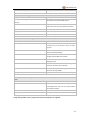
Presetting by SMS for GPRS tracking (Ensure that your SIM card supports GPRS connection prior to setting)
Set ID for GT30X
W******,010,ID
Set APN
W******,011,APN,APN
Password
Tracker ID must not over 14 digits.
Name,
APN
If
no
APN
name
and
password
required, just insert APN only;
APN defaulted as ‘CMNET’;
APN + APN name + password not over
39 characters.
Set IP Address and Port
W******,012,IP, Port
IP: xxx.xxx.xxx.xxx
Port: [1,65534]
Enable
GPRS
Tracking
W******,013,X
Function
X=0, turn off GPRS tracking (default);
X=1, enable TCP
X=2, enable UDP
Set
Time
Interval
for
W******,014,XXXXX
Sending GPRS Packet
XXXXX should be in five digitals and in
unit of 10 seconds.
XXXXX=00000,
to
turn
off
this
function;
XXXXX=00001~65535, time interval for
sending GPRS packet and in unit of 10
seconds.
For more information regarding GPRS settings please refer to <GPRS Communication Protocol>
W******,021,XX###
Set sleep mode
for saving power
XX=00 turn off sleep mode
XX=01 sleep mode
XX=02 deep sleep mode
### is the ending character
Set power saving mode
W******,026,XX
XX=00, to turn off this function
when GT30X is inactive
XX=01~99, to set this function. It is in
(In power saving mode, GPS
unit of minute.
stops working. GSM enters
Example:
standby
stop
If XX=10, GT30X will enter power
sending out message until it
saving mode after it is immobile for 10
is activated by an SMS or an
minutes.
mode
and
incoming call)
Set
phone
number
for
W******,030,T
Set interval for logging
T
is
the
telephone
number
for
wiretapping and max. 16 digits
wiretapping
W******,031,X
X=0, to turn off this function
(Note: this interval is not
X=[1, 65535] to set interval in second.
relevant to the interval of
For example, W000000,031,60, GT30X
continuous tracking)
will
store
location
data
every 60
seconds.
Set time zone difference
W******,032,T
T=0, to turn off this function
T=[1, 65535] to set time difference in
minute to GMT. Default value is GMT
For those ahead of GMT, just input the
- 13 -