1
MEILIGAO GPS
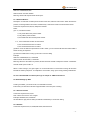
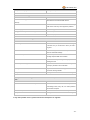
Blue LED - indicating GPS status
On
One button is pressed
Flashing ( every 0.1 second)
The unit is being Initialized
Flashing (on for 0.1 second and off for 2.9 seconds)
GT30X has a GPS fix
Flashing (on for 1 second and off for 2 seconds)
GT30X has no GPS fix
Green LED - indicating GSM status
On
One call is coming in / one call is being made
Flashing ( every 0.1 second)
The unit is being Initialized
Flashing (on for 0.1 second and off for 2.9 seconds)
GT30X is connected to the GSM network
Flashing (on for 1 second and off for 2 seconds)
GT30X is not connected to the GSM network
Power Button
To turn on/off GT30X
SOS Button
Press SOS button to make a phone call and/or send
an SMS to the preprogrammed phone number.
Press it to receive an incoming call.
Press it to increase volume during conversation.
Call B
Press B button to make a phone call and/or send an
SMS to the preprogrammed phone number.
Press it to reject a call, cancel calling or complete a
conversation.
Call C
Press C button to make a phone call and/or send an
SMS to the preprogrammed phone number.
Press it to decrease volume during conversation.
4.3 First Use
Please read this manual before using your GT30X.
Ensure that your GT30X has a working SIM installed.
- Check that the SIM has not run out of credit
(Test the SIM in a phone to make sure it can send and receive SMS)
- Check that the SIM Lock code is turned off
- If you require the function of sending an SMS location report to the authorized phone number when it
makes a call to the GT30X, please make sure the SIM installed supports displaying caller ID.
Charge the battery for at least 3 hours in power-off status using the wall charger or car charger with USB
cable. Red light is on during charging and is off when charging is complete.
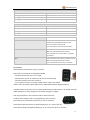
Push the power button to the on side and wait for about 20 seconds.
It will then enter standby mode. It is suggested that you be in an outer
place where it can receive better GPS when you turn on the device.
Check that the Red LED (power) on GT30X is flashing (on for 1 second and off for 2 seconds).
Check that the Green LED (GSM) is flashing (on for 0.1 second and off for 2.9 seconds).
-5-