1
LP‐9778SR User Manual Troubleshooting: USB Storage and Web Menu Feature Issues
I cannot access my USB storage device after I plug it into the router.
Follow the instructions below for your operating system.
Windows 7 and Vista
To access the drive from your Windows desktop:
Note: If the USB drive does not appear automatically under your Networked devices (Windows 7, Vista or Mac OS X),
you will need to Map the Network Drive.
a. Click the Start button.
b. Click Computer.
c. On the Computer page, the drive should appear on the left hand column under Network as Loopcomm_REP_USB.
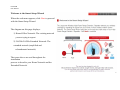
To Map the Network Drive:
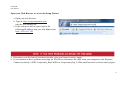
a. Click the Start button.
b. Click Computer.
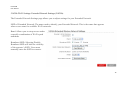
c. Click Map Network Drive from the top bar.
d. Select a drive letter (any), then enter in the folder field:
\\shared disk IP address
e. If the drive fails to open, click browse and locate Loopcomm_REP_USB under Network.
60