1
English
English
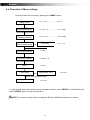
4.2 Function Description
Getting Started – First time use.
For first-time use, follow the steps below:
1. Make sure that your doctor or care provider has initialized and configured the appropriate
treatment values into the unit.
2. Make sure that your package contains a face or nasal mask with headgear. If not, your
doctor or care provider can recommend the type of mask and headgear you must obtain
3. Attach tubing and mask (see Setup section).
4. Attach power cord to the unit and an electrical outlet (see Setup section). Unit will power-on
automatically.
5. Use the “MENU” button to set the Current Time, Ramp Up Time, and Ramp Starting
Pressure, (see “MENU” Button Section for description of these options).
Note that these values may have already been set by your doctor or care provider.
6. Press the “START/STANDBY” button – Airflow to the mask will begin.
7. You can now place the Headgear and Mask over your head and face and begin treatment.
4.3 Menu Button - Option Description
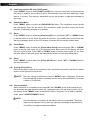
(1)
Ramp Time (only CPAP mode)
Ramp time function allows user to fall into sleep with a lower, comfortable pressure and helps
users gradually get accustomed to increasing treatment pressure. The first selection of
pressing "MENU" is [Ramp XX MIN]. When the "MENU" setting is in [Ramp XX MIN]
mode, press "UP" or "DOWN" button to set the preferred ramp time and press "MENU" for
confirmation. There are 10 adjustable levels, 0, 5, 10, 15, 20, 25, 30, 35, 40 and 45 minutes.
(2)
Ramp Starting Pressure (only CPAP mode)
Press "MENU" button to select [Ramp P XX.X] menu, press "UP" or "DOWN" button to
set the preferred ramp starting pressure and press "MENU" for confirmation. The ramp
starting pressure can be changed from 3 cmH2O to “Therapy Pressure – 1” cmH2O. For
example, if your therapy pressure is 10 cmH2O, the maximum ramp starting pressure you
can select is 9 cmH2O.
(3)
Therapy Pressure (only CPAP mode)
Press "MENU" button to select the [P XX.XcmH2O] menu. You can view the current
pressure setting displayed in cmH2O unit. Therapy pressure is adjustable only by the provider,
a respiratory therapist or doctor.
NOTE: The therapy pressure is to only be prescribed by a physician.
(4)
PVA (Pressure Variation Algorithm)
Press "MENU" button to select [c
on/off] menu, you can view if the PVA function is
enabled by the provider, a respiratory therapist or physician. The PVA function delivers
pressure relief upon exhalation to improve comfort. If the PVA function is enabled, press
"UP" or "DOWN" button to adjust the comfort level. There are 3 adjustable levels of
pressure relief that you feel while exhalation. Level 1 provides small pressure variation; and
level 3 provides higher pressure variation.
9