1
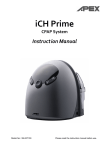
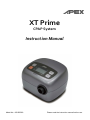
XT Prime
CPAP System
Instruction Manual
Model No.: 9S-005580
Please read the instruction manual before use.
Table of Content
Important Safeguards......................................... . ...... ....1
1. Introduction ..................................................................3
2. Product Description......................................................5
3. Installation ....................................................................6
4. Operation .....................................................................7
5. Adding a Humidifier ....................................................11
6. Using the SD Card to Collect Data ............................ 11
7. Cleaning & Maintenance............................................ 12
8. Troubleshooting .........................................................13
9. Technical Specifications ............................................. 15
10. Note, Caution, And Warning Statements.................. 16
11. Servicing ................................................................... 17
12. Limited Warranty ...................................................... 17
Appendix A: EMC Information .................................... 18
English
IMPORTANT SAFEGUARDS – PLEASE MAKE THIS
PRECAUTIONS LIST AVAILABLE TO ALL USERS and
PROVIDERS
READ ALL INSTRUCTIONS BEFORE USING THIS SYSTEM
WARNING –
1. THIS DEVICE IS NOT INTENDED FOR LIFE SUPPORT. It may stop operating due to power
interruption but no hazards to patient.
2. If oxygen is used with the device, the oxygen flow must be turned off when the device is not in
use.
Explanation of the Warning: When the device is not in operation and the oxygen flow is left on,
oxygen delivered into the tubing may accumulate within the device’s enclosure and create a risk
of fire.
3. Oxygen supports combustion. Oxygen should not be used while smoking or in the presence of an
open flame.
4. Always ensured the device is generating airflow before the oxygen supply is turned. Always turn
off the oxygen supply before stopping the airflow from the device.
5. This device should not be used in the vicinity of a flammable anesthetic mixture in combination
with oxygen or air and nitrous oxide.
6. The airflow for breathing generated by this device may be as much as 7°C (12.6° F) higher than
the room temperature. This device should not be used if the room temperature is warmer than
35°C (95°F) to prevent the airflow temperature from exceeding 40° C (104° F) and causing
irritation to your airway.
7. If this device overheats, it will stop operating and show “Error 002” on the display. After cooling
down to proper temperature, the device can restart again.
8. This machine should be used only with masks (and connectors) recommended by the
manufacturer, or by your physician or respiratory therapist. A mask should not be used unless the
CPAP machine is turned on and operating properly. The vent holes associated with the mask
should never be blocked for proper exhaling purpose. If the vent hole is blocked, the CPAP
machine will stop and show message “Error 002”, after cooling down, please re-connect the
power cord to reset the machine.
9. At low CPAP pressure, some exhaled gas may remain in the mask and be re-breathed.
1
English
CAUTION –
1. Make sure the environment around the machine is dry and clean. Dust and foreign particles may
affect the treatment. Keep the air inlet on the back of the machine clear to prevent overheating
and damage of the device. Do not place the machine near a source of hot or cold air. Extreme
cold or hot environment may damage user's respiratory airway.
2. If there is a possibility of electro-magnetic interference with mobile phones, please increase the
distance between devices or turn off the mobile phone.
3. Do not connect the device to the personal computer for data downloading during the treatment.
This may cause the CPAP system failure.
4. To prevent from potential allergic reactions to mask used in the device, This machine shall be
used only with masks (and connectors) recommended by the manufacturer.
5. U.S. Federal law restricts this device to sale by or on the order of a licensed physician.
DANGER -To reduce the risk of electrocution:
1. Always unplug this product immediately after using.
2. Do not use while bathing.
3. Do not place or store product where it can fall or be pulled into a tub or sink.
4. Do not place in or drop into water or other liquid.
5. Do not reach for a product that has fallen into water. Unplug immediately.
WARNING -To reduce the risk of burns, electrocution, fire or injury to persons:
1. This product should never be left unattended when plugged in.
2. Close supervision is necessary when this product is used by, on, or near children or invalids.
Choking resulting from a child swallowing a small part that has become detached from the device
or its accessories.
3. Use this product only for its intended use as described in this manual, do not use attachments not
recommended by the manufacturer.
4. Never operate this product if it has a damaged cord or plug, if it is not working properly, if it has
been dropped or damaged, or dropped into water. Return the product to a service center for
examination and repair.
5. Keep the cord away from heated surfaces.
6. Never block the air openings of this product or place it on a soft surface, such as a bed or couch,
where their openings may be blocked. Keep the air opening free of lint, hair, and other similar
particles.
7. Never drop or insert any object into any opening on the unit or into the tubing.
8. When disposing the unit because of damage or failure, you must comply with the regulations of
your particular region or country for disposing such equipment
9. No modification of this equipment is allowed.
10. Do not modify this equipment without authorization of the manufacturer.
11. If this equipment is modified, appropriate inspection and testing must be conducted to ensure
continued safe use of the equipment.
12. Do not leave long lengths of air tubing around the top of your bed. It could twist around your head
or neck while you are sleeping and lead to strangulation.
2
English
1. Introduction
This manual is provided to explain initial set up and operating instructions. This manual should be
stored in a safe location and be readily accessible for future reference.
1.1 General Information
Obstructive Sleep Apnea (OSA) is a condition that an intermitted and repetitive obstruction of the
upper respiratory tract causes a complete (apnea) or partial (hypopnea) block of breathing
airflow during sleep. The syndrome varies depending on the degree of relaxation of the tongue
and soft palate muscle.
The most common treatment for OSA is Continuous Positive Airway Pressure (CPAP). CPAP
devices can deliver a constant air pressure into your upper airway via a nasal mask. This
constant air pressure can keep your airway open during sleep, therefore prevents the OSA.
This device is a micro-processor controlled continuous positive airway pressure device. It
features the illuminated, menu-driven LCD display, universal power supply, and ramp time
adjustment. The ramp time adjustment and ultra quiet operation ensure you to fall asleep
comfortably while air pressure slowly build up to treatment level. The user compliance meter
records the total system’s operating time for physician’s reference.
The system has been tested and successfully approved to the following standards:
EN
EN
EN
EN
60601-1
60601-1-2
61000-3-2 Class A
61000-3-3
For US and CANADA only
E348970
53DG
Medical Equipment- CPAP
WITH RESPECT TO ELECTRICAL SHOCK,
FIRE AND MECHANICAL HAZARDS ONLY
IN ACCORDANCE WITH ANSI/AAMI
ES60601-1 (2005,3rd ed.) and CAN / CSA C22.2
No. 60601-1 (2008)
Le produit à été testé avec des équipements médicaux et respecte les normes ANSI/AAMI
ES60601-1 (2005,3rd ed.) and CAN / CSA C22.2 No. 60601-1 (2008). prévenant les choc électrique, le feu et
les risques de blessures physiques.
3
English
EMC Warning Statement
This equipment has been tested and found to comply with the limits for medical devices to the
EN 60601-1-2:2007. These limits are designed to provide reasonable protection against harmful
interference in a typical medical installation. This equipment generates, uses and can radiate
radio frequency energy and, if not installed and used in accordance with the instructions, may
cause harmful interference to other devices in the vicinity. However, there is no guarantee that
interference will not occur in a particular installation. If this equipment does cause harmful
interference to other devices, which can be determined by turning the equipment off and on, the
user is encouraged to try to correct the interference by one or more of the following measures:
Reorient or relocate the receiving device.
Increase the separation between the equipment.
Connect the equipment into an outlet on a circuit different from that to which the other device(s)
are connected.
Consult the manufacturer or field service technician for help.
This system has been tested and compliance to the following volunteer standards: FDA.
1.2 Intended Use
This device is intended to provide continuous positive airway pressure (CPAP) for the treatment
of adult Obstructive Sleep Apnea (OSA).
Cautions: Some patients might have pre-existing contraindications for CPAP therapy, or
might experience some potential side effects of using CPAP device, please
consult your physician if you have any questions concerning your therapy.
4
English
2. Product Description
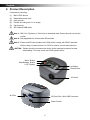
Components including:
(1)
(2)
(3)
(4)
(5)
(6)
Main CPAP device
Detachable power cord
User manual
Flexible air tubing with 1.8 m length
Carrying bag
SD card and USB cable
Note 1: ONLY for Physician or Technician to download data. Patient should not use this
unction.
Note 2: Only applicable for devices with SD card slot.
Note 3: Please use SD card (smaller than 2GB) which comply with SDHC standard.
Before using it, please format it to FAT16 to ensure correct data collection.
CAUTION - Patient should not connect the device to the personal computer for data
downloading. This may cause the CPAP system failure.
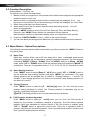
Menu Button
Start/Standby Button
LCD Display
Up Button
Down Button
Air Outlet
Air Filter
SD Card Slot / Mini-USB Connector
Power Socket
5
English
3. Installation
3.1 Unpacking
To secure its contents inside, the CPAP device and accessories are bundled in a paper packaged
box. Unpack this box by removing the CPAP and its accessory and checking for any damage,
which may have occurred during shipping. If there are damages, please contact your dealer
immediately.
3.2 Setting Up
1) Connect the power cord to CPAP device and plug into main
electrical outlet.
Once the power cord is plugged into the electrical outlet, the
device is in ready to operate position (“STANDBY” sign
appears in LCD display)
NOTE:
The plug is also served to disconnect the
device.
2) Connect one end of the air tubing firmly onto the air outlet
of the CPAP.
3) Connect the other end of the air tubing to the mask system.
Putting on the mask and headgear according to the mask
instruction manual.
6
English
4. Operation
NOTE: Always read the operating instruction before use.
4.1 Control Panel Description
Buttons arrangement on control panel and main use of the buttons:
START/STANDBY
To start the treatment, simply press the "START/STANDBY" button. To stop the
treatment, press the "START/STANDBY" button again. The display will switch
between [STANDBY] and Therapy Pressure [ XX.X cmH2O] in cmH2O unit.
MENU
Press the "MENU" button to enter the setting mode when device is in standby mode.
The adjustment setting includes mode selection, ramp time selection, ramp starting
pressure, therapy pressure adjustment, alarm ON/OFF, clock alarm and clock setting,
compliance meter, and total operating meter. When each setting's value has been
changed, press "MENU" for confirmation and press "MENU" again for next setting
selection. Please refer to 4.2 Function Description section for detailed information.
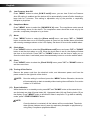
UP
Press the "UP" button to increase the value.
DOWN
Press the "DOWN" button to decrease the value.
7
English
4.2 Function Description
Getting Started – First time use.
For first-time use, follow the steps below:
1. Make sure that your physician or care provider has initialized and configured the appropriate
treatment values into the unit.
2. Make sure that your package contains a face or nasal mask with headgear. If not, your
physician or care provider can recommend the type of mask and headgear you must obtain
3. Attach tubing and mask (see Setup section).
4. Attach power cord to the unit and an electrical outlet (see Setup section). Unit will
power-on automatically.
5. Use the “MENU” button to set the Current Time, Ramp Up Time, and Ramp Starting
Pressure, (see “MENU” Button Section for description of these options).
Note that these values may have been already set by your physician or care provider.
6. Press the “START/STANDBY” button – Airflow to the mask will begin.
7. You can now place the Headgear and Mask over your head and face and begin treatment
4.3 Menu Button - Option Descriptions
The following items describe the options presented to you after you press the “MENU” button on
the control panel.
(1)
Ramp Time
Ramp time function allows user to fall into sleep with a lower, comfortable pressure and
helps users gradually get accustomed to increasing treatment pressure. The first selection
of pressing "MENU" is [Ramp XX MIN]. When the "MENU" setting is in [Ramp XX MIN]
mode, press "UP" or "DOWN" button to set the preferred ramp time and press "MENU" for
confirmation. There are 10 adjustable levels, 0, 5, 10, 15, 20, 25, 30, 35, 40 and 45 minutes.
(2)
Ramp Starting Pressure
Press "MENU" button to select [Ramp P XX.X] menu, press "UP" or "DOWN" button to
set the preferred ramp starting pressure and press "MENU" for confirmation. The ramp
starting pressure can be changed from 3 cmH2O to “Therapy Pressure – 1” cmH2O. For
example, if your therapy pressure is 10 cmH2O, the maximum ramp starting pressure you
can select is 9 cmH2O.
(3)
Therapy Pressure
Press "MENU" button to select the [P XX.XcmH2O] menu. You can view the current
pressure setting displayed in cmH2O unit. Therapy pressure is adjustable only by the
provider, a respiratory therapist or doctor.
NOTE: The therapy pressure is to only be prescribed by a physician.
(4)
PVA (Pressure Variation Algorithm)
Press "MENU" button to select [c
on/off] menu, you can view if the PVA function is
enabled by the provider, a respiratory therapist or physician. The PVA function delivers
pressure relief upon exhalation to improve comfort. If the PVA function is enabled, press
"UP" or "DOWN" button to adjust the comfort level. There are 3 adjustable levels of
pressure relief that you feel while exhalation. Level 1 provides small pressure variation; and
level 3 provides higher pressure variation.
8
English
(5)
Low Pressure Auto Off
Press "MENU" button to select [LOW P on/off] menu, you can view if the Low Pressure
Auto Off setting is enabled and the device will be automatically turned off while detecting a
large leak for 3 minutes. This setting is adjustable only by the provider, a respiratory
therapist or physician.
(6)
Compliance Meter
Press "MENU" button to select the [CM XXXX.X hr] menu. The compliance meter records
the total therapy hours for the device. The compliance meter should be re-set only by the
provider, a respiratory therapist or by a doctor.
(7)
Alarm
Press "MENU" button to select the [Alarm on/off] menu, and press "UP" or "DOWN"
button to set the alarm on or off. When the alarm is turned on, the audible alarm will activate
with warning messages shown on the LCD display. Set alarm off to mute the audible alarm.
(8)
Clock Alarm
Press "MENU" button to select the [Clock Alarm on/off] menu and press "UP" or "DOWN"
button to set the clock alarm on or off. When the clock alarm is set on, the display will show
the time on the left side. Press "UP" or "DOWN" button to set the time to wake you up.
Once the clock alarm is activated, press the start/standby button to mute the audible alarm.
(9)
Clock
Press "MENU" button to select the [Clock XX:XX] menu, press "UP" or "DOWN" button to
set the current time.
(10) Turning off the Device
Remove the power cord from the electrical outlet, and disconnect power cord from the
power socket on the right side of the device.
NOTE:
(11)
Once the setting is confirmed, press the “MENU” button. Otherwise, the device
will automatically go back to standby without saving the modification if no action
is taken in 20 seconds.
Event Indication
While the device is on standby mode, press UP" and "DOWN" button at the same time to
see the latest one data of Apnea Index (AI), Hypopnea Index (HI) and Snoring Index (SI) on
the display. Press "MENU" button to show each index in sequence. To go back to standby
mode, press "START/STANDBY" button.
NOTE:
Once the device is re-started, all the indexes will be re-calculated. The whole
data of these indexes are only seen by respiratory therapists or physicians by
using Easy Compliance playback software.
9
English
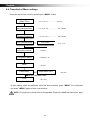
4.4 Flowchart of Menu settings
Enter the user's menu mode by pressing the “MENU” button.
Ramp
(Ramp Time)
< 0, 5, 10, 15, ……………., 45> min
Ramp P
(Ramp Starting Pressure)
< 3, 3.5, 4, 4.5, ……………., 19> cmH2O
P
(Therapy Pressure)
< 4, 4.5, 5, 5.5, ……………., 20> cmH2O
C
(PVA Comfort Level)
PVA <On>
<0, 1, 2, 3>
Low P
(Low Pressure Shut Off)
CM
(Compliance Meter)
Alarm
Clock Alarm
Clock
< on/off >
< XXXX.X > hr
< on/off >
Clock Alarm <On>
< hh: mm >
< hh: mm >
In each setting, when the preferred value has been selected, press “MENU” for confirmation
and press “MENU” again to enter next selection.
NOTE: For physicians, please refer to a separated “Physician’s Additional Instruction” page.
10
English
5. Adding a Humidifier
XT Prime CPAP device can be used with XT Heated
Humidifier (9S-006500) which is available from the
home care provider. The heated humidifier may reduce
nasal dryness and irritation by providing adequate
moisture and heat to the airflow. Please refer to the XT
heated humidifier (9S-006500) instruction manual for
complete setup information.
NOTE: When XT Prime CPAP device is used with the heated humidifier, its power supply is
from the power socket outlet of the heated humidifier. Do not connect the power cord
to CPAP device and plug into main electrical outlet.
6. Using the SD Card to Collect Data
If physicians need to review the usage data, they may ask you to use the SD card to copy data
from the device, and to return the card to them. Data that is copied to the SD Card is still stored
and available on the device.
1. Insert the SD Card when the device is in standby mode.
2. Data copying starts automatically when the SD Card is inserted into the slot.
3. The [COPY] & [Card] messages are displayed on the LCD while data is being copied.
4. The [End] & [OK] messages are displayed on the LCD when copying has finished.
5. Remove the SD Card and mail it to the clinician.
6. The SD card does not need to be uninstalled for the device to work properly.
CAUTION:
Do not remove the SD card until [End] & [OK] messages are displayed on
the LCD, or data copied to the card may be corrupted or missing.
11
English
7. Cleaning & Maintenance
7.1 Cleaning the Main Unit
The main unit should be cleaned regularly (at least every 30 days). To clean the unit, wipe it
down with a damp cloth using a mild detergent. When selecting a cleaning agent, take
precautions tochoose one that is not chemically abrasive to the surface of the plastic case. All
parts should be air-dried thoroughly before use. During storage, the unit should be kept in a
dust-free location.
WARNING: Don’t try to open this device. Repairs and internal servicing should only performed
by an authorized service agent. Don’t drop any subject into the air tube or air
outlet.
7.2 Tubing and Mask
The tubing and mask should be checked and cleaned daily. Please refer to the cleaning
instruction packaged with the accessories.
1. Disconnect the air tubing from the air outlet of the device.
2. Remove the air tubing and headgear straps from the nasal mask.
3. Wash the mask system according to the instructions supplied with it. Wash the air tubing in
warm water using mild detergent.
4. Rinsed thoroughly, hang and allow to dry.
5. Before next use, assemble the mask and headgear according to the mask user instructions.
6. All items of the mask and air tubing are subject to normal wear and tear and may eventually
be replaced. Replace the mask and the air tubing if they are damaged.
CAUTION:
CAUTION:
WARNING:
WARNING:
Do not use blench, chlorine-, alcohol-, or aromatic-based (including all
scented oils), moisturizing or antibacterial soaps to clean the cushion,
mask, air tubing. These solutions may cause hardening and reduce the life
of the product.
Do not wash or dry the mask or air tubing at a temperature above 70°C
(160°F)
Do not use any cleaner containing fragrance or conditioners as they will
leave a residue.
The mask must not be re-used by another person. This is to avoid the risk
of cross-infection.
12
English
7.3 Air Filter Maintenance
For an optimum operation of the device, the air filter can be cleaned by the user at least once
every two weeks or more often if this device is operated in a dusty environment. It is
recommended that the filter be replaced with a new one after 6 months of use; however,
depending on the air quality, the replacement time may vary.
CAUTION:
Dirty air filter may cause high operating temperatures that affect device
performance. Ensure the air filter is cleaned and fitted at all times.
1. Remove the dirty filter from the enclosure on the rear of the
device.
2. Wash the filter in warm water with a mild detergent, and rinse
with water. Allow the filter to air dry completely before
reinstalling. Do not use a filter that is not completely dry. If the
filter is torn, replace it.
3. Reinstall the filter.
NOTE: Please follow national requirements to dispose the unit properly.
8. Troubleshooting
The table below lists troubleshooting solutions for the problems that may happen. If the problem
persists, contact your equipment provider service agent.
Problem
Possible Causes
Solutions
No display
1. Ensure the power cord is
1. The power cord is not
connected.
connected to the power socket.
2. LCD failure or controlled PCB 2. Contact your equipment provider
failure.
for repair.
Display code incorrect
LCD failure or controlled PCB
failure.
Contact your equipment provider for
repair.
Illuminant under LCD is not LED failure
on
Contact your equipment provider for
repair.
Buttons disable
Button failure
Contact your equipment provider for
repair.
Air delivered is slow
1.
2.
3.
Data can not be copied to
the SD card
1. SD card is full.
2. SD card is not inserted
correctly.
3. Data on the SD card is
corrupted.
1. Check the ramp time setting
2. Change or clean the filter
regularly.
3. Contact your equipment provider
for repair.
1. Ensure the SD card has enough
capacity.
2. Ensure the SD card is inserted into
the slot.
3. Format the card.
During ramp time.
Filter is too dirty.
Flow generator failure.
Error / Warning Messages show in LCD.
13
English
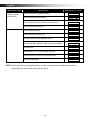
M e s s a g e t yp e
Error:
Primary function
can’t execute.
Warning:
Definition
Message in LCD
Error for abnormal system settings
Error 001
Error for flow generator failure
Error 002
Error for abnormal timer setting or timer failure
Error 003
Error for flow sensor failure
Error 004
Out of system memory
Warn 001
System memory is nearly full
Warn 002
SD card module communication failure
Warn 003
Remove the SD card while data is being processed
Warn 004
SD card is full
Warn 005
Inconsistent ID no. of device with SD card
Warn 006
Wrong firmware version of SD card module
Warn 007
SD card is damaged
Warn 008
NOTE: When the warning message appears, contact your physician or equipment provider to
download the memory data and reset the meter.
14
English
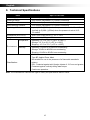
9. Technical Specifications
Item
Specifications
Power Supply
Universal power supply, AC100-240V, 50/60 Hz, 0.5-0.3A
Pressure Range
4-20 cmH2O (adjustable in 0.5 cmH2O increment)
Ramp Time
0-45 minutes (adjustable in 5-minute increment)
Ramp Starting Pressure
3-19 cmH2O (adjustable in 0.5 cmH2O increment)
Operating Altitude
up to 8,000 ft (2,438 m) when the pressure is set at 4-18 cmH2O
but limit to 5,000ft (1,524m) when the pressure is set at 18.5 20 cmH2O
Dimensions (W x D x H)
14.5 x 13.0 x 10.0 cm or 5.7” x 5.1” x 3.9”
Weight
Approximately 800 g or 1.76 lb
Environment
Classification:
Temperature
Operating: +5°C to +35°C (+41°F to +95°F)
Storage: -15°C to 50°C (+5°F to +122°F)
Shipping: -15°C to 70°C (+5°F to +158°F)
Humidity
Operating: 15%RH to 95%RH non-condensing
Storage: 10%RH to 90%RH non-condensing
Shipping: 10%RH to 90%RH non-condensing
Class II
Type BF, Applied Parts: Mask
Not suitable for use in the presence of a flammable anesthetic
mixture
IP21: Protected against solid foreign objects of 12.5 mm and greater;
Protected against vertically falling water drops.
Continuous operation.
Note: The manufacturer reserves the right to modify the specification without notice.
15
English
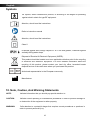
Symbols
BF symbol, which indicated this product, is according to the degree of protecting
against electric shock for type BF equipment.
Attention, should read the instructions.
Refer to instruction manual
Attention, should read the instructions.
Class II
Protected against solid foreign objects of 12.5 mm and greater; Protected against
vertically falling water drops.
Disposal of Electrical & Electronic Equipment (WEEE):
This product should be handed over to an applicable collection point for the recycling
of electrical and electronic equipment. For more detailed information about the
recycling of this product, please contact your local city office, household waste
disposal service or the retail store where you purchased this product.
Authorized representative in the European community
Manufacturer
10. Note, Caution, And Warning Statements
NOTE:
Indicate information that you should pay special attention to.
CAUTION:
Indicate correct operating or maintenance procedures in order to prevent damage to
or destruction of the equipment or other property.
WARNING:
Calls attention to a potential danger that requires correct procedures or practices in
order to prevent personal injury.
16
English
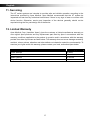
11. Servicing
The XT series systems are intended to provide safe and reliable operation according to the
instructions provided by Apex Medical. Apex Medical recommends that the XT system be
inspected and serviced by authorized technicians if there is any sign of wear or concern with
device function. Otherwise, service and inspection of the devices generally should not be
required during the five year design life of the device.
12. Limited Warranty
Apex Medical Corp. (hereafter ‘Apex’) gives the customer a limited manufacturer warranty on
new original Apex products and any replacement part fitted by Apex in accordance with the
warranty conditions applicable to the product in question and in accordance with the warranty
periods from date of purchase as listed below. This warranty does not cover damage caused by
accident, misuse, abuse, alteration and other defects not related to material or workmanship. To
exercise your rights under this warranty, please contact your local, authorized Apex dealer.
Product
Warranty period
CPAP devices
2 years
Water chamber
6 months
Mask systems
6 months
Disposable products
None
17
English
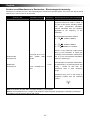
Appendix A: EMC Information
Guidance and Manufacturer’s Declaration- Electromagnetic Emissions:
This device is intended for use in the electromagnetic environment specified below. The user of this device should
make sure it is used in such an environment.
Emissions Test
Compliance
Electromagnetic Environment-Guidance
RF emissions
CISPR 11
Group1
The device uses RF energy only for its internal function. Therefore, its RF
emissions are very low and are not likely to cause any interference in
nearby electronic equipment.
RF emissions
CISPR 11
Class B
The device is suitable for use in all establishments, including domestic
establishments and those directly connected to the public low-voltage
power supply network.
Harmonic emissions Class A
IEC61000-3-2
Voltage fluctuations / Complies
Flicker emissions
IEC61000-3-3
Guidance and Manufacturer’s Declaration- Electromagnetic Immunity:
This device is intended for use in the electromagnetic environment specified below. The user of this device should
make sure it is used in such an environment.
Immunity Test
IEC60601 test level
Electrostatic Discharge (ESD) ±6kV contact
IEC61000-4-2
±8kV air
Electrical fast transient/ burst
IEC61000-4-4
Surge
IEC61000-4-5
Voltage dips, short
interruptions and voltage
variations on power supply
input lines
IEC61000-4-11
Power frequency
(50/60Hz) magnetic field
IEC61000-4-8
Compliance
±6kV contact
±8kV air
Electromagnetic
Environment-Guidance
Floors should be wood, concrete or
ceramic tile. If floors are covered
with synthetic material, the relative
humidity should be at least 30 %.
±2kV for power supply ±2kV for power supply Mains power quality should be that
line
line
of atypical commercial or hospital
±1kV for input/out line ±1kV for input/out line environment
±1kV for differential
mode
±2kV for common
mode
<5 % UT (>95 % dip in
UT)for 0,5 cycle
40 % UT (60 % dip in
UT)for 5 cycles
70 % UT (30 % dip in
UT)for 25 cycles
<5 % UT (>95 % dip in
UT)for 5 sec
3 A/m
±1kV for differential
mode
±2kV for common
mode
<5 % UT (>95 % dip in
UT) for 0,5 cycle
40 % UT (60 % dip in
UT) for 5 cycles
70 % UT (30 % dip in
UT) for 25 cycles
<5 % UT (>95 % dip in
UT) for 5 sec
3 A/m
NOTE: UT is the a.c. mains voltage prior to the application of the test level
18
Mains power quality should be that
of atypical commercial or hospital
environment.
Mains power quality should be that
of atypical commercial or hospital
environment. If the user of this
device requires continued operation
during power mains interruptions, it
is recommended that the device be
powered from an uninterruptible
power supply or a battery.
Power frequency magnetic fields
should be at levels characteristic of
atypical location in a typical
commercial
or
hospital
environment.
English
Guidance and Manufacturer’s Declaration - Electromagnetic Immunity:
This device is intended for use in the electromagnetic environment specified below. The user of this device should
make sure it is used in such an environment.
Immunity Test
IEC60601 test level
Compliance
Electromagnetic Environment-Guidance
Portable and mobile RF communications
equipment should be used no closer to
any part of this device, including cables,
than there commended separation
distance calculated from the equation
applicable to the frequency of the
transmitter.
Recommended separation distance
d = 1.2 P 150kHz to 80MHz
d = 1.2 P 150kHz to 80MHz
d = 2.3 P 80 MHz to 2.5G MHz
Conducted RF
IEC 61000-4-6
Radiated RF
IEC 61000-4-3
3Vrms150 kHz to 80
MHz outside ISM
bandsa
3 Vrms
3 V/m
3 V/m
GHz
80 MHz to 2.5
Where P is the maximum output power
rating of the transmitter in watts (W)
according to the transmitter manufacturer
and d is the recommended separation
distance in meters (m).b
Field strengths from fixed RF transmitters,
as determined by an electromagnetic site
survey c, should be less than the
compliance level in each frequency
ranged.
Interference may occur in the vicinity of
equipment marked with the following
symbol:
NOTE 1: At 80 MHz and 800 MHz, the higher frequency range applies.
NOTE 2: These guidelines may not apply in all situations. Electromagnetic propagation is affected by absorption
and reflection from structures, objects and people.
19
English
a) The ISM (industrial, scientific and medical) bands between 150 kHz and 80 MHz are 6,765 MHz to 6,795
MHz;13,553 MHz to 13,567 MHz; 26,957 MHz to 27,283 MHz; and 40,66 MHz to 40,70 MHz.
b) The compliance levels in the ISM frequency bands between 150 kHz and 80 MHz and in the frequency range
80 MHz to 2.5 GHz are intended to decrease the likelihood that mobile/portable communications equipment
could cause interference if it is inadvertently brought into patient areas. For this reason, an additional factor of
10/3 is used in calculating the recommended separation distance for transmitters in these frequency ranges.
c)
Field strengths from fixed transmitters, such as base stations for radio (cellular/cordless) telephones and land
mobile radios, amateur radio, AM and FM radio broadcast and TV broadcast cannot be predicted theoretically
with accuracy. To assess the electromagnetic environment due to fixed RF transmitters, an electromagnetic
site survey should be considered. If the measured field strength in the location in which the device is used
exceeds the applicable RF compliance level above, the device should be observed to verify normal operation.
If abnormal performance is observed, additional measures may be necessary, such as reorienting or relocating
the device.
d) Over the frequency range 150 kHz to 80 MHz, field strengths should be less than 3 V/m.
Recommended separation distances between
communications equipment and this device:
portable
and
mobile
RF
This device is intended for use in an electromagnetic environment in which radiated RF disturbances are controlled.
The customer or the user of this device can help prevent electromagnetic interference by maintaining a minimum
distance between portable and mobile RF communications equipment (transmitters) and this device as recommended
below, according to the maximum output power of the communications equipment.
Rated maximum output
Separation distance according to frequency of transmitter m
power
80 MHz to 800 MHz
800 MHz to 2,5 GHz
150 kHz to 80 MHz
of transmitter
d = 1.2 P
d = 1.2 P
d = 2.3 P
W
0.01
0.12
0.12
0.23
0.1
0.38
0.38
0.73
1
1.2
1.2
2.3
10
100
3.8
12
3.8
12
7.3
23
For transmitters rated at a maximum output power not listed above, the recommended separation distance d in
meters (m) can be estimated using the equation applicable to the frequency of the transmitter, where P is the
maximum output power rating of the transmitter in watts (W) according to the transmitter manufacturer.
Note 1: At 80 MHz and 800 MHz, the separation distance for the higher frequency range applies.
Note 2: These guidelines may not apply in all situations. Electromagnetic propagation is affected by absorption and
reflection from structures, objects, and people.
20
USA
APEX MEDICAL USA CORP.
615 N. Berry St. Suite D, Brea, CA 92821, USA
APEX MEDICAL S.L.
Elcano 9, 6a planta
48008 Bilbao. Vizcaya. Spain
APEX MEDICAL CORP.
No.9, Min Sheng St., Tu-Cheng,
New Taipei City, 23679, Taiwan
www.apexbrand.com
Print-2012/All rights reserved