1
High Resolution, High Contrast & Long-life Lamp
Plus a User-friendly Display for Enhanced
Convenience
Manufacturing Products that Minimize Environmental Impact
WD570U
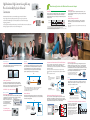
The WD570U and XD560U create a new intermediate category in Mitsubishi Electric’s
line-up of high-performance portable projectors. Placing a focus on greater operation ease,
an advanced user-friendly display has been newly added to ensure convenience and simplicity
when giving presentations.
Other unique features include USB and Internet ports for trouble-free, direct connection to video sources,
making these projectors ideal for use in classrooms and meeting rooms.
Ecology
Auto Power Off
6000-hour Long-life Lamp (max. use set to Low mode)
If no image signal is output for a predetermined period of time*, power
is automatically turned off, realizing energy savings by reducing needless
power consumption.
A longer service life for the projection lamp has been achieved by incorporating an optimal design for lamp temperature control. Benefits include
substantial reductions in projector operating cost and the labor required for
changing the lamp.
XD560U
*Time preset by user
Stand-by Wattage under 0.5W*
WD570U
XD560U
3,000-hour lamp
Mounted lamp
1st replacement
Mounted lamp
6,000-hour lamp
Reduced operating cost
3,000
6,000
• Lamp life specification is an estimate based on verification under proper conditions and is not the duration of the warranty.
Lamp will shut-off automatically when usage reaches the specified estimated maximum lamp hours.
Service life may vary widely depending on usage and operating environment and conditions, as well as users’ adherence
to the maintenance and cleaning procedures provided in the user manual.
Stand-by (low) mode power consumption is less than 0.5W, offering
increased energy savings and further contributing to environmental
preservation.
*When in stand-by (low) mode. At this time, use of the LAN function, RS-232C output is
not possible.
Presentation
Network
Computer-free Presentations (PTG file/JPEG Viewer)
Network Connectivity
3500lm High Luminance
USB Display/LAN Display
The high 3500lm luminance helps ensure presentation images are clearly
seen without lowering the light in the room.
To use the projector to reproduce images from a computer, a VGA cable,
USB cable, LAN cable or commercially available wireless dongle can be
used. For displaying images via a LAN, up to four computers can be
connected to one projector. The projection screen can be divided into
quarters, reproducing all computer screens simultaneously.
Using “PtG Converter”, PowerPoint files can be converted into a special
format and saved on a USB storage device. When the USB device is
connected to the projector, users can replay slideshows or animation effects
using only the projector.
Projectors are equipped with a RJ-45 LAN terminal for remote operation.
Additionally, when used with Crestron® Room View®, integrated control of
up to 250 projectors including power on/off control, message display and
confirmation of lamp service hours is possible using RoomView™/ e-Control
™. Both projectors are equipped with AMX Device Discovery for simplified
device management and compatible with PJLink™.
LAN
PTG
3500lm
Enjoy slideshows made with Microsoft®
PowerPoint or other software without
using a computer.
*Image brightness comparison
3D READY – Enjoy the future today
User Friendly
Ultra Quiet 28dB Operation
Fan noise during projector operation can be distracting during a presentation
or videoconference. The WD570U and XD560U projectors operate at a
significantly low noise level of only
Examples of Noise Levels
20dB : Rustling leaves, the ticking of
28dB (i.e., in “low lamp” mode). As a
a wall clock (from 1m in front)
result, presentations and confer28dB
30dB : A whisper, a suburban
ences can be held without
area very late at night
distracting projector noise in the
40dB : A quiet neighborhood,
small birds chirping
background.
Top-loading lamp
for easier maintenance
Change the file format
from PPT to PTG, and
save the file on a USB
storage device.
PJ Link is a registered trademark or trademark
registration has been submitted in Japan,
the United States and other countries/regions.
Audio
Stand-by Audio/Audio Pass-through
USB
3000:1 High Contrast
Dark chip3TM is newly introduced to the DLPTM chip line-up. Stray-light
processing has been optimized for the optical system, achieving a high
contrast of 3000:1. This makes it possible to reproduce sharp, vivid images
in which sentences and other characters can be easily read.
JPEG files saved on a USB storage device can be projected in slideshow
style.
Note: Only compatible with JPEG files.
Display via LAN (Wired and Wi-Fi)
2500lm
Note: The types of slideshows and animation effects that can be replayed are limited.
When the projector is in stand-by mode, its 10W speaker can still be used.
Additionally, while in stand-by mode, an external speaker can be used by
connecting it via the Audio Out terminal.
Images transferred via USB cable
Notes:
1) Only one optional USB Type-A port from a computer can be directly connected
to a projector. Multiple connections using a USB hub is not possible.
2) For displaying images via a LAN, network settings are required.
3) Not all USB dongles are compatible.
Stand-by Audio
JPEG Viewer
Enjoy slideshows without a computer.
DVD audio
Simply save
the JPEG file on
a USB storage device.
No picture
(stand-by mode)
Remote Desktop
When using the LAN Display function, a USB mouse or USB keyboard can
be connected to the projector enabling direct access to a computer utilizing
the Internet or other application.
LAN
Remote computer control
via a keyboard and mouse
connected to the projector
via a USB cable and Wi-Fi
dongle.
Simultaneous Message Display (Visual PA)
Using a control room computer equipped with projector-control software,
administrators can simultaneously send messages (up to 390 characters
long) in real-time to projectors connected to the LAN. Ideal for broadcasting
important information to multiple rooms in the school or building.
Gather in
the schoolyard
Control Room
IT manager inputs
message and sends
via LAN
Remote location
Wireless mouse/keyboard
Same message is
displayed in each
classroom
Room
A
Room
B
Room
C
Gather in
the schoolyard
Gather in
the schoolyard
Gather in
the schoolyard
The 10W speaker can be used when the projector is
in stand-by mode.
In addition, audio can be output when the projector is
in stand-by mode, using the projector as an amplifier.
Excellent Sound Projection (10W Speaker+Audio Mix)
A high-volume, 10W speaker is built-in,
eliminating the need for an external
speaker. Using the “Audio Mix*”
feature and wireless microphone sold
separately, the presenter’s voice is
reproduced loud and clear in real time.
*Only compatible with stereo mini-jack.
Not compatible with RCA jack (L/R) or HDMI.
*10W speaker and external speaker cannot be
used at the same time.
Projector
What’s
this?
What’s
this?