1
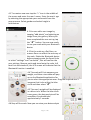
4.1 To create a new user tap the “+” icon in the middle of
the screen and enter the user’s name. Enter the user’s age
by selecting the appropriate year and month from the
pop-up menu. Select gender and select height in
centimetres.
4.2 You can add a user image by
tapping “add photo” and selecting an
image from your gallery. When you
have completed the user set-up, tap
the “
” button. You are now ready
to use your scale with your Bluetooth
device.
4.3 Put the scale on a flat floor; an
uneven floor can affect the accuracy of
the scale. Shake the Bluetooth device
before stepping onto the Smart Scale
or select “settings” and “no device”, this will confirm the
user settings. Remove socks and stand onto the scale, left
foot first and stand still, the LCD screen will indicate that the
Bluetooth function is enabled.
4.4 The scale will first measure your
weight, and then a turntable will pop
up on the Bluetooth application for
you to select the appropriate user. Drag the required user’s
image so that it sits within the blue
”
circle and then select “
4.5 The user’s weight will be displayed
in a blue circle. When the blue circle
turns green, the data analysis will be
complete; this should take
approximately 2 seconds.
4.6 Step off the scale. Now you can view your data analysis
Page 7 of 10