1
ity contact or the Drag-Error bit of a servodrive.
Important: for the inputs, an "Enabled" polarity corresponds to a normally
open (N.O.) circuit or switch; while a "Disabled" polarity corresponds to a
normally closed (N.C.) circuit.
Galaad receives from AxeMotion the eventual corrections, new functions and
updates of the firmware (the internal microprogram) of the CNC modules. Consequently, updating Galaad can induce an automatic CNC card firmware update if the option is ticked. Anyway Galaad will ask you to confirm before updating the CNC module firmware, which takes about 15 seconds.
The data transfer corresponds to the speed of the USB flow towards the AxeMotion module. Default setting is "very-fast" and can be set to "fast" if you experience communication problems with the AxeMotion module, which problems
are usually due to noise in the circuit, generated by sources of electrical parasites (big motors starting, neon lights, etc.).
The zero-end switches correspond to the reset of absolute co-ordinates, i.e.
the machine zero point, using a reference run. This reset is managed by Galaad that must know which binary inputs correspond to the axis end switches
and their polarity (normally closed or normally open).
Important: if you do not know where the axis end switches are connected to,
then call "Parameters / Machine / IO test" to see which switch correspond to
which input with which polarity. A normally dark input that becomes light when
the switch is triggered corresponds to an "enabled" polarity. Reciprocally, if the
input is normally light and becomes dark when the switch is triggered, then the
polarity is "disabled".
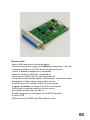
The right-hand side of the window allows you to set the pin assignment of the
output signals of the DB-25 connector. Just indicate which signal goes to which
pin, avoiding redundancies. Please note that Clock (pulse) and Dir (direction)
signals can be output to pins 2-9 only, and the eventual PWM signal cannot be
output to these 2-9 pins, so the PulseBox NxtG remains compatible with an
LPT parallel port. All other configurations are allowed.
Please refer to Galaad user's manual for more advanced information about this
software and its parameters.
--10--