1
 4. Running Hearing Tests
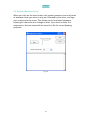
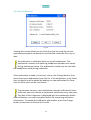
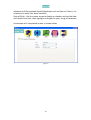
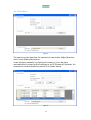
Having previously either entered details for a new person or selected someone who has been tested before, click on Run Test from the home screen. Before testing, you should ensure that the subject’s ears are not blocked, the audiometer is connected and has been tested and the headphones are correctly in place. 4.1 Automatic Operation To use automatic operation, check that the Automatic Test tab is set as shown above and decide whether or not you want to have standard tone presentations or pulsed tone presentations. If pulsed, click on the Pulsed Tones tick box. Fig 4.1 To start a hearing test click on the Run Test button. During the hearing test the subject will hear tones in one ear at each of up to eight different frequencies and then again in the other ear. Each tone will increase in volume until the subject confirms that they have heard the tone by pressing the response switch. The system will run through this several times for each tone to ensure a consistent response. If there is no consistent response you will be notified by a message appearing on screen. As the test proceeds, the results will be plotted on the audiogram. 21