1
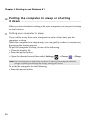
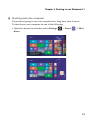
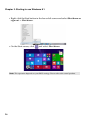
Chapter 2. Starting to use Windows 8.1 Putting the computer to sleep or shutting it down ------------------------------------------------------------------------------------------------------When you have finished working with your computer, you can put it to sleep or shut it down. Putting your computer to sleep If you will be away from your computer for only a short time, put the computer to sleep. When the computer is in sleep mode, you can quickly wake it to resume use, bypassing the startup process. To put the computer to sleep, do one of the following: • Close the display lid. • Press the power button. • Open the charms bar and then select Settings → Power → Sleep. Note: Put your computer to sleep before you move it. Moving your computer while the storage is spinning can damage the storage, causing loss of data. To wake the computer, do the following: • Press the power button. 14