1
Version:1.0
User Manual
Wrist Blood Pressure Monitor
EBP-017
Wrist Type
EASY AT HOME MEDICAL,LLC
Any questions,please call toll-free :
1-855-822-6999 M-F 9 a.m.-5 p.m. CST
E-MAIL:[email protected]
Thank you very much for selecting
EBP-017.
Wrist Blood Pressure Monitor
Please do read the user manual carefully and thoroughly so as to ensure
the safe usage of this product.
Please keep this manual in order to reference in future.
CATALOGUE
INTRODUCTION
Table of Contents
General Description
INTRODUCTION ............................................................... 1
General Description
Safety Information
LCD Display Signal
Monitor Components
Thank you for selecting
wrist type blood pressure Monitor (EBP-017).
The monitor features blood pressure measurement, pulse rate measurement and
the result storage. The design provides you with two years of reliable service.
BEFORE YOU START .......................................................... 5
Installing and Replacing the Batteries
Setting Date, Time and Measurement Unit
This manual contains important safety and care information, and provides step-bystep instructions for using the product.
MEASUREMENT ............................................................... 8
Tie the Cuff
Start Measurement
FEATURES:
Systolic Blood Pressure
Diastolic Blood Pressure
DATA MANAGEMENT .......................................................... 10
Recall the Records
Delete the Records
INFORMATION FOR USER ..................................................... 13
Tips for Measurement
Maintenance
ABOUT BLOOD PRESSURE.................................................... 15
What are systolic pressure and diastolic pressure?
What is the standard blood pressure classification?
Why does my blood pressure fluctuate throughout the day?
Why do I get a different blood pressure at home compared to the hospital?
Is the result the same if measuring on the right wrist?
TROUBLESHOOTING ......................................................... 17
SPECIFICATIONS ............................................................. 18
CONTACT INFORMATION...................................................... 19
COMPLIED STANDARDS LIST
......................................19
FCC STATEMENT ............................................................. 20
EMC GUIDANCE ............................................................. 20
Readings taken by the EBP-017 are equivalent to those obtained by a trained
observer using the cuff and stethoscope auscultation method.
Read the manual thoroughly before using the product.
Pulse Rate
Memory: Up to 60 pieces of records
Safety Information
The signs below might be in the user manual, labeling or other components. They are the
requirement of standard and using.
Symbol for “THE OPERATION
GUIDE MUST BE READ”
Symbol for “SERIAL NUMBER”
Symbol for “MANUFACTURER”
Symbol for “DIRECT CURRENT”
Symbol for “TYPE B APPLIED
PARTS”
Symbol for “ENVIRONMENT
PROTECTION - Electrical waste
products should not be disposed of
with household waste. Please recycle
where facilities exist. Check with your
local authority or retailer for recycling
advice”
Symbol for “MANUFACTURE
DATE”
1
INTRODUCTION
CAUTION
This device is intended for adult use only.
This device is intended for non-invasive measuring and monitoring of arterial blood pressure. It is
not intended for use on extremities other than the wrist or for functions other than obtaining a blood
pressure measurement.
Do not confuse self-monitoring with self-diagnosis. This unit allows you to monitor your blood
pressure.Do not begin or end medical treatment without asking a physician for treatment advice.
If you are taking medication,consult your physician to determine the most appropriate time to
measure your blood pressure. Never change a prescribed medication without consulting your
physician.
If the cuff pressure exceeds 40 kPa (300 mmHg),the unit will automatically deflate. Should the cuff
not deflate when pressures exceeds 40 kPa (300 mmHg), detach the cuff from the wrist and press
the START/STOP button to stop inflation.
To avoid measurement errors, carefully read this manual before using the product.
The equipment is not AP/APG equipment and not suitable for use in the presence of a flammable
anesthetic mixture with air of with oxygen or nitrous oxide.
The operator shall not touch output of batteries and the patient simultaneously.
Do not use the monitor under the conditions of strong electromagnetic field (e.g. medical RF
equipment) that radiates interference signal or electrical fast transient / burst signal.
The user must check that the equipment functions safely and see that it is in proper working
condition before being used.
Please use ACCESSORIES and detachable partes specified/ authorised by MANUFACTURE.
Otherwise, it may cause damage to the unit or danger to the user/patients.
Manufacturer will make available on request circuit diagrams, component parts list etc.
This unit is not suitable for continuous monitoring during medical emergencies or operations.
Otherwise, the patient’s wrist and fingers will become anaesthetic, swollen and even purple due to a
lack of blood.
Please use the device under the environment which was provided in the user manual. Otherwise,
the performance and lifetime of the device will be impacted and reduced.
During use, the patient will be in contact with the cuff.The materials of the cuff have been tested and
found to comply with requirements of ISO 10993-5:2009 and ISO 10993-10:2010. It will not cause any
potential alergic reaction or contact injury.
The device doesn’t need to be calibrated within the two years of reliable service.
Please dispose of ACCESSORIES, detachable parts, and the ME EQUIPMENT according to the
local guidelines.
When the device was used to measure patients who have common arrhythmias such as atrial or
ventricular premature beats or atrial fibrillation, the best result may occur with deviation. Please consult
your physician about the result.
This device is contraindicated for any female subject who may be suspected of, or is pregnant.
Besides providing inaccurate readings, the effects of this device on the fetus are unknown.
The device has been evaluated clinically using manual cuff/stethoscope auscultation as the reference.
Blood pressure measurements determined with this device are equivalent to those obtained by a
trained observer using the cuff/stethoscope auscultatory method, within the limits prescribed by the
American National Standard, Manual, electronic, or automated sphygmomanometers.”
2
INTRODUCTION
LCD Display Signal
SYMBOL
DESCRIPTION
EXPLANATION
Systolic
blood pressure
High pressure result
Diastolic
blood pressure
Low pressure result
BPM
Pulse/minute; heartbeats/minute
Memory
The displayed measurement values
is from the memory.
Movement error
symbol
Shocking will result in inaccurate
Low battery
Batteries are low and need to be replaced
mmHg
Measurement unit of the blood pressure
(1kPa=7.5mmHg)
Measurement unit the blood pressure
(1mmHg=0.133kPa)
Deflating
CUFF air is exhausting of deflating
kPa
Current time
Year/Month/Day,Hour/Minute
Grade
The grade of the blood pressure
Arrhythmia
Irregular heartbeat
Heartbeat
Heartbeat detection during the
measurement
3
INTRODUCTION
BEFORE YOU START
Installing and Replacing the Batteries
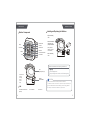
Monitor Components
1.Open the battery
door.
MEM BUTTON
Memory
SYSTOLIC
LCD DISPLAY
SET BUTTON
Norm
DIASTOLIC
Optim
GRADE
START/STOP BUTTON
Time
Date
PULSE RATE
TIME
2.Insert the batteries
according to the
polarity indications.
(Always select the
authorized / specified
2×AAA batteries.)
3.Close the battery
door.
Replace the batteries under following circumstances:
CUFF
(Type B applied part)
displays on the LCD.
The LCD display dims.
When powering on the monitor, the LCD doesn’t light up.
Component List
1.PCBA
2.Air Pipe
3.Pump
4.Valve
5.Cuff
BATTERY
COMPARTMENT
CAUTION
Remove batteries if the device is not likely to be used for some time.
Worn batteries are harmful to the environment. so please do not dispose with other daily trash.
Remove the old batteries from the device following your local recycling guidelines.
List
1.Wrist Blood Pressure Monitor
(EBP-017)
4
Do not dispose of batteries in fire. Batteries may explode or leak.
2. 2×AAA batteries
3.User manual
5
BEFORE YOU START
BEFORE YOU START
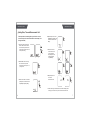
Setting Date, Time and Measurement Unit
Please proceed to time setting before your initial use so as to
ensure each piece of record are labled with a time stamp. (Year
Range: 2010-2050)
1.When the monitor is OFF, press
the SET button to enter into the
clock mode, then press and hold
“SET” button for about 3 seconds
to enter year setting.
4.Repeat steps 2 and 3 to set
the [MONTH] and [DAY]. Then
it will enter into time format
setting.
5.Select the 24 hours
time format or the 12
hours time format.
Repeat steps 2 and 3
to set the [HOUR]
and [MINUTE].
2.Press “MEM” button to change
the numeral. Each press will
increase the numeral by one in a
cycling manner.
3.Press “SET” button to confirm the
[YEAR]. Then the monitor diverts
to [MONTH] and [DAY] setting.
6.Repeat steps 2 and
3 to set the
measurement unit.
7.After confirming the meausrement unit, the LCD will display all the
settings you have done one by one and the monitor will shut off.
6
7
MEASUREMENT
MEASUREMENT
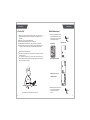
Tie the Cuff
Start Measurement
1 .Remove all accessories (watch, bracelet, etc) from your left wrist. If your
1.After correctly positioning the cuff,
press START/STOP button to turn
on the monitor, and it will complete
the measurement process.
physician has diagnosed you with poor circulation in your left wrist, use your
right wrist.
2.Roll or push up your sleeve to expose the skin.
3.Apply the cuff to your left wrist with your palm facing up.
4. Position the edge of the cuff about 1-1.5cm (0.4 -0.6 ) from wrist joints.
5. Fasten the wrist cuff around your wrist, leaving no extra room between the cuff
and your skin. If the cuff is too loose, the measurement will be inaccurate.
Rest for 5 minutes before measuring.
Wait at least 3 minutes between measurements. This allows your blood
circulation to recover.
For a meaningful comparison, try to measure under similar conditions. For
example, take daily measurement at approximately the same time, on the same
wrist, or as directed by a physician.
LCD Display.
Adjust to zero.
Inflating and measuring.
Display and save the
measuring result.
Time
Date
Optim
Norm
Keep the BP monitor the same level of your heart
8
2.Press START/STOP button to turn
off the monitor. Otherwise, the
monitor will shut off within 1
minute.
9
DATA MANAGEMENT
DATA MANAGEMENT
Recall the Records
3.When there has no record, the LCD
displays “---”.
1.When the blood pressure monitor is off,
press “MEM” button to access the
memory, it will display the latest record
first when the records are less than
three groups. When there are three or
more than three groups ,it will display
the average value of the latest three
records first.
2. Press “MEM” button again, it will
display the latest measurement
record. Press “MEM” button to rotate
the history records. Press SET button
to look back the record. You can
check 60 groups of record totally.
When it displays the record, it will
shutdown in 1minute if has no
operation.
The exact time and date
of the measurement
will display alternatively.
10
The corresponding
date is January 1st.
UP
DOWN
CAUTION
The most recent record (1) is shown first. Each new measurement
is assigned to the first (1) record. All other records are pushed back
one digit (e.g., 2 becomes 3, and so on), and the last record (60) is
dropped from the list.
The corresponding
time is 10:38.
11
INFORMATION FOR USER
DATA MANAGEMENT
Delete the Records
When you did not obtain the accurate measurement, you can clear all the
measuring results by following steps below.
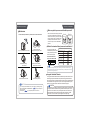
Tips for Measurement
Measurements may be inaccurate if taken in the following
circumstances.
1.Press and hold both the “MEM” button
for 3 seconds when the monitor is in the
memory recall mode, the flash display
“dEL ALL” will show.
Within 1 hour
after dinner or drinking
Immediate measurement
after tea, coffee, smoking
Within 20 minutes
after taking a bath
When talking or moving your fingers
2.When the LCD display blinking “dEL
ALL”, press “SET” button to confirm
clearing.
The LCD will display “dEL dONE”,
indicating that memory clearing is
complete.
3.If you wish to give up clearing, press the
START/STOP button to turn off the
monitor.
In a very cold environment
12
When you want to discharge urine
13
INFORMATIONFOR
FORUSER
USER
INFORMATION
ABOUT BLOOD PRESSURE
What are systolic pressure and diastolic pressure?
Maintenance
To obtain the best performance, please follow the instructions below.
Norm
Opt
im
Time
Date
When ventricles contract and pump blood out
of the heart, the blood pressure reaches its
maximum value in the cycle, which is called
systolic pressure. When the ventricles relax,
the blood pressure reaches its minimum
value in the cycle, which is called diastolic
pressure.
Systolic
Diastolic
press
relax
blood entering
vein
blood discharging
artery
What is the standard blood pressure classification?
Norm
Optim
Time
Date
Put in a dry place and avoid the sunshine
No
Op
rm
tim
Tim
Dat e
e
Avoid intense shaking
and collisions
Avoid touching water,
clean it with a dry cloth in case.
The chart on the right is the
standard blood pressure classification published by American
Heart Association (AHA).
AHA Home Guideline for
Upper Limit of Normal BP
Norm
Optim
Time
Date
Avoid dusty and unstable
temperature environment
SYS
DIA
135 mm Hg
85 mm Hg
This chart reflects blood pressure categories defined by American Heart Association.
Blood Pressure Category
Normal
Systolic
mmHg (upper#)
Diastolic
mmHg (lower#)
less than 120
and
less than 80
Prehypertension
120-139
or
80-89
High Blood Pressure
(Hypertension) Stage 1
140-159
or
90-99
160 or higher
or
100 or higher
Higher than 180
or
High Blood Pressure
(Hypertension) Stage 2
Hypertensive Crisis
(Emergency care needed)
Higher than 110
CAUTION
Please consult a physician if your measuring result falls outside the range.
Please note that only a physician can tell whether your blood pressure value
has reached a dangerous point.
Norm
Optim
Norm
O ptim
Time
Date
Time
Date
Use wet cloths to remove dirt
Avoid washing the cuff
CAUTION
• If you have any problems with this device, such as setting up, maintaining or using,
please contact the SERVICE PERSONNEL of
. Don’t open or repair the
device by yourself.
• Please report to
if any unexpected operation or events occur.
14
Irregular Heartbeat Detector
An irregular heartbeat is detected when a heartbeat rhythm varies while the unit is
measuring the systolic and diastolic blood pressure.During each measurement,
this equipment records the heartbeat intervals and works out the standard deviation.
If the calculated value is larger than or equal to 15,the irregular heartbeat symbol
appears on the symbol when the measurement results are displayed.
CAUTION
The appearance of the IHB icon indicates that a pulse irregularity consistent with
an irregular heartbeat was detected during measurement. Usually this is NOT a
cause for concern. However, if the symbol appears often, we recommend you
seek medical advice. Please note that the device does not replace a cardiac
examination, but serves to detect pulse irregularities at an early stage.
15
ABOUT BLOOD PRESSURE
TROUBLESHOOTING
Why does my blood pressure
fluctuate throughout the
day?
1. Individual blood pressure varies
multiple times everyday, it is also affected by the way you tie your cuff and measurement position, so please take the
measurement under the same conditions.
2.If the person takes medicine, the
pressure will vary more.
PROBLEM SYMPTOM
No power
Low
batteries
3.Wait at least 3 minutes for
another measurement.
Why do I get a different
blood pressure at home
compared to the hospital?
The blood pressure is different even
throughout the day due to weather
emotion, exercise etc, Also, there is the
“white coat” effect, which means blood
pressure usually increases in clinical
settings.
Is the result the same
if measuring on the
right wrist?
It is ok for both wrists, but there
will be some different results for
different people. We suggest you
measure the same wrist every time.
16
This section includes a list of error messages and frequently
asked questions for problems you may encounter with your wrist
blood pressure monitor. If the products not operating as you
think it should, check here before arranging for servicing.
What you need to pay
attention to when you measure
your blood pressure at home:
If the cuff is tied properly.
If the cuff is too tight or too loose.
If the cuff is tied on the wrist.
If you feel anxious.
Taking 2-3 deep breaths before
beginning will be better for measuring.
Advice:Relax yourself for 4-5
minutes until you calm down.
Error
massage
Display is dim or
will not light up.
CHECK THIS
REMEDY
Batteries are exhausted. Replace with new batteries
Batteries are inserted
incorrectly.
Show on
Batteries are low.
the display
Insert the batteries
correctly
Replace with new batteries
E 1 shows
The cuff is not secure.
Refasten the cuff and then
measure again.
E 2 shows
The cuff is very tight
Refasten the cuff and then
measure again.
E 3 shows
The pressure of the
cuff is excess.
Relax for a moment
and then measure again.
E 10 or
E 11 shows
Movement can affect the
The monitor detected
measurement.Relax for a
motion while measuring. moment and then
measure again.
E 20 shows
The measurement
Loosen the clothing on
process does not detect the wrist and then
the pulse signal.
measure again.
E 21 shows
Measure incorrectly.
EExx,shows on
the display.
A calibration error
occurred.
Relax for a moment and
then measure again.
Retake the measurement.
If the problem persists,
contact the retailer or our
customer service
department for further
assistance.Refer to the
warranty for contact
information and return
instructions.
17
SPECIFICATIONS
Power Supply
Display Mode
CONTACT INFORMATION
Contact Information
Battery powered mode:
2×AAA batteries (3V)
Digital LCD V.A 31.5mm×44mm(1.25’’×1.73’’)
Measurement Mode
Oscillographic testing mode
Measurement Range
Pressure: 0kPa-40kPa(0mmHg-300mmHg)
pulse value:(40-199)beat/minute
Accuracy
Pressure:
5℃-40℃(41℉-104℉)within±0.4kPa(3mmHg)
pulse value:±5%
Normal working condition
Temperature:5℃ to 40℃(41℉ to 104℉)
Relative humidity: ≤85%RH
Atmospheric pressure: 86kPa to 106kPa
Storage & transportation
condition
Temperature:-20℃-60℃ (-4℉ - 140℉)
Relative Humidity: 10%RH-93%RH
Atmospheric Pressure: 50kPa-106 kPa
Measurement perimeter
of the wrist
About 13.5cm-21.5cm(5 /
Weight
External dimensions
Attachment
Mode of operation
Degree of protection
IP Classification
Software version
Device classification
1
”
3 -
81/2 )
”
Approx.112g(3.95oz)(Excluding batteries)
Approx. 68mm×75mm×31mm(2.68”×2.95”×1.22”)
(Excluding the cuff)
2×AAA batteries,one storage,user manual
Continuous operation
Type B applied part
For more information about our products, please visit
,
or call
Customer 1-866-822-6999 M-F 9 a.m.-5 p.m.CST, usual
problems and customer download,
will serve you anytime.
Complied Standards List
Risk management
Labeling
ISO 14971:2007
EN 980:2008
User manual
EN 1041:2008
General Requirements
for Safety
IEC 60601-1:2005
Electromagnetic
compatibility
Non-invasive
Sphygmomanometers
General
Requirements
IEC 60601-1-2:2007
AASI/AAMI SP10:2002/A1:2003/A2:2006/(R)2008
IP×0
V01
Internally Powered ME Equipment
18 WARNING: No modification of this equipment is allowed.
19
EMC GUIDANCE
Table 2 Guidance and MANUFACTURER’s declaration – electromagnetic
IMMUNITY – for all ME EQUIPMENT and ME SYSTEMS
FCC Statement
This device complies with Part 15 of the FCC Rules. Operation is subject to
the following two conditions:
(1) this device may not cause harmful interference, and
(2) this device must accept any interference received, including interference
that may cause undesired operation.
Guidance and manufacturer’s declaration – electromagnetic immunity
The device is intended for use in the electromagnetic environment specified below.
The customer or the user of the device should assure that it is used in such an
environment
IMMUNITY test
Electrostatic
discharge (ESD)
IEC 61000-4-2
EMC Guidance
Table 1 Guidance and MANUFACTURER’s declaration – ELECTROMAGNETIC
EMISSIONS- for all ME EQUIPMENT and ME SYSTEMS
Guidance and manufacturer’s declaration – electromagnetic emissions
Electrical fast
transient/burst
IEC 61000-4-4
Surge IEC
61000-4-5
The device is intended for use in the electromagnetic environment specified
below. The customer or the user of the device should assure that it is used in
such an environment.
Emissions test
Compliance
Electromagnetic environment - guidance
RF emissions
CISPR 11
Group 1
The device uses RF energy only for its
internal function. Therefore, its RF
emissions are very low and are not likely
to cause any interference in nearby
electronic equipment.
RF emissions
CISPR 11
Class B
Harmonic emissions
IEC 61000-3-2
Not applicable
Voltage fluctuations/
flicker emissions IEC
61000-3-3
20
Not applicable
Voltage dips,
short interruptions
and voltage
variations on
power supply
input lines
IEC 61000-4-11
IEC 60601 test level Compliance level
±6 kV contact
±8 kV air
±2 kV for
power supply lines
±1 kV for
input/output lines
±1 kV line(s)
to line(s)
±2 kV line(s)
to earth
±6 kV contact
±8 kV air
Not applicable
Not applicable
<5% UT
(>95% dip in UT )
for 0.5 cycle
40% UT
(60% dip in UT )
for 5 cycles
Not applicable
70% UT
(30% dip in UT )
for 25 cycles
<5% UT
(>95% dip in UT )
for 5 s
Electromagnetic
environment - guidance
Floors should be wood,
concrete or ceramic tile. If
floors are covered with
synthetic material, the
relative humidity should be
at least 30%.
Mains power quality should
be that of a typical
commercial or hospital
environment.
Mains power quality should
be that of a typical
commercial or hospital
environment.
Mains power quality should
be that of a typical
commercial or hospital
environment. If the user of
the device requires
continued operation during
power mains interruptions,
it is recommended that the
device be powered from an
uninterruptible power supply
or a battery.
Power frequency magnetic
fields should be at levels
characteristic of a typical
location in a typical
commercial or hospital
IEC 61000-4-8
environment.
NOTE
UT is the a.c. mains voltage prior to application of the test level.
Power frequency
(50/60Hz)
magnetic field
3A/m
3A/m
21
Table 4 Guidance and MANUFACTURER’s declaration – electromagnetic IMMUNITY –
for ME EQUIPMENT and ME SYSTEMS that are not LIFE-SUPPORTING
Guidance and manufacturer’s declaration – electromagnetic immunity
The device is intended for use in the electromagnetic environment specified below.
The customer or the user of the device should assure that it is used in such an environment.
IMMUNITY test
IEC 60601
TEST LEVEL
Compliance
level
Electromagnetic environment guidance
Portable and mobile RF communications
equipment should be used no closer to
any part of the device, including
cables, than the recommended
separation distance calculated from the
equation applicable to the frequency of
the transmitter.
Conducted RF
IEC 61000-4-6
Radiated RF
IEC 61000-4-3
3 Vrms
150 kHz to
80 MHz
3 V/m
80 MHz to
2.5 GHz
Not applicable
3 V/m
Recommended separation distance
3,5
d=[
] P
V1
d = 1.167 P 80 MHz to 800 MHz
Recommended separation distances
between portable and mobile RF communications equipment and the device.
The device is intended for use in an electromagnetic environment in which
radiated RF disturbances are controlled. The customer or the user of the device
can help prevent electromagnetic interference by maintaining a minimum distance
between portable and mobile RF communications equipment (transmittters) and the
device as recommended below, according to the maximum output power of the
communications equipment.
Rated maximum output
power of transmitter
(W)
d = 2.333 P 800 MHz to 2,5 GHz
where P is the maximum output power
rating of the transmitter in watts (W)
according to the transmitter manufacturer
and d is the recommended separation
distance in metres (m).
Field strengths from fixed RF
transmitters, as determined by an
electromagnetic site survey, a should be
less than the compliance level in each
frequency range. b
Interference may occur in the vicinity of
equipment marked with the following
symbol:
NOTE 1
NOTE 2
Table 6 Recommended separation distances between portable and mobile
RF communications equipment and the ME EQUIPMENT or ME SYSTEM –
for ME EQUIPMENT and ME SYSTEMS that are not LIFE-SUPPORTING
At 80 MHz and 800 MHz, the higher frequency range applies.
These guidelines may not apply in all situations. Electromagnetic
propagation is affected by absorption and reflection from structures, objects
and people.
Separation distance according to frequency of transmitter (m)
150 kHz to 80 MHz 80 MHz to 800 MHz 800 MHz to 2.5 GHz
d=[
3,5
] P
d = 1.167 P
d = 2.333 P
0.01
Not applicable
0.117
0.233
0.1
Not applicable
0.369
0.738
1
Not applicable
1.167
2.333
10
Not applicable
3.690
7.378
100
Not applicable
11.67
23.33
V1
For transmitters rated at a maximum output power not listed above, the recommended
separation distance d in metres (m) can be estimated using the equation applicable to
the frequency of the transmitter, where P is the maximum output power rating of the
transmitter in watts (W) according to the transmitter manufacturer.
NOTE 1 At 80MHz and 800MHz, the separation distance for the higher frequency
range applies.
NOTE 2 These guidelines may not apply in all situations. Electromagnetic propagation
is affected by absorption and reflection from structures, objects and people.
a Field strengths from fixed transmitters, such as base stations for radio (cellular /
22
cordless) telephones and land mobile radios, amateur radio, AM and FM radio broadcast and TV broadcast cannot be predicted theoretically with accuracy. To assess the
electromagnetic environment due to fixed RF transmitters, an electromagnetic site
survey should be considered. If the measured field strength in the location in which
the device is used exceeds the applicable RF compliance level above, the device
should be observed to verify normal operation. If abnormal performance is observed,
additional measures may be necessary, such as re-orienting or relocating the device.
b Over the frequency range 150 kHz to 80 MHz, field strengths should be less than
[V 1]V/m.
23