1
Compute (Bridgend) Ltd
SELCOPY Batch User Manual
Release 3.30
8 Merthyr Mawr Road, Bridgend, Wales UK CF31 3NH
Tel: +44 (1656) 65 2222
Fax: +44 (1656) 65 2227
CBL Web Site - http://www.cbl.com
This document may be downloaded from http://www.cbl.com/documentation.php
CBL Ref: z:\cd\sman\s330\SELCOPY_3.30_User_Manual.pdf
- 2015/03/03 11:10:28 -
SELCOPY Manual
Contents
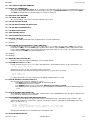
Documentation Notes.........................................................................................................................................................................1
Summary of Changes..........................................................................................................................................................................2
SELCOPY Assembler for z/OS, z/VM and z/VSE...................................................................................................................2
SELCOPY C++ for z/OS, z/VM, Series i, UNIX and Windows................................................................................................3
Introduction..........................................................................................................................................................................................6
General Information................................................................................................................................................................6
Mainframe Version..................................................................................................................................................................6
iSeries, UNIX and PC Versions...............................................................................................................................................6
New Computer User................................................................................................................................................................6
Bits and Bytes Explained........................................................................................................................................................7
Hexadecimal Explained...........................................................................................................................................................7
Packed Decimal Explained.....................................................................................................................................................8
Zoned Decimal Explained.......................................................................................................................................................8
New SELCOPY User..............................................................................................................................................................8
Abbreviations and Synonyms..........................................................................................................................................9
Selection..........................................................................................................................................................................9
Multiple Selection...........................................................................................................................................................10
Other Control Statements..............................................................................................................................................10
Blocked Files..................................................................................................................................................................10
Selection Summary........................................................................................................................................................11
Work Area......................................................................................................................................................................12
Job Control Language....................................................................................................................................................12
Your Next Step...............................................................................................................................................................13
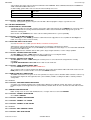
Control Statement Syntax Rules......................................................................................................................................................14
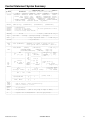
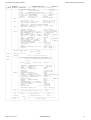
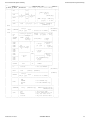
Control Statement Syntax Summary...............................................................................................................................................17
Control Statement Syntax Summary Notes..........................................................................................................................22
Operation Words, Parameters and Keywords................................................................................................................................24
! (Default separator character)..............................................................................................................................................24
* (Comment)..........................................................................................................................................................................24
*< (Comment Ignoring Separator).........................................................................................................................................25
*> (Comment in Summary)...................................................................................................................................................25
/* (End of Input Control Statements).....................................................................................................................................25
\ (Control Statement Continuation)........................................................................................................................................25
ABTRAP................................................................................................................................................................................26
ADABAS................................................................................................................................................................................26
ADD=n..................................................................................................................................................................................27
ALL........................................................................................................................................................................................28
AND (Operation Word)..........................................................................................................................................................28
AND=string (Logical Operator)..............................................................................................................................................28
APPEND...............................................................................................................................................................................29
ASA0.....................................................................................................................................................................................30
ASC.......................................................................................................................................................................................30
ASCII.....................................................................................................................................................................................30
ASSGN..................................................................................................................................................................................30
AT=p.....................................................................................................................................................................................30
BANNER...............................................................................................................................................................................30
BASE=xxxx...........................................................................................................................................................................31
BDW......................................................................................................................................................................................31
BLKSIZE=n (for Input)...........................................................................................................................................................31
BLKSIZE=n/SAME/MAX/UNB (for Output)...........................................................................................................................33
BUFNO..................................................................................................................................................................................34
BWD......................................................................................................................................................................................34
Reversing Direction for KSDS........................................................................................................................................34
BY=n.....................................................................................................................................................................................35
CALL modname....................................................................................................................................................................35
CALL (for Mainframe)............................................................................................................................................................35
CALL (for UNIX, Windows and OS/2)...................................................................................................................................37
CANCEL (Operation Word)...................................................................................................................................................39
CANCEL (Parameter)...........................................................................................................................................................39
CAT fname............................................................................................................................................................................39
CAT=catref............................................................................................................................................................................41
CHAR....................................................................................................................................................................................41
CHKP....................................................................................................................................................................................41
CIPHER.................................................................................................................................................................................42
CKPT.....................................................................................................................................................................................42
CLEAR..................................................................................................................................................................................42
CLOSE fname.......................................................................................................................................................................42
CLOSE=disp.........................................................................................................................................................................43
CMS......................................................................................................................................................................................43
COMPRESS..........................................................................................................................................................................43
CONTMAX............................................................................................................................................................................44
CP.........................................................................................................................................................................................44
2015-03-03 11:16:07
i
SELCOPY Manual
Contents
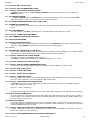
Operation Words, Parameters and Keywords
CVDATE................................................................................................................................................................................45
CVxx=n Conversion Synonyms............................................................................................................................................46
CVAE=n (ASCII --> EBCDIC)...............................................................................................................................................47
SELCOPY ASCII->EBCDIC Translate Table................................................................................................................48
CVBC=n (Binary --> Char)....................................................................................................................................................48
CVBP=n (Binary --> Packed)................................................................................................................................................49
CVCB=n (Char --> Binary)....................................................................................................................................................49
CVCF=n (Char --> Float).......................................................................................................................................................49
CVCH=n (Char --> Hex)........................................................................................................................................................50
CVCP=n (Char --> Packed)..................................................................................................................................................51
CVEA=n (EBCDIC --> ASCII)...............................................................................................................................................52
SELCOPY EBCDIC->ASCII Translate Table................................................................................................................53
CVFC=n (Float --> Char).......................................................................................................................................................53
CVHC=n (Hex --> Char)........................................................................................................................................................54
CVPB=n (Packed --> Binary)................................................................................................................................................54
CVPC=n (Packed --> Char)..................................................................................................................................................55
CYLOFL=n............................................................................................................................................................................56
DATAWIDTH.........................................................................................................................................................................56
DB2 (Operation Word)..........................................................................................................................................................57
DB2 (Parameter)...................................................................................................................................................................57
DEFDIR=path........................................................................................................................................................................57
DEFER..................................................................................................................................................................................58
DEL fname............................................................................................................................................................................58
DEV=cuu...............................................................................................................................................................................59
DEV=dev...............................................................................................................................................................................59
DIR........................................................................................................................................................................................60
DIR (for MVS)................................................................................................................................................................60
DIR (for CMS)................................................................................................................................................................61
DIR (for VSE).................................................................................................................................................................62
DIR (for iSeries, UNIX and PC)......................................................................................................................................63
DIRDATA (General)..............................................................................................................................................................64
DIRDATA (for CMS).......................................................................................................................................................65
DIRDATA (for MVS).......................................................................................................................................................66
DIRDATA (for VSE).......................................................................................................................................................66
DIRDATA (for iSeries, UNIX and PC)............................................................................................................................67
DIV=n....................................................................................................................................................................................67
DL1........................................................................................................................................................................................69
DO user-label........................................................................................................................................................................70
DOS......................................................................................................................................................................................70
DSN.......................................................................................................................................................................................70
DSN=....................................................................................................................................................................................70
DUMMY.................................................................................................................................................................................71
DUMPALL [= YES | NO ].......................................................................................................................................................71
DUMPENC = "xy" | "x"..........................................................................................................................................................72
EBC.......................................................................................................................................................................................72
EBCDIC.................................................................................................................................................................................72
ELSE.....................................................................................................................................................................................72
ELSEIF..................................................................................................................................................................................73
END.......................................................................................................................................................................................73
ENTRY..................................................................................................................................................................................73
ENTRYEOJ...........................................................................................................................................................................73
ENVFAIL...............................................................................................................................................................................74
ENVVAR...............................................................................................................................................................................74
EODISK.................................................................................................................................................................................74
EOF (Operation Word)..........................................................................................................................................................74
Note..............................................................................................................................................................................75
EOF (Testing for)..................................................................................................................................................................75
WARNING 1..................................................................................................................................................................75
EOJ.......................................................................................................................................................................................76
EOL (End-of-Line protocol)...................................................................................................................................................76
EOMEMB..............................................................................................................................................................................77
EQ 'string'..............................................................................................................................................................................77
EQU (Operation Word)..........................................................................................................................................................77
!!! IMPORTANT FEATURE !!!.......................................................................................................................................77
ESDS....................................................................................................................................................................................79
MVS environment.........................................................................................................................................................79
EXACT..................................................................................................................................................................................79
EXCL.....................................................................................................................................................................................79
EXIT='phasenam'..................................................................................................................................................................79
EXPAND...............................................................................................................................................................................80
Restrictions...................................................................................................................................................................80
FAIL=NOCLOSE...................................................................................................................................................................80
FILE=fname/keyword............................................................................................................................................................81
FILE=DUMMY (logical).........................................................................................................................................................81
DUMMY Input...............................................................................................................................................................81
FILE=START (logical)...........................................................................................................................................................82
2015-03-03 11:16:07
ii
SELCOPY Manual
Contents
Operation Words, Parameters and Keywords
FILE=STOP...........................................................................................................................................................................83
FILE=SUSP...........................................................................................................................................................................83
FILE=CARD..........................................................................................................................................................................83
Reading Through VSE /* and /&...................................................................................................................................84
FILE=STDIN..........................................................................................................................................................................84
FILE=STDOUT......................................................................................................................................................................85
FILE=JECL............................................................................................................................................................................85
Important.......................................................................................................................................................................85
FILE=LOG.............................................................................................................................................................................85
TYPE param.................................................................................................................................................................86
FILE=PLOG (Print and LOG)................................................................................................................................................86
FILE=PRINT..........................................................................................................................................................................87
FROM param................................................................................................................................................................87
FILE=PUNCH........................................................................................................................................................................89
FILE=TAPEnn.......................................................................................................................................................................89
FILE=fname..........................................................................................................................................................................89
Mainframe Job Control..................................................................................................................................................90
FILE=#nnn............................................................................................................................................................................90
FILE=fn.ft.fm.........................................................................................................................................................................90
FILE=fileid.............................................................................................................................................................................91
ERROR 158..................................................................................................................................................................91
FILL=x...................................................................................................................................................................................92
On READ......................................................................................................................................................................92
FLAG.....................................................................................................................................................................................93
FNAME..................................................................................................................................................................................93
FORMAT='string'...................................................................................................................................................................94
FORMAT Control Characters........................................................................................................................................94
FMT=column-list...................................................................................................................................................................95
FROM=p...............................................................................................................................................................................96
FWD......................................................................................................................................................................................96
Reversing Direction on a KSDS....................................................................................................................................96
GE 'string'..............................................................................................................................................................................96
GEN=n..................................................................................................................................................................................97
GET fname............................................................................................................................................................................98
GOSUB.................................................................................................................................................................................98
GOTO GET/EOJ/CANCEL/user-label...................................................................................................................................98
GT 'string'............................................................................................................................................................................100
HEAD='string'......................................................................................................................................................................100
HEAD=NO..................................................................................................................................................................100
IF.........................................................................................................................................................................................101
IF (Type 1 - Character Strings)....................................................................................................................................102
IF (Type 2 - Arithmetic)................................................................................................................................................104
IF (Type 3 - Specials)...................................................................................................................................................105
IMS......................................................................................................................................................................................105
IN.........................................................................................................................................................................................106
INCLUDE fileid....................................................................................................................................................................106
INCOUNT=n........................................................................................................................................................................106
Default STOPAFT=1...................................................................................................................................................107
INPUT.................................................................................................................................................................................107
INS fname...........................................................................................................................................................................107
Use WRITE instead of INS.........................................................................................................................................108
INTO=n...............................................................................................................................................................................109
READ INTO n.............................................................................................................................................................109
INTV=n................................................................................................................................................................................109
ISAM...................................................................................................................................................................................109
ISN......................................................................................................................................................................................110
JECL...................................................................................................................................................................................110
KEY=...................................................................................................................................................................................110
KEQ (Key EQual)........................................................................................................................................................110
KEYFROM=n......................................................................................................................................................................112
KEYLEN=n..........................................................................................................................................................................112
For CMS, AS/400, UNIX and PC input.......................................................................................................................112
KEYPOS=n.........................................................................................................................................................................113
For CMS, AS/400, UNIX and PC input.......................................................................................................................113
KGE=..................................................................................................................................................................................113
KL=n....................................................................................................................................................................................114
KP=n...................................................................................................................................................................................114
KSDS..................................................................................................................................................................................114
MVS environment.......................................................................................................................................................114
L..........................................................................................................................................................................................114
label.....................................................................................................................................................................................114
LABEL=NO.........................................................................................................................................................................114
LE 'string'.............................................................................................................................................................................115
LEAVE.................................................................................................................................................................................115
LENGTH=n.........................................................................................................................................................................115
LINE=n................................................................................................................................................................................115
2015-03-03 11:16:07
iii
SELCOPY Manual
Contents
Operation Words, Parameters and Keywords
Testing the LINE number............................................................................................................................................116
LOG.....................................................................................................................................................................................116
LOWER...............................................................................................................................................................................116
LRECL.................................................................................................................................................................................117
LRECL (1. as a position)..............................................................................................................................................117
LRECL (2. as an Operation Word)...............................................................................................................................117
LRECL (3. as a Parameter for Files)............................................................................................................................118
LT........................................................................................................................................................................................119
LTM=YES............................................................................................................................................................................120
MARC..................................................................................................................................................................................120
MARC Formats supported..........................................................................................................................................120
MIXED='string'....................................................................................................................................................................121
Example......................................................................................................................................................................122
MOD (Redundant word)......................................................................................................................................................122
MOVE=n.............................................................................................................................................................................122
Padded Destination.....................................................................................................................................................122
MSTIND..............................................................................................................................................................................123
MULT=n..............................................................................................................................................................................123
NE.......................................................................................................................................................................................124
NEWBLK.............................................................................................................................................................................125
NL........................................................................................................................................................................................125
NOASA0..............................................................................................................................................................................125
NOBANNER........................................................................................................................................................................126
NOBDW..............................................................................................................................................................................126
NOENVVAR........................................................................................................................................................................126
NOFILL................................................................................................................................................................................126
NODUP...............................................................................................................................................................................127
NOPRINT............................................................................................................................................................................127
NORDW..............................................................................................................................................................................127
On a READ statement................................................................................................................................................127
NOSORT.............................................................................................................................................................................128
NOSUB...............................................................................................................................................................................128
NOSUBS.............................................................................................................................................................................128
NOTRUNC..........................................................................................................................................................................128
NOW (Redundant word)......................................................................................................................................................129
NULLS.................................................................................................................................................................................129
ONES='string'......................................................................................................................................................................129
OPEN fname.......................................................................................................................................................................130
Note............................................................................................................................................................................130
OPEN=RWD/NORWD........................................................................................................................................................131
OPTION..............................................................................................................................................................................132
OR (Operation Word)..........................................................................................................................................................133
OR= 'string' (Logical Operator)...........................................................................................................................................134
PACK=n..............................................................................................................................................................................134
PACKB=n............................................................................................................................................................................134
PAD=x.................................................................................................................................................................................135
PAGEDEPTH......................................................................................................................................................................135
Default.........................................................................................................................................................................135
PAGEWIDTH......................................................................................................................................................................135
Default, Min/Max.........................................................................................................................................................135
PASS=x'nnnn,nnnn,nnnn,nnnn'..........................................................................................................................................136
PASSWORD=string............................................................................................................................................................136
PERFORM user-label.........................................................................................................................................................137
PFX.....................................................................................................................................................................................137
PLOG..................................................................................................................................................................................137
POS.....................................................................................................................................................................................137
POS (1. as an Operation Word)...................................................................................................................................137
POS=p1 (,p2) (2. as a Parameter with Numeric Arg)..................................................................................................137
POS=p1 (,p2) (3. as a Parameter with Special Keyword)............................................................................................139
POS @...............................................................................................................................................................................139
POS @user........................................................................................................................................................................139
POS ANY...........................................................................................................................................................................140
POS CBLNAME.................................................................................................................................................................140
Beware........................................................................................................................................................................140
POS COMRG.....................................................................................................................................................................140
POS DATE.........................................................................................................................................................................141
POS DIFF...........................................................................................................................................................................141
POS DSN...........................................................................................................................................................................142
For MVS......................................................................................................................................................................142
POS FHDR.........................................................................................................................................................................142
POS FNAME......................................................................................................................................................................142
CAT Files....................................................................................................................................................................143
POS FSIZE........................................................................................................................................................................143
POS FT..............................................................................................................................................................................143
POS HEAD.........................................................................................................................................................................143
POS L.................................................................................................................................................................................144
2015-03-03 11:16:07
iv
SELCOPY Manual
Contents
Operation Words, Parameters and Keywords
LRECL=0....................................................................................................................................................................144
POS PARM........................................................................................................................................................................144
POS PCB...........................................................................................................................................................................145
POS PGNO........................................................................................................................................................................145
POS RBA...........................................................................................................................................................................145
POS RETCODE.................................................................................................................................................................146
POS RETCMS...................................................................................................................................................................146
POS RETVSAM.................................................................................................................................................................146
POS RETXV.......................................................................................................................................................................147
POS RPL............................................................................................................................................................................147
POS SEG...........................................................................................................................................................................147
POS SQLCA.......................................................................................................................................................................148
POS SQLDA.......................................................................................................................................................................148
POS SQLMA.......................................................................................................................................................................149
POS STATUS....................................................................................................................................................................150
POS UPSI..........................................................................................................................................................................150
POS UXADIFF...................................................................................................................................................................150
POS UXATPTR..................................................................................................................................................................150
Example......................................................................................................................................................................150
POS UXDW........................................................................................................................................................................151
POS UXINCNT...................................................................................................................................................................151
POS UXINCNT+4..............................................................................................................................................................151
POS UXLINE......................................................................................................................................................................151
POS UXLINEREM..............................................................................................................................................................151
POS UXLRECL..................................................................................................................................................................151
Example......................................................................................................................................................................152
POS UXLRECL+4..............................................................................................................................................................152
POS UXPD.........................................................................................................................................................................152
POS UXPGNO...................................................................................................................................................................152
POS UXPW........................................................................................................................................................................152
POS UXREPLYL................................................................................................................................................................152
POS VOLID........................................................................................................................................................................153
PRINT.................................................................................................................................................................................154
PRRECLEN=NO/YES.........................................................................................................................................................154
PRT.....................................................................................................................................................................................154
PRTCTL..............................................................................................................................................................................155
PTR=@user........................................................................................................................................................................155
PUNCH...............................................................................................................................................................................155
QUIT....................................................................................................................................................................................155
RANGE=yyyy/mm/dd-yyyy/mm/dd......................................................................................................................................155
RBA=n.................................................................................................................................................................................156
VSAM ESDS...............................................................................................................................................................156
RC_KEYNF=n.....................................................................................................................................................................156
RDW....................................................................................................................................................................................157
Option statement.........................................................................................................................................................157
READ fname.......................................................................................................................................................................157
File Name (Mandatory)...............................................................................................................................................158
REC=n (Testing for)............................................................................................................................................................159
REC=n (Reading by)...........................................................................................................................................................159
RECFM=.............................................................................................................................................................................160
Default RECFM...........................................................................................................................................................160
REM=n................................................................................................................................................................................162
REP.....................................................................................................................................................................................162
REPLY=n............................................................................................................................................................................162
REPORT.............................................................................................................................................................................163
Effects of REPORT.....................................................................................................................................................163
RESET................................................................................................................................................................................165
RETCODE...........................................................................................................................................................................165
Return Code Values....................................................................................................................................................165
RETURN.............................................................................................................................................................................166
REUSE................................................................................................................................................................................166
REVERSE...........................................................................................................................................................................166
RKP=n.................................................................................................................................................................................167
RRDS..................................................................................................................................................................................167
MVS environment.......................................................................................................................................................167
S=n......................................................................................................................................................................................167
SEARCH.............................................................................................................................................................................168
SEG.....................................................................................................................................................................................168
SEP x..................................................................................................................................................................................169
SEQ=dd..............................................................................................................................................................................169
SITE='string'........................................................................................................................................................................169
SIZE=n................................................................................................................................................................................169
SLEEP.................................................................................................................................................................................170
SORT=sort-list....................................................................................................................................................................170
SORTDIR=x........................................................................................................................................................................171
SPACE=n............................................................................................................................................................................171
2015-03-03 11:16:07
v
SELCOPY Manual
Contents
Operation Words, Parameters and Keywords
SQL='full SQL statement'....................................................................................................................................................171
READ statement.........................................................................................................................................................172
SSA.....................................................................................................................................................................................172
SSN=xxxx...........................................................................................................................................................................172
STACK................................................................................................................................................................................172
LIFO/FIFO keywords...................................................................................................................................................173
START................................................................................................................................................................................173
STARTISN=........................................................................................................................................................................173
STARTKEY=.......................................................................................................................................................................173
STARTRBA=n.....................................................................................................................................................................174
STARTREC=n.....................................................................................................................................................................174
STEP=n...............................................................................................................................................................................175
Use in Array Processing.............................................................................................................................................175
STOP..................................................................................................................................................................................176
STOPAFT=n.......................................................................................................................................................................176
STOPAFT Defaults.....................................................................................................................................................176
SUB=n.................................................................................................................................................................................177
INTO parameter..........................................................................................................................................................177
SUBDIR=n..........................................................................................................................................................................178
SUSP..................................................................................................................................................................................178
SYS=n.................................................................................................................................................................................178
Dynamic Allocation.....................................................................................................................................................179
SYSTEM.............................................................................................................................................................................179
CMS Environment Usage...........................................................................................................................................179
TAB=n.................................................................................................................................................................................180
Notes...........................................................................................................................................................................180
TABLE=...............................................................................................................................................................................180
TABSIN/TABSOUT.............................................................................................................................................................181
THEN..................................................................................................................................................................................181
THENIF...............................................................................................................................................................................181
TIMES=n.............................................................................................................................................................................182
TO=n...................................................................................................................................................................................182
TRAN..................................................................................................................................................................................182
'Lit1' 'Lit2'.....................................................................................................................................................................182
TRUNC................................................................................................................................................................................183
Output Files.................................................................................................................................................................183
TYPE=x (for Data)...............................................................................................................................................................184
TYPE=x (for Printing)..........................................................................................................................................................184
TYPE=B (for Printing).........................................................................................................................................................185
TYPE=C (for Printing).........................................................................................................................................................185
TYPE=D (for Printing).........................................................................................................................................................186
TYPE=DX (for Printing).......................................................................................................................................................187
TYPE=H (for Printing).........................................................................................................................................................187
TYPE=M (for Printing).........................................................................................................................................................188
TYPE=MC...................................................................................................................................................................188
TYPE=MP (for Printing)......................................................................................................................................................188
TYPE=N (for Printing).........................................................................................................................................................189
TYPE=S (for Printing).........................................................................................................................................................190
LOG Output.................................................................................................................................................................190
UNIX....................................................................................................................................................................................191
UNPK=n..............................................................................................................................................................................192
UNPKB=n............................................................................................................................................................................192
UPD (Parameter)................................................................................................................................................................192
VSAM Inserts..............................................................................................................................................................192
UPD fname (Operation Word).............................................................................................................................................192
Length Modification on Update...................................................................................................................................193
UPPER................................................................................................................................................................................194
user-label............................................................................................................................................................................194
UTIME.................................................................................................................................................................................194
UXxxxxxx............................................................................................................................................................................195
VLEN...................................................................................................................................................................................195
VOL=volser.........................................................................................................................................................................195
VSAM..................................................................................................................................................................................195
MVS environment.......................................................................................................................................................195
VTOC..................................................................................................................................................................................196
VSE Systems..............................................................................................................................................................196
WHERE=where-clause.......................................................................................................................................................196
WORKLEN=n......................................................................................................................................................................197
WRITE fname......................................................................................................................................................................197
File Names..................................................................................................................................................................198
WTO (Operation Word).......................................................................................................................................................199
WTO (Parameter)................................................................................................................................................................199
XOR='string'........................................................................................................................................................................199
XV func................................................................................................................................................................................200
For CMS......................................................................................................................................................................200
Y2........................................................................................................................................................................................202
2015-03-03 11:16:07
vi
SELCOPY Manual
Contents
Operation Words, Parameters and Keywords
Option Y4....................................................................................................................................................................203
ZEROS='string'...................................................................................................................................................................203
Further Information.........................................................................................................................................................................204
Nesting of Operation Words................................................................................................................................................204
Abbreviations and Synonyms..............................................................................................................................................204
Comment Data....................................................................................................................................................................205
* Comments................................................................................................................................................................205
Separator Character............................................................................................................................................................206
Continuation Character.......................................................................................................................................................206
Redundant = Sign...............................................................................................................................................................206
Redundant FILE=................................................................................................................................................................207
Redundant NOW.................................................................................................................................................................207
Comparison Operators........................................................................................................................................................207
Data v Data Comparison.....................................................................................................................................................208
Literals for Arithmetic..........................................................................................................................................................208
Negative Literals.........................................................................................................................................................208
Literals for String Compares...............................................................................................................................................208
Literals for PRINT/LOG/Output Files...................................................................................................................................209
Writing Variable Length Data..............................................................................................................................................209
Changing Record Formats..................................................................................................................................................210
Fixed Input..................................................................................................................................................................210
Dynamic Allocation..............................................................................................................................................................211
Mainframe Environments............................................................................................................................................211
Multiple Input Files..............................................................................................................................................................212
A "Problem" Example..................................................................................................................................................212
Automatic EOJ....................................................................................................................................................................213
Forced EOJ.........................................................................................................................................................................213
Processing with no Input File..............................................................................................................................................214
Execution via VSE Console................................................................................................................................................214
SYSIN for MVS and CMS...................................................................................................................................................215
ENQ/DEQ for PDS Output..................................................................................................................................................215
Note............................................................................................................................................................................215
Monitor MVS Operator STOP command.............................................................................................................................215
Bit Testing - ON/OFF/MIXED..............................................................................................................................................216
Testing for bits ON......................................................................................................................................................216
Bit Modification - OR/XOR/AND..........................................................................................................................................217
Set bits ON..................................................................................................................................................................217
Selection Summary Format.................................................................................................................................................217
SEL-ID........................................................................................................................................................................217
Pointers and LRECL - Discussion.................................................................................................................................................220
LRECL................................................................................................................................................................................220
The @ Pointer.............................................................................................................................................................220
User @ Pointers..........................................................................................................................................................220
Combination................................................................................................................................................................220
Range Tests........................................................................................................................................................................220
Pointer Assignment - Indirect..............................................................................................................................................220
LRECL........................................................................................................................................................................220
Pointer Assignment - Direct................................................................................................................................................221
Duration of Pointers....................................................................................................................................................221
Pointer Value testing...........................................................................................................................................................222
Testing for @ pointer set/unset...................................................................................................................................222
Pointer Usage Considerations............................................................................................................................................222
Setting a Pointer from an Address Constant.......................................................................................................................223
MVS............................................................................................................................................................................223
Getting a Pointer Value into Workarea................................................................................................................................224
@ Pointer Example.............................................................................................................................................................224
CBLNAME & SELCNAM..................................................................................................................................................................225
CBLNAME Overview...........................................................................................................................................................225
AS/400, UNIX and PC.................................................................................................................................................225
SELCNAM Overview...........................................................................................................................................................225
AS/400, UNIX and PC.................................................................................................................................................225
CBLNAME Options.............................................................................................................................................................227
Heading Line...............................................................................................................................................................227
Mainframe Debugging Aids............................................................................................................................................................231
ABEND Trap Set ON...........................................................................................................................................................231
Selection Id.................................................................................................................................................................231
ABEND Trap Set OFF.........................................................................................................................................................232
Selection Id.................................................................................................................................................................232
Avoiding Loops....................................................................................................................................................................233
The SELCOPY Query Desk................................................................................................................................................234
2015-03-03 11:16:07
vii
SELCOPY Manual
Contents
ISAM Files........................................................................................................................................................................................235
ISAM Input -Sequential.......................................................................................................................................................235
ISAM Input - Direct..............................................................................................................................................................235
ISAM Update.......................................................................................................................................................................235
ISAM Output - Blocked........................................................................................................................................................235
ISAM Output - Unblocked...................................................................................................................................................236
KEYLEN Param..........................................................................................................................................................236
TSO Usage.......................................................................................................................................................................................237
TSO Example 1 - S CLIST..................................................................................................................................................237
TSO Example 2 - CLIST.....................................................................................................................................................238
TSO Example 2 - in action..........................................................................................................................................239
TSO Example 3 - CLIST.....................................................................................................................................................240
TSO Example 3 - in action..........................................................................................................................................241
TSO Example 4 - SCANPDS..............................................................................................................................................242
Limitations of SCANPDS............................................................................................................................................242
The User EXIT (Obsolete)...............................................................................................................................................................244
Conventions........................................................................................................................................................................244
Example of User EXIT.........................................................................................................................................................245
Mainframe Machine Requirements................................................................................................................................................246
Computer Type...................................................................................................................................................................246
Control Program..................................................................................................................................................................246
Main Storage.......................................................................................................................................................................246
VSE Users..................................................................................................................................................................246
Peripheral Devices..............................................................................................................................................................246
Number of Phases/Modules................................................................................................................................................247
Installation...........................................................................................................................................................................247
ZAP Material.......................................................................................................................................................................247
VSAM Files.......................................................................................................................................................................................248
The IDCAMS DEFINE.........................................................................................................................................................248
VSAM Managed SAM Files.................................................................................................................................................248
VSAM Operations...............................................................................................................................................................249
READ (Synonyms RD IN INPUT)...............................................................................................................................249
VSAM Parameters..............................................................................................................................................................249
KSDS, ESDS, RRDS or VSAM Parameter.................................................................................................................249
VSAM use of LRECL/RECFM.............................................................................................................................................252
VSAM Input LRECL............................................................................................................................................................252
VSAM Output LRECL..........................................................................................................................................................252
Direct Processing after EOF...............................................................................................................................................253
Empty VSAM files for MVS.................................................................................................................................................253
Approximate Solution..................................................................................................................................................254
VSAM Example...................................................................................................................................................................254
IMS and DL/1 Processing................................................................................................................................................................255
For MVS.............................................................................................................................................................................255
For VSE......................................................................................................................................................................255
Execution............................................................................................................................................................................255
For MVS......................................................................................................................................................................255
Terminology........................................................................................................................................................................255
Special Position Keywords for DL1/IMS..............................................................................................................................256
Syntax without SSA.............................................................................................................................................................256
Function Codes...........................................................................................................................................................257
Syntax with SSA..................................................................................................................................................................258
Record Length.....................................................................................................................................................................259
Work Area...........................................................................................................................................................................259
STATUS Codes...................................................................................................................................................................259
STATUS=GB..............................................................................................................................................................260
MPS Usage.........................................................................................................................................................................260
ERROR Checking...............................................................................................................................................................260
Essential Checks........................................................................................................................................................260
CHKP Calls.........................................................................................................................................................................261
Different DBD for same DB.................................................................................................................................................261
Printing................................................................................................................................................................................261
Direct Processing after EOF...............................................................................................................................................261
Looping on GU....................................................................................................................................................................262
IMS/DL1 Examples.............................................................................................................................................................262
DL1 Example 1 - Read........................................................................................................................................................262
DL1 Example 2 - Read using SSA......................................................................................................................................262
DL1 Example 3 - Unload/Load............................................................................................................................................262
DL1 Example 4 - Delete......................................................................................................................................................263
DL1 Example 5 - Insert.......................................................................................................................................................263
DL1 Example 6 - Replace...................................................................................................................................................264
DL1 Example 7 - Use of Work Area....................................................................................................................................264
DL1 Example 8 - Generalised Print.....................................................................................................................................264
2015-03-03 11:16:07
viii
SELCOPY Manual
Contents
IMS and DL/1 Processing
Quick Print of IMS/DL1 Data Base..............................................................................................................................264
DB2 Processing...............................................................................................................................................................................266
Introduction.........................................................................................................................................................................266
Concepts and Terminology.................................................................................................................................................266
DB2.............................................................................................................................................................................266
Execution............................................................................................................................................................................267
Identifying the DB2 Subsystem...........................................................................................................................................268
Running a SELCOPY in Different DB2 Subsystems...........................................................................................................268
Using Multiple CBLNAME modules............................................................................................................................268
Concurrent Read Limit........................................................................................................................................................269
Concurrent Insert Limit........................................................................................................................................................269
Using Statement Continuation............................................................................................................................................269
Special Position Keywords for DB2.....................................................................................................................................269
The CBLSQLOG log file......................................................................................................................................................270
DB2 Example 1: Normal SQL Execution.............................................................................................................................270
DB2 Example 2: Run Time Error RC=8..............................................................................................................................271
DB2 Example 3: Run Time Error with SQLCA Test............................................................................................................272
SELCOPY SQL I/O Area format.........................................................................................................................................273
Generating SELCOPY EQU statements.............................................................................................................................274
DB2 Example 4: Accessing the SQLDA..............................................................................................................................274
DB2 Example 5: Ctl Cards for generating EQU statements................................................................................................275
DB2 Example 5: Output file.................................................................................................................................................277
Ctl Cards for generating LOAD statements.........................................................................................................................277
Direct READ of DB2 Tables................................................................................................................................................277
SELCOPY SQL Error Handling...........................................................................................................................................277
DB2 Example 6: DB2 Connect Failure................................................................................................................................278
DB2 Example 7: DB2 OPEN Failure...................................................................................................................................278
RC=8 Suppression..............................................................................................................................................................279
SQL Warnings from PREPARE..........................................................................................................................................280
Enhanced processing of PREPARE warnings............................................................................................................280
SELCOPY SQL Statement Types.......................................................................................................................................280
IMMEDIATE................................................................................................................................................................280
Reading DB2 Tables...........................................................................................................................................................281
READ - Type 1....................................................................................................................................................................282
Example......................................................................................................................................................................282
READ - Type 2....................................................................................................................................................................283
Example......................................................................................................................................................................283
READ - Type 3....................................................................................................................................................................284
UPDATE of Current Row....................................................................................................................................................284
Example......................................................................................................................................................................284
DELETE of Current Row.....................................................................................................................................................285
Example......................................................................................................................................................................285
Prepared INSERT...............................................................................................................................................................285
Example......................................................................................................................................................................285
The DB2 Operation.............................................................................................................................................................286
Example......................................................................................................................................................................286
ADABAS Processing.......................................................................................................................................................................288
Installation...........................................................................................................................................................................288
Commands..........................................................................................................................................................................288
FORMAT='string'.................................................................................................................................................................288
FORMAT=ALL....................................................................................................................................................................288
SEQ dd................................................................................................................................................................................288
Record Length Returned.....................................................................................................................................................289
ADABAS Control Block.......................................................................................................................................................289
ISN=n..................................................................................................................................................................................289
LRECL=n............................................................................................................................................................................289
STARTISN=n......................................................................................................................................................................289
KEY.....................................................................................................................................................................................290
STARTKEY.........................................................................................................................................................................290
SEARCH.............................................................................................................................................................................290
EXCL...................................................................................................................................................................................290
PASS...................................................................................................................................................................................291
CIPHER...............................................................................................................................................................................291
Direct Processing after EOF...............................................................................................................................................291
AS/400, UNIX and PC Processing..................................................................................................................................................292
AS/400, UNIX and PC Environments..................................................................................................................................292
SELCNAM (Mainframe CBLNAME Equivalent)..................................................................................................................292
FILE=PRINT Output Fname................................................................................................................................................293
AS/400 native printer file.....................................................................................................................................................293
Note............................................................................................................................................................................293
Command Line Parameters................................................................................................................................................293
Command Line Options......................................................................................................................................................294
-ctl fileid.......................................................................................................................................................................294
2015-03-03 11:16:07
ix
SELCOPY Manual
Contents
AS/400, UNIX and PC Processing
Command Line Control Cards.............................................................................................................................................294
Fileids..................................................................................................................................................................................295
Beware........................................................................................................................................................................295
AS/400, UNIX and PC I/O...................................................................................................................................................295
RECFM for AS/400, UNIX and PC files..............................................................................................................................296
RECFM=F...................................................................................................................................................................296
Direct Read for AS/400, UNIX and PC................................................................................................................................297
RECFM=V...................................................................................................................................................................297
Binary Field Interpretation...................................................................................................................................................298
%ENVVAR% for literals or File names................................................................................................................................298
Note............................................................................................................................................................................299
ASCII/EBCDIC Differences.................................................................................................................................................299
AS/400 automatic ASCII to EBCDIC conversion................................................................................................................300
Note............................................................................................................................................................................300
The APPEND Parameter....................................................................................................................................................300
The TRUNC/NOTRUNC Parameter....................................................................................................................................300
Issuing AS/400, UNIX and PC/DOS Commands................................................................................................................300
VM/CMS Processing........................................................................................................................................................................301
DOS ON or OFF ?...............................................................................................................................................................301
Native CMS I/O...................................................................................................................................................................301
CMS Filename Notation......................................................................................................................................................301
CMS File Mode 4................................................................................................................................................................302
RECFM for CMS files..........................................................................................................................................................302
RECFM=F...................................................................................................................................................................302
RECFM=FB/VB Special Meaning.......................................................................................................................................303
Lower Case Commands......................................................................................................................................................303
SELC EXEC........................................................................................................................................................................303
SELCCTL EXEC.................................................................................................................................................................304
Read CMS File - Print and Log...........................................................................................................................................304
The APPEND Parameter....................................................................................................................................................305
The TRUNC/NOTRUNC Parameter....................................................................................................................................305
XV - Transfer Variable.........................................................................................................................................................305
REXX and EXEC2......................................................................................................................................................305
The CLEAR parameter........................................................................................................................................................306
Issuing CMS commands.....................................................................................................................................................306
Prohibited Use............................................................................................................................................................306
Issuing STACK commands.................................................................................................................................................306
LIFO/FIFO keywords...................................................................................................................................................306
Issuing CP commands........................................................................................................................................................307
Prohibited Use............................................................................................................................................................307
Last Command issued........................................................................................................................................................307
Direct Read for CMS...........................................................................................................................................................308
By Record Number.....................................................................................................................................................308
Direct Processing after EOF...............................................................................................................................................309
SELCRDR - Read off RDR Queue......................................................................................................................................309
SELCCKD - Read Guest VSE/MVS File (with DOS OFF)..................................................................................................309
SELCFBA - Read Guest FBA (DOS ON)............................................................................................................................310
SELCVSAM - CMS with VSAM...........................................................................................................................................310
CMS Update-in-Place.........................................................................................................................................................311
Example......................................................................................................................................................................311
CMS use of DIR input.........................................................................................................................................................312
CMS use of DIRDATA.........................................................................................................................................................312
FLAG with DIRDATA...........................................................................................................................................................312
CMS with IMS/DLI...............................................................................................................................................................313
CMS Distribution Material...................................................................................................................................................313
EXAMPLES.......................................................................................................................................................................................315
Example 1 - Card Reformatted to Print...............................................................................................................................315
Example 2 - Tape Copy and Print.......................................................................................................................................315
Example 3 - Tape Format, Copy & Print.............................................................................................................................316
Example 4 - Use of GOTO..................................................................................................................................................316
Example 5 - Variable to Fixed Length.................................................................................................................................317
Example 6 - DA Disk to Tape & Print..................................................................................................................................317
Example 6a - Sequential Disk to VSAM..............................................................................................................................317
Example 7 - Use of @ Pointer.............................................................................................................................................318
Match 2 Files out of Sequence...................................................................................................................................318
Example 8 - VSAM Dump/Restore......................................................................................................................................319
Back-Up 6 VSAM Files to 1 Tape File........................................................................................................................319
Example 9 - RECFM=V from Card......................................................................................................................................320
Alternative Technique.................................................................................................................................................321
Example 10 - Compare 2 Files............................................................................................................................................321
User's Own Control Routine to Vet Differences..........................................................................................................322
2015-03-03 11:16:07
x
SELCOPY Manual
Contents
MESSAGES......................................................................................................................................................................................327
CONTROL CARD Errors.....................................................................................................................................................327
Console Message.......................................................................................................................................................327
SELECT TIME Errors..........................................................................................................................................................334
Console Message.......................................................................................................................................................334
SELCOPY SQL Messages..................................................................................................................................................340
WARNING Messages at EOJ.............................................................................................................................................341
To the Operator...........................................................................................................................................................341
TAPE ERRORS for VSE.....................................................................................................................................................342
PERM TAPE ERROR - ACCEPT/BYPASS/CANCEL................................................................................................343
RETURN CODES set by SELCOPY...................................................................................................................................343
2015-03-03 11:16:07
xi
Documentation Notes
The SELCOPY User Manual is available in Adobe Acrobat PDF format at CBL web page http://www.cbl.com/selcdoc.html.
Copyright in the whole and every part of this document and of the SELCOPY system and programs is owned by Compute
(Bridgend) Ltd, whose registered office is located at 8 Merthyr Mawr Road, Bridgend, Wales, UK, CF31 3NH, and who reserve
the right to alter at their convenience the whole or any part of this document, or the SELCOPY system and programs.
No reproduction of the whole or any part of the SELCOPY system and programs, or of this document, is to be made without prior
written authority from Compute (Bridgend) Ltd.
At the time of publication, this document is believed to be correct. Where the program product differs from that stated herein,
Compute (Bridgend) Ltd reserve the right to revise either the program or its documentation at their discretion.
CBL do not warrant that upward compatibility will be maintained for any use made of this program product to perform any operation
in a manner not documented within the user manual.
2015-03-03 11:16:07
SELCOPY Manual
1
Summary of Changes
This section describes the major new features and changes provided by SELCOPY Release 2.0x. The last edition of this manual,
published in April 1998, documented SELCOPY Release 9.8 for Mainframe platforms and SELCOPY Release 2.01 for iSeries,
UNIX and PC platforms.
Note that changes and new features may be subject to alteration, at the discretion of CBL, according to advice and feed-back from
users. CBL welcomes your new feature suggestions and requirements.
SELCOPY Assembler for z/OS, z/VM and z/VSE
Introduced in Rel 9.8P (March 1999):
The SELCNAM file.
OPT SITE='string' parameter.
OPT PASS=x'nnnn,nnnn,nnnn,nnnn' parameter.
OPT RANGE=yyyy/mm/dd-yyyy/mm/dd parameter.
4 digit year for VM/VSE DIR.
OPT Y2/Y4 support.
OPT CONTMAX support.
CBLC5050 CBLNAME field.
New Error Messages: 001, 153, 154
*IMPORTANT*
*IMPORTANT*
*IMPORTANT*
*IMPORTANT*
*IMPORTANT*
Introduced in Rel 2.00 (May 2001):
PRINT output changes for TYPE=B,C,D,M.
ASCII/EBCDIC Translation changes.
PAGEWIDTH=nnn changes.
OPT DATAWIDTH supported.
POS UXREPLYL supported.
Control card length restriction relaxed for MVS and CMS SYSIN.
Changes to default SELCOPY output listing.
*IMPORTANT*
*IMPORTANT*
*IMPORTANT*
Introduced in Rel 3.00 (December 2010):
Support optional BSAM output to non-VSAM data sets.
Large Blocksize Interface (LBI) used for tape data sets with BLKSIZE>32K
Support I/O buffers obtained from above the 16M line (SMS Extended Datasets).
Introduce CBLNAME option STapeInpLIOC=YES for VSE CA-EPIC encrypted tapes.
Introduced in Rel 3.10 (March 2012):
CALL to a mixture of COBOL II and Enterprise COBOL sub-routines.
Support VSAM control blocks allocated above the 16MB line.
Introduced in Rel 3.20 (October 2013):
DB2 WITH common-table-expression support.
Correction for use of ADABAS AMODE(31) ADAUSER module.
Introduced in Rel 3.30 (March 2015):
Enhancements to SELCOPY Debugger (See "SELCOPYi Reference and User Guide".)
2015-03-03 11:16:07
SELCOPY Manual
2
Summary of Changes
SELCOPY Assembler for z/OS, z/VM and z/VSE
SELCOPY C++ for z/OS, z/VM, Series i, UNIX and Windows
Introduced in Rel 2.02 (June 1998):
NORDW made default for RECFM=V input.
Platform supported: HP-UX and OS/2.
REVERSE Range Test.
RECFM=V2 supported.
RECFM=MFV supported.
NOBDW for RECFM=V files supported.
*IMPORTANT*
Introduced in Rel 2.03 (September 1998):
OPT RANGE=yyyy/mm/dd-yyyy/mm/dd parameter.
POS FHDR supported.
Arithmetic: 31-digit for Packed Decimal.
Control Statement Maximum LRECL increased to 512.
Larger SELCOPY.NAM file supported.
Unsupported Keywords tolerated.
*IMPORTANT*
Introduced in Rel 2.04 (May 1999):
Platform supported: AS/400.
Platform supported: Windows 95/98/ME/NT/2000.
INCLUDE statement supported.
Syntax: Comments to summary using *> supported.
OPT BAN/BANNER and NOBAN/NOBANNER supported.
FILL=x or NOFILL for RECFM=U input files.
Print TYPE=DX for Hex Only Dump PRINT.
AS/400 stdin redirection with "<".
AS/400 native printer file.
AS/400 auto ASCII/EBCDIC conversion of text input file.
Introduced in Rel 2.05 (October 1999):
UPD statement (Update in place).
GEN statement (Generate random data).
%ENVVAR% system environment variables for literals or Fnames.
OPT ENVFAIL = SAME/NULL/CANCEL supported.
OPT ENVVAR/NOENVVAR supported.
Syntax: Allow POS 3 +2 -1 to mean POS 4.
POS VOLID for Volid of current disk volume.
Short last RECFM=F input record now gives actual length for LRECL.
Introduced in Rel 2.06 (August 2000):
RECFM=U input LRECL=0 no longer treated as LRECL=1.
EOF and RC=8, not ERROR 571, when file not found.
"C++" to "C" for CALL Shared Library source, slccall.
DEFER is no longer default for Output files.
CAT statement (Concatenate files).
READ/WRITE DSN=n AT p (Dynamic Allocation).
Syntax: LRECL = 0 assignment allowed.
Syntax: @A = 0 (Allow any value for @ptrs).
Syntax: IF @A = NULL supported.
Syntax: END statement treated as /* (End of Ctl Statements).
Euro Currency Symbol printable.
2015-03-03 11:16:07
SELCOPY Manual
*IMPORTANT*
*IMPORTANT*
*IMPORTANT*
*IMPORTANT*
3
Summary of Changes
SELCOPY C++ for z/OS, z/VM, Series i, UNIX and Windows
LOG REPLY support for UNIX, but not AS/400.
Number of open files restriction for DOS and Windows removed.
CALLed C/C++ sub-routines DLL for Windows and OS2.
OPT FILL=x or NOFILL for SELCOPY.NAM file.
Network Machine UNC "\\" filename prefix supported.
Arithmetic: Error Processing for field overflow and validity.
Record returned at EOF/CLOSE.
NOTRUNC the default if EOL=NO coded.
Allow "/*" as end of file on FILE=CARD if column 3 is blank.
Default LOG length changed from 79 to 80.
Start of execution SELCOPY Banner Format changed.
New Error Messages: 031, 157, 158, 159, 160, 161, 570, 580.
Introduced in Rel 2.07 (February 2001):
MASK test bug fixed.
SYSTEM statement return code reflected in RETSYS (RETCMS).
UTIME statement to Update file Timestamps.
CVDATE NOW TO DATECB statement.
SLEEP statement to pause processing.
SPACE with no argument treated as SPACE 1.
*IMPORTANT*
Introduced in Rel 2.08 (August 2003):
DIR/DIRDATA sub-directory input suppressed. See also: SUBDIR.
Default file extension ".FIL" removed. (Applicable to PC only.)
DIFF position following different length field compare
UXADIFF now in Big Endian format.
Syntax: Continuation Character "\" supported.
PRINT TYPE=D output default format changed.
DIFF value testing.
Expiry Date displayed correctly in SELCLST footer.
Expiry Date warning message output to console.
8-byte POS UXATPTR for 64-bit machines
Command line options "-ctl", "-lst", "-log" and "-V".
stdin and stdout files for streamed input and output.
FILE=CARD input no longer synonymous with FILE=SYSIN.
@ pointer name length and total number
DIR and DIRDATA input support for UNIX platforms.
DIR and DIRDATA input SUBDIR/NOSUB parameter.
DIR and DIRDATA input SORTDIR/NOSORT parameter.
DEFDIR=path option for I/O Operations.
DUMPALL and DUMPENC options for PRINT TYPE=D.
POS VOLID for UNIX platforms.
Default WORKLEN=80 if no input file and no WORKLEN option specified.
SELCLST output changes to PRINT counting guide and footer.
CVBx/CVxB up to 8-byte binary field conversion.
POS RBA support for Relative Byte Address of current record.
KEY, RBA and REC for Direct Reads on a Disk File.
STARTKEY, STARTRBA and STARTREC for Disk Files.
OPTION RC_KEYNF=n for the Key Not Found condition.
ASC/EBC parameter on literals.
POS UXREPLYL supported.
POS UXLINE, UXLINEREM, UXPD, UXPW, UXDW supported.
Floating Sign on FORMAT for CVxC.
New Error Message: 166.
*IMPORTANT*
*IMPORTANT*
*IMPORTANT*
*IMPORTANT*
*IMPORTANT*
*IMPORTANT*
Introduced in Rel 3.00 (December 2010) and Rel 3.10 (March 2012):
See separate document "SELCOPY C++ Version (SLC) 3.10 New Features."
2015-03-03 11:16:07
SELCOPY Manual
4
Summary of Changes
SELCOPY C++ for z/OS, z/VM, Series i, UNIX and Windows
Introduced in Rel 3.20 (October 2013):
See separate document "SELCOPY C++ Version (SLC) 3.20 New Features."
Introduced in Rel 3.30 (March 2015):
See separate document "SELCOPY C++ Version (SLC) 3.30 New Features."
2015-03-03 11:16:07
SELCOPY Manual
5
Introduction
General Information
SELCOPY is primarily concerned with the reading, writing, manipulating and updating of files on IBM (or equivalent) mainframe,
AS/400, UNIX and PC computers. Its intention is to insulate users whenever possible from the rigorous rules and tedious tasks
found in data processing, thereby gaining productivity.
Simple SELCOPY applications include: copying one file to another, modifying and manipulating input data, accumulating totals,
writing modified data to a second output file, printing original data, new data and accumulated totals at the end of the run; and even
interrogating the operator at execution time.
Everything can be done on a conditional basis. Printing, copying and modifying may each be governed by different selection
criteria. The number of conditions is not limited by SELCOPY, and may be as complex as the user wishes. One can even examine
or alter down to the "Bit" level.
The number of times a statement is to be actioned may be limited by the STOPAFT parameter, which is very useful in a testing
environment.
SELCOPY does not limit the number of output or input files which may be read, written or updated (as allowed by the Operating
System) in a controlled sequence. Thus, match and merge, or match and update is simple with SELCOPY.
The only limiting factor on the number of files, number of conditions and number of actions permitted within a SELCOPY run, is
the machine size in which SELCOPY is operating.
Flexibility of syntax has been given special attention. As a result, there are numerous methods of saying the same thing. For
example, blanks, commas, or a combination of both are all acceptable for separating parameters.
Arithmetic functions supported are addition, subtraction, multiplication and division for Packed Decimal or Binary data, while
conversion functions include character, packed decimal, binary and hexadecimal notation. (Any type to any other.)
Mainframe Version
The SELCOPY program was initially developed for all mainframe operating systems and consists of Basic Assembler Language
modules.
All mainframe SELCOPY code is independent of Operating System. The same program will work under all varieties of MVS,
VSE, TSO and CMS. SELCOPY is ideal for developing systems under CMS or TSO for subsequent operational use in a Batch
environment.
iSeries, UNIX and PC Versions
See also:
• Section AS/400, UNIX and PC Processing.
To open up the product for use on other platforms, the bulk of the Mainframe SELCOPY program has been translated into the C++
language.
SELCOPY is currently operational on INTEL x86/Pentium (or equivalent) machines running PC/DOS, MS-DOS, Windows
95/98/ME/NT/2000/XP/Vista and OS/2; Sun Sparc machines running Solaris; COMPAQ Alpha machines running Tru64 UNIX
(Digital); RS/6000 machines running AIX; HP PA-Risc machines running HP-UX; and iSeries machines running OS/400.
New Computer User
The first-time computer user may already be wondering what a file in computer terminology really means. To begin with, let us
consider a "record":
A Record is a string of numbers and/or letters representing information concerning a certain entity. This entity may be an employee
with a name, address, age and salary. Alternatively, it could be a component description with a number indicating how many of
these components are in stock in the warehouse at the moment. Records are also known as Logical Records.
A Block is a number of logical records strung together. The concept of a block is meaningless to AS/400, UNIX and PC systems.
However, on mainframe systems, records are stored on magnetic media in blocks in order to minimise the amount of space used
by control information between blocks of data.
Blocks are also known as Physical Records.
2015-03-03 11:16:07
SELCOPY Manual
6
Introduction
New Computer User
A Data Set is a collection of records, which, for mainframes, may be blocked or unblocked, stored on a computer medium such as
magnetic tape, magnetic disk, or even the now old fashioned punched cards.
For AS/400, UNIX and PC systems, data sets can be stored on any magnetic media such as disk, tape, diskette, optical disk and
CD-ROM.
Normally, records in any one "data set" are all associated with the same type of entity. The "Payroll" data set only has records
which describe employees. The "Stock" data set only has records describing warehouse stock.
Control Card and Control Statement are terms used frequently throughout this manual to refer to a record which contains control
information, a statement, directing SELCOPY as to what processing is to be done. Historically, SELCOPY's instructions were read
off punched cards.
Broadly speaking, each "data set" on a computer system is referred to by a unique name.
In a mainframe environment, depending on the type of Operating System used by your machine, Job Control Language (JCL) of
one type or another, is usually required to link a particular Data Set to a unique File name which may in turn be referenced in your
SELCOPY control statements.
In an AS/400, UNIX or PC environment, a data set may be referenced directly by its file identification name (fileid.)
Therefore, for mainframe, a File is an abstract or logical concept of a collection of data. The data set referenced depends on JCL
statements, supplied separately or generated by SELCOPY's Dynamic Allocation feature.
For AS/400, UNIX and PC, a File is a collection of data referenced by a unique fileid.
MVS users have a built-in facility in the JCL to concatenate (join together in a string) several Data Sets to form one File, which
results in a need to differentiate between Files and Data Sets.
Although VSE users now have the same facility via SELCOPY's CAT control statement, traditionally, data set concatenation was
never available to them and data sets were always referred to as files.
Usually in a mainframe environment, a file does refer to a single data set but long established confusion within the industry has
resulted in the two being effectively treated as synonomous.
Bits and Bytes Explained
The computer memory consists of a series of switches known as "Bits" in either the ON or the OFF position. A combination of
eight switches is called a "Byte", and one byte is used for each character on your keyboard.
Note that data on IBM midrange (AS/400 and iSeries) and IBM compatible mainframe systems is transmitted using Extended
Binary Coded Decimal Interchange Code (EBCDIC). In contrast, UNIX and PC operating systems transmit data using American
Standard Code for Information Interchange (ASCII). Because of this, alphanumeric and special characters on IBM AS/400 and
mainframe systems have different binary representations to those on UNIX and PC systems.
The letter A, for instance, is stored in AS/400 and IBM compatible mainframe computer memory as 1100 0001, and in UNIX and
PC computer memory as 0100 0001 (where 1 represents an 'on' bit, and 0 represents an 'off' bit).
It is useful to be able to refer to a byte of data, and know its bit configuration. But using a string of 1's and 0's is laborious and leads
to errors. For this purpose we use Hexadecimal Representation.
Hexadecimal Explained
The first four bits of any byte are, broadly speaking, coded to distinguish between numbers, letters and special characters. It is
therefore convenient to split the byte into two groups of four bits.
The highest possible value of a four digit binary number is 1111 which is equivalent to 15 in base 10. This means, that to represent
this number as a single digit, we have to work in base 16.
Base 16
(Hex)
Binary
Base 16
(Hex)
Binary
0
0000
8
1000
1
0001
9
1001
2
0010
A
1010
3
0011
B
1011
4
0100
C
1100
5
0101
D
1101
6
0110
E
1110
7
0111
F
1111
If we refer to each group of four digits as a single hexadecimal (base sixteen) digit, we can then represent an eight digit number
(one byte) with two hexadecimal digits.
2015-03-03 11:16:07
SELCOPY Manual
7
Introduction
Hexadecimal Explained
As we have already seen, the EBCDIC letter A is stored in AS/400 and IBM mainframe computer memory as 1100 0001. This can
be represented in hex as X'C1', which tells us that the first two and the last bits are on, and all the rest are off. Similarly, the ASCII
letter A, stored in UNIX and PC computer memory as 0100 0001, can be represented in hex as X'41', which tells us that the
second and the last bits are on, and all the rest are off. We distinguish hex numbers from other data by enclosing them in quotes
and preceding them with an X.
It is important to realise that hex and character format are for our benefit only. The computer does everything at the bit level.
Packed Decimal Explained
Although packed decimal is not inherent to AS/400, UNIX and PC environments, SELCOPY for AS/400, UNIX and PC fully
supports this form of numeric field. It is, in fact, the default numeric field type used by all SELCOPY arithmetic functions.
A single digit number is stored in the memory of the computer as an eight bit binary field. The first four bits are coded to signify a
numeric value, i.e. binary 1111 (X'F') for AS/400 and mainframe, binary 0011 (X'3') for UNIX and PC. However, if we already know
that we are dealing with a number, the code becomes unnecessary, and the first four bits are only wasting valuable storage space.
To save this storage space we "pack" the data - that is we leave out the coded bits - thus reducing the storage space needed by
half.
Consider the numeric string '987': Normally it would be stored as X'F9F8F7' for AS/400 and mainframe, and X'393837' for UNIX
and PC, but if we pack the data it becomes X'987C', and we have saved one byte of storage.
The X'C' (or 1100 in binary) denotes a Positive value, while a Negative value is normally represented by X'D'.
The hex values X'A', X'C', X'E' and X'F' are all valid Positive codes.
The hex values X'B' and X'D' are both valid Negative codes.
So to summarise with an example: The representation '2' (in IBM Assembler Language, shown as C'2' for Character 2) has
precisely the same meaning as the representation X'F2' on AS/400 and mainframe computers, and X'32' on UNIX and PC
computers. This is because AS/400 and mainframe machines process it as simply eight switches set as 11110010, and UNIX and
PC machines as eight switches set as 00110010.
The representation X'2C' to us means the same thing, because we recognise it as Packed Decimal data holding the number 2. But
to the computer it is totally different. It is a combination of eight switches set as 00101100.
Packed decimal data is unprintable and must therefore be converted (unpacked) into a character representation, called Zoned
Decimal, before it can be printed.
Zoned Decimal Explained
Zoned Decimal representation uses a full byte for each numeric digit, but the junior (right-most) byte is zoned according to the sign
of the complete numeric string, thus differentiating between positive and negative values.
As we saw above, the first four bits (left-most) of a byte are coded to signify a numeric value by having all four bits either set to
binary 1111 (X'F') for AS/400 and mainframe, or binary 0011 (X'3') for UNIX and PC.
These "first four bits" are known as the Zone portion of a byte, while the last 4 bits (right-most) are known as the Numeric portion
of a byte.
Only the junior (right-most) byte of a zoned decimal string may be zoned to indicate the sign, or to be more precise, it is only the
junior byte which is used for defining the sign. All other zones on other bytes in the string are ignored for arithmetic purposes.
Conveniently, the sign representations for zones are identical to those used for Packed Decimal data:
The hex values X'A', X'C', X'E' and X'F' are all valid Positive codes.
The hex values X'B' and X'D' are both valid Negative codes.
SELCOPY will always use X'F' for positive because the character so generated is printable on AS/400 and IBM mainframe
machines.
SELCOPY for UNIX and PC, performs an EBCDIC to ASCII translation on the zoned byte so that the same character is printed for
UNIX and PC as would be printed in a mainframe environment.
Thus +1 +2 through to +0 in the junior byte will print as 1 2 3 4 5 6 7 8 9 0.
SELCOPY will always use X'D' for negative because this is traditionally the standard. Thus -1 -2 through to -9 in the junior byte will
print as J K L M N O P Q R, and the byte containing -0 (X'D0') will print as a "brace" (right-hand curly bracket) on some printers, but
on others it will be unprintable.
New SELCOPY User
See also:
• READ, WRITE and FILE in section Operation Words, Parameters and Keywords.
2015-03-03 11:16:07
SELCOPY Manual
8
Introduction
New SELCOPY User
Copying a complete file from one disk to another is achieved by the following two control statements:
READ FILE=A
WRITE FILE=B
SELCOPY will obey the control statements you supply in the sequence that you supply them. SELCOPY does not read the whole
file at once. It could well be too big to get into the machine storage. SELCOPY reads the file one record at a time and applies all
your control statements to each record individually.
On reaching the last of your control statements, it loops back to the first one and reads another record off the input file which again
has all your control statements applied to it. Thus your control statements are obeyed once for each input record, and this will
continue until all records from the input file have been processed.
The File names A and B could of course be other names of your own choosing, making the statements more meaningful for your
particular application. The length of the file name is however limited by the type of Operating System under which you are using
SELCOPY.
If at the same time you want the file printed then the control statements become:
READ FILE=A
WRITE FILE=B
WRITE FILE=PRINT
Abbreviations and Synonyms
But already it is becoming tedious to have to repetitively key in the fact that 'A' and 'B' are files. Surely SELCOPY should know that
they are files because we are either reading or writing them. This should also be true of a printer file.
YES - this assumption is made by SELCOPY, and users may omit the FILE= on all READ and WRITE statements. Also the word
WRITE may be omitted for the PRINT output. Thus, the above example could be rewritten as:
READ A
WRITE B
PRINT
Even further, for the ultimately lazy, READ may be abbreviated to RD, WRITE to WR, and PRINT to PR. You will see later that
many such abbreviations and synonyms are available to you.
Different users of SELCOPY may have different programming backgrounds, and as such may prefer to use the term GET instead
of READ. When SELCOPY was first written, the only keyword for reading an input file was INPUT, which of course is still
supported. The word IN then became the first abbreviation.
In the same way, the word WRITE may be replaced with PUT, OUTPUT or OUT. So again we can rewrite the above example:
GET A
PUT B
PRINT
For the purposes of this introduction however, we will stick to the words READ and WRITE. It is hardly worth continuing to use
FILE= any longer, so further examples will omit it.
Selection
Usually it is unnecessary to print every record that is being copied, so you could very easily restrict the printing to only certain
records:
READ A
WRITE B
IF POS 20 =
THEN PRINT
'XYZ'
SELCOPY processes the above set of control statements in sequence.
The READ statement causes file 'A' to be read. This really means that the first record is read from file 'A'. So as well as having data
recorded on file 'A', we now also have a copy of the first record stored in the machine memory under control of SELCOPY.
The WRITE statement causes file 'B' to be written. Again, this really means that one record is written to file 'B'. The data used for
writing this record is taken from SELCOPY's input area in the machine memory.
The IF statement causes the data starting at position 20 of the input area, (arbitrary position chosen for this example), to be
checked for equality with the characters XYZ, which will result in a true or false condition.
The THEN statement is ignored for false conditions, but actioned for true conditions. Action in this case would cause the data held
in the input area in the machine memory to be printed.
Later you will see that you can modify and move around this data held in the input area before writing it to file 'B' or printing it.
2015-03-03 11:16:07
SELCOPY Manual
9
Introduction
Selection
Having reached the end of your control statements, SELCOPY goes back to the beginning to repeat the operation. This time the
READ statement will cause the second record of the file to be processed. And so it goes on until finally the end of the input file is
reached.
At this point SELCOPY prints totals of how many records it read from file 'A', wrote to file 'B' and printed. The Selection Summary
is described below.
Multiple Selection
Similarly, records written to file B could be restricted:
READ A
IF POS
THEN
IF POS
THEN
20 = XYZ
WRITE B
20 = XYZ
PRINT
Note that this time the quotes around XYZ were omitted. Quotes around a string of characters are optional, provided the string
does not contain blanks, commas, quotes, asterisks or lower case characters. But the output to file 'B' and to the printer are based
on identical conditions, so it is better written as:
READ A
IF POS 20 =
THEN WRITE B
THEN PRINT
XYZ
There is no restriction on the number of THEN statements that follow an IF statement other than the amount of machine storage
available to SELCOPY for storing details of your control statements. Similarly you may have as many IF statements and as many
output files as you require. Later, you will see that you can also have as many input files as you require, but for the time being it is
easier to restrict yourself to a single input file.
Other Control Statements
At this stage, other control statements in SELCOPY may become meaningful with little need to reference this manual:
READ A
IF POS 6 NE 'XYZ'
AND POS 42 = ','
THEN PRINT
THEN POS 42 = ' '
* Modify it to blank.
THEN PRINT
THEN LOG
STOPAFT=6
WRITE B
BLKSIZE=800
All records that are Not Equal (NE) to 'XYZ' in positions 6 through 8, and also have a comma in position 42, are printed. i.e. the
data stored in the input area at that time is printed.
Position 42 of the input area for these records is then modified to blank and the input area is printed again. So these records are
printed twice, once before modification and once after. Records that do not satisfy the IF/AND condition are not printed or modified.
Also conditional on the IF/AND is the THEN LOG which is similar to print, but instead of printing to a real printer device or a print
file on disk, it writes the data from file A to the operator's log device which is a screen, allowing quick verification that the job is
running as expected. STOPAFT=6 as you have guessed means stop after this action has been taken 6 times.
All records are written to file 'B' because the WRITE statement is unconditional. i.e. it did not have the word THEN in front of it
which would have made it conditional on the IF/AND combination preceding it. Note that some of the records written to file 'B' have
been modified first.
Blocked Files
The BLKSIZE=800 in the above example tells SELCOPY that records written to file 'B' are not to be physically transferred to the
output medium immediately, but stored until enough of them are available to build up a block of length 800 bytes. Thus for records
of length 80 bytes there will be no physical data transfer to the file 'B' until 10 logical records are stored. At that point, one physical
record, known as a block, is written to the output file 'B'.
Mainframe
In mainframe environments, input files are usually blocked, so it is essential SELCOPY knows the Logical RECord Length in bytes,
(LRECL), in order to process a single record at a time.
MVS and CMS users are fortunate because this information is available to SELCOPY from details stored by these operating
systems when the file was created.
VSE users are obliged to supply this LRECL information themselves on the control statement that mentions the input file:
2015-03-03 11:16:07
SELCOPY Manual
10
Introduction
READ OLDMAST
WRITE NEWMAST
Blocked Files
LRECL=100
BLKSIZE=3600
STOPAFT=50
Omission of LRECL by VSE users will result in SELCOPY making the assumption that the input logical record length (LRECL) is 80
bytes.
For output files, the default assumption is made that the logical record length (LRECL) is the same as that of the input file.
A STOPAFT of 50 indicates that only 50 records are to be written to the file 'NEWMAST'. SELCOPY will, therefore, terminate the
run prematurely without reading any more records than necessary from the file OLDMAST, than are required to write 50 of them to
the file NEWMAST.
iSeries, UNIX and PC
The concept of storing data in blocks is meaningless for most AS/400, UNIX and PC files. However, data is still transferred to the
output medium in discrete amounts as specified by the BLKSIZE parameter.
Input files for AS/400, UNIX and PC, are usually character data files with LRECL defined as the length of data delimited by EOL
(End of Line) character(s). The EOL character(s) may be defined by the user or allowed to default to any type of standard line-end
protocol. These are typically Carriage Return/Line Feed (CR/LF) for PC's (X'0D0A') and AS/400 IFS (X'0D25'), and Line Feed (LF)
for UNIX systems (X'0A').
Note that LRECL may be coded on I/O statements to read or write fixed length records (RECFM=F). In this case, if EOL characters
exist, they are included as data within the logical records. The LRECL parameter should be used when reading or writing files
containing binary data.
Selection Summary
Automatically, SELCOPY will print a Selection Summary at the end of every execution. This summary gives you a count of how
many times each selection was actioned. Your selections are numbered by SELCOPY when it prints out your control statements.
This automatic selection summary can be useful if for control purposes you require to count the number of records on a particular
file. In the above example however, you must give SELCOPY something to justify reading beyond record 50, even if it is only a
dummy output file.
READ OLDMAST LRECL 100
WRITE NEW BLKSIZE=3600 STOPAFT=50
WRITE DUMMY
* Comments allowed on any statement,
* but must be preceded by "*".
DUMMY is a reserved file name which indicates that no data transfer is to take place. Thus no file is actually created, but you still
get a total of the number of times SELCOPY obeyed the WRITE DUMMY command. In this case the total will be the same as the
number of input records read, but consider the following:
READ
IF
OR
OR
PAYROLL LRECL 248
POS 25 = A
POS 25 = M
POS 25 = D
THEN GOTO GET
PRINT STOPAFT=20
WRITE DUMMY
* Get an input record.
* Go back to 1st ctl stmt.
The THEN GOTO GET statement causes SELCOPY to ignore subsequent control statements and loop back to the first control
statement to read or "get" the next logical record. The total for the dummy file will therefore only reflect those records that do not
have A, M or D in position 25.
In the case of a control card that causes no file I/O, comments may be reproduced on the corresponding Selection Id in the
Selection Summary, by coding '*>' instead of '*' before the comment data.
The real example below illustrates the layout of the Selection Summary. Later, you may wish to refer to the section Further
Information for a detailed description of the Selection Summary.
2015-03-03 11:16:07
SELCOPY Manual
11
Introduction
Selection Summary
SELCOPY/WNT 2.08 at CBL - Bridgend UK (Internal Only)
o ----------------------------------------------------o
** SMXINT01.CTL ***
2002/08/23 14:15
----------------
L=001 --- 2001/10/23 10:10:20
D:\S\200\MFR\INSTALL\CBLNAME.MAC
INTO 21
(P24)
WORKLEN 333
o
o
1.
READ
o
2.
3.
PRINT 'CBLNAME Macro Parameter
PRINT '-----------------------
4.
POS LRECL+21, 200 = ' '
* Blank out residue from previous, longer records.
IF
* Header for CBLNAME Macro parameter name.
* Store the parameter higher up in work area.
* No further checking required for this record.
Default
-------
PAGE
1
-------- o
Field Name
----------
** The CBLNAME assembler macro on CD-ROM **
o
Offset
------
o
Product
-------
OpSys'
-----'
STOPAFT 1
STOPAFT 1
o
o
o
5.
6.
POS 21 = '.***'
THEN MOVE 34
FROM
THEN GOTO GET
26 TO 201
o
o
o
o
7.
8.
IF POS
AND POS
AND POS
THEN
THEN
21 = '.*'
69 = 'SELCOPY'
79 = 'MVS'
MOVE 34
FROM 201 TO
PRINT LEN 100
1
* Assembler macro comment record.
* Description of fields applicable to SELCOPY only...
* ..and MVS only.
* Overwrite 1st 14 bytes of latest record with CBLNAME parameter.
*> Print all matching records.
o
o
o
o
o
o
o
INPUT
RECNO
----1
1
264
272
376
386
518
525
o SUMMARY..
SEL-ID
-----o
1
2----3
4
o
5----6
7
8
o
SEL SEL
1
TOT ID.
1
2
3
4
5
6
7
8
9
0
--- --- ....,....0....,....0....,....0....,....0....,....0....,....0....,....0....,....0....,....0....,....0
1
2 CBLNAME Macro Parameter
Default
Field Name
Offset
Product
OpSys
1
3 ----------------------------------------------------1
8 DB2SubSys=character(4)
DB2A
CBLCDB2S
X'044'
SELCOPY
MVS
2
8 DB2Plan=character(8)
CBLPLAN0
CBLCDB2P
X'048'
SELCOPY
MVS
3
8 SVsamRc160=Error|Empty
Error
CBLSREL
X'058'
SELCOPY
MVS
4
8 SDynallocFail=Error|Empty
Error
CBLSREL
X'058'
SELCOPY
MVS
5
8 SMVSBufIn=integer
0
CBLSBUFI
X'060'
SELCOPY
MVS
6
8 SMVSBufOut=integer
0
CBLSBUFO
X'061'
SELCOPY
MVS
....,....1....,....2....,....3....,....4....,....5....,....6....,....7....,....8....,....9....,....0
RECORD
LENGTH
-----69
69
61
61
61
61
61
61
o
o
o
o
o
SELTOT
FILE
BLKSIZE LRECL
--------------- ----4,154 READ CBLNAME
2048
72 U
1
4,154
235
6
6
Print all matching records.
** SELCOPY/WNT 2.08.158
o
FSIZE
----4,154
CI
--
DSN
--D:\S\200\MFR\INSTALL\CBLNAME.MAC
o
o
o
Licensed by Compute (Bridgend) Ltd
** Expiry: 08 Jul 2003 **
+44 (1656) 652222 & 656466 **
o
Figure 0. Selection Summary.
Work Area
So far, POS n has always referenced a position within the input record. This is fine for simple executions with a single input file.
If however there is a second input file, or data manipulation is required, you need the ability to reference positions outside the
current input record.
To cater for this, it is possible to request that a record is read into a specific position within a work area which is common to all
files. Thus you may read different files into different positions within the same work area.
Parts of the work area which are not used for input data may then be used to store information or accumulate totals.
The WORKLEN parameter, coded on the first READ statement, or on an OPTION statement, is used to indicate to SELCOPY the
length of the work area required.
READ ABC
WORKLEN 2000
READ XYX
INTO 50
PRINT
FROM 20
L 80
* Reads into pos 1 (default).
* Print data from 2 files, length 80.
Job Control Language
You do of course also have to supply Job Control Language (JCL) statements.
The essential one of course is the one which will invoke the SELCOPY program:
z/OS
// EXEC PGM=SELCOPY
VSE
// EXEC SELCOPY
CMS
UNIX & Windows
SELCOPY
iSeries
CALL SELCOPY
2015-03-03 11:16:07
SELCOPY Manual
12
Introduction
Job Control Language
Mainframe Only
Unless SELCOPY's Dynamic Allocation is being used, other JCL is required to link the files, which were mentioned in your
SELCOPY control statements, with real physical data stored on a computer readable medium.
These are:
• DD statements for MVS users,
• ALLOC statements for TSO users,
• FILEDEF statements for CMS users, and
• TLBL, DLBL, EXTENT and ASSGN statements for VSE users.
Detailed information on JCL is available in the IBM literature on that subject.
Your Next Step
You now have sufficient knowledge of SELCOPY to copy and/or print selected records from the most common type of computer
based file. i.e. one that has a Fixed length record format for mainframe, and Undefined length record format for AS/400, UNIX
and PC.
The Control Card Summary, a few pages on, is intended as a quick reference table for the experienced user.
Glance through it - you may find it useful, even at this stage. - but don't let it frighten you.
Then browse through the manual without worrying about learning it. Do not try to absorb it all. Just read the bits that look
interesting, or easy.
Then look at the examples at the back of the manual. They may now begin to make some sense.
Where you meet parameters and operations that you do not understand, go back and look them up in the body of the manual.
2015-03-03 11:16:07
SELCOPY Manual
13
Control Statement Syntax Rules
1. For MVS and CMS systems, length restriction for SELCOPY control statements is equal to the LRECL of the SYSIN
control card input file, up to a maximum of 256 bytes.
For RECFM=V input, the LRECL value includes a 4-byte Record Descipter Word (RDW) so the maximum control
statement length will be the lesser of the allocated maximum LRECL minus 4, or 252 bytes. The RDW is ignored by
SELCOPY for RECFM=V SYSIN.
Similarly, any sequence numbers that exist in the last 8 bytes of the record are included in the LRECL value and reduce
the control card maximum length value accordingly. Note that sequence numbers are also ignored by SELCOPY syntax
checking.
For VSE systems, if SELCOPY's control card file is RECFM=F (Fixed length records), then, reminiscent of the "Punched
Card" days, the last eight bytes of each control statement are reserved for use as a sequence or identification field. i.e.
card columns 73-80 for all types of control card input, except the 96 column card where the sequence field is in columns
89-96. SELCOPY will ignore this field for syntax checking, so it may contain anything.
No sequence field is expected for RECFM=V and RECFM=U control statement input
For iSeries, UNIX and PC systems, control statement input may be of any length up to 512 bytes.
2. SELCOPY has been developed so that the same syntax is supported across all systems. However, where keywords are
coded that are not applicable or not yet supported in SELCOPY on a particular platform, the keyword is tolerated and
ignored and processing continues provided no logic problem ensues.
3. For compatibility with earlier releases of SELCOPY, it is permissable to code ./ in positions 1-2 of any control statement.
The ./ is treated as two blanks.
4. A comma (X'6B' EBCDIC, X'2C' ASCII), or an equals sign (X'7E' EBCDIC, X'3D' ASCII), in any position, is treated as
blank (X'40' EBCDIC, X'20' ASCII) unless it is enclosed in single quotes (X'7D' EBCDIC, X'27' ASCII) or in double quotes
(X'7F' EBCDIC, X'22' ASCII).
5. An asterisk (X'5C' EBCDIC, X'2A' ASCII) in position 1, or in any position which is preceded by a blank and is not enclosed
in quotes, defines the start of comment data. The sequence field at the end of the statement defines the end of the
comment. Comment data is ignored by SELCOPY for syntax purposes.
If the comment ends with the continuation character (Syntax Rule 25) then the subsequent control card is read as
comment data.
6. A card that is totally blank up to the sequence field is quite acceptable to SELCOPY. Its only effect is to increase the
spacing on the SELCOPY print-out.
7. Multiple blanks or commas or combinations of both are treated as a single blank, unless enclosed in quotes. Hex strings
are exceptions to this (Syntax Rule 17).
8. A word is defined as a sequence of characters with no intervening blanks, commas, equal signs, quotes or asterisks.
Thus a blank, or its equivalent, delimits the beginning and end of a word. It is not necessary to delimit the beginning of the
first word with a blank, so position 1 of the control statement may be used.
Words may be supplied in Upper Case or in Lower Case, or even as a mixture of both. SELCOPY will ignore the case
setting and process all words as upper case. Lower case literals which are not enclosed in quotes will be used as if they
had been supplied in upper case. e.g. The word abc is the same as if ABC were coded.
Exceptions to this rule are:
♦ Dynamic Allocation for mainframe SELCOPY, where upper casing of the filename on DSN= will occur whether
it is supplied in quotes or not. (To disable this upper casing for CMS I/O, refer to section relating to CBLNAME
switches later in this manual).
♦ iSeries, UNIX and PC File Names which do not undergo case translation by SELCOPY, thus eliminating the
need to supply the lower, or mixed case file names in quotes. If lower or mixed case file names are unsupported
(e.g. on FAT formatted PC drives), then upper casing is performed automatically by the operating system.
9. Delimiters within a word which is enclosed in quotes are processed as though they were not delimiters and considered to
be part of the word. Words of this nature are later referred to as strings.
Lower case strings will remain lower case. e.g.
'abc' is not the same as 'ABC' because of the quotes.
abc however, is the same as 'ABC'.
10. A string literal may be enclosed in either Single quotes or Double quotes. Strings containing a single quote must be
enclosed within double quotes and vice versa. e.g.
PRINT 'Can use "QUOTE2" in a literal.'
PRINT "Can use 'QUOTE1' in a literal."
Alternatively, a quote in a string may be represented as two consecutive quotes, and the whole string enclosed in the
same type of quote. This will not affect the maximum string length, as the two consecutive quotes are counted as one
byte. e.g.
PRINT 'Can use ''QUOTE1'' in a literal.'
PRINT "Can use ""QUOTE2"" in a literal."
11. The first word on a SELCOPY control statement is normally an Operation Word such as READ, IF, THEN, ELSE, WRITE
or END.
2015-03-03 11:16:07
SELCOPY Manual
14
Control Statement Syntax Rules
Control Statement Syntax Rules
The section Control Statement Syntax Summary illustrates the full list of operation words. Syntax alternatives are
described in Abbreviations and Synonyms in section Further Information.
If no Operation Word is found, and the statement has only one word, it is treated as a user label, otherwise it is treated as
a NOW (unconditional) operation.
Certain exceptions to this, such as REPORT, NOP, PRINT, LOG etc are listed under GOTO
GET/EOJ/CANCEL/user-label in section Operation Words, Parameters and Keywords.
12. The second and subsequent words are known as Parameters and may be supplied on control statements in any order.
Abbreviations may be used where many parameters are required, or the EQU statement may be used to combine
parameters.
13. Parameters normally consist of a keyword and an associated argument. Some parameters however, such as VSAM,
DIRECTORY, NOTRUNC and APPEND, do not have an argument.
The keyword and argument may be separated by an equals sign (X'7E' EBCDIC, X'3D' ASCII), with or without intervening
blanks. Blanks on their own of course are equally acceptable, but for readability, this manual will often give examples
using equals signs:
READ XYZ
LRECL=150
BLKSIZE=600
RECFM=F
Additional, redundant commas or equal signs can therefore be used to enhance readability:
====TOTALRTN====
==RETURN==
* Accumulate totals *
14. An argument consisting of a decimal numeric value which is to be used as a length or position may be up to 10 digits
long, with or without leading zeros. Machine architecture limits the numeric value to decimal 2,147,483,647
(X'7FFF,FFFF') which is the maximum value for fixed binary arithmetic. For lengths, this value is further limited to decimal
16,777,215 (X'00FF,FFFF) which is the maximum value for a single-instruction move or compare.
The operators "+" and "-" for addition and subtraction are obeyed resulting in a value calculated at control statement
interpretation time. No operators are supported for multiplication and division at this level. Operators with intervening
blanks are supported in SELCOPY for iSeries, UNIX and PC only. For mainframe SELCOPY, no intervening blanks are
allowed. The following example illustrates the only situation in SELCOPY where an intermediate comma is not treated as
blank but is mandatory in order to terminate the first positional expression. e.g.
IF POS +20 + 2 -1 -1,
+30 +3 -3
= 'XYZ'
means:
IF POS 20 30 = 'XYZ'
* A range test.
EQU names may be used to provide part of the numeric expression.
POS=0008
POS=8
POS 1+2+3+4-2
POS 300-292
POS EQUNAME+27-9
15. Other arguments are defined as strings. Strings may be of any length and may contain any character. Syntax Rule 25
describes use of the control card continuation character in long strings. Strings which contain the delimiters blank, comma,
equals, asterisk or quote must be enclosed in quotes. The enclosing quotes do not count as part of the length of the string.
GT 0008
NE
ABCDEF
EXACT='ABC,DEF X'
FILE=MASTER
LT '''A'''
*
*
*
*
*
is the same as GT='0008'
is the same as NE='ABCDEF'
the quotes are needed.
is the same as FILE='MASTER'
the string length is 3.
16. For compatibility with previous releases of SELCOPY, it is still permitted to use POS=* to represent POS=@. In this case,
the asterisk will not be treated as the start of a comment field. Note however that while POS @ is valid, POS * will result in
the asterisk defining the start of a comment.
The POS=* notation however is obsolete and should be avoided.
17. If the string required cannot be represented in character form (contains characters which are not on the keyboard) then
the option to specify the string in hexadecimal notation should be used. The 'bit' testing and manipulating facilities of
SELCOPY are examples of where 'hex' notation is virtually essential.
Each byte of the string is represented by two hexadecimal digits, the whole string is enclosed in quotes and prefixed with
the letter X.
If the number of hexadecimal digits is not a multiple of 2, a senior (leftmost) hexadecimal zero is added to the string.
IF
IF
IF
or
IF
P 1 = ABC
P 1 = 'ABC'
P 1 = X'C1C2C3'
IF
IF
IF
or
IF
P 1 ONES=0000
P 1 ONES='0000'
P 1 ONES=X'F0F0F0F0'
P 1 = X'414243'
P 1 ONES=X'30303030'
2015-03-03 11:16:07
*
\
*
|
* Mainframe and iSeries. |
|
* UNIX and PC.
/
mean the same.
*
\
*
|
* Mainframe and iSeries. |
|
* UNIX and PC.
/
mean the same.
SELCOPY Manual
15
Control Statement Syntax Rules
IF P 1 LT
IF P 1 LT
X'A'
X'0A'
IF P 1 NE
IF P 1 NE
or
IF P 1 NE
''''
X'7D'
X'27'
Control Statement Syntax Rules
*
*
*
\
|
mean the same.
/
*
\
* Mainframe and iSeries. |
|
* UNIX and PC.
/
mean the same.
Long hexadecimal strings are notoriously difficult to read. To reduce this problem embedded commas are allowed within
hex strings in SELCOPY control statements. For even more clarity, blanks are also permitted. These commas and blanks
are totally ignored by SELCOPY, so the user may have as many of them as he may wish, placing them anywhere within
the quotes.
IF
IF
IF
IF
IF
IF
POS
POS
POS
POS
POS
POS
4
4
4
4
4
4
=
=
=
=
=
=
X'0000,123C 0000,456D'
X'00,01,02,03,04'
X'0000,05,06,0000'
X'0,0,0,A,B,C,D,00,F'
X',,,00,,,,0,,,0000000,,,A'
X'4780,D172
1B88
D201,C112,D185'
18. A control statement causing file input is required in order to invoke SELCOPY's automatic looping back to the beginning
of the control statements when it reaches the end.
Because the first READ or OPTION statement defines the length of the input record area, or work area if WORKLEN is
coded, it must be placed before any position is addressed, or any output file mentioned. With the exception of non-logic
control statements such as OPTION, EQU, REPORT, NOPRINT etc, a READ statement, if used, should be the first
control statement read by SELCOPY.
19. Output to at least one file must be present in a set of control statements. This output may be to the printer, the operator's
console or even to FILE=DUMMY.
20. Each IF statement may be followed by as many AND/OR statements as required.
21. At least one THEN statement must follow each IF statement or its associated AND/OR statements.
22. If input data to SELCOPY is to be via the same device as the control statements, then an END must be the last control
statement.
23. For users of VSE (both native and under CMS/DOS), CMS (VM/ESA 1.2 or earlier) and TSO, a /* statement, or its
equivalent end-of-file indication which may be set by an EOF statement, is always necessary. Native MVS users may omit
this statement, while users of CMS (VM/ESA 1.2.1 or later) require a null line.
Users of iSeries, UNIX or PC may code a /* in pos 1,2 to indicate end of input control cards. All data following this
statement is ignored (not even read in.)
24. It is sometimes irritating to use a whole card in order to code one SELCOPY statement. To overcome this, a separator
character has been defined to indicate that the logical SELCOPY control statement ends there, and further data on that
control record is to be treated as a new logical control statement.
The separator character is not taken to be part of the record, and is not printed. It is only effective on control statements,
so your data cards will remain unchanged.
The default separator character is "!" (exclamation mark - X'5A' EBCDIC, X'21' ASCII). This may be modified to an
installation default via an entry in CBLNAME or via the OPTION SEP= statement in SELCNAM. A temporary override may
be specified for a SELCOPY job step by coding OPTION SEP= statement at the start of the control statements.
IF P 8 NE ABC
!THEN GOTO GET
will produce
IF P 8 NE ABC
THEN GOTO GET
25. It can also be irritating to have to code extra SELCOPY statements due to control card width restrictions. To overcome
this, a continuation character has been defined to indicate that the next control record is to be concatenated to the end of
the current logical SELCOPY control statement.
The continuation character is not taken to be part of the record, and is not printed. It gets replaced by position 1 of the
continuation control statement, and is only effective on control statements, so your data cards will remain unchanged.
The continuation character is a "\" (backslash - X'E0' EBCDIC, X'5C' ASCII) as the last character of a control statement.
PRINT 'THIS IS A LONGER TH\
AN NORMAL LITERAL \
FOR ILLUSTRATION'
will produce
PRINT 'THIS IS A LONGER THAN NORMAL LITERAL
2015-03-03 11:16:07
FOR ILLUSTRATION'
SELCOPY Manual
16
Control Statement Syntax Summary
*** __________________________________________________________________________
|
|
SELCOPY Rel 2.0x
Table 1. |
|Op Word |
Parameters
(See: Notes on Control Card Summary)
|
|________|____________________________________________________________________|
|
| (
SITE=x
PASS=X'n' RANGE=nn
SEP=x
CONTMAX=n
NOPRINT )|
| OPTION | ( WORKLEN=n ABTRAP=ON REPORT HEAD=str
PAGEWIDTH=n
PRTCTL )|
|
| ( EOF=xx RDW
FILL=x
ASA0
TABSIN=n
PAGEDEPTH=n NOPCTL )|
|
| (
NORDW NOFILL NOASA0
TABSOUT=n DATAWIDTH=n NOPTOT )|
|
| (
DUMPALL=YES/NO
DUMPENC="xy"
DEFDIR=path
)|
|
| ( BANNER NOBANNER
BDW NOBDW
ENVFAIL=x
ENVVAR NOENVVAR )|
|
| (
SUBDIR=n NOSUB
SORTDIR=x NOSORT
RC_KEYNF=n
)|
|________|____________________________________________________________________|
|
|
|
| REPORT | (HEAD=string) (PAGEWIDTH=n)
(PAGEDEPTH=n)
(DATAWIDTH=n)
|
|________|____________________________________________________________________|
|
|
|
| NOPRINT|
* NOPCTL+NOPTOT
*
|
| NOPCTL |
* No Print of Ctl cards.
* No other parameters allowed. |
| NOPTOT |
* No Print of Summ Totals.
*
|
| PRTCTL |
* Print Ctl Cards, Reset NOPCTL. *
|
|________|____________________________________________________________________|
| INCLUDE|
fileid
** AS/400, UNIX and PC only ** |
|________|____________________________________________________________________|
| EQU
| user-name
string1
(string2 string3 .. string32)
|
|________|____________________________________________________________________|
| EOF
| ))
* Any 2 "special" chars
** VSE only ** |
|________|____________________________________________________________________|
| userlab|
* No parameters
|
|________|____________________________________________________________________|
|
|
|
| READ | fname (WORKLEN=n) * WORKLEN on 1st READ or OPTION card only.
|
|
CAT |
* Other params same as 'THEN READ'. (Table 2)
|
|________|____________________________________________________________________|
|
|
|
|
| fname/TAPEnn
(INTV=n)
(DEV=device)
** VSE only ** |
| CKPT |
(OPEN=RWD/NORWD)
(LABEL=NO
* Tape only
|
|
|
(CLOSE=RWD/NORWD/UNLD)
(LTM=YES) * Tape only
|
|________|____________________________________________________________________|
|
|
ANY
| ( = ) |
| ( PTR @user ) * Range
|
|
|
POS
|
EQ | 'Litval'
| (
@
) * test
|
|
|
P
p1 (,p2)
|
GT |
(ASC/EBC) | ( REVERSE )
* only.
|
|
|
|
LT |______________| ( STEP n )
*
|
|
|___________________|
LE |
|_________________________|
|
|
| NGT |
n AT p3
|
|
|
|
|
etc |
|
|
|
|
n AT p1
|
| P p3, p4
|
|
|
|
POS
|
|
| ( FILL (X'40') )
|
| IF
|
P
p1 LEN n | ONES |
LEN
| ( PAD
)
|
| AND
|
LENGTH
| ZEROS | P p3
L
n |
* Diff length
|
| OR
|
| MIXED |
LENGTH |
*
compares only.|
| THENIF |___________________|_______|______________|_________________________|
|
|
n
|
|
n
* No mixed TYPEs. |
|
|
ptr+n
|
|
ptr+n
* Length 4 only
|
|
| 4/n AT p1 TY=B/P |
op | 4/n AT p2 TY=B/P
*
for TYPE=B. |
|
|___________________|_______|________________________________________|
|
|
|
|
|
|
EOF / DIR / DATA
|
|
|
|_______________________________________|
|
|
|
|
|
| ( (FILE) fname )
|
|
| IN/INCOUNT/REC
|
op |
n
|
|
|
|___________________|_______|___________|____________________________|
|
|
|
|
|
|
|
LINE / RETCD
|
op |
n
|
|________|___________________|_______|________________________________________|
| (NOW) |
|
| THEN |
* NOW is default - means unconditionally.
|
| ELSE |
* Refer to Tables 2, 3 and 4.
|
|________|____________________________________________________________________|
| CANCEL |
|
| QUIT
|
* No parameters.
|
|________|____________________________________________________________________|
| (END) |
* No parameters.
(END is only reqd if input is CARD.)
|
|________|____________________________________________________________________|
| /*
|
* Signals EOF on SYSIN/SYSIPT - does not get printed.
|
|________|____________________________________________________________________|
2015-03-03 11:16:07
SELCOPY Manual
17
Control Statement Syntax Summary
Control Statement Syntax Summary
*** __________________________________________________________________________
|
|Param or |
SELCOPY Rel 2.0x
Table 2. |
|Op Word |Op Word |Parameters
(See: Notes on Control Card Summary)
|
|________|_________|__________________________________________________________|
|
|
| fname/CARD/TAPEnn/DUMMY
* Standard |
|
|
|
| fname
VTOC/DIR/DIRDATA
* Special |
|
|
|
| fname
ISAM/VSAM/KSDS/ESDS/RRDS
* Keyed
|
|
|
|
| fname
TABLE/SQL=string/n AT p DB2/SSN= * DB2
|
|
|
|
| Fn.Ft.Fm
(DIR/DIRDATA)
* CMS/LIBR |
|
|
|
| fileid/stdin (DIR/DIRDATA)
* AS/400,UNIX,PC
|
|
|
|
| dbname
(#nnn/nnn) DL1
* IMS/DL1
|
|
|
|
| #nnn/nnn
DL1/ADABAS
* IMS/DL1/ADABAS
|
|
|
| READ
|
|
|
|
|
| (DSN=string/n at p1)
* Dynamic allocation|
|
|
|
CAT
| (VOL=volser)
(CAT=vsamcat)
* VSE Dynamic alloc |
|
|
|
| (DEV=cuu/TAPE) (SYS=nnn)
* VSE Dynamic alloc |
|
|
|
|
|
|
|
|
| (LRECL=n/V/U) (RECFM=F/V/U/FB/VB/V2/MFV)
|
|
|
|
| (BLKSIZE=n) (INTO=p) (WTO=YES) (DEFER) (TRUNC)
|
|
|
| OPEN
| (RDW/NORDW) (BDW/NOBDW)
|
|
|
|
|
|
|
|
|
| (SUBDIR) (SORTDIR)
* AS/400,UNIX,PC
|
|
|
|
| (KEYPOS=p) (KEYLEN=n)
* CMS,AS/400,UNIX,PC
|
|
| CLOSE | (KGE/KEY/STARTKEY=string/n AT p) * " KSDS/ISAM/ADABAS |
|
|
| (REC/STARTREC=n (AT p (TYPE=x))) * " RRDS/ADABAS
|
|
|
|
| (BWD) (PASS=string)
* Any VSAM
|
|
|
|
| (RBA/STARTRBA=n (AT p (TYPE=x))) * ESDS,AS/400,UNIX,PC |
|
|
| (FMT='ff.')
(SEQ=dd)
(ISN=n) * ADABAS
_______|
|
|
|
| (EXCL)
(CIPHER=s)
* ADABAS
|
|
|
|
| (FMT=) (WHERE=) (UPD=) (SORT=)
* DB2
|(STOPAFT=n)|
|
|
| (NULLS) (VLEN) (PFX) (CHAR)
* DB2
|
|
|
|
| (OPEN=RWD/NORWD)
(LABEL=NO)
* Tape
| (TIMES=n)|
|
|
| (CLOSE=UNLD/RWD/NORWD)
* Tape
|
|
|
|
| (CLOSE=NOFLUSH/LEAVE)
* VSE ** Card/Dkt |
|
|
|
| (DEV=device)
* Disk/Tape|______
|
|
|
| (SYS=n)
* VTOC/Tape
|
|
|
|
| (TAB=n)(EOL=CRLF/LF/CR/NO/'str') * AS/400,UNIX,PC |
|
|
|
| (FILL=x)
* AS/400,UNIX,PC |
|
|
|_________|_____________________________________________________|
|
|
|
|
|
|
|
| UPDATE | fname (#nnn)
n AT p1
|
|
|
|
| #nnn
(FROM= p1 (,p2) )
|
|
| (NOW) | INSERT | fn.ft.fm
'string'
|
|
|
|
|
|
|
|
| DELETE |
* DEL is for KSDS/DL1/DB2 only.
|
|
| THEN
|_________|______________________________________________|__
|
|
|
| fname/LOG/PRINT/PUNCH/TAPEnn/fn.ft.fm/#nnn/... |
|
|
|
|
../stdout/fileid/DUMMY/JECL/START/STOP/SUSP |
|
| ELSE
|
|
|
|
|
|
| (
n AT p1 )
|
|
|
|
| (FROM=p1 (,p2) ) (LRECL=n/V/U)
(WTO=YES)
|
|
|
|
| (
'string')
|_
|
|
|
|
|
|
|
|
| (BLKSIZE=n) (RECFM=F/V/U/FB/VB/V2) * Tape/Disk |
|
|
|
| (FILL=x)
(NEWBLK=YES)
* Tape/Disk |
|
|
|
| (ISAM)
(KEYLEN=n)
* ISAM
|
|
|
|
| (CYLOFL=n) (MSTIND=YES)
* ISAM
|
|
|
|
| (KEYPOS=p)
* Blocked ISAM |
|
|
|
| (KEYFROM=p)
* Unblked ISAM |
|
|
| (WRITE) | (VSAM/KSDS/ESDS/RRDS)
* VSAM
____|
|
|
|
| (REUSE)
(PASS=string)
* VSAM
|
|
|
|
| (TYPE=N/C/H/M/MP/B/D/DX/S)
* PRINT/LOG|(STOPAFT=n)|
|
|
| ('literal') (DUMPALL) (DUMPENC) * PRINT/LOG|
|
|
|
| (PAGEDEPTH=n) (DATAWIDTH=n)
* PRINT
|
|
|
|
| (REPLY=n AT p))
* LOG/CP
| (TIMES=n)|
|
|
| (APPEND)
(TRUNC/NOTRUNC)
* CMS
|____
|
|
|
| (CLEAR)
* CMS LOG
|
|
|
|
| (OPEN=RWD/NORWD)
(LABEL=NO)
* Tape
|
|
|
|
| (CLOSE=RWD/NORWD/UNLD) (LTM=YES) * Tape
|
|
|
|
| (DEV=device/TAPE)
* Disk/Tape
|
|
|
|
| (SYS=n)
* VTOC/Tape
|
|
|
|
| (FAIL=NOCLOSE)
* VSE ** Tape/Disk
|
|
|
|
| (EOL=CRLF/LF/CR/NO/'str')
* AS/400,UNIX,PC|
|
|
|_________|___________________________________________________|
|
|
|
|
|
|
|
|
DB2
| (SQL=) Full SQL statement/n at p
(SSN=)
|
|
|
|_________|___________________________________________________|
|
|
|
|
|
|
|
|
|
Any
| dbname
| ( SEG=segname/p
string )
|
|
|
| DL1/IMS |
| ( SEARCH=string/p
op
n AT p )
|
|
|
|
|
(#nnn)
|_____________________________________|
|
|
| Function|
|
|
|
|
| Code
|
DL1 |
(SSA=string/p)
|
|
|________|_________|_____________|_____________________________________|______|
2015-03-03 11:16:07
SELCOPY Manual
18
Control Statement Syntax Summary
Control Statement Syntax Summary
*** __________________________________________________________________________
|
|Param or |
SELCOPY Rel 2.0x
Table 3. |
|Op Word |Op Word |Parameters
(See: Notes on Control Card Summary)
|
|________|_________|__________________________________________________________|
|
|
|
|
|
|
|
|
|
| ADD
|
| TO |
|
|
|
|
|_________|
|____|
|
(INTO n AT p5)
|
|
|
|
|
|
|
|
(
p5,p6 )
|
|
|
| SUB
|
n
|FROM|
n
|
|
|
|
|_________|n (AT p1)|____|n (AT p1)|
(TYPE=(B/P) |
|
|
|
| p1,p2
|
| p1,p2
|
|
|
|
| MULT
|
|
|
|
|
|
|
|
|
| BY |
| (REM n AT p7) * REM only |
|
|
| DIV
|
|
|
| (
p7,p8 ) * on DIV. |
|
|
|_________|_________|____|_________|____________________________|
|
|
|
|
|
|
|
| CALL
| name
( p1 p2 p3 ...p16 ) (SIZE=n) (ENTRY=n) |
|
|
|
|
(ENTRYEOJ=n)
|
|
| (NOW) |_________|___________________________________________________|
|
|
|
|
|
|
|
|
|
n AT p1
| (STOPAFT=n) |
| THEN | COMPRESS|
TO=p2
|
|
|
|
| FR p1 (,p2)
* Default len is LRECL.|
(TIMES=n) |
|
|_________|___________________________________________|_____
|
| ELSE |
|
|
|
|
|
|
| 'string in quotes' | (REPLY = n AT p3 ) * LOG/CP|
|
|
| LOG
|____________________| ( INTO
p3 (,p4)) * only.|
|
|
| CP
|
n AT p1
|
|
|
|
| SYSTEM | FROM=
p1,p2
|
|
|
|
| STACK
|
p1 LEN n
| (LIFO/FIFO)
* STACK
|
|
|
|
|
'string'
|
* only.
|
|
|
|_________|____________________|____________________________|
|
|
|
|
|
|
|
|
|
| CVCH
|
|
|
* Redundant |
|
|
| CVHC
|
|
| n AT p3
* destn
|
|
|
| CVAE
| FR
|
| p3 (,p4)
*
length |
|
|
| CVEA
| FROM p1 (,p2) |
|
*
ignored|
|
|
|_________| POS n AT p2 |
|_________________________|
|
|
|
|
P
|
|
|
|
|
| CVBP
|
|
|
|
|
|
| CVCB
|
|
| n AT p3
|
|
|
| CVCF
|________________| TO |
p3,p4
*
|
|
|
| CVCP
|
| INTO |
* Mandatory |
|
|
| CVPB
|
|
|_____________* destn
|
|
|
|_________|
n AT p1
|
|
*
length. |
|
|
|
|
FR
|
|
*
|
|
|
| CVBC
|
|
| p3 FORMAT=string
|
|
|
| CVFC
|
|
| n AT p3
|
|
|
| CVPC
|
|
|
p3,p4
|
|
|
|_________|________________|______|_________________________|
|
|
|
|
|
|
|
|
|
| CVDATE |
NOW
| TO |
DATECB
|
|
|
|_________|________________|______|_________________________|
|
|
|
|
|
|
|
| DO
| userlab
* Also see RETURN. |
|
|
|_________|___________________________________________|
|
|
|
|
| (STOPAFT=n) |
|
| EXIT
| name
(SIZE=n) (ENTRY=n)
|
|
|
|_________|___________________________________________|
|
|
|
|
|
(TIMES=n) |
|
|
|
n AT p1
|
|
|
| EXPAND |
TO=p2
|
|
|
|
| FR p1 (,p2)
* Default len is LRECL.|
|
|
|_________|___________________________________________|___
|
|
|
|
|
|
|
|
|
EOM
|
|
|
|
|
EOMEMB
* For DIRDATA inp.
|
|
|
| FLAG
|
|
|
|
|
|
EODISK
* For CMS DIRDATA only.|
|
|
|
|
EOD
|
|
|
|_________|_______________________________________________|__
|
|
|
|
|
|
|
| GENERATE|
n AT p
(BASE=string)
RANGE=low,high/string |
|
|
|
|
TYPE=B/Z/C/(P)|
|
|
|_________|__________________________________________________|
|
|
|
|
|
|
|
|
| GET
* 1st control stmt.
|
|
|
| GOTO
| EOJ
* Force immed End Of Job. |
|
|
|
| CANCEL
* EOJ, but indic error.
|
|
|
|
| userlab
* Any user defined label. |
|
|________|_________|__________________________________________________|_______|
2015-03-03 11:16:07
SELCOPY Manual
19
Control Statement Syntax Summary
Control Statement Syntax Summary
*** __________________________________________________________________________
|
|Param or |
SELCOPY Rel 2.0x
Table 4. |
|Op Word |Op Word |Parameters
(See: Notes on Control Card Summary)
|
|________|_________|__________________________________________________________|
|
|
|
|
|
|
|
|
* p may be any expression resolving to a
|
|
|
| LRECL = |
p
* position in rec/workarea, e.g. 2002 /
|
|
|
|
|
* L+6 / L-42 / @+22-EQUNAME / @FRED-6+@BILL |
|
|
|
@
= |_____________________________________________________|
|
|
|
|
|
|
|
| @user = | n AT p
( TYPE=B/C/P )
* TYPE=P is default.
|
|
|
|_________|_____________________________________________________|
|
|
|
|
|
|
|
|
|
TAGBEG / TAGEND
|
|
|
|
|
TAGNEXT / TAGPREV
|(STOPAFT=n)|
|
|
|
TAGDEL / TAGINS / TAGREP
|
|
|
| MARC
| p1 (,p2)
* p1 --> mcb |
|
|
|
|
TAGKEY
n AT p3
* p2 --> rec |
|
|
|
|
p3,p4
| (TIMES=n)|
|
|
|
TAGKGE
string
|
|
|
|_________|______________________________________________|__
|
|
|
|
|
|
|
|
|
|
| POS
|
p1 (,p2)
|
| literal
|
|
|
|
| P
|
p1 LEN n
| ( = ) | (ASC/EBC)
|
|
|
|
|
|
| (MOD) |______________|
|
|
|
|_________|_________________|
|
|
|
|
|
|
|
| AND |
n AT p3
|
|
|
| (NOW) |
| (POS) p1 (,p2) | OR
|
|
|
|
|
| MOD
| (P ) p1 LEN n | XOR | POS p3 (,p4) |
|
|
|
|
|
n AT p1
|
| P p3 LEN n |
|
|
|
|_________|_________________|_______|______________|
|
|
| THEN |
|
|
|(FILL=x)|
|
|
|
| FR
|
|( PAD )|
|
|
|
| FROM p1 (,p2)|
|
|
|
|
|
| POS n AT p |
p3 (,p4)
|
|
|
| ELSE |
|
P
|
TO
|
|
|
|
| MOVE
|
p1, p2
|
INTO
|
|
|
|
|
|
'literal'
|
n AT p3
|
|
|
|
|
|
|
FR
|
|
|
|
|
|
n (AT p1)
|
|
|
|
|
|
|
FR
|
|
|
|
|
|_________|_______________|________________________|________|
|
|
|
|
|
|
|
| RETCODE | n
|
|
|
|_________|______________________________________________|(STOPAFT=n)|
|
|
|
|
|
|
| RETURN |
* No parameters.
|
|
|
|_________|______________________________________________| (TIMES=n)|
|
|
|
|
|
|
| SLEEP
| n
(SECS/MINS/HOURS)
|
|
|
|_________|______________________________________________|
|
|
|
|
|
|
|
| SPACE
| n
|
|
|
| LINE
|
|
|
|
|_________|______________________________________________|__
|
|
|
|
|
|
|
|
|
|
|
p1,p2
| 'lit1' 'lit2'
|
|
|
|
|
|
|__________________|
|
|
|
|
|
n AT p1
|
|
p4 (,p5)) |
|
|
|
|
FR
|
UPPER/LOWER
|
|
|
|
|
|______________|
ASCII/EBCDIC
|(TO
|
|
|
| TRAN
|
|
PRINT
|
|
|
|
|
| FROM
|__________________|(INTO
|
|
|
|
|
p1,p2 |
|
|
|
|
|
|
|
256 AT p3
|
n4 AT p4) |
|
|
|
|
n at p1 | TAB=
|
FR)
|
|
|
|
| POS
|
p3 (,p3+255) |
|
|
|
|_________|______________|__________________|_______________|
|
|
|
|
|
|
|
|
|
|
n AT p1
|
|
|
|
| UPPER
|
| (TO p3)
|
|
|
| LOWER
|
|
|
|
|
|
|
p1,p2
|
|
|
|
|_________|_________________________________|______________|_
|
|
|
|
|
|
|
|
|
|
fileid
|
'yyyy/mm/dd hh.mm.ss'
|
|
|
| UTIME
|
p1,p2
|
FTIME=
p3,p4
|
|
|
|
|
n at p1
|
n at p3
|
|
|________|_________|______________|___________________________________|_______|
2015-03-03 11:16:07
SELCOPY Manual
20
Control Statement Syntax Summary
Control Statement Syntax Summary
*** __________________________________________________________________________
|
|Param or |
SELCOPY Rel 2.0x
Table 5. |
|Op Word |Op Word |Parameters
(See: Notes on Control Card Summary)
|
|________|_________|__________________________________________________________|
|
|
|
|
|
|
|
| * Transfer Variable - CMS, VSE and MVS/TSO. |
|
|
|
|
|
|
|
|
| FETCH
'varname'
|
|
|
|
| GET
n AT p1
INTO n AT p3
|(STOPAFT=n)|
| (NOW) |
| SET
p1 p2
p3 p4
(NOSUBS) |
|
|
|
|______________________________________________|______
|
|
|
|
|
|
|
|
XV
| NEXT
n AT p1
INTO n AT p3
* CMS and TSO. |
|
| THEN |
|
p1 p2
p3 p4
|
|
|
|
|_____________________________________________________|
|
|
|
|
'varname'
|
|
|
|
| DROP
n AT p1
(NOSUBS)
* CMS REXX only.|
|
| ELSE |
|
p1 p2
|
|
|
|
|_____________________________________________________|
|
|
|
| ARG
|
|
|
|
| SOURCE
INTO n AT p1
* CMS REXX only.|
|
|
|
| VERSION
p1 p2
|
|
|________|_________|_____________________________________________________|____|
*** __________________________________________________________________________
|
POS
|
SELCOPY Rel 2.0x
Table 6. |
| Keyword |
Description
(See: Notes on Control Card Summary)
|
|_________|___________________________________________________________________|
|
|
|
Additional POS keywords allow reference to data outside the input or work |
|
area, or to special positions within it.
|
|
POS keywords can be arguments to: POS, FROM, TO, INTO, and AT parameters. |
|
|
|
Numeric displacements on these keywords allow reference to keyword+n or
|
|
keyword-n as required,
|
|_____________________________________________________________________________|
|
|
|
| @
| The @ pointer, set by assignment or by a Range Test.
|
| @user
| A user defined @ pointer.
|
| ANY
| Anywhere within logical record, from POS 1 to POS LRECL.
|
| CBLNAME | Points to the start of the currently loaded CBLNAME module.
|
| COMREG | VSE: The COMREG system control block. (synonym COMRG.)
|
| DATE
| A table of today's dates in various formats, built by SELCOPY.
|
| DIFF
| Points to first difference in string1 after a string compare.
|
| DSN
| MVS: The 44-byte Data Set Name of the last file processed.
|
|
| CMS: The 18-byte Fileid, Fn Ft Fm of last file processed.
|
| FHDR
| The 128-byte File Header Record of the last RECFM=MFV input file. |
| FNAME
| The 8-byte File Name of the last file processed.
|
| FSIZE
| The 4-byte binary File Size at OPEN time of last file, if known. |
|
| e.g. VSAM and CMS files.
|
| FT
| The start of SELCOPY's File Table for the file last accessed.
|
| HEAD
| The start of SELCOPY's Heading. POS HEAD-1 --> ASA char.
|
| LRECL
| Last position in current logical rec, assuming POS 1 is 1st.
|
| L
| Synonym for LRECL.
|
| PARM
| The PARM data passed on the EXEC invoking SELCOPY.
|
| PCB
| IMS/DL1: The PCB for the last data base used.
|
| PGNO
| Synonym for UXPGNO, Current Page Number.
|
| RBA
| Relative Byte Address within the file of the last record read.
|
| RETSYS | Return Code from last SYSTEM command.
4-byte Binary.
|
| RETCODE | Highest Return Code last set by SELCOPY.
4-byte Binary.
|
| RETCD
| Synonym for RETCODE.
|
| RETVSAM | Return Code from last VSAM operation.
4-byte Binary.
|
| RETXV
| Return Code from last XV command.
4-byte Binary.
|
| RPL
| SELCOPY Request Parameter List for VSAM, DB2, IMS, DL1 & ADABAS. |
| SEG
| IMS/DL1: 8-byte Segment Name of last data base used.
|
| STATUS | IMS/DL1: 2-byte Status Code following last dbase operation.
|
| SQLCA
| DB2: SQL Communication Area.
|
| SQLDA
| DB2: SQL Descriptor Area.
|
| SQLMA
| DB2: SELCOPY Message Area.
|
| UPSI
| VSE: The UPSI byte in COMREG.
|
| UXADIFF | Absolute addr of where POS DIFF is pointing.4-byte Binary.
|
| UXATPTR | Absolute addr of where POS @ is pointing.
4-byte Binary.
|
| UXDW
| Current Data Width value.
4-byte Binary.
|
| UXINCNT | Input Record Count of Prime input file.
4-byte Binary.
|
| UXLINE | Line count in current page of PRINT.
4-byte Binary.
|
| UXLINEREM Lines remaining in current page of PRINT.
4-byte Binary.
|
| UXLRECL | Length of current input record.
4-byte Binary.
|
| UXPD
| Current Page Depth value.
4-byte Binary.
|
| UXPGNO | SELCOPY's internal Page Number accumulator. 4-byte Packed Dec.
|
| UXPW
| Current Page Width value.
4-byte Binary.
|
| UXREPLYL| Length of last LOG REPLY input.
4-byte Binary.
|
| VOLID
| 11 byte volume label of the disk containing the last input fileid.|
|_________|___________________________________________________________________|
2015-03-03 11:16:07
SELCOPY Manual
21
Control Statement Syntax Summary
Control Statement Syntax Summary Notes
Control Statement Syntax Summary Notes
( )
Words or parameters enclosed in brackets are optional and may be omitted on SELCOPY control cards. The brackets
must be omitted.
= ,
Equal signs and commas in SELCOPY control cards are for the user's readability only, and may be kept or replaced with
blanks as required. Multiple occurrences are acceptable. e.g.
==write== abcfil,,,,from==,,==1,,,,,,,,,=
The only exception to this rule is where a comma is used to separate the start and end positions of a p1, p2 range or field
definition, where the p2 expression starts with a positive or negative displacement. e.g.
pos 1, +10-@+1
/
Indicates a choice from a list of parameters separated by '/'.
You may choose ONE only. If one of the parameters is enclosed in brackets, that parameter is the default if none are
used.
fname
Represents a file name. This may be a user chosen name for an ordinary file, or one of the SELCOPY keywords
representing a special file, or special action. They are: CARD DUMMY JECL LOG PRINT PUNCH START STOP SUSP
and TAPEnn.
fn.ft.fm
Represents a VM/CMS file name in native form.
fileid
Represents a full iSeries, UNIX or PC file name in native form.
#nnn
Represents a DL1 or ADABAS file identifier where nnn is numeric. The hash sign is optional.
string
Represents A character data of any length. Only needs to be enclosed in quotes if it has embedded blanks, commas,
asterisks or quotes.
'literal'
Represents a string to be moved, printed or written to a file. It must always be enclosed in quotes.
n
Represents a number of bytes or a record number. An expression is allowed, provided it evaluates to a simple number.
The @ pointer, user @ pointers, or the Position Keyword, LRECL, may also be included. e.g.
22+@+45-7+EQUATEDNAME-6+EQUNAM2+17+@FRED-@A+@BB+1+LRECL
This is valid provided the equated names do not involve special Position Keywords. The maximum value varies according
to where it is used. Please refer to the Parameter Description for details.
p
p1
p2
etc.
Represent a position within the input or work area. The theoretical maximum value is 2,147,483,647, but the size of the
work area, defined by WORKLEN=n is the practical limit. Certain keywords have a special interpretation, e.g. @ ANY
DATE L PCB and UXLRECL. Numeric displacements, including pointer variables, may be used. e.g.
AT 2+4+@A-@B+20
POS=@+92-47+6
FROM=L-23+9-EQUNAME+7
p1,p2 or
p1 (,p2)
Represents a range where p1 is the start of the range and p2 is the upper position (last). The syntax (,p2) indicates that a
range is optional. The position p2 must always be greater than or equal to p1, and the keyword ANY may not be used
because ANY is defined as the range starting at POS 1 up to POS LRECL, where LRECL is the length of the current input
record.
name
The name of a link-edited VSE PHASE, z/OS or CMS Load MODULE, a UNIX Shared Object Module or a MS Windows
Dynamic Link Library.
x
Represents a single byte which may be supplied as character or hex.
userlab
This is a user chosen name to be used with GOTO and DO (PERFORM). Labels may be any length which fits on a card,
and may contain any character other than SELCOPY delimiters. They are underlined when the control statements are
printed. Certain words, such as PRINT, PR, EOJ and QUIT, may not be used as labels because they are treated in
preference as Operation Words.
2015-03-03 11:16:07
SELCOPY Manual
22
Control Statement Syntax Summary
Control Statement Syntax Summary Notes
))
This may be any combination of non-alpha non-numeric characters, used for VSE to define a non-standard EOF char
sequence for SYSIPT.
device
This may be any of the device codes listed under the DEV parameter.
op
This may be any of the SELCOPY defined Comparison Operators for use within an IF-type statement, or a DL1 SEARCH
argument.
2015-03-03 11:16:07
SELCOPY Manual
23
Operation Words, Parameters and Keywords
See also:
• Section Control Statement Syntax Summary
All SELCOPY Parameters and Operation Words are listed below in alphabetical order.
Sometimes it is difficult to find the parameter, keyword, argument or comparison operator that is required. Some are the synonym
form of something else, which starts with a different letter. For example the LOW parameter is described under the heading of its
synonym, GE.
Under such difficulty the index may provide assistance. It should have an entry for each synonym, as well as an entry for anything
else of interest.
Each parameter is followed by a description of its action in each situation where it is used plus any necessary information
concerning the argument. Some will have a reference to a more elaborate discussion later in the manual on the same subject. e.g.
IMS and DL1.
Reference to one particular parameter description may not necessarily give you every other possible parameter that may be used
on the same SELCOPY statement.
Operation Words permitted in SELCOPY control statements are detailed below, merged in with the parameters in alphabetical
order.
Examples of Operation Words are:
OPTION
REPORT
NOPRINT
EQU
<------------- (This is an important one)
READ
CAT
DL1func
IF
AND
DO
RET
EOJ
EOF
OPEN
DB2
OR
CANCEL
CLOSE
CKPT
WRITE
UPD
INS
DEL
SQL=sqlstmt
THEN
ELSE
THENIF
ELSEIF
END
All Operation Words are optional with the exception that there must be at least one causing input of a file (or an OPTION
statement defining a WORKLEN), and at least one causing output to a file, where PRINT, LOG or DUMMY are sufficient to satisfy
the requirement for an output file.
! (Default separator character)
See also:
• SEP in this section.
• Separator Character in section Further Information.
* (Comment)
READ FILE=ABC
PRINT
STOPAFT=22
** Update eyecatcher **
IF POS 1 = '*!*'
THEN POS 2 = '*'
* Read a record from ABC
* Print the 1st 22 of them.
* Asterisks must be in quotes.
* Set to ***
An asterisk (X'5C' EBCDIC, X'2A' ASCII) in position 1, or in any position which is preceded by a blank and is not enclosed in
quotes, defines the start of comment data. The sequence field at the end of the statement defines the end of the comment.
If the comment ends with the continuation character '\' then the subsequent control statement is read as comment data.
Comment data is ignored by SELCOPY for syntax purposes.
2015-03-03 11:16:07
SELCOPY Manual
24
Operation Words, Parameters and Keywords
* (Comment)
*< (Comment Ignoring Separator)
*< IF POS 22 = 'ABC' !T POS 13 = 'DEF'
*< IF @A = 1 !AND @B = 2 !AND @C <> 3
IF P 1 '<' *<?
!T DO LT-RTN
* Normal comment
Any control statement which has an asterisk in position 1 and a less than sign in position 2 ( *< in positions 1, 2) is considered to
be wholly comment.
Any separator character is ignored, thus multi-statement lines may be commented out with a single change.
*> (Comment in Summary)
IF POS 1,22 = 'ABC'
!THEN DUMMY
*> ABC found in 1,22.
All comment data must commence with an asterisk. However, comments on THEN and ELSE statements which do not cause file
I/O are subject to further inspection.
If the next character is a greater than sign, then that comment is stored and reproduced on the Selection Summary for that
selection id.
The follwoing statement would therefore have the text Comment data printed on the summary against that selection id.
THEN POS 20 = XYZ
*>Comment data
/* (End of Input Control Statements)
/* starting in column 1 is used to signify end of input control statements for SELCOPY processing.
VSE, CMS/DOS, TSO and CMS (VM/ESA 1.2 or earlier)
/* must be used to signify end of SYSIN/SYSIPT input control statements.
VSE users may alter the /* default by using the EOF operation word.
CMS (VM/ESA 1.2.1 or later)
/* or a null line may be used to signify end of SYSIN input control statements.
MVS Batch
No indication of end of control statements is required for batch MVS.
iSeries, UNIX and PC
/* must be used to signify end of STDIN if statements are input via the console or command prompt, and is optional if
control statements are redirected from a control file. All data following the /* statement is ignored (not even read in).
Comment data may be included on the same record provided column 3 is blank. e.g.
/*
End of SELCOPY Control Statements.
Alternatively, the END statement may be used to indicate end of input control statements. Note, however, that if F=CARD
input has been requested, then input is required following the END statement and so /* should be used to terminate.
\ (Control Statement Continuation)
See also:
• CONTMAX in this section.
DB2
SQL='CREATE TABLE=CBL.SQUERY
(SQNO
DECIMAL(6) UNIQUE
NOT NULL
CUSTKEY VARCHAR(7) PRIMEKEY NOT NULL
CONTACT VARCHAR(7)
DEFAULT NULL)
IN DATABASE CBLSUPP AUDIT CHANGES'
\
\
\
\
Logical control statements may be continued over one or more control statement record. The continuation character is a
backslash (\ - EBCDIC X'E0', ASCII X'5C') as the last character of a control statement.
If the last non-blank character on a control statement is a continuation character, then the next control statement is concatenated
with the current control statement. Position 1 of the next control statement replaces the continuation character. This process of
concatenation is repeated until a control statement is read with no continuation character.
2015-03-03 11:16:07
SELCOPY Manual
25
Operation Words, Parameters and Keywords
\ (Control Statement Continuation)
Concatenation of control statements takes place before syntax analysis. This means that continuation characters can be freely
inserted at any convenient point in a long SELCOPY control statement, including inside literal strings.
As illustrated above, this is particularly useful when coding long SQL statements for the SELCOPY DB2 Processing feature.
Notes on Control Statement Continuation:
For AS/400, UNIX and PC only, the length of the full control statement is limited to a maximum of 512 bytes.
It is recommended that continuation records are not used in the SELCNAM file because the first continuation record encountered
will cause allocation of a continuation record buffer, which by default will be length 4096. This will be unnecessary and wasteful on
most SELCOPY runs, which no not use continuation records, and wrong for SELCOPY runs which require continuation records in
excess of 4096. OPTION CONTMAX may be used to override this default maximum for continued statement length.
Long OPTION statements in the SELCNAM file may be broken up into several OPTION statements. e.g.
OPT SITE='Your installation name - location'
OPT RANGE='1900/01/01-2001/06/11'
OPT PASS=x'0123,4567,89ab,cdef'
ABTRAP
--- Mainframe only ---
See also:
• Section Mainframe Debugging Aids.
OPT
ABTRAP ON
WORKLEN=2000
OPTION
ABTRAP=OFF
The ABTRAP parameter and its argument may be used on an OPTION statement for switching the Abend Trap ON or OFF as
required for an individual execution of SELCOPY, thereby temporarily overriding the default setting in CBLNAME.
Valid arguments are: ON, OFF, YES and NO.
ABTRAP=YES/ON will suppress the storage dump produced by the system in abend situations, and instead give the user more
readable diagnostics.
It is recommended that this option is taken at install time for all operating systems, by setting the appropriate "bit" in CBLNAME,
because with the Abend Trap enabled it is normally much easier to find the cause of the problem.
The Abend Trap needs only to be disabled, using ABTRAP=NO/OFF, when the problem is such that a conventional dump is
needed by CBL for investigation.
The abend trap in SELCOPY is not activated until the selection process is about to begin, so if coded on more than 1 OPTION
statement, the last setting will be used during the selection process.
ADABAS
--- Mainframe only ---
ADA
See also:
• Section ADABAS Processing.
READ 047 ADABAS
FORMAT='AC,AD,AH.'
WORKLEN=2000
RD #047 ADA
FMT=ALL
SEQ=AC
W=3000
INS 22 ADA
FROM 100
FMT='AA.'
Because non ADABAS files may also be processed within SELCOPY simultaneously, it is necessary to inform SELCOPY that the
file number used is an ADABAS file, and this is done by coding the ADABAS parameter, or its synonym, ADA, as illustrated above.
You may omit the ADABAS parameter on subsequent SELCOPY control cards which use the same ADABAS file, provided no
ambiguity arises from use of an IMS/DL1 numbered PCB within the same run.
The ADABAS Data Base may be processed using the READ, WRITE, INS, DEL and UPD commands, or any synonym. However,
the current implementation of ADABAS support does not support a READ HOLD facility, so the DEL and UPD functions are
effectively disabled.
For ADABAS, WRITE is treated as a synonym for INS.
The command must be immediately followed by a number indicating the required file. Leading zeroes are permitted. Also permitted
is a leading hash-sign.
2015-03-03 11:16:07
SELCOPY Manual
26
Operation Words, Parameters and Keywords
ADABAS
The keyword ADA or ADABAS must follow next to indicate that it is an ADABAS file rather than a DL1 PCB number.
Any ADABAS function requires the existence of a Workarea. i.e. the WORKLEN parameter, or its synonym W, must have been
used on the first READ type or OPTION control statement, and must be large enough to accommodate data retrieved.
ADD=n
See also:
• Packed Decimal Explained in section Introduction.
• Section Mainframe Debugging Aids.
Field 1
Field 2
(Field 3)
_____________________________________________________________
|
|
|
|
|
|
|
|
|
|
|
|
|
|
|
|
|
|
|
| (INTO n3 AT p5) |
|
|
|
|
|
| (
p5,p6 ) |
|
|
|
n1
|
|
n2
|
|
| (NOW) | ADD | n1 AT p1 | TO | n2 AT p3 |_________________|
| THEN |
| p1,p2
|
|
p3,p4 |
|
| ELSE |
|
|
|
|
|
|
|
|
|
|
| (TYPE=(B/P)
|
|
|
|
|
|
|
|
|________|_______|__________|____|__________|_________________|
THEN ADD=4 AT=20
ELSE ADD 2 AT 20
NOW ADD 14
ADD 14
ADD @A at @B to
TO=8 AT=30
TO 4 AT 30 TYPE=B
TO 8 AT 30
TO 2 AT 6 TY=B
@C at @D into @E at @F
*
*
*
*
*
TYPE=P is default.
Binary addition.
Adds dec 14 to p.d. field.
Adds dec 14 to binary field.
Variable lengths and positions.
The ADD operation will cause Field 1 to be added to Field 2 with the result being optionally stored in Field 3.
INTO Parameter
If an INTO parameter is supplied, the result is stored at Field 3, otherwise Field 2 is overwritten.
Literals
A literal, an unquoted decimal number, may be used for either or both source fields if so required. However, a literal value
for Field 2 may only be used if an INTO parameter is also supplied.
TYPE Parameter
Only TYPE=P (the default) and TYPE=B are supported.
If any other TYPE parameter is coded, TYPE=P, the default, is assumed and the operation done assuming Packed
Decimal for both source and destination.
The TYPE parameter may only be coded once on each arithmetic statement.
SELCOPY will accept the TYPE parameter either following the source or the destination, but it is applied to both source
and destination fields. ERROR 045 is issued if the TYPE parameter is coded more than once.
TYPE=B (Binary)
All data is valid for Binary arithmetic, up to a maximum length of 4 bytes.
The senior bit (leftmost) defines the sign. Zero is positive, and one is negative, but for a 1-byte binary field, the value is
treated as unsigned and always positive. If an arithmetic operation with a 1-byte destination field has a negative result,
then Return Code 8 is set.
Important Note
Please refer to Section AS/400, UNIX and PC Processing which gives details on the two different methods by which a
binary field is interpreted outside SELCOPY, depending on the type of machine processor.
Note that TYPE=B arithmetic data cannot be invalid and Binary addition and subtraction are useful for modifying the @
pointer.
TYPE=P (Packed Decimal - Default)
If TYPE is not coded, TYPE=P (Packed Decimal) is assumed, having a maximum length of 16 bytes, (31 decimal digits
and a sign).
If the result of the operation is too large to be held in the destination field, then it will be truncated to fit the destination field
length. If truncation involves the loss of significant digits (non-zero), then Return Code 8 is set.
If the data is not valid Packed Decimal, then SELCOPY will set Return Code 8 in an AS/400, UNIX or PC environment,
or, in a mainframe environment, a Data Exception will occur. This may result in ERROR 536, indicating an error in
SEL---27 for instance, or it may produce a storage dump, depending on whether your Systems Programmer has enabled
SELCOPY's Abend Trap.
2015-03-03 11:16:07
SELCOPY Manual
27
Operation Words, Parameters and Keywords
ADD=n
ALL
--- ADABAS only ---
See also:
• FORMAT in section ADABAS Processing.
AND (Operation Word)
A
IF POS=20
ONES X'F0F0F0'
AND POS 44
GT 406
LT 512
AND POS ANY = 'FRED BLOGGS'
AND POS @-3 NE 'MR'
AND INCOUNT
GE 12
AND POS=0000006
ZEROS X'808080'
THEN WRITE DISKOUT LRECL=560 BLKSIZE=5600
Not to be confused with the AND Logical Operator.
The AND Operation Word may be used to produce compound conditions, and has the same range of parameters as the IF card.
The AND card must be immediately preceded by an IF, AND, OR, ELSEIF, or THENIF.
AND has a higher priority than OR, thus:
IF cond1
!AND cond2
!OR cond3
!AND cond4
!AND cond2)
!OR (cond3
!AND cond4)
means
IF (cond1
AND=string (Logical Operator)
See also:
• OR and XOR in this section.
Destination
Source
____________________________________________________________________
|
|
|
|
|
|
|
|
|
'Litval'
|
|
|
|
|
|
| (NOW) |
POS
p1 (,p2)
|
|
n AT p3
|
| THEN |
P
p1 LEN n
|
AND
|
|
| ELSE |
|
|
POS p3 (,p4)
|
|
|
|
|
P
p3 LEN n
|
|________|_________________________|_________|_______________________|
Arguments p1, p2, p3, p4 and n are supported also as @ and @user pointer values or Position Keywords.
POS 99
POS 50
POS 50
POS=12
POS=20
AND '000'
AND X'BF,BF'
AND X'5F,5F'
AND=X'F8'
AND POS 30 L=5
*
*
*
*
*
Force numeric zones.
Set 2 EBCDIC alpha chars to lower case.
Set 2 ASCII alpha chars to upper case.
Set OFF low order 3 bits (right most)
"AND" data with data.
Not to be confused with the AND Operation Word described above, the AND in this instance is a Logical Operator which gives the
facility of forcing any bit setting to become zero, regardless of its original status, while leaving other bit settings in the same byte(s)
unchanged.
The contents of the input record or work area at the position specified by the POS parameter are logically ANDed with the AND
argument.
This will set to zero all bits in the record corresponding to '0' bits in the argument. Bits in the record corresponding to '1' bits in the
argument remain the same.
The argument may be supplied as a literal, or in POS p LEN n notation, where LEN is unlimited provided it fits in the record or
workarea.
Using AND in combination with OR (Logical Operator), half a byte can be set, leaving the other half unchanged. e.g. force negative
packed-decimal sign at pos 20 without losing the decimal number held in the same byte.
POS 20
POS 20
AND X'F0'
OR X'0D'
2015-03-03 11:16:07
* Set jnr 4 bits all OFF.
* Set jnr 4 bits to X'D'.
SELCOPY Manual
28
Operation Words, Parameters and Keywords
AND=string (Logical Operator)
The following listing is generated when run in a mainframe environment and illustrates AND logical together with its dangers.
The same SELCOPY job run on UNIX or PC would, of course, produce a PRINT output with hex characters interpreted using the
ASCII character set. In this example, many of the characters, produced as a result of the logical AND with X'BF', would be
unprintable.
SELCOPY REL 2.00 AT CBL - Bridgend UK (Internal Only)
PW000 pw=0 (133)
o -----------------------------------------------------------------------o
o
* SMXAND CTL N *
1.
2.
3.
4.
10.44 THU 22 NOV 2001
---------------------
PAGE
1
-------- o
L=002 +++ 90/02/10 15:09:33
o
rd card w 2222
* Please read the informative data records.
p 1001 =x'bf'
* Use of STOPAFT=1 would be better here.
move 999 fr 1001 to 1002
* Propagate the X'BF'.
and here.
print
ty b l=80
* Print original data.
*---*
p 1
AND p 1001 len 1000
* Set off all the X'40' bits.
*---*
pr
ty b l=80
* Print modified data.
o
5.
o
(OS) VM/CMS=VM05
6.
o
o
o
end
o
o
o
INPUT
RECNO
-----
SEL SEL
1
TOT ID.
1
2
3
4
5
6
7
8
9
0
--- --- ....,....0....,....0....,....0....,....0....,....0....,....0....,....0....,....0....,....0....,....0
RECORD
LENGTH
------
o
1
1
4 *ABCD - ORIGINALLY UPPER CASE - WXYZ 0123456789 "!%&*()+:@/,.=<>'
5CCCC464DDCCCDCDDE4EDDCD4CCEC464EEEE4FFFFFFFFFF475655454776647467444444444444444
C12340006997951338047759031250006789001234567890FAC0CDDEAC1BBECED000000000000000
65
1
1
6
abcd
originally upper case
wxyz
18888020998889899A0A9989088A8020AAAA0BBBBBBBBBB031211010332203023000000000000000
C12340006997951338047759031250006789001234567890FAC0CDDEAC1BBECED000000000000000
65
2
2
4 * NOTE DANGERS:- NUMERICS, SPECIAL CHARS, BLANKS - ALSO CHANGED *
54DDEC4CCDCCDE764DEDCDCCE64EDCCCCD4CCCDE64CDCDDE464CDED4CCCDCCC45000000000000000
C0563504157592A0054459932B02753913038192B02315220001326038157540C000000000000000
65
6
65
o
o
o
o
o
o
o
2
2
o
SUMMARY..
o SEL-ID
-----1
o
2----6
o
note dangers
numerics special chars blanks
also changed
1099A80889889A3209A98988A20A98888908889A2089899A02089A90888988801000000000000000
C0563504157592A0054459932B02753913038192B02315220001326038157540C000000000000000
....,....1....,....2....,....3....,....4....,....5....,....6....,....7....,....8....,....9....,....0
SELTOT
FILE
--------2 READ SYSIN
2
BLKSIZE
------72
LRECL
----65 U
FSIZE
----2
CI
--
o
o
o
o
DSN
---
o
o
** ** ** ** ** ** ** SELCOPY IS LICENSED BY COMPUTE (BRIDGEND) LTD +44 (1656) 652222 & 656466 ** ** ** ** ** ** **
** EXPIRY DATE -- 2002/05/21 **
o
Figure 0. AND (Logical Operator).
Note that the preferred method of forcing a character string to be upper or lower case is to use the UPPER or LOWER command
parameters. These will leave special characters and numerics unchanged, and operate appropriately on all system platforms.
APPEND
--- CMS, MVS, iSeries, UNIX, PC only ---
APP
WRITE OUTDD
APPEND
WR
TEMP.LISTING.A
APPEND
WR C:\BATCH\ERROR.LOG
APPEND
For use on output statements in a CMS system with DOS set ON or OFF, MVS with DISP=MOD and in AS/400, UNIX and PC
environments. This parameter will cause output records to be appended to data that already exists in a file prior to execution of the
SELCOPY job.
For CMS only, ERROR 538 is issued (CMS WRITE ERROR) if the RECFM of the output file does not match that of the existing file,
or if LRECL does not match when RECFM=F.
If APPEND is omitted the default action for output to a sequential file or MVS PDS member is to erase the named output file prior
to writing anything to it.
The APPEND parameter need only be mentioned on 1 WRITE statement for any particular file.
Notes on APPEND:
1. MVS data sets should be allocated with DISP=MOD for this WRITE APPEND to succeed.
2. APPEND is the default for VSAM files. The VSAM file must be defined with IDCAMS parameter REUSE, and REUSE
must also be specified as a parameter on WRITE in order to overwrite existing data in a VSAM file.
2015-03-03 11:16:07
SELCOPY Manual
29
Operation Words, Parameters and Keywords
APPEND
ASA0
OPTION
ASA0
The ASA0 parameter may be supplied on the OPTION statement only.
ASA0 switches on print of the mainframe ASA print control character 0 in column 1 for all PRINT records that are preceeded by a
blank line in the SELCOPY output listing. Print of the blank line immediately prior to these records is suppressed.
PRINT TYPE=S output for system print is not affected by the ASA0 and NOASA0 options.
ASA0 may be specified in SELCNAM to override the system default which is NOASA0.
ASC
--- iSeries, UNIX, PC only ---
POS 1 = 'ABC'
ASC
IF
POS 11 = 'ABC'
ASC
READ
/usr/cbl/test/keyed_txt
KEY='10AGFH3'
ASC
KEYPOS=11
ASC may be specified after a quoted literal to indicate that the literal is to be treated as being in the ASCII coding convention,
regardless of the native coding convention of the host machine.
By default, literals are stored in the native coding convention of the host machine.
ASCII
See also:
• TRAN and CVEA in this section.
Parameter of TRAN statement to convert EBCDIC to ASCII.
ASSGN
Assignment statements are discussed under MOD.
AT=p
ADD 3 AT 20
TO 4 AT 30
IF P 200 = XYZ
THEN SUB 2 AT 40
FROM 4 AT @TOT
ELSE SUB 1
FROM 4 AT @TOT
The AT parameter indicates the position within the input record area, or workarea, from which data is to be used for the previously
mentioned field. It may be used to define the position of more than one field in an operation, and is therefore a positional
parameter.
In the above ADD statement, three bytes of packed decimal data at positions 20,21 and 22 will be added to a four byte packed
decimal accumulator found at positions 30,31,32 and 33.
Omission of the first AT parameter causes the SUB argument to be treated as an absolute value. In the above example, the
accumulator is decremented by 1 by the ELSE statement.
BANNER
--- iSeries, UNIX, PC only ---
BAN
OPTION
BANNER
2015-03-03 11:16:07
* Display banner line on terminal.
SELCOPY Manual
30
Operation Words, Parameters and Keywords
BANNER
The BANNER parameter may be supplied on the OPTION statement only.
BANNER activates display of the SELCOPY banner line to the user's terminal. By default, the SELCOPY banner line is displayed at
startup of every SELCOPY execution. e.g.
....,....1....,....2....,....3....,....4....,....5....,....6....,....7....,....8
SELCOPY/OS2 2.07 at Your Installation Name
2001/02/09 02:24
The banner line is not displayed until all control statements have been processed, so it may be switched off using the NOBANNER
option, switched on, and back off again, as you prefer, anywhere within your control statements.
If a control card error occurs, the Banner Line is automatically switched on, and a banner line is displayed before displaying the
error message.
BASE=xxxx
See also:
• GEN in this section.
GEN
8 AT 10
THEN GEN 3 AT 20
BASE=X'ABCD,EF00'
BASE XYZ
RANGE 'ABCDEFGHI'
RANGE 10000 59999
TYPE=C
TYPE P
BASE is an optional parameter for use on the GEN statement. Its 4-byte argument provides the base for random number
generation.
If omitted, the Default BASE is the 4-byte TOD clock, in combination with the Selection number, which results in a different set of
random numbers for each execution.
BDW
--- iSeries, UNIX, PC only ---
READ C:\OS390\CBLLIB\SSC\VBDATA
WRITE C:\TEMP\TESTDATA.RFV
RECFM=V
RECFM=V
BDW
BDW
* RECFM=V input data contains BDWs.
* Write Mainframe format RECFM=V file.
BDW may be specified on a READ or WRITE statement only.
For RECFM=V, both input and output files, BDW may be coded to indicate that a Block Descriptor Word exists or is required. BDW
is the default for all RECFM=V Input/Output.
NOBDW should be specified if no Block Descriptor Word exists or is required.
BLKSIZE=n (for Input)
BLK=n
B=n
READ F1 LRECL=97 BLKSIZE=32000
THEN RD FILE2
BLK=100
ELSE RD FIL3
B=441 L=44
* Means buffer size.
* Restrict input buffer size.
* Need not be multiple of LRECL.
BLKSIZE for Input should be avoided. If coded, it is used by SELCOPY for buffer allocation only, as the maximum input blocksize
to expect.
No check is made that the stated blocksize agrees with the actual blocksize read, and even for RECFM=F, it does not have to be a
multiple of LRECL. However, mainframe SELCOPY will check that the stated blocksize is greater than or equal to the actual
blocksize read.
The keywords, SAME, MAX and UNB, are not permitted on Input files.
iSeries, UNIX and PC Input Blocksize
The concept of blocking logical records together does not exist for standard AS/400, UNIX and PC files, so a default input
buffer size of 2048 is used. Coding BLKSIZE on the input statement will override this default.
On RECFM=F input, if BLKSIZE is omitted and an LRECL is specified, then the input BLKSIZE is equal to the LRECL.
On RECFM=U input, if the BLKSIZE specified is less than the maximum LRECL, then records are read with an LRECL no
greater than the BLKSIZE minus the length of the EOL character(s).
RECFM=V input is supported in SELCOPY on AS/400, UNIX and PC environments in the same way as for mainframe
MVS and VSE. The input BLKSIZE defaults to the value contained in the 4 byte BDW (Block Descripter Word) located at
the start of each Physical Record.
Coding a blocksize smaller than that defined in the BDW will reduce the memory requirements. However, coding BLKSIZE
2015-03-03 11:16:07
SELCOPY Manual
31
Operation Words, Parameters and Keywords
BLKSIZE=n (for Input)
less than the maximum length record (incorporating the 4 byte RDW) will give ERROR 537 together with the following:
cblfio: RECFM=V insuff data for RDW value on last rec.
File='xxxxx'
The maximum input and output BLKSIZE permitted in SELCOPY for PC/DOS is 32751 bytes.
Input Blocksize Check
Mainframe SELCOPY instructs data management to read 1 byte more than expected, provided this does not exceed
device capacity. If the data returned fills the input buffer, then we must have an error condition, and the job is cancelled
with ERROR 501 or 502.
If this problem is encountered then use of the following control statements will help diagnose the problem:
read FILE1
recfm=u
blksize=32760
!print
l=100
This will print only the 1st 100 bytes of each input block, but has the advantage of displaying the length of each block
under the Record Length heading on the right hand side of the report.
Avoid coding BLKSIZE for Input
Under normal circumstances, the BLKSIZE parameter should NOT be coded on input files because the default size for
buffer space is adequate.
BLKSIZE is never required for VSAM.
MVS and CMS Input BLKSIZE
Input files have the full file geometry known to the system at OPEN time for all standard files, so buffer allocation is done
precisely for a known BLKSIZE.
Do NOT override it by coding BLKSIZE on the SELCOPY statement, or on the DD card. Reducing it will cause an error,
and increasing it is wasteful.
LRECL or RECFM may of course be changed if you wish to process a file differently. e.g. reading a RECFM=VB file as
RECFM=U.
Only unlabelled tapes or foreign files (from a VSE machine) have no geometry information, in which case an override is
necessary, preferably on the DD card.
VSE use of BLKSIZE
On an Input file, BLKSIZE should only be used to override the default size if it is either too small, or ridiculously large, i.e.
wasteful.
Too small is exceptional, in which case ERROR 043, 501, 502, 509 or 543 is returned. Code an appropriate BLKSIZE to
increase the buffer size used.
Too large is normal and acceptable within limits which can be set in CBLNAME, but in a virtual storage environment,
buffer storage must be "fixed" before every read operation. This can be very inefficient if storage belonging to another
partition has to be paged out first, before the read starts. After the read, the other partition will cause its storage to be
paged back in, thereby causing the phenomenon known as 'thrashing'.
Thrashing can be reduced by coding a smaller default buffer size in the CBLNAME phase, or alternatively by coding a
BLKSIZE parameter on the READ card. However, if a small CBLNAME default is used, jobs with large input blocksizes
will need a BLKSIZE parameter on the READ card.
VSE Buffer Size determination
The amount of storage allocated for an input buffer, (there are 2 of them for each input file), is determined in the following
order of precedence:
1. The value on the BLKSIZE parameter on the READ card is used if coded.
2. The default value in the CBLNAME phase/load module is used if present.
3. For CKD (Count Key Data) disk devices, if a DEV parameter is coded, the track capacity of that device is used,
otherwise track capacity of the CBLNAME default disk type, normally SYSRES, is used, or 32760 if this is
smaller.
4. For FBA (Fixed Block Architecture) disk devices, 0671, 3310, 3370, 9332, 9335 and 9336 disks, a value of
16384 is used unless an override value has been coded in the CBLNAME phase/load module for FBA maximum
buffer size. Note that the maximum blocksize for an FBA device is 32761.
5. For Tape devices, the track capacity of the default disk device is used, or 32760 if this is smaller. Note that the
maximum blocksize for a tape device is 32767.
VSE with Mixed Disks - Caution
Reading a 3340 input file, with a 3375 SYSRES, with BLKSIZE coded at 3340 maximum, will fail unless DEV=3340 is
also coded, or 3340 is the default DEV type in CBLNAME.
This is because SELCOPY adds 1 to its input buffer size, checks it against the device capacity (rather large on a 3375),
and finding it acceptable, will pass control to the system to perform the input function. The operating system complains
because 3340 device capacity has been exceeded (by 1 byte), and the job is cancelled.
2015-03-03 11:16:07
SELCOPY Manual
32
Operation Words, Parameters and Keywords
BLKSIZE=n/SAME/MAX/UNB (for Output)
BLKSIZE=n/SAME/MAX/UNB (for Output)
BLK=
B=
WRITE STOCKF LRECL=97 B=970
THEN WR LOWSTK
BLKSIZE=SAME
ELSE WR STKHI L=44 BLK=MAX
* Must be multiple of LRECL.
* Mainframe - use same as input file.
* Mainframe - use device maximum.
BLKSIZE for output is important and should usually be supplied, unless the data set is managed by MVS SMS.
Numeric argument
The value of BLKSIZE determines the length of each block of data written, and may range from a length equal to the
logical record length up to the maximum allowable for the device in question.
For RECFM=F records, BLKSIZE must be an exact multiple of LRECL to satisfy data management, but SELCOPY will
accept any value from the user and round it down to the nearest multiple of LRECL. Thus it is allowable to code
LRECL=199 BLKSIZE=2000 for a RECFM=F output file. BLKSIZE will be rounded down to 1990, the nearest multiple,
and accepted.
iSeries, UNIX and PC Output Blocksize
Since data records in AS/400, UNIX and PC environments are not blocked together as for mainframe, specifying BLKSIZE
on output serves only to define the size of buffer to which output records are stored before eventually being written to disk.
Data is written to disk when the output buffer is full or at the end of the job run.
Variable output is supported in SELCOPY on AS/400, UNIX and PC environments in the same way as for mainframe
MVS and VSE.
Coding BLKSIZE for RECFM=V output defines a maximum size for the blocks into which variable length logical records
are to be written.
The maximum input and output BLKSIZE permitted in SELCOPY for PC/DOS is 32751 bytes.
Keyword argument
The following keywords may be used for Mainframe Output files only:
BLKSIZE=SAME
For MVS only, use the same Blksize as the Primary Input file.
BLKSIZE=MAX
Use the maximum valid BLKSIZE for device.
For MVS users, BLKSIZE=MAX is not actioned unless the CBLNAME field CBLSDEV is set for the appropriate
device. Because CBLSDEV is only used in MVS for BLKSIZE=MAX calculations, it may be set to an FBA device,
in which case CBLSFBAM (FBA Max) may also be set to reflect your preferred installation BLKSIZE maximum.
BLKSIZE=UNB (Default)
Write unblocked output.
Default BLKSIZE
If BLKSIZE is omitted, it will default to being equal to the record length (LRECL) of the output file, and it will therefore be
unblocked. (Default Output LRECL is to use the same LRECL as the Input file.)
For AS/400, UNIX and PC, where the input file is not Fixed Record Format, the output BLKSIZE defaults to 2048.
Default for Variable output files in a mainframe environment causes the output file to be unblocked, but the physical
records will always contain the leading four 'blocksize' bytes required by Data Management, as well as the four bytes for
the record size. SELCOPY in this case still has to allocate an output buffer of a finite size, so the value taken is the track
capacity of the SYSRES device.
In an AS/400, UNIX or PC environment, the default BLKSIZE for Variable output files is 2048 unless BLKSIZE is coded
on a preceding READ statement, in which case the specified input BLKSIZE defines a maximum for RECFM=V output
BLKSIZE. As for mainframe, the output BLKSIZE value is stored in a 4 byte binary Block Descripter Word (BDW) found
at the start of each Physical Record.
In the case of Undefined output files in a mainframe environment, omitting the BLKSIZE parameter again allocates an
output buffer of size equal to to the track capacity of the SYSRES device. If this value is to be exceeded, (e.g. for tape),
BLKSIZE must be specified at a value not less than the largest record expected. However, this value may not exceed
32760.
DISP=MOD for MVS
If BLKSIZE is coded on the SELCOPY control card for an output file with DISP=MOD, then it is ignored if the system
supplies an existing blocksize when SELCOPY opens the file. Overruling this with a smaller, coded, BLKSIZE would
cause earlier data to be ignored by some programs when the file is next read. SELCOPY however would give ERROR
501.
MVS use of DD Statement
For MVS users it is often preferable to supply BLKSIZE and other DCB information on the DD statement in order to
maintain installation standards.
This method also allows DCB information to be copied from another cataloged data set using DCB=data.set.name, or
2015-03-03 11:16:07
SELCOPY Manual
33
Operation Words, Parameters and Keywords
BUFNO
from the DCB parameter on an earlier DD statement using DCB=*.ddname.
MVS SMS (System Managed Storage)
Users with SMS may want to take advantage of the System Determined BLKSIZE facility, which will choose an optimum
block size based on the output file and device geometry.
System Determined BLKSIZE is only activated when no value for the blocksize of an output data set is available from
any source, at open time.
In order to stop SELCOPY from using a default value when none is provided, the X'08' bit of CBLSREL, the Release
Dependencies flags in CBLNAME must be set on.
VSE FBA Devices
FBA devices will have an output BLKSIZE restricted to a fixed installation defined value. (Default of 16384.) This value is
used as the maximum for RECFM=U files if no other is specified. To modify this maximum, refer to SMaxFBABlock
parameter in the CBLNAME macro which is distributed with both the SELCOPY and CBLVCAT software products.
Consult your installation's Systems Programmer for details of changing this maximum value to what is required at your
installation.
Notes on Output BLKSIZE Parameter Usage
The presence of a BLKSIZE parameter on only one THEN or NOW card for a particular output file is sufficient. It is not
necessary to include it on every reference. If coded on more than one THEN or NOW card, the last blocksize
encountered will take effect.
Coding BLKSIZE alone when copying records from a RECFM=U (e.g. any VSAM) file will result in an unblocked output
file. In this case RECFM must also be coded to override the default, which is that of the prime input file.
PUNCH files may be treated as blocked, by coding LRECL, but only if the length of the logical record is a factor of the real
length of a card, 80 or 96 bytes, as appropriate.
BUFNO
READ ABCFIL
WRITE XYZFIL
--- MVS only --BUFNO=20
BUFNO=6
For MVS only, the number of buffers used for a QSAM file may be controlled by the BUFNO=n parameter on a READ or WRITE
command.
The default number of buffers used for MVS is controlled by a setting in CBLNAME. Refer to SMVSBufIn and SMVSBufOut
parameters in the CBLNAME macro which is distributed with both the SELCOPY and CBLVCAT software products. If the
argument to either of these parameters is zero, then the default value for that parameter is determined by MVS (usually 2 buffers).
BUFNO=n and its associated CBLNAME default are ignored for VSAM.
BWD
--- VSAM only ---
READ ABCFIL
READ ABCFIL
KSDS
KSDS
BWD
STARTKEY ZZZZ
BWD
The BWD parameter on a READ statement for a VSAM file will read the next record, but working backwards. If the file has just
been opened, the record returned will be the last record in the file. Subsequent reads work backwards through the file.
The EOF condition is given when the 1st record in the file has just been read, and a read backwards is attempted. The EOF
condition will cause normal End-of-Job unless the EOF condition is tested.
Reversing Direction for KSDS
Currently, SELCOPY only supports reversing the direction on a KSDS file.
The BWD parameter applies only to the READ statement on which it is coded. Other statements reading the same file must then
have either the BWD or FWD parameter to avoid confusion, otherwise an ERROR message is issued. FWD will read the file
conventionally, i.e. Forwards.
Looping with FWD/BWD logic is an obvious danger, but the facility can give powerful advantages.
IF POS
THEN
ELSE
THEN
22 =
READ
READ
READ
'XXX'
ABC KSDS
ABC FWD
ABC
2015-03-03 11:16:07
BWD
* Read the file ABC Backwards.
* Read FORWARDS.
* This will give ERROR message.
SELCOPY Manual
34
Operation Words, Parameters and Keywords
Reversing Direction for KSDS
BY=n
See also:
• MULT and DIV in this section.
MULT
THEN
ELSE
MULT
4 AT 20
BY 2 AT 30
INTO 6 AT 40
DIV 6 AT 20
BY 2 AT 600
MULT 4 AT 20
BY 7
* Using a literal.
4 AT 20
BY 7
INTO 5 AT 50
Describes the multiplier or divisor in a MULT or DIV operation.
For multiplication, the destination field MUST have a length of at least the number of significant bytes (not decimal digits) in the
multiplier PLUS the number of significant bytes in the multiplicand.
CALL modname
--- Mainframe, UNIX, PC only ---
Mainframe users may use the CALL statement to invoke modname, a separately compiled and linked VSE phase or MVS Load
Module which uses standard IBM linkage.
UNIX and PC users may use the CALL statement to invoke a Shared Object contained within a Dynamic Shared Library.
The CALL statement is not yet supported in SELCOPY for AS/400.
CALL (for Mainframe)
See also:
• Section The User EXIT.
CALL RTNX
98 'LITVAL' @+2 UXLRECL '44' X'014C'
SIZE=512 ENTRY=8
THEN CALL ASMRTN
ENTRY=4096
SIZE=600
parm1 p2 p3 p4 etc.
ELSE CALL COBOLRTN
SIZE=8192
p1 p2 p3 etc.
R1
Address of parameter address list.
R14
Return Address within SELCOPY. (Absolute address.)
R15
ENTRY point of called module. (Absolute address.)
User Exit Information
It may be useful within a called subroutine to have access to the same information as is passed to the (now obsolete) User
Exit feature. This is provided in Register 0.
R0
Address of UX information.
Parameters
If required, parameters may follow the module name. Up to 16 parameters may be supplied in any of the following
formats:
numeric
Position in work area or current input record.
keyword
Any SELCOPY POS Keyword.
'ccccc'
Anything in quotes = Character literal.
non-numeric
Treated as Character literal.
X'xxxx'
Hexadecimal literal.
A standard parameter list is built consisting of a full word for each parameter containing the absolute address of its data.
The last full word pointer has the senior bit flagged on. For other pointers, the senior bit is zero.
The phase/load module, "modname", is then invoked with a standard BALR 14,15 with Register 1 pointing at the
beginning of the parameter list.
If no parameters exist, register 1 will be set pointing to a parameter list of one entry which points at position 1 of the work
area, or current input record if no work area exists.
Return Code
A return code may be passed back to SELCOPY in Register 15, which if greater than any previous return code received
by SELCOPY will be used as the return code passed back by SELCOPY at End of Job.
2015-03-03 11:16:07
SELCOPY Manual
35
Operation Words, Parameters and Keywords
CALL (for Mainframe)
XA Environment
Called subroutines running in either AMODE(24) or AMODE(31) are supported. SELCOPY will reset its own addressing
mode when it regains control.
SIZE
SIZE=nnn may be coded for VSE users wishing to override the default size of 2048 bytes allocated for the module to be
loaded in by SELCOPY. The SIZE parameter for MVS users is ignored.
ENTRY
ENTRY=nnn may be coded to give control to that module at a displacement within it of nnn bytes (decimal).
Note that the ENTRY displacement may be different for each CALL statement, and therefore must be coded every time.
If no ENTRY parameter is coded, an entry displacement of zero is used for that particular call.
ENTRY and SIZE parameters may be supplied before, after, or even in between parameters of the CALL statement, so if
a character literal of ENTRY or SIZE is required for the CALLed module, it must be enclosed in quotes.
CALL ASMRTN2
CALL ASMRTN2
parm1 parm2 ENTRY=4096 parm3 p4 p5
'LIT1','ENTRY','LIT3',ENTRY=16
ENTRYEOJ
ENTRYEOJ=nnn may be coded giving a called subroutine the option of cleaning up just before EOJ. The ENTRYEOJ
routine, at offset nnn in the module, is called only once just before EOJ. Registers are set as follows:
R0
Address of UX information.
R1
0
R14
Return address within SELCOPY. (Absolute address.)
R15
Address of the ENTRYEOJ routine. (Absolute address.)
Language Environment (LE)
SELCOPY may CALL Language Environment routines written in any LE supported programming language (e.g.
Assembler, COBOL, C++, etc.) To successfully CALL routines created with LE, the SELCOPLE load module/phase must
exist in your load library. The SELCOPLE object deck is supplied on the product CD-ROM along with SELCOPY. Refer to
the SELCOPY Installation Guide for details.
COBOL (non-LE)
Calling COBOL II and COBOL/370 subroutines under MVS requires initiation via the module ILBOSTP0. COBOL II or
COBOL/370 is recognised by SELCOPY and the module ILBOSTP0 is invoked automatically.
Please note that the level of ILBOSTP0 module used for the call should be that supplied with the release of COBOL being
used. Selecting an earlier level of ILBOSTP0 may result in longer job run times caused by unnecessary I/O.
Example
An Assembler routine which will take the byte at parameter 1 and use it to overwrite the 1st byte of all other parameters:
CALLTEST CSECT
USING *,15
STM 14,12,12(13)
Save registers.
L
2,0(1)
1st Parm, Source.
IC 3,0(2)
LOOP LTR 2,2
Test the flag bit which makes value negative.
BM EXIT
If we've just done last one. (Branch Minus)
LA 1,4(1)
Next Parm pointer, Destination.
L
2,0(1)
STC 3,0(2)
B
LOOP
EXIT LM 14,12,12(13)
Restore registers.
LA 15,243
Set a Return Code, other than 0.
BR 14
END
The following SELCOPY calls the above Assembler routine.
Note that the EOJ command at the end has been asterisked out because it is unnecessary.
OPTION is used instead of IN DUMMY to specify WORKLEN. Both CALL and EXIT statements are not counted as either
input or output functions for the purposes of checking if it is worth continuing the run, so having actioned all control
statements, SELCOPY will not loop back to the first because there is no input available. (Use GOTO label to overcome
this if required.)
The Return Code of 243 was actually set by the called routine, although in the warning message it is described as "FROM
SELCOPY".
2015-03-03 11:16:07
SELCOPY Manual
36
Operation Words, Parameters and Keywords
CALL (for UNIX, Windows and OS/2)
SELCOPY REL 2.00 AT CBL - Bridgend UK (Internal Only)
PW000 pw=0 (133)
o -----------------------------------------------------------------------o
o
** SMXCALL CTL N **
OPTION W 100
1.
PRINT
2.
CALL
3.
PRINT
4.
IF P 26,33 = X
T CALL CALLTEST
5.
PRINT
CALLTEST
X
(OS) VM/CMS=VM05
10.56 THU 22 NOV 2001
---------------------
PAGE
1
-------- o
L=003 +++ 92/03/02 14:30:14
* Work area auto initialised to blanks.
o
* Print a blank line length 80.
o
5 10 15 20 25 30
* Will also set Retcode=243.
o
o
o
o
* Should have X in pos 5,10,15,20,25 and 30.
* Should succeed at pos 30 and set @ ptr.
X'E9' @+8 @+11 L-32
* (X'E9' is 'Z')
o
* Should now have Z in posns 38,41 and 48.
* EOJ for loop prevention not reqd. (No input file).
o
o
o
o
o
INPUT
RECNO
----0
0
0
SEL SEL
1
TOT ID.
1
2
3
4
5
6
7
8
9
0
--- --- ....,....0....,....0....,....0....,....0....,....0....,....0....,....0....,....0....,....0....,....0
1
1
1
3
X
X
X
X
X
X
1
5
X
X
X
X
X
X
Z Z
Z
....,....1....,....2....,....3....,....4....,....5....,....6....,....7....,....8....,....9....,....0
o SUMMARY..
SEL-ID
-----o
1
2
3
o
4
5
o
o
o
SELTOT
FILE
BLKSIZE
--------------1
1 CALL CALLTEST
1
1 CALL CALLTEST
1
o ***WARNING***
o
RECORD
LENGTH
-----80
80
80
LRECL
-----
FSIZE
-----
CI
--
DSN
--o
o
243 = RETURN CODE FROM SELCOPY
** ** ** ** ** ** ** SELCOPY IS LICENSED BY COMPUTE (BRIDGEND) LTD +44 (1656) 652222 & 656466 ** ** ** ** ** ** **
** EXPIRY DATE -- 2002/05/21 **
o
o
Figure 0. CALL an Assembler Sub-routine.
CALL (for UNIX, Windows and OS/2)
For UNIX systems, the object code for any CALLed function must be held as a Shared Object in a library of shared object modules,
known as a Dynamic Shared Library. Similarly, for Windows and OS/2 systems, the object code must be linked into a Dynamic
Link Library (DLL). Dynamic share libraries and dynamic link libraries are in fact files not directories, but of course, they may
contain object code for several functions, hence the name library.
For the purpose of running SELCOPY, the library must have a file name with suffix .so in COMPAQ Tru64 and SUN Solaris
systems; suffix .a in IBM AIX systems; and a suffix .dll in MS Windows and IBM OS/2 systems. In addition, Shared Objects in an
AIX environment (referred to as archive libraries), must have file name beginning with the characters lib. e.g. libc.a is an archive
library for C compiler functions.
The C source code supplied with the distribution material, slccall.c and slccall.h need to be modified locally according to your
CALL statement requirements, then compiled and linked separately at your site.
Every SELCOPY CALL statement is routed at execution time through the module slccall, which must identify the required function
and call it using a standard C or C++ function invokation. In earlier releases of SELCOPY, the slccall library had to be compiled
using a C++ compiler. While the SELCOPY program itself is still compiled with C++, its definition of the slccall() function now uses
'extern "C"' to indicate that linkage is according to "C" standards. This has the following advantages:
• Customers without a C++ compiler may adapt slccall.c as they require for their own routines and recompile it using a C
compiler.
• Dependency on the C++ compiler's name mangling technique for external function names is removed. Thus, the user may
recompile slccall.c using a different version of the compiler for their platform than was used for the SELCOPY program
itself. For example, name mangling differences occur between the following versions of SUN's C++ compiler: SC3.0.1 and
SC5.0 The "C" function names are not mangled, so no compatibility problem arises.
The C++ compiler may still be used for the slccall.c source if your own functions depend on C++ facilities, and the source file
named slccall.cpp if preferred. However, if you use the C++ compiler, all function names and all external variables must be defined
with 'extern "C"' to indicate "C" linkage.
The slccall.h header file defines the name EXTERNC for this purpose, set as follows:
#if defined(__cplusplus)
#define EXTERNC
extern "C"
#else
#define EXTERNC
#endif
For UNIX, the main SELCOPY program has been linked in such a way that the runtime linker will search the directory /usr/selcopy
for any shared object files it may require, (i.e. slccall.so or libselc.a). Therefore, the file slccall.so for COMPAQ and SUN or
libselc.a for AIX, must exist on the /usr/selcopy/ directory. The linkage command used for each flavour of UNIX SELCOPY is
2015-03-03 11:16:07
SELCOPY Manual
37
Operation Words, Parameters and Keywords
CALL (for UNIX, Windows and OS/2)
detailed below. You may wish to set up a symbolic link so that any reference to /usr/selcopy will be re-routed to the name of your
choice.
For Windows and OS/2, SELCOPY will search the directories referenced in the PATH environment variable for the file slccall.dll.
Since a Shared Object will allow undefined symbols, slccall could call a function that resides in yet another Shared Object file.
Please also refer to documentation and examples within the slccall.c file itself.
Parameters
If required, parameters may follow the function name. Up to 16 parameters may be supplied in any of the following
formats:
numeric
Position in work area or current input record.
keyword
Any SELCOPY POS Keyword.
'ccccc'
Anything in quotes = Character literal.
non-numeric
Treated as Character literal.
X'xxxx'
Hexadecimal literal.
A standard parameter list is built and passed to the called function as a list of parameters, terminated with a NULL pointer.
Unlike the mainframe version, if no parameters exist, the first pointer in the parameter list is NULL.
Return Code
A return code may be passed back to SELCOPY, which if greater than any previous return code received by SELCOPY
will be used as the return code passed back by SELCOPY at End of Job.
Routines with Non-standard Linkage
Certain callable objects, for example those compiled using MicroFocus Cobol, may require that main() is linked using its
own linker. To support this, the SELCOPY program is supplied also as a dynamic shared object, which may be called from
a dummy front-end.
At this time, the objects needed to be able to tailor SELCOPY for calling Non-standard linkage routines have only been
required for the COMPAQ Tru64 platform.
Please contact CBL should you require this feature for SELCOPY on other platforms.
The required objects are as follow:
numeric
Position in work area or current input record.
Source code for selcopy.dyn which allows the user to link selcopy main() with his own special
slcmain.cpp C++
hooks.
selcopy.dyn SELCOPY executable which can be re-linked by the user from slcmain.cpp.
slcgg.so
Shared Object library which is linked dynamically only by the selcopy.dyn executable. Must reside
in /usr/selcopy.
The routine to be called should exist within a separate Shared Object (.so) but still be referenced in slccall.so. The
selcopy.dyn object must be linked, using the non-standard linker, before it can be used to execute SELCOPY statements
containing CALL statements to non-standard routines.
SUN Sparc (Solaris)
The -Kpic (position independent code) option must be used for the compilation, together with the -c (compile only) option.
e.g.
CC
-c
-Kpic
slccall.c
The object file, slccall.o, from the above compilation must be linked separately, using ld with the -G option to produce the
Shared Object (.so). The -z text option will force a fatal error from ld, if any relocations against non-writable, allocatable
sections remain. e.g.
ld
-G
-z text
-o slccall.so
slccall.o
The main SELCOPY/Solaris program has been linked with the option:
-R
/usr/selcopy
This causes the runtime linker to search the directory /usr/selcopy for any shared object files it may require.
COMPAQ Alpha (Tru64/Digital UNIX) and IBM RS/6000 (AIX)
The -shared option must be used for the compilation, together with the -c option (compile only), and -o option defining
object destination file. e.g.
cxx
cc
-c
-c
-shared
-shared
-o ./olib/slccall.o
-o ./olib/slccall.o
slccall.c
slccall.c
* Tru64 UNIX.
* AIX.
The object file, slccall.o, from the above compilation must then be linked separately, using ld, as follows, to produce
output as a Shared Object (.so for DEC and .a for AIX). e.g.
ld
-o /usr/selcopy/slccall.so
2015-03-03 11:16:07
-shared
-no_archive
-lc ./olib/slccall.o
SELCOPY Manual
* Tru64 UNIX.
38
Operation Words, Parameters and Keywords
ld
-o /usr/selcopy/libselc.a
CANCEL (Operation Word)
-shared
-no_archive
-lc ./olib/slccall.o
* AIX.
The main SELCOPY program has been linked with the option:
-rpath
/usr/selcopy
This causes the runtime linker to search the directory /usr/selcopy for any shared object files it may require.
Microsoft Windows 95/98/ME/NT/2000 and IBM OS/2
Many different C/C++ compilers exist for these operating platforms. Please refer to the documentation that accompanies
your compiler for compile and link options and details on how to create a run time DLL (slccall.dll).
CANCEL (Operation Word)
--- Mainframe only ---
QUIT
Caution: Do not confuse this operation word with the parameter. It is totally different from GOTO CANCEL which is described
under the GOTO heading.
Also THEN CANCEL is equivalent to THEN GOTO CANCEL.
CANCEL, or its synonym QUIT, is only interpreted in the following way if coded as a single word on a card of its own.
On reading a CANCEL statement, no further control cards are read, the CANCEL statement and Selection Summary are printed,
and the run is terminated immediately with Return Code 52.
No processing is done on any output file. However, certain input files may have already been opened in order to establish their
LRECL etc. These files are NOT closed.
Because CANCEL causes immediate termination during the reading of your Control Cards, it is only required when using
SELCOPY conversationally.
CANCEL is useful conversationally when an error has been made keying in control statements under TSO, CMS or on the
operator's console in a VSE environment, with SYSIN control card input taken from the TERMINAL.
In a VSE environment, (including VM/CMS with "SET DOS ON"), a syntax error keyed in on the console or terminal will result in
an error message and a request to enter further statements. The statement in error is totally ignored, so you may try again.
Thus the CANCEL statement would only be required after keying in a valid statement, accepted by SELCOPY, but nevertheless
wrong.
CANCEL (Parameter)
CANCEL may be used as a parameter in the form GOTO CANCEL to terminate processing with an error indication at Selection
Time. It is described further under the GOTO heading.
Note that:
• THEN CANCEL is equivalent to THEN GOTO CANCEL.
• NOW CANCEL is equivalent to GOTO CANCEL.
Beware:
• CANCEL is equivalent to QUIT.
CAT fname
See also:
• INCOUNT and IF INCOUNT in this section.
2015-03-03 11:16:07
SELCOPY Manual
39
Operation Words, Parameters and Keywords
CAT fname
READ XYZ
LRECL 147
INTO 101
WORKLEN 2000
CAT CARD
* Will use LRECL of 80.
CAT DDNAME
* LRECL not required for MVS.
CAT /USR/TESTDATA/UNIX.TEST.DATA
CAT //XSERV/C/DOCUMENTS/MYCLIENTS.LIST * Networked directory.
CAT ABC DSN='VSE.SAM.FILE' VOL=SYSWK1
* Dynamic Allocation.
CAT TAPE10
LRECL=217
LABEL=NO
OPEN=NORWD
CAT XYZ44
RECFM=V
* Variable length disk file.
CAT GHI
ESDS
* VSAM file in entry sequence.
CAT DBAAAA00 DL1 SEG=DBAAAA01
* A DL1 data base.
CAT LIB2
DIR
* A PDS directory.
CAT TAPE10
* A magnetic tape.
CAT ABCFIL KSDS
WRITE BIGFIL
RECFM VB
LRECL 200
BLKSIZE 32760
Refer to CAT=catref in this secion for VSE VSAM catalog reference in association with Dynamic Allocation.
The CAT statement gives Concatenation of Input files on any type of file. There are no restrictions on File type, Record format,
record length, blocksize or device type. Even DIRDATA input can be concatenated.
The CAT statement must follow a READ or another CAT.
The same input file may be concatenated as many times as required following a READ statement. e.g.
READ AA
!CAT XX
CAT BB
!CAT XX
CAT CC
!CAT XX
WR ABCFIL
* Files AA,XX,BB,XX,CC,XX written.
CAT supports the same parameters as the READ statement, except: INTO, WORKLEN, and KEY, STARTKEY, KGE,
STARTREC, or any other parameter for direct reading.
Note that the INTO on the READ statement remains in effect for associated CAT files.
Historically, the CAT statement was used as a device for delayed OPEN by concatenating the file with a known empty file. Please
use the DEFER parameter in future.
Storage Considerations
Beware that the buffer allocation for each CAT statement is not released until end of job is reached. So for jobs with
many CAT statements, storage must be a consideration.
On MVS and CMS the input BLKSIZE is known to the system and so buffer allocation is accurate and not wasteful, but for
VSE it may well be worth explicitly coding BLKSIZE in order to reduce an excessive default buffer size.
IF EOF tests on CAT files
The EOF condition may be tested for any CAT file by specifying the filename, but if that filename is used on several CAT
statements, then once EOF has been reached on the first, the EOF condition for that file will always be true. e.g.
READ AA
!CAT AA
!CAT AA
IF EOF AA
* Will be true after 1st AA.
THEN LOG 'EOF found on AA'
THEN EOJ
Use of IF EOF without mention of the filename is regarded as testing for EOF on the Prime input file.
If the Prime input consists of several files using the CAT statement, IF EOF will only be true on reaching EOF on the Last
CAT statement, even if that filename has already been mentioned in 1 or more earlier CAT statements. e.g.
READ AA
!CAT AA
!CAT AA
IF EOF
* Will be true after 3rd AA.
THEN LOG 'EOF found on AA (3rd)'
THEN EOJ
IF INCOUNT tests on CAT files
IF INCOUNT tests (synonym IF REC) may be used on CAT files. The INCOUNT is maintained for each CAT file and so
you can look at specific records for each file by quoting filename.
IF INCOUNT without a filename will reference the Current file. e.g.
READ AA !CAT BB
IF INCOUNT AA = 1
IF INCOUNT BB = 1
IF REC 1
CC
IF IN = 1
!CAT
!T
!T
!T
!T
CC
LOG
LOG
LOG
LOG
'INCOUNT=1
'INCOUNT=1
'INCOUNT=1
'INCOUNT=1
on
on
on
on
file
file
file
some
AA'
BB'
CC'
file or other.'
Note that IF IN 1 will have 3 hits (one for each concatenated file). The default STOPAFT=1 for IF INCOUNT equality tests
is suppressed here due to the presence of CAT input.
CAT Example for VSE
This VSE example reads an MVS tape volume which has standard labels, and contains 2 logical data sets. It processes
everything (all 6 physical data sets) as data by reading the tape as unlabelled using SELCOPY's NL parameter, No Label.
An MVS data set on tape consists of 3 sections, each one terminated by a Tape Mark which denotes physical EOF
(End-of-File) for a VSE unlabelled tape.
◊ The 1st section contains two 80-byte Tape Header records for the data set, and on the 1st data set on the tape
volume this section will also contain one 80-byte Volume label preceding the HDR records.
◊ The 2nd section contains the data records for the data set which may be of any length up to 32760 bytes.
◊ The 3rd section contains two 80-byte Trailer records for the data set.
Thus the 2 data sets constitute 6 unlabelled VSE files, which we will read as one file using the CAT statement.
Note that TLBL cards are not required for unlabelled tapes.
2015-03-03 11:16:07
SELCOPY Manual
40
Operation Words, Parameters and Keywords
// ASSGN SYS010,X'280'
// ASSGN SYS011
etc up to
// EXEC SELCOPY
READ TAPE10
NL
CAT TAPE11
NL
OPEN=NORWD
CAT TAPE12
NL
OPEN=NORWD
CAT TAPE13
NL
OPEN=NORWD
CAT TAPE14
NL
OPEN=NORWD
CAT TAPE15
NL
OPEN=NORWD
CAT=catref
SYS015, all to the same drive.
CLOSE=NORWD
CLOSE=NORWD
CLOSE=NORWD
CLOSE=NORWD
CLOSE=NORWD
B=80
B=32760
B=80
B=80
B=32760
B=80
RECFM
RECFM
RECFM
RECFM
RECFM
RECFM
U
U
U
U
U
U
IF LRECL = 80
* Check length of current record.
TI P 2 = 'VOL' !OR P 2 = 'HDR' !OR P 2 = 'TRL'
THEN PRINT
TYPE M
* Statistics info.
THEN GG
* GOTO GET if reqd.
WRITE BIGFIL RECFM U LRECL 32760
* Make a Disk copy.
/*
CAT Example for MVS
An example for MVS users is to concatenate several associated files of different types. e.g. A RECFM=FB unlabelled
tape file, a RECFM=VB file and a VSAM ESDS on different disk types.
This cannot be done via JCL concatenation because it is restricted to data sets with like characteristics i.e. They are
processable using the same DCB etc. Any exception such as BLKSIZE, RECFM or DEV type makes them unlike.
Assuming DD statements for TAPE1, DISK1, DISK2, SYSPRINT and SYSIN:
READ TAPE1
RECFM=FB
L=46
INTO 11
CAT DISK1
*
CAT DISK2
ESDS
*
IF IN 1 !THEN MOVE 8 FR FNAME TO 1 *
WORKLEN 222
Recfm, Blksize & Lrecl known to system.
Must identify as VSAM ESDS.
Current filename.
IF POS 11 = 'CUST'
THEN LRECL = L+10
THEN PRINT
Test pos 1 of inp rec.
Allow for filename.
Print Customers only.
*
*
*
CAT=catref
--- VSE only ---
READ INDD DSN='VSE.VSAM.FILE' KSDS CAT=UCAT1
* Dynamic VSAM for VSE.
Refer to CAT fname in this section for data concatenation.
CAT=catref is used to specify the catalog on which a Dynamically Allocated VSE VSAM file resides.
Dynamic Allocation for a VSE VSAM file, as well as requiring the VSAM, KSDS, ESDS or RRDS parameter, will also need to
identify the VSAM catalog which owns the dataset.
CAT=catref is therefore required to define the DDNAME for the VSAM Catalog owning the dataset.
Note that, although no DLBL is required for the target VSAM file, it is still required that a DLBL exists for catref.
It is common practice, however, to have DLBL statements residing in the Standard Label Area for all VSAM catalogs.
CHAR
--- DB2 only ---
See also:
• Section DB2 Processing.
READ
TAB='CBL.SQUERY'
WHERE=SQNO>9000
CHAR
Indicates that all data within the row of a DB2 results table is to be returned in displayable character format.
All fields will be padded with blanks or the default FILL character if coded, and separated with character '|' (X'4F').
Binary, packed decimal and floating point columns are converted so that all data in the workarea is returned in external (printable)
format.
If CHAR is omitted then all data values are returned in internal format.
CHKP
--- DL1, IMS only ---
SYNC
CHKP #0
CHKP #999
DL1
DL1
2015-03-03 11:16:07
* Checkpoint all accessed databases.
SELCOPY Manual
41
Operation Words, Parameters and Keywords
CHKP
CHKP calls for DL1 apply to all data bases in use. The data base name is ignored for CHKP calls, so any data numeric base
name that is not used for real I/O may be used.
In the Selection Summary, no matter which number is specified, the database is always reported as #0000.
Note the difference in spelling of the VSE command CKPT, which is used for writing checkpoint records to ordinary sequential files
on tape or disk.
The Checkpoint Id (length 8) is taken from position 1 of the input or work area.
Use of CHKP causes SELCOPY to attempt to use the I/O PCB, which is only made available if CMPAT=YES is coded in the
PCBGEN. If CMPAT=YES is not coded, then CHKP calls result in STATUS=AD.
CIPHER
READ #042 ADA
--- ADABAS only --FMT='AA,BB.'
CIPHER=XYZABC
For ADABAS use only, the CIPHER parameter , if coded, has an 8-character argument which is the cipher code to be used.
CIPHER need only be coded once for each ciphered file.
CKPT
CKPT TAPE10
CLOSE=UNLD
CKPT XYZ
DEV=3330
--- VSE only --LABEL=NO INTV=1000
* Disk device different from SYSRES.
CKPT may be used as an operation word only. Only one CKPT operation is allowed, and this must immediately follow the first
READ statement.
CKPT initiates check-point recording, to either tape or disk, at regular intervals during the SELCOPY selection process. Tape
checkpoint may share the same tape volume as an output file.
The interval between check-points is based on the number of input records processed, and is controlled by the INTV parameter,
default INTV=5000.
Restarting from the check-point records so produced is as described in the relevant IBM system documentation.
CLEAR
READ PROFILE.EXEC.A
LOG CLEAR
STOPAFT=1
LOG 'Message literal' S=1
LOG S=6
--- CMS, iSeries, UNIX, PC only --* Clear the screen.
* Any data.
* Write 1st 6 recs to the screen.
For use on mainframe in CMS mode (with DOS set ON or OFF), UNIX, AS/400 and PC. The CLEAR parameter on an output
statement to the file LOG, WTO or TERM will clear the screen of the user's terminal. On a teletype terminal, the parameter is
ignored.
No data is transferred to the terminal - the screen is just cleared.
For CMS, if the screen is already full, or if it contains a CP asynchronous (highlighted) message, the terminal will enter the
"HOLDING" state before the clear operation takes place. Otherwise the clearing takes place immediately.
CLOSE fname
See also:
• OPEN and DSN in this section.
CLOSE OUTDD
CLOSE INFILE
* Release file OUTDD.
* DSN is field in workarea.
The CLOSE fname statement may be used to immediately close a file, thereby releasing the resource to the operating system.
Following the close of an input file, data is returned to the user as follows:
2015-03-03 11:16:07
SELCOPY Manual
42
Operation Words, Parameters and Keywords
CLOSE fname
• If WORKLEN=n has been coded, LRECL is equal to the size of the last record successfully read. The data is unchanged,
unless the FILL option was coded for that input file, in which case the previous record will be filled with the FILL character.
• If WORKLEN has been omitted, a blank record of LRECL=80 is returned to the user.
SELCOPY sets the DEFER flag on for the closed file. If a further READ or WRITE statement is actioned for the file it will be
re-opened and processing starts at the first record.
For both input and output files, this then allows use of a different DSN (dataset name), provided as a field in the workarea using
dynamic allocation.
CLOSE=disp
--- VSE only ---
CL=NORWD/RWD/UNLD
CL=NOREW/REW/RUN
CL=LEAVE/NOFLUSH
READ TAPE12 LRECL=100
OPEN=NORWD
LABEL=NO
READ DKTFIL L=128
CLOSE=LEAVE
WRITE TAPE14 FROM=6 LRECL=95
CLOSE=UNLD
READ CARD
CLOSE=LEAVE
CLOSE=NORWD
For MVS, please refer to IBM's Job Control Manual. Use the LABEL parameter of the DD statement for tape positioning.
For VSE, the CLOSE parameter defines the action required (disposition) at CLOSE time of a TAPE, CARD or DISKETTE file. i.e.
at end-of-file or end-of-job. Permitted arguments are:
UNLD/RUN
Rewind and unload tape.
RWD/REW
Rewind Tape to Load Point.
NORWD/NOREW/LEAVE
No Rewind, leave tape as it is.
LEAVE
Do not eject Diskette.
NOFLUSH/LEAVE
Do not flush unprocessed cards.
(Refer to FILE=CARD in this section.)
If omitted, default action is:
• UNLD for diskettes or input tape files.
• RWD for output tape files.
• The Card Reader is flushed of any unprocessed cards.
At installations using a Tape library management system, these options might be effectively ignored, because SELCOPY uses
standard Logical IOCS, and the tape management system intercepts the CLOSE and modifies its action according to parameters
usually supplied on the TLBL card. This will override anything you may have coded on the SELCOPY control card.
CMS
--- CMS, iSeries, UNIX, PC only ---
See also:
• SYSTEM in this section.
COMPRESS
See also:
• EXPAND in this section.
____________________________________________________
|
|
|
|
|
|
n AT p1
|
n AT p2
|
|
COMPRESS |
(FROM)
|
TO
|
|
|
( FR )
p1
|
p2
|
|_____________|____________________|_________________|
Storing data is extremely inefficient when the data consists of many embedded blanks and other duplicated characters. To avoid
this inefficiency, the COMPRESS/EXPAND facility allows compression before writing, and expansion back to the full record size
after reading a compressed record.
COMPRESS and EXPAND operate on storage only, and are not concerned with any particular file.
2015-03-03 11:16:07
SELCOPY Manual
43
Operation Words, Parameters and Keywords
COMPRESS
If the source length is not provided, the default length used for the COMPRESS statement is LRECL.
After compression or expansion, the LRECL value is modified to reflect the size of the compressed or expanded data.
It is possible that the compressed data is longer than the source.
Restrictions
Restictions on COMPRESS usage.
1. Source and destination may not overlap.
2. Destination length, if provided, does not cause the operation to fail if its confines are exceeded. However, a
syntax error will occur if the destination field is not within the work area.
3. For iSeries, UNIX and PC, the optional FROM parameter has been made mandatory. Thus:
COMPRESS
COMPRESS
COMPRESS
COMPRESS
1
FR 1
456 AT 1
LRECL AT 1
TO
TO
TO
TO
1001
1001
1001
1001
*
*
*
*
Gives a syntax error.
Acceptable. (Length=LRECL.)
Acceptable.
Acceptable.
Example
For back-up purposes, the following statements would be suitable:
READ BIGFILE
NORDW
W=2222
COMPRESS FR 1
TO=1001
WR TAPEFIL RECFM=VB FR=1001 B=32000 L=512
* Read normal file.
* Compress LRECL bytes.
* Write Back-up.
The NORDW parameter has been included on the input file because we do not wish to include any RDW in the
compression algorithm. If input is not RECFM=V, then the NORDW parameter is simply accepted with no error message
because RECFM=F and RECFM=U records have no RDW anyway.
SELCOPY will of course generate an appropriate RDW for the output file which is explicitly coded as RECFM=V.
CONTMAX
OPTION
CONTMAX=6144
* Override continuation record buffer maximum.
The CONTMAX parameter may be supplied on the OPTION card only.
The continuation record character ( \ - EBCDIC X'E0') allows long logical control statements to be constructed from multiple
control records, up to a default maximum of 4096 bytes. OPTION CONTMAX=n may be used to overrule the default maximum
length of a logical control statement when using continuation records.
If the CONTMAX argument is not a valid positive decimal number or the CONTMAX buffer has already been allocated due to the
processing of a continuation character on an earlier control statement, then SELCOPY will terminate with the following message:
ERROR 154 INVALID CONTMAX OR ALREADY SET
Use of the continuation character and CONTMAX is most useful for processing a DB2 database which can result in the
requirement for literals defining long, complicated SQL statements.
CP
--- CMS only ---
See also:
• POS RETCMS in this section.
• Issuing CP commands in section VM/CMS Processing.
_____________________________________________________________
|
|
|
|
|
|
n AT p1
|
|
|
|
|
|
|
|
L
|
n AT p3
|
|
|
p1 LEN
n
|
|
|
|
LENGTH
|
L
|
|
| FROM =
LRECL
|
REPLY
p3 LEN
n |
|
CP
|
|
=
LENGTH
|
|
|
p1 (,p2)
|
INTO
LRECL
|
|
|
|
|
|
|
'lit'
|
|
|
|_________________________|
p3 (,p4)
|
|
|
|
|
|
|
'lit'
|
|
|________|_________________________|__________________________|
Arguments p1, p2 and n are supported also as @ and @user pointer values or Position Keywords.
For use in CMS mode only, with DOS set ON or OFF, the CP parameter may be used to issue CP commands from within a
SELCOPY execution.
2015-03-03 11:16:07
SELCOPY Manual
44
Operation Words, Parameters and Keywords
CP
Literals must be in enclosed in quotes otherwise incorrect spelling of a legal parameter could be processed as a literal.
Beware that CP must have its commands provided in upper case and SELCOPY's literals in quotes always retain their upper/lower
case integrity.
REPLY Parameter
The REPLY parameter, (INTO is a synonym), is optional. If omitted, any reply from CP is placed in the work area starting
at POS 1.
Length of the REPLY area may be defined at any value using the above syntax. (The 8192 byte restriction no longer
exists on current versions of CP.)
If no REPLY length is provided, then the remainder of the work area is made available, starting from the position p3.
Because the CP reply is of variable length, SELCOPY will place four asterisks immediately following the reply. This will
occur even for CP commands with no reply, as in the example below for instance. In that example, no REPLY/INTO
parameter was supplied for the CP reply, so the default of INTO=1 is assumed. The CP reply is of zero length, so position
1 to 4 will be overwritten with '****' by SELCOPY.
If a CP statement supplies a length for the REPLY data and the reply from CP is not at least 4 bytes less than this length,
then "****" is no longer appended by SELCOPY to the CP reply data, even when sufficient space exists beyond the reply
area within the confines of the WORKLEN parameter.
CP's reply uses X'15' as a line separator, which for console devices is the New Line character. In fact, CP will accept
multiple commands from the caller if they are separated by X'15' characters. e.g.
CP 'Q DASD' REPLY 900 AT 101
* Restrict reply to 900 bytes.
CP 'Q DASD'
* Reply may use whole of workarea.
THEN CP 'QUERY RDR ALL'
INTO 101
STOPAFT 1
ELSE CP
FROM=1 LEN=20
REPLY @BEG,@END
STOP=1
Return Code
The CP command for VM/CMS users gives feedback to SELCOPY both with a return code and a condition code.
SELCOPY then passes the return code to the user as a 4-byte binary value at POS RETCMS.
It is possible however for CP to return a zero return code (indicating success) but a bad condition code (indicating failure).
e.g. when the REPLY area is too small.
In such cases, SELCOPY will overrule the CP Return Code by setting it to 256, thereby allowing the user to recognise
success with a single test. Also the first character of the reply area is overwritten with a "not" sign (X'5F').
Use IF 4 AT RETCMS TY=B = 0 in preference to testing for asterisks or not signs. It is inconvenient to have storage
overwritten when it may contain data that is still required.
A later release of SELCOPY may remove the current action of overwriting the work area with Return Code information.
Reply to Terminal
If you require to get CP's reply straight back to the terminal, instead of into storage, use the CMS command in the form:
CMS 'CP QUERY NAMES'
Example
&BEGSTACK
READ
'* LISTING W'
DIRDATA
INTO=44
W=200
IF POS 44,44+LRECL-1 = 'ERROR'
* ....,....1....,....2....,....3....,....4...
T P 1 = 'MSG OPERATOR --ERROR FOUND IN xxxxxxxx--'
T MOVE 8
FR DSN
TO 31
* Fname of current file.
T CP FR 1
L=70
* Send message to Operator...
* ...using data from a CMS file.
T LOG FR 1
L=70
* Same message on user's TERM.
T FLAG EOMEMB
* Only 1st for each file.
&END
EXEC SELC
Prohibited Use
The use of CP commands at your installation may have been prohibited by your Systems Programmer at install time, in
which case the following message is issued.
ERROR 115
PRIVILEGED COMMAND (CP/CMS/STACK)
CVDATE
CVDATE
NOW
--- iSeries, UNIX, PC --TO
DATECB
* Update POS DATE table with current date and time.
At this time, the CVDATE operation, used for date and time manipulation, is in a primitive form available only in SELCOPY for
AS/400, UNIX and PC. It supports only 1 type of Source Date field (NOW), and 1 type of Destination Date field (DATECB).
NOW refers to the current date and time, and DATECB is the entire POS DATE Control Block.
2015-03-03 11:16:07
SELCOPY Manual
45
Operation Words, Parameters and Keywords
CVDATE
Therefore, use of CVDATE in its current form will refresh every field in the POS DATE table based on the exact date and time at
which the operation is executed.
SELCOPY/OS2 2.07 at CBL - Bridgend UK (Internal Only)
o ----------------------------------------------------o
** z:\cd\sm200\SMXCVDAT.CTL ***
opt worklen
2001/10/26 12:33
----------------
L=001 --- 2001/10/26 12:33:53
222
(P24)
o
* No input file so work area required.
o
o
o
1.
2.
3.
4.
print from date-28, date+64
sleep
82 secs
cvdate
now
to
datecb
print from date-28, date+64
ty=d
ty=d
*
*
*
*
1st Dump PRINT of the entire POS DATE table.
Pause processing for 82 seconds.
Update the POS DATE table with the date and time now.
2nd Dump PRINT of the entire POS DATE table.
o
o
o
o
o
o
o
INPUT
SEL SEL
RECNO
TOT ID.
------- --0
1
1
0000 2001299F 01233580
0020 302F3236 2031323A
0040 63746F62 65722020
0
1
4
0000 2001299F 01235200
0020 302F3236 2031323A
0040 63746F62 65722020
o SUMMARY..
SEL-ID
-----o
1----4
o
PAGE
1
-------- o
o
80
31302F32
33333A35
20323030
80
31302F32
33353A32
20323030
o
362F3031
382E3020
312F3239
2032362F 31302F30 31203230 30312F31
46726964 61792020 20203236 7468204F
3920576B 3A343320 00009145 00
* .)..#5 10/26/01 26/10/01 2001/1*
*0/26 12:33:58.0 Friday
26th O*
*ctober
2001/299 Wk:43 ...E.
*
362F3031
302E3020
312F3239
2032362F 31302F30 31203230 30312F31
46726964 61792020 20203236 7468204F
3920576B 3A343320 00009145 00
* .)..#R.10/26/01 26/10/01 2001/1*
*0/26 12:35:20.0 Friday
26th O*
*ctober
2001/299 Wk:43 ...E.
*
o
o
o
SELTOT
-----1
FILE
----
BLKSIZE
-------
LRECL
-----
FSIZE
-----
CI
--
DSN
--o
** SELCOPY IS LICENSED BY COMPUTE (BRIDGEND) LTD +44 (1656) 652222 & 656466 **
** EXPIRY DATE -- 12 JUN 2001 **
o
Figure 0. CVDATE Conversion (Date Control Block).
CVxx=n Conversion Synonyms
_____________________________________________________________________________
|
|
|
|
|
|
| CVCH | FR
p1,p2 |
|
* Redundant
|
|
| CVHC | FROM n AT p2 |
| n AT p3
* Destination | (STOPAFT=n) |
| CVAE | POS
| TO | p3 (,p4)
*
length
|
(TIMES=n) |
| CVEA |
P
|
|
*
ignored. |
|
|_______|_______________|______|________________________________|_____________|
_____________________________________________________________________________
|
|
|
|
|
|
| CVBP |
|
|
|
|
| CVCB |
|
|
|
|
| CVCF |
|
| n AT p3
* Source
|
|
| CVCP | FR
p1,p2 |
|
p3,p4
*
and
| (STOPAFT=n) |
| CVPB | FROM n AT p2 | TO |
* Destination |
(TIMES=n) |
|_______| POS
| INTO |_________________ * length
|
|
|
|
P
|
|
*
mandatory.|
|
| CVBC |
|
| p3 FORMAT=string
|
|
| CVFC |
|
|
n AT p3
|
|
| CVPC |
|
|
p3,p4
|
|
|_______|_______________|______|________________________________|_____________|
A variety of synonyms exist for the conversion facilities available within SELCOPY. They are:
2015-03-03 11:16:07
SELCOPY Manual
46
Operation Words, Parameters and Keywords
CVxx=n Conversion Synonyms
Name
Synonym
Source
Destination
CVAE
CVE
ASCII
EBCDIC
CVBC
UNPKB
Binary
Character
CVBP
CVD
Binary
Packed Dec
CVCB
PACKB
Character
Binary
CVCF
- (no synonym)
Character
Floating Point
CVCH
CVH
Character
Hexadecimal
CVCP
PACK
Character
Packed Dec
CVEA
CVA
EBCDIC
ASCII
CVFC
- (no synonym)
Floating Point
Character
CVHC
- (no synonym)
Hexadecimal
Character
CVPB
CVB
Packed Dec
Binary
CVPC
UNPK
Packed Dec
Character
CVAE=n (ASCII --> EBCDIC)
CVE=n
See also:
• TRAN and CVEA in this section.
CVAE 50 AT 200
THEN
CVAE=50 AT 200
ELSE
CVAE @A,@B
TO 300
TO @C
Use of the CVAE parameter, with its associated numeric argument, allows conversion of the specified number of bytes of data at
the position defined by the AT parameter, from ASCII to EBCDIC.
If a TO parameter is supplied, the converted data is placed in the position defined by the TO parameter, and the original data is
unchanged.
For compatibility with the PC Server S/390 System, with permission of the author of PCOPY, Mr Charles R. Berghorn, IBM/OEM
Poughkeepsie, the translate tables in SELCOPY are identical to those used by the PCOPY program. PCOPY is supplied as part of
the PC Server S/390 system for import/export of files between mainframe VM and OS/2.
Note that the same ASCII/EBCDIC translate tables are used by SELCOPY on all operating platforms. For example ASCII x'80',
which is displayed as the euro character on most Windows PC systems, will always translate to EBCDIC x'9F', the euro character's
equivalent representation on most mainframe systems.
The keyword CVE (ConVert to Ebcdic) is a synonym for CVAE.
2015-03-03 11:16:07
SELCOPY Manual
47
Operation Words, Parameters and Keywords
SELCOPY ASCII->EBCDIC Translate Table
SELCOPY ASCII->EBCDIC Translate Table
HEX
00
01
02
03
04
05
06
07
08
09
0A
0B
0C
0D
0E
0F
00
00
01
02
03
37
2D
2E
2F
16
05
25
0B
0C
0D
0E
0F
10
10
11
12
13
3C
3D
32
26
18
19
3F
27
22
1D
35
1F
20
40
5A
7F
7B
5B
6C
50
7D
4D
5D
5C
4E
6B
60
4B
61
30
F0
F1
F2
F3
F4
F5
F6
F7
F8
F9
7A
5E
4C
7E
6E
6F
40
7C
C1
C2
C3
C4
C5
C6
C7
C8
C9
D1
D2
D3
D4
D5
D6
50
D7
D8
D9
E2
E3
E4
E5
E6
E7
E8
E9
AD
E0
BD
5F
6D
60
79
81
82
83
84
85
86
87
88
89
91
92
93
94
95
96
70
97
98
99
A2
A3
A4
A5
A6
A7
A8
A9
C0
4F
D0
A1
07
80
9F
20
21
1C
23
EB
24
9B
71
28
38
49
90
BA
EC
DF
90
45
29
2A
9D
72
2B
8A
9A
67
56
64
4A
53
68
59
46
A0
EA
DA
2C
DE
8B
55
41
FE
58
51
52
48
69
DB
8E
8D
B0
73
74
75
FA
15
B0
B1
B3
B4
B5
6A
B7
B8
B9
CC
BC
C0
AB
3E
3B
0A
BF
8F
3A
14
A0
17
CB
CA
1A
1B
9C
04
D0
34
EF
1E
06
08
09
77
70
BE
BB
AC
54
63
65
66
62
E0
30
42
47
57
EE
33
B6
E1
CD
ED
36
44
CE
CF
31
AA
F0
FC
9E
AE
8C
DD
DC
39
FB
80
AF
FD
78
76
B2
43
FF
CVBC=n (Binary --> Char)
UNPKB=n
See also:
• FORMAT in this section.
CVBC
3 AT 402
TO 27
FORMAT 'ZZ,ZZ9.99'
CVBC
3 FR 402
TO 27
FORMAT 'zz,zz9.99'
THEN UNPKB=3 FROM=402
TO=27 FORMAT='ZZ,ZZ9.99'
CVBC
2 AT 123
TO 5 AT 31
* No FORMAT used.
Convert BINARY ---> CHARACTER, the CVBC (UNPKB) operation will convert Binary data to Character format numeric data
suitable for printing.
Source
The argument of CVBC determines the number of bytes of binary data to be converted, up to a maximum length of 4
bytes of binary data for mainframe and AS/400, 8 bytes of binary data for UNIX and PC.
The Sign of the source is dictated by the senior bit of the binary number (the leftmost). If this is "1", the number is treated
as negative.
But there is an exception: if the binary source is only one byte long, the value is assumed to be positive. Thus X'FF'
becomes 255, and not -1.
Destination
The destination field may be specified with or without a FORMAT parameter.
With FORMAT
The argument of the FORMAT parameter indicates how the source field is to be converted to character, allowing
insertion of special characters and zero suppression.
Maximum FORMAT length is 255.
Without FORMAT
If the FORMAT parameter is omitted then it is necessary to indicate the length of the destination by using the
TO n AT p syntax, i.e. the destination is to be of length "n", starting at position "p". Maximum length of a CVBC
destination field without a FORMAT parameter is 16 bytes on mainframe and 32 bytes on AS/400, UNIX and PC
platforms.
The whole of the destination field will be numeric, without zero suppression, but the junior (right-most) byte will be
zoned if the result is negative, thereby preserving the sign.
This is known as Zoned Decimal representation.
A positive result will not be zoned.
Thus if we consider a result of 12 for a destination defined by TO 4 AT 2000, then at the end of the operation,
positions 2000 to 2003 will contain the character string "0012".
However, a result of -12 would produce the string "001K", where the K represents the number 2 with a negative
zone.
2015-03-03 11:16:07
SELCOPY Manual
48
Operation Words, Parameters and Keywords
CVBC=n (Binary --> Char)
Without a FORMAT parameter, if the result is too large to fit in the number of bytes specified, then it is merely
truncated on the left, whereas with a FORMAT the field is filled with asterisks and RC=8 is set.
Important Note
Please refer to Section iSeries, UNIX and PC Processing which gives details on the two different methods by which a
binary field is interpreted outside SELCOPY, depending on the type of machine processor.
CVBP=n (Binary --> Packed)
CVD=n
CVBP
1 AT 20
TO 3 AT 30
THEN CVD=4 FROM=27
TO=27 INTO=4
Convert BINARY ---> PACKED DECIMAL. Conversion from Binary to Packed decimal is achieved with the CVBP parameter.
The 1st statement will ConVert the Binary value of the single byte starting in position 20, to a Packed decimal number, storing the
result in the 3 bytes starting at position 30.
Binary maximum field lengths are 4 bytes for mainframe and AS/400, 8 bytes for UNIX and PC systems. Packed Decimal
maximum field length is 16 bytes. If the result of the conversion is a value too large for the chosen length of packed decimal
destination, it is truncated from the left. i.e. high order bytes lost.
Note that the maximum size source, 8 bytes of binary data, is only large enough to fill 10 bytes of packed decimal data. Thus, the
limitation of 16 bytes for the destination is more than enough, and the high order 6 bytes of a 16 byte destination must always be
zero after a CVBP operation.
The Sign of the number is dictated by the senior bit of the binary number (the leftmost). If this is "1", the number is treated as
negative.
But there is an exception: if the binary source is only one byte long, the value is assumed to be positive. Thus X'FF' becomes
255, and not -1.
Important Note
Please refer to Section iSeries, UNIX and PC Processing which gives details on the two different methods by which a
binary field is interpreted outside SELCOPY, depending on the type of machine processor.
CVCB=n (Char --> Binary)
PACKB=n
CVCB 7 AT 420
TO 4 AT 880
PACKB=7 FROM=420
TO=880 INTO=4
Convert CHARACTER ---> BINARY, the CVCB operation will ConVert Character data (zoned decimal) to Binary. It is similar to the
CVCP (PACK) as described below, except that the result is stored as a binary number instead of Packed decimal.
The maximum length of the source is 256 bytes. The CVCP parameter gives full details of source data allowed, and how it is
interpreted.
The maximum length of the destination is 4 bytes on mainframe and AS/400, 8 bytes on UNIX and PC platforms. Therefore, for
mainframe, the maximum value of the character source is +(2**31)-1 and the minimum value is -(2**31). For AS/400, UNIX and
PC systems, the maximum value of the character source is +(2**63)-1 and the minimum value is -(2**63).
Important Note
Please refer to Section iSeries, UNIX and PC Processing which gives details on the two different methods by which a
binary field is interpreted outside SELCOPY, depending on the type of machine processor.
CVCF=n (Char --> Float)
See also:
• CVFC in this section.
THEN CVCF
22 AT 1001
TO 8 AT 2001
* Char --> Float.
For the CVCF operation, the character source data may be in any format as supported for CVCP, up to length 256.
Maximum length of a floating point destination is 8 bytes.
2015-03-03 11:16:07
SELCOPY Manual
49
Operation Words, Parameters and Keywords
CVCF=n (Char --> Float)
Conventionally, floating point numbers are held as 4, 8 or 16 byte variables, known as Single, Double or Extended precision
respectively. Extended precision is not supported.
Although SELCOPY will allow you to create a floating point variable of length 7, 5 or even 3 for instance, it will not be suitable for
most systems - only for further processing with SELCOPY. For compatability, lengths 4 or 8 should be used.
Precision Problems are described under CVFC.
CVCH=n (Char --> Hex)
CVH=n
See also:
• CVHC and CVCP in this section.
THEN CVCH
20 AT 55
ELSE CVH=57
FROM=23
TO=55
TO=509
CVCH (ConVert Character to Hex) will expand data, regardless of data type, into printable hex format. This allows printing part of a
line in character form as normal, while printing another part in hexadecimal notation.
CVCH=n will take 'n' bytes from the FROM position, convert them into printable hex, and store the '2n' bytes in the TO position.
The length of the destination is always double the length of the source, so an INTO parameter is not required. e.g
• On Mainframe and AS/400, 'ABC 23' becomes 'C1C2C340F2F3' with no blanks.
• On UNIX and PC, 'ABC 23' becomes '414243203233' with no blanks.
Maximum length of source data is 128 bytes.
Source and destination may overlap.
The CVCP operation description contains an example print where CVCH is used as a means of illustrating the CVCP conversion.
The following mainframe example is equally applicable to AS/400 UNIX, and PC environments.
SELCOPY REL 2.00 AT CBL - Bridgend UK (Internal Only)
PW000 pw=0 (133)
o -----------------------------------------------------------------------o
** SMXCVCH CTL N **
1.
rd cblname.text
2.
3.
4.
5.
6.
if p 2 'TXT'
t cvch 1 at
t move 4 fr
t cvch 3 at
t cvch 2 at
t cvch 2 at
(OS) VM/CMS=VM05
11.11 THU 22 NOV 2001
---------------------
PAGE
1
-------- o
L=002 +++ 92/05/28 16:43:39
o
w 200
o
o
o
o
o
7.
8.
9.
10.
t
t
t
t
11.
12.
o
o
o
o
INPUT
RECNO
----2
3
4
5
6
4
4
4
4
at
at
at
at
to
to
to
to
to
101
104
109
116
122
*
*
*
*
*
x'02' code in pos 1.
the TXT and a blank.
the hex displacement.
length of TXT data.
the ESD id.
o
o
to 130
* 1st 4 bytes of data.
to 139
* 2nd 4 bytes
to 148
* 3rd 4 bytes
to 157
* 4th 4 bytes .. etc.
* Only 16 bytes converted here, just as illustration.
t move 16 at 17
to 168
* The 16 bytes in orig CHAR format.
t pr fr 101,200
ty c
* Print 100 bytes of reformatted data.
* TYPE=C used in case orig char data is unprintable.
o
cvch
cvch
cvch
cvch
1
2
6
11
15
17
21
25
29
SEL SEL
1
TOT ID.
1
2
3
4
5
6
7
8
9
0
--- --- ....,....0....,....0....,....0....,....0....,....0....,....0....,....0....,....0....,....0....,....0
1 12 02 TXT 000000 0038 0001
C3969497 A4A3854D C2998984 87859584
Compute(Bridgend
2 12 02 TXT 000038 0038 0001
00000000 4B615A00 00000000 00000000
...../!.........
3 12 02 TXT 000070 0038 0001
00010000 00FF0101 040A5555 00000000
................
4 12 02 TXT 0000A8 0038 0001
00000000 00000000 00000000 00000000
................
5 12 02 TXT 0000E0 0020 0001
00000000 00000000 00000000 00000000
................
....,....1....,....2....,....3....,....4....,....5....,....6....,....7....,....8....,....9....,....0
o
o
o
RECORD
LENGTH
-----80
80
80
80
80
o
o
o
o
SUMMARY..
SEL-ID
o -----1
2---12
o
o
o
SELTOT
FILE
--------8 READ CBLNAME
5
BLKSIZE
------80
LRECL
----80 F
FSIZE
----8
CI
--
DSN
--CBLNAME.TEXT.A5
o
o
** ** ** ** ** ** ** SELCOPY IS LICENSED BY COMPUTE (BRIDGEND) LTD +44 (1656) 652222 & 656466 ** ** ** ** ** ** **
** EXPIRY DATE -- 2002/05/21 **
o
Figure 0. CVCH Conversion (Char to Hex notation).
2015-03-03 11:16:07
SELCOPY Manual
50
Operation Words, Parameters and Keywords
CVCH=n (Char --> Hex)
CVCP=n (Char --> Packed)
PACK=n
See also:
• CVPC and CVHC in this section.
CVCP
10 AT 1000
TO 4 AT 2000
PACK 10
FROM 1000
TO 2000
INTO 4
The argument of the CVCP parameter defines the number of bytes to be ConVerted from Character to Packed decimal format.
The maximum length of the source field is 256 bytes.
The maximum length of the destination field is 16 bytes. Consequently, a maximum 31 of the junior numerical characters within
the source field can be packed.
The CVHC operation description details a method of overcoming the 16 byte destination field restriction.
In the above example, 10 bytes of character source data, starting at position 1000, are packed into 4 bytes of packed decimal data
and stored in positions 2000-2003.
For the CVCP operation, any type of source data is acceptable, but certain non-numerics will have a special effect. Interpretation
rules are:
1. Blanks and embedded non-numerics in the source data are ignored. e.g.
123 456X# 789 becomes 123456789
2. Left-adjusted non-numerics are ignored unless '+' or '-' is the leftmost non-blank character, in which case it will take priority
in determining the sign of the result. e.g.
KX.FW/6(B)789 becomes 6789
3. More than one right-adjusted non-numeric causes the result to be negative, but does not contribute to the value of the
number. e.g.
6789ZYDTZ becomes -6789
4. A single right-adjusted non-numeric character in the range X'C0' - X'C9' (i.e. 0 - 9 with '+' overpunch) is treated as numeric
and contributes to the number. (X'C1' to X'C9' is 'A' to 'I') The result is positive unless overridden by a leftmost '-' sign. e.g.
6789D becomes 67894
5. A single right-adjusted non-numeric character in the range X'D0' - X'D9' (i.e. 0 - 9 with '-' overpunch) is treated as numeric
and contributes to the number. (X'D1' to X'D9' is 'J' to 'R') The result is negative unless overridden by a leftmost '+' sign.
e.g.
6789K becomes -67892
Source and destination may overlap without restriction or loss of integrity of the result. If the receiving field is too short to contain
the whole of the PACKed number, then truncation will commence from the senior (left-hand) end.
The following mainframe example is equally applicable to AS/400 UNIX, and PC environments.
2015-03-03 11:16:07
SELCOPY Manual
51
Operation Words, Parameters and Keywords
CVCP=n (Char --> Packed)
SELCOPY REL 2.00 AT CBL - Bridgend UK (Internal Only)
PW000 pw=0 (133)
o -----------------------------------------------------------------------o
* SMXCVCP CTL H *
o
(OS) VM/CMS=VM05
11.19 THU 22 NOV 2001
---------------------
PAGE
1
-------- o
L=013 +++ 92/01/23 20:52:21
o
1.
read card worklen 1000
o
2.
3.
IF INCOUNT LT 4
THEN PRINT
PAGEDEPTH=66
THEN GOTO GET
* 1st 3 records are for heading.
* Prevent going to 2 pages.
* Don't process heading recs.
o
o
4.
5.
MOVE 40 FR 21
MOVE 40 FR 20
* Reposition the Comment data.
* Blank out original Comment data.
o
o
6.
7.
8.
9.
10.
*
*
*
*
*
o
o
o
TO 61
TO 21
CVCP 16 FR 1 TO 20 INTO 8
CVH 8
FROM 20
TO 40
PRINT L=100 TYPE M STOPAFT=2
GOTO GET
STOPAFT 2
PRINT L 100
TYPE C
o
o
o
Convert CHAR ---> P.D. (Pack)
Convert P.D. ---> HEX for readability.
Use 'TYPE M' for 1st 2 lines.
But don't print them twice.
'TYPE C' for the rest. (less paper)
o
END
INPUT
RECNO
----1
2
3
o
SEL SEL
1
TOT ID.
1
2
3
4
5
6
7
8
9
0
--- --- ....,....0....,....0....,....0....,....0....,....0....,....0....,....0....,....0....,....0....,....0
1
2
-------- Destination Data -------2
2 SOURCE (in Char)
(Packed Dec)
( Hex )
Comments
3
2 ------------------------------------------------>
RECORD
LENGTH
-----80
80
80
o
o
o
o
4
1
8 4.242,22 . 21
5
2
8 3$186#4 14.6
6
7
8
9
10
11
12
13
14
1
2
3
4
5
6
7
8
9
00002221
0004422C
000000042422221C
PUNCTUATION IGNORED.
80
o
o
o
o
o
o
SUMMARY..
o SEL-ID
-----1
o
2----3
4----7
8----9
o
10
o
10
10
10
10
10
10
10
10
10
0000161%
000000031864146C
SO ARE EMBEDDED NON-NUMERIC CHARACTERS.
0003844
1234567890123456
...i...%
234567890123456C
TOO LARGE - WILL BE TRUNCATED.
-12F
......._
000000000000126D
'F' TREATED AS +6 BUT MINUS OVERRULES.
ABC12F
.......%
000000000000126C
'ABC' IS IGNORED.
K
........
000000000000002D
2X
........
000000000000002D
'X' CAUSES MINUS RESULT.
12FD
........
000000000000012D
+ 12FD
........
000000000000012C
Result forced positive by the + sign.
ASDCVHJKGHJSDFGH
........
000000000000000D
S** HJSC6BN7TYU
.......'
000000000000067D
....,....1....,....2....,....3....,....4....,....5....,....6....,....7....,....8....,....9....,....0
SELTOT
FILE
--------14 READ SYSIN
3
11
2
9
BLKSIZE
------80
LRECL
----80 U
FSIZE
----14
CI
--
80
80
80
80
80
80
80
80
80
80
o
o
o
o
DSN
---
o
o
o
** ** ** ** ** ** ** SELCOPY IS LICENSED BY COMPUTE (BRIDGEND) LTD +44 (1656) 652222 & 656466 ** ** ** ** ** ** **
** EXPIRY DATE -- 2002/05/21 **
o
Figure 0. CVCP Conversion (Character to Packed Decimal).
CVEA=n (EBCDIC --> ASCII)
CVA=n
See also:
• TRAN and CVAE in this section.
CVEA 50 AT 200
THEN
CVEA=50 AT 200
TO 300
Use of the CVEA parameter, with its associated numeric argument, allows conversion of up to 256 bytes of data at the position
defined by the AT parameter, from EBCDIC to ASCII.
If a TO parameter is supplied, the converted data is placed in the position defined by the TO parameter, and the original data is
unchanged.
For compatibility with the PC Server S/390 System, with permission of the author of PCOPY, Mr Charles R. Berghorn, IBM/OEM
Poughkeepsie, the translate tables in SELCOPY are identical to those used by the PCOPY program. PCOPY is supplied as part of
the PC Server S/390 system for import/export of files between mainframe VM and OS/2.
Note that the same ASCII/EBCDIC translate tables are used by SELCOPY on all operating platforms. For example EBCDIC x'9F',
which is displayed as the euro character on most mainframe systems, will always translate to ASCII x'80', the euro character's
equivalent representation on most Windows PC systems.
The keyword CVA (ConVert to Ascii) is a synonym for CVEA.
2015-03-03 11:16:07
SELCOPY Manual
52
Operation Words, Parameters and Keywords
SELCOPY EBCDIC->ASCII Translate Table
SELCOPY EBCDIC->ASCII Translate Table
HEX
00
01
02
03
04
05
06
07
08
09
0A
0B
0C
0D
0E
0F
00
00
01
02
03
CF
09
D3
7F
D4
D5
C3
0B
0C
0D
0E
0F
10
10
11
12
13
C7
B4
08
C9
18
19
CC
CD
83
1D
D2
1F
20
81
82
1C
84
86
0A
17
1B
89
91
92
95
A2
05
06
07
30
E0
EE
16
E5
D0
1E
EA
04
8A
F6
C6
C2
14
15
C1
1A
40
20
A6
E1
FE
EB
90
9F
E2
AB
8B
9B
2E
3C
28
2B
7C
50
26
A9
AA
9C
DB
A5
99
E3
A8
9E
21
24
2A
29
3B
5E
60
2D
2F
DF
DC
9A
DD
DE
98
9D
AC
BA
2C
25
5F
3E
3F
70
D7
88
94
B0
B1
B2
FC
D6
FB
60
3A
23
40
27
3D
22
80
F8
61
62
63
64
65
66
67
68
69
96
A4
F3
AF
AE
C5
90
8C
6A
6B
6C
6D
6E
6F
70
71
72
97
87
CE
93
F1
80
A0
C8
7E
73
74
75
76
77
78
79
7A
EF
C0
DA
5B
F2
F9
B0
B5
B6
FD
B7
B8
B9
E6
BB
BC
BD
8D
D9
BF
5D
D8
C4
C0
7B
41
42
43
44
45
46
47
48
49
CB
CA
BE
E8
EC
ED
D0
7D
4A
4B
4C
4D
4E
4F
50
51
52
A1
AD
F5
F4
A3
8F
E0
5C
E7
53
54
55
56
57
58
59
5A
A0
85
8E
E9
E4
D1
F0
30
31
32
33
34
35
36
37
38
39
B3
F7
F0
FA
A7
FF
CVFC=n (Float --> Char)
THEN CVFC
8 AT 2001
TO 1001 FORMAT=fmt
* Float --> Char.
For the CVFC operation, the floating point source data may be up to length 8, as described above for the CVCF destination.
The character destination is defined by the FORMAT parameter, which is restricted to a maximum length of 48 (what you can get
on a control card), but is further restricted to: a maximum of 9 places of decimal before the decimal point, and a maximum of 9
places of decimal after the decimal point.
Examples of the FORMAT parameter are:
FORMAT ZZ9.999999
format 'szzz9.9999'
FMT='ZZZ,999.9999S'
fmt='999,999,999.999,999,999 s'
fmt
'99.9999999 -'
The first full-stop encountered in the FORMAT is taken to be the decimal point.
If S (upper or lower case) is coded as the first or last digit of the FORMAT, the sign of the result (+ or -) will be placed in that
position.
If the first or last digit of the FORMAT is a minus sign (-) then a minus sign will be placed in that position if the result is negative.
Otherwise it will be blank.
Beware of Precision Problems
The first 8 bits of all floating point fields represent the number's sign and exponent.
A floating point field of length 4 has 3 bytes (24 bits) representing the number's mantissa which yields a maximum value of
2**24 (16,777,215), i.e. 8 decimal digits of which only the first 7 digits are reliably precise.
Therefore, for a 4-byte floating point field, it would be misleading to use a FORMAT string that represents a number of
more than 7 significant (non-zero) digits, even though SELCOPY will not object. For example, specifying
FORMAT=999,999,999.999,999,999 would produce a character reresentation of the floating point value for which only
the first 7 significant digits are reliably precise. The remainder of the numeric value is garbage.
Similarly, a floating point field of length 8 has 7 bytes (56 bits) representing the number's mantissa which yields a
maximum value of 2**56, i.e. 17 decimal digits of which the first 16 digits are reliably precise.
2015-03-03 11:16:07
SELCOPY Manual
53
Operation Words, Parameters and Keywords
CVFC=n (Float --> Char)
CVHC=n (Hex --> Char)
CVHC 8
AT 200
TO 220
Use of the CVHC parameter (ConVert Hex to Character), with its associated numeric argument, allows conversion of up to 256
bytes of data at the position defined by the AT parameter, from printable hexadecimal notation to character notation, which may
or may not be printable. e.g.
For Mainframe and iSeries platforms,
• C1C2C3 will convert to ABC (6 bytes to 3).
• F54BF6F0 will convert to 5.60 (8 bytes to 4).
• F1,F2 F3,F4 will convert to 1234 (12 bytes to 4).
Similarly, for UNIX and PC,
• 414243 will convert to ABC (6 bytes to 3).
• 352E3630 will convert to 5.60 (8 bytes to 4).
• 31,32 33,34 will convert to 1234 (12 bytes to 4).
Two characters of the source field are required to generate one character of the destination field. i.e. it is the reverse of CVCH
(CVH) conversion.
Invalid hex data in the source will result in an Asterisk being placed in the destination. RC=8 is set and processing continues.
An odd number of characters specified as the source data will result in the last character being treated as invalid.
Blanks and commas in the source are ignored.
Uses
Common uses for the CVHC operation.
1. It is not often that data held in Hex notation is required back in its original character form. However, Hex notation
exists on a dump file for instance, so CVHC could be used to convert the expanded dump data back to its original
form.
2. On a Link Edit map file, the offsets which are displayed in Hex notation can be converted back to a binary
number, thereby allowing sorting or arithmetic to be performed.
3. The restriction on length of destination field, imposed when packing (CVCP) numerical data, may be overcome
by using CVHC. So long as the character string contains no non-numerics, other than blanks and commas, then
the required sign byte may be inserted immediately following the string and converted from hex to character
(CVHC). e.g.
POS
1 = '123456789012345678901234567890123'
POS 34 = 'C'
CVHC 34 AT 1 TO 17 AT 101
* 33 byte char. field.
* Upper case 'C' (SIGN).
* 17 byte p.d. field.
CVPB=n (Packed --> Binary)
CVB=n
CVPB
6 AT 20
TO 4 AT 30
THEN CVB=6 FROM=20 TO=20 INTO=4
Convert PACKED DECIMAL ---> BINARY. Conversion from Packed decimal to Binary is achieved with the CVPB parameter.
The 1st statement above will take 6 bytes of packed decimal data from position 20 of the record or work area, convert the decimal
number to binary, and store the result in 4 bytes which start at position 30. The THEN statement illustrates that fields may overlap.
If invalid packed decimal data is found in the source, the destination is filled with binary zeros, Return Code 8 is set and
processing continues.
Length of source may not exceed 16 bytes.
Length of destination may not exceed 4 bytes for mainframe and AS/400 systems, 8 bytes for UNIX and PC systems. Therefore,
the ranges of decimal values that may be converted are -(2**31) to +(2**31)-1 on mainframe and -(2**63) to +(2**63)-1 on AS/400,
UNIX and PC.
These limits equate to values with a maximum of 10 significant decimal digits (6 bytes packed decimal) on mainframe and 19
significant decimal digits (10 bytes packed decimal) on AS/400, UNIX and PC platforms. Thus, a source field of length greater than
6 bytes or 10 bytes respectively, must contain leading zeroes.
If the packed decimal number is within the defined limits but is too large for the destination field, the result is truncated from the
left. i.e. high order bytes may be lost.
Important Note
Please refer to Section iSeries, UNIX and PC Processing which gives details on the two different methods by which a
binary field is interpreted outside SELCOPY, depending on the type of machine processor.
2015-03-03 11:16:07
SELCOPY Manual
54
Operation Words, Parameters and Keywords
CVPB=n (Packed --> Binary)
SELCOPY REL 2.00 AT CBL - Bridgend UK (Internal Only)
PW000 pw=0 (133)
o -----------------------------------------------------------------------o
* SMXCVPB CTL H *
o
READ CARD
MOVE 100
3.
4.
5.
6.
CVCP
CVPB
CVPB
CVBP
10 AT 1
4 AT 22
4 AT 22
3 AT 32
TO
TO
TO
TO
4
3
2
4
7.
8.
9.
10.
CVCH
CVCH
CVCH
CVCH
4
3
4
2
TO
TO
TO
TO
22
32
40
50
11.
12.
13.
14.
print 'Orig Char Comment
print '--------- ------space 1
STOPAFT=1
print
o
o
AT
AT
AT
AT
WORKLEN 1000
FR 100
TO 21
22
32
40
50
11.22 THU 22 NOV 2001
---------------------
PAGE
1
-------- o
L=009 +++ 88/02/10 14:41:41
1.
2.
o
(OS) VM/CMS=VM05
AT
AT
AT
AT
o
o
* Ensure destination portion blank
22
32
50
40
*
*
*
*
PACK (4th record is truncated)
CVB
CVB (1st 4 records are truncated)
CVD
o
o
* Convert to hex notation for printing.
* Note that destination overwrites source.
o
o
o
o
o
o
o
P.D.
----
Binary
P.D.
Bin' STOPAFT=1
-----------' STOPAFT=1
* A blank line.
* print the card area.
o
end
INPUT
RECNO
----1
1
o
SEL SEL
1
TOT ID.
1
2
3
4
5
6
7
8
9
0
--- --- ....,....0....,....0....,....0....,....0....,....0....,....0....,....0....,....0....,....0....,....0
1 11 Orig Char Comment
P.D.
Binary
P.D.
Bin
1 12 --------- --------------------
1
2
3
4
5
6
7
8
9
10
11
o
o
o
o
1
2
3
4
5
6
7
8
9
10
11
14
14
14
14
14
14
14
14
14
14
14
RECORD
LENGTH
-----80
80
10,460.98
1046098C 0FF652 1046098C F652
4.240,22
0424022C 067856 0424022C 7856
3 186 40
0318640C 04DCB0 0318640C DCB0
1234567890 TRUNCATED 4567890C 45B352 4567890C B352
-176
NEG'VE
0000176D FFFF50 0000176D FF50
- 2 20
NEG'TVE
0000220D FFFF24 0000220D FF24
25 CR
NEG
0000025D FFFFE7 0000025D FFE7
20 f 3gk
NEG
0000203D FFFF35 0000203D FF35
cr 20
POSITIVE 0000020C 000014 0000020C 0014
2 CR 0
POSITIVE 0000020C 000014 0000020C 0014
2 #(=0
POSITIVE 0000020C 000014 0000020C 0014
....,....1....,....2....,....3....,....4....,....5....,....6....,....7....,....8....,....9....,....0
o
o
80
80
80
80
80
80
80
80
80
80
80
o
o
o
o
o
o
SUMMARY..
SEL-ID
o -----1
2---10
o
11---13
14
SELTOT
FILE
--------11 READ SYSIN
11
1
11
BLKSIZE
------80
LRECL
----80 U
FSIZE
----11
CI
--
DSN
---
o
o
o
o
** ** ** ** ** ** ** SELCOPY IS LICENSED BY COMPUTE (BRIDGEND) LTD +44 (1656) 652222 & 656466 ** ** ** ** ** ** **
** EXPIRY DATE -- 2002/05/21 **
Figure 0. CVPB Conversion (Packed to Binary). Also illustrates CVBP and CVCH.
CVPC=n (Packed --> Char)
UNPK=n
See also:
• CVCP and FORMAT in this section.
CVPC
3 AT 3000
TO 2000
FORMAT='ZZZ,ZZ9.99 CR'
CVPC
3 AT 3000
TO
6 AT 2000
* No FORMAT used.
UNPK=4 FR=101 TO=420 FORMAT=9999.99
* Original style.
This parameter indicates that data is to be unpacked, that is, ConVerted from Packed decimal to formatted Character numeric
data suitable for printing.
Source
The argument of CVPC determines the number of bytes of packed decimal data to be converted up to maximum length
of 16 bytes.
The 16 byte source restriction may be overcome by treating it as a character string, converting it to hex (CVCH) and
removing the sign byte. The CVCP operation description contains an example print where CVCH (CVH) is used as a
means of illustrating the CVCP conversion.
Destination
The destination field may be specified with or without a FORMAT parameter.
With FORMAT
The argument of the FORMAT parameter indicates how the packed decimal number is to be converted to
character, allowing insertion of special characters and zero suppression. If a FORMAT parameter is used then
conversion of an invalid packed decimal field will result in RC=8 being set and the destination field being filled
with asterisks
Maximum FORMAT length is 255.
2015-03-03 11:16:07
SELCOPY Manual
55
Operation Words, Parameters and Keywords
CVPC=n (Packed --> Char)
Without FORMAT
If the FORMAT parameter is omitted then it is necessary to indicate the length of the destination by using the
TO n AT p syntax, i.e. the destination is to be of length "n", starting at position "p".
The whole of the destination field will be numeric, without zero suppression, but the junior (right-most) byte will be
zoned if the result is negative, thereby preserving the sign.
This is known as Zoned Decimal representation. A positive result will not be zoned.
Thus if we consider a result of 12 for a destination defined by TO 4 AT 2000, then at the end of the operation,
positions 2000 to 2003 will contain the character string "0012".
However, a result of -12 would produce the string "001K", where the K represents the number 2 with a negative
zone.
Without a FORMAT parameter, if the result is too large to fit in the number of bytes specified, then it is merely
truncated on the left, whereas with a FORMAT the field is filled with asterisks and RC=8 is set.
For UNIX and PC, CVPC without a FORMAT parameter will fill the destination field with asterisks if the source is
invalid.
Mainframe SELCOPY, however, will accept any source field for a CVPC operation if a FORMAT parameter and
argument is not provided.
CYLOFL=n
--- ISAM only ---
CO=n
WR ISOUT ISAM
KEYLEN=8
KEYPOS=6
CYLOFL=2
THEN WRITE ISOUT2 INDEXED
KL 8
KP=6
CYLOFL=3
ELSE ISFIL3 IX CO=4 KL=9 KP=39
For use on Indexed Sequential output files only, the CYLOFL parameter defines the number of tracks per cylinder that are to be
allowed for overflow records on the prime extent.
If the CYLOFL parameter is omitted, the default value used is zero, and no cylinder overflow area is allocated for the new ISAM
(Indexed Sequential Access Method) output file.
The CYLOFL parameter is illegal on ISAM input files.
DATAWIDTH
DW
OPT
REPORT
PRINT
HEAD=OFF
DW=50
HEAD 'My Report'
dw 66
DATAWIDTH=89
DATAWIDTH (abbreviation DW) may be specified on an OPTION or PRINT statement to define the number of bytes of data that
are printed on 1 line of SELCOPY's output to the PRINT file before wrap occurs on to the next line. Thus, extremely useful for
printing in portrait.
The maximum and default DATAWIDTH value is 100 bytes, the minimum is 10 bytes.
The position of the RECORD LENGTH column in the PRINT block, is always 2 bytes to the right of the printed data and unaffected
by narrow PAGEWIDTH values.
2015-03-03 11:16:07
SELCOPY Manual
56
Operation Words, Parameters and Keywords
DATAWIDTH
o SELCOPY/OS2 2.07 at CBL - Bridgend UK (Internal Only)
-----------------------------------------------------
2001/11/22 11:34
----------------
PAGE
1 o
--------
o
o
** z:\cd\sm200\SMXDW.CTL ***
o
o
1.
rd
2.
if lrecl > 0
t upper 1, lrecl
L=003 --- 2001/11/22 11:34:36
(P24)
c:\config.sys
o
o
* Print the OS/2 directory path.
o
if
o
o
o
p any = ' PATH='
t print fr @+1 dw=50
* If this record is not length 0.
* Ensure data is upper case.
3.
INPUT
RECNO
----132
o
o
o SUMMARY..
SEL-ID
-----o
1
2
3
o
SEL SEL
TOT ID.
1
2
3
4
5
--- --- ....,....0....,....0....,....0....,....0....,....0
1
3 PATH=D:\MPTN\BIN;D:\IBMCOM;D:\P390;D:\IBMLAN\NETPR
OG;D:\MUGLIB;D:\NETSCAPE\404\COM\PROGRAM;D:\NETSCA
PE\202\NAV;J:\DUP;J:\;E:\;E:\CA;E:\CD;E:\CG\XO;E:\
CG;E:\CP;E:LET;E:\;C:\OS2;D:\PCOMOS2;D:\CMLIB;C:\O
S2\SYSTEM;C:\OS2\MDOS\WINOS2;C:\OS2\INSTALL;C:\;C:
\OS2\MDOS;C:\OS2\APPS;C:\MMOS2;E:\ACROBAT3\READOS2
;D:\REM2;Z:\WC\BINP;Z:\WC\BINW;D:\READIBM2;
....,....0....,....0....,....0....,....0....,....0
RECORD
LENGTH
-----351
o
o
o
o
o
SELTOT
FILE
--------399 READ config
281
1
BLKSIZE
------2048
LRECL
----351 U
FSIZE
----399
CI
--
DSN
--c:\config.sys
o
o
** SELCOPY IS LICENSED BY COMPUTE (BRIDGEND) LTD +44 (1656) 652222 & 656466 **
** EXPIRY DATE -- 2002/05/20 **
o
o
Figure 0. PRINT with DATAWIDTH.
DB2 (Operation Word)
--- DB2 only ---
See also:
• Section DB2 Processing.
DB2
DB2
'COMMIT'
'DROP TABLE MYTAB'
Execute a general SQL statement provided by the user in full SQL syntax.
For any SQL verb, other than SELECT, SELCOPY passes the statement directly to DB2 for execution.
For SQL verb SELECT, SELCOPY prepares the statement for execution but does not perform the automatic open and execute as
for the READ statement.
DB2 (Parameter)
--- DB2 only ---
See also:
• Section DB2 Processing.
READ INTAB
TAB='SYSIBM.SYSTABLES'
DB2
W 1000
DB2 may be coded to identify input as a DB2 Base Table or Results Table. However, it is not mandatory, since the presence of
TAB= will enable SELCOPY's DB2 processing.
DEFDIR=path
--- iSeries, UNIX, PC only ---
DEFAULTDIR
DFLTDIR
opt defdir=g:\Tmp
wr abcfile.da
* Mixed case will remain intact.
* Will write file "g:\Tmp\abcfile.da"
opt defdir=ABC\xyz
wr PQR\abcfile.da
* Mixed case will remain intact.
* Will write file "c:\curr\sys\dir\ABC\xyz\PQR\abcfile.da"
DEFDIR, or its synonyms DEFAULTDIR and DFLTDIR, may be specified on an OPTION statement to define the default run-time
directory for all SELCOPY I/O Operations.
2015-03-03 11:16:07
SELCOPY Manual
57
Operation Words, Parameters and Keywords
DEFDIR=path
OPTION DEFDIR=path may be coded in the SELCNAM file, in the SELCOPY control statements, or in both. The last DEFDIR
coded must appear before any file I/O statements. ERROR 169 will be issued if an OPTION DEFDIR is encountered following any
file I/O statement, regardless of whether the existing DEFDIR path was specified.
When DEFDIR=path has been coded, and a file I/O statement references a DSN, or filename without a DSN, which does not start
at the root directory of a filesystem, then the DEFDIR path is used as a prefix instead of the system's current working directory.
Note that no change is made to the system's current working directory.
If the DEFDIR argument is a relative path, it is appended to the system's current working directory.
If the DEFDIR argument is an EQU name, then the argument of the EQU statement should be enclosed in quotes in order to
prevent the string being uppercased during the EQU processing.
System environment variables may be used as part or all of the DEFDIR argument.
DEFER
See also:
• OPEN and DSN in this section.
READ DSN='CBL.SELC970.DM(SMSUM)'
WRITE OUTDD FROM 1001
DEFER
DEFER
* DEFER OPEN of PDS member.
* DEFER OPEN of output file.
The OPEN of any file may be deferred until the file is used by coding the DEFER parameter on the READ or WRITE statement.
DEFER is the default only on dynamically allocated datasets, or where an explicit OPEN or CLOSE provides the first mention of
the filename.
DEL fname
--- VSAM, DL1, IMS, DB2 only ---
DELETE
DLET
See also:
• Section VSAM Files.
• Section IMS and DL/1 Processing.
• Section DB2 Processing.
Strictly speaking, DEL is a parameter on the NOW, THEN or ELSE Operation Words, but may be used as an operation word in its
own right.
DEL causes the last record, segment or row read to be deleted from the VSAM file, DL1/IMS database or DB2 database
referenced.
For DL1 delete only, if INTO=n is used for the READ, then FROM=n must be used for the DEL. This is required because DL1 will
check that the key in the record at the FROM position matches with the record to be deleted.
For VSAM and DB2, DEL will delete the current record/row regardless of its position in the workarea.
The DEL statement may only be used on a VSAM KSDS or RRDS input file which has been given the UPD parameter on its first
READ statement, or on a DL1/IMS database, or on a DB2 database.
DEL is not available for: AS/400, UNIX, PC, QSAM, ISAM, ESDS, ADABAS or CMS files.
Must Read first
It is mandatory that a record must be read, either sequentially or by key, before being deleted.
Please note that after a Key Not Found message, following an unsuccessful keyed read, it is not allowed to issue a DEL
command. VSAM will simply return a bad return code and SELCOPY will terminate the run.
READ
IF P
THEN
THEN
XYZ KSDS UPD
28 = X'000C'
PRINT
DEL XYZ
* Keep a record of deletions.
DB2 rows may also be deleted using full SQL statements via the DB2 SQL='DELETE.. ' syntax. In this case, a previous
SELCOPY read is not required.
VSAM Positioning
After a record has been deleted, it is permitted to issue a sequential read of the same KSDS which will simply read the
record following the one just deleted. VSAM does not lose its positioning within the file.
2015-03-03 11:16:07
SELCOPY Manual
58
Operation Words, Parameters and Keywords
DEL fname
READ, DEL, INS and UPD statements may all be included in the same SELCOPY run for the same KSDS as required.
Similar statements for other KSDS files may also be included.
Example
An example of a Generic Delete is as follows:
READ XYZ KSDS
KEY 'B'
UPD
STOPAFT=99999
PRINT
* Keep a record of deletions.
IF P 1 = '--- KEY/REC NOT FOUND ---'
THEN EOJ
* Must prevent loop.
DEL XYZ
This will print and delete all records in the KSDS file XYZ which have a key starting with the letter 'B'. Note that the Key
Not Found message is also printed.
The STOPAFT is essential because SELCOPY will use a default STOPAFT=1 on a keyed read using a literal.
DEV=cuu
READ ABC DSN='VSE.SAM.FILE'
READ XYZ DSN='VSE.TAPE.FILE'
--- VSE only --DEV=342
DEV=TAPE SYS=024
* File on physical unit 342.
* Specific Tape unit.
Dynamic Allocation for a VSE SAM (Sequential) disk file will require to identify the disk device on which the dataset is located.
DEV=cuu indicates the Channel Unit address of a disk device. Alternatively, VOL=volser or SYS=nnn may be used to identify
the disk.
For tape devices, the Channel Unit address should not be used, otherwise SELCOPY will try to open it as a disk.
DEV=TAPE must be coded instead, resulting in an available tape drive being dynamically assigned. To control which tape unit is
used, the SYS=nnn parameter should also be coded on the control card and the required tape unit assigned to the logical unit nnn.
Note that, with no dynamic allocation, DEV=TAPE without SYS=nnn will default to SYS000 (i.e. no dynamic assign.)
DEV=dev
--- VSE only ---
DEVICE=
For MVS and CMS, the DEV parameter is totally ignored, provided it has the correct syntax. Thus DEV is only for use at VSE
installations.
Even at VSE installations, the DEV parameter need only be considered if different disk device types are available on the same
system. If all your disks are the same, omit the DEV parameter. If all your disks are not the same, use CBLNAME to set the
default to your preferred device type.
DEV is for use only on READ, WRITE or CKPT operations on VSE disks where the device differs in type from that of the installation
default as specified in the CBLNAME phase/load module. If no installation default were specified, then omission of the DEVICE
parameter will default to a device type equal to that of the SYSRES disk, so normally it is not required.
There is no need to repetitively code the DEVICE parameter on every control statement that mentions the file concerned. Once per
file is sufficient because only the last DEVICE parameter encountered per file takes effect.
Permitted arguments for 'DEVICE' are:
2311 2314 2319 3330 3340 3350 3375 3380 3390 9345
FBA (3310 3370 9332 9335)
DKT (DISKETTE 3540)
TAPE
TAPE Devices
Use of DEV=TAPE allows the VSE user to have a filename for a tape device without the restriction that it must start with
"TAPE" and end with a number indicating the SYS number.
Unlike VSE DLBL names, the tape filename on a TLBL may then be up to 8 chars.
If DEV=TAPE is used, the VSE user supplies SYS=nnn to establish the VSE System Logical Unit for use by SELCOPY
when opening the file.
If the SYS parameter is omitted, then under Dynamic Allocation, an available tape drive will be dynamically assigned to a
free programmer logical unit. Where Dynamic Allocation is not in use, the default of SYS000 will be used.
RD
RD
RD
RD
TAPE20
MAGTAPFL DEV=TAPE SYS=20
ABC
DEV=TAPE
CDE DSN='TAPE.INPUT' DEV=TAPE
2015-03-03 11:16:07
*
*
*
*
// TLBL
// TLBL
// TLBL
Dynamic
TAPE20, etc
MAGTAPFL, etc
ABC, etc (uses SYS000)
Assign.
SELCOPY Manual
59
Operation Words, Parameters and Keywords
DEV=dev
FBA Devices
Although the 0167, 3310, 3370, 9332, 9335 and 9336 are different devices, they all have the same Fixed Block
Architecture, and should be referenced by DEV=FBA as they are treated as synonomous within SELCOPY.
VSE with Mixed Disks
Please note the following 4 points:
1. Because the VSE Operating System offers a device independent open routine, it is only necessary to inform
SELCOPY of the device type in order to prevent SELCOPY from building a control block for the file (DTF) with a
blocksize, greater than the track capacity of the device, or, less than the actual blocksize of the file.
2. Thus, an installation with a 3340 SYSRES, may read and write 3375's without consideration of the device type,
except that SELCOPY will insist that the blocksize is restricted to the track capacity of SYSRES, i.e of a 3340.
3. To read and write 3375 files with 3375 blocksize limits, it is necessary to tell SELCOPY that it is a 3375. This is
done either with a DEV parameter, or by coding 3375 as the default disk device type in CBLNAME.
4. Although the track capacity of a 3375 is 36000, the maximum blocksize permitted is 32760, as governed by
Logical IOCS.
Diskette Devices
The keywords 3540, DKT and DISKETTE are synonomous, indicating that the device is a 3540 diskette, but please note
the following 3 points:
1. You must supply a DLBL and EXTENT card in the JCL for each diskette file. If the ASSGN card is omitted,
SYS010 is used for input and SYS011 for output.
2. Input files MUST be on a track boundary. i.e. the first record must be on SECTOR 1 of a track.
3. Multiple volume files require an EXTENT card for each volume.
DIR
DIRECTORY
DCTY
READ ABC
DIR
INTO=101
RD IJSYSRL
DIRECTORY
IN
MACLIB
DCTY
READ
'* EXEC *'
DIR
WORKLEN=2000
The directory of an MVS PDS or PDSE, CMS minidisk, VSE Library or iSeries, UNIX or PC disk, may be processed using the DIR
parameter on a READ statement.
Each directory entry is processed as a logical record on which the usual SELCOPY operations may be applied.
Other parameters allowed with DIRECTORY are INTO=n, WORKLEN=n, DEV=dev and WTO=YES.
DIR (for MVS)
The length of entries within a PDS directory may vary due to the presence of "user" data. SELCOPY will handle this variation, so
the LRECL parameter should be omitted.
Because directory entries are held in blocks of length 256, a default LRECL=256 is used. Therefore, if WORKLEN is used, it must
be greater than 256 in order to prevent ERROR 20 occurring.
If an LRECL value is coded greater than 256, it is ignored.
Values less than 256 will be accepted and used, but if any entry is found that exceeds this value, a selection time error will be given
and the run terminated.
Note that the Selection Summary shows the characteristics of member records, not of directory records.
Unless SELCOPY's Dynamic Allocation is being used, a DD card must be supplied which associates the filename with the PDS
(Partitioned Data Set) used. An existing STEPLIB or JOBLIB will suffice if this load library is in fact the directory required.
If further data sets are concatenated at the JCL level, i.e. on the DD card, then these directories will also be processed. The input
record count, INCOUNT, will be reset to 1 at the start of each new data set and POS DSN updated to reference the data set name
of the concatenated PDS. All concatenated data sets must be PDSs. However, the RECFM, LRECL and BLKSIZE of member data
is unimportant because only the directories are processed.
To process a directory a block at a time, replace the DIR parameter with RECFM=U, thus reading the directory as a normal
sequential file. Standard MVS directories all have an EOF record at the end, separating them from the member records.
2015-03-03 11:16:07
SELCOPY Manual
60
Operation Words, Parameters and Keywords
DIR (for MVS)
SELCOPY REL 2.00 AT CBL - Bridgend UK (Internal Only)
o ----------------------------------------------------o
OS JOB=NBJ
11.10 WED 28 NOV 2001
---------------------
PAGE
1
-------- o
** CBL.SMAN.EXAMPLES(SMXDIRM1) ***
L=001 --- 2001/11/22 12:45:57 (P390)
OPT
W 333
PD=100 ** ADJUST PAGE DEPTH TO GET IT ALL ON 1 PAGE.
o
o
o
1.
READ PDS1DD DSN='CBL.COB2.SOURCE'
CAT PDS3DD DSN='CBL.SMAN.EXAMPLES'
CAT PDS6DD DSN='CBL.EXEC'
o
o
IF P 1 = 'S'
T MOVE 8 FR FNAME TO 91
2.
o
o
3.
T PRINT TYPE MC L 100 S 10
INPUT
RECNO
-----
*
*
*
*
DIR
DIR
DIR
* THE DIRECTORY OF AN MVS PDS.
* CONCATENATED WITH ANOTHER DIR.
* 3 IS ENOUGH FOR THIS EXAMPLE.
o
ONLY MEMBERS BEGINING WITH 'S'.
CURRENT DDNAME IN CONCATENATION.
COULD USE POS DSN FOR DATA SET NAME.
FIRST 10 ONLY.
o
o
SEL SEL
1
TOT ID.
1
2
3
4
5
6
7
8
9
0
--- --- ....,....0....,....0....,....0....,....0....,....0....,....0....,....0....,....0....,....0....,....0
RECORD
LENGTH
------
o
o
o
3
1
3 SQ9790
001000040p180p1812010000P390B
011F17070 9F0 9F990A0A00
PDS1DD
42
1
2
3 SELCPRT 000000040p180p1812010000P390B
008017070 9F0 9F990A0A00
PDS3DD
12
2
3
3 SELCPRTD001000040033003310010100NBJ
000F1001112F112F07090900
PDS3DD
42
3
4
3 SMXDIRM100100005003?003?14000000NBJ
008F1008112 112 270B0B00
PDS3DD
42
4
5
3 SMXOPEN100100003003"003"11010100NBJ
00EF1104112 112 54060600
PDS3DD
42
5
6
3 SSXVM03 00000003003"003"11010100NBJ
00A01104112 112 54060600
PDS3DD
12
31
7
3 SAMPLE
000000000q1?0q1?13050500P390A
077010090 7 0 7 19020200
PDS6DD
12
32
8
3 SCANPDS 001000010p020p03130)0500P390A
016F11070 4F0 4F000 0800
PDS6DD
42
33
9
3 SCANPDX 000000010p020p03130)0500P390A
016011070 4F0 4F000 0800
PDS6DD
12
34
10
o
o
o
o
o
o
o
o
o
o
o
o
o
o
o
o
o
o
3 SCTL
000000040q020q0220010100P390A
PDS6DD
059F10090 8F0 8F14070700
....,....1....,....2....,....3....,....4....,....5....,....6....,....7....,....8....,....9....,....0
o
SUMMARY..
o SEL-ID
-----1
o
o
SELTOT
-----42 READ
CAT
CAT
2----3
FILE
---PDS1DD
PDS3DD
PDS6DD
BLKSIZE LRECL
------- ----23440
80 FB
23476
222 VB
23440
80 FB
*EOF*NOT*REACHED*
FSIZE
----3
5
34
CI
--
DSN
--CBL.COB2.SOURCE
CBL.SMAN.EXAMPLES
CBL.EXEC
42
o
o
CBLM02
CBLM04
CBLM01
o
10
***WARNING***
o
4 = RETURN CODE FROM SELCOPY
o
o
** ** ** ** ** ** ** SELCOPY IS LICENSED BY COMPUTE (BRIDGEND) LTD +44 (1656) 652222 & 656466 ** ** ** ** ** ** **
** EXPIRY DATE -- 2002/05/21 **
Figure 0. DIR input for MVS.
DIR (for CMS)
See also:
• CMS use of DIR input in section VM/CMS Processing.
CMS directory entries are returned reformatted to a fixed length of 81 bytes, so any LRECL coded is ignored. Prior to SELCOPY
Release 9.8P, the default formatted record length was 79 bytes. This 2 byte increase is due to the introduction of a century
indicator into the date last updated field. Consequently, all fields to the right of this field have been shifted right by 2.
Although a 4 digit year is now the default, the original 2 digit year and formatted record layout may be obtained by specifying the
parameter Y2 on the READ statement or on an OPTION statement. If specified on an OPTION statement in SELCNAM, then it will
become the systemwide default.
Note that CMS users need no JCL.
2015-03-03 11:16:07
SELCOPY Manual
61
Operation Words, Parameters and Keywords
DIR (for CMS)
SELCOPY REL 2.00 AT CBL - Bridgend UK (Internal Only)
PW000 pw=0 (133)
o -----------------------------------------------------------------------o
** SMXDIRC1 CTL N **
1.
IN SMX*.*.N DIR
2.
IF P 23 = '1992'
AND P 61 = 'V'
T PRINT
(OS) VM/CMS=VM05
10.24 THU 26 APR 2001
---------------------
PAGE
1
-------- o
L=002 --- 2001/04/26 10:02:48
o
o
o
o
o
o
o
INPUT
RECNO
----1
6
9
17
o
o SUMMARY..
SEL-ID
-----o
1
2
SEL SEL
1
TOT ID.
1
2
3
4
5
6
7
8
9
0
--- --- ....,....0....,....0....,....0....,....0....,....0....,....0....,....0....,....0....,....0....,....0
1
2 SMX
EXEC
N2 1992/02/08 16:19:47
38
64 V
1 PC01NN R/W
5
2 SMXCVCP CTL
N4 1992/01/23 20:52:21
29
72 V
2 PC01NN R/W
6
2 SMXDIRC2 CTL
N4 1992/02/09 18:44:47
10
69 V
1 PC01NN R/W
8
2 SMXINTRO EXEC
N2 1992/01/24 11:52:21
31
70 V
1 PC01NN R/W
....,....1....,....2....,....3....,....4....,....5....,....6....,....7....,....8....,....9....,....0
RECORD
LENGTH
-----81
81
81
81
o
o
o
o
SELTOT
FILE
--------28 READ SMX*
4
BLKSIZE
-------
LRECL
----81 U
FSIZE
----28
CI
--
DSN
--SMX*.*.N
o
o
o
** ** ** ** ** ** ** SELCOPY IS LICENSED BY COMPUTE (BRIDGEND) LTD +44 (1656) 652222 & 656466 ** ** ** ** ** ** **
** EXPIRY DATE -- 2002/05/21 **
Figure 0. DIR input for CMS.
DIR (for VSE)
Any LRECL coded is ignored.
VSE users on SP2 or later normally need no JCL because DLBL and EXTENT information for libraries is available from the
Standard Labels area.
The file mask consists of 4 tokens:
1. Library name (as on DLBL).
2. Sub Library name.
3. Member Name. (Default is * meaning all names)
4. Member Type. (Default is *)
The LIBR directory record, passed to SELCOPY in LISTDIR format, is reformatted for DIR input with fields in the same positions as
the CMS directory record as far as possible.
As for CMS, all date fields in the default VSE directory record have increased by 2 bytes to accomodate a century indicator thus
increasing the default fixed record length from 96 to 100. Consequently, all fields to the right of the date last updated field have
been shifted right by 2, and all fields to the right of the date created field have been shifted right by 4.
Again, the original 2 digit year format record may be obtained by specifying the parameter Y2 on the READ statement or on an
OPTION statement, and may become the systemwide default by specifying Y2 on an OPTION statement in SELCNAM.
Certain fields are VSE specific:
POS 23
"yyyy/mm/dd" is Last-Changed date.
POS 52
"B" indicates value represents Bytes, not Records.
POS 53
"#" indicates member is non-contiguous in library.
POS 54
"S" indicates member is SVA eligible.
POS 55
"M" indicates member is MSHP controlled.
POS 72
"yyyy/mm/dd" is Creation date if different from Last-Changed, else blanks.
POS 84
Member Id. i.e. Name.Type with blanks removed.
2015-03-03 11:16:07
SELCOPY Manual
62
Operation Words, Parameters and Keywords
DIR (for VSE)
SELCOPY REL 2.00 AT CBL - Bridgend UK (Internal Only)
o ----------------------------------------------------o
VSE
F7 JOB=SSDIRV01
19.04 MON 30 APR 2001
---------------------
PAGE
1
-------- o
** SSDIRV01 JCL N ***
L=003 --- 2001/05/08 10:32:30
* VSE DIR input- used as example in manual.
o
in PRD2.CBL.*.*
2.
if p 23 = '2001'
t pr s 7
o
1.
o
INPUT
RECNO
----1
2
3
7
8
9
11
o
o
o
dir
o
w 2222
o
* Select everything in this library last updated in 2001.
o
SEL SEL
1
TOT ID.
1
2
3
4
5
6
7
8
9
0
--- --- ....,....0....,....0....,....0....,....0....,....0....,....0....,....0....,....0....,....0....,....0
1
2 CLR
DB
2001/04/27
28 #S
2001/04/18 CLR.DB
2
2 DB210DEF DB
2001/04/23
3,006 B#S
DB210DEF.DB
3
2 PROF
DB
2001/04/29
25 #S
2001/04/18 PROF.DB
4
2 S20A
DB
2001/04/26
672 #
2
S20A.DB
5
2 S20ADEF DB
2001/04/28
137 #
2001/04/26 S20ADEF.DB
6
2 S98P
DB
2001/03/12
1,557 #
7 2000/09/07 S98P.DB
7
2 S980
DB
2001/03/12
1,432 #
7 2000/12/11 S980.DB
....,....1....,....2....,....3....,....4....,....5....,....6....,....7....,....8....,....9....,....0
o SUMMARY..
SEL-ID
-----o
1
RECORD
LENGTH
-----100
100
100
100
100
100
100
o
o
o
o
o
SELTOT
FILE
--------11 READ PRD2
2
BLKSIZE
-------
LRECL
----100 U
*EOF*NOT*REACHED*
FSIZE
----11
CI
--
DSN
---
VOL/CAT
------o
7
o
o
***WARNING***
o
4 = RETURN CODE FROM SELCOPY
** ** ** ** ** ** ** SELCOPY IS LICENSED BY COMPUTE (BRIDGEND) LTD +44 (1656) 652222 & 656466 ** ** ** ** ** ** **
** EXPIRY DATE -- 2002/05/21 **
o
Figure 0. DIR input for VSE.
DIR (for iSeries, UNIX and PC)
See also:
• SUBDIR and SORTDIR in this section.
Directory entries may be read with any wildcard fileid. e.g.
read
read
read
read
c:\con*
d:\ab*.xy*
cde:*.bu
/usr/cbl/*
DIR
DIR
DIR
DIR
* Note:
3 disks processed. (Any number allowed).
* UNIX or iSeries IFS directory.
The default number of subdirectory levels to be processed is 0. i.e. directory records of files contained in subdirectories of the
specified fileid mask are not processed. The SUBDIR parameter may be specified to process levels of nested subdirectories.
By default, directory records are returned unsorted. i.e. in the order returned from the operating system. The SORTDIR parameter
may be specified to process directory records in a specified sort order.
The output is formatted as follows:
POS 1
Timestamp in the form "yyyy/mm/dd hh:MM:ss".
POS 22-28
(iSeries and UNIX) Start of the file mode as described for mknod. POS 25-28 contains the file
permissions information reported in the traditional octal representation. e.g.
777 for rwxrwxrwx, 744 for rwxr--r--, 661 for rw-rw---x
POS 25-28
(PC) Start of file attributes:
a = amended
r = read only
h = hidden (currently not supported).
s = system (currently not supported).
POS 30
File name.
POS 38
File extension prefixed by period.
POS 43
Number of bytes.
POS 60
Full fileid including directory.
2015-03-03 11:16:07
SELCOPY Manual
63
Operation Words, Parameters and Keywords
DIR (for iSeries, UNIX and PC)
SELCOPY/WNT 2.08 at CBL - Bridgend UK (Internal Only)
o ----------------------------------------------------o
** z:\cd\sm200\SMXDIRP1.CTL ***
1.
2.
o
o
rd c:\con*
print s=13
INPUT
RECNO
----1
2
3
4
5
6
7
8
o
o
o
o
9
10
o
11
o
12
13
o
DIR
2002/08/20 10:01
----------------
L=002 --- 2002/08/20 10:05:04
(P24)
o
subdir
o
SEL SEL
1
TOT ID.
1
2
3
4
5
6
7
8
9
0
--- --- ....,....0....,....0....,....0....,....0....,....0....,....0....,....0....,....0....,....0....,....0
1
2 2002/07/03 15:03:42
a
CONFIG .SYS
0 C:\CONFIG.SYS
2
2 2002/07/03 15:03:42
CONFIG .BAK
0 C:\CONFIG.BAK
3
2 1992/03/03 22:04:16
r
CONTOVER.DOC
407 C:\CD\CONTOVER.DOC
4
2 1992/02/05 13:46:54
r
CONTOVET.DOC
380 C:\CD\CONTOVET.DOC
5
2 2001/08/23 10:35:04
r
CONTRACT.DOC
594 C:\CD\CONTRACT.DOC
6
2 1994/06/13 17:55:34
r
CONTYYMM.DOC
908 C:\CD\CONTYYMM.DOC
7
2 1996/05/31 17:12:34
r
CONTENTS.KEX
3,580 C:\cg\CONTENTS.KEX
8
2 2000/12/06 13:48:34
a
connect*.gif
1,917 C:\Program Files\Common Files\Adaptec Sha
red\CreateCD\connected.gif
9
2 2001/10/30 16:04:22
a
config .txt
1 C:\Program Files\Data LifeGuard\8263142\c
onfig.txt
10
2 2000/11/30 14:15:28
a
conemail.gif
971 C:\Program Files\Dell\Solution Center\Hel
p\conemail.gif
11
2 2000/11/30 14:15:28
a
connoff .gif
1,278 C:\Program Files\Dell\Solution Center\Hel
p\connoff.gif
12
2 1999/06/25 16:23:08
a
ConfigS*.dll
36,864 C:\Program Files\FoneSync\ConfigSupport.d
ll
13
2 2001/09/12 14:29:36
r
Connect*.
0 C:\Program Files\Internet Explorer\Connec
tion Wizard
....,....1....,....2....,....3....,....4....,....5....,....6....,....7....,....8....,....9....,....0
o SUMMARY..
SEL-ID
-----o
1
PAGE
1
-------- o
RECORD
LENGTH
-----72
72
77
77
77
77
77
126
o
109
o
o
o
o
114
o
113
102
o
111
o
o
SELTOT
FILE
--------13 READ con*
2
BLKSIZE LRECL
------- ----2048 2046 U
*EOF*NOT*REACHED*
FSIZE
----13
CI
--
DSN
--c:\con*
o
13
o
o
***WARNING***
o
4 = RETURN CODE FROM SELCOPY
** SELCOPY/WNT 2.08.152
Licensed by Compute (Bridgend) Ltd
** Expiry: 08 Jul 2003 **
+44 (1656) 652222 & 656466 **
o
Figure 0. DIR input for iSeries, UNIX and PC.
DIRDATA (General)
DIRD
DD
See also:
• FLAG EOMEMB and FLAG EODISK in this section.
• CMS use of DIR input in section VM/CMS Processing.
SELCOPY's DIRDATA (Directory + Data) processing will read directory records, as above for the DIR parameter, plus all data
records from the actual member/file for each directory entry in turn.
INCOUNT values
Two independent INCOUNT values are maintained for DIRDATA input:
For DIR records
The INCOUNT for DIR records is simply incremented by 1 to reflect the count of CMS, iSeries, UNIX and PC
filenames or VSE/MVS directory member names processed.
For MVS DIRDATA input, the INCOUNT for the directory portion is reset to 1 at the start of a new PDS which
may be concatenated with the first, either at the JCL level, or by use of SELCOPY's CAT statement.
For DATA records
The INCOUNT for DATA records is always reset to 1 at the start of each CMS, iSeries, UNIX or PC file or each
member of a VSE Library or MVS PDS. The first data record is always record 1.
Use IF DIR and IF DATA to differentiate between directory and data records. e.g.
IF
DIR
THEN DO NEWMEMB
IF DATA
AND INCOUNT GT 4
THEN FLAG EOM
UPDATE-in-Place
UPDATE-in-Place on the DATA records is supported, for MVS, CMS, iSeries, UNIX and PC DIRDATA input only, but
please take adequate precautions by backing up your files. This is a powerful facility, but it can also be destructive if your
changes were not those actually intended.
Directory records may not be updated.
2015-03-03 11:16:07
SELCOPY Manual
64
Operation Words, Parameters and Keywords
DIRDATA (General)
MVS users must specify UPD on the first READ for the file.
No modification is made to the length of data records, regardless of changes made by the user to the LRECL value.
However, any change made to the data content will be updated in place on the data set.
The same record may be updated by several UPDATE statements, or repeatedly with the UPDATE statement in a loop,
without degradation, because SELCOPY does not perform the physical I/O for the update until the next block is
requested.
Any attempt to update a directory record will result in Select Time Error 565, and termination of the run. However, use of
IF DIR would avoid the risk of attempting to update a DIR record.
DIRDATA (for CMS)
READ
'* EXEC *'
DIRDATA
The DIRDATA (Directory + Data) processing of SELCOPY may be used to read the directory records of CMS minidisks, as
described above for the DIR parameter, plus all data records from the actual file for each directory entry in turn.
The reformatted FST data (directory record) for each CMS file matching the DIRDATA file mask is the same format (length 81
bytes) as for CMS DIR input.
RECFM=U is the Record Format used by SELCOPY for DIRDATA input because it is a combination of reformatted FST records
and data records of many files, which may be of various record formats. The reformatted FST records will of course contain details
of the real CMS record format for each file processed, as well as other information such as timestamp, LRECL and file size.
INCOUNT values are discussed above under DIRDATA (General).
UPDATE-in-Place on the DATA records is supported, and is discussed above.
WORKLEN=n is only essential if the DIRDATA file mask includes files with LRECL exceeding 83, and the user requires the whole
of the record.
The length 83 is an arbitrarily chosen figure for the default buffer size, and may be changed for later releases.
Records larger than this arbitrary buffer size, or larger than the work area if WORKLEN is coded, are truncated, and Return Code
5 is set.
Fmode 3 files are ignored for DIRDATA input because CMS files with a File Mode of 3 are deleted as soon as they have been
read.
POS=DSN may be used to refer to the CMS File Id of the current CMS file being processed. Refer to SELCSCAN EXEC which is
supplied with the SELCOPY software product and is a generalised version of the following:
SELCOPY REL 2.00 AT CBL - Bridgend UK (Internal Only)
PW000 pw=0 (133)
o -----------------------------------------------------------------------o
** SMXDIRC2 CTL J ***
1.
read '* EXEC G'
2.
if dir
or p 1,2 = '*'
then goto get
(OS) VM/CMS=VM05
16.41 THU 22 NOV 2001
---------------------
PAGE
1
-------- o
L=003 +++ 94/07/27 15:24:04
dirdata
o
w 200
o
o
o
o
o
* If it's a directory rec
* or a comment line, * or /*
* then skip it.
o
** Data Recs only **
if pos
then
then
then
3.
4.
5.
o
any = 'EXEC '
pos L+1,80 = ' '
move 18 fr dsn to 81-18
plog l 80 stopaft 6
*
*
*
*
Scan whole record length.
Clear residual data.
CMS fileid.
6 is enough for a demo.
o
o
o
o
o
o
INPUT
RECNO
----80
17
244
41
5
50
SEL SEL
1
TOT ID.
1
2
3
4
5
6
7
8
9
0
--- --- ....,....0....,....0....,....0....,....0....,....0....,....0....,....0....,....0....,....0....,....0
1
5 EXEC SELC
AMCTL
EXEC
G6
2
5 EXEC AMEQU
AMINFO EXEC
G2
3
5 EXEC S
AMINFO EXEC
G2
4
5 EXEC SELC
AMREF
EXEC
G2
5
5 EXEC P6 &1 &2 &3 &4 &5 &6
AMSORT EXEC
G2
6
5 EXEC SELC &0
AMSORT EXEC
G2
....,....1....,....2....,....3....,....4....,....5....,....6....,....7....,....8....,....9....,....0
RECORD
LENGTH
-----9
10
6
9
25
12
o
SELTOT
FILE
--------599 READ *
2
3----5
BLKSIZE
-------
LRECL
----81 U
*EOF*NOT*REACHED*
FSIZE
----50
CI
--
DSN
--AMSORT.EXEC.G2
35
6
o ***WARNING***
o
o
o
o
SUMMARY..
SEL-ID
o -----1
o
o
o
o
4 = RETURN CODE FROM SELCOPY
** ** ** ** ** ** ** SELCOPY IS LICENSED BY COMPUTE (BRIDGEND) LTD +44 (1656) 652222 & 656466 ** ** ** ** ** ** **
** EXPIRY DATE -- 2002/05/21 **
o
o
Figure 0. DIRDATA for CMS.
2015-03-03 11:16:07
SELCOPY Manual
65
Operation Words, Parameters and Keywords
DIRDATA (for MVS)
DIRDATA (for MVS)
READ
PDSIN
DIRDATA
UPD
MVS users may access all members of single or concatenated PDSs by use of the DIRDATA input facility.
UPDATE-in-place is also supported, provided the UPD parameter is provided on the first READ statement.
Example of Use
Change the TSO userid ABCDXXXX to ABCD2222 all members of a library:
//
//
//
//
EXEC
PGM=SELCOPY
LIBS
DD DSN=LIB1
SYSPRINT DD SYSOUT=A
SYSIN
DD *
read LIBS dird upd
if data
and
pos any = 'ABCDXXXX'
then pos @+4 =
'2222'
then upd LIBS
/*
Or from TSO use the SCANPDS procedure supplied on the distribution master:
ALLOC F(LIBS)
SCANPDS LIBS
DSN(LIB1)
ABCDXXXX
ABCD2222
DIRDATA (for VSE)
READ
IJSYSRS.CBL.*.PHASE
DIRDATA
Users of VSE/SP2 or higher, may access System Library members, via any generic name defining a group of members as
supported by VSE's LIBR program, by use of the DIRDATA parameter.
Unlike DIRDATA under MVS or CMS, 2 different input streams may not be open concurrently.
Member name records are returned, (in LIBR's PUNCH format), together with each member's data records in turn.
DIR records are not reformatted, but left in the same format as supplied by LIBR. They will contain either:
• 'CATALOG ' in pos 1-8 and REPLACE=YES in position 43-53.
• ' PHASE ' in pos 1-7. (Note: there is a blank in pos 1.)
SELCOPY REL 2.00 AT CBL - Bridgend UK (Internal Only)
o ----------------------------------------------------o
** SSLIBR06 JCL D ***
1.
rd prd2.cbltest.*.*
VSE
F8 JOB=SSLIBR06
17.20 THU 22 NOV 2001
---------------------
PAGE
1
-------- o
L=004 --- 2001/11/22 16:53:36
dirdata
o
w 2222
o
o
if dir
o
and pos any = 'PROG1'
then flag eomemb
t goto get
2.
3.
o
o
o
if data
o
and in = 2
then flag eomemb
4.
o
o
o
5.
print
o
o
o
o
o
o
INPUT
RECNO
----1
1
2
2
1
2
3
1
2
SEL SEL
1
TOT ID.
1
2
3
4
5
6
7
8
9
0
--- --- ....,....0....,....0....,....0....,....0....,....0....,....0....,....0....,....0....,....0....,....0
1
5 CATALOG AAAA.BBBB
REPLACE=YES
2
5 Data for AAAA.BBBB - Rec 1
3
5 Data for AAAA.BBBB - Rec 2
4
5 CATALOG CCCC.DDDD
REPLACE=YES
5
5 Data for CCCC.DDDD - Rec 1
6
5 Data for CCCC.DDDD - Rec 2
7
5 CATALOG EEEE.F
REPLACE=YES
8
5 Data for EEEE.F
- Rec 1
9
5 Data for EEEE.F
- Rec 2
....,....1....,....2....,....3....,....4....,....5....,....6....,....7....,....8....,....9....,....0
o SUMMARY..
SEL-ID
-----o
1
2----3
4
o
5
o
RECORD
LENGTH
-----80
80
80
80
80
80
80
80
80
o
o
o
o
o
SELTOT
FILE
--------11 READ PRD2
2
3
9
BLKSIZE
-------
LRECL
----80 U
FSIZE
----0
CI
--
DSN
---
VOL/CAT
------o
o
** ** ** ** ** ** ** SELCOPY IS LICENSED BY COMPUTE (BRIDGEND) LTD +44 (1656) 652222 & 656466 ** ** ** ** ** ** **
** EXPIRY DATE -- 2002/05/21 **
o
Figure 0. DIRDATA for VSE.
2015-03-03 11:16:07
SELCOPY Manual
66
Operation Words, Parameters and Keywords
DIRDATA (for iSeries, UNIX and PC)
DIRDATA (for iSeries, UNIX and PC)
READ
A:READ*.*
DIRDATA
DIRDATA processing is supported in a similar fashion to that on the mainframe, giving the directory records plus all the data
records from the actual file for each directory entry in turn.
SELCOPY/OS2 2.08 at CBL - Bridgend UK (Internal Only)
o -------------------------------------------------------o
** z:\cd\sm200\SMXDIRP2.CTL ***
2002/08/20 10:47
----------------
L=006 --- 2002/08/20 10:47:24
PAGE
1
-------- o
(P24)
o
** Select DOS batch files that use EXIT to end job run. **
o
o
1.
rd '//servp31/p31h/cg/*.bat'
DIRDATA
subdir
w 444
* Read DOS batch files on SERVP31.
2.
p LRECL+1, 300 = ' '
* Blank out residue.
3.
4.
i dir
t move 80 fr 1 to 301, 380
t gg
* DIRectory record ?
* Store directory record.
o
o
o
o
o
o
o
o
i p any = 'exit'
5.
6.
7.
8.
t
t
t
t
o
o p any = 'EXIT' *
*
*
*
*
pr fr 301 L 80
pr
L 80
space
1
flag
eom
DATA records only.
Print DIRectory record.
Print DATA record containing hit.
Print 1 blank line.
Flag end of member after one hit.
o
o
o
o
INPUT
RECNO
----34
34
o
9
9
2
2
5 1998/01/30 16:32:26
r
P
.BAT
2,125 \\servp31\p31h\cg\xd\
6 :
2. If %1 = SMAN/VMAN/UMAN/DMAN then execute CBLDOCP immediately & exit.
3
3
5 1991/03/18 17:51:40
6 goto exit
r
SELC
.BAT
1,017
o
34
34
4
4
5 1997/02/03 17:34:26
6 goto exit
r
SELCCOMP.BAT
o
24
24
5
5
5 1991/02/21 12:57:42
6 goto exit
r
SETDT
o
30
30
o
SEL SEL
1
TOT ID.
1
2
3
4
5
6
7
8
9
0
--- --- ....,....0....,....0....,....0....,....0....,....0....,....0....,....0....,....0....,....0....,....0
1
5 1995/01/13 14:12:36
r
FLL
.BAT
648 \\servp31\p31h\cg\xd\
1
6 exit rc
RECORD
LENGTH
-----7
7
o
o
75
75
o
\\servp31\p31h\cg\xd\
9
9
o
1,654
\\servp31\p31h\cg\xd\
9
9
o
928
\\servp31\p31h\cg\xd\
9
9
o
.BAT
....,....1....,....2....,....3....,....4....,....5....,....6....,....7....,....8....,....9....,....0
o
o
SUMMARY..
SEL-ID
o -----1
2
o
3----4
5----8
SELTOT
FILE
--------1,492 READ *
1,492
27
5
BLKSIZE LRECL
------- ----2048 2046 U
FSIZE
----27
CI
--
DSN
--\\servp31\p31h\cg\*.bat
o
o
o
o
** SELCOPY/OS2 2.08.152
Licensed by Compute (Bridgend) Ltd
** Expiry: 08 Jul 2003 **
+44 (1656) 652222 & 656466 **
Figure 0. DIRDATA for iSeries, UNIX and PC.
DIV=n
See also:
• Packed Decimal Explained in section Introduction.
• Section Mainframe Debugging Aids.
Field 1
Field 2
(Field 3)
(Field 4)
_____________________________________________________________________________
|
|
|
|
|
|
|
|
|
|
n1
|
|
n2
|
|
| (TYPE= |
| DIV | n1 AT p1 | BY | n2 AT p3 | (INTO n3 AT p5) | (REM n4 AT p7) | (B/P)) |
|
| p1,p2
|
|
p3,p4 | (
p5,p6 ) | (
p7,p8 ) |
|
|_____|__________|____|__________|_________________|________________|_________|
NOW
THEN
ELSE
DIV
DIV
DIV 6 AT 20
DIV 6 AT 20
DIV 6 AT 20
4 AT 34
4 AT 34
BY
BY
BY
BY
BY
2 AT 30
2 AT 30
2 AT 30
17
17
INTO 4 AT 40
INTO 4 AT 40
REM 5 AT 50
TYPE=B
REM 5 AT 50
INTO 4 AT 40
The DIV operation will cause Field 1 to be divided by Field 2, with the result being optionally stored in Field 3.
INTO parameter
If an INTO parameter is supplied, the result is stored at Field 3, otherwise Field 1 is overwritten.
2015-03-03 11:16:07
SELCOPY Manual
67
Operation Words, Parameters and Keywords
DIV=n
Literals
A literal, an unquoted decimal number, may be used for either or both source fields if so required. However, a literal value
for Field 1 may only be used if an INTO parameter is also supplied.
TYPE parameter
Only TYPE=P (the default) and TYPE=B are supported.
If any other TYPE parameter is coded, TYPE=P, the default, is assumed and the operation done assuming Packed
Decimal for both source and destination.
The TYPE parameter may only be coded once on each arithmetic statement.
SELCOPY will accept the TYPE parameter either following the source or the destination, but it is applied to both source
and destination fields.
ERROR 045 is issued if the TYPE parameter is coded more than once.
TYPE=B (Binary)
All data is valid for Binary arithmetic, up to a maximum length of 4 bytes.
The senior bit (leftmost) defines the sign. Zero is positive, and one is negative, but for a 1-byte binary field, the value is
treated as unsigned and always positive. If an arithmetic operation with a 1-byte destination field has a negative result,
then Return Code 8 is set.
Important Note
Please refer to Section AS/400, UNIX and PC Processing which gives details on the two different ways in which
a binary field is interpreted outside SELCOPY, depending on the type of machine processor.
Note that TYPE=B arithmetic data cannot be invalid and Binary addition and subtraction are useful for modifying
the @ pointer.
TYPE=P (the default)
If TYPE is not coded, TYPE=P (Packed Decimal) is assumed, having a maximum length of 16 bytes, (31 decimal digits
and a sign).
If the result of the operation is too large to be held in the destination field, then it will be truncated to fit the destination field
length.
If truncation involves the loss of significant digits (non-zero), then Return Code 8 is set.
If the data is not valid Packed Decimal, then SELCOPY will set Return Code 8 in an AS/400, UNIX or PC environment,
or, in a mainframe environment, a Data Exception will occur. This may result in ERROR 536, indicating an error in
SEL---27 for instance, or it may produce a storage dump, depending on whether your Systems Programmer has enabled
SELCOPY's Abend Trap.
Remainder
If a REM parameter is supplied on a DIV operation, the remainder is stored there, otherwise the remainder is lost because
the quotient (the result) is always returned as a whole number. The REM field need not be initialised.
Maximum lengths
Packed Decimal
Binary
Dividend
16 bytes
4 bytes
Divisor
8 bytes
4 bytes
Quotient
8 bytes
4 bytes
Remainder 8 bytes
4 bytes
Example
The following mainframe example is equally applicable to AS/400, UNIX and PC environments.
2015-03-03 11:16:07
SELCOPY Manual
68
Operation Words, Parameters and Keywords
DL1
SELCOPY REL 2.00 AT CBL - Bridgend UK (Internal Only)
PW000 pw=0 (133)
o -----------------------------------------------------------------------o
o
* SMXDIV CTL H *
(OS) VM/CMS=VM05
17.39 THU 22 NOV 2001
---------------------
PAGE
1
-------- o
L=008 +++ 88/02/10 22:11:53
1.
READ CARD
o
2.
3.
IF INCOUNT LT 3
THEN PRINT
THEN GOTO GET
o
4.
5.
6.
MOVE 100 FROM 100 TO 17
CVCP
10 AT 1
TO 4 AT 20
CVCP
6 AT 11
TO 2 AT 30
7.
DIV 4 AT 20
o
WORKLEN 1000
o
o
* ENSURE DESTINATION PORTION BLANK.
* Convert CHAR ---> PACKED for arith.
o
o
o
o
o
4
2
3
2
AT
AT
AT
AT
BY 2 AT 30
20
30
40
50
TO
TO
TO
TO
INTO 3 AT 40
20
30
40
50
REM 2 AT 50
8.
9.
10.
11.
CVCH
CVCH
CVCH
CVCH
* Convert CHAR ---> HEX
*
for readability.
* (overwriting itself.)
o
12.
PRINT STOPAFT=50
* Print the card area.
END
* End of Ctl, Data records follow:
o
o
o
o
o
o
o
o
INPUT
RECNO
----1
2
3
4
5
6
7
8
SEL SEL
1
TOT ID.
1
2
3
4
5
6
7
8
9
0
--- --- ....,....0....,....0....,....0....,....0....,....0....,....0....,....0....,....0....,....0....,....0
1
2 ORIGINAL DATA
DIVIDEND DIVISOR
QUOTIENT REMAINDER
2
2 -------------------- ---------(ANS) --------1 12 10,460.98 200
1046098C 200C
05230C
098C
2 12 4.242,22 21
0424222C 021C
20201C
001C
3 12 3 186 40 14.6
0318640C 146C
02182C
068C
4 12 1234567
-73
1234567C 073D
16911D
064C
5 12 -176
-17
0000176D 017D
00010C
006D
6 12 - 2 20
220
0000220D 220C
00001D
000C
....,....1....,....2....,....3....,....4....,....5....,....6....,....7....,....8....,....9....,....0
o
SUMMARY..
o SEL-ID
-----1
o
2----3
4---12
SELTOT
FILE
--------8 READ SYSIN
2
6
BLKSIZE
------80
LRECL
----80 U
FSIZE
----8
CI
--
RECORD
LENGTH
-----80
80
80
80
80
80
80
80
DSN
---
o
o
o
o
o
o
o
o
** ** ** ** ** ** ** SELCOPY IS LICENSED BY COMPUTE (BRIDGEND) LTD +44 (1656) 652222 & 656466 ** ** ** ** ** ** **
** EXPIRY DATE -- 2002/05/21 **
Figure 0. DIV (Arithmetic Divide).
DL1
--- Dl1, IMS only ---
DLI
DL/1
DL/I
IMS
See also:
• Section IMS and DL/1 Processing.
READ FILE=dbdname DL1
GHU
dbdname DLI
ISRT
dbdname DL/I
SEG=ABCD1234
FROM=2000
The IBM databases, IMS and DL1, may be accessed using SELCOPY. In this instance, SELCOPY is invoked by DL1 and on
termination returns control to DL1.
Because non IMS/DL1 files may also be processed within SELCOPY simultaneously, it is necessary to inform SELCOPY that the
file name you mention is a DL1 file, and this is done by coding the DL1 parameter, or one of its synonyms, as illustrated above.
You may omit the DL1 parameter on subsequent SELCOPY control cards which use the same DL1 file.
Any of the standard DL1 function codes may be passed to SELCOPY as an operation word, including DLET and REPL, provided
you have the authorisation to do so. Refer to your IBM Reference Manual for IMS or DL1.
2015-03-03 11:16:07
SELCOPY Manual
69
Operation Words, Parameters and Keywords
DO user-label
DO user-label
PERFORM user-label
GOSUB user-label
DO
HEADRTN
PERFORM
GET_MAST_SUBRTN
THEN DO
XX-ROUTINE
TIMES=6
ELSE GOSUB
RTN#43
STOPAFT=200
Repetitive coding may be reduced by use of the DO opword/parameter, synonyms PERFORM and GOSUB.
The argument to the DO parameter is a user-label which defines the beginning of the set of statements that are to be executed. It
is essential to terminate this set with a RETURN statement.
It is not permitted to drop through into a sub-routine. Control must always be passed to a sub-routine via a DO, PERFORM or
GOSUB parameter. Thus it is necessary to terminate previous main-line control statements with a GOTO GET or GOTO
user-label statement.
Sub-routines may call each other, and may even call themselves.
Nesting of the DO statement is restricted to 32 levels.
DOS
--- CMS, iSeries, UNIX, PC only ---
See also:
• SYSTEM in this section.
DSN
See also:
• POS DSN in this section.
DSN=
See also:
• FILE=fileid in this section.
READ
READ
OPEN
WRITE
READ
READ
DSN='CBL.SELC970.DM(SMERR)'
FILE=SSIN DSN=//SERVA/PUBLIC/OPEN.HTML
VSESAM DSN='VSE.CBLNAME.ASSEMBLE'
VOL=SYSWK2
DSN='VSE.EXISTING.KSDS.FILE' CAT=UCATWK1 REUSE
F=INDD DSN='SELCCTL
EXEC
B1'
INDD DSN= 44 AT 2001 DEV=141
* FILE=DEFAULTF used.
* UNC for networked fileid.
* FILE=DEFAULT used.
* Variable DSN in workarea.
Dynamic Allocation of a dataset using either a literal or a variable within the workarea.
If no filename is supplied, a default of DEFAULTF (for VSE, DEFAULT is used to accomodate its restriction of 7 characters) is
given to the file for reference purposes. This is true whether the DSN is supplied as a literal or as a variable in the workarea.
If DSN= is also omitted and the DSN argument is provided as a string literal, then the filename defaults to the first qualifier of the
dsn.
As a Literal
For mainframe SELCOPY only, if the dataset name is provided in quotes, then contrary to the SELCOPY standard in all
other cases, the dataset name is made Upper Case. In all other environments, quotes ensure that the DSN is not upper
cased. To disable upper casing of CMS filenames, refer to section relating to CBLNAME options later in this manual.
The maximum length of the DSN argument for VSE disk files (SAM and VSAM) is 44 bytes, for MVS data sets is 54 bytes
(44 plus a possible 10 bytes for PDS member name), and 17 bytes for tape files. If the maximum is exceeded, then the
extra characters are truncated. There is no restriction on DSN argument length for CMS, AS/400, UNIX and PC.
On VSE and MVS, a quoted DSN literal with leading or embedded blanks will result in "NO FORMAT 1 LABEL FOUND"
for VSE and SELCOPY ERROR 574 DYN ALLOC FAILED for MVS. However, trailing blanks do not cause an error and
are simply ignored.
TSO Users
2015-03-03 11:16:07
SELCOPY Manual
70
Operation Words, Parameters and Keywords
DSN=
If the provided dataset name is unquoted, and the job is invoked from a TSO terminal, then the TSO User Prefix will be
added to the data set name. Normally, this is the user's TSO User Id, but it may differ according to the user's Profile
setting.
MemberName (MVS Only)
MVS partitioned data set (PDS/PDSE) member name specification accounts for the additional 10 bytes on the MVS DSN
argument limit. These 10 bytes allow an 8-byte member name enclosed in parentheses to be added at the end of the
PDS/PDSE DSN.
Short member names may be right-padded with blanks to make any length up to, but not exceeding 8 bytes.
e.g. 'Mast.Lib(Mem1 )' means 'MAST.LIB(MEM1)'.
Short dataset names may also be right-padded with blanks to make any length up to, but not exceeding 44 bytes.
e.g. 'MAST.Lib (meM1 )' means 'MAST.LIB(MEM1)'.
CMS File Ids
CMS fileids consist of 3 tokens: Fname (up to 8 bytes), Ftype (up to 8 bytes) and Fmode (1 or 2 bytes) which may be
supplied totally free format.
e.g. ' Abc Exec B2 ' means 'ABC EXEC B2'.
iSeries, UNIX and PC File Ids
The Universal Naming Convention (UNC) in the format //server/resource, may be supplied as the DSN argument for
networked files. Note that the PC style directory separator '\' is also acceptable.
The parameters DIR and DIRDATA may be supplied on an input statement that invokes dynamic allocation. This is
especially useful when used in conjunction with a variable fileid mask which is built in the workarea at run time. e.g.
opt worklen 1000
log 'Specify search directory:' reply=100 at 901
@dsnl = 4 at uxreplyl ty=b
read indir
dsn=@dsnl at 901
dirdata
*
*
*
*
Define a work area.
Required dir in 100 bytes at 901.
@dsnl=actual fileid mask length.
Read files that match the mask.
Note that use of UNC file id input with DIR or DIRDATA is not supported.
As a Variable
This use of the DSN= parameter allows a dataset to be processed, even when its name is unknown until execution time.
The DEFER attribute is automatically set for such files. e.g. DSN=n AT p or DSN=p1, p2
Multiple further use of this filename must either omit the DSN parameter, or have exactly the same arguments.
No TSO prefix is included when the DSN is provided from the workarea.
The maximum allowable length of a variable DSN argument is the same as for a DSN literal. Similarly, MVS users may
include a PDS member name with the same freedom of use of padded blanks as described above. This reduces the
complications involved in handling variable PDS and member names.
CMS users may also use the free format as described above for a DSN literal.
DUMMY
READ DUMMY
THEN WRITE
LRECL=100
DUMMY
WORKLEN=22000
DUMMY is a synonym for the FILE=DUMMY and is discussed under the FILE parameter even though the word FILE is redundant
and may be omitted.
DUMPALL [= YES | NO ]
--- iSeries, UNIX, PC only ---
See also:
• DUMPENC in this section.
The DUMPALL parameter may be specified on an OPTION statement or a PRINT statement to control TYPE=D (Dump) print
output.
DUMPALL=NO is default and will condense multiple, consecutive lines of duplicate data in the dump print output into a single line
containing an indication of the number of lines that have been condensed.
DUMPALL or DUMPALL=YES will display all lines of the dump print so that multiple, consecutive lines of duplicate data are not
condensed.
DUMPALL may be coded on an OPTION statement in the SELCNAM file.
2015-03-03 11:16:07
SELCOPY Manual
71
Operation Words, Parameters and Keywords
DUMPALL [= YES | NO ]
DUMPENC = "xy" | "x"
--- iSeries, UNIX, PC only ---
The DUMPENC parameter may be specified on an OPTION statement or a PRINT statement to define the character used to
delimit the character data of TYPE=D (Dump) print output.
The DUMPENC argument may only be 1 or 2 characters:
• The 1st character defines the enclosing character for the character interpretation part of a TYPE=D line.
• The 2nd character defines the enclosing character for the duplicate TYPE=D data lines which get suppressed into a single
"=same=" line on the output, provided DUMPALL has not been coded on the PRINT or OPTION statement.
By default, these enclosing characters are "|" and ":". i.e. DUMPENC="|:"
_________________________________________________________________________
|
|
|
INPUT
SEL SEL
|
|
RECNO
TOT ID.
|
|
------- --|
|
0
1 11
190
|
|
0000 206C696E 65732073 75707072 65737365
| lines suppresse|
|
|
0010 642E2020 20202020 20202020 20202020
|d.
|
|
|
0020 20202020 20202020 20202020 20202020
|
|
|
|
0030
=same=
(7 lines)
:
:
|
|
00A0 20202020 20202020 44696666 20646174
|
Diff dat|
|
|
00B0 612E2020 20202020 20202020 2020
|a.
|
|
|_________________________________________________________________________|
DUMPENC may be coded on an OPTION statement in the SELCNAM file.
EBC
--- AS/400, UNIX, PC only ---
POS 1 = 'ABC'
EBC
IF
POS 11 = 'ABC'
EBC
READ
/usr/cbl/test/keyed_txt
KEY='10AGFH3'
EBC
KP=11
EBC may be specified after a quoted literal to indicate that the literal is to be treated as being in the EBCDIC coding convention,
regardless of the native coding convention of the host machine.
By default, literals are stored in the native coding convention of the host machine.
EBCDIC
See also:
• TRAN and CVAE=n (ASCII --> EBCDIC) in this section.
Parameter of TRAN statement to convert ASCII to EBCDIC
ELSE
EL
L
It is sometimes required to make a selection based on a failure to find something. The ELSE statement provides this facility.
If more than one action is required to be based on an ELSE, it should be followed by THEN statements which will be actioned with
the ELSE statement.
IF POS ANY = TORONTO
THEN WRITE FILE TORONTO
ELSE WRITE FILE OTHERS
IF POS
THEN
ELSE
THEN
THEN
40,400 = ABC
DUMMY
WRITE FILE NOABC
NOABC2 STOPAFT=274000
PRINT
S=50
*
*
*
*
Dummy file
If ABC not
If ABC not
If ABC not
if ABC found.
found.
found.
found.
The ELSE will always relate to the previous IF or ELSEIF.
2015-03-03 11:16:07
SELCOPY Manual
72
Operation Words, Parameters and Keywords
ELSE
ELSEIF
ELSE IF
LI
LI
See also:
• Nesting of Operation Words in section Further Information.
When an ELSE needs to be tested for further conditions before taking action, the ELSEIF may be used. This statement may have
the same parameters as the IF statement.
IF
AND
AND
condition 1
condition 2
condition 3
THEN WR ABCFIL
ELSEIF
condition 4
AND condition 5
THEN WR XYZFIL
END
E
The END card indicates the end of SELCOPY control cards, and is only mandatory when data cards follow the control cards. An
END card may be supplied however on any SELCOPY run.
For AS/400, UNIX and PC, the END statement may be used instead of /* to terminate the card input stream. No further control
cards will be read. Note however, that if FILE=CARD input has been requested, then further input from the control card device will
be requested, which must then use the /* in cols 1,2 to terminate.
END instead of /* is particularly useful for UNIX platforms where certain special characters need to be hidden from the shell, and
the '!' needs to be followed by a blank in order to be treated as data for selcopy. e.g.
selcopy ! read readme.dec! if p 1 = #! t log s=22! t wr z.z! end
VSE and TSO users must always provide a /* card to terminate the card input stream, and this is still true even with an END card.
Only the END card may be omitted.
READ FILE=CARD
WRITE
DISK BLKSIZE=8000
END
Data cards for FILE=CARD go here.
/*
ENTRY
--- Mainframe only ---
CALL BALRTN
THEN EXIT UXRTN
ENTRY=4
ENTRY=64
SIZE=28000
ENTRY=nnn may be coded on the mainframe CALL or EXIT statement. It will give control to the module invoked at a
displacement within it of nnn bytes (decimal).
Note that the ENTRY displacement may be different for each CALL or EXIT statement, and therefore must be coded every time.
If no ENTRY parameter is coded, an entry displacement of zero is used for that particular call.
The ENTRY parameter may be supplied before, after, or even in between parameters of the CALL statement, so if a character
literal of ENTRY or SIZE is required for the CALLed module, it must be enclosed in quotes.
CALL ASMRTN2
CALL ASMRTN2
parm1 parm2 ENTRY=4096 parm3 p4 p5
'LIT1','ENTRY','LIT3',ENTRY=16
ENTRYEOJ
CALL BALRTN
--- Mainframe only --ENTRY=4
ENTRYEOJ=16
SIZE=28000
ENTRYEOJ=nnn may be coded on the mainframe CALL statement to give a called subroutine the option of cleaning up just
before EOJ, similar to the automatic entry at EOJ for the EXIT statement.
2015-03-03 11:16:07
SELCOPY Manual
73
Operation Words, Parameters and Keywords
ENTRYEOJ
At EOJ, when the ENTRYEOJ routine is called, at offset nnn within the called module, registers are set as follows:
R0
Address of UX information.
R1
0
R15
Address of the ENTRYEOJ routine. (Its absolute address.)
ENVFAIL
--- AS/400, UNIX, PC only ---
See also:
• %ENVVAR% for literals or File names in section AS/400, UNIX and PC Processing.
The ENVFAIL parameter may be specified on an OPTION statement only.
When a referenced system Environment Variable does not exist, the action taken will depend on the ENVFAIL option. The 4
possible arguments to ENVFAIL are as follow:
ENVFAIL=SAME
%envvar% is processed unchanged. (Default)
ENVFAIL=CANCEL
The job is cancelled.
ENVFAIL=NULL
%envvar% is substituted with null.
ENVFAIL='string'
%envvar% is substituted with 'string'.
e.g.
OPTION
ENVFAIL='XXX'
IF '%ABC%' = 'XXX'
THEN PLOG 'ENVIRONMENT VARIABLE NOT SET'
ENVVAR
--- AS/400, UNIX, PC only ---
See also:
• %ENVVAR% for literals or File names in section AS/400, UNIX and PC Processing.
The ENVVAR parameter may be specified on an OPTION statement only.
Translation of system Environment Variables in SELCOPY control statements may be switched on using the ENVVAR option. The
NOENVVAR option should be used to switch off environment variable translation. ENVVAR is the default.
EODISK
--- CMS only ---
See also:
• FLAG in this section.
EODISK, and its synonym EOD, are parameters on the FLAG statement for DIRDATA processing.
EOF (Operation Word)
--- VSE only ---
See also:
• EOF (Testing for) in this section.
For MVS, the EOF operation is accepted by SELCOPY, but ignored. Please refer to IBM's Job Control Manual, and use the DATA
parameter of the DD statement for processing JCL as data.
For VSE, the EOF operation word is used to alter the characters used by the VSE System to indicate end-of-file on the Card
Reader. VSE /* and /& cards may then be read as ordinary data.
The EOF card may appear anywhere in the SELCOPY control cards, but because it is actioned immediately on processing the
Control Cards, (not dynamically at execution time), it is recommended to follow immediately after the READ statement.
Use of more than one EOF operation word results in the last one taking effect throughout execution.
The EOF statement is coded as follows:
2015-03-03 11:16:07
SELCOPY Manual
74
Operation Words, Parameters and Keywords
EOF (Operation Word)
EOF ))
where )) are any two special characters of your choice, excluding the Separator Character, exclamation mark. (!). The two
characters chosen do not have to be the same.
An essential prerequisite for the use of EOF is that a Programmer Logical Unit (i.e SYSnnn) must be assigned to the same
device as SYSIPT. If this is not done, the presence of an 'EOF' card will either be ignored or produce the operator message:
INVALID ENVIRONMENT FOR EOF
Installations using POWER should note that POWER Control Cards may not be omitted, otherwise POWER will generate an
automatic * $$ EOJ after the first /& card it finds.
READ
CARD
EOF ))
PRINT
END
data cards which may include /* /& and
))
JOB
cards.
Note
Installations with the CBLSIPTC=X'03' bit set on in CBLNAME, in order to allow control statements to be read from a Procedure,
will find the EOF Operation Word disabled.
Having set this option in CBLNAME, to override it for a specific job, it is only necessary to set UPSI 11000001 (X'C1' for Console
1nput).
EOF (Testing for)
See also:
• Multiple Input Files in section Further Information.
IF EOF
IF EOF
IF EOF
ABC
FILE=ABC
By default, when SELCOPY reaches EOF (End of File) on the prime input file, normal EOJ (End of Job) is actioned and the run
terminates without the user having to worry about it.
However, using the IF EOF statement, users may keep control after EOF has been detected in order to take some special action at
this time. (But use the CAT statement if the special action is to read another sequential file.)
When IF EOF is used it then becomes the user's responsibility to terminate the job by issuing a GOTO EOJ statement.
SELCOPY will only give automatic EOJ if control drops through to the last statement, which by definition means go back to the first
statement, and there are either no input statements remaining, or no output statements remaining. (User Exits and CALL routines
do not count.)
When processing data records with an MVS PDS DIRDATA read, IF EOF will be successful if a FLAG EOM has been issued for
the current member.
Beware of Looping at EOF because your end-of-file test is in such a place that it never gets executed due to a preceding THEN
GOTO statement that always succeeds.
When several input files are in use, it becomes necessary to identify which one is referred to when a test is made for end-of-file.
This is achieved by quoting the filename on the IF EOF statement. If the filename is omitted, it is assumed to be the main input file,
i.e. the first one mentioned.
Due to the presence of an EOF test, SELCOPY assumes that the user wishes to continue processing after reaching end-of-file.
This could result in an attempt to read the file again, in which case the user is supplied with the same record as was left in the
workarea or input buffer by the previous input operation, complete with any modifications the user may have already made to it.
This is not treated as an error condition.
In fact, when end-of-file is recognised it is because an attempt was made to read a file when there was nothing left to read. Thus, if
the EOF condition is not tested immediately after the READ operation, you run the risk of processing the last record twice.
The same file may be tested for EOF in as many IF/OR/AND/THENIF/ELSEIF statements as required. However, it would be more
readable if the READ operation and the test for EOF were coded once only and invoked by the DO operation (PERFORM) which of
course can be conditional on a THEN or ELSE.
WARNING 1
When End-of-File is detected, that file is immediately closed by SELCOPY, thus freeing up System resources at the earliest
possible time. Also, all READ operations on that file are removed from the control card sequence, just as though they had reached
a STOPAFT value.
2015-03-03 11:16:07
SELCOPY Manual
75
Operation Words, Parameters and Keywords
WARNING 1
On some operating systems, the I/O buffer is allocated in System Dynamic Storage, so if processing is to continue after EOF is
reached, and no work area was coded, then a blank filled area, length 80, is supplied by SELCOPY to act as the current record. If
a work area exists, SELCOPY returns LRECL equal to the size of the last record read and the data is unchanged. If the FILL option
is coded on the input statement or in SELCNAM, the data from the last record read will be filled with the nominated FILL character.
WARNING 2
EOF tests do not have to follow a READ operation. They may go anywhere, but beware of a GOTO which can cause SELCOPY
to bypass the test, resulting in an EOF loop, and beware too of the double processing of the last record mentioned above.
It is recommended that for safety and readability, EOF tests are placed immediately after the READ operation.
IF EOF Example
Read a file, record length 80, and print an accumulated total of the 4-byte packed decimal field in positions 20-23 of all records.
Also display the same message on the operator's terminal.
READ ABC
IF EOF
THEN
THEN
THEN
THEN
THEN
POS 90 =
ADD 4 AT
WORKLEN 200
POS 101 = 'FILE ABC TOTAL = 9999.99 '
CVPC 4 AT 90
TO 118
FORMAT 9999.99
PRINT
FROM 101
L=25
* Print accumulated total.
LOG L=25
FROM 101
* Tell operator.
EOJ
* Means GOTO EOJ.
X'0000,000C'
STOPAFT=1
* Initialise (just once).
20
TO 4 AT 90
* Accumulate.
EOJ
STOP
GOTO EOJ
FILE=STOP
See also:
• EOF (Testing for) in this section.
NOW EOJ
THEN EOJ
EOJ
GOTO EOJ
EOJ is a parameter on the NOW/THEN/ELSE, or an Operation Word in its own right. It is not a label even if it is the only word on a
card. EOJ indicates that the job is to be terminated immediately on execution of this statement. i.e. the same as GOTO EOJ.
When EOJ, or any of its above synonyms, is actioned, it is considered a deliberate and calculated act on the part of the user, so
the RC=4 and RC=16 warnings, for not reaching EOF and not having any output selection hits respectively, are suppressed.
An EOJ command is advised if you have used IF EOF to handle end-of-file processing on the Prime input file.
EOL (End-of-Line protocol)
READ
WRITE
C:\TEST\DATA.XYZ
C:\PAYROLL.UNX
EOL='XYZ'
EOL=LF
--- AS/400, UNIX, PC only --* Input file with XYZ delimiter.
* Output file with UNIX EOL standard.
The EOL param is normally not needed, and when needed, EOL is applicable only on READ and WRITE to RECFM=U files.
For RECFM=U input, when the EOL parameter is omitted, any type of standard line-end protocol is acceptable to SELCOPY
running under any supported operating system. UNIX will accept PC protocol and vice versa.
Since the Line Feed character in EBCDIC is x'25', SELCOPY for AS/400 does not automatically recognise the UNIX end-of-line
standard of LF (x'0A' ASCII) and so EOL=x'0A' would have to be coded on input. Note that on AS/400 systems, each input record is
treated as though it is already in EBCDIC so, for ASCII character data, CVAE ASCII to EBCDIC conversion would be required
following the input statement.
Uniquely for the AS/400, SELCOPY will automatically convert a RECFM=U file to EBCDIC if the PC end-of-line standard of CRLF
(x'0D0A' ASCII) is encountered on the 1st record.
Defaults are usually correct, but you may for instance require RECFM=U output with a format in conflict with the default for your
operating system, or for input, you may require to restrict SELCOPY's liberal acceptance of any EOL variant.
2015-03-03 11:16:07
SELCOPY Manual
76
Operation Words, Parameters and Keywords
EOL (End-of-Line protocol)
EOL=CRLF forces the PC or AS/400 standard: CRLF. (X'0D0A' for PC, x'0D25' for AS/400)
EOL=LF
forces the UNIX standard: LF only. (X'0A')
EOL=CR
forces a non-standard: CR only. (X'0D')
EOL='str'
forces a non-standard: 'str' where 'str' may be any string.
e.g. EOL=X'0D0D,0A0A' or EOL=EOLINE even.
EOL=NO
Indicates no End-of-Line delimiter at all.
Output data is written using length LRECL only and NOTRUNC implied.
Input data reads data length LRECL only, the value of which may be set or modified by the user before issuing the
READ statement.
EOL is accepted on any type of file I/O statement, and ignored where inappropriate. i.e. when a RECFM other than U is explicitly
set.
Where RECFM has not been explicitly coded, RECFM=U is implied from the EOL=xxx parameter, for both input and output files.
EOMEMB
--- Mainframe, PC only ---
See also:
• FLAG in this section.
EOMEMB, and its synonym EOM, are parameters on the FLAG statement for DIRDATA processing.
EQ 'string'
EX=
EXACT=
=
See also:
• Comparison Operators in section Further Information.
• ASCII/EBCDIC Differences in section AS/400, UNIX and PC Processing.
IF POS 12
EQ
PNBKRQZ
OR POS 1
EQ
POS 4001
LENGTH 4000
OR POS=57
EX=X'001F'
AND P 178
EXACT='CANCELED BY OPERATOR'
THENIF POS 201 280
=
'SYSTEM ABEND'
Used to specify an exact value to be tested for equality with a field in the input or work area. The argument may be a character or
hexadecimal string of any length that will fit on a control card. The length of the input field for comparison is equal to the length of
the string.
In the case of the argument being another position parameter it is essential to indicate the length of the comparison required.
If the result of the comparison is equality, the associated THEN Control Cards are actioned.
This operator may be omitted altogether. Absence of a comparison operator will default to an equality test.
IF POS 6 'ABC DATA'
is the same as
IF POS 6 EQ 'ABC DATA'
EQU (Operation Word)
!!! IMPORTANT FEATURE !!!
Remembering the position in the SELCOPY work area of various constants and areas is often a tedious task. Even worse is the
task of finding all references to a position in order to change it.
2015-03-03 11:16:07
SELCOPY Manual
77
Operation Words, Parameters and Keywords
!!! IMPORTANT FEATURE !!!
The EQU statement allows the user to give meaningful names to such positions, or indeed to anything, as illustrated below. Thus
any change to a value which is used many times may be made by altering just one statement, the EQU statement.
The first argument of an EQU statement is the equated name which may be of any length and consist of any character excluding
'!', '=', '*' and ','. The next, and subsequent arguments are then used as substitutes for every further occurrence of the EQUated
name. An asterisk denotes end of arguments, allowing comments.
No substitution occurs for equated names that are enclosed in quotes, but it is quite acceptable to equate a name to a literal that is
enclosed in quotes.
The EQU statement may be supplied anywhere within the SELCOPY control cards, provided it comes before the use of the
equated name. However, for ease of reference, it is recommended that all EQU statements are placed at the beginning of your
control cards, immediately following the OPTION statement if used.
equ INA
equ INB
equ OUTA
equ OUTB
equ RF1
RF1
move 6
move 9
print
1001
1046
1101
1120
read STK1
w 2222
into INA
from INA
to OUTA
from INB
to OUTB
from OUTA
* Input area.
* Any comment allowed.
* rd STK1 w 2222 into 1001
* Etc etc...
* Etc etc...
EQU Nesting and Pointer Variables
An EQUated value may reference, without restriction, other EQUated values, positional keywords and pointer variables. e.g.
equ @LONGMEANINGFULNAME @abcd
equ OFFSET cblname+@POS-1
equ DEFAULT OFFSET+256
* Overcome 4 character name limitation.
* @POS cannot be zero.
EQU Names with Displacements
Having EQUated the name FRED to a number such as 14000, users may refer to POS FRED+22 in order to reference POS 14022.
If however an EQU statement already exists, such as EQU FRED+22 192, then it will take precedence, and any reference to
FRED+22 will be interpreted as 192 instead of 14022.
EQU Names with Expressions
No limit is placed on the number of arithmetic elements used to make up a compound numeric argument, which may include as
many EQU values as required. e.g.
equ
equ
pos
pos
AA 100
BB 50
AA+22-6-10-600+610+6
@+AA+AA+11-BB-1
* refers to POS 122.
* refers to POS @+160.
EQU Example
EQU INREC 2001
READ ABC
INTO
IF POS INREC+21
THEN LRECL =
THEN WR XYZ
INREC
INREC+79 = X'0D0A'
@-INREC
* Valid.
FROM INREC
EQU Dangers
Resolution of EQU names is done before validation of keywords and parameters, and no restrictions are made - anything may
be EQUated. So please beware of EQUating words such as POS or FROM, or indeed any of the reserved keywords.
You have the power. Please use it with care.
2015-03-03 11:16:07
SELCOPY Manual
78
Operation Words, Parameters and Keywords
ESDS
ESDS
--- VSAM only ---
See also:
• VSAM Output LRECL in section VSAM Files.
READ (FILE=)fname ESDS (INTO=p) (WORKLEN=n) (WTO=YES)
(PASS=passwd)
(WRITE) (FILE=)fname ESDS (FROM=p) (LRECL=n/V/U) (STOPAFT=n)
(REUSE) (PASS=passwd) (FILL=c) (RECFM=F/V/U/FB/VB)
Indicates that the file mentioned is an ESDS, Entry Sequence Data Set, which is to be processed using VSAM.
Note that the LRECL and RECFM parameters are only available for output, and these are subject to special interpretation.
MVS environment
This parameter may be omitted altogether and SELCOPY will recognise the file as a VSAM file of the correct type
(KSDS/ESDS/RRDS) from the JFCB.
Exceptions to this are: when the VSAM file is using Local Shared Resources, or when proprietary software is used to simulate
VSAM.
VSE environment
If VSAM is coded instead of ESDS, the file is first opened assuming a KSDS, resulting in a VSAM Error Message on the Operator's
console. It is then opened as an ESDS, and normal processing continues.
EXACT
EX
See also:
• EQ 'string' in this section.
IF POS 22
IF POS 22
EXACT=XYZ
XYZ
=
* Has the same meaning.
EXACT is a synonym for the EQ comparison operation. Both are redundant and may be omitted altogether.
EXCL
RD #7 ADA
--- ADABAS only --EXCL
SEQ=AB
FORMAT='AB,AD.'
SRCH='sb data' 'XYZ'
The EXCL parameter, if coded on one or more statements referencing an ADABAS file, indicates that Exclusive Control is
required for that file.
EXIT='phasenam'
EXIT=EXPAND
ENTRY=16
THEN
EXIT=COMPRS
--- Mainframe only --SIZE=8000
STOPAFT=350
* Default size of 2048 for VSE.
The EXIT facility has become effectively obsolete since introduction of the CALL statement.
Please refer to the CALL statement.
An EXIT statement indicates that at this point in the SELCOPY logic, control is to be passed to code supplied by the user in an
Assembler Language User Exit. For an explanation of how to write a user exit, please refer to the later section The User EXIT.
The argument of EXIT is the name of the loadable phase/module of executable code. This is held on a VSE Library, an MVS Load
Library (PDS), or a CMS TEXT file.
The SIZE parameter is not required for MVS users, and if present is ignored. For VSE it is required if the size of the phase is
greater than 2048 decimal, the default size used.
The ENTRY parameter, if present is used to cause entry to the exit routine at a decimal displacement other than zero.
2015-03-03 11:16:07
SELCOPY Manual
79
Operation Words, Parameters and Keywords
EXIT='phasenam'
All EXIT routines are called unconditionally just before EOJ to allow any clean-up which may be required, so an ENTRYEOJ
parameter, as on the CALL statement, is not required.
EXPAND
See also:
• COMPRESS in this section.
____________________________________________________
|
|
|
|
|
|
n AT p1
|
n AT p2
|
|
EXPAND
|
(FROM)
|
TO
|
|
|
( FR )
p1
|
p2
|
|_____________|____________________|_________________|
Storing data on disk is extremely inefficient when the data consists of many embedded blanks and other duplicated characters. To
avoid this inefficiency, the COMPRESS/EXPAND facility allows compression before writing, and expansion back to the full record
size after reading a compressed record.
COMPRESS and EXPAND operate on storage only, and are not concerned with any particular file.
If the source length is not provided, the default length used for the EXPAND statement is LRECL.
After compression or expansion, the LRECL value is modified to reflect the size of the compressed or expanded data.
It is possible that the expanded data is shorter than the source.
Restrictions
1. Source and destination may not overlap.
2. Destination length, if provided, does not cause the operation to fail if its confines are exceeded. However, a syntax error
will occur if the destination field is not within the work area.
3. For AS/400, UNIX and PC, the optional FROM parameter has been made mandatory.
Thus:
EXPAND
EXPAND
EXPAND
EXPAND
1
FR 1
456 AT 1
LRECL AT 1
TO
TO
TO
TO
1001
1001
1001
1001
*
*
*
*
Gives a syntax error.
Acceptable. (Length=LRECL.)
Acceptable.
Acceptable.
Example
For restore purposes, the following statements would be suitable:
READ TAPEFIL RECFM=VB NORDW
W=2222
EXPAND
FR 1
TO 601
WR BIGFILE
FR 601
RECFM=VB B=8000
* Read Back-up.
* Expand LRECL bytes.
* Write normal file.
The NORDW parameter has been included on the input file because we do not wish to include any RDW in the expansion
algorithm. If input is not RECFM=V, then the NORDW parameter is simply accepted with no error message because RECFM=F
and RECFM=U records have no RDW anyway.
SELCOPY will of course generate an appropriate RDW for the output file which is explicitly coded as RECFM=V.
FAIL=NOCLOSE
WRITE NEWMAST
THEN WR TAPE23
ELSE TAPE24
--- VSE only ---
BLKSIZE=13000
FAIL=NOCLOSE
FAIL=NOCLOSE
FAIL=NOCLOSE
For VSE users prior to SP2, who do not have conditional JCL, this parameter and argument, FAIL=NOCLOSE, will cause
SELCOPY to bypass closing the associated file if the run is terminated by SELCOPY due to an error encountered, or due to
satisfaction of a THEN GOTO CANCEL condition.
Thus any VSE tape management system's catalog information, normally updated at 'close' time, will remain unchanged when a
SELCOPY error condition arises.
Note that VSAM always tries to AUTOCLOSE clusters at end-of-step if the user has not closed them.
2015-03-03 11:16:07
SELCOPY Manual
80
Operation Words, Parameters and Keywords
FAIL=NOCLOSE
FILE=fname/keyword
F=
The parameter FILE= may also be replaced by the synonym F=, but is better omitted altogether because its argument is already
known to be a file name.
THEN
PRINT
THEN
F=PRINT
THEN
FILE=PRINT
THEN WRITE FILE=PRINT
*
*
*
*
(Recommended
Same as THEN
Same as THEN
Same as THEN
usage)
PRINT.
PRINT.
PRINT.
4 types of FILE argument:
1. A keyword indicating a pseudo file which requires special logical action on the part of SELCOPY, without real I/O.
DUMMY
Logical - No real I/O.
START
Logical - Commence selection process.
STOP
Logical - GOTO EOJ.
SUSP
Logical - Suspend selection process.
2. A keyword indicating a file with special treatment, but using real I/O.
CARD
Same Device as Control Cards.
JECL
For VSE only with POWER.
LOG
Operator's or user's Terminal screen.
PRINT
Listing with various formatting.
PUNCH
ASA chars added.
3. The keyword TAPEnn, for VSE users only, indicating a Tape device, without having to code DEV=TAPE and SYS=nn.
TAPEnn for MVS users is just another file name as discussed under 'fname'.
TAPEnn
For VSE only - Tape Device.
4. Any other fname represents the file name of a real file which may be on any device. This is the most common type of file
name used.
fn.ft.fm
For CMS only - CMS native file, or generic group
fileid
For AS/400, UNIX and PC only - AS/400,UNIX,PC native file, or generic group
#nnn
IMS, DL1, or ADABAS file.
lib.sublib.name.type
VSE LIBR members or generic group.
fname
Any other file.
Detailed descriptions of each of the above reserved file names follow.
FILE=DUMMY (logical)
See also:
• Processing with no Input File in section Further Information.
READ DUMMY
WRITE DUMMY
THEN DUMMY
DUMMY
LRECL 123
WORKLEN 2222
STOPAFT 1234
* Treated as
WRITE DUMMY.
DUMMY is a pseudo file name which will cause no real I/O. We will consider it first as Input, then as Output.
DUMMY Input
READ DUMMY will result in SELCOPY assuming it has reached immediate end-of-file, and unless an IF EOF DUMMY test exists,
the job will be terminated equally immediately.
This is a convenient way to initialise an empty file.
RD DUMMY
WR OUTFIL
* Immediate EOF.
* Writes zero records, but file is opened and closed.
2015-03-03 11:16:07
SELCOPY Manual
81
Operation Words, Parameters and Keywords
DUMMY Input
Other parameters normally associated with files are allowed, LRECL (Default LRECL=80), STOPAFT etc, also WORKLEN if it is
the prime (1st mentioned) input file. So it is possible to use an EQU statement at the front of the control cards to change a filename
to DUMMY even though the filename to be changed mentions geometry information such as LRECL etc.
RD DUMMY
LRECL=n
BLKSIZE=n
RECFM=x
DEV=xxxx
* etc
If no WORKLEN is coded anywhere, (not even on an OPTION stmt), and IF EOF processing is used, then an I/O area of length
LRECL (80) is allocated which will be initialised to blanks or to the FILL character if coded on the READ DUMMY statement.
Note that the OPTION statement may be used more efficiently for Processing with no Input File, however the READ DUMMY will
also give this facility:
READ DUMMY
LRECL 138
W=9999
IF EOF DUMMY
* Always true.
THEN CP 'QUERY RDR ALL'
IF POS 1 8192 = 'MYJOB'
THEN LOG
FR @-20
L=80
EOJ
* Unconditional end-of-job. (Not a label)
Please remember that when you test for EOF, you then have the responsibility of terminating the job with an EOJ statement.
SELCOPY will however terminate automatically if EOF has been reached on all input files, (i.e. no other input is possible), and
control drops through to the end of control statements or GOTO GET is actioned.
DUMMY Output
No data is output, but at end-of-job, separate diagnostic totals are produced for this pseudo output file.
Other parameters normally associated with files are allowed, LRECL, STOPAFT etc, so an EQU statement may be used to change
a filename to DUMMY if it is not required for a particular run.
EQU XYZ
WR XYZ
DUMMY
LRECL=n
* No real
XYZ output - TEMP BLKSIZE=n RECFM=x DEV=xxxx
* etc
WRITE DUMMY provides a convenient method of preventing SELCOPY's automatic EOJ when all selections are satisfied, thus
allowing counting the number of records which satisfy a particular condition.
READ TAPE14
LRECL 138
PRINT
TYPE=M
STOPAFT=17
WRITE DUMMY
* Prevent EOJ after 17th record.
Use of FILE=DUMMY as a No Op
When action is required on the failure of an IF test only, then FILE=DUMMY can be used to effectively 'do nothing', on the
mandatory THEN statement, which allows an ELSE to follow.
IF POS ANY = 'XYZ'
!THEN DUMMY
!ELSE POS L+1 = 'XYZ'
FILE=START (logical)
See also:
• FILE=SUSP (logical) in this section.
There are times when you only want to "start" your main selection logic when a certain condition arises. Until then all selections are
to be suspended. The pseudo output file, START, will fulfil this requirement.
Selection activity is started when a START operation is actioned. Control is immediately passed to the next statement following the
one with the FILE=START, and from there on, statements are actioned in the normal sequence. Selection to FILE=SUSP can
subsequently alter this.
A START operation, when already in the "STARTed" state, is treated as a null operation, and the Selection Count is not updated.
The mere presence of one or more pseudo file START statements causes SELCOPY to suspend all ordinary selections right from
the beginning of execution.
i.e to operate in the SUSP state.
Only conditions that could result in the actioning of a START command are checked. Once this START has been actioned, every
condition is checked as normal.
Only the Prime input file is processed in the SUSP state, and no movement of data to the work area occurs until a START
operation is successful.
Thus, the use of INTO=n on the prime READ statement is not permitted.
READ MASTER
RECFM=V
IF P 1 = H150
!THEN EOJ
IF P 1 = H149
!THEN START
2015-03-03 11:16:07
* Terminate after 149 branch.
* Header rec for 149 branch.
SELCOPY Manual
82
Operation Words, Parameters and Keywords
PRINT
TYPE=B
FILE=START (logical)
STOPAFT=200
FILE=STOP
STOP
FILE=EOJ
GOTO EOJ
EOJ
The run is terminated immediately action is taken on this pseudo output file selection. All files are closed and totals are printed as
for a normal end-of-job.
READ ABCFILE
PRINT
IF POS 21 GT X'0599,000C'
THEN STOP
GOTO GET
STOPAFT=5000
STOP
* Treated as
GOTO EOJ.
FILE=SUSP
SUSP can only be used in conjunction with START as described above. All output activity is suspended when SUSP is actioned.
Subsequently, only conditions that result in THEN START are tested, so beware of failure to satisfy an INCOUNT comparison
when selection is in the SUSP state.
READ MASTER
RECFM=V
IF POS 1 = H
THENIF P 2 GT '206'
THEN EOJ
ELSE SUSP
* Only header recs have H in pos 1.
*
* Terminate after Branch 206.
* Suspend all Branches.
IF POS 1 = 'H149'
OR POS 1 = 'H153'
OR POS 1 = 'H206'
THEN START
*
*
*
*
PRINT TYPE=B
* Only if in
STOPAFT=200
Header rec for 149 branch.
Header rec for 153 branch.
Header rec for 206 branch.
Activate reqd branches.
START state.
FILE=CARD
FILE=SYSIN
See also:
• SYSIN for MVS and CMS in the section Further Information.
• EOF (Operation Word) in this section.
FILE=CARD is only applicable on a READ statement. For mainframe SELCOPY, the filenames CARD and SYSIN are
synonomous. However, for AS/400, UNIX and PC SELCOPY, FILE=SYSIN is a synonym for FILE=STDIN.
READ FILE=CARD indicates that the input data records are read from the same data set as the SELCOPY control statements. The
CARD data records follow immediately after the END statement which must be specified to define the end of SELCOPY control
statements.
VSE CARD input is taken via SYSIPT, and MVS CARD input via the DD card for SYSIN. AS/400, UNIX and PC CARD input may
be via STDIN standard system input, which may be piped or redirected; or via the "-ctl fileid" command line syntax, whereby
records are read directly from fileid thus leaving STDIN free for READ FILE=STDIN piped data input.
LRECL of CARD input records depend upon the characteristics of the control statement file and device. MVS and CMS SYSIN
statements may be fixed or variable up to a maximum LRECL of 256 bytes. AS/400, UNIX and PC CARD records are read via a
RECFM=U input file with end-of-line characters, so LRECL is variable up to an imposed maximum of 512 bytes. VSE SYSIPT
CARD input is fixed length 80 bytes although support still exists for the 96 column card with a default LRECL of 96.
FILE=CARD is reported in the execution summary of the SELCOPY listing as filename SYSIN on mainframe and CARD on
AS/400, UNIX and PC systems.
READ CARD
PRINT
END
data cards ...
/*
2015-03-03 11:16:07
Required for VSE only.
SELCOPY Manual
83
Operation Words, Parameters and Keywords
Reading Through VSE /* and /&
Reading Through VSE /* and /&
The EOF operation may be used if it is required to process /* and /& cards as data on a VSE system.
CLOSE=LEAVE for VSE Card Input: Conditional Job Control, which is available as part of the operating system to MVS and
VSE/SP2.1 users, may still be achieved in a limited way by the smaller VSE, DOS/VS or even original DOS user.
We will take advantage of the fact that Card input data which is intended for a VSE program, but which is not read by that
program, is then processed by the VSE system as potential JCL.
Releases of SELCOPY prior to Rel 8 have prevented this possibility by unconditionally flushing the card reader to EOF at EOJ,
thereby clearing residual data cards and saving the operator the trouble of having to intervene to flush out invalid cards.
CLOSE=LEAVE may be coded on a CARD input statement to instruct SELCOPY that the Card Reader is Not to be Flushed at
EOJ, thus allowing unprocessed cards to be handled by Job Control.
Careful choice of what is read or not read by the SELCOPY job will result in the next step being run or not run as the case may be.
e.g.
RD CARD
CLOSE=LEAVE W 222
RD ABCFIL KSDS
KEY='AAAAAA'
* User's Control Record.
IF P 6 = X'0000'
THEN EOJ
* User's indicator.
* Leave Cards in RDR.
FLUSH
READ CARD
GOTO FLUSH
* Flush next job.
END
* Data card read by SELCOPY.
* Start of Conditional JCL *
// DLBL and/or Extent info etc.
// EXEC PROGNAME
* Data for program, PROGNAME.
/*
* Indic end of SELC ctl.
* Always read by SELC.
*
*
*
*
Conditional
Conditional
Conditional
Conditional
FILE=STDIN
*
*
*
*
--- AS/400, UNIX, PC only ---
FILE=SYSIN
See also:
• Command Line Parameters in the section AS/400, UNIX and PC Processing.
For AS/400, UNIX and PC versions of SELCOPY, the filenames STDIN and SYSIN are synonomous on a READ statement. Both
indicate that the input file is from the stdin input stream.
The command line argument "-ctl fileid" must be used to define the name of the Control Statement input file, thereby freeing up
stdin for use as a regular input file.
This allows output from another process to be piped as input data to an execution of SELCOPY. e.g.
File test01.ctl contains the following SELCOPY control statements:
rd stdin
wr stdout s=22
pr
s=11
end
We then issue the following command:
dir testdir\*
|
selcopy
-ctl test01.ctl
The output (stdout) from the dir command will be piped into selcopy where it is read as stdin, but only the 1st 22 lines of input are
written to stdout which is not piped and so is directed to the terminal. The 1st 11 lines are also printed on the SELCOPY output
listing file, which will also report the number of stdin records processed.
Note that the following command would achieve the same result without the requirement to have a real file for the control cards.
dir testdir\*
|
selcopy ! in stdin ! wr stdout s=22 ! pr s=11 ! end
By default, STDIN is buffered by SELCOPY, using the default buffer size of 2048. This default may be overridden using the
BLKSIZE=n parameter on the READ statement.
2015-03-03 11:16:07
SELCOPY Manual
84
Operation Words, Parameters and Keywords
FILE=STDIN
As for standard AS/400, UNIX and PC files, the default record format is RECFM=U (undefined length records) terminated with LF
or CRLF according to the host operating system. RECMF=x and LRECL=n may be coded to override this.
FILE=STDOUT
--- AS/400, UNIX, PC only ---
FILE=STDOUT is only applicable on a WRITE statement.
WRITE FILE=STDOUT allows SELCOPY output to be piped as input data to another process. e.g.
File test02.ctl contains the following SELCOPY control statements:
in c:\testdir\keyfile.txt
* Keyed file.
if pos 21 >= '2000'
then wr stdout
then pr
s=11
end
* Test year later than 1999.
We then issue the following command:
selcopy
< test02.ctl
|
sort
> c:\testdir\keysort.txt
All records containing string greater than or equal to 2000 in position 21 will be written to STDOUT. The 1st 11 lines of output will
also be printed in the SELCOPY listing file, which will also report the number of stdout records written. The STDOUT output from
SELCOPY will be piped into the SORT command where it is read as stdin. The records are sorted to stdout which is directed to
fileid c:\testdir\keysort.txt.
Note that, if no pipe exists for WRITE FILE=STDOUT output, then data is directed to the terminal.
By default, STDOUT is buffered by SELCOPY, using the default buffer size of 2048. This default may be overridden using the
BLKSIZE=n parameter on the WRITE statement.
As for standard AS/400, UNIX and PC files, the default record format is RECFM=U (undefined length records) terminated with LF
or CRLF according to the host operating system. RECMF=x and LRECL=n may be coded to override this.
FILE=JECL
WRITE JECL
THEN JECL
--- VSE only ---
'* $$ PRT FNO=1PRT,CLASS=C'
FROM 1501
LRECL 72
The filename JECL may be used at VSE/POWER installations in order to issue POWER JECL statements dynamically, controlling
the destination of unit record device output. i.e. the PUN and LST cards.
Similar to PRINT output, data may be a literal or come from the input or work area. In the above example, the user must ensure
that positions 1501 to 1572 hold a valid POWER JECL statement.
JECL data from the input/work area must be length 72, padded with blanks. JECL literals are padded to 72 bytes by SELCOPY.
Important
You must not use LST=SYSnnn, where nnn is numeric. All SELCOPY's print output goes via SYSLST, which is JECL's default
anyway.
ERROR 035 is issued if an error is detected in the format of the JECL statement, but only basic validation is performed by
SELCOPY.
FILE=LOG
LOG
WTO
SYSLOG
See also:
• FILE=PRINT, FILE=PLOG (Print and LOG) and CLEAR in this section.
_________________________________________________________________ ___________
|
|
|
|
|
|
2015-03-03 11:16:07
SELCOPY Manual
85
Operation Words, Parameters and Keywords
FILE=LOG
|
|
|
n AT p1
|
|
|
|
|
|
B |
|
|
|
|
|
L
C |
n AT p3
|
|
|
|
|
p1 LEN
n
D |
|
|
|
|
|
LENGTH
H |
L
|
|
|(NOW) |
| FROM=
LRECL
TYPE= M | INTO
p3 LEN n | STOPAFT=n |
|
|
|
MC |
=
LENGTH
|
|
|
|
|
p1 (,p2)
MP | REPLY
LRECL
| TIMES=n |
| THEN | LOG |
N |
|
|
|
|
|
'lit'
S |
|
|
|
|
|______________________________|
p3 (,p4) |
|
| ELSE |
|
|
|
|
|
|
|
'lit'
|
|
|
|
|
|______________________________|_____________________|
|
|
|
|
|
|
|
|
|
CLEAR
(CMS only)
|
|
|______|_____|____________________________________________________|___________|
WR LOG
L 50
LOG
FR=2000 LRECL=50
THEN LOG
'ERROR FOUND ON ABOVE DATA'
ELSE WTO
'CANCEL OR IGNORE?'
REPLY 3 AT 2050
LOG
CLEAR
STOPAFT=1
* For
CMS only.
LOG
* Treated as
WRITE LOG.
LOG output is directed to the Operator's Console. However, with modern operating systems, this often means to the user terminal
that initiated such output, as is the case under TSO, CMS, and ICCF, giving instant information on the terminal instead of having to
edit a LISTING file.
Outside TSO, CMS and ICCF, use the LOG facility with caution, or in desperation when a printer is not available, because output is
to the operator's console.
TYPE param
The same TYPE arguments are available as with the PRINT file, giving input record number and counting guide etc.
If omitted, TYPE=S is assumed. e.g. a 72 byte record will be written to the terminal as an unmodified 72 byte line.
LRECL param
As with PRINT, different lengths may be used on different LOG commands.
If data available is less than the requested LRECL, or contains right adjusted blanks then the line logged is truncated.
If omitted, LRECL=79 is assumed for mainframe systems and LRECL=80 for AS/400, UNIX and PC systems.
STOPAFT=50 is Default
To avoid the inconvenience of accidentally filling the operator's, or your own, screen with LOG output, if STOPAFT is omitted,
STOPAFT=50 is assumed.
CLEAR param
Available for CMS only, causes the user's screen to be cleared.
REPLY param
Not supported for AS/400. A reply from the operator can be requested by coding REPLY n AT p or any alternative syntax as
shown above. INTO is treated as a valid synonym for REPLY. If only a length is supplied as a reply argument, then the reply data is
placed in pos 1 of the input/work area. The actual length of the last string literal entered by the user is held in the 4-byte binary field
at POS UXREPLYL.
TSO Users
When invocation of SELCOPY is at a TSO user's terminal, from a TSO READY prompt, TSO command within ISPF or from a
CLIST or REXX exec, then:
• All LOG output is directed to the TSO user's own terminal.
• All REPLY data for a LOG statement is requested from the TSO user's own terminal.
• Error messages concerning a SELCOPY execution that fails are directed to the TSO user's own terminal.
FILE=PLOG (Print and LOG)
See also:
• FILE=PRINT and FILE=LOG in this section.
PLOG
* Treated as
WR PLOG
L 50
THEN PLOG
'ERROR FOUND ON ABOVE DATA'
WRITE PLOG, (not as a label).
The PLOG file writes to both PRINT and LOG files, which is useful when the same message is required on both files, typically for
application error message literals.
If TYPE is specified then it is applied to both PRINT and LOG files, otherwise the respective defaults apply:
2015-03-03 11:16:07
SELCOPY Manual
86
Operation Words, Parameters and Keywords
FILE=PLOG (Print and LOG)
• TYPE=S for LOG
• TYPE=N for mainframe PRINT
• TYPE=C for AS/400, UNIX and PC PRINT output.
If no LRECL is specified, then the default value for PRINT applies to the LOG output also.
FILE=PRINT
PRINT
PR
See also:
• FILE=PLOG (Print and LOG), FILE=LOG, DATAWIDTH, PAGEWIDTH, PAGEDEPTH and TYPE=x (for Printing) in this
section.
___________________________________________________________________________
|
|
|
|
|
|
|
|
|
B
|
|
|
|
p1
|
C
|
|
|
|
p1 p2
|
D
|
|
|
|
n AT p1
| TYPE = H
|
|
|
|
p1 L
n
|
M
|
|
|
| FROM=
p1 LEN
n
|
MC
|
|
|
|
p1 LRECL n
|
MP
|
|(WR)
|
|
'lit'
* In Quotes.
|
S * |
|
|
PR
|
|
N ** |
|(FILE=)|
PRT
|__________________________________________| PD
|
|
| PRINT |
| PAGEDEPTH=n |
|
| SYSPRINT|
|
|
|
|
|
LRECL
* Without FROM/FR will | PAGEWIDTH=n |
|
|
|
LEN n
*
default to FR=1
| PW
|
|
|
|
L
*
|
|
|
|
|
| DATAWIDTH=n |
|
|
|
| DW
|
|
|
|__________________________________________|
|
|
|
|
| STOPAFT=n
|
|
|
| 'lit'
* In Quotes, no FROM or LRECL. |
TIMES=n
|
|
|
|__________________________________________|______________|
|
|
|
|
|
|
|
* AS/400, UNIX and PC Default
|
|
|
|
** Mainframe
Default
|
|_______|_________|_________________________________________________________|
Arguments p1, p2 and n are supported also as @ and @user pointer values or Position Keywords.
Note that L, LEN, and LRECL apply to the individual selection statement, having no bearing on any other output statements to the
file PRINT.
PRINT
FROM 20
LRECL=100
PR '** ERROR **'
TIMES=6
PRT
L 100
S 250
PRINT
PR
TYPE M
THEN PRINT
FR @+50
L 560
TYPE=B
STOPAFT=266
PAGEDEPTH=66
* Print literal 6 times.
* Treated as
WRITE PRINT.
PD 66
PRINT indicates that data is to be output to a printing device.
FROM param
The data printed is by default from position 1, otherwise from the FROM argument if used. This may be numeric, or one of the
Position Keywords.
LRECL param: Length printed is either that requested on the LRECL parameter. If no LRECL parameter is coded, the length
printed is the length of the last record read from any file.
Different PRINT statements may use different LRECL values.
Note that if you are processing multiple variable length files, or processing several records (variable length) from the same file in
the work area, the default length used for printing does not depend on where the data you are printing came from. It is the length of
the last record read.
Note also that variable length records, when printed will include the 4-byte RDW, (unless NORDW is specified for the input file),
whereas, when written out to a Fixed length file will not include the RDW.
Literal strings: To avoid the problem caused by poor spelling of parameters, or the use of illegal parameters on a PRINT
statement, PRINT and LOG literals must always be enclosed in quotes. Thus an unrecognised word is not a literal by default.
2015-03-03 11:16:07
SELCOPY Manual
87
Operation Words, Parameters and Keywords
FROM param
TYPE param
Data may be printed in any of several different representations, controlled by the TYPE parameter.
Omission of TYPE for a mainframe environment causes the print to be straight forward unedited character, TYPE=N. However, for
a AS/400, UNIX or PC environment the print will be character with unprintables translated to full-stops, TYPE=C.
For most print types, data is printed in as many 100 byte lines as are needed. The length of the data print line may be reduced by
using the DATAWIDTH parameter.
A line of dots printed at the top and bottom of each page gives the user a counting guide to assist checking positions.
Furthermore, the length of the input record last read, the input record number, and the selection id number that caused the print
operation, are also printed.
PAGEDEPTH param
Controls page depth, but is better coded on the OPTION statement because it effects all printing. If omitted, PAGEWIDTH is
determined as follows:
1. The prevailing value coded on an OPTION PAGEDEPTH statement.
2. The system default value on an OPTION PAGEDEPTH statement in SELCNAM.
3. The system default value coded in CBLNAME.
4. The Operating System default. (VSE only).
5. The internal default value 58. (MVS only).
PAGEWIDTH param
Controls page width, but is better coded on the OPTION statement because it effects all printing. If omitted, PAGEWIDTH is
determined as follows:
1. The prevailing value coded on an OPTION PAGEWIDTH statement.
2. The system default value on an OPTION PAGEDEPTH statement in SELCNAM.
3. The system default value coded in CBLNAME.
4. The default value 132.
PAGEWIDTH effects the format of TYPE=D (Dump) printing.
DATAWIDTH param
Controls the number of bytes of data that are printed in each line of the PRINT file. DATAWIDTH is better coded on the OPTION
statement because it effects all printing. If omitted, the prevailing value on an OPTION PAGEDEPTH, or the SELCNAM default is
used.
DATAWIDTH has no effect on TYPE=D (Dump) printing.
Job Control
PRINT and SYSPRINT are synonomous for both VSE and MVS users. They may be mixed at will.
MVS output goes via the DD card for SYSPRINT.
VSE output goes via SYSLST, which must be assigned to a printer, tape or disk device, or to IGN. Assignment to UA is not
acceptable.
AS/400, UNIX and PC output is, by default, written to the file SELC.LST on the current directory on the current drive. This default
may be overridden using one or both of the following methods:
1. Setting the Environment Variable SLCLST will override the default output fileid. e.g.
SET
SET
ADDENVVAR
SLCLST=c:\tmp\S.LST
SLCLST=\tmp\selcopy\s.lst
SLCLST '\tmp\selcopy\s.lst'
for PC.
for UNIX.
for AS/400.
With this environment variable set, PRINT output will be sent to the file \tmp\s.lst for every SELCOPY execution.
2. Specifying the command line option -lst with the required output fileid on the SELCOPY execution statement, will direct
the SELCOPY listing and PRINT output to the specified file. This will also override the fileid argument coded on the
SLCLST environment variable. e.g.
SELCOPY
<c:\s\ctl\ssprint
-lst c:\s\lst\ssprint.001
For this SELCOPY execution, PRINT output will be sent to the file c:\s\lst\ssprint.001
2015-03-03 11:16:07
SELCOPY Manual
88
Operation Words, Parameters and Keywords
FILE=PUNCH
FILE=PUNCH
SYSPUNCH
CARD
WR PUNCH
PUNCH
FROM 101
* Treated as
WRITE PUNCH.
In AS/400, UNIX and PC environments, the filename PUNCH and its synonyms are treated as disk fileids.
The filenames PUNCH, SYSPUNCH and CARD on a control card causing output are synonomous. In a VSE environment output
will be via SYSPCH, and in an MVS environment via the DD card for SYSPUNCH.
VSE users should note that SELCOPY will take care of generating any ASA control character if SYSPCH is assigned to disk. You
should not specify LRECL=81.
FILE=TAPEnn
READ FILE=TAPE10
LRECL=100
* uses SYS010
CKPT FILE=TAPE11
* Can only go on output tape.
WRITE TAPE11 LRECL=56 BLKSIZE=1120
* Truncated records to SYS011.
See also:
• FILE=fname in this section.
In AS/400, UNIX and PC environments, filenames TAPEnn are treated as disk fileids.
In an MVS environment, TAPEnn is just another filename, with no special meaning.
In a VSE environment TAPEnn indicates that the file is on magnetic tape. TAPEnn is the filename to be used on the TLBL card,
and the 'nn' identifies the programmer logical unit, SYS0nn, to be assigned for this file.
TAPE, TAPE0, and TAPE00 will all use SYS000 as the logical unit. TAPE1 and TAPE01 will use SYS001 and so on, but remember
that in your particular VSE supervisor, programmer logical units may not go as high as 99 in the partition you are using.
File names of this type may be used with the READ, CAT, WRITE, and CKPT operations. The parameters OPEN=ctl and
CLOSE=ctl specify tape rewind options at open and close time, and LABEL=NO indicates an unlabelled tape.
For VSE tape input, SELCOPY provides an Error Handling Routine which endeavours to make the best of an I/O error. When an
I/O error is encountered the operator is given the option to CANCEL, BYPASS or ACCEPT.
CANCEL
simply cancels the job.
BYPASS
ignores the questionable block and reads the next.
attempts to use whatever data has been read as valid, and processing continues. Under certain
circumstances no data has been transferred, in which case the operator will be informed that his choice
has been reset to BYPASS.
Tape input I/O errors often result in the loss or gain of a few bytes of data, which means that if RECFM=U is not used, then it is
highly likely that the block read will fail to satisfy logical requirements, and the job will be cancelled anyway with an error "BLKSIZE
NOT MULTIPLE OF LRECL" for RECFM=F input, or "BLKSIZE DISCREPANCY" for RECFM=V input.
If this happens, rerun with RECFM=U on the input file, and copy it to another tape. Then repair the copied file.
ACCEPT
FILE=fname
See also:
• FILE=fn.ft.fm and FILE=fileid in this section.
• Table 2 in section Control Statement Syntax Summary.
READ FILE=INFIL
LRECL=123
DEV=3370
CAT INFIL2
L 44
* Concatenated with INFIL.
READ FILE=INDD DSN=c:\selc\test\ddall.001
* Use with Dynamic Allocation.
WR BB34567
FILL=X'FF'
* MVS gets geometry off DD card.
INS AA34567
* KSDS, DL1 or ADABAS.
The fname may not exceed 8 alpha-numeric characters (7 for VSE disk files) and the first character must be alphabetic. (Note that
this means no blanks.)
2015-03-03 11:16:07
SELCOPY Manual
89
Operation Words, Parameters and Keywords
FILE=fname
The word FILE need not be coded as the operations Read, Write, Insert, Delete, Replace etc, are sufficient to identify the next word
as a fname.
If fname is not one of the reserved file names or SELCOPY keywords, then fname is the symbolic name that SELCOPY uses to
reference a file or DB2 table, and is treated as follows:
• For MVS, the ddname of an allocated data set which may be on any device supported by QSAM or VSAM data
management, e.g. tape, disk, card, etc.
• For VSE, the label name of a file which will be considered to reside on disk, unless DEV=TAPE, DEV=DKT or a synonym
is supplied.
• For CMS, the filename of a file defined on a FILEDEF, or all, or part of, the file identifier in a "fn ft fm" combination.
• For AS/400, UNIX and PC, a fileid of a file on disk.
When used in conjunction with the DSN parameter, fname defines the symbolic name to be assigned to the specified file by
SELCOPY's dynamic allocation.
On mainframe systems, where no dynamic allocation is in effect for fname, JCL is required to link fname with real physical data.
Mainframe Job Control
VSE users must supply a DLBL/TLBL, EXTENT and ASSGN for the file.
MVS users must supply a DD statement.
CMS users must supply a FILEDEF.
CMS/DOS users must supply a DLBL and ASSGN.
TSO users must supply an ALLOC.
Once allocated to a file, via JCL or dynamic allocation, FILE=fname may be used on SELCOPY control statements that need to
reference the associated file. (e.g. READ, IF INCOUNT, IF EOF)
FILE=#nnn
--- DL1, IMS, ADABAS only ---
See also:
• Section IMS and DL/1 Processing.
• Section ADABAS Processing.
READ ABC #3
DL1
READ
#14
DL1
READ #057
ADA FMT 'AA,BB.'
RD 000057
ADA FMT 'AA,BB.'
*
*
*
*
Use 3rd DBD with name ABC.
Use 14th DBD from PSB.
ADABAS file number 57.
Same ADABAS file.
IMS/DL1 and ADABAS files may use a numeric filename, which may optionally be preceded by # (hash sign).
FILE=fn.ft.fm
--- CMS only ---
FILE=' fn ft fm '
See also:
• Section VM/CMS Processing.
READ
CAT
WRITE
PROFILE.EXEC
' &1 &2 &3 '
'TEST EXEC A5'
* File Mode "*" assumed.
This filename notation is available for CMS users only, allowing CMS disk files to be referenced directly by their native CMS file
name which consists of three parts: Fn (File name), Ft (File type) and Fm (File mode) indicating the CMS disk on which it resides.
There are 2 ways to define a native CMS file. Only the syntax differs. The processing generated is identical:
1. By delimiting the 3 tier name with full-stops separating each part, and having no embedded blanks.
2. By delimiting the 3 tier name with blanks, (as many as required), all enclosed in quotes.
Blanks are also permitted between the quotes and the file name. Thus, data via the EXEC1 STACK which has been
tokenised, does not lose its integrity when truncated to 8 bytes.
The third part of the CMS file name (Fm) may be omitted, in which case, for input files it will default to '*', and for output files it will
default to 'A1'.
All CMS files are processed using the native CMS I/O routines FSREAD and FSWRITE, except File Mode 4 files which are treated
specially by being forced to use standard MVS Data Management, which offers certain opportunities.
2015-03-03 11:16:07
SELCOPY Manual
90
Operation Words, Parameters and Keywords
FILE=fn.ft.fm
It is recommended that fn.ft.fm notation is used only for quick, one-off jobs. For readability, it is better to issue a FILEDEF for your
CMS file, and refer to it within SELCOPY by its regular filename. SELCOPY will still process the file using native CMS I/O, and you
will not have so much to key in if you refer to the file more than once.
When such file name syntax is used for files which have INCOUNT and EOF tests, and it is required to quote the filename on the
tests in order to avoid ambiguity, the first part only, (the Fn), should be used.
Usually however, the default being the prime input file makes it unnecessary, although perfectly valid, to quote a file name:
RD
'PROFILE EXEC A'
IF EOF PROFILE
THEN EOJ
IF POS 1 'GLOBAL'
AND INCOUNT PROFILE GT 10
THEN POS 1 '*'
THEN LOG
WRITE 'PROFILE2 EXEC D'
FILE=fileid
--- AS/400, UNIX, PC only ---
FILE=' fileid '
See also:
• Section AS/400, UNIX and PC Processing.
READ
RD
READ
WRITE
C:\CONFIG.SYS
%1
* Fileid supplied as input parameter.
lower.case.filename
'\cbl\support\selcopy.query.file'
This FILE= notation is available for AS/400, UNIX and PC users only, allowing AS/400, UNIX and PC disk local or networked files
to be referenced directly by their native fileid. The fileid is preserved with the case setting as coded on the control statement.
Directory separators within fileids may be represented using slash '/', commonly used for UNIX fileids; and/or backslash '\', used for
PC fileids. SELCOPY executing on any AS/400, UNIX or PC system will accept fileids with either form of directory separator or a
combination of both.
read
write
c:\accounts/2002/q1inv.txt
usr/bin/john/scripts/findfile
Fileids that contain blanks or special characters should be enclosed in quotes.
read
"C:\Program Files\Scan It! Publisher\Install Setup.txt"
When such file name syntax is used, SELCOPY constructs an 8 byte filename as described below. This filename may be used on
INCOUNT and EOF tests in order to avoid ambiguity.
If the trailing bytes of a fileid obey the standard file extension convention as defined by the FAT (File Allocation Table) system, then
the filename is assumed to be the 8 characters immediately preceeding the dot.
This is equally applicable to free format fileids that happen to fit this, usually PC/DOS, convention. e.g.
config.sys
selcread.ll
payroll.mast.a
* Filename is
* Filename is
* Filename is
config
selcread
oll.mast
For fileids that do not comply with this standard, the filename is assumed to be the last 8 characters of the whole fileid. e.g.
.oslevel_mlinfo.cache
lost+found
payroll-mast-a
* Filename is
* Filename is
* Filename is
fo.cache
st+found
l-mast-a
All fileids are preserved with their original case settings as coded on the control statement.
ERROR 158
When 2 or more fileids, which are identical but for character case, are used in the same SELCOPY execution, ERROR 158 FILEID
CONFLICT POSSIBLE DUE TO CASE DIFFS occurs. On UNIX platforms, these represent different files. However, on AS/400,
PC/DOS, OS/2 and Windows, they represent different file control blocks which operate on the same file.
If the fileids are intended to reference the same file, they should be ammended so that the case settings match. If, however, you
want files having the same fileids but with different case settings, then the DSN parameter should be used to define the fileid in
conjunction with an arbitrary, unique file name for each variant. e.g.
READ
READ
READ
ABC
XYZ
ABC
DSN='Master.Data'
DSN='MASTER.data'
2015-03-03 11:16:07
* ABC is an arbitrary filename.
* Will refer to 'Master.Data'.
SELCOPY Manual
91
Operation Words, Parameters and Keywords
ERROR 158
Network Fileids
Fileids that are prefixed with 2 directory separator characters ( \\ or // ) are treated as network resource references, having the
Universal Naming Convention (UNC) format, and are processed in the same way as local files. e.g.
READ
//fileserv/accounts/invoices/compa.20011030.doc
Using the UNC fileid format to reference networked files has the benefit that disk mapping to a drive letter is not required.
When processing networked files, SELCOPY is subject to the usual network permissions allocated to the executing user.
FILL=x
PAD=x
See also:
• IF and MOVE=n in this section.
OPTION
WORKLEN 2000
FILL=X'FF'
WRITE XYZ
LRECL 400
BLKSIZE 800
IF
POS 101,200 = 'A'
FILL 'A'
THEN POS 101,200 = 'ABC'
FILL '-'
FILL X'00'
The FILL character may only be a single byte, in character or hex. If omitted, the default character used will be a blank (EBCDIC
X'40', ASCII X'20').
On READ
For AS/400, UNIX and PC only, residual data from the previous, longer input record is cleared using the FILL character. This
applies only to RECFM=U and RECFM=V input files, and only if WORKLEN is used.
No action is taken if the current record length is equal to or greater than the previous. If the current record length is less than the
previous, then data that immediately follows the current record is cleared up to the length of the previous record.
No account is taken of any INTO parameter which may have been used for reading the same file into different positions of the work
area. e.g.
read
read
indd
indd
dsn='c:\tmp\variable.len.data'
into
1
into 501
fill=x
* 1st record is long.
* 2nd record is short.
In this example, the 2nd input statement for INDD reads into position 501 a record that has a smaller LRECL value than the
previous record read into position 1 by the 1st input statement for INDD. This results in data already in position 501 of the work
area, being replaced with the FILL character X. Data in position 1 from the 1st READ is left intact.
The default for RECFM=U and RECFM=V input is NOFILL, unless changed with an earlier FILL parameter either in the current
control statements or in the SELCNAM file.
On WRITE
FILL is used on a WRITE statement to specify the character to be used to fill out the record if insufficient data is available from the
input record or work area.
When the work area is large enough to make up the entire output record, the FILL character is not used.
On OPTION
When WORKLEN is coded on an OPTION statement, FILL=x may also be coded to define the filler character to be used for
initialisation of the work area.
FILL=x is not supported for a WORKLEN coded on a READ statement.
For AS/400, UNIX and PC only, OPTION FILL may be coded in SELCNAM to define the default FILL character for subsequent
READ statements. Refer to FILL On READ above.
2015-03-03 11:16:07
SELCOPY Manual
92
Operation Words, Parameters and Keywords
On READ
On an IF type operation
FILL may be used on an IF,AND,OR,THENIF or ELSEIF statement to specify the character to be used as filler when one of the
fields being compared is short.
On a MOVE/MOD operation
FILL may be used on a MOVE or MOD statement to specify the character to be used as filler when the source field is short.
FLAG
--- Mainframe, PC only ---
______________________________________________________________________________
|
|
|
|
|
|
|
EOM
|
| (NOW)
|
|
EOMEMB
* For CMS/MVS/VSE/PC DIRDATA inp. |
| THEN
| FLAG |
(STOPAFT=n)
|
| ELSE
|
|
EODISK
* For CMS DIRDATA only.
|
|
|
|
EOD
|
|_________|______|_____________________________________________________________|
The FLAG statement is for use only in conjunction with DIRDATA input.
When reading both DIRectory and DATA records (DIRDATA) for all members of an MVS PDS or a generic group of members from
a VSE library (SP2 or higher), or a generic group of CMS or PC files, the FLAG statement may be used to cause special action on
the next read of the DIRDATA input file.
FLAG EOMEMB (FLAG EOM)
Supported for Mainframe and PC platforms only, set End of Member indicator so that, when the next DIRDATA read is
issued, SELCOPY will bypass the rest of the current member without processing the data records.
Useful for improving speed over large volumes of data, or for ignoring unwanted data. e.g.
READ VSELIBA.SUBA.*.JCL
DIRDATA
IF IN = 1
A POS ANY = ABC
THEN FLAG EOMEMB
THEN GG
S=9999
S=9999
WR BKUPFILE DEV=TAPE
W=1000
RECFM=VB
*
*
*
*
If DIR Rec.
Ignore members with ABC.
Indicate End of Member.
GOTO GET (Bypass it)
B=32000 L=4096
* Take a copy.
When processing data records on an MVS PDS DIRDATA read, IF EOF will be successful if a FLAG EOM has been
issued for the current member.
FLAG EODISK (FLAG EOD)
Supported for CMS only, set End of Disk indicator so that, when the next DIRDATA read is issued, SELCOPY will bypass
the rest of the current CMS Disk without processing the remaining data records for the current CMS file or any further
CMS files on the current CMS Disk.
Significant speed improvement when a whole disk is bypassed. e.g.
READ '* * *'
DIRDATA
IF IN = 1
A POS 10 = 'MODULE'
THEN FLAG EOMEMB
THEN GG
IF IN = 1
TI POS 20 = 'S'
OR POS 20 = 'Y'
THEN FLAG EODISK
THEN GG
WR TAPEFIL
W=1000
* If DIR Rec.
S=9999
S=9999
* Indicate End of Member.
* GOTO GET (Bypass it)
* If DIR Rec.
* TI means THEN IF.
S=2
S=2
RECFM=VB B=32000 L=4096
* Indicate End of DISK.
* GOTO GET (Bypass it)
* TAPEFIL needs a
FILEDEF.
FNAME
See also:
• POS FNAME in this section.
2015-03-03 11:16:07
SELCOPY Manual
93
Operation Words, Parameters and Keywords
FNAME
FORMAT='string'
FMAT
FMT
See also:
• FORMAT='string' and FORMAT=ALL in section ADABAS Processing.
• FMT=column-list in this section.
CVPC
4 AT 10
TO 10
CVBC=2 FR=1
TO=87
CVFC
8 AT 101 TO 2001
FORMAT='zZ,zz9.99 NEGATIVE'
FMT=S99.9
* Include sign.
FMAT='ZZ9.999,999-'
The FORMAT parameter for ADABAS file processing is described separately in the section on ADABAS.
FORMAT determines the format and length of the receiving field in an unpack operation. (Conversion of packed decimal, binary or
floating point data to printable character data.) There must be one character in the 'string' for each byte of the receiving field. The
length may not exceed 255.
If the source field contains invalid data or if the resulting number is too large for the 'string', the receiving field will be filled with
asterisks, and Return Code 8 is set.
FORMAT may be omitted, provided the length of the destination field is supplied, in which case a FORMAT of that length,
containing all 9's, is assumed. e.g.
CVPC
2 AT 20
TO 5 AT 436
* Uses FORMAT=99999
Any character, within the format string, that is not one of the format control characters, is transferred without change to the
corresponding byte of the receiving field.
FORMAT Control Characters
'9' indicates a numeric position and will result in no zero suppression.
'Z', or 'z', indicates that a non-significant zero occurring in that position is to be replaced by a blank. The user should beware of
losing what could be important punctuation, such as a decimal point, when zero suppression is still active. e.g.
POS 11=X'00006d'
!CVPC 3 AT 11
TO 1 FMT='zzzzz.99-'
* Gives: "
06-"
Important punctuation should always be preceded by a '9' in the FORMAT string.
'S' or 's' at the start of the format string will output the sign '+' or '-' at the head of the output character field. Note that the position of
the sign remains fixed, even if non-significant zeroes have been blanked out. e.g.
POS 11=X'00007c'
!CVPC 3 AT 11
TO 1 FMT='Szzzz9.99'
* Gives: "+
0.07"
Floating Sign
On AS/400, UNIX and PC systems only, 'S', 's' or '+' may be used repeatedly to indicate that the resultant sign is to be floated down
to the junior insignificant 'S', and always displayed as either '+' or '-'.
The 'S' format character is processed as a 'Z' format character, giving zero suppression, except that the junior insignificant 'S' is
replaced with the sign of the source. e.g.
POS 11=X'00007c'
POS 11=X'0654,321c'
POS 11=X'0000,021d'
!CVPC 3 AT 11
!CVPC 4 AT 11
!CVPC 4 AT 11
TO 1 FMT='SsSss9.99'
TO 1 FMT='++,Ss9.99'
TO 1 FMT='++,++9.99'
* Gives: "
+0.07"
* Gives: "+6,543.21"
* Gives: "
-0.21"
The '-' format character is similar to the 'S' format character, except that the junior insignificant '-' is only replaced with the sign of
the source when negative. When the source is positive, the '-' format character is replaced with a significant digit or blank. e.g.
POS 11=X'0054,321d'
POS 11=X'0054,321c'
POS 11=X'7654,321d'
!CVPC 4 AT 11
!CVPC 4 AT 11
!CVPC 4 AT 11
TO 1 FMT='--,--9.99'
TO 1 FMT='--,--9.99'
TO 1 FMT='--,--9.99'
* Gives: " -543.21"
* Gives: "
543.21"
* Gives: "*********"
(Too big.)
'S' or '-' format characters should not be coded to the right of 'Z' or '9' format characters because the sign position could get used
for a significant digit. An exception is made for a '-' format character which is immediately preceded by a '9' format character. In this
case, the '-' is processed as a punctuation character. However, use of '-' as a punctuation character is best avoided. e.g.
POS 11=x'00213d'
POS 11=x'00213d'
2015-03-03 11:16:07
!CVPC 3 AT 11
!CVPC 3 AT 11
TO 1 FMT='zzzzzs99'
TO 1 FMT='ssss9-99'
* Gives: "
* Gives: "
SELCOPY Manual
213"
-2-13"
94
Operation Words, Parameters and Keywords
FORMAT Control Characters
Negative Numbers
Other characters can be coded to the right of the junior 'Z', 'z' or '9' in the 'string'. These will be transferred to the receiving field
only if the result is negative, otherwise they will be replaced by blanks.
Any character string may appear, with a length limited only by confines of the control statement itself, but notably the accounting
standard either CR or DR may be appropriate, depending on the context.
Example
The example below illustrates use of the FORMAT parameter in CVPC operations. Its use with CVBC and CVFC is the same.
The following mainframe example is equally applicable to AS/400, UNIX and PC environments.
SELCOPY REL 2.00 AT CBL - Bridgend UK (Internal Only)
PW000 pw=0 (133)
o -----------------------------------------------------------------------o
o
* SMXFMAT CTL H *
READ CARD
o
2.
3.
IF INCOUNT LE 3
THEN PRINT
THEN GOTO GET
o
4.
5.
POS 17, 100 = ' '
CVCP 16 AT 1
TO 8 AT 20
o
6.
7.
CVPC 8
CVPC 2
o
8.
9.
CVH 8
PRINT
o
o
10.13 FRI 23 NOV 2001
---------------------
PAGE
1
-------- o
L=011 --- 2001/11/23 09:53:46
1.
o
(OS) VM/CMS=VM05
o
WORKLEN 1000
FR 20
FR 26
FROM 20
LRECL 100
o
PAGEDEPTH=66
TO 40
TO 30
* 1st 3 recs are for heading.
* Keep to a single page.
* Just print, don't process them.
o
* Ensure destination portion blank.
* Prepare the Packed Decimal source.
o
FORMAT 'ZZZ,ZZ9,999.99
FORMAT 'SZZ9 CR'
TO 80
TYPE M
NEGATIVE
'
o
* Convert P.D. to HEX for readability.
o
END
INPUT
RECNO
----1
2
3
o
SEL SEL
1
TOT ID.
1
2
3
4
5
6
7
8
9
0
--- --- ....,....0....,....0....,....0....,....0....,....0....,....0....,....0....,....0....,....0....,....0
1
2 SOURCE DATA
P.D.
'SZZ9 CR' 'ZZZ,ZZ9,999,99 ---NEGATIVE---'
2
2 ----------------------- ----------------------------------3
2
RECORD
LENGTH
-----80
80
80
o
o
o
o
4
1
9 1046219200
00006120
0014290C
+200
10,462,192.00
000001046219200C
80
5
2
9 4.242,22
00002221
0004422C
+221
424,222.21
000000042422221C
80
6
3
9 1111111111111111
11111111
1111111C
+111
111111111111111C
80
7
4
9 -17F
0000001_
0000007
-176 CR
0,001.76
NEGATIVE
000000000000176D
80
8
5
9
00000002
0000000D
-
0,000.02
NEGATIVE
000000000000002D
80
9
6
9 17FD
o
o
21
o
o
*****************************
o
o
o
o
K
2 CR
o
o
o
SUMMARY..
SEL-ID
-----1
o
2----3
4----5
6
o
7----9
o
0000000' - 17 CR
0,000.17
NEGATIVE
000000000000017D
0000001
....,....1....,....2....,....3....,....4....,....5....,....6....,....7....,....8....,....9....,....0
SELTOT
FILE
BLKSIZE LRECL
--------------- ----9 READ SYSIN
80
80 U
3
6
6
(***01 RETCD=8***)
6
***WARNING*** (SEL----6)
FSIZE
----9
CI
--
DSN
---
80
o
o
o
o
8 = RETURN CODE FROM SELCOPY
o
o
** ** ** ** ** ** ** SELCOPY IS LICENSED BY COMPUTE (BRIDGEND) LTD +44 (1656) 652222 & 656466 ** ** ** ** ** ** **
** EXPIRY DATE -- 2002/05/21 **
Figure 0. FORMAT with CVPC Data Conversion.
FMT=column-list
--- DB2 only ---
See also:
• Section DB2 Processing.
READ INTAB
TAB='CBL.ADMIN'
FMT='EMPLOYEE,DEPT,INSNO,SALARY'
Used to specify a column-list, in standard SQL syntax, for DB2 READ and INSERT operations. If FMT= is omitted all columns of a
table are selected.
2015-03-03 11:16:07
SELCOPY Manual
95
Operation Words, Parameters and Keywords
FMT=column-list
Quotes, delimiting the column-list, are required where more than one column is specified.
FROM=p
FR=p
See also:
• POS in this section.
MOVE 100
FROM @+3
TO 300
THEN PACK 9 FROM 1600
TO 1800 INTO 5
ELSE LRECL=5 FROM 1800 TYPE=P
WRITE FILEA
RECFM=V
FROM=300
The FROM parameter defines the start position of the source data for an operation.
Normally this is a numeric value indicating a position in the current input area, or work area if used.
The special position keywords, such as SEG, UXLRECL, @, L, RETCMS are also allowed on the FROM parameter.
For example, FROM=L+1 will take data from the end of the input record + 1, which is the first byte in the work area beyond the
current record. Useful when the input is of variable or undefined length.
When used in conjunction with an output file, the FROM parameter with its associated position, causes the output to the specified
file to be taken from that position in the input or work area, containing the record currently being processed.
Confusion can arise using FROM when copying RECFM=V to RECFM=F. This is due to the presence of the RDW (Record
Descriptor Word), and is discussed more fully in the section Changing Record Formats.
FWD
READ ABCFIL
READ ABCFIL
--- VSAM only ---
ESDS
KSDS
FWD
STARTKEY ZZZZ
FWD
The FWD parameter is default for all VSAM input, provided the direction of reading is never reversed. So normally, FWD need
never be coded.
The FWD parameter on a READ statement for a VSAM file indicates that the file is to be read in a forward direction.
Reversing Direction on a KSDS
Currently, SELCOPY only supports reversing the direction on a KSDS file.
If the BWD parameter, (to read the file in a backwards direction), is used on any READ statement, then it becomes mandatory that
other READ statements for the same file also have either the BWD or FWD parameter, thereby avoiding confusion.
Please refer to the BWD parameter for more information.
GE 'string'
NLT
LOW
LO
>=
See also:
• Comparison Operators in section Further Information.
• ASCII/EBCDIC Differences in section AS/400, UNIX and PC Processing.
IF POS L-23 GE POS 39 LEN 4
OR POS 88 NLT X'04'
THENIF P 1 GE 'A'
LE 'D'
* Upper & lower limits.
Allows testing of a field in the input record against a lower limit. The data tested must be greater than or equal to the string in order
to satisfy the condition.
GE and LE may be coded on the same IF card in order to define a range of values. If one is omitted, no test is made for that limit.
2015-03-03 11:16:07
SELCOPY Manual
96
Operation Words, Parameters and Keywords
GE 'string'
GEN=n
GENERATE=n
RANDOM=n
____________________________________________________________________________
|
|
|
B
|
|
|
|
|
|
Z
|
|
|
| ( NOW ) |
| (TYPE=C ) |
|
|
|
|
n AT p |
P
|
RANGE low high
|
|
|
THEN | GEN
|
|
| (BASE g)|
|
|
p1,p2
|___________|___________________________|
|
|
ELSE |
|
|
|
|
|
|
| TYPE=C
|
( RANGE='charstring' ) |
|
|__________|_______________|___________|___________________________|_________|
GENERATE or GEN indicates that generation of random data is required, and its argument, "n", indicates the length in bytes of the
data to be generated.
AT together with its argument "p" defines the position in the record or work area where the generated data is to be placed. "p" may
be any value allowed for position definition of a "destination" field.
TYPE and its argument indicate the type of data to be generated. The argument may have any of the following values:
C
generates Character data.
P
generates Packed decimal data.
B
generates Binary data.
Z
generates Zoned decimal data.
If TYPE is omitted, TYPE=P is assumed. RANGE and its arguments, "low" and "high", define the numeric range of values to be
generated for this data field. Both arguments must be present and must be coded in decimal, with or without a preceding sign.
The RANGE parameter is mandatory for all data types except TYPE C.
RANGE=low,high for TYPE C generation means that characters will be taken randomly from character data as follows:
RANGE 1 26
A through Z.
RANGE 27 36
0 through 9.
RANGE 37 44
' +-=,./*' (excluding quotes)
RANGE 45 52
'()_!:@#$' (excluding quotes)
Any range between 1 and 52 is acceptable. e.g.
GEN 33 AT 201 TY C
RANGE=1,3
This would fill positions 201 to 233 with a random mixture of A, B and C characters.
No check is made on the given range, so a range of say -44 +567 would give unpredictable ( ? ) data, which will almost certainly be
less random than required.
For TYPE C only, the RANGE parameter may be omitted, in which case the default of RANGE 1 26 is assumed, which will result in
character data in the range A through Z only.
For TYPE=C only, a RANGE="charstring" may be supplied, which is a string of characters to be used as the source of generated
data. Characters will be randomly chosen from the string in order to fill the data field defined by GEN and AT. It is possible
therefore to generate a predominance of certain characters by including them in the string more than once. e.g.
RANGE=XAXBXCXDXEXFXG would generate data, half X's, and half A-G. BASE is an Optional parameter. Its argument, "g"
indicates that for this particular field the base for "random" number generation is to be "g".
This allows the user to ensure that every time SELCOPY is executed, this GEN statement will always generate the same
"random" values.
"g" must be supplied as a 4 byte string according to standard SELCOPY syntax for strings. (i.e. Hex strings can be supplied).
If the BASE parameter is omitted, a base for "random" number generation will be taken using an algorithm on the TOD clock, in
combination with the Selection number, and a different set of generated numbers may be expected each time the job is run.
An example of the GEN statement follows. Note that data generation may also be conditional, and also subject to further selective
modification before writing to the destination file.
2015-03-03 11:16:07
SELCOPY Manual
97
Operation Words, Parameters and Keywords
GEN=n
_________________________________________________________________________________________
|
/
|
SELCOPY REL 2.00 AT CBL - Bridgend UK (Internal Only)
PW000 pw=0 (133)
(OS) VM/\
| o -----------------------------------------------------------------------/
|
\
|
/
| o
* SMXGEN CTL N *
L=002 +++ 90/02/21 18:58:12
\
|
* Build a small file with generated data in just 4 fields.
/
|
OPTION
W 2222
* No input file, but we need a work area.
\
| o
/
|
1. print 'ZONED
PACKED
CHAR
BINARY'
\
|
2. print '------------------'
/
| o
\
|
LOOP
/
|
---\
| o
3. GEN 4 AT 01
TYPE Z
BASE KGHJ
RANGE -20 +20
/
|
4. GEN 3 AT 11
TYPE P
BASE BB
RANGE 51 99
\
|
5. GENERATE 9 AT 21 TYPE C
BASE 7777
RANGE 2 8
* B ---> H.
/
| o
6. GEN 4 AT 31 TYPE B
BASE KTWXH
RANGE -16
+16
\
|
7. LRECL = 3 at 11
type p
* Set record length in range 51 to 99.
/
|
8. WR SMXGEN.DA.B RECFM=VB B=22000 * Create Var length output file.
\
| o
* Now expand the data by converting to hex for readability.
/
|
9. CVCH 4 FR 31
TO 31
* ConVert
Char --> Hex.
\
|
10. CVCH 3 FR 11
TO 11
/
| o
11. PRINT L 100
* Print length 100 regardless of rec len.
\
|
12. GOTO LOOP
STOPAFT 5
* Loop back 5 times only.
/
|
* EOJ stmt not necessary - automatic EOJ when it drops through.
\
| o
/
|
\
|
INPUT
SEL SEL
/
| o
RECNO
TOT ID.
1
2
3
4
5
6
\
|
------- --- ....,....0....,....0....,....0....,....0....,....0....,....0....,/
|
0
1
1 ZONED
PACKED
CHAR
BINARY
\
| o
0
1
2 -----------------/
|
0
1 11 0000
00096C
GHHFDBEFG FFFFFFF9
\
|
0
2 11 0004
00087C
BCHBDFCCD 00000006
/
| o
0
3 11 001N
00078C
EEEHHGHGH 00000002
\
|
0
4 11 0010
00079C
FFDGFEGGE 0000000F
/
|
0
5 11 001J
00092C
GBGBHCEGG FFFFFFF8
\
| o
0
6 11 001P
00098C
HDFGCBECB FFFFFFFB
/
|
....,....1....,....2....,....3....,....4....,....5....,....6....,\
|
/
| o SUMMARY..
\
|
SEL-ID
SELTOT
FILE
BLKSIZE LRECL
FSIZE
CI
DSN
/
|
-------------------- -----------\
| o
1----2
1
/
|
3----7
6
\
|
8
6 WR
SMXGEN
22000
42 VB
6
SMXGEN.DA.B1 /
| o
9---11
6
\
|
12
5
/
|
\
| o
/
|
** ** ** ** ** ** ** SELCOPY IS LICENSED BY COMPUTE (BRIDGEND) LTD +44 (165\
|
** EXPIRY DATE -- 2002/05/21 **
/
|________________________________________________________________________________________\
Figure 0. GEN to Generate Data.
GET fname
See also:
• READ fname in this section.
GOSUB
See also:
• DO user-label in this section.
GOTO GET/EOJ/CANCEL/user-label
GO TO
IF POS 77 = FIN
THEN GOTO EOJ
ELSE GOTO GET STOPAFT=500
GOTO NORM-RTN STOPAFT=300
THEN GOTO CANCEL
2015-03-03 11:16:07
* Bypass 1st 500 recs.
* NORM-RTN is a user label.
SELCOPY Manual
98
Operation Words, Parameters and Keywords
GOTO GET/EOJ/CANCEL/user-label
The basic logic used in SELCOPY for processing a file is simply to present each logical record to EVERY selection, in the same
order as the selections were supplied on the control statements. Only after every selection has been checked against a record is
the next record read. The 'GOTO' parameter allows this sequence to be broken.
A total of the number of records causing execution of the 'GOTO' is supplied at the end of job as for all other selections, and of
course a STOPAFT parameter may be used if required.
The 4 different types of GOTO are as follow:
GOTO GET (GG)
GOTO GET, or its synonym GG, causes processing of subsequent control statements to be skipped. Control is passed
immediately to the first logic control statement.
GOTO EOJ (EOJ, FILE=STOP, STOP)
The GOTO EOJ statement, or any of its synonyms, will cause an orderly termination of the job step before reaching
end-of-file on the prime input.
The selection summary will still give the *EOF*NOT*REACHED* message on files which were not processed to EOF, but
the usual Return Code 4 will be suppressed because in this case it was the user's decision to terminate the job, not
SELCOPY's. Note that the summary totals will not reflect true input file size(s).
Similarly, if GOTO EOJ is actioned, the normal check for all output selection totals being zero is also suppressed. Thus
Return Code 16, or its CBLNAME-defined installation equivalent, will never be generated.
GOTO CANCEL
Causes similar action to GOTO EOJ, but the job is cancelled. No dump is produced, but the current input Block (not
record) is printed in TYPE=D (Dump) format as an aid in debugging.
In a DOS/VS or early VSE environment the job is terminated causing subsequent executions within the same JOB to be
flushed.
In all environments, the Return Code 44 set by SELCOPY may be tested within the invoking procedure in order to flush
subsequent steps.
If the TYPE=D print of the input buffer is not required, then instead of GOTO CANCEL use:
THEN RETCODE=123
THEN GOTO EOJ
* Your required Return Code.
* Force EOJ with high RetCode.
Beware that the CANCEL operation word on its own, with no other parameters, is not the same as GOTO CANCEL.
CANCEL (with no other parameters) means QUIT, i.e. quit immediately on reading this control card. No further control
cards are read and the run is terminated immediately with Return Code 52.
GOTO user-label
This statement causes any further processing of the current record to be continued or restarted at the statement
immediately following after the "user label" card.
The label may start anywhere on the card, and have any length between 1 and 67. Special characters may be used, but
embedded blanks or commas are not permitted unless the label is enclosed in quotes whenever used. The underlining of
the label, as illustrated below, is generated automatically by SELCOPY.
LOOP
*
---IF POS
THEN
THEN
To change all commas to blanks.
ANY = ','
POS @ = ' '
GOTO LOOP
* EBCDIC X'6B',
* EBCDIC X'40',
ASCII X'2C'
ASCII X'20'
A more efficient method of changing all occurences of one character within a string to another, is to use the TRAN
parameter.
Reserved Labels
There are certain reserved words for Labels which if encountered as a single word on a control card are still
actioned as an operation word. These are:
CANCEL
E
GET
NOP
PDUMP
PUNCH
RET
DUMMY
EL
GG
NOPRINT
PLOG
QUIT
RETURN
DUMP
ELSE
LOG
NOPCTL
PR
R
SPACE
NOPTOT
PRINT
REPORT
STOP
END
EOJ
2015-03-03 11:16:07
PRT
SELCOPY Manual
WTO
99
Operation Words, Parameters and Keywords
GT 'string'
GT 'string'
>
See also:
• Comparison Operators in section Further Information.
• ASCII/EBCDIC Differences in section AS/400, UNIX and PC Processing.
IF POS L-23 GT POS 39 LEN 4
OR POS 88 GT X'04'
THENIF P 1
> 'A'
< 'D'
ELSEIF P 1
GT 'A'
LE 'D'
* Upper & lower limits.
GT (Greater Than) allows testing of a field in the input record against a lower limit. The data tested must be greater than the string
in order to satisfy the condition.
GT and LT (or indeed any other 2nd operator) may be coded on the same IF card in order to define a range.
HEAD='string'
HD='string'
H='string'
See also:
• REPORT and POS HEAD in this section.
OPTION HEAD='the heading required'
REPORT H='the heading required'
The SELCOPY single line heading may be replaced by a heading of your own choice, or suppressed altogether by use of the
HEAD parameter.
HEAD='user heading' may be coded on the OPTION statement, with or without the REPORT parameter, or coded on the
REPORT statement.
The heading supplied, up to a maximum length of 123 bytes for mainframe and 56 bytes for AS/400, UNIX and PC, is left
adjusted and underlined. It actually replaces the standard SELCOPY heading,
'SELCOPY REL n.nn AT installation - location'.
The partition/operating system identifier and Job name/User Id are removed, but time, date and page number will remain on the
right.
HEAD=NO
A null string as the argument to HEAD is not permitted, but if HEAD=NO is coded, then the standard heading is suppressed, but
the time, date and page number on the right will still remain.
POS HEAD, in section Additional Position Keywords defines the method of dynamically examining and modifying the
SELCOPY Heading line and associated underlining.
As well as illustrating use of the HEAD parameter on an OPTION statement without using REPORT, the following example also
lists the current Distribution tape contents.
The following mainframe example is equally applicable to AS/400, UNIX and PC environments.
2015-03-03 11:16:07
SELCOPY Manual
100
Operation Words, Parameters and Keywords
HEAD=NO
SELCOPY/WNT 2.07 at CBL - Bridgend UK (Internal Only)
o ----------------------------------------------------o
2001/11/23 11:38
----------------
PAGE
1
-------- o
** z:\cd\sm200\SMXHEAD2.CTL ***
L=001 --- 2001/11/23 11:38:03 (P24)
option
head 'ALL MAINFRAME SELCOPY INSTALLATION MATERIAL ON CD-ROM'
o
1.
line 1
o
2.
3.
rd d:\s\200\mfr\install\*
plog
stopaft 1
dir
o
* New page to see effect of our HEAD param.
o
* D: is drive letter of the CD-ROM.
* Output to both PRINT and LOG files.
o
ALL MAINFRAME SELCOPY INSTALLATION MATERIAL ON CD-ROM
2001/11/23 11:38
PAGE
2
o --------------------------------------------------------------------------INPUT
SEL SEL
1 RECORD
RECNO
TOT ID.
1
2
3
4
5
6
7
8
9
0 LENGTH
o
------- --- ....,....0....,....0....,....0....,....0....,....0....,....0....,....0....,....0....,....0....,....0 -----1
1
3 2001/05/03 11:46:30
r
CBLNAME .ASS
9,590 D:\s\200\mfr\install\CBLNAME.ASS
91
2
2
3 2001/05/03 13:44:10
r
CBLNAME .MAC
161,505 D:\s\200\mfr\install\CBLNAME.MAC
91
o
3
3
3 2001/05/04 10:51:10
r
CBLNAMEO.ASS
19,281 D:\s\200\mfr\install\CBLNAMEO.ASS
92
4
4
3 2001/05/15 16:59:04
r
S200INST.HTM
96,966 D:\s\200\mfr\install\S200INST.HTM
92
5
5
3 2001/05/15 16:33:00
r
S200INST.TXT
89,068 D:\s\200\mfr\install\S200INST.TXT
92
o
6
6
3 2001/05/17 15:25:56
r
SELC200 .OBJ
182,480 D:\s\200\mfr\install\SELC200.OBJ
91
7
7
3 2001/04/19 15:16:32
r
SELCOPLE.OBJ
1,680 D:\s\200\mfr\install\SELCOPLE.OBJ
92
8
8
3 2001/05/16 23:26:00
r
SELCOPQL.OBJ
61,600 D:\s\200\mfr\install\SELCOPQL.OBJ
92
o
9
9
3 1997/04/25 17:59:00
r
SELCOPQX.DBR
13,200 D:\s\200\mfr\install\SELCOPQX.DBR
92
10
10
3 2001/05/03 11:54:54
r
SELCOPY .NMX
475 D:\s\200\mfr\install\SELCOPY.NMX
91
11
11
3 2001/05/16 21:34:22
r
SNF200 .HTM
77,200 D:\s\200\mfr\install\SNF200.HTM
90
o
12
12
3 2001/05/16 20:54:34
r
SNF200 .TXT
64,663 D:\s\200\mfr\install\SNF200.TXT
90
13
13
3 2001/05/07 17:52:24
r
SELCCFTR.BAT
1,782 D:\s\200\mfr\install\CMS\SELCCFTR.BAT
96
14
14
3 2001/05/07 17:51:22
r
SELCCFTR.CMD
2,009 D:\s\200\mfr\install\CMS\SELCCFTR.CMD
96
o
15
15
3 2001/05/07 17:49:28
r
SELCCJ08.CTL
654 D:\s\200\mfr\install\CMS\SELCCJ08.CTL
96
16
16
3 2001/05/07 17:50:20
r
SELCCJ08.XEC
1,055 D:\s\200\mfr\install\CMS\SELCCJ08.XEC
96
17
17
3 1997/04/11 14:22:00
r
SELCGEN .XEC
37,311 D:\s\200\mfr\install\CMS\SELCGEN.XEC
95
o
18
18
3 2001/05/04 13:15:26
r
SELCMADA.JCL
1,323 D:\s\200\mfr\install\MVS\SELCMADA.JCL
96
19
19
3 2001/05/07 18:54:36
r
SELCMDB2.JCL
1,928 D:\s\200\mfr\install\MVS\SELCMDB2.JCL
96
20
20
3 2001/05/04 13:16:10
r
SELCMFTR.BAT
2,698 D:\s\200\mfr\install\MVS\SELCMFTR.BAT
96
o
21
21
3 2001/05/04 13:16:26
r
SELCMFTR.CMD
2,955 D:\s\200\mfr\install\MVS\SELCMFTR.CMD
96
22
22
3 2001/05/03 12:13:18
r
SELCMJ01.JCL
1,835 D:\s\200\mfr\install\MVS\SELCMJ01.JCL
96
23
23
3 2001/05/17 15:23:32
r
SELCMJ02.JCL
829 D:\s\200\mfr\install\MVS\SELCMJ02.JCL
96
o
24
24
3 2001/05/16 20:30:50
r
SELCMJ06.JCL
1,352 D:\s\200\mfr\install\MVS\SELCMJ06.JCL
96
25
25
3 2001/05/16 20:31:06
r
SELCMJ07.JCL
1,733 D:\s\200\mfr\install\MVS\SELCMJ07.JCL
96
26
26
3 2001/05/03 15:29:42
r
SELCMJ08.JCL
956 D:\s\200\mfr\install\MVS\SELCMJ08.JCL
96
o
27
27
3 2001/05/09 12:06:26
r
SELCVADA.JCL
875 D:\s\200\mfr\install\VSE\SELCVADA.JCL
96
28
28
3 2001/05/07 17:54:40
r
SELCVCMS.BAT
2,029 D:\s\200\mfr\install\VSE\SELCVCMS.BAT
96
29
29
3 2001/05/07 18:05:02
r
SELCVCMS.CMD
1,996 D:\s\200\mfr\install\VSE\SELCVCMS.CMD
96
o
30
30
3 2001/05/09 12:06:02
r
SELCVDL1.JCL
878 D:\s\200\mfr\install\VSE\SELCVDL1.JCL
96
31
31
3 2001/05/07 17:53:36
r
SELCVFTR.BAT
3,389 D:\s\200\mfr\install\VSE\SELCVFTR.BAT
96
32
32
3 2001/05/07 17:54:06
r
SELCVFTR.CMD
3,342 D:\s\200\mfr\install\VSE\SELCVFTR.CMD
96
o
33
33
3 2001/05/09 12:06:56
r
SELCVJ01.JCL
628 D:\s\200\mfr\install\VSE\SELCVJ01.JCL
96
34
34
3 2001/05/09 12:07:58
r
SELCVJ02.JCL
1,268 D:\s\200\mfr\install\VSE\SELCVJ02.JCL
96
35
35
3 2001/05/09 12:08:52
r
SELCVJ06.JCL
1,146 D:\s\200\mfr\install\VSE\SELCVJ06.JCL
96
o
36
36
3 2001/05/09 12:12:20
r
SELCVJ07.JCL
1,077 D:\s\200\mfr\install\VSE\SELCVJ07.JCL
96
37
37
3 2001/05/09 12:12:52
r
SELCVJ08.JCL
911 D:\s\200\mfr\install\VSE\SELCVJ08.JCL
96
....,....0....,....0....,....0....,....0....,....0....,....0....,....0....,....0....,....0....,....0
o
SUMMARY..
SEL-ID
SELTOT
FILE
BLKSIZE LRECL
FSIZE
CI
DSN
o -------------------- -----------1
1
2
37 READ *
2048 2046 U
37
d:\s\200\mfr\install\*
o
3
37
o
** SELCOPY IS LICENSED BY COMPUTE (BRIDGEND) LTD +44 (1656) 652222 & 656466 **
** EXPIRY DATE -- 12 JUN 2001 **
o
o
o
o
o
o
o
o
o
o
o
o
o
o
o
o
o
o
Figure 0. HEAD - User Heading.
IF
I
3 Types of IF
1. Character Strings. e.g.
IF
POS 22
=
POS 122
LEN 6
2. Arithmetic. e.g.
IF
4 AT 11
TYPE B
<
7
3. Specials. e.g.
IF
EOF
FILE=ABC
An IF statement tests a condition, resulting in a true of false condition.
When True
All related (immediately following) THEN statements are actioned. Any ELSE or ELSEIF, which is immediately following
the THEN statements, is then bypassed, together with all its related (immediately following) THEN statements.
2015-03-03 11:16:07
SELCOPY Manual
101
Operation Words, Parameters and Keywords
IF
When False
All related THEN cards are bypassed until an ELSE, ELSEIF, IF, NOW or default NOW operation is found, and this
statement is then actioned.
Positions and Lengths
Arguments referring to positions and lengths are also supported as @ and @user pointer values or combinations.
SELCOPY's Position Keywords are also valid.
Return Code
Please refer to the POS parameter for discussion on Non-Existent POS testing. It is possible to get Return Code 6 when
comparison is on a Non-Existent position.
IF (Type 1 - Character Strings)
See also:
• POS in this section.
Field 1
Field 2
_____________________________________________________________________________
|
|
|
|
|
|
|
|
|
|
'Litval'
|
|
|
|
ANY
|
op |
| ( PTR @user ) * Range |
|
|
POS
| ( = ) | (ASC/EBC)
| (
@
) * test
|
|
|
P
|
EQ | * AS/400,
| ( REVERSE )
* only. |
|
|
p1 (,p2)
|
GT | UNIX, PC only.| ( STEP n )
|
| IF
|
|
LT |
|
|
| AND
|___________________|
LE |_______________|________________________|
| OR
|
| NGT |
|
|
| THENIF |
|
etc |
n AT p3
|
|
| ELSEIF |
|
|
| ( FILL (X'40') )
|
|
|
n AT p1
|
| P p3, p4
| ( PAD
)
|
|
|
POS
|
|
|
* Diff length
|
|
|
P
p1 LEN n | ONES |
LEN
|
* compares only.|
|
|
LENGTH
| ZEROS | P p3
L
n |
|
|
|
| MIXED |
LENGTH
|
|
|________|___________________|_______|_______________|________________________|
IF defines a logical comparison of 2 strings of data, Field 1 and Field 2, as illustrated in the syntax box above.
IF
IF
P 22
P DSN
=
=
'ABC'
P 1001,1006
* Test for literal
* Single test length 6.
Literals
Literals must be enclosed in single quotes if they are to contain lower case alpha, blanks, commas, equals signs etc.
However, quotes are recommended for all string literals, especially numeric strings.
IF
IF
IF
P 20
= 'Literal'
'Literal' = 'Literal'
EQUated-NAME = 'Literal'
* Pointless but valid.
* More valuable.
Data Fields
May be defined using any of the following:
n bytes at position p1.
n AT p1
POS p1
n bytes at position p1.
LEN n
Defines Start and End positions. Refer to Range Tests below.
POS p1,p2
Lengths
At least one of the fields must be supplied with a length. If only one field has a length, then the other field defaults to the
same length.
The exception is when Field 1 is defined using p1 p2 syntax indicating a Range Test. Field 2 must then also be supplied
with a length otherwise ERROR 069 is issued (Length Required).
IF
IF
P 21,100
P ANY
=
=
P 1
P 1
* ERR069 - LEN REQD
* ERR069 - LEN REQD
If both Field 1 and Field 2 are supplied with lengths, then the comparison is either a Range Test (scan) or a Padded
Compare.
Padded Compares
If Field 1 does not use the p1,p2 syntax and Field 1 and Field 2 both have lengths, it is considered a Padded Compare,
where the shorter field is considered to be padded out with the FILL character up to the length of the longer field.
IF
80 AT 1
=
'ABC'
* Test for ABC + 77 blanks.
If Field 1 is defined using the p1,p2 syntax then FILL=x must be coded explicitly in order to distinguish it as a padded
compare and not a range test.
2015-03-03 11:16:07
SELCOPY Manual
102
Operation Words, Parameters and Keywords
IF
POS 1,80 =
'ABC'
IF (Type 1 - Character Strings)
FILL=' '
* This is not a range test.
ASCII or EBCDIC Literals
For SELCOPY on AS/400, UNIX and PC, the ASC or EBC parameter may be specified on a string compare or range test
that involves a string literal. These indicate to SELCOPY that the literal should be treated as being in the ASCII or
EBCDIC coding convention respectively, regardless of the coding convention of the host machine.
By default, literals are treated as being in the coding convention of the host machine.
IF
POS 1
=
'ABC'
EBC
* Test for EBCDIC 'ABC'. (x'C1C2C3')
FILL=x for Padded Compares
The default FILL or PAD character for a Padded Compare is blank (EBCDIC X'40', ASCII X'20'.) This may be changed by
use of the FILL/PAD parameter coded on IF/AND/OR/THENIF/ELSEIF.
IF
80 AT 1
=
'ABC'
FILL='-'
* Test for ABC + 77 minus signs.
Range Tests
A Range Test, or scan, is recognised if Field 1 is defined using the p1 p2 syntax giving the start and end of the range to
be scanned.
Note that p2 will define the last position to be compared with Field 2, and, provided enough data is available within the
record or work area, the compare will be made for the full length of Field 2.
IF
IF
P 1,100
P ANY
=
=
P 1001
P 1001
LEN 6
LEN 6
* Range Test sets @ ptr.
* Means IF P 1,LRECL ...
A Range Test, is also recognised if a STEP, PTR or REVERSE parameter is coded, regardless of the syntax used to
define Field 1.
IF
100 AT 1 =
P 1001
LEN 6
PTR=@A
* Treated as Range test.
STEP=n for Range Tests
Scanning a range of positions for a string may be restricted by stepping up the range with a user specified increment,
other than the default.
If STEP=n is omitted for a Range Test, STEP=1 is assumed.
IF
P 1,100
=
P 1001
LEN 6
STEP=10
* Check every 10 bytes.
PTR=@user for Range Tests
By default, any successful Range Test will set the @ pointer. This may be changed so that a specified User @ Pointer is
set instead, leaving the standard @ pointer unchanged.
IF
P 1,100
=
P 1001
LEN 6
PTR=@A
* Range Test sets @A ptr.
REVERSE for Range Tests
For SELCOPY on AS/400, UNIX and PC, the REVERSE parameter may be specified to scan a range of positions starting
at the end position and working backwards.
Always True
Beware of the dangers of testing for NE (Not Equal) over a range of positions, or anywhere in a record, by coding:
IF
POS ANY
NE
'XYZ'
You are guaranteed 'True' on every record whose length exceeds 3 bytes because POS ANY means test all possible
positions.
The test may return false at position 1 because pos 1-3 does actually contain XYZ, but that will make it impossible to find
'XYZ' at position 2. Therefore the condition is true.
On records less than 3 bytes the test is impossible, so false is returned.
On a record length 3 you will get a valid result depending on the contents of the 3 byte record. But to get what you really
want, you should code:
IF POS ANY
EQ 'XYZ'
THEN DUMMY
ELSE GOTO NO-XYZ
* Records without XYZ in them.
Multiple Comparisons
A single IF statement can be coded to cause multiple comparisons, as though an IF/AND/AND etc combination had
been coded. e.g.
IF
POS 31
2015-03-03 11:16:07
<> 3 AT 131
> 'DDD'
< 'QQQ'
SELCOPY Manual
103
Operation Words, Parameters and Keywords
IF (Type 2 - Arithmetic)
IF (Type 2 - Arithmetic)
Field 1
Field 2
_____________________________________________________________________________
|
|
|
|
|
| IF
|
|
|
|
| AND
|
n
|
|
n
* No mixed TYPEs. |
| OR
|
ptr+n
|
op |
ptr+n
* Length 4 only
|
| THENIF | 4/n AT p1 TY=B/P |
| 4/n AT p2 TY=B/P
*
for TYPE=B. |
| ELSEIF |
|
|
|
|________|___________________|_______|________________________________________|
This gives a true arithmetic comparison with due respect for the sign when dealing with Packed Decimal or Binary data, and
comparison of @ Pointer values.
Packed Decimal
Arithmetic comparison may be made on Packed Decimal data by coding TYPE=P on both comparands of an IF/AND/OR
statement, except on literals.
Lengths of the comparands may differ, varying from 1 to 16 bytes.
IF
4 AT 21 TY=P
=
8 AT 31 TY=P
* Test 4 bytes against 8.
A decimal numeric literal value, not in quotes, may be used for either comparand if required, but no TYPE parameter
should be coded for the numeric literal.
IF
IF
6 AT 11 TY=P
4 AT 21 TY=P
=
<
7
0
* Test v literal.
* Test for negative.
Binary Data and @ Pointer Values
These are described together because they have exactly the same scope and also may be tested against each other.
Note that the positional pointer DIFF, assigned following an unequal string compare, may be treated in the same way as
an @ pointer on IF statements in an AS/400, UNIX or PC environment. e.g.
IF
IF
IF
LRECL
4 AT 22 TY=B
4 AT 11 TY=B
>
<
<
42
4 AT 33 TY B
@abc-17
* Binary and numeric lit.
* Binary only.
* Binary and @ptr
IF
IF
IF
@A
@A
@A-6+@B
GT
GT
=
-34
L
7+@C-@D
* Pointer and numeric lit.
* Pointer and LRECL.
* Mult pointers.
IF
IF
IF
DIFF
DIFF+5
DIFF+@A
GT
EQ
=
109
@A
7+@B-@C
* DIFF and numeric lit.
* DIFF and @ptr.
* DIFF and Mult pointers.
Comparison of Binary Data length 4 only is supported, using the TYPE=B parameter. The comparands, which for @
pointers are stored as absolute storage addresses, can be considered as positions relative to position 1 of the workarea
for the comparison, so it is possible therefore to compare @ABC with LRECL, both of which will be considered numeric
values.
If for instance, the current record length is 80, and @ABC points to position 60 of the workarea, or position 60 of the
current input record, then @ABC is considered to have the value 60, and the following condition test will result in true.
IF @ABC
= LRECL-20
IF @ABC+L = 140
* Is
true. (60 = 80-20)
* Also true. (60+80 = 140)
Outside the workarea is however still valid for @ pointers which have been set to point at special positions such as
HEAD, FNAME, DSN and DATE etc.
Whether these positions are above or below the workarea is a function of dynamic storage management which may
change with later releases of operating systems.
Negative comparands must therefore be allowed, and the comparison is made arithmetically. i.e. -2 is lower than -1
which is lower than 0, thus:
IF @HHH > 0
* If @HHH is set.
May be WRONG.
If @HHH points at the SELCOPY heading, POS HEAD, and if this exists in storage below the workarea, then when it is
adjusted to become a number, (relative to the start of the workarea), it will be negative. i.e. not greater than zero. The test
will then fail, in spite of the fact that @HHH is actually set to a valid position. The test should be:
IF @HHH <> 0
* Must check for
NOT EQUAL.
If an @ pointer is not set, it has the value zero. However, setting @ pointers and LRECL to zero is supported in
SELCOPY for AS/400, UNIX and PC, and so testing for zero may not be sufficient to determine that an @ pointer is not
set. In this case, the @ pointer should be tested against the literal NULL.
IF @ABC = 0
IF @ABC = NULL
IF DIFF = NULL
* If @ABC is not set (Sufficient for mainframe).
* If @ABC is not set (Supported for AS/400, UNIX and PC).
* Similarly for DIFF pointer (AS/400, UNIX and PC only).
Note that the following is still not supported:
IF RETCMS > 44
2015-03-03 11:16:07
* Gives
ERROR 008.
SELCOPY Manual
104
Operation Words, Parameters and Keywords
IF (Type 3 - Specials)
But the following is supported:
IF
IF
4 AT RETCMS TY=B
> 44
P RETCMS > X'0000,002C'
* New syntax.
* Original syntax.
IF (Type 3 - Specials)
See also:
• POS UXLINE in this section.
_____________________________________________________________________________
|
|
|
|
|
|
EOF
|
|
|
|
DIR
|
|
|
|
DATA
|
|
|
|_______________________________________|
|
| IF
|
|
|
|
|
| AND
|
IN
|
|
| ( (FILE) fname )
|
| OR
|
INCOUNT
|
op |
n
|
|
| THENIF |
REC
|
|
|
|
| ELSEIF |___________________|_______|___________|____________________________|
|
|
|
|
|
|
|
LINE
|
op |
n
|
|
|
RETCODE
|
|
|
|________|___________________|_______|________________________________________|
Special IF keywords are available which do not reference user data. Each is discussed more fully under the appropriate keyword
heading, but in summary they are:
IF EOF fname
Tests for End of File on the optionally mentioned file name. If no filename is mentioned then the Prime Input file is
assumed.
IF EOF
IF EOF
ABC
* End of file on FILE=ABC ?
* End of file on Prime Inp ?
IF DIR fname and IF DATA fname
Relating to the DIRDATA input function only, which causes DIR ectory and DATA records to be read from all members of
an MVS PDS, generic groups of VSE library members or CMS, AS/400, UNIX or PC files.
These tests allow the user to differentiate between directory and data records.
IF DIR
IF DATA
* Is it a DIRectory record ?
* Is it a DATA
record ?
IF INCOUNT op n fname
Tests the input record number on the optionally mentioned file name. If no filename is mentioned then the Prime Input
file is assumed.
IF IN > 4 F=ABC
IF REC = 1
* IN is an abbreviation.
* 1st rec of Prime Inp file?
IF LINE op n
Tests SELCOPY's internal line count for printed output.
IF LINE > 62
* Are we getting towards page bottom?
IF RETCODE op n
Tests SELCOPY's return code which may have been set either deliberately by the user or, having encountered certain
error or unusual conditions during execution, by SELCOPY itself.
IF RETCODE=8
* Test for minor error.
Multiple Comparisons
For INCOUNT, LINE and RETCODE, a single IF statement can be coded to cause multiple comparisons, as though an
IF/AND/AND etc combination had been coded.
IF
RETCD
<> 24
> 21
< 30
IMS
See also:
• DL1 in this section.
2015-03-03 11:16:07
SELCOPY Manual
105
Operation Words, Parameters and Keywords
IMS
IN
See also:
• READ fname and INCOUNT=n in this section.
INCLUDE fileid
--- AS/400, UNIX, PC only ---
INC
INCLUDE g:\cc\slc/ctl/ssinc01.i02
INC
ctl\ssinc01.i01
INC
//serv00a/selc/ctl/equ01
* Both / and \ are acceptable on any platform.
* ssinc01.ctl may also contain INC statements.
* UNC fileid.
SELCOPY control statements from other control files may be inserted into the current input stream using the INCLUDE statement.
The contents of the include file are inserted, unchanged, during SELCOPY's control card analysis, immediately following the
INCLUDE control statement. SELCOPY treats these statements as part of the main job stream.
Nesting of include statements is supported so that an included file can itself contain one or more INCLUDE statements.
This facility allows users to standardise SELCOPY code for certain tasks and store it in a common file for use in many job streams.
A good example would be an EQUate deck that maps fields within records of a fixed format input file.
From the command line:
selcopy
!include
g:\cc\slc/ctl/ssinc01.i01
!/*
is same as:
selcopy
< g:\cc\slc/ctl/ssinc01.i01
However, use of the INCLUDE statement has the advantage of being able to add a little extra logic, such as:
selcopy
!inc ssinc01.i01
!inc ssinc01.i03
!if in gt 20
!t eoj
!end
INCOUNT=n
IN=n
REC=n d
See also:
• POS UXINCNT in this section.
• Comparison Operators in section Further Information.
IF
IF
IF
IF
IF
INCOUNT=75
INCOUNT NLT 100
ABC
ABC
INCOUNT GT 100
INCOUNT GT 26
FILE=ABC
FILE=ABC
INCOUNT NE 1
* Assumes prime input file.
* \
* \ Checks file
ABC.
* /
* /
The variable INCOUNT may only be referenced on an IF-type operation.
The INCOUNT value n, which must be positive numeric (decimal), is compared with a count of the input records for the file
concerned. The full range of numeric Comparison Operators may be used for testing the INCOUNT value.
If no filename is mentioned, the prime (first mentioned) input file is assumed. The input record count of files other than the prime
input file may be checked by specifying the filename on the IF statement.
After EOF has been reached, INCOUNT remains set at the number of records successfully read. Subsequent reads which do not
return a record are not counted.
The INCOUNT value is also updated for direct reads with KEY, RBA or REC parameters. Naturally this upsets calculations on file
size, but for files that support direct reading the File Size is often known from the Operating System, and is printed by SELCOPY in
the Selection Summary.
2015-03-03 11:16:07
SELCOPY Manual
106
Operation Words, Parameters and Keywords
Default STOPAFT=1
Default STOPAFT=1
A default STOPAFT=1 is assumed for all THEN statements that are dependent on an INCOUNT equality test, based on the
assumption that INCOUNT can only increase, making it impossible to satisfy an equality test again.
However, this default is suppressed as soon as a user-label that follows the INCOUNT test is encountered. This is based on the
assumption that GOTO statements may pass control to subsequent THEN statements via the label. e.g.
IF INCOUNT = 2
=LABEL1==
THEN ADD 1
TO 4 AT 101
TY=B
* Default STOPAFT=1 suppressed.
THEN PRINT FROM 101
LEN 4
TY=B
THEN GOTO LABEL1 STOPAFT 3
* Add and print executed 4 times.
CAT (concatenated) input and DIRDATA input however, both reset the INCOUNT value when switching to the next file/member,
thereby invalidating the assumption that INCOUNT can only increase.
Thus, if CAT or DIRDATA input exists, whether it is prime input or not, a default STOPAFT=1 is NOT applied to any subsequent
THEN operations following an IF INCOUNT=n equality test.
INCOUNT values for DIRDATA
2 independent INCOUNT values are maintained for DIRDATA input:
For DIR records
The INCOUNT for DIR records is simply incremented by 1 to reflect the count of CMS/PC filenames or VSE/MVS directory
records.
For MVS DIRDATA input, the INCOUNT for the directory portion is reset to 1 at the start of a new PDS which may be
concatenated with the first, either at the JCL level, or by use of SELCOPY's CAT statement.
For DATA records
The INCOUNT for DATA records is always reset to 1 at the start of each CMS or PC file or each member of a VSE Library or
MVS PDS.
So the confusion of recognising the first data record with the syntax IF INCOUNT=2 is avoided. The first data record is now
INCOUNT=1.
INPUT
See also:
• READ fname in this section.
INS fname
--- Mainframe only ---
INSERT
ISRT
Strictly speaking, INS is a parameter on the NOW, THEN or ELSE Operation Words, but it is considered an Operation Word in its
own right.
INS may only be used on IMS/DL1, DB2, ADABAS and VSAM KSDS or RRDS files. It causes a new record to be inserted into
the file.
INS is not available for: QSAM, ISAM, ESDS or CMS files.
Use with IMS/DL1, DB2 and ADABAS are discussed in the appropriate sections, while use with a KSDS is discussed both here and
in the section on VSAM Files.
READ, INS, DEL and UPD statements may all be included in the same SELCOPY run for the same KSDS - as many as required.
Similar statements for other KSDS files may also be included.
2015-03-03 11:16:07
SELCOPY Manual
107
Operation Words, Parameters and Keywords
Use WRITE instead of INS
Use WRITE instead of INS
New KSDS records may be written (i.e. inserted) into an existing KSDS using the WRITE statement, provided the records are
written in key sequence.
WRITE does not use Update mode as it is effectively loading the file which gives it significant speed advantages.
Never use INS when WRITE will do the same job, particularly on high volume or frequent jobs.
INS is only required if update mode is essential in order to issue DEL and REP statements, or records have to be inserted
unsorted, out of key order.
Processing Mode
To use INS, Processing Mode must be for Update, indicated by having the UPD parameter coded on the first READ statement for
the KSDS.
Positioning
It is not necessary to cause any special positioning on the input KSDS before inserting a record. The new record will be inserted
into the correct place in the file according to the key field which is embedded within the record.
Thus, records may be inserted in any sequence - there is no requirement to sort an input file containing insertions.
Note that if the FROM parameter is used, then the key will be taken from its defined position in the record, but relative to the FROM
parameter's argument, not relative to POS 1 of the work area.
After a record has been inserted, it is not permitted to issue a sequential read of the same KSDS immediately following the
insertion. VSAM's positioning is lost due to the change from direct processing (for the INS) back to sequential processing.
If subsequent sequential reading is required, a keyed read must be issued first, using KEY=keyarg, KEQ=keyarg or KGE=keyarg.
Duplicate INS
On getting a Duplicate Record Error from a VSAM Insert request, Return Code 12 is set by SELCOPY, and processing continues.
So to test for a Duplicate:
INS ABCFIL KSDS
IF RETCD=12
THEN RETCD=11
THEN DO DUPLRTN
* Clear it for next time.
* Take appropriate action.
INS Example (a)
Note that this example is sophisticated (twice) in the next paragraphs, (b) and (c):
READ XYZ KSDS UPD
LOOP
READ NEWRECS
IF EOF NEWRECS
THEN EOJ
PRINT
INS XYZ
GOTO LOOP
* Dummy read to indicate UPD mode.
* Seq file of new records.
* End of Job at EOF on 2nd file.
* Keep a record of insertions.
* Can't allow another Seq Read.
The GOTO LOOP prevents further sequential reading after VSAM's position is lost due to the INS statement.
The test for end of file on NEWRECS is essential because automatic EOJ will only occur on EOF of XYZ, the prime input.
INS Example (b)
A better (still not the best) way to code the above would be:
READ NEWRECS
@LSAV = LRECL
READ XYZ KSDS
LRECL = @LSAV
PRINT
INS XYZ
W=4000
UPD
INTO 1005
STOPAFT=1
STOPAFT=1
STOPAFT=1
*
*
*
*
*
*
Seq file of new records.
Save curr LRECL.
Dummy read to set UPD.
Reset NEWRECS LRECL.
Keep a record of insertions.
Do the actual insertion (FROM 1).
Note that the single dummy read (STOPAFT=1) of the KSDS will set the current record length to a value which may differ from that
required for the first record to be inserted. So LRECL is saved and restored, but only once.
It is assumed that the new records, read into POS 1 of the workarea, do not extend beyond POS 1000.
No EOF test is required because NEWRECS is the Prime Input, first mentioned.
2015-03-03 11:16:07
SELCOPY Manual
108
Operation Words, Parameters and Keywords
Use WRITE instead of INS
INS Example (c)
The best, and of course simplest way to code the above would be:
READ
WRITE
PRINT
NEWRECS
XYZ KSDS
* Seq file of new records.
* Writing is effectively
inserting.
* Keep a record of insertions.
Writing new records to a KSDS is most efficiently done by processing the file in sequential output mode, but note that the
sequential file, NEWRECS, in this case must be sorted into ascending key sequence.
Update mode is only required when DEL and/or REP operations are required, or when INS is used to insert records out of
sequence.
INTO=n
READ FILE=ABC LRECL=100 WORKLEN=4000 INTO 2000
NOW PACK 6 FROM 2000 TO 400 INTO 4
The INTO parameter is used on two different types of operation, but in both cases is associated with the destination field of the
operation.
READ INTO n
When INTO is used on a READ operation, (note that the WORKLEN=n parameter must be present), the user may request data to
be read into a specific position rather than into POS=1 of the work area. This is similar to the FROM parameter for output files. If
omitted, data is read into position 1 of the work area.
INTO=@user is valid for on a READ operation, but beware of using an INTO based on LRECL, the position of which will reflect the
length of the record just read, which for variable length input is unpredictable.
In order to use an INTO position based on the LRECL setting before the statement is executed use the following technique:
@ABC = LRECL
READ FILE=A
INTO @ABC+1
* i.e. Previous LRECL+1
When using INTO and FROM for Variable to Fixed length files, please read the section Changing Record Formats in Further
Information.
CVxx INTO n
The INTO parameter is also used on certain conversion operations, viz: CVxx, PACK, PACKB, CVB, CVD. In these cases it does
not define the position of the destination of the operation, but the length of the destination field.
In the above example we are taking six bytes from position 2000, and the result is going to position 400 where it is packed INTO
four bytes in "packed decimal" format.
INTV=n
--- VSE only ---
CKPT FILE=TAPE14 INTV=22000
The value of 'n' determines the number of input records processed between checkpoints. The first checkpoint is always performed
when INCOUNT is zero.
If omitted, the default checkpoint interval will be 5000.
ISAM
--- ISAM only ---
INDEXED
IS
IX
See also:
• Section ISAM Files.
READ FILE ABCD ISAM INTO 200 WORKLEN 3000
WRITE FILE XYZ INDEXED KEYLEN=8 KEYPOS=2 LRECL=43 BLKSIZE=860
2015-03-03 11:16:07
SELCOPY Manual
109
Operation Words, Parameters and Keywords
ISAM
WRITE PQRS IX L=43 B=43 KL=8 KEYFROM=2 FROM=109 MI=YES CO=3
ISAM indicates that the file is organised using the Indexed Sequential Access Method (ISAM), and may be specified for both input
and output files on most disk devices.
VSAM however replaces ISAM on modern disk devices and operating systems. Its Key Sequence Data Set (KSDS) offers all the
facilities of ISAM. Because ISAM is not supported under certain circumstances, the "ISAM Interface Program", known as the IIP, is
available. This allows programs referring to ISAM files to continue running without change, even when the file has been rewritten as
a VSAM KSDS.
SELCOPY supports VSAM in native mode, so it is not necessary to run via the IIP. If your file is VSAM, change your ISAM
parameter to KSDS or VSAM - that is all you require to do.
Note that when ISAM is used on a READ card, all other parameters specifying geometry information for the file must be omitted.
If the parameter ISAM is omitted, the default assumption is that the file is organised using SAM (Sequential Access Method).
ISN
--- ADABAS only ---
See also:
• Section ADABAS Processing.
ISN is a synonym for REC. It represents the Internal Sequence Number for direct reading by record number of ADABAS files.
JECL
--- VSE only ---
JECL (for VSE users) is discussed under the heading FILE=JECL.
KEY=
--- CMS, AS/400, UNIX, PC, VSAM, ISAM, ADABAS only ---
KEQ=
See also:
• STARTKEY= in this section.
• Direct Read for CMS in section VM/CMS Processing.
• Direct Read for AS/400, UNIX and PC in section AS/400, UNIX and PC Processing.
(NOW)
THEN
ELSE
READ
(BWD)
RD
(FILE=) fname
(ISAM)
IN
( F=) fn.ft.fm
(VSAM)
INPUT
(KSDS)
GET
(STOPAFT=n)
READ ABC ISAM
KEQ=H10700
THEN RD XYZ KSDS
KGE=5 AT 200
RD KEYED.CMSFILE.A
KEY='KEYDATA'
_
|
| KEY
| KEQ
| KGE
|_
_
|
'keydata' |
n AT p
|
|
_|
(INTO=n)
KEYPOS=17
(UPD)
(KEYPOS=n) (KEYLEN=n)
(BLKSIZE=n) (RECFM=x)
(WORKLEN=n)
KEYLEN=10
Use of the KEQ, KEY or KGE parameters, with an associated generic key, provides keyed input from:
• ISAM files,
• VSAM KSDS files,
• ADABAS data bases,
• CMS files which are in a "key" sequence,
• AS/400, UNIX and PC files which are in a "key" sequence,
but cannot be used on CAT statements.
KEQ (Key EQual)
KEQ or its synonym KEY, allows the user to read an input file, going directly to the first record whose key matches exactly the
generic key supplied.
2015-03-03 11:16:07
SELCOPY Manual
110
Operation Words, Parameters and Keywords
KEQ (Key EQual)
KGE (Key Greater or Equal)
For VSAM and CMS only, KGE is similar to KEQ, but if no record is equal to the generic key, the next record with a higher key is
returned.
Generic key Data
Key data may be supplied using the n AT p syntax, where n is the length of the generic key AT position p in the workarea. Thus it
is possible to dynamically control the reading of a Keyed file using input data from a secondary card file or Console terminal input.
Generic key Literal
A key literal may be any length from 1 to the defined key length of the file, supplied as a simple literal, which need only be
enclosed in quotes if it contains any SELCOPY delimiter.
But STOPAFT=1 is default for key literals.
STOPAFT=1 Default
When a literal is supplied as the argument for the KEY, KEQ or KGE parameters, it is reasonable to suppose that the operation of
reading that specific record will be required only once.
If a STOPAFT parameter is not supplied, then a default STOPAFT=1 will be used for that read statement.
Coding STOPAFT=n will override this default.
Direct and Sequential reading combined
Use of KEY, KEQ or KGE will result in a direct read every time. STARTKEY may be used to revert to sequential reading after an
initial direct read.
Other read statements for the same file which do not have the KEQ or KGE parameters will read the next sequential record
following the previous record read, regardless of how the previous record was read, either sequentially or with KEQ or KGE. Thus a
keyed read with KEQ or KGE will interfere with sequential reading.
CMS, AS/400, UNIX and PC Keyed Reads
Because CMS, AS/400, UNIX and PC files are not defined as "Keyed" files within the Operating System, it is necessary to inform
SELCOPY of the position of the key within the input record using the KEYPOS parameter (abbreviation KP). Key length is not
always required as the length is assumed to be that of the first key supplied. KEYLEN=n however is required if the first generic key
length used is less than on subsequent keyed reads.
For AS/400, UNIX and PC files, the input record format may be fixed, variable or undefined (but not RECFM=V2 or MFV). If
record format is variable, then the LRECL parameter is mandatory in order to give SELCOPY a maximum value to improve on its
RDW validation. Since LRECL on a read statement implies RECFM=F, RECFM=V is also necessary.
Any CMS, AS/400, UNIX or PC file used with the KEY parameter must be in key sequence. It is the responsibility of the user to
ensure this.
Key Not Found.
If a direct read using KEQ or KGE results in a not found condition, the job is not terminated and return code remains unchanged,
however, a record length 25 is returned containing:
--- KEY/REC NOT FOUND ---
On mainframe systems, a CBLNAME option may be set to suppress this record so that the data is not overwritten and LRECL is
unchanged.
Beware that, following a failed keyed read that returns this record, the LRECL value is updated so that LRECL=25. Therefore, if no
special action is taken to modify the LRECL, any subsequent WRITE statement will output a record of length 25.
On AS/400, UNIX and PC systems, RC_KEYNF may be specified on an OPTION statement in SELCNAM or within the SELCOPY
control statements to set a non-zero return code for a not found condition.
In contrast to the STARTKEY parameter, the EOF condition is not given when the requested generic key is higher than any other
key on the file.
2015-03-03 11:16:07
SELCOPY Manual
111
Operation Words, Parameters and Keywords
KEQ (Key EQual)
Example
Suppose we have a sequential file, called KEYDATA, where each record holds a 6 byte key in position 1-6 referencing a VSAM
Key Sequence Data Set (KSDS). We require to print the first 50 bytes of each VSAM record.
If we read the sequential file into pos 1 (default), and read the VSAM file into pos 11, then print from 1 (default), length 60 instead of
50, we will get the keys printed on the left, as well as embedded in the data, but the advantage is that the Not Found error message
which may get returned instead of a record will have its key identified.
End-of-file on the sequential input will cause automatic EOJ because it is the Prime (1st mentioned) input file. Please take care to
avoid looping in more complicated routines.
RD KEYDATA
W 2000
RD CUSTFIL KSDS INTO 11
PR TYPE M L 100
KEQ 6 AT 1
* Get 1st key rec.
* Direct Read of VSAM.
* Print 100 bytes from 1.
Other applications might take the KEY data interactively off the terminal using the LOG with REPLY facility.
KEYFROM=n
--- ISAM only ---
KF=n
See also:
• Section ISAM Files.
READ FILE=TAPE10 LRECL=88
NOW FILE=ABC INDEXED LRECL=80 BLKSIZE=80 KEYLEN=8 KEYFROM=81
The KEYFROM parameter is for use only on unblocked ISAM output files.
It allows SELCOPY to take the key information from a specified position, rather than from position 1, which is the default if omitted.
Note very carefully that different THEN NOW and ELSE statements, which refer to the same unblocked ISAM output file, may have
different KEYFROM arguments. Omission of the KEYFROM parameter for unblocked ISAM output results in the use of a different
technique of obtaining the key and data portions.
In the above file copy, the 88 byte tape input records are truncated to 80 bytes of data, and written to the unblocked ISAM output
file, ABC. The key for the ISAM record is taken from position 81 of the tape input record, and need not be duplicated anywhere
within the 80 byte data portion.
KEYLEN=n
--- CMS, AS/400, UNIX, PC, VSAM, ISAM only ---
KL=n
READ KEYED.FILE.A
KEY='A' KEYLEN=6
KEYPOS=11
WRITE FILE ISAMOUT INDEXED L=260 B=2600 KEYPOS=66 KEYLEN=17
For CMS, AS/400, UNIX and PC input
SELCOPY has special processing allowing keyed reads on CMS, AS/400, UNIX and PC files where a key set exists. SELCOPY
dynamically builds its own index according to usage.
The argument, n, of the KEYLEN parameter specifies the length of the field within the input record which is to be used as the key
for keyed reads.
Key length is not always required as the length is assumed to be that of the 1st key supplied. KEYLEN=n is required only if the
length of the 1st generic key used is less than on subsequent keyed reads.
For ISAM output
The argument, n, of the KEYLEN parameter determines the length of the field within the record or work area which is to be used as
the key.
This parameter must be supplied on at least one THEN or NOW card for an indexed sequential file. There is no default value.
Note that this parameter must be omitted on a READ card.
2015-03-03 11:16:07
SELCOPY Manual
112
Operation Words, Parameters and Keywords
For CMS, AS/400, UNIX and PC input
For VSAM input
The KEYLEN parameter is not applicable for VSAM input statements.
For VSAM KSDS files though, the defined KEYLEN may be accessed via a 4 byte binary field at POS FT+128. e.g.
READ FILE=A
KSDS
@KLEN = 4 AT FT+128
READ FILE=A
KSDS
STOPAFT=1
TYPE=B STOPAFT=1
KEY=@KLEN AT 101
* So FT points at FILE=A.
* @KLEN = Defined KEYLEN.
* Use KEY at POS 101.
KEYPOS=n
--- CMS, AS/400, UNIX, PC, ISAM only ---
KEYLOC=n
KP=n
RKP=n-1
READ KEYED.FILE.A
KEY=7 AT 1001
WRITE ADDRMST INDEXED
L=80
B=880
ADDRMST
ISAM
L=80
B=880
THEN WR ISBLK
IX
KL=7
KEYPOS=16
KP=11
KEYLEN=9
KEYPOS=5
KL=9
RKP=4
L=50
B=900
For CMS, AS/400, UNIX and PC input
SELCOPY has special processing allowing keyed reads on CMS, AS/400, UNIX and PC files where a key set exists. SELCOPY
dynamically builds its own index according to usage.
The argument, n, of the KEYPOS parameter specifies the start position of the field within the input record which is to be used as
the key for keyed reads.
Because CMS, AS/400, UNIX and PC files are not defined as "Keyed" files within the Operating System, it is necessary to inform
SELCOPY of the position of the key within the input record using the KEYPOS parameter.
For AS/400, UNIX and PC file RECFM=V input, the KEYPOS or RKP parameter is based on the position or offset within the data
portion of the record, totally disregarding the RDW which always exists. This is true whether the RDW or NORDW option is in
effect. Thus, the KEYPOS (or RKP) arguments do not require any change if the file is copied to a file of different record format, or if
the user changes the NORDW option to RDW.
For ISAM output
For Blocked ISAM Output files only, the KEYPOS argument, 'n', specifies the position of the first byte of the field in the output
record which is to be used as the key for blocked files.
KEYPOS must be omitted for unblocked ISAM output, and for all input functions.
There is no default value for blocked ISAM output. KEYPOS must be supplied on at least one THEN or NOW card.
Note that KEYPOS is NOT the position in the work area. It is for ISAM to use, not SELCOPY, and represents the position of the
key in the record itself.
The synonym, RKP, may be used instead of KEYPOS to indicate a Relative Key Position which is always 1 less than the absolute
position. KP starts at the value 1, while RKP starts at the value 0, both indicating the first byte of the record.
Thus the above statements for ADDRMST are identical because RKP=4 means the same as KP=5.
KGE=
--- CMS, AS/400, UNIX, PC, VSAM only ---
KGE (Key Greater or Equal) permits direct reading of CMS, AS/400, UNIX, PC and VSAM files only, and is discussed under the
KEQ param, synonym KEY.
2015-03-03 11:16:07
SELCOPY Manual
113
Operation Words, Parameters and Keywords
KGE=
KL=n
See also:
• KEYLEN=n in this section.
KP=n
See also:
• KEYPOS=n in this section.
KSDS
--- VSAM only ---
See also:
• Section VSAM Files.
READ ABC
KSDS
WRITE
XYZ KSDS
Indicates a file of VSAM organisation, a Key Sequence Data Set.
MVS environment
This parameter may be omitted altogether and SELCOPY will recognise the file as a VSAM file of the correct type
(KSDS/ESDS/RRDS) from the JFCB.
Exceptions to this are: when the VSAM file is using Local Shared Resources, or when proprietary software is used to simulate
VSAM.
L
L is an abbreviation for the operation word ELSE, or the parameters LRECL and LENGTH according to context.
label
See also:
• GOTO GET/EOJ/CANCEL/user-label in this section.
LABEL=NO
NOLABEL
NOLAB
NL
READ TAPE10 LRECL 99 OPEN=NORWD LABEL=NO
WRITE TAPE11 OPEN=RWD NL
NOW F=TAPE12 LABEL=NO OPEN=NORWD CLOSE=UNLD LTM=YES
For MVS, please refer to IBM's Job Control Manual and use the LABEL parameter of the DD statement for unlabelled tapes. e.g.
LABEL=(1,NL)
If LABEL=NO is coded, it indicates that the tape in question is unlabelled, and is not to have standard VSE label checking
performed on it.
DO NOT USE this parameter if your tape is part of a Multivolume Tape file, even if it is unlabelled.
This is because the VSE label checking routine is needed to interrogate the operator at End-of-Volume of each tape to decide
whether or not this is End-of File.
Unlabelled Multivolume Tapes should be processed as "labelled" tapes, and VSE's error messages concerning missing VOL1 and
HDR labels should be given the reply "IGNORE".
2015-03-03 11:16:07
SELCOPY Manual
114
Operation Words, Parameters and Keywords
LABEL=NO
If LABEL=NO is omitted, the default assumption is that the tape has standard labels.
LE 'string'
NGT
HIGH
HI
<=
See also:
• Comparison Operators in section Further Information.
• ASCII/EBCDIC Differences in section AS/400, UNIX and PC Processing.
IF POS 90
LE X'801C'
OR INCOUNT NGT 5989
THENIF POS 227
GE 49
LE 87
Compares a field in the input record or work area for being either less than or equal to the supplied string argument. i.e. the 'string'
denotes the upper limit which will satisfy the condition.
Any second comparison operator may be coded with its string argument on the same card in order to define a range. In this case,
both comparisons must result in a true condition so as to satisfy the subsequent selection.
For example, the above, 2 byte packed decimal field at position 90 could also be tested for a lower limit:
IF POS 90 @b3
GE X'024C' @b3 LE X'801C'
LEAVE
--- VSE only ---
See also:
• CLOSE=disp in this section.
LEAVE is an argument on the CLOSE parameter, used to prevent tapes rewinding, diskettes being ejected, or unprocessed
cards being flushed.
LENGTH=n
LEN=n
L=n
IF POS 8 GT POS 20 LENGTH 6
IF POS 22 = POS 48 LEN @ABC+@XYZ
The LENGTH parameter, or its synonym LEN or L, is used to indicate the length of the compare operation when both operands are
data within the input or work area.
The argument to the LENGTH parameter may not exceed 16 MB.
LENGTH or LEN, but not L, may also be used on the DL1/IMS SEARCH option and DB2 TABLE/SQL options, where the field
value is held in the work area.
However, the n AT p syntax is preferred, rather than POS p LEN n which originally was the only syntax supported.
LINE=n
See also:
• POS UXLINE and SPACE=n in this section.
IF LINE GT 50
THEN LINE=1
The LINE parameter is used for both testing and setting SELCOPY's internal line count for printed output.
2015-03-03 11:16:07
SELCOPY Manual
115
Operation Words, Parameters and Keywords
LINE=n
The line count is also maintained when TYPE=S printing is used, where, for mainframe, the user supplies the ASA character.
An invalid ASA character is treated as blank, a single space.
For REPORT printing, SELCOPY generates a heading line, the underlining for this heading, and an automatic blank line. Thus the
first line on which data is printed becomes line 4.
Testing the LINE number
SELCOPY's line count is the number of lines that have already been used on the page, so you can never succeed in testing for
lines 1, 2 and 3 because the linecount goes instantly to 4 as soon as you write the first line of data on a page. It follows therefore
that a test for LINE=4 will only be true after line 4 has been printed.
It is recommended that GE is used instead of EQ when testing the line count because the SPACE command may have caused the
line count to have exceeded the value tested, in which case equality will never be found.
IF LINE GE 62
THEN DO NEW-PAGE-RTN
To test for a variable line number, use the following:
@XX = n AT p
TYPE=p
IF 4 AT UXLINE TYPE=B
THEN DO whatever
* Set @XX to value from work area.
* Test against binary value at UXLINE.
>= @XX
Setting the LINE number
The LINE parameter may be used to instruct SELCOPY on where to print the next line. The statement causes the printer to skip
immediately to the line number specified. 'n' may be any number up to a maximum of the system line count.
If 'n' is not greater than the number of automatic header lines, including the blank line, the next line printed will be at the top of the
page immediately after the heading(s).
If the next available line for printing is greater than the line number requested, then the internal line count value is set high (X'7F' is
placed in the 1st byte of UXLINE) and the LINE=n request is considered satisfied. The next time a data line is printed it will be at
the top of the next page.
In order to economise on paper when things don't go exactly as planned, all line requests are totally ignored if already at Line 1.
(i.e. if Line 1 is the next line to be printed.) Thus, if no data is printed, then LINE=n commands are ignored. To override this, use
the sequence:
LINE 1
PRINT ' '
LINE 33
PRINT
* Print a blank line.
* Print the data reqd.
The SPACE operation may be used to space lines in SELCOPY's printed output.
LOG
LOG may be used as an operation word in itself, causing output to the LOG file, and is not treated as a user label. It is discussed
under the heading FILE=LOG .
LOWER
LOWER
TRAN
LOWER
80 AT 101
80 AT 101
@BEG,@END
LOWER
TO 401
* To lower case.
* Identical to above.
The keyword LOWER may be used as a parameter on the TRAN statement or as an operation word in its own right, causing the
field defined by the argument to be converted to lower case.
2015-03-03 11:16:07
SELCOPY Manual
116
Operation Words, Parameters and Keywords
LOWER
LRECL
3 uses of LRECL
1. As a Position argument.
2. As an Operation Word for changing the length of the current record in storage. Discussed below.
3. As a Parameter for files, defining the maximum record length permitted on that file. Discussed below.
LRECL (1. as a position)
L
LRECL or L (but not LEN) points to the last byte of the current record in storage (assuming it was read into position 1 of the
workarea). Discussed under POS=LRECL.
LRECL (2. as an Operation Word)
LEN=change
See also:
• Changing Record Formats in section Further Information.
• Example 9 - RECFM=V from Card in section Examples.
__________________________________________________________________________
|
|
|
* p may be any expression resolving to a
|
| (NOW) |
|
p
*
position in rec/workarea, e.g. 2002 / |
|
| LRECL = |
*
L+6 / L-42 / @+22-EQUNAME / @A+@B-6-@C |
| THEN |
|________________________________________________________|
|
|
|
|
| ELSE |
| n AT p
( TYPE=B/C/P/Z )
|
|
|
|
_
|
|_______|_________|________________________________________________________|
LRECL or LEN (but not L), without reference to any file name, may be used as an operation word on a NOW/THEN/ELSE card to
modifiy the length of the current logical record held in SELCOPY's storage. i.e. the LRECL assignment may be made after
reading a record.
Note that L as an operation word is a synonym for ELSE, and not for LRECL.
LRECL assignment is useful for writing a variable or undefined file where the record lengths differ from those of the input records.
Please note that if your input file is of variable or undefined record format, and the output is RECFM=F, (fixed length), it is not
necessary to modify the LRECL. For fixed output, SELCOPY will truncate long records and pad out short records with the FILL
character or contents of the workarea if used.
LRECL can be changed in any of the following ways:
LRECL=n
Sets the length of the current logical input record to the decimal value, n.
LRECL=L+n or LRECL=L-n
Increments or decrements the value stored for the length of the current logical input record by the decimal value, n.
LRECL=@+n or LRECL=@-n
Sets the value stored for the length of the current logical input record to the current setting of the @ pointer, plus or minus the
decimal value, n. However, any @USER pointer, or pointer combination, may be used instead of @.
IF POS=ANY EX=XYZ
THEN LRECL=@+2
ELSE LRECL=@A+@B-@C+20
2015-03-03 11:16:07
* Makes
Z the last byte of the record.
* Multiple vars allowed.
SELCOPY Manual
117
Operation Words, Parameters and Keywords
LRECL (2. as an Operation Word)
LRECL = n AT p TYPE x
This will cause n bytes starting at position p of the work area to be evaluated as a numeric value and used to set value of the
length of the current logical input record.
The TYPE argument, (default TYPE=P), may be B, C or P, which indicates Binary, Character or Packed Decimal for the data type
of the 'n' bytes.
Use of TYPE=C obeys the same rules as the CVCP (PACK) operation for obtaining the numeric portion of the 'n' bytes of
Character data. e.g.
READ CARD
W 2000
LRECL = 4 AT 1 TYPE=C
* Set LRECL from 4 bytes of char data.
WRITE XYZ
RECFM=V
B=4096
END
* Data records follow.
0450 This is a data record, len 80. LRECL written to XYZ will be 450.
0033 This data record, len 80, will get written to XYZ length 33.
Example 9 in section Examples sophisticates this technique.
Illegal Settings
1. a value based on invalid data for conversion. e.g. TYPE omitted, so packed decimal conversion used, but binary or
character was required.
2. a value greater than the original record length, unless WORKLEN parameter used. So, without a WORKLEN, you are
able to decrease LRECL, but you are not able to increase it above its original value.
3. a value greater than WORKLEN.
4. a value based on an @ pointer if it points outside the work area or input record, or has no setting. (i.e if the last range test
was unsuccessful).
5. a value less than 1 (i.e. zero or negative) for SELCOPY on mainframe platforms, and a value less than 0 (i.e. negative)
for SELCOPY on AS/400, UNIX and PC platforms,
In such cases the operation is ignored, Return Code 8 is set, and at end-of-job a total is printed of LRECL modifications ignored.
RECFM=V input
Note that if input is RECFM=V, and RDW is in effect, (RDW is default for mainframe SELCOPY), and LRECL is changed, the
4-byte RDW (Record Descriptor Word) at the start of the input record remains unchanged in the input area. In other words,
SELCOPY has noted the "changed" LRECL, but does not modify any of your data in the input area.
Any RECFM=V output file will have RDW's regenerated from SELCOPY's internal store of the current LRECL value, ignoring the
original input record RDW. (This avoids errors due to inadvertant modification of the RDW by the user.)
NORDW may be set as an installation standard in CBLNAME or SELCNAM, and is recommended.
LRECL (3. as a Parameter for Files)
RECSIZE
L
See also:
• LRECL, POS LRECL and RECFM= in this section.
READ FILE=ABC LRECL=250
WRITE FILE=XYZ LRECL=87 RECFM=V
PRINT L 100
THEN LOG TYPE S LRECL @A+@B
The value n defines the maximum Logical RECord Length permitted for a file. However PRINT and LOG are exceptions to this.
If the RECFM (RECord ForMat) of the file is F (Fixed), then all records are fixed at the same length, i.e. the value n.
If RECFM is omitted, then the explicit LRECL=n coded is taken to imply RECFM=F. To overrule this, RECFM=U or V should also
be coded.
RECFM=V or RECFM=U, variable or undefined, allows the LRECL to vary for individual records within the file, up to the maximum
specified.
The original VSE syntax combining RECFM and LRECL, which results in LRECL taking the default value, is still supported for
both VSE and MVS:
LRECL=V to indicate standard Variable length format.
LRECL=U to indicate Undefined length.
2015-03-03 11:16:07
SELCOPY Manual
118
Operation Words, Parameters and Keywords
LRECL (3. as a Parameter for Files)
PRINT and LOG files
Are exceptions in that the LRECL value applies ONLY to the single selection on which it is coded. Different values may be used
therefore on different statements, but the value must always be numeric.
All other files
The presence of LRECL on any single READ, or WRITE defines that value as the maximum LRECL for all selections referring to
that file. There is no need to code it repeatedly.
If coded differently on several statements, the value last mentioned will take effect for the whole of the file.
Coding LRECL on READ should be avoided for all types of input with the exception of VSE sequential and AS/400, UNIX and PC
RECFM=F input. Unlike other access methods, the standard access methods or set of file I/O functions on these systems, do not
return LRECL values.
To write different length records to a RECFM=V or U file, use the WRITE fname FROM p1,p2 syntax.
Alternatively, precede the WRITE statement with a separate statement using LRECL as an Operation Word as described under
the previous heading.
Default LRECL for INPUT
1. For VSAM, the catalog value of LRECL is used. Whatever you code is ignored.
2. For DIR (Directory), the appropriate system value is used. Whatever you code is ignored.
3. LRECL=n value used if coded on SELCOPY READ statement.
4. MVS files use the DD card value if present.
5. MVS files use the value stored in the tape Header Label or disk DSCB if available, and it usually is. (Preferred method.)
Thus MVS users need only code LRECL on the rare occasions when they want to read a file with a different LRECL to
that used on creation, and even then, it is preferably coded on the DD card.
6. VSE ISAM use the value in the VTOC entry. (c/f the DSCB for MVS)
7. AS/400, UNIX and PC files are RECFM=U by default, and the LRECL is assumed to be the length of data delimitted by
standard or user defined EOL characters.
8. Failing all else, the value 80 is assumed.
Default LRECL for OUTPUT
1. LRECL=n value is used if coded on the SELCOPY WRITE statement.
For VSAM, this has a special meaning overriding the catalog value, discussed at length in the VSAM Section. Its use
however should be avoided.
2. For VSAM, the record length of the current record is used, up to the maximum permitted for the file as defined in the
VSAM catalog.
3. MVS files use the DD card value if present. (Preferred method.)
4. MVS files use the value stored in the tape Header Label or disk DSCB, if the file already exists on the volume and is to be
overwritten.
5. BLKSIZE value is used if available.
6. LRECL of the Prime input file used if available, else a value of 80.
LT
<
See also:
• Comparison Operators in section Further Information.
• ASCII/EBCDIC Differences in section AS/400, UNIX and PC Processing.
IF
OR
POS 90
GT X'025C'
INCOUNT
LT
5989
THENIF
2 AT 1 TY=P <
ELSEIF
@ABC
<
LT
X'800C'
4 AT 11
4 AT 111
TYPE=P
TYPE=B
The LT comparison operator Causes the comparison between two objects to result in a true condition when the 1st object is less
than the 2nd.
Any second comparison operator may be coded with its argument on the same card in order to define a range. In this case, both
comparisons must result in a true condition so as to satisfy the subsequent selection.
2015-03-03 11:16:07
SELCOPY Manual
119
Operation Words, Parameters and Keywords
LT
In the example above, the 2 byte (positive) packed decimal field at position 90 must be within the range 26 to 799.
Note that this comparison is strictly logical on a binary value. The algebraic differences between packed decimal positive and
negative are ignored. e.g. the value -45 is represented in packed decimal as X'045D' which would satisfy the above comparison.
For proper Arithmetic Comparisons, with respect for the sign (as shown in the above THENIF and ELSEIF examples), refer to
the section on the IF statement.
LTM=YES
WRITE TAPE22
LRECL=44
WRITE ANYNAME8 DEV=TAPE
--- VSE only ---
BLKSIZE=880 LABEL=NO
L=44 B=880 LABEL=NO
LTM=YES
LTM=YES
VSE unlabelled tapes are acceptable with or without a leading tape mark. The VSE standard, without LTM, is used by SELCOPY
when writing magnetic tape.
Coding LTM=YES causes a Leading Tape Mark to be written at OPEN time to an unlabelled magnetic tape, which may be required
so that the tape is suitable for processing on some other system.
LTM=YES need only be coded on one control card relating to the relevant file.
MARC
--- Mainframe only ---
____________________________________________________________________________
|
|
|
|
|
|
|
|
| TAGBEG
* Point before 1st TAG.
|
|
|
|
| TAGEND
* Point after last TAG.
|
|
|
|
| TAGNEXT
* Get next TAG into MCB.
|
|
|
|
| TAGPREV
* Get prev TAG into MCB.
|
| (NOW) |
|
|
|
| THEN | MARC | p1
(p2) | TAGINS
* Insert new TAG from MCB. |
| ELSE |
|
| TAGREP
* Replace current TAG.
|
|
|
|
| TAGDEL
* Delete current TAG.
|
|
|
|
|_________________________________________________|
|
|
|
|
|
|
|
|
| TAGKEQ
n AT p3
* Get TAG with Key EQ.
|
|
|
|
|
p3,p4
|
|
|
|
| TAGKGE
'lit'
* Get TAG with Key GE.
|
|_______|______|___________|_________________________________________________|
p1 = Position of MCB, the MARC Control Block.
p2 = Position of MARC record within the workarea, default 1.
The MARC statement is for specialist users in the Bibliographic field, where a standardised record layout exists for the exchange
of information concerning books and their titles, authors, publishers etc.
The record format of a MARC file is usually RECFM=VB, but VSAM is also used, which of course also supports records of varying
length. However, the inner complexities of the MARC record take the "variable" concept much further.
The MARC record holds some fixed information, as well as a variable number of variable length TAG "records", and it is these TAG
records that the user requires to manipulate.
MARC Formats supported
There are 3 types of MARC formats supported: Exchange Format. JW Standard Format. (J. Whitaker & Sons Ltd) JW Internal
Format.
SELCOPY will automatically recognise the type of MARC format in use by checking flags in the fixed part of the record.
MARC users will of course already have full details of its formats, so here we will only list the functions available through
SELCOPY.
Note that, for a TAGINS operation, if no MARC record has already been read, the fixed information required in a MARC record
must first be initialised by the user.
ASCII Input
For Exchange format, untranslated ASCII input may be used. SELCOPY will recognise ASCII and translate to EBCDIC all data
returned in the MCB.
2015-03-03 11:16:07
SELCOPY Manual
120
Operation Words, Parameters and Keywords
MARC Formats supported
MARC Control Block
SELCOPY will operate using a control block in the work area defined by the user with WORKLEN=nnn on the OPT statement or
first READ. We will refer to this control block as the MCB, the MARC Control Block, and the format of the MCB is:
mcb+00
CL6' '
- Reserved -
mcb+06
CL4'xxxx'
Tag number (blank if no tag supplied)
mcb+10
CL2
Status code (blank if no error)
mcb+12
CL12
Tag directory
mcb+24
CL2' '
- Reserved -
mcb+26
CLnnn
Tag data, length nnn.
MARC Status Codes
blanks
Successful - No error.
DN
Del - No current tag to delete.
FI
Format Invalid - Tag pointers inconsistent.
GE
Get End (NEXT/PREV).
GK
Get Key - no key found.
IK
Ins Key - exists already.
RK
Rep Key - does not match existing.
RL
Rep/ins - wrong Length data.
SP
Spanned Exch format not supported.
UF
Unsupported Function.
UP
Unsupported Parameter.
XO
MCB - Storage Overflow - Worklen too small ?
SELCOPY/MARC Example
equ mcb
901
equ marcstat 911
read marcfile
loop
marc
mcb
recfm v
tagnext
w 2000
* Next TAG from MARC rec.
if p marcstat = ' '
t pr
fr mcb+26
l=50
t goto loop
* If good status.
* Print TAG data.
* If not last TAG.
space 4
* Separate physical recs.
MIXED='string'
See also:
• Bit Testing - ON/OFF/MIXED in section Further Information.
IF POS
OR POS
THENIF
ELSEIF
31 MIXED X'C0'
* Test first 2 bits of pos 31.
79 MIXED X'0303,0303' * Test last 2 bits in all 4 bytes.
POS 10 MIXED 000
POS 10 MIXED POS 20 LEN 2
In the above IF example only 2 bits are tested. One must be on, and the other must be off to give a 'true' result. In the OR example,
4 bytes are tested altogether, but only the 2 junior bits of each byte. Of the eight bits tested, one must be on, one must be off, and
the rest could have any setting, in order to give a 'true' result.
The data starting at the specified position will be tested against the supplied 'string'. This condition is satisfied if there is a mixture of
bit settings in the data, corresponding to the '1' bits in the 'string'. Note that at least two bits need to be tested in order to obtain a
'mixture' of bit settings.
If the tested bits are all off, or all on, the result of the test is 'false'
2015-03-03 11:16:07
SELCOPY Manual
121
Operation Words, Parameters and Keywords
Example
Example
Check the sign of a 6-byte packed decimal field which starts at position 591, on the assumption that the sign is hexadecimal C, D or
F. The sign is held in the last byte.
IF P 596
MIXED=X'03'
THEN GOTO
NEGVE-RTN
ELSE GOTO
POSVE-RTN
MOD (Redundant word)
Destn
Source
_______________________________________________________________________
|
|
|
|
|
|
|
|
|
|
'Litval'
|
|
|
|
POS
p1 (,p2)
|
|
|
|
|
|
P
p1 LEN n
|
| (ASC/EBC)
|
|
|
|
|
| * AS/400,
|
|
|(NOW) |
|
| UNIX, PC only.|
|
| THEN |_________________________| ( = ) |_______________| ( PAD
) |
| ELSE |
| ( MOD ) |
| (FILL= x ) |
|
| MOD
( POS ) p1 (,p2) |
|
n AT p3
|
|
|
| LET
( P
) p1 LEN n |
|
|
|
|
| ASSGN
n AT p
|
| POS p3 (,p4) |
|
|
|
|
| P
p3 LEN n |
|
|______|_________________________|_________|_______________|____________|
MOD causes data at the destination to be overwritten by data from the source, effectively the same as MOVE, but literals are
allowed for the source.
The keyword MOD is best omitted, or for readability replaced with an = sign separating the destination and source.
If the keyword POS or its synonym P is the first word on a control statement, or the first word following NOW, THEN or ELSE, then
an implied MOD statement is assumed.
MOD is also permitted as an operation word, but again, for readability, it is better to use the POS p1 = syntax.
Please refer to the MOVE statement below for discussion on the FILL/PAD character, overlapping arguments, maximum lengths
and Return Code 8.
MOVE=n
Source
Destination
_______________________________________________________________________
|
|
|
|
|
|
|
|
|
| (FR)
|
|
|
|
|
|
|(FROM) p1 (,p2)|
|
p3 (,p4)
|
|
|
|
| POS n AT p1 |
|___________________|
|
|
|
|
P
| TO |
|
|
|
|
|_______________| INTO |
|
|
|( NOW ) |
|
|
|
n AT p3
| (PAD
) |
|
| MOVE |
n AT p1
|
|
FR
| (
= x ) |
| THEN |
|
FR
|
|
| (FILL
) |
| ELSE |
|_______________|______|___________________|
|
|
|
|
|
|
|
|
|
|
|
| TO
p3 (,p4) | FROM p1 |
|
|
|
|
n
| INTO
n AT p3 | FR
|
|
|________|______|_______________|________________|_________|____________|
Arguments p1, p2 and n are supported also as @ pointer values or Position Keywords.
MOVE will cause data from the source to be used to overwrite the destination, as defined in the above syntax box, effectively the
same as MOD, but literals are not supported.
Maximum length for a MOVE argument is 16 meg, but the movement of data may not extend outside the input or work area,
whichever is the larger.
If only 1 length is provided, then that length is used for both source and destination,
MOVE 100
MOVE
MOVE
FR 1
FR 1
1,100
TO 1001
TO 1001,1100
TO 1001
* Moves 100.
* Moves 100.
* Moves 100.
If 2 lengths are provided, the source is padded or truncated to fit destination,
Padded Destination
The FILL character (synonym PAD) is used if the destination is longer than the source.
The default FILL character is blank (EBCDIC X'40', ASCII X'20').
2015-03-03 11:16:07
SELCOPY Manual
122
Operation Words, Parameters and Keywords
MOVE
MOVE
1,100
@A,@B
TO 1001,2000 FILL=X'00'
TO @C,@D
Padded Destination
* Moves 100, pads 900
* Default FILL=X'40' or X'20'
Overlap for Propagation
Provided source and destination lengths are the same, (or only one length is supplied), the Source and destination fields may
overlap, thereby providing a propagation facility,
A MOVE with overlapping fields will produce repeats when moving left to right.
MOVE=9
FROM 1
TO 4
* Before: C'Mm.LKJNVCJXXXXXXXX'
* After: C'Mm.Mm.Mm.Mm.XXXXXX'
If this effect is not required, use WORKLEN=n and move it first to the top end of the work area, then back.
Return Code 8
For mainframe, if source and destination lengths differ, then the Source and destination fields may not overlap destructively.
i.e. cause overwriting of data in the source before it has been used as a source.
RC=8 is set if this occurs, and the MOVE operation is ignored.
The exception to this is when both source and destination start at the same position, in which case the MOVE operation is
accepted and no RC=8 occurs.
The AS/400, UNIX and PC versions of SELCOPY allow, and action, any type of overlapping MOD or MOVE without error, whether
it is padded or not. Therefore destructive overlapping of the source field does not cause RC=8, but instead actions the propagation
facility as described above.
MOVE
1, 40
TO
2, 90
MOVE
1, 40
TO
1, 90
FILL='Y' * RC=8 on mainframe,
* but actioned for AS/400, UNIX and PC SELCOPY.
FILL='Z' * Actioned by mainframe, AS/400, UNIX and PC SELCOPY.
MSTIND
--- ISAM only ---
MSTIND=YES
MI
WRITE FILE=PQR ISAM KEYLEN=8 KEYPOS=2 L=80 B=800 MSTIND=YES
A Master Index area is required on a separate disk extent (Extent 0 for VSE users) for an Indexed Sequential output file. The
argument YES is optional.
If omitted, no master index extent is constructed. (Must be omitted on a READ card.)
MULT=n
See also:
• Packed Decimal Explained in section Introduction.
• Section Mainframe Debugging Aids.
Field 1
Field 2
(Field 3)
_________________________________________________________________
|
|
|
|
|
|
|
|
|
|
|
|
|
|
|
|
n1
|
|
n2
|
|
|
| MULT | n1 AT p1 | BY | n2 AT p3 | (INTO n3 AT p5) | (TYPE=B/P) |
|
| p1,p2
|
|
p3,p4 | (
p5,p6 ) |
|
|
|
|
|
|
|
|
|_______|__________|____|__________|_________________|____________|
Multiplicand
Multiplier
Destination
MULT
4 AT 20
BY
2 AT 30
INTO
MULT
4 AT 20
BY
2 AT 30
MULT
4 AT 20
BY
700
6 AT 40
The MULT operation will cause Field 1 to be multiplied by Field 2, with the result being optionally stored in Field 3.
INTO parameter
2015-03-03 11:16:07
SELCOPY Manual
123
Operation Words, Parameters and Keywords
MULT=n
If an INTO parameter is supplied, the result is stored at Field 3, otherwise Field 1 is overwritten.
Literals
A literal, an unquoted decimal number, may be used for either or both source fields if so required. However, a literal value
for Field 1 may only be used if an INTO parameter is also supplied.
TYPE parameter
Only TYPE=P (the default) and TYPE=B are supported.
If any other TYPE parameter is coded, TYPE=P, the default, is assumed and the operation done assuming Packed
Decimal for both source and destination.
The TYPE parameter may only be coded once on each arithmetic statement.
SELCOPY will accept the TYPE parameter either following the source or the destination, but it is applied to both source
and destination fields.
ERROR 045 is issued if the TYPE parameter is coded more than once.
TYPE=B (Binary)
All data is valid for Binary arithmetic, up to a maximum length of 4 bytes.
The senior bit (leftmost) defines the sign. Zero is positive, and one is negative, but for a 1-byte binary field, the value is
treated as unsigned and always positive. If an arithmetic operation with a 1-byte destination field has a negative result,
then Return Code 8 is set.
Important Note
Please refer to Section AS/400, UNIX and PC Processing which gives details on the two different ways in which
a binary field is interpreted outside SELCOPY, depending on the type of machine processor.
Note that TYPE=B arithmetic data cannot be invalid and Binary addition and subtraction are useful for modifying
the @ pointer.
TYPE=P (the default)
If TYPE is not coded, TYPE=P (Packed Decimal) is assumed, having a maximum length of 16 bytes, (31 decimal digits
and a sign).
If the result of the operation is too large to be held in the destination field, then it will be truncated to fit the destination field
length.
If truncation involves the loss of significant digits (non-zero), then Return Code 8 is set.
If the data is not valid Packed Decimal, then SELCOPY will set Return Code 8 in an AS/400, UNIX or PC environment,
or, in a mainframe environment, a Data Exception will occur. This may result in ERROR536, indicating an error in
SEL---27 for instance, or it may produce a storage dump, depending on whether your Systems Programmer has enabled
SELCOPY's Abend Trap.
Packed Decimal Field Lengths
The destination field MUST have a length which is at least the number of significant bytes (not decimal digits) in the
multiplicand (Field 1) PLUS the number of bytes, (significant or otherwise), in the multiplier (Field 2).
For example, multiplying 130,000 by 30, using 4 and 2 byte packed decimal fields respectively, ( X'01,30,00,0C' and
X'03,0C' ) must have a destination length of 6 bytes minimum, otherwise a Data Exception will occur.
The same values, held in 4 and 3 byte fields respectively, would require a 7 byte destination field, in spite of the leading
zeros in the multiplier.
The rule is that the multiplier is treated as if it could contain the maximum possible value, in this case X'99,99,9C'.
For the purpose of calculating the size required for the multiplicand (destination), the length generated for a literal is the
number of significant digits, excluding leading zeros, plus one digit for the sign position, divided by 2, and rounded up to a
whole number. e.g. a literal of 4444 becomes X'04444C' which is length 3 bytes.
Maximum lengths
Packed Decimal
Binary
Multiplicand
16 bytes
4 bytes (the MULT param)
Multiplier
8 bytes
4 bytes (the BY param)
Destination
16 bytes
4 bytes (the INTO param)
NE
NOT
<>
See also:
• Comparison Operators in section Further Information.
• ASCII/EBCDIC Differences in section AS/400, UNIX and PC Processing.
2015-03-03 11:16:07
SELCOPY Manual
124
Operation Words, Parameters and Keywords
IF
OR
OR
POS 33 NE
POS 33 NE
POS 33 NOT
THENIF 2 AT 1
ELSEIF @ABC
NE
ABC
* Literal char string 'ABC'.
POS 123 LENGTH 3
* Data v data
X'C1C2C3'
* Same as above IF.
TY=P <> 4 AT 11 TY=P
<> 4 AT 111 TY=B
The NE comparison operator causes the comparison between two objects to result in a true condition when the 1st object is not
equal to the 2nd.
If the result of the comparison is inequality, the condition is "true", and associated THEN control cards are actioned.
BEWARE of the dangers of coding:
IF POS ANY NE 'XYZ'
You are guaranteed success on every record whose length exceeds 3 bytes.
POS ANY means test all possible positions within the logical record. If any one position gives true then the IF is true.
The result may be false at position 1 because pos 1-3 does actually contain XYZ, but that will make it impossible for the test to fail
at position 2.
Positions 2-4 will NOT be XYZ. Therefore the result is true.
NEWBLK
--- Mainframe only ---
NEWBLK=YES
READ TAPE11 RECFM=V
IF POS 5 = HEADER
THEN WRITE TAPE22 BLKSIZE=32000 NEWBLK
ELSE WRITE TAPE22
* Blocksize applies, NEWBLK does not.
Indicates that the current record is to be placed first in an output block, and therefore causes the current block to be truncated and
written out immediately if it already holds records for output.
NEWBLK is a parameter that applies to a particular selection only. It does not cause truncation on other THEN/NOW/ELSE
statements for the same file. If truncation is required on other selections to the same file, it is necessary to code NEWBLK on each
one.
If omitted on a selection, records written out by that selection will only go on to a new block if there is not enough room for the
record on the current block.
NEWBLK on every selection for a file will force unblocked output, regardless of what BLKSIZE was specified.
In the above example, TAPE11 is copied to TAPE22, but every header record is forced on to the start of a new block.
Programs reading a file so produced can then make use of the RELSE facility available in certain operating systems.
NEWBLK=YES is accepted as meaning simply NEWBLK.
NL
NOLABEL
See also:
• LABEL=NO in this section.
NOASA0
OPTION
--- Mainframe only ---
NOASA0
The NOASA0 parameter may be supplied on the OPTION statement only.
NOASA0 switches off print of the mainframe ASA print control character 0 in column 1 for all PRINT records. A blank line
preceeding the data record is printed instead. NOASA0 is default for SELCOPY SYSLST/SYSPRINT output.
PRINT TYPE=S output for system print is not affected by the ASA0 and NOASA0 options. Thus, a TYPE=S print line that has ASA
character 0 in column 1, will be printed as is, even if NOASA0 is in affect.
ASA0 may be specified in SELCNAM to override the NOASA0 system default.
2015-03-03 11:16:07
SELCOPY Manual
125
Operation Words, Parameters and Keywords
NOASA0
NOBANNER
--- AS/400, UNIX, PC only ---
NOBAN
OPTION
NOBANNER
* Suppress display of banner line on terminal.
The NOBANNER parameter may be supplied on the OPTION statement only.
NOBANNER suppresses display of the SELCOPY banner line to the user's terminal. By default, the SELCOPY banner line is
displayed at startup of every SELCOPY execution.
The banner line is not displayed until all control statements have been processed, so it may be switched off, switched on using the
BANNER option, and back off again, as you prefer, anywhere within your control statements.
If a control card error occurs, the Banner Line is automatically switched on, and a banner line is displayed before displaying the
error message.
NOBANNER may be specified in SELCNAM to override the BANNER system default.
NOBDW
--- AS/400, UNIX, PC only ---
READ C:\FTP\OS390\LIST\SQL0001.LST
WRITE C:\TEMP\TESTDATA.RFV
RECFM=V
RECFM=V
NOBDW
NOBDW
* RECFM=V input with no BDWs.
* RECFM=V output with no BDWs.
NOBDW may be specified on a READ or WRITE statement only.
Certain file transfer programs available for mainframe to PC conversion, omit the Block Descriptor Word (BDW) on the output file.
For RECFM=V, both input and output files, NOBDW may be coded to indicate that no Block Descriptor Word (BDW) exists or is
required.
BDW is the default for all RECFM=V Input and Output. However, for RECFM=V input without BDWs, SELCOPY will recognize the
missing BDW on the 1st block and thereafter treat the file as a NOBDW file, so for input, the NOBDW parameter could be omitted.
NOENVVAR
--- AS/400, UNIX, PC only ---
See also:
• %ENVVAR% for literals or File names in section AS/400, UNIX and PC Processing.
The NOENVVAR parameter may be specified on an OPTION statement only.
Translation of system Environment Variables in SELCOPY control statements may be switched off using the NOENVVAR option.
ENVVAR is the default and switches on environment variable translation. e.g.
option NOENVVAR
pos 1 = '%path%='
option
ENVVAR
pos 8 = '%path%'
*
*
*
*
Switch off translation of env vars.
Will not be translated.
Resume translation of env vars.
Will be translated.
NOENVVAR may be specified in SELCNAM to override the ENVVAR system default.
NOFILL
--- AS/400, UNIX, PC only ---
NOFILL may be specified on a READ statement only, to preserve residual data from the previous, longer RECFM=U or RECFM=V
input record.
NOFILL is the default and is only required if either FILL=x has been coded on an earlier READ statement for the same fileid, or
FILL=x has been coded on an OPTION statement in the SELCNAM file.
2015-03-03 11:16:07
SELCOPY Manual
126
Operation Words, Parameters and Keywords
NOFILL
NODUP
--- DB2 only ---
See also:
• Section DB2 Processing.
READ
STATSIN
TAB=16 AT 110
FMT='TREETYPE,HEIGHT,AGE'
NODUP
Indicates that NO DUPlicate rows are to be returned from a DB2 table read. This generates a SELECT DISTINCT SQL statement.
NOPRINT
NOPCTL
NOPSUM
NOPTOT
NOPRINT
NOP
*
*
*
*
*
No print of Control Cards.
No print of Selection Summary Totals
No print of Selection Summary Totals
No print of Control Cards or Totals.
Abbreviation for NOPRINT.
NOPRINT, or its synonym NOP, will cause SELCOPY to suppress printing of both the user's control cards, and the standard
selection summary at EOJ.
NOPRINT will have no effect on printing caused by use of the THEN PRINT statement. This may only be suppressed using JCL.
NOPCTL or NOPTOT, may be used in the same way to suppress only control cards or totals respectively.
NOPRINT, NOP, NOPCTL and NOPTOT may all be used as parameters on any SELCOPY control card, or may be supplied as an
operation word on a control card of their own. As such, they are all Reserved Words, and are not allowed as labels.
Suppression of printing control statements commences on the card following the NOPRINT card or parameter, except where
NOPRINT is encountered on the very first control card read, in which case no control cards at all are printed.
When NOPRINT is in effect, and a Control Card error is encountered, the option NOPRINT is reset immediately, and the control
card actually causing the error is printed.
Error Messages will not be suppressed by the NOPRINT parameters. As soon as an error is encountered, NOPRINT is switched
off.
NORDW
READ ABC
RECFM=V
NORDW
* Suppress Record Descriptor Word.
NORDW is recommended as it simplifies reference to the user data.
The NORDW parameter on an input statement will cause SELCOPY to suppress presenting to the user, for that particular input file,
the 4-byte Record Descriptor Word which is always at the start of all RECFM=V logical records.
Conversely, the RDW parameter on an input statement will cause SELCOPY to present to the user the 4-byte Record Descriptor
Word of RECFM=V input.
On a READ statement
NORDW and RDW are permitted on input statements referencing any type of RECFM. However, for input of RECFM=F and
RECFM=U, they have no effect because no Record Descriptor Word exists for these record formats.
RDW/NORDW are not permitted on output statements, and if coded will result in an error message.
Statistics in the Selection Summary will reflect the real maximum LRECL found, which will include the 4 bytes for the RDW.
On an OPTION statement
The NORDW param may also be coded on the OPTION statement, in which case it will be effective on all RECFM=V input files, but
for that run only.
2015-03-03 11:16:07
SELCOPY Manual
127
Operation Words, Parameters and Keywords
On a READ statement
The CBLNAME/SELCNAM default
NORDW is the default for AS/400, UNIX and PC SELCOPY and RDW is the mainframe SELCOPY default. NORDW or RDW may
be set as the installation default for all executions of SELCOPY by setting a switch in CBLNAME or coding NORDW/RDW on an
OPTION statement in SELCNAM.
Use the RDW parameter on an OPTION or READ statement to override the CBLNAME/SELCNAM settings.
NOSORT
--- AS/400, UNIX, PC only ---
SORT=NO
NOSORT may be coded on OPTION or READ to indicate that DIR or DIRDATA input is to be returned unsorted. i.e. in the order
returned from the operating system. NOSORT is only required if the installation standard has been set to something else using the
SORTDIR=x option in the SELCNAM file.
NOSUB
--- AS/400, UNIX, PC only ---
SUBDIR=0
NOSUB may be coded on OPTION or READ to indicate that DIR or DIRDATA input should not include nested levels of
subdirectories. NOSUB is only required if the installation standard has been set to something else using the SUBDIR=n option in
the SELCNAM file.
NOSUBS
--- CMS only ---
See also:
• XV func in this section.
• XV - Transfer Variable in section VM/CMS Processing.
Parameter of XV statement to suppress CMS REXX substitution and case translation when setting, dropping or retrieving REXX
variables.
NOTRUNC
--- CMS, AS/400, UNIX, PC only ---
WR ABC.DOSLIB.A RECFM V NOTRUNC
WRITE OUTDD NOTRUNC RECFM U
The NOTRUNC parameter may be specified on a WRITE statement only to prevent record truncation of trailing blanks.
By default, SELCOPY will strip off any trailing blanks on a Variable or Undefined length CMS, AS/400 UNIX or PC output file.
Note that in CMS, RECFM=V and RECFM=U are synonymous. Thus a record consisting of all blanks will be truncated to a 1 byte
(blank) record for CMS or a 0 byte record for AS/400, UNIX and PC systems.
Certain CMS files must not be truncated. e.g. truncation of a DOSLIB will cause loss of storage initialisation (the trailing blanks)
when a program is loaded from that library.
Use of EOL=NO for AS/400, UNIX or PC output, which implies RECFM=U, will force a default of NOTRUNC. EOL=NO is typically
used to write raw data with no End Of Line characters and without stripping trailing blanks. e.g.
READ ABC
WR
OUTU
L=100
EOL=NO
* An input file of 441 bytes, RECFM=F.
* Will write 4 RECFM=U recs of 100, 1 rec of 41.
If for some reason trailing blanks need to be stripped off, then TRUNC should be coded on the same statement as the EOL=NO
parameter wherever it is used.
TRUNC (the default) and NOTRUNC may be coded on any output statement but are ignored if not RECFM=U (CMS RECFM=V).
2015-03-03 11:16:07
SELCOPY Manual
128
Operation Words, Parameters and Keywords
NOTRUNC
NOW (Redundant word)
N
The word NOW is redundant, and should never be coded. However, NOW and N are still supported as optional words.
NOW defines an action to be taken unconditionally. It is actioned every time SELCOPY loops through your control statements,
provided SELCOPY's logic sequence is not interrupted by a GOTO parameter, or altered by the action of FILE=SUSP statement.
NOW POS 20 = X'FF'
NOW MOVE 20 FROM 1 TO 40
NOW WRITE NEWMAST
If NOW is omitted, and the first word encountered is not another operation word, an unconditional operation is assumed by
default.
Thus action words such as READ, WRITE, GOTO, MOVE, PACK, ADD, SPACE, etc become operation words themselves.
ADD 4000 TO 4 AT 120
GOTO PROCESS-RTN
* Default NOW card.
* Default NOW card.
If the first word of a control card is not one of these secondary operation words, it is assumed that a WRITE operation is required.
NEWMAST STOPAFT=400
NEWMAST FROM=1
NEWMAST LRECL 100
NEWMAST
PRINT
* This is a
* So it will
* This will write the file NEWMAST.
* So will this.
* And this.
* Treated as a
User-label because it
* is a single unreserved word.
Keyword, NOT a label.
print a record.
THEN cards become unconditional if they follow a NOW or a default NOW.
In the days of SELCOPY control cards on real punched cards, (when NOW was not optional), this was a useful way of writing
statements which might later be made conditional by changing the first THEN to a NOW.
NOW POS 20 = XXXX
THEN POS 30 = XXXX
THEN
P 40
XXXX
* The word
NOW could be changed to
THEN,
* and an
IF inserted in front of it,
* making all
THEN
NULLS
--- DB2 only ---
See also:
• Section DB2 Processing.
READ
TEST
SQL='SELECT * FROM CBL.TYPE_TEST'
NULLS
Indicates that, on a DB2 read, NULL indicator variables are to be returned to the workarea as well as the column data for
columns that can accept NULL values. The indicator variable is a 2 byte binary integer set to -1 (X'FFFF') if the column value is
null. If requested it immediately precedes the column data in the workarea.
NULLS is implied if parameter PFX is coded.
ONES='string'
See also:
• Bit Testing - ON/OFF/MIXED in section Further Information.
IF POS 44
IF POS 44
OR POS 77
AND P 888
ONES
000
ONES X'F0,F0,F0'
ONES '0000'
ONES POS 140
LENGTH=14
ONES is a comparison operator for testing data at the "bit" level. It provides the means of testing that certain bits are ON, while
ignoring the setting of other bits.
If there are '1' bits in the 1st POS corresponding to all the '1' bits in the string, (or in the 2nd POS for the specified length), the result
of the comparison is "true", and associated THEN control cards are actioned.
2015-03-03 11:16:07
SELCOPY Manual
129
Operation Words, Parameters and Keywords
ONES='string'
OPEN fname
OPEN
OPEN
OPEN
OPEN
INDD DSN='VSE.INPUT.FILE'
SYS=30
ABC DSN=44 AT 101
'/accounts/dept1/payroll_master.bkup.027'
C:\AUTOEXEC.BAT
* Dynamic Allocation
Open the file referenced by fname. The DSN parameter may be supplied to dynamically allocate fname to the file before opening
it.
If OPEN provides the first reference to fname then the DEFER parameter is implied for that fname.
OPEN is useful in the following circumstances:
• To reuse a filename for multiple dynamically allocated input or output files.
• To ensure that a dynamically allocated output file, using a variable dsn, is opened if no output operation is ever executed
for it. This makes it possible to WRITE an empty file using Dynamic Allocation.
Note
SELCOPY normally opens a file automatically. For input files, this is done during validation of the first control statement to
reference the fname. For output files, it is done at the end of control statement analysis.
Exceptions to this rule are:
1. The control statement is OPEN or CLOSE.
2. The control statement specifies DEFER.
3. The control statement specifies DSN parameter which is a variable.
In these cases, the open is actioned when the control statement is executed.
2015-03-03 11:16:07
SELCOPY Manual
130
Operation Words, Parameters and Keywords
Note
SELCOPY REL 2.00 AT CBL - Bridgend UK (Internal Only)
o ----------------------------------------------------o
1.
o
o
15.15 FRI 23 NOV 2001
---------------------
PAGE
1
-------- o
** CBL.SMAN.EXAMPLES(SMXOPEN1) ***
L=001 +++ 2001/11/23 15:14:48 (NBJ)
* Copy only the members of a PDS with names starting 'SELC*' to a 2nd PDS and rename them to 'SS*'.
o
o
OS JOB=NBJ
equ
outdsn
read
indd
2001
* Position of output data set name.
dsn='CBL.SMAN.EXAMPLES.OPEN'
dirdata
if dir
then if pos 1
= 'SELC'
then do newmemb
2.
2.
3.
4.
5.
else
o
o
w 2222
o
* Start of new input PDS member.
* If member name starts with 'SELC'.
o
then goto get
* Initialise new output DSN.
o
then goto get
* Flag end of member data input.
flag eom
o
o
o
6.
7.
o
wr
outdd
goto get
o
o
* Write data records to current output DSN.
o
8.
9.
10.
11.
12.
==newmemb==
------*
....,....1....,....2....,....3....,
pos outdsn = 'CBL.SMAN.EXAMPLES.OPEN.DUP(SS
)'
stopaft 1
* 1st time only.
move
4 fr 5 to outdsn+29
* Insert new member name.
print
fr
outdsn, outdsn+35
* New output DSN.
open
outdd
dsn=36 at outdsn
* Auto close on previous file.
=ret=
o
o
o
o
o
o
o
o
o
o
o
INPUT
RECNO
----8
9
10
11
12
13
14
15
16
17
18
19
20
21
22
23
24
SEL SEL
1
TOT ID.
1
2
3
4
5
6
7
8
9
0
--- --- ....,....0....,....0....,....0....,....0....,....0....,....0....,....0....,....0....,....0....,....0
1 10 CBL.SMAN.EXAMPLES.OPEN.DUP(SS
)
2 10 CBL.SMAN.EXAMPLES.OPEN.DUP(SSCKD
)
3 10 CBL.SMAN.EXAMPLES.OPEN.DUP(SSCOMP )
4 10 CBL.SMAN.EXAMPLES.OPEN.DUP(SSCTL
)
5 10 CBL.SMAN.EXAMPLES.OPEN.DUP(SSERAS )
6 10 CBL.SMAN.EXAMPLES.OPEN.DUP(SSFBA
)
7 10 CBL.SMAN.EXAMPLES.OPEN.DUP(SSLL
)
8 10 CBL.SMAN.EXAMPLES.OPEN.DUP(SSMEMO )
9 10 CBL.SMAN.EXAMPLES.OPEN.DUP(SSPAGE )
10 10 CBL.SMAN.EXAMPLES.OPEN.DUP(SSPUR
)
11 10 CBL.SMAN.EXAMPLES.OPEN.DUP(SSREAD )
12 10 CBL.SMAN.EXAMPLES.OPEN.DUP(SSSCAN )
13 10 CBL.SMAN.EXAMPLES.OPEN.DUP(SSSKEL )
14 10 CBL.SMAN.EXAMPLES.OPEN.DUP(SSTEXT )
15 10 CBL.SMAN.EXAMPLES.OPEN.DUP(SSTXTV )
16 10 CBL.SMAN.EXAMPLES.OPEN.DUP(SSTYP
)
17 10 CBL.SMAN.EXAMPLES.OPEN.DUP(SSVSAM )
....,....1....,....2....,....3....,....4....,....5....,....6....,....7....,....8....,....9....,....0
o
o
o
o
o
o
SUMMARY..
SEL-ID
-----1
2----5
6
7
8
9---10
11
12
SELTOT
FILE
--------1,775 READ INDD
17
1,741 WR
OUTDD
1,741
1
17
17 OPEN OUTDD
17
BLKSIZE
------1776
LRECL
----222 VB
FSIZE
----34
1776
88 VB
1776
88 VB
CI
--
RECORD
LENGTH
-----12
12
12
12
12
12
12
12
12
12
12
12
12
12
12
12
12
DSN
--CBL.SMAN.EXAMPLES.OPEN
CBLM04
69
CBL.SMAN.EXAMPLES.OPEN.DUP(SSVSAM)
CBLM05
69
CBL.SMAN.EXAMPLES.OPEN.DUP(SSVSAM)
CBLM05
o
o
o
o
o
o
o
o
o
o
o
** ** ** ** ** ** ** SELCOPY IS LICENSED BY COMPUTE (BRIDGEND) LTD +44 (1656) 652222 & 656466 ** ** ** ** ** ** **
** EXPIRY DATE -- 2002/05/21 **
o
Figure 0. OPEN - Open File Name.
OPEN=RWD/NORWD
--- VSE only ---
OP=REW/NOREW
OP=LEAVE
READ TAPE11 NOLABEL OPEN=NORWD
WRITE TAPE22 BLKSIZE=7800 OP NOREW
For MVS, please refer to IBM's Job Control Manual and use the LABEL parameter of the DD statement for tape positioning.
VSE users may control tape positioning at open time on both labelled and unlabelled tape files using the OPEN parameter.
In an MVS environment, if coded, the OPEN parameter is ignored.
If RWD (synonym REW) is specified, the tape is rewound to load point before the file is opened. This is default action if omitted.
If NORWD (synonyms NOREW and LEAVE) is specified, it is assumed that the tape is already positioned correctly. For example
OPEN=NORWD is required on CAT statements referring to the same tape.
At VSE installations using a Tape library management system, these options are effectively ignored because the special
parameters on the TLBL card will override anything specified here.
2015-03-03 11:16:07
SELCOPY Manual
131
Operation Words, Parameters and Keywords
OPEN=RWD/NORWD
OPTION
OPTIONS
OPT
ABTRAP=ON|OFF|YES|NO
PAGEWIDTH=n
PW
WORKLEN=n
W
OPTION
FILL=x
HEAD=string|NO
HD
DEFDIR=path
DATAWIDTH=n
DW
DUMPALL=YES|NO
PAGEDEPTH=n
PD
PRTCTL
NOP
NOPRINT
NOPCTL
NOPSUM
NOPTOT
NORDW|RDW
BANNER|NOBANNER
SITE='string'
REPORT
R
SEP=x|NO|OFF
SSN=xxxx
Y2|Y4
DUMPENC="xy"
ENVVAR|NOENVVAR
ASA0|NOASA0
ENVFAIL=SAME|NULL|CANCEL|str
PRRECLEN=NO/YES
SUBDIR=n|NOSUB
RC_KEYNF
SORTDIR=x|NOSORT
RANGE=yyyy/mm/dd-yyyy/mm/dd
PASS=x'n'
When used, it is recommended that the OPTION statement is supplied as the first control statement, but it may be coded
anywhere, and used as many times as required.
The following parameters are supported on OPTION. They are discussed in more detail under their individual headings within the
reference section of this manual.
ASA0
For mainframe only, switches on print of the ASA print control character 0 in column 1 of the SELCOPY listing.
ABTRAP=OFF
For mainframe only, switches the Abend Trap ON or OFF.
BANNER
For AS/400, UNIX and PC only, allows output of the SELCOPY banner line to the user's terminal.
CONTMAX=n
For mainframe only, changes the default maximum length of a logical control statement using continuation records.
DATAWIDTH=n
Changes the number of bytes of data that are printed on 1 line of SELCOPY's PRINT output.
DEFDIR=path
Controls default run-time directory for SELCOPY I/O operations.
DUMPALL [=YES | NO]
Controls display of duplicate of lines data for TYPE=D (dump) printing.
DUMPENC="xy" | "x"
Changes characters that delimit character data in a TYPE=D (dump) print.
ENVFAIL=SAME/NULL/CANCEL/string
For AS/400, UNIX and PC only, defines the action taken when a referenced system Environment Variable does not exist.
ENVVAR
For AS/400, UNIX and PC only, switches on system environment variable translation.
EOF=xx
For VSE only, controls the End-Of-File character sequence for SELCOPY control cards.
FILL=x
Defines the filler character for initialisation of the work area.
HEAD='user heading'
Changes the standard SELCOPY heading as indicated.
This option may not be specified in the SELCNAM fileto define an installation default.
NOASA0
For mainframe only, switches off print of the ASA print control character 0 in column 1 of the SELCOPY listing.
NOBANNER
For AS/400, UNIX and PC only, suppresses output of the SELCOPY banner line to the user's terminal.
NOENVVAR
For AS/400, UNIX and PC only, switches off system environment variable translation.
NOPCTL, NOPTOT/NOPSUM, NOP/NOPRINT
2015-03-03 11:16:07
SELCOPY Manual
132
Operation Words, Parameters and Keywords
OPTION
Controls printing of control cards, summary totals, or both respectively.
NORDW
Suppresses the 4-byte Record Descriptor Word on RECFM=V input records.
NOSORT
For AS/400, UNIX and PC only, forces DIR and DIRDATA directory records to be read in no fixed order.
NOSUB
For AS/400, UNIX and PC only, suppresses processing of nested levels of subdirectories for all DIR and DIRDATA input.
PAGEDEPTH=n
Changes the number of lines per page in SELCOPY's output listing.
PAGEWIDTH=n
Changes the number of bytes printed in the header and footer lines of the SELCOPY listing.
PASS=x'n'
Specifies the unique 8-byte hexadecimal password required for successful execution of SELCOPY.
PRRECLEN=NO/YES
For AS/400, UNIX and PC only, excludes/includes the RECORD LENGTH column in the SELCOPY PRINT block.
PRTCTL
Switches on printing of control statements in the SELCOPY listing.
RANGE=yyyy/mm/dd-yyyy/mm/dd
Specifies an operational date range during which SELCOPY will execute successfully.
RC_KEYNF
For AS/400, UNIX and PC only, sets the default return code for a direct read KEY/REC not found condition.
RDW
Includes the 4-byte Record Descriptor Word on RECFM=V input records.
REPORT
Forces SELCOPY's report format output.
SEP=x
Defines the separator character default or suppresses control statement separation (SEP=NO).
SITE='string'
Specifies the user's company name and location as required for successful execution of SELCOPY.
SORTDIR=x
For AS/400, UNIX and PC only, forces DIR and DIRDATA directory records to be read in the specified sort order.
SSN=xxxx
For DB2 only, changes the, up to 4 byte character, standard or CBLNAME defined DB2 sub-system name.
SUBDIR=n
For AS/400, UNIX and PC only, specifies the number of levels of nested subdirectories to be processed for all DIR and
DIRDATA input.
WORKLEN=n
Defines a user work area fo size n bytes.
Y2
For mainframe only, sets a 2-digit year date format for VM and VSE DIR input records.
Y4
For mainframe only, sets a 4-digit year date format for VM and VSE DIR input records.
OR (Operation Word)
O
See also:
• IF in this section.
The OR statement has the same parameters as the IF statement.
Use of the OR statement allows the user to base a THEN statement on satisfaction of any of several conditions.
2015-03-03 11:16:07
SELCOPY Manual
133
Operation Words, Parameters and Keywords
OR (Operation Word)
If an OR statement has AND statements following it, then the selection will be made only when the OR and the AND conditions are
satisfied. In the example below, records 101 to 199 will only be written to the file MINI if position 6 and 12 also satisfy the stated
requirements.
IF INCOUNT = 46
OR INCOUNT 60
OR INCOUNT
GT 100
AND POS 6 = 'XXX'
AND POS 12 NE '*'
LT 200
OR POS 20 = POS 30
LENGTH 7
OR POS 55 89 = 'AK/985/HX'
AND POS 47
=
'CR'
THEN MINI
* This will WRITE
FILE=MINI.
Perhaps the above control statements are clearest if the separator character is used to combine the associated statements onto a
single line, as follows:
if
or
or
or
or
incount =
incount =
incount >
p 20
=
p 55,89 =
then write
46
60
100
< 200
pos 30
len 7
'AK/985/HX'
MINI
!and p
6
!and p 47
= 'XXX'
=
!and p 12 <> '*'
'CR'
OR= 'string' (Logical Operator)
Destn
Source
______________________________________________________________
|
|
|
|
|
|
|
|
|
'Litval'
|
|
|
|
|
|
| (NOW) |
POS
p1 (,p2)
|
|
n AT p3
|
| THEN |
P
p1 LEN n
|
OR
|
|
| ELSE |
|
| POS p3 (,p4) |
|
|
|
|
P
p3 LEN n |
|________|_________________________|_________|_________________|
Arguments p1, p2 etc and n are supported also as @ and @user pointer values or Position Keywords.
POS 44
OR
000
POS 44
OR
X'4040,4040,4040'
POS 44
OR
X'2020,2020,2020'
THEN POS @+77
OR
POS L-23
ELSE P 99
OR
X'F0'
THENIF P 99 GE X'FA'
THEN GOTO NOT_NUMERIC
*
*
*
LEN 80
*
Set 3 EBCDIC bytes to numeric.
Set 4 EBCDIC alpha chars to upper case.
Set 4 ASCII alpha chars to lower case.
Set 1 EBCDIC byte
to numeric.
Modification of data at the "bit" level is achieved with the AND, OR and XOR operations.
The OR operation gives the facility to force bits ON.
OR causes data in the record or work area to be logically OR ed with the OR argument.
Bits in the data which correspond to '1' bits in the argument will be set to '1'. Bits in the data corresponding to '0' bits in the
argument will remain unchanged.
The argument may be supplied as a literal, or in POS p LEN n notation, where LEN is unlimited provided it fits in the record or
workarea.
PACK=n
See also:
• CVCP=n (Char --> Packed) in this section.
PACKB=n
See also:
• CVCB=n (Char --> Binary) in this section.
2015-03-03 11:16:07
SELCOPY Manual
134
Operation Words, Parameters and Keywords
PACKB=n
PAD=x
See also:
• FILL=x, MOVE=n and IF in this section.
PAD is a synonym for FILL on a move or compare operation that uses fields of different lengths.
PAGEDEPTH
PD
OPT
REPORT
PRINT
HEAD=OFF
PD=50
HEAD 'My Report'
pd 72
PAGEDEPTH=86
The PAGEDEPTH (abbreviation PD) parameter may be supplied on the OPTION card, REPORT card, or on any PRINT operation.
The argument of the last PAGEDEPTH parameter encountered will be the number of lines used per page for all SELCOPY's
printed output from that point on, including its own control cards.
The minimum allowed for PAGEDEPTH is 10 lines. Maximum is 2,147,483,647 or effectively unlimited.
Default
If the PAGEDEPTH parameter is omitted, the value coded in the SELCNAM file or CBLNAME module, will be used in preference if
it is non-zero. Your installation's System Programmer will have the necessary information to set this default if required.
If no value is set in CBLNAME or SELCNAM, then:
For VSE, the System default is used for the number of lines per page.
For MVS, the value is taken from a constant held within SELCOPY, which is currently set at 58.
For AS/400, UNIX or PC, the value is taken from a constant held within SELCOPY, which is currently set at 86.
PAGEWIDTH
PW
See also:
• DATAWIDTH and PAGEDEPTH in this section.
OPT
REPORT
PRINT
HEAD=NO
PW=120
HEAD 'My Report'
pw 96
PAGEWIDTH=100
The PAGEWIDTH (abbreviation PW) parameter may be supplied on an OPTION statement, REPORT statement, or any PRINT
operation.
PAGEWIDTH defines the number of bytes available for printing report headings and the CBL details at the foot of the listing.
DATAWIDTH controls the number of bytes of data that are printed on 1 line of SELCOPY's output to the PRINT file before wrap
occurs on to the next line.
Headings, footings and TYPE=D printing are adjusted according to the page width specified as the argument of the last
PAGEWIDTH parameter encountered.
Default, Min/Max
For mainframe, the PAGEWIDTH argument does not include the ASA print control character.
If the PAGEWIDTH parameter is omitted, then the default is obtained from the following:
1. The value coded on an OPTION PAGEWIDTH statement in the SELCNAM control file if non-zero.
2. The CBLNAME value if non-zero.
3. A value of 132 bytes which will result in output length 133 bytes including the ASA character.
2015-03-03 11:16:07
SELCOPY Manual
135
Operation Words, Parameters and Keywords
Default, Min/Max
Minimum PAGEWIDTH is 72 bytes, maximum is 160 bytes. However, since the actual I/O command for printing is restricted to
133 characters, coding PAGEWIDTH>132 (SYSIN/SYSLST output > 133 with ASA) will force the date and page number to be right
adjusted at output column 133. Thus no truncation will occur.
For AS/400, UNIX and PC, if the PAGEWIDTH parameter is omitted, then the default is obtained from the following:
1. The value coded on an OPTION PAGEWIDTH statement in the SELCNAM control file if non-zero,
2. A value of 132 bytes. No ASA characters are produced on AS/400, UNIX and PC output listings.
Minimum PAGEWIDTH is 66 bytes, maximum is 155 bytes.
Headings
The Page Number is always right adjusted to whatever width is available, the Operating System and Jobname are removed, and
the date in the heading is compressed into International Date Standard format. If the page width is sufficiently small, the
company details will be overwritten by the date and page number fields. The new page width takes effect immediately for headings
even when still printing control cards,
TYPE=D Printing if PW < 132
If Page Width is less than 132, all TYPE=D printing will print X'10' bytes per line instead of X'20', thus making the whole of the
print output line visible when displayed on a standard 80 byte screen. e.g.
_________________________________________________________________________
|
|
|
INPUT
SEL SEL
|
|
RECNO
TOT ID.
|
|
------- --|
|
1
1
2
55
|
|
0000 C4C1E3C1 40C3C1D9 C440C6D6 D940E3E8
|DATA CARD FOR TY|
|
|
0010 D7C57EC4 40D7D9C9 D5E3C9D5 C740E2C1
|PE=D PRINTING SA|
|
|
0020 D4D7D3C5 40404040 40404040 4DD3C5D5
|MPLE
(LEN|
|
|
0030 C7E3C840 F5F55D
|GTH 55)
|
|
|
2
2
2
72
|
|
0000 F2D5C440 C4C1E3C1 40C3C1D9 C440C6D6
|2ND DATA CARD FO|
|
|
0010 D940E3E8 D7C57EC4 40D7D9C9 D5E3C9D5
|R TYPE=D PRINTIN|
|
|
0020 C740E2C1 D4D7D3C5 40404040 40404040
|G SAMPLE
|
|
|
0030 40404040 40404040 40404040 404DD3C5
|
(LE|
|
|
0040 D5C7E3C8 40F7F25D
|NGTH 72)
|
|
|_________________________________________________________________________|
PASS=x'nnnn,nnnn,nnnn,nnnn'
See also:
• SITE='string' and RANGE=yyyy/mm/dd-yyyy/mm/dd in this section.
• PASSWORD=string in this section.
• Section CBLNAME & SELCNAM.
OPTION
PASS=X'0123,4567,89AB,CDEF'
PASS and its argument x'nnnn,nnnn,nnnn,nnnn' may be provided as a parameter on an OPTION statement in the SELCNAM file
only. It specifies a unique 8-byte hexadecimal password supplied to the user by CBL for normal execution of SELCOPY. The
password is based on the information specified on the SITE and RANGE parameters which are also supplied by CBL.
Note that, unless the password is already defined in the CBLNAME load module, use of the PASS option is mandatory. Since
CBLNAME does not exist for SELCOPY on AS/400, UNIX and PC platforms, a SELCNAM file containing SITE, RANGE and PASS
parameters is always required.
Refer to the separate document "SELCOPY Installation Guide" for more details.
PASSWORD=string
--- VSAM only ---
PASSWD=string
PASS=string
READ ABC
VSAM
WRITE XYZ KSDS
THEN READ FILEXXX
2015-03-03 11:16:07
PASSWORD=XNCRTYKM
PASSWD=ABCDEFGH
ESDS
PASS 'XY+Z,8'
SELCOPY Manual
136
Operation Words, Parameters and Keywords
PASSWORD=string
VSAM files which are passworded may have the password supplied on a SELCOPY control statement instead of having the
operator given the option to key it in on the console.
The password must be enclosed in quotes if it contains any of the SELCOPY delimiters.
When SELCOPY prints the control cards, both the keyword, PASS, and its argument are blanked out, thus avoiding disclosure of
the password on the printed output, or even that a password were supplied.
PERFORM user-label
See also:
• DO user-label in this section.
PFX
--- DB2 only ---
See also:
• NULLS and VLEN in this section.
• Section DB2 Processing.
READ
SQL='SELECT * FROM P390.TESTDEC'
PFX
PFX may be used to imply both the NULLS and VLEN keywords.
VARCHAR columns are placed in the workarea in fields of maximum width, with a 2 byte binary length prefix.
Similarly, all columns which can accept NULL values will have a 2 byte binary indicator variable preceding them in the workarea.
PLOG
See also:
• FILE=PLOG (Print and LOG) in this section.
PLOG causes output to both PRINT and LOG files.
POS
1. as an operation word.
2. as a parameter with numeric argument(s).
3. as a parameter with Special Keyword argument(s). e.g. POS @, POS DATE.
POS (1. as an Operation Word)
See also:
• MOD in this section.
POS 20 = 'XYZ'
POS 20 = 4 AT 80
POS as an operation word defines the destination field for an assignment statement.
POS=p1 (,p2) (2. as a Parameter with Numeric Arg)
P=p1 (,p2)
See also:
• IF in this section.
• Section Pointers and LRECL - Discussion.
2015-03-03 11:16:07
SELCOPY Manual
137
Operation Words, Parameters and Keywords
IF POS 1,28 = ABC
OR POS=27 GT X'40'
POS=p1 (,p2) (2. as a Parameter with Numeric Arg)
* A range test.
The POS parameter may have 1 or 2 arguments defining a position, p1, or a field (range) from position p1 to p2 inclusive.
POS is required to indicate where a test is to be made (IF/OR/AND/THENIF/ELSEIF card), or where data manipulation is to
commence (NOW/THEN/ELSE card), and its unquoted decimal numeric argument(s) must be within the input record or work
area, defined by WORKLEN.
However, either or both p1 and p2 may be special Position Keywords, such as DATE, L, @, @user and HEAD etc, all of which
are described on the following pages.
POS=p1 (1 argument)
Defines a single position as the start of a field, without defining its length.
If WORKLEN has been specified, POS=27 for example indicates the 27th position in the work area, regardless of what INTO
parameters were used for reading files. Without WORKLEN, POS=27 indicates the 27th position in the last record read. Numeric
positions always start at 1, so POS=0 has no meaning.
POS=p1,p2 (2 arguments)
Give the start and end positions of a field or a range in the record or work area.
Range Tests
IF-type operations, where the first argument (field) is defined using the POS p1,p2 syntax, are considered to define a range of
positions which are all to be checked against a specified condition.
The first POS argument, p1, indicates the position at which to start the scan, while p2 indicates the position in the input record or
work area at which the last compare is to be made, regardless of the length of the string:
IF POS 6 8
EQ MANCHESTER * Gives 3 compares.
The IF statement describes testing a POS Range for not containing a string.
Use of the REVERSE parameter in SELCOPY for AS/400, UNIX and PC systems, scans the range starting with the end position
and working backwards.
Range Tests set the @ Pointer
Range tests, POS=p1,p2 and POS=ANY allow scanning for data and will always set the @ pointer. If the string argument is
found within the range, the @ pointer will be set to point to it.
If the argument is not found, the @ pointer is set to null, and any subsequent operation using the @ pointer will become a No-op.
No error message is given, the operation is simply ignored.
Special @user Pointers may be used instead of the standard @ Pointer by coding PTR=@user on the IF statement.
POS Reference
If no WORKLEN=n parameter is provided to define a work area, and the LRECL of the current record has been reduced, users
may still reference data that exists in the upper portion of the original record, even though this data may be above the newly
defined current record length.
Non-Existent Position
Be aware of the danger of testing a position that may not exist.
If no WORKLEN is used, and input records are of variable or undefined length, then, on a record of length 120, any test on position
121 or greater must return "false".
No error message is given, and the Return Code is unchanged except when the test made is for inequality, in which case Return
Code 6 is set to alert the user of the possibility of a logic error.
Similarly, any operation causing action (NOW,THEN,ELSE) on a non-existent position results in the requested action being ignored
because it is impossible.
No error message is given, but in this case Return Code=8 is set.
2015-03-03 11:16:07
SELCOPY Manual
138
Operation Words, Parameters and Keywords
POS=p1 (,p2) (2. as a Parameter with Numeric Arg)
Variable Input
Variable length input records have 4 bytes of control information, known as the RDW, at the front of the record which may be
accessed by the user. The first byte of data therefore starts at POS=5. Use of the NORDW parameter is recommended to inhibit
this.
POS=p1 (,p2) (3. as a Parameter with Special Keyword)
Certain data, available to the SELCOPY program, is also of interest to the user. The following Special Position Keywords allow
user reference to data outside the input or work area, or to special positions within it. (These were previously described as
Additional Position Keywords).
These keywords may be used as arguments to any parameter requiring a position, e.g. POS, FROM, TO, INTO, and AT.
Numeric displacements may be requested on these keywords allowing reference to keyword+n or keyword-n as required, where
n is a numeric value.
Variable displacements may also be requested on these keywords if appropriate. e.g. POS PARM+@A+6-@B
All Special POS Keywords are described in detail below under the following headings:
POS @
POS FT
POS RPL
POS UXLINE
POS @user
POS HEAD
POS SEG
POS UXLINEREM
POS ANY
POS L
POS SQLCA
POS UXLRECL
POS CBLNAME
POS PARM
POS SQLDA
POS UXPD
POS COMRG
POS PCB
POS SQLMA
POS UXPGNO
POS DATE
POS PGNO
POS STATUS
POS UXPW
POS DIFF
POS RBA
POS UPSI
POS UXREPLYL
POS DSN
POS RETSYS
POS UXADIFF
POS VOLID
POS FHDR
POS RETCODE
POS UXATPTR
POS FNAME
POS RETVSAM
POS UXDW
POS FSIZE
POS RETXV
POS UXINCNT
POS @
See also:
• Section Pointers and LRECL - Discussion.
Refers to the position established in the last Range test. i.e. when scanning for a string within a range of positions which is defined
by coding two arguments on the POS parameter, or POS=ANY as defined below.
IF POS 50 98 = LONDON
AND POS @+7 NE ROAD
AND POS @-3 NE 'MR '
THEN MOVE 20
FROM @
IF POS @+98-79 = XXX
THEN PR
FR @-20
POS @ = X'404040'
* Set the @ Pointer, if found.
* Use it, with displacement.
TO 400
* Use @ Pointer if already set.
* Use it.
* Use @ Pointer
Unconditionally.
* Gives
RETCODE=8 if @ not set.
Condition tests based on the @ pointer result in false if the @ ptr is not set.
Action statements based on the @ pointer are not actioned if the @ ptr is not set. Furthermore, Return Code 8 is set to highlight
the condition.
The @ and @user pointers may be used as integer variables and may be assigned directly.
POS @user
See also:
• Section Pointers and LRECL - Discussion.
Refers to the position addressed by the named user @ pointer, which may have been established by a Range test using the PTR
parameter or by a direct assignment.
2015-03-03 11:16:07
SELCOPY Manual
139
Operation Words, Parameters and Keywords
POS @user
On mainframe, up to 32 user @ pointers with alphanumeric names of length 1 to 4 characters may be set within a SELCOPY job.
On AS/400, UNIX and PC platforms, an unlimited number of user @ pointers with alphanumeric names of any length, may be set
within a SELCOPY job.
Apart from name, POS @user operates identically to POS @ described above.
IF P 6,98 = LOND
THEN DUMMY
ELSE @TOWN = 21
PTR=@TOWN
* Set @TOWN ptr if found.
* @TOWN has been set.
* Set @TOWN default.
IF P @TOWN,L = XX PTR=@END
T DUMMY
L @END = L
* Set @END ptr if found.
* @END has been set.
* @END default is POS LRECL.
PRINT
* Use 2 user @ Pointers.
FR @TOWN,@END
The @ and @user pointers may be used as integer variables and may be assigned directly.
POS ANY
May be used on an IF-type operation only. It indicates that a scan of the whole record is to be made for the indicated string. If a
work area exists, no part of the work area outside the input record is included in the scan.
Note that POS=ANY scans always start at position 1 and continue for a length equal to 1 plus the current LRECL (which may
have been modified by the user) less the length of the string, regardless of what INTO parameter was used on the last input
operation, so beware of the following:
READ CARD INTO=101
W=2000 * Card is length 80.
IF POS ANY = XYZ
* Will scan pos 1 to 78 only.
THEN PRINT
* Therefore NOTHING printed.
END
* * * *
Data Card with the word XYZ on it.
Another with XYZ on it.
Nothing is printed because POS=ANY in the above example means POS 1,78 (i.e. POS 1,1+L-(string length)), which commences
at position 1, assuming INTO=1, and continues only as far as POS 78. Position 101 to 178 are not even checked.
IF
POS
101,101+L-3
would work.
POS CBLNAME
--- Mainframe only ---
POS CBLNAME refers to the start of the CBLNAME module/phase which has been loaded in for the current SELCOPY execution.
This is useful for checking what defaults are set for your installation, but note that modification of this storage will have no effect on
the CBLNAME defaults already in place.
Beware
Because the storage at POS CBLNAME is allocated by the system when the module is loaded, attempts to reference storage
beyond the length of the loaded module run the risk of causing an Access Violation.
POS COMRG
--- VSE only ---
POS COMREG
Please try to AVOID the use of POS COMRG. It is operating system dependent.
For VSE only, refers to the first byte of the VSE Communications Region, containing interesting information such as the System
Date and Julian Date.
A better way to test today's date of course would be to use POS DATE, which has the advantage of being transparent over
operating systems.
Details of the contents of the VSE Communications Region may be found in the IBM manual "Systems Control and Services".
COMRG may not be used as a destination argument.
IF POS COMRG = '07/03/94'
THEN MOVE=5
FROM=COMRG+83
2015-03-03 11:16:07
TO=77
* Check Today's date.
* Julian date.
SELCOPY Manual
140
Operation Words, Parameters and Keywords
POS COMRG
POS DATE
IF P DATE-2 NE '1994'
T MOVE 10 FR DATE+20
TO 1001
* Check Century and year.
* Day of Week.
Refers to the date and time (at the start of SELCOPY execution only) in International Standard Date format. Other date formats
are also supplied as defined in the following table.
The DATE Table starts at POS DATE-28 and ends at POS DATE+67.
Keyword
Content
Len
Description
DATE-28
'....'
4
Julian Date in Packed Decimal. (ccyydddF)
DATE-24
'....'
4
Time in unsigned Packed Dec. (0hhmmsst)
DATE-20
'05/22/86 '
9
American Std Date.
DATE-11
'22/05/86 '
9
British Std Date.
DATE-2
'19'
2
Century.
DATE
'86/05/22 '
9
International Standard Date. (yy/mm/dd)
DATE+9
'18:58:59.7 '
11
Time. (hh:mm:ss.t)
(Last digit is in tenths of Secs)
DATE+20
'Thursday '
10
Day of Week. (in lower case)
DATE+30
'22nd '
5
Day of Month.
DATE+35
'May '
10
Month of Year. (in lower case)
DATE+45
'1986/'
5
Year.
DATE+50
'142 '
4
Day of Year (Julian date)
Week of Year.
DATE+54
'Wk:21 '
6
If 1st Jan is Thurs,Fri,Sat, then 1st Jan is in Week 0.
If 1st Jan is Sun,Mon,Tue,Wed, then 1st Jan is in Week 1.
Sunday is considered to be Day 1 of the Week.
DATE+60
'....'
4
No of days since 1st Jan 1900. (Binary)
DATE+64
'....'
4
No of secs since midnight. (Binary)
POS DIFF
IF P 101 NE P 201 L=100
T P 301,400 = ' '
T P DIFF+200 = '*'
T @D = DIFF
T SPACE 1
T PRINT FR 101 L=100
T PRINT FR 201 L=100
T PRINT FR 301 L=100
*
*
*
*
*
*
*
*
This will set POS DIFF.
Use of POS DIFF.
Save it in an @ptr.
Field 1.
Field 2.
1st difference highlighted.
At the start of a SELCOPY execution, POS DIFF is initialized to null.
Subsequently, POS DIFF is set automatically by SELCOPY for every string compare operation on an IF/AND/OR/THENIF/ELSEIF
statement, but remains unchanged for Range Tests and arithmetic compares.
After a string compare (field 1 versus field 2), POS DIFF will point to a position from the start of field 1 of the first difference found,
or will be set to null (cleared) if the compare resulted in equality.
POS DIFF cannot be set by an assignment statement as can an @pointer, but otherwise, is used in the same way as an @pointer.
e.g. @D = DIFF can be used to save its value and, on AS/400, UNIX and PC platforms, IF DIFF may be used to test the value of
DIFF.
If one of the fields is shorter than the other, then for the purpose of the compare only, the fill character is used to pad the shorter
field up to the length of the longer field. Note that this does not affect data in positions that immediately follow the shorter field. If
both fields compare equal for the full length of the shorter field, then the compare continues for the residual data of the longer field
against the padded area of the shorter field. e.g.
IF
4 AT 1
=
10 AT 101
FILL='N'
* Padded string compare.
In the above, field 1 at position 1 length 4 is padded with the character 'N' up to a length of 10 bytes. However, data at positions 5
through 10 remains unchanged.
If field 1 and field 2 are not equal, then POS DIFF points to the start position of field 1 plus the offset of the first difference found.
This is true whether the offset falls within the defined length of field 1 or within any padded area that follows. Thus, in the above
2015-03-03 11:16:07
SELCOPY Manual
141
Operation Words, Parameters and Keywords
POS DIFF
example, POS DIFF may point to any position between 1 and 10.
POS DSN
The DSN position refers to the Data Set Name of the last file processed. Data at POS DSN may not be modified.
For MVS
POS DSN is a 44-byte character string, followed by an 8 byte PDS member name or GDG number where appropriate.
In fact, it refers to the start of the JFCB which SELCOPY has already read for its own purposes. Other information in the JFCB may
also be referenced. e.g. POS DSN+98 is a 2-byte field of switches indicating the Data Set Organisation.
DSN+98=X'40' => Pysical Sequential, DSN+98=X'02' => Partition Organisation (PDS/PDSe), DSN+99=X'08' => VSAM, etc. POS
DSN+80 is the data set creation date in the format 'YDD'.
'Y' is a 1-byte binary field containing the year from 1900, and 'DD' is a 2-byte binary field containing Julian day of the year.
A comprehensive map of the JFCB may be found in "OS/390 JES2/JES3 Data Areas Volume 3".
For DIRDATA, the name of the member being currently processed can be picked up from the DIRectory record when it is read.
This can be recognised with an IF DIR statement.
For CMS
POS DSN is the 18-byte CMS File Id, consisting of File Name (8), File Type (8), and File Mode (2).
In fact, it refers to offset 8 within the FSCB which SELCOPY has built for processing the file.
For DIRDATA, the current CMS File Id is reflected at POS DSN.
For VSE
POS DSN is a 44-byte character string.
For DIRDATA the name of the member being currently processed can be picked up from the DIRectory record when it is read. This
can be recognised with an IF DIR statement.
For AS/400, UNIX and PC
POS DSN is the full AS/400, UNIX or PC fileid including the drive letter (for PC) and directory.
For DIRDATA, POS DSN is the full generic fileid used for input. The name of the member being currently processed can be picked
up from the DIRectory record when it is read. As for MVS and VSE, this can be recognised with an IF DIR statement.
POS DSN may be changed in a future release of SELCOPY for AS/400, UNIX and PC, to reflect the current File Id of a DIRDATA
READ, as for SELCOPY on CMS.
POS FHDR
--- AS/400, UNIX, PC only ---
POS FHDR refers to the 128-byte File Header Record of a RECFM=MFV (MicroFocus Variable length) file. e.g.
read
/some/mf/var/file
recfm=mfv
print from fhdr l=128 type=d stopaft=1
* Print the header only.
Header records are automatically bypassed for input files, and automatically generated for output files.
RECFM=MFV files written by SELCOPY can be identified by the string x'5e1c,0202' at offset x'6C' from the header (POS
FHDR+108).
POS FNAME
See also:
• FILE=fileid in this section.
Refers to the 8 byte File Name of the last file processed, for any type of I/O.
Data at this position is for ACCESS ONLY, and may not be modified.
FILE=fileid describes how the 8 byte fname is constructed for AS/400, UNIX and PC fileids.
2015-03-03 11:16:07
SELCOPY Manual
142
Operation Words, Parameters and Keywords
CAT Files
CAT Files
POS FNAME is particularly useful when using the CAT statement for concatenating several input files.
After a read of a file which has others concatenated with it, POS FNAME will refer to the 8-byte filename of the file currently being
processed for input. To refer to the current Data Set name, please use POS DSN.
DIRDATA
for CMS, MVS and VSE DIRDATA, POS FNAME only gives the 1st 8-byte token of the file mask provided on the READ statement.
To access the current member name, please refer to POS DSN or the DIRectory record.
For PC DIRDATA, POS FNAME gives the 8-byte filename of the member currently being processed. To access the current
member name (fileid), please refer to the DIRectory record.
POS FSIZE
--- CMS, VSAM, AS/400, UNIX, PC only ---
For VSAM and CMS input files, POS FSIZE refers to a fullword (4 bytes) containing the binary count of the number of records
held in the last file processed.
For AS/400, UNIX and PC input files, POS FSIZE refers to a 4 byte field containing the binary count of the number of bytes held
in the last file processed. This value is as supplied by the operating system when SELCOPY opened the file for input.
If the file is concurrently open for update by other users, FSIZE at OPEN time may no longer be true.
SELCOPY will issue a warning message in the Selection Summary if a discrepancy is detected. However, this check is only made
if the user's control cards have caused the whole file to be read sequentially without any direct reads.
READ ABC.EXEC.A
REC 4
IF 4 AT FSIZE TY=B >
IF 4 AT FSIZE TY=B =
IF
POS FSIZE
=
AT FSIZE TY=B
@XYZ
12
X'0000,000C'
*
*
*
*
Read last rec in a CMS file.
Compare with variable.
Compare with fixed val.
Same as above.
POS FT
--- Mainframe only ---
Refers to SELCOPY's File Table for the most recently accessed file.
Most of the File Table is reserved and undeclared in order to avoid release dependencies. The following, however, is declared and
offsets will be kept constant, or special POS keywords will be introduced.
FT+012
Storage Address of ADABAS Control Block (4 bytes binary) POS UXATPTR may be used to make use of real
storage addresses.
FT+032
File Name (8 bytes character) as in POS FNAME.
FT+128
VSAM Key Length (4 bytes binary)
FT+132
VSAM Key Position (4 bytes binary)
POS HEAD
See also:
• POS DATE in this section.
IF POS HEAD+8 = 'REL 9.7' * SELCOPY Release No.
AND POS=HEAD+82 NE 'BG'
* Partition Id.
OR POS HEAD+89 = 'JOBABC'
* the Job Name.
ELSEIF POS HEAD+130 = ' 2'
* Check Page No.
THEN POS HEAD
= 'REPLACEMENT HEADING REQUIRED BY USER'
THEN P HEAD+160 = '------------------------------------'
ELSE MOVE
37 AT 200
TO HEAD+20
Refers to the first positon of the standard SELCOPY heading which holds information such as today's Date, Time of Day, CMS
User Id or Batch Jobname, which may be required for use during execution, and may be modified by the user. ( POS DATE is
better for referencing times and dates.)
Note that the format of SELCOPY's heading varies according to PAGEWIDTH which is set using the OPTION statement.
The underlining for this heading is held in mainframe storage at position HEAD+160 and in AS/400, UNIX and PC storage at
HEAD+158. The length of the underline is 132, which may also be modified.
For mainframe, HEAD-1 and HEAD+160-1 are the ASA characters.
2015-03-03 11:16:07
SELCOPY Manual
143
Operation Words, Parameters and Keywords
POS HEAD
For AS/400, UNIX and PC, HEAD-1 is the Form Feed character X'0C', and HEAD+132 and HEAD+290 are Line Feed (EOL)
characters X'0A' for UNIX and PC, x'25' for AS/400 IFS.
Note that if HEAD is used on the REPORT card, the SELCOPY standard heading is overwritten before executing your control
statements.
POS L
POS LRECL
See also:
• LRECL in this section.
• Section Pointers and LRECL - Discussion
POS L refers to a position in the work area, or input record if WORKLEN is not supplied, which is equal to the currently stored
value of LRECL. e.g. If the last record read has a Logical RECord Length (LRECL) of 55 and no manipulation of the LRECL value
has occurred via use of the LRECL operation word, then POS L is equivalent to POS 55.
If data is read without a work area, or read into position 1 of the work area (this is default), POS L points at the last byte of the input
record.
This is useful for variable and undefined record format input records (RECFM=V and RECFM=U) where the LRECL varies.
IF POS @ L-4 = XY
THEN POS L = X'FF'
* Find XY in latter part of rec.
* Modify last byte in record.
POS=L+n or POS=L-n may be coded to reference displacements from the end of the record.
Note that positive displacements require the presence of the WORKLEN parameter. If a positive or negative displacement is used
to modify a position outside the scope of the work area (or input record if no WORKLEN is coded), then Return Code 8 is set by
SELCOPY.
LRECL=0
AS/400, UNIX and PC platforms typically represent blank lines in RECFM=U format files as just a Line Feed or Carriage Return
Line Feed sequence with zero length data. Because of this, LRECL may have the default value 0 or may be directly assigned to 0
(when LRECL is used as an operation word). Therefore, even POS L with no displacements can fall outside the scope of the input
record or work area.
Beware: When testing for blank lines, do not use the following syntax:
IF POS 1, LRECL = ' '
RECFM=U blank lines have LRECL=0 and so the test resolves to a descending range test which will always test false:
IF POS 1, 0
= ' '
* Descending range.
(Invalid.)
Such tests should be replaced with:
IF LRECL AT 1 = ' '
This will succeed when LRECL=0 because the padded compare will pad out the short field with the FILL character (default FILL
character is blank) up to the length of the larger field, in this case 1, for the literal supplied.
POS PARM
For the CMS user, POS PARM refers to the parameters on the "SELCOPY" command which invoked the module, and these
parameters are tokenised into 8-byte tokens.
The first token will be "SELCOPY " which is followed by whatever parameters were coded on the command.
The first unused token is filled with X'FF's.
IF P PARM+8 NE X'FFFF'
T MOVE 8 FR PARM+8 TO 500
* Check existence of Parm.
* Use it.
As for CMS, POS PARM for AS/400, UNIX and PC systems refers to the string of parameters which may be coded by the user on
the command line invoking SELCOPY.
However, unlike the mainframe, the operating system will terminate each parameter with a X'00' character.
These parameters are held in system storage owned by the AS/400, UNIX or PC operating system and should not be overwritten.
Suggested code to overcome this is:
move 80 fr parm to 1
tr 80 at 1
x'00' '#'
pr l=80 ty=d
2015-03-03 11:16:07
* Translate to what you want.
* Use it for whatever.
SELCOPY Manual
144
Operation Words, Parameters and Keywords
POS PARM
Any blanks on the command line prior to the first parameter are ignored.
POS PARM points at the first non-blank character. The blanks are in fact present at pos PARM-n where n is the number of blanks
keyed in.
For the MVS and VSE user, POS PARM points at the data string supplied as the PARM field on the EXEC statement. It is not
tokenised. The 2 bytes in front of this string hold the length, in binary, of the parm string.
IF P PARM-2 GT X'0000'
T @PLEN = 2 AT PARM-2 TYPE=B
T MOVE @PLEN AT PARM
TO 500
* Check length of Parm Data.
* Pick it up.
* Use it.
Note that the 2-byte length field is not available under CMS.
POS PCB
--- DL1, IMS only ---
Refers to the PCB (Program Communication Block) of the last IMS/DLI file accessed. The user may then examine fields within this.
The PCB belongs to DL1 and therefore may not be used as a destination argument.
THEN MOVE 2 FROM=PCB+8 TO=200
IF POS=PCB+20 = 'SXXX0002'
IF POS PCB+10 = X'4040'
* The level feedback.
* Segment name feedback.
* Status code feedback.
Fields in DL1's PCB may be referenced as:
Keyword
Description
Length
Type
POS
PCB
Database Name
8
Char
POS
PCB+8
Seg Level
2
ZonedDec
POS
PCB+10
Status Code
2
Char
POS
STATUS
Synonym for PCB+10.
POS
PCB+12
Processing Options
4
Char
POS
PCB+16
Reserved
4
POS
PCB+20
Segment Name
8
Char
POS
SEG
Synonym for PCB+20.
POS
PCB+28
Length of Key Feedback Area
4
Binary
POS
PCB+32
No of Sensitive Segs
4
Binary
POS
PCB+36
Key Feedback Area
Var
Char
POS PGNO
See also:
• POS UXPGNO in this section.
POS PGNO refers to the 4 byte Packed Decimal field used for SELCOPY's Page Number.
POS RBA
--- AS/400, UNIX, PC only ---
For disk file I/O, the current record RBA (Relative Byte Address) of the last input or output file processed, is made available to the
user via POS RBA.
For input files, the current record is the last record read, whilst, for output files, the current record is the record that is to be written
next, not the last record written.
POS RBA refers to the junior 4-bytes of an 8-byte RBA on all systems. Where the operating system supports file sizes in excess of
4 gigabytes, the senior 4-bytes will be non-zero as appropriate. e.g.
cvbc
8 at RBA-4 to orec+46
fmt='zz,zzz,zzz,zz9'
On input, this can provide a useful mechanism for saving the current RBA, continuing processing on the file, then going back to the
saved file position with a direct read by RBA.
2015-03-03 11:16:07
SELCOPY Manual
145
Operation Words, Parameters and Keywords
POS RBA
POS RETCODE
POS RETCD
Refers to the 4-byte Binary field in SELCOPY storage used to hold the current SELCOPY return code.
POS RETCODE allows reference and modification to the actual binary value in SELCOPY's storage.
CVPC 8 AT 1
TO 100
FORMAT ZZZ9.99
IF
POS RETCODE
= X'0000,0008'
THEN POS RETCODE+3 =
X'07'
* Modify with lit value.
CVCB
* Set from user's data.
6 AT 20
TO 4 AT RETCODE
This facility is also available using the RETCODE keyword referring to the return code in decimal.
CVPC 8 AT 1
TO 100
IF
RETCODE = 8
THEN RETCODE = 7
FORMAT ZZZ9.99
It is also discussed under RETCODE.
POS RETCMS
--- CMS, AS/400, UNIX, PC only ---
POS RETSYS (AS/400, UNIX, PC only)
POS RETXV
See also:
• SYSTEM and CP in this section.
Use of SELCOPY to issue native AS/400, UNIX, PC, CMS and CP commands has created the need to inspect the Return Code
set by the system.
With the exception of SELCOPY for PC/DOS and MS-DOS, the System Return Code is stored in a 4 byte binary field in SELCOPY
storage and may be tested by referring to POS RETCMS (or POS RETSYS for AS/400, UNIX, PC systems) within an IF-type
condition test.
POS RETCMS contains the return code from the last system command. Unlike SELCOPY's own RETCODE, the system return
code at POS RETCMS does NOT remain at the highest encountered but is overwritten every time a system command is executed.
This includes CMS I/O for SELCOPY READ, WRITE, etc to CMS files. The RETCMS field should, therefore, be saved in your
workarea if it is not tested immediately after your SYSTEM command.
Note that the fullword holds the system return code in binary, so it is necessary to use hexadecimal notation in order to check it.
IF POS RETSYS = X'0000,001C'
IF 4 AT RETSYS TY=B = 28
* If the system Retcode = 28.
* A valid alternative.
For PC/DOS and MS-DOS, the system command is obeyed, but no Return Code is made available by the system. POS RETSYS
will simply be set to 0 by SELCOPY.
RETXV is a synonym for RETCMS which is set following an XV statement to transfer a REXX or EXEC2 variable between
SELCOPY and the controlling environment.
POS RETVSAM
--- VSAM only ---
POS RETVSAM refers to a 4-byte binary field held in SELCOPY storage which is updated by SELCOPY with the 3-byte VSAM
Error Feedback information from the RPL of the last VSAM I/O operation:
1st
byte - always X'00'.
2nd
byte - RPL Return Code (Error Class)
3rd
byte - RPL Condition Code - may be non-zero even if no error.
4th
byte - RPL Error Code (Error Type).
e.g.
READ ABC KSDS
2015-03-03 11:16:07
KEY='ZYX'
SELCOPY Manual
146
Operation Words, Parameters and Keywords
POS RETVSAM
IF POS RETVSAM+3 = X'04'
OR POS RETVSAM+3 = X'10'
T GOTO NOT-FOUND
* ErrCode 4 - Exceeds highest key.
* ErrCode 16 - No record found.
IF POS RETVSAM+3 NE X'00'
T GOTO NOT-FOUND
* Is an alternative.
WRITE XYZ KSDS
IF POS RETVSAM+3 = X'08'
OR POS RETVSAM+3 = X'0C'
T GOTO NOT-WRITTEN
* ErrCode 8 - Duplicate rec.
* ErrCode 12 - Sequence error.
IF POS RETVSAM+3 NE X'00'
T GOTO NOT-WRITTEN
* Is an alternative.
VSAM Return Codes from OPEN are not made available in POS RETVSAM. If the OPEN is not successful, SELCOPY terminates
the run with an error message.
POS RETXV
--- CMS only ---
RETXV is a synonym for RETCMS which is set following an XV statement to transfer a REXX or EXEC2 variable between
SELCOPY and the controlling environment. e.g.
IF
POS
RETXV = X'0000,0000'
POS RPL
--- DL1, IMS, ADABAS, DB2, VSAM only ---
See also:
Section DB2 Processing.
For VSAM, DB2, IMS, DL1 and ADABAS, the RPL position refers to SELCOPY's Request Parameter List for VSAM, or equivalent
for the above Database Management Systems. e.g.
RD ABC RRDS REC=8
PRINT FROM POS RPL+04
PRINT FROM POS RPL+64
L=4
L=4
TYPE=B
TYPE=B
* For VSE RBA.
* For MVS RBA.
For DB2, POS RPL refers to the user information area in the SQL Request Parameter List maintained by SELCOPY for SQL
processing. and applies to the most recently executed SELCOPY SQL function.
Fields in RPL user information area may be referenced as:
Keyword
Description
Length
Type
POS
RPL
SQL Verb
8
Char
POS
RPL+8
SQL Function
8
Char
POS
RPL+16
Return code
4
Binary
POS
RPL+20
SQL return code
4
Binary
POS
RPL+24
CAF return code
4
Binary
POS
RPL+28
CAF reason code
4
Binary
POS
RPL+32
Current LRECL
4
Binary
POS
RPL+36
Max LRECL
4
Binary
POS
RPL+40
SQLCODE from PREPARE
4
Binary
POS SEG
--- DL1, IMS only ---
Refers to the segment name of the last DLI record processed. This is an 8 byte field held within the PCB used by DL1 for the last
DL1 operation on the file concerned. POS=SEG will point at the same data as POS=PCB+20.
SEG may not be used as a destination argument.
IF POS SEG
GT
2015-03-03 11:16:07
'RECTYP03'
SELCOPY Manual
147
Operation Words, Parameters and Keywords
POS SEG
POS SQLCA
--- DB2 only ---
See also:
Section DB2 Processing.
POS SQLCA refers to the SQL Communications Area for the most recently executed SQL statement. Data at this position is for
ACCESS ONLY and must not be modified.
The SQLCA is an SQL area in which the results of the execution of an SQL statement are reported. In particular it contains the
SQL return code SQLCODE at offset 12 (X'0C').
For DB2 Ver 4.1 the format and contents of the SQLCA are described in detail in Appendix C of the IBM document SQL Reference
(document number SC26-3270). A brief description is given below.
Fields in SQLCA may be refererenced as:
Keyword
POS
Name
SQLCA
SQLCAID
Description
Length
Type
Block id 'SQLCA'
8
Char
POS
SQLCA+8
SQLCABC
Block length
4
Binary
POS
SQLCA+12
SQLCODE
SQL return code
4
Binary
POS
SQLCA+16
SQLERRML
Error tokens length
2
Binary
POS
SQLCA+18
SQLERRMC
Error tokens
70
Char
POS
SQLCA+88
SQLERRP
Product signature
8
Char
POS
SQLCA+96
SQLERRD1
Internal error code
4
Binary
POS
SQLCA+100
SQLERRD2
Internal error code
4
Binary
POS
SQLCA+104
SQLERRD3
Affected row count
4
Binary
POS
SQLCA+108
SQLERRD4
Timerons value
4
Float
POS
SQLCA+112
SQLERRD5
Syntax error position
4
Binary
POS
SQLCA+116
SQLERRD6
Internal error code
4
Binary
POS
SQLCA+120
SQLWARN0
Warning indicator
1
Char
POS
SQLCA+121
SQLWARN1
String Truncation
1
Char
POS
SQLCA+122
SQLWARN2
Nulls eliminated
1
Char
POS
SQLCA+123
SQLWARN3
Columns > variables
1
Char
POS
SQLCA+124
SQLWARN4
No WHERE for UPD/DEL
1
Char
POS
SQLCA+125
SQLWARN5
Invalid DB2 syntax
1
Char
POS
SQLCA+126
SQLWARN6
Date addition error
1
Char
POS
SQLCA+127
SQLWARN7
Fraction truncated
1
Char
POS
SQLCA+128
SQLWARN8
Character substitution
1
Char
POS
SQLCA+129
SQLWARN9
Arithmetic exceptions
1
Char
POS
SQLCA+130
SQLWARNA
Invalid name/label
1
Char
POS
SQLCA+131
SQLSTATE
SQL state code
5
Char
The SQL return code can thus be referenced as:
IF
4 AT SQLCA+12
POS SQLDA
TY B
<>
0
* Test SQLCODE not zero.
--- DB2 only ---
See also:
Section DB2 Processing.
POS SQLDA refers to the SQL Descriptor Area for the most recently executed SQL statement. Data at this position is for
ACCESS ONLY and must not be modified.
The SQLDA is used to:
• Inform DB2 of the data type, location and length of the application data areas containing column values when transferring
row data to and from DB2.
• Inform the application of the data type, length and name of each column that will be returned as a result of a SELECT (set
up by the SQL DESCRIBE of the SELECT statement).
• Inform the application of the data type, length and name of each column in a given table or view (set up by the SQL
DESCRIBE of the table or view name).
2015-03-03 11:16:07
SELCOPY Manual
148
Operation Words, Parameters and Keywords
POS SQLDA
The SQLDA consists of a 16 byte header followed by a variable number of 44 byte occurrences each describing either a column or
an application variable depending on the use of the SQLDA.
For DB2 Ver 4.1 the format and contents of the SQLDA are described in detail in Appendix C of the IBM document SQL Reference
(document number SC26-3270).
Fields in SQLDA may be refererenced as:
Keyword
Description
Length
Type
POS
SQLDA
Name
SQLDAID
Block id 'SQLDA'
8
Char
POS
SQLDA+8
SQLDABC
Block length
4
Binary
POS
SQLDA+12
SQLN
Number of SQLVARNs
2
Binary
POS
SQLDA+14
SQLD
Number in use
2
Binary
POS
SQLDA+16
SQLVAR1
First SQLVARN
44
Group
The SQLVARNs are not directly addressable with SELCOPY POS keywords. The following table assumes that SQLVA has been
equated to SQLDA+16+44*(n-1) where n is the number of the column required.
Each SQLVARN has the following layout:
Keyword
Name
Description
Length
Type
POS
SQLVA
SQLTYPE
Column data type
2
Binary
POS
SQLVA+2
SQLLEN
Column length
2
Binary
POS
SQLVA+4
SQLDATA
Address of data
4
Binary
POS
SQLVA+8
SQLIND
Address of indicator
4
Binary
POS
SQLVA+12
SQLNAMEL
Length of column name
2
Binary
POS
SQLVA+14
SQLNAME
Column name (or label)
30
Char
POS SQLMA
--- DB2 only ---
See also:
Section DB2 Processing.
POS SQLMA refers to the formatted SQL message area for the most recently executed SQL statement. Data at this position is
for ACCESS ONLY and must not be modified.
Unlike the SQLCA and SQLDA, the SQLMA is not an SQL control block.
DB2 provides a utility program DSNTIAR which, given an SQLCA, produces a formatted text message in an application supplied
area. The message is in VARCHAR format, i.e. it consists of a 2 byte length field followed by a variable length character field.
When SELCOPY receives a non-zero return code from the execution of an SQL statement it calls DSNTIAR to format the
corresponding SQL message into 72 byte lines. Up to 10 lines are supported. A blank line signifies end of message (the 2 byte
length refers to the size of the area provided to DSNTIAR by SELCOPY (720 bytes) not the amount actually used by DSNTIAR to
format the message).
Fields in SQL message may be referenced as:
Keyword
Description
Length
Type
Message Area Length
2
Binary
POS
SQLMA
POS
SQLMA+2
Message Line 1
72
Char
POS
SQLMA+74
Message Line 2
72
Char
POS
SQLMA+146
Message Line 3
72
Char
POS
SQLMA+218
Message Line 4
72
Char
POS
SQLMA+290
Message Line 5
72
Char
POS
SQLMA+362
Message Line 6
72
Char
POS
SQLMA+434
Message Line 7
72
Char
POS
SQLMA+506
Message Line 8
72
Char
POS
SQLMA+578
Message Line 9
72
Char
POS
SQLMA+650
Message Line 10
72
Char
2015-03-03 11:16:07
SELCOPY Manual
149
Operation Words, Parameters and Keywords
POS SQLMA
POS STATUS
--- DL1, IMS only ---
POS STATUS is supported as a synonym for POS PCB+10 for the IMS/DL1 user.
POS UPSI
--- VSE only ---
Please try to AVOID the use of POS UPSI. It is operating system dependent.
For VSE only, refers to the UPSI byte within the VSE Communications Region. This position could be referenced using the
COMRG argument plus a displacement, but it is difficult to remember the correct displacement.
UPSI may not be used as a destination argument.
IF POS=UPSI ONES X'C0'
THEN MOVE 3
FR UPSI
TO 1234
POS UXADIFF
POS UXADIFF refers to SELCOPY's 4-byte internal POS DIFF pointer which holds the absolute address (not the position relative
to the start of the workarea) of the 1st byte in field 1 which differed from its counterpart in field 2 of the last compare.
On 64-bit COMPAQ Tru64 platforms, this address is an 8-byte field of which POS UXADIFF points to the junior 4 bytes. Note that
all binary fields, referenced by a SELCOPY special keyword, are stored in Big Endian format.
If the last compare resulted in equality, UXADIFF will be set to binary zero.
Thus, the following sequence is possible:
==RETRY==
IF POS 1001 <> POS 2001 LEN 1000
THEN MOVE 4
FR UXADIFF
TO UXATPTR * Set @ pointer.
THENIF P @ = 'TRIVIAL'
THEN MOVE 7 FR @+1000
TO @
THEN GOTO RETRY
Reference to the section discussing the User Exit will reveal that POS UXADIFF is in fact 4 bytes on from POS UXINCNT, i.e. in
the next full-word, so it could also be referenced as POS UXINCNT+4, as it was by some users before POS UXADIFF was
supported.
Note that other UX fields may be referenced in a similar way.
POS UXATPTR
POS UXATPTR is almost obsolete, but is still used for pointer arithmetic. Do not use POS UXATPTR to save and restore the @
pointer, instead use:
@SAV = @
@
= @SAV
* Save it.
* Restore it.
POS UXATPTR refers to SELCOPY's 4-byte internal @ pointer which holds the absolute address (not the position relative to the
start of the work area) of the data referenced by POS @ which will usually be either in the work area, or in the input buffer if the
WORKLEN parameter is not used.
On 64-bit COMPAQ Tru64 platforms, this address is an 8-byte field of which POS UXATPTR points to the junior 4 bytes. Note that
all binary fields, referenced by a SELCOPY special keyword, are stored in Big Endian format.
If the @ ptr is not set, it will contain binary zeros.
POS UXATPTR is modifiable but please be careful to avoid setting it to an invalid address.
If no work area is used, and a different record is current at the time of restoring the @ pointer, then results will be unpredictable.
Example
POS UXATPTR can be used if a real storage address held in control blocks available to SELCOPY requires access. e.g.
READ #27
ADA
MOVE 4 AT FT+12
@ADA = @
2015-03-03 11:16:07
FMT='AB,AC,AD.'
TO UXATPTR
* Read an ADABAS DB.
* @ADA -->
ADABAS Control Block.
SELCOPY Manual
150
Operation Words, Parameters and Keywords
Example
Reference to the section discussing the User Exit for mainframe environments, will reveal that POS UXATPTR is in fact 4 bytes
on from POS UXLRECL, i.e. in the next full-word, so it could also be referenced as POS UXLRECL+4, as it was by some users
before POS UXATPTR was supported.
Note that other UX fields may be referenced in a similar way.
POS UXDW
--- AS/400, UNIX, PC only ---
POS UXDW refers to a 4-byte internal binary field containing the current Data Width as set by the DATAWIDTH option.
POS UXINCNT
(Synonym UXINCOUNT) It is occasionally required to use the input record number as data within an output record, or it is required
to test it with a "bit" operation (e.g. to check for an even number).
The 4 bytes containing the Input Record Number of the prime input file may be tested by referring to POS UXINCNT within an
IF/AND/OR condition test.
Only the Prime Input File may be tested with UXINCNT.
The UX indicates that this field is available to mainframe User Exit routines.
Note that the fullword holds the record number in binary, so it is necessary to use hex notation in order to check it.
IF POS UXINCNT ZEROS=X'0000,0001'
* If Even Recno.
If prime input uses the CAT statement, or the DIRDATA option, then UXINCNT is reset to 1 at the start of each new CAT file or
DIRDATA member.
POS UXINCNT+4
See also:
• POS UXADIFF in this section.
POS UXLINE
See also:
• POS UXPD in this section.
POS UXLINE refers to SELCOPY's 4-byte internal Line Number which is held in binary and contains the number of lines already
printed on the current page.
If no data has been printed, it will contain X'0000,0000'.
In mainframe SELCOPY, POS UXLINE+4 refers to another 4-byte binary value which contains the maximum number of lines per
page, i.e. PAGEDEPTH.
In AS/400, UNIX and PC SELCOPY, POS UXPD references this field.
POS UXLINEREM
--- AS/400, UNIX, PC only ---
POS UXLINEREM refers to a 4-byte internal binary field containing the number of Lines Remaining on the current page.
POS UXLRECL
Refers to the position of the 4-byte binary number within SELCOPY's storage containing current LRECL setting. Unless modified
explicitly, using an LRECL=n statement, this will be the length of the last record read by SELCOPY from any file, (set by
SELCOPY).
UXLRECL should not be used as a destination argument because it is not re-examined and used by SELCOPY as it is on return
from a User Exit. (SELCOPY uses a register for current LRECL).
2015-03-03 11:16:07
SELCOPY Manual
151
Operation Words, Parameters and Keywords
POS UXLRECL
Instead Use the LRECL = n (AT p TYPE x) statement as a valid way to change SELCOPY's current LRECL value which is held in
this 4-byte binary field.
Example
It is easy to set an @ pointer to a value held as a binary field in the user's work area using the following:
@ABC = 2 AT 21
TY=B
* Set from 2 byte binary field at POS 21.
But the reverse (i.e. setting a 2 byte binary field to a value held as an @ pointer) is not quite so simple, but can be done with the
following:
LRECL = @ABC
MOVE 2 FR UXLRECL+2
TO 21
POS UXLRECL+4
See also:
• POS UXATPTR in this section.
POS UXPD
--- AS/400, UNIX, PC only ---
POS UXPD refers to a 4-byte internal binary field containing the current Page Depth as set by the PAGEDEPTH option.
POS UXPGNO
POS PGNO
POS UXPGNO, or its synonym POS PGNO, refers to the 4-byte Packed Decimal field used within the SELCOPY program to
control the Page Number printed at the top of each page of printed output.
Note that POS UXPGNO will hold the page number last printed. If no data has been printed, due to use of NOPRINT or
NOPCTL, it will contain X'0000,000C'.
For TYPE=S PRINT, unless REPORT HEAD is coded, no page number is displayed.
Data at POS UXPGNO may be modified, but it is the responsibility of the user to ensure that any modification is made with valid
Packed Decimal data.
If you modify it, take into account that SELCOPY will add 1 to your new value before printing the next page.
Note that no page number is displayed for TYPE=S PRINT.
POS UXPGNO may be useful when issuing JECL commands to POWER for separating different SYSLST streams under VSE.
POS UXPW
--- AS/400, UNIX, PC only ---
POS UXPW refers to a 4-byte internal binary field containing the current Page Width as set by the PAGEWIDTH option.
POS UXREPLYL
POS UXREPLYL refers to a 4 byte binary field within SELCOPY's storage containing the length of data received from the last LOG
REPLY operation.
Initially this field contains zeroes and has a maximum value equal to the length of the last REPLY INTO field.
2015-03-03 11:16:07
SELCOPY Manual
152
Operation Words, Parameters and Keywords
POS UXREPLYL
SELCOPY REL 2.00 AT CBL - Bridgend UK (Internal Only)
PW000 pw=0 (133)
o -----------------------------------------------------------------------o
o
** SMXUXREP CTL A ***
opt w 200 fill=X
1.
2.
rd card
pr fr uxreplyl ty=b len=4
o
*
(OS) VM/CMS=VM05
15.32 FRI 23 NOV 2001
---------------------
PAGE
1
-------- o
L=001 --- 2001/04/29 15:10:58
* Fill workarea with character 'X'.
o
* String 'REPLY data length is nn'
* Initial value of POS UXREPLYL.
o
3.
4.
....,....1....,....2....,....3....,....4....,....5...
stack 'This is data to be returned to SELCOPY via LOG REPLY.'
log 'Enter a string for POS UXREPLYL test:' reply 80 at 101
5.
6.
7.
8.
9.
lrecl
pr fr
pr fr
pr fr
space
= 4 at uxreplyl ty=b
101
101
len=80+20
uxreplyl ty=b len=4
1
cvbc
pr
4 at uxreplyl
o
* Put data (length 53) on CMS stack.
* Retrieve stacked record into 80 byte field.
o
o
o
*
*
*
*
*
Set lrecl to REPLY data length (Written to 'RECORD LENGTH' column).
Print LRECL bytes (length of reply DATA).
Print
length of reply FIELD + 20.
Value of POS UXREPLYL following LOG REPLY (binary).
Print 1 blank line.
o
o
o
10.
11.
to
22
len=23
format=z9
* Convert REPLY data length to character.
* Print
REPLY data length.
o
o
end
o
o
o
INPUT
RECNO
-----
SEL SEL
1
TOT ID.
1
2
3
4
5
6
7
8
9
0
--- --- ....,....0....,....0....,....0....,....0....,....0....,....0....,....0....,....0....,....0....,....0
1
1
2
23
1
1
1
1
0000
0000
6 This is data to be returned to SELCOPY via LOG REPLY.
7 This is data to be returned to SELCOPY via LOG REPLY.
53
53
1
1
8
o
o
o
o
RECORD
LENGTH
------
o
XXXXXXXXXXXXXXXXXXXX
1
o SUMMARY..
SEL-ID
-----o
1
2---11
o
53
0003
0005
1
o
o
11 REPLY data length is 53
....,....1....,....2....,....3....,....4....,....5....,....6....,....7....,....8....,....9....,....0
53
o
o
SELTOT
FILE
--------1 READ SYSIN
1
BLKSIZE
------111
LRECL
----23 U
FSIZE
----1
CI
--
DSN
--o
o
o
** ** ** ** ** ** ** SELCOPY IS LICENSED BY COMPUTE (BRIDGEND) LTD +44 (1656) 652222 & 656466 ** ** ** ** ** ** **
** EXPIRY DATE -- 2002/05/21 **
Figure 0. LOG REPLY with POS UXREPLYL.
POS VOLID
--- AS/400, UNIX, PC only ---
POS VOLID refers to a 32 byte, blank padded or truncated, character field.
On PC operating systems, this field contains the Volume label of the disk which holds the last file processed by SELCOPY. PC
formatted disk types include FAT, FAT32, NTFS, CDFS and HPFS. Return Code 8 is set for any statement using VOLID as a
position when the last file read was not from a local or networked disk. e.g. Input from stdin.
On AS/400 and UNIX operating systems, the hostname (nodename) of the local machine is supplied at POS VOLID.
2015-03-03 11:16:07
SELCOPY Manual
153
Operation Words, Parameters and Keywords
POS VOLID
SELCOPY/SUN 2.08 at Compute Bridgend - Wales - (pw=94)
o -----------------------------------------------------1.
in /usr/cbl/djh/* dir w 99
2.
3.
if p 30 = .
t move 6 at volid to 43
t pr dw=90
2002/08/29 12:32
----------------
PAGE
1
--------
o
o
o
o
o
e
o
o
o
o
o
INPUT
RECNO
----1
2
4
5
6
9
o SUMMARY..
SEL-ID
-----o
1
2----3
o
SEL SEL
TOT ID.
1
2
3
4
5
6
7
8
9
--- --- ....,....0....,....0....,....0....,....0....,....0....,....0....,....0....,....0....,....0
1
3 2002/05/16 12:52:35 100666 .login .
s01
607 /usr/cbl/djh/.login
2
3 2002/06/11 22:32:20 100777 .cshrc .
s01
13,260 /usr/cbl/djh/.cshrc
3
3 2002/05/18 22:22:23 100755 .dtprof*.
s01
5,111 /usr/cbl/djh/.dtprofile
4
3 2002/08/09 12:40:41 100600 .Xautho*.
s01
97 /usr/cbl/djh/.Xauthority
5
3 2002/08/09 12:40:55 100600 .TTauth*.
s01
69 /usr/cbl/djh/.TTauthority
6
3 2002/07/03 00:11:34 100777 .dbxrc .
s01
3,244 /usr/cbl/djh/.dbxrc
....,....1....,....2....,....3....,....4....,....5....,....6....,....7....,....8....,....9
RECORD
LENGTH
-----78
78
82
83
84
78
o
o
o
o
SELTOT
FILE
--------15 READ *
6
** SELCOPY/SUN 2.08.159
BLKSIZE LRECL
------- ----2048 2046 U
FSIZE
----15
Licensed by Compute (Bridgend) Ltd
** Expiry: 07 Jun 2003 **
CI
--
DSN
--/usr/cbl/djh/*
+44 (1656) 652222 & 656466 **
o
o
Figure 0. POS VOLID with DIR.
PRINT
PRT
PR
See also:
• FILE=PRINT and TYPE=x (for Printing) in this section.
PRINT, or its synonyms PR and PRT, may be used an operation word in itself, and is not treated as a user label.
It is discussed under the heading FILE=PRINT.
PRRECLEN=NO/YES
OPTION
PAGEWIDTH=100
--- AS/400, UNIX, PC only ---
PRRECLEN=NO
The PRRECLEN parameter may be supplied on the OPTION statement only. It suppresses the RECORD LENGTH column for
output PRINT, giving the same results as seen on the mainframe when PAGEWIDTH is less than 132.
Normally, this heading is not suppressed when PAGEWIDTH is less than 132, as it is on the mainframe.
______________________
|
|
|
|
|
1 RECORD |
| 9
0 LENGTH |
|..0....,....0 ------ |
|
84 |
|
172 |
|______________________|
Instead, it is shifted left in sympathy with DATAWIDTH, such that only 2 blanks separate the scale heading for data and the
RECORD LENGTH heading.
The PRRECLEN option may be included in SELCNAM, and/or the SELCOPY control cards.
PRT
PRT is a synonym for PRINT.
2015-03-03 11:16:07
SELCOPY Manual
154
Operation Words, Parameters and Keywords
PRT
PRTCTL
OPT
PRTCTL
PRTCTL
* With no parameters.
The PRTCTL parameter may be used on the OPTION statement to reset the action of a NOPCTL which may have been given
earlier. Subsequent control cards will then be printed.
Unlike NOPCTL, PRTCTL is not supported as a parameter on all varieties of operation words.
For convenience however, PRTCTL has been supported as an operation word in its own right, and is not treated as a user label.
PTR=@user
See also:
• IF in this section.
• Section Pointers and LRECL - Discussion.
IF POS 20,77 = 'ABC'
OR POS ANY
= XYZ
PTR=@FRED
PTR=@JOE
The PTR parameter may be used on any IF-type statement which defines a Range Test.
By default, any successful Range Test will set the @ pointer. This may be changed, using the PTR parameter, so that a specified
User @ Pointer is set instead, leaving the standard @ pointer unchanged.
The PTR argument is of the format @xxxx, where xxxx is any user chosen alphanumeric name.
On mainframe, a maximum of 32 user @ pointers are permitted having names of length 1 to 4 characters. On AS/400, UNIX and
PC platforms, an unlimited number of user @ pointers are permitted having names of any length.
PUNCH
PUNCH may be used an operation word in itself, and is not treated as a user label. It is discussed under the heading
FILE=PUNCH.
QUIT
See also:
• CANCEL (Operation Word) in this section.
RANGE=yyyy/mm/dd-yyyy/mm/dd
See also:
• GEN=n in this section.
• PASS=x'nnnn,nnnn,nnnn,nnnn' and SITE='string' in this section.
• Section CBLNAME & SELCNAM.
OPTION
RANGE=1900/01/01-2001/06/11
RANGE=2028/02/27-2028/03/04
Refer to GEN=n for creation of random data in a specified range.
RANGE and its argument yyyy/mm/dd-yyyy/mm/dd, may be coded on an OPTION statement in the SELCNAM file only. It
specifies a date window within which the SELCOPY program will function normally.
The password supplied by CBL is based on the information specified on the SITE and RANGE parameters. If more than one
RANGE parameter has been provided by CBL in conjunction with the password, then it is essential that they are all coded once in
the SELCNAM file on one or more OPTION statements.
If your machine's system date is outside the operational ranges, SELCOPY will terminate with the following message:
ERROR 124 (CHECK EXPIRY DATE)
Note that, unless the date ranges are already defined in the CBLNAME load module, use of the RANGE option is mandatory.
Since CBLNAME does not exist for SELCOPY on AS/400, UNIX and PC platforms, a SELCNAM file containing SITE, RANGE and
PASS parameters is always required.
2015-03-03 11:16:07
SELCOPY Manual
155
Operation Words, Parameters and Keywords
RANGE=yyyy/mm/dd-yyyy/mm/dd
Refer to the separate document "SELCOPY Installation Guide" for more details.
RBA=n
--- AS/400, UNIX, PC, VSAM only ---
See also:
• Direct Read for AS/400, UNIX and PC in section AS/400, UNIX and PC Processing.
RD XYZFIL2
ESDS
RBA=1024
THEN READ XYZ
ESDS
RBA=5 AT 200 TYPE=B
READ /usr/cbl/test/2001q3
LRECL=100 B=400 RECFM=V
RBA=64000
The RBA parameter, with its associated Relative Byte Address, may be specified on the input statement for AS/400, UNIX, PC and
VSAM ESDS files only. It allows the user to commence processing the input file at a specific record.
RBA is an acronym for Relative Byte Address, and is a genuine relative number. i.e. RBA=0 refers to the first byte of the first
record.
The RBA may be supplied as a single decimal number, or as a data field defined by the n AT p1 syntax or equivalent. Thus, it is
possible to dynamically control the starting point for read by RBA of one of the supported file types, using input data from a
secondary card file or from screen input.
The data type of the field may be character, binary or packed decimal and identified as such using parameter TYPE=C, B or P
respectively on the input statement. Default conversion is TYPE=P.
VSAM ESDS
ERROR 544 is given if an RBA requests a relative byte address which exceeds the file size, or does not point to position 1 of a
logical record.
VSAM records are not normally split over Control Intervals (unless spanned) so every Control Interval will start with the beginning
of a record. i.e. RBA as a multiple of CISIZE will normally be a valid request.
AS/400, UNIX and PC
The input record format may be fixed, variable or undefined (but not RECFM=V2 or MFV). If record format is variable, then the
LRECL parameter is mandatory in order to give SELCOPY a maximum value to improve on its RDW validation. Since LRECL on a
read statement implies RECFM=F, RECFM=V is also necessary.
KEYLEN and KEYPOS parameters may also be coded if the file has a "key" field and is RECFM=V. This information has the affect
of further improving SELCOPY's RDW validation.
ERROR 544 is given if an RBA requests a relative byte address which exceeds the file size.
The RBA argument need not point at position 1 of a logical record. The input buffer is filled from the RBA point in the file, and the
first full record that follows will be returned, ignoring any partial record that might exist at that RBA. The RBA value set at POS RBA
will be that of the record returned, which may well be greater than the RBA requested.
RC_KEYNF=n
OPTION
RC_KEYNF=0
OPT
RC_KEYNF=8
OPT
RC_KEYNF=2
--- AS/400, UNIX, PC only ---
* Return Code unchaged. (Default)
When a direct read gives a not found condition, following a request to read a position beyond the filesize or a non-existent record,
then the record "--- KEY/REC NOT FOUND ---" is returned. By default, no return code is set and no indication of the failed read is
reported against the selection identifier in the summary.
RC_KEYNF=n, where n is from 0 to 254, may be specified on an OPTION statement in SELCNAM or in the SELCOPY control
statements, to define the required return code for the Key Not Found condition. If RC_KEYNF=0 is specified, the return code
remains unchanged.
If the argument of the RC_KEYNF option is non-zero, the return code will be set as requested, however, the event will be
considered as a RC=8 for the purpose of reporting in the summary for that selection.
2015-03-03 11:16:07
SELCOPY Manual
156
Operation Words, Parameters and Keywords
RC_KEYNF=n
RDW
READ ABC
RECFM=V
RDW
* Keep the Record Descriptor Word.
Unless changed in the SELCNAM control file or CBLNAME module, RDW is the default for mainframe SELCOPY whereas
NORDW is the default for SELCOPY on AS/400, UNIX and PC.
The RDW parameter on an input statement will cause SELCOPY to present to the user the 4-byte Record Descriptor Word of
RECFM=V input.
NORDW and RDW are permitted on input statements referencing any type of RECFM. However, for input of RECFM=F and
RECFM=U, they have no effect because no Record Descriptor Word exists for these record formats.
RDW/NORDW are not permitted on output statements, and if coded will result in an error message.
Statistics in the Selection Summary will reflect the real maximum LRECL found, which will include the 4 bytes for the RDW.
Option statement
RDW may also be coded on the OPTION statement, in which case it will be effective on all RECFM=V input files, but for that run
only.
The CBLNAME/SELCNAM default
NORDW or RDW may also be specified as the installation default for all executions of SELCOPY by setting a switch in CBLNAME
or coding NORDW/RDW on an OPTION statement in SELCNAM.
Use the NORDW parameter on an OPTION or READ statement to override any CBLNAME/SELCNAM settings.
READ fname
RD
GET
INPUT
IN
See also:
• DSN= in this section.
• Dynamic Allocation in section Further Information.
• Reading DB2 Tables in section DB2 Processing.
_______________________________________________________________________
|
|
|
|
| fname/CARD/TAPEnn/DUMMY
* Standard Seq
|
|
| fname
VTOC/DIR/DIRDATA
* Special Seq
|
|
| fname
ISAM/VSAM/KSDS/ESDS/RRDS
* Keyed
|
|
| fname TABLE/SQL=string/n AT p (SSN=) * DB2
|
|
| Fn.Ft.Fm
(DIR/DIRDATA)
* CMS
|
|
| fileid
* AS/400,UNIX,PC
|
|
| dbname
(#nnn/nnn) DL1
* IMS/DL1
|
|
| #nnn/nnn
DL1/ADABAS
* IMS/DL1/ADABAS
|
|
|
|
|
| (DSN=string/n at p1)
* Dynamic allocation
|
|
| (VOL=volser)
(CAT=vsamcat)
* VSE Dynamic alloc
|
|
| (DEV=cuu/TAPE) (SYS=nnn)
* VSE Dynamic alloc
|
|
|
|
|
| (LRECL=n/V/U) (RECFM=F/V/U/FB/VB/V2/MFV) (TRUNC) (DEFER) |
|
| (BLKSIZE=n) (INTO=p) (WTO=YES) (STOPAFT=n) (WORKLEN=n)
|
|
|
|
| READ
| (BDW/NOBDW) (FILL=x)
* AS/400,UNIX,PC
|
|
| (KEYPOS=p) (KEYLEN=n)
* CMS Keyed
|
|
| (KGE/KEY/STARTKEY=string/n AT p)
* KSDS,CMS,ISAM,ADABAS |
|
| (UPD)
* MVS Update-in-place |
|
| (REC/STARTREC=n (AT p (TYPE=x)))
* RRDS,CMS,ADABAS
|
|
| (FWD/BWD) (PASS=string)
* Any VSAM
|
|
| (RBA/STARTRBA=n (AT p (TYPE=x)))
* ESDS
|
|
| (FMT='ff.')
(SEQ=dd)
(ISN=n)
* ADABAS
|
|
| (EXCL)
(CIPHER=s)
* ADABAS
|
|
| (FMT=) (WHERE=) (UPD=) (SORT=)
* DB2
|
|
| (NULLS) (VLEN) (PFX) (CHAR) (DB2)
* DB2
|
|
|
|
|
| (OPEN=RWD/NORWD)
(LABEL=NO)
* Tape
|
|
| (CLOSE=UNLD/RWD/NORWD)
* Tape
|
|
| (CLOSE=NOFLUSH/LEAVE)
* VSE ** Card/Dkt
|
|
| (DEV=device)
* Disk/Tape
|
|
| (SYS=n)
* VTOC/Tape
|
|_________|_____________________________________________________________|
2015-03-03 11:16:07
SELCOPY Manual
157
Operation Words, Parameters and Keywords
READ fname
Strictly speaking, READ is a parameter on the NOW, THEN or ELSE Operation Words, but should be considered here as an
operation word itself.
Early versions of SELCOPY treated READ, (INPUT as it was then), as a true Operation Word, and conditional READ's on a THEN
or ELSE were not supported.
File Name (Mandatory)
READ must (except for dynamic allocation) define the name of the file from which records are to be obtained. If it is not a standard
sequential file, the file name must be followed or replaced by a keyword indicating the type of file. The replacement keywords are
discussed under the parameter description for FILE.
Dynamic Allocation
An alternative way of defining the filename on the READ statement is via Dynamic Allocation.
Referencing the full data set name for the required SAM/VSAM file, either as a literal or as a variable at a specified position in the
workarea, removes the necessity to supply an MVS DD card, CMS FILEDEF or VSE DLBL and assignment.
On VSE, it is necessary to indicate to SELCOPY the device on which the SAM file resides (via the DEV, VOL or SYS parameter)
or, in the case of VSAM files, the owning catalog (via the CAT parameter).
If the DSN argument is provided as a string literal, then the fname parameter may be omitted, allowing it to default to the first
qualifier of the dsn.
DB2
READ for DB2 will either generate a dynamic SQL SELECT statement or execute a user supplied SQL= SELECT statement to
open and then fetch rows of a DB2 table.
Optional Parameters
Other parameters are allowed on the READ statement, all of which are enclosed in brackets above indicating optional. Some of
these may be omitted on second and subsequent operations on the same file, but please refer to the individual parameter
descriptions for more information on use of the above.
Examples
READ may be conditional on a THEN or ELSE, and subsequent control cards may cause further reads from the same file, or from
other files.
READ
READ
READ
READ
READ
READ
XYZ
INTO 100
LRECL 147
WORKLEN 2000
CARD WORKLEN=2000
* Default LRECL of 80.
DDNAME
* LRECL not required for MVS.
TAPE10
LRECL=217 LABEL=NO OPEN=NORWD
'* EXEC A' DIRDATA
* Generic group of files.
GHI ESDS
* VSAM file in entry sequence.
IF EOF CARD
THEN READ XYZ
ELSE READ GHI
INTO 400
* Conditional input.
* Still an ESDS (Mentioned earlier).
The Work Area
Refer to the WORKLEN parameter for more detail. Use of the OPTION statement to provide WORKLEN makes it no longer
necessary that the first "logic" control card in any SELCOPY run is a READ.
READ however may still be used to provide WORKLEN=n, defining the length of the work area required by the user to manipulate
and store data, for example to compare data on two separate files, the use of INTO on one or both READ statements can prevent
data from one file overwriting data from the other.
BLKSIZE parameter
This is rarely necessary for MVS input files.
For VSE, although not normally necessary, it allows minimization of buffer space allocation instead of catering for track capacity of
the SYSRES device.
The BLKSIZE value quoted may be greater than the real blocksize, because it is only used for input buffer allocation purposes.
2015-03-03 11:16:07
SELCOPY Manual
158
Operation Words, Parameters and Keywords
File Name (Mandatory)
End of File
As soon as EOF is reached on any input file which is not processed with keyed reads, that file is closed immediately. This means
that where drive allocation is controlled dynamically at OPEN and CLOSE time, and the SELCOPY job has multiple input, in
particular tape input, the effected drive is released for use by another job.
On certain operating systems, dynamically allocated buffer storage is released at CLOSE time, so unless the WORKLEN
parameter were used, the contents of the input I/O area may be unpredictable or even inaccessable when you are processing after
an IF EOF test. A Protection Exception could even occur if you try to modify storage that is no longer owned.
REC=n (Testing for)
IF REC = 46 is identical to IF INCOUNT = 46.
Please refer to the INCOUNT parameter for details.
REC=n (Reading by)
--- CMS, AS/400, UNIX, PC, VSAM, ADABAS only ---
ISN=
THEN READ XYZ
RRDS
REC=5 AT 200 TYPE=C
RD ABC.CMSFILE.A
REC=446
STOPAFT=1
RD \usr\cbl\test\data.2
REC=22
LRECL=80
RECFM=F
The REC parameter and argument, may be specified on the input statement for CMS, AS/400, UNIX, PC, VSAM RRDS and
ADABAS files only. It allows the user to read the input file directly by specific record number.
For ADABAS, the synonym ISN (Internal Sequence Number) is commonly used.
For AS/400, UNIX and PC, the REC parameter is supported for fixed record format files only. The LRECL parameter, which
implies RECFM=F, may be specified to override the 2048 byte record length default.
The record number may be supplied either as an absolute numeric literal, or as a length of data within the workarea whose
position is defined by the AT parameter, and whose data type is defined by:
TYPE=P
Packed Decimal (Default)
TYPE=B
Binary.
TYPE=C
Character,
Therefore, it is possible to dynamically control the record being read using input data from a secondary file, or even interactively
from screen input.
When an absolute number is supplied as the REC argument, it is reasonable to suppose that the operation of reading that specific
record will be required only once. If STOPAFT is not supplied, then a default STOPAFT=1 will be assumed.
Although RRDS is an acronym for "Relative Record Data Set", it is an absolute record number that is used for reading a record.
i.e. REC=1 will read the first record, REC=2 reads the 2nd, and so on, for VSAM's RRDS, CMS and ADABAS files.
If a requested REC is not found in the file, the job is not terminated and return code remains unchanged, however, a record length
25 is returned containing:
--- KEY/REC NOT FOUND ---
On mainframe systems, a CBLNAME option may be set to suppress this record so that the data is not overwritten and LRECL is
unchanged.
Beware that, following a failed keyed read that returns this record, the LRECL value is updated so that LRECL=25. Therefore, if no
special action is updated to modify the LRECL, any subsequent WRITE statement will output a record of length 25.
On AS/400, UNIX and PC systems, RC_KEYNF may be specified on an OPTION statement in SELCNAM or within the SELCOPY
control statements to set a non-zero return code for a not found condition.
The following example illustrates a simple application: Suppose a file has directory records which each point to the next directory
record, and the first is at record 14. We need not worry how large the file is. e.g.
RD LIB.DATA
REC 14
PRINT TYPE=M
LOOP
RD LIB.DATA
REC 2 AT 1
TYPE B
PRINT TYPE M
L=100
IF P 1 NE X'0000'
THEN GOTO LOOP
STOPAFT=100
EOJ
2015-03-03 11:16:07
* Get 1st dir rec.
*
*
*
*
Read next dir rec.
Print 1st 100 bytes.
Last entry check.
STOPAFT for safety.
SELCOPY Manual
159
Operation Words, Parameters and Keywords
REC=n (Reading by)
Other applications may take the REC data from a card file in character numeric format which the user has manually prepared, or
interactively off the terminal using TYPE=C.
RECFM=
See also:
• NORDW in this section.
• NORDW default in section CBLNAME & SELCNAM.
• Changing Record Formats in section Further Information.
• RECFM for AS/400, UNIX and PC files in section AS/400, UNIX and PC Processing.
• RECFM for CMS files in section VM/CMS Processing.
• RECFM=FB/VB Special Meaning in section VM/CMS Processing.
READ AAA
WRITE BBB
RECFM=U
RECFM=F
LRECL=1166
LRECL=400 BLKSIZE=4000
The RECFM parameter may be supplied for all operating systems, on a READ or WRITE control statement, to indicate the RECord
ForMat of a file. Permitted arguments are:
F for Fixed length records.
U for Undefined length records.
V for Variable length records.
V2 for Variable (2-byte RDW) length records. (AS/400,UNIX and PC only)
MFV for Variable (MicroFocus) length records. (AS/400,UNIX and PC only)
The arguments FB and VB are also permitted for Fixed Blocked and Variable Blocked respectively. However, it is not necessary to
indicate this to SELCOPY, except in the case of blocked CMS files.
SELCOPY processes Fixed and Variable non-CMS mainframe input as blocked regardless of control statements or JCL cards.
SELCOPY will read a complete block, and use as much as required for each logical record until no data remains in the block. An
error message is given if the last logical record is too small.
In a mainframe environment, Fixed and Variable Output files are only blocked if a BLKSIZE parameter is given, either on the
SELCOPY control statements, or in the JCL for MVS users.
Standard Variable length records have a Record Descriptor Word (RDW) in the 1st 4 bytes of each record. This can be confusing
when changing from one record format to another. and the recommended NORDW parameter and SELCNAM/CBLNAME option.
Default RECFM
In the event RECFM is not available from any source then:
the default for Input files is RECFM=F for mainframe platforms, and RECFM=U for AS/400, UNIX and PC.
the default for Output files for all platforms is either the same as that of the prime input, or, when LRECL=n is explicitly coded,
RECFM=F is used.
It is worth noting here that all VSAM files are RECFM=U, so if RECFM is not coded on output and the prime input is VSAM then
output will be unblocked.
AS/400, UNIX and PC
RECFM=F
RECFM=F is supported in the same way as on the mainframe. However, Block size for the AS/400, UNIX and PC systems has no
meaning since all the fixed length records are strung together into what might be considered 1 single block. SELCOPY will treat
RECFM=FB as RECFM=F taking LRECL bytes for each READ statement and present it as a logical record.
RECFM=F Input
When the last record of a RECFM=F input file is shorter than the defined LRECL, then the Current LRECL value is set to the real
length of data returned, not the full "fixed" length.
RECFM=F Output
ALL short RECFM=F output records are written, padded with the FILL character up to the fixed record length.
If a short last output record is required, then write the output file with EOL=NO, which is treated as RECFM=U without End-of-Line
characters. e.g.
READ ABC
WR
OUTF
WR
OUTU
L=100
L=100
EOL=NO
2015-03-03 11:16:07
* An input file of 441 bytes, RECFM=F.
* Will write 5 RECFM=F recs, all length 100.
* Will write 4 RECFM=U recs of 100, 1 rec of 41.
SELCOPY Manual
160
Operation Words, Parameters and Keywords
Default RECFM
RECFM=V
Although completely foreign to the AS/400, UNIX or PC world, RECFM=V is supported fully in the same way as for mainframe MVS
and VSE, for the convenience of processing files ported from the mainframe environment. Exceptions are:
1. Coding RECFM=V without BLKSIZE=n on a READ or WRITE statement, is treated as RECFM=VB, and the data blocked
to the default blocksize of 2048, unlike on the mainframe where unblocked is assumed.
2. The input FSIZE reported in the summary will reflect the number of logical records processed, not the number of physical
records (blocks), as would be reported on a mainframe CMS system at OPEN time. (This information is not available from
an AS/400, UNIX or PC system.)
RECFM=V2
Certain COBOL compilers and SORT utilities on AS/400, UNIX and PC systems operate on files with records consisting of a 2-byte
Record Descriptor Word (RDW), followed by actual data. Unlike RDW for standard RECFM=V, these RDW values do not include
their own (2-byte) length, but only the length of the data. Specifying RECFM=V2 on input or output allows SELCOPY to process
this type of file in the same way as it processes standard RECFM=V files.
RECFM=MFV
MicroFocus Variable length files may be processed by coding RECFM=MFV on the read statement.
Such files have a Header Record which is bypassed by SELCOPY's read, so the first record returned to the user is the first real
data record. The Header Record (Length=128) is saved in storage by SELCOPY and made available to the user via the special
POS keyword, FHDR.
RECFM=U
The most common type of AS/400, UNIX or PC file, RECFM=U is supported in the same way as for the mainframe with the
exception that a delimiter is used to terminate records which may be left to default or overridden using the EOL parameter.
For PC and AS/400 IFS systems, the standard character sequence CRLF - Carriage Return and Line Feed (X'0D0A' for PC,
X'0D25' for AS/400) is the default. For UNIX systems, the UNIX standard LF (X'0A') is the default.
RECFM=U Input
SELCOPY will accept either standard, whether running on an AS/400, UNIX or PC system, and CR (X'0D') alone is also accepted
as a record terminator.
Note that, since the Line Feed character in EBCDIC is x'25', SELCOPY for AS/400 does not automatically recognise the UNIX
end-of-line standard of LF (x'0A' ASCII) and so EOL=x'0A' would have to be coded on input. For AS/400 systems, each input
record is treated as though it is already in EBCDIC so, for ASCII character data, CVAE ASCII to EBCDIC conversion would be
required following the input statement.
In all cases, the terminator string (CRLF, etc) is not returned as part of the record, and is not included in the LRECL set after a
READ.
RECFM=U Output
SELCOPY will generate the appropriate record terminator string, for the active operating system, AS/400, UNIX or PC. This
however may be changed by use of the EOL parameter which may be coded on the WRITE statement.
MVS users should note
RECFM is not needed on input files because it is normally known by the Operating System. Unlabelled Tapes, and tapes written
by a VSE System, are both exceptions and require RECFM, LRECL and BLKSIZE to be supplied either on the SELCOPY control
card, or on the DD card for the file.
Only the above mentioned RECFM arguments may be coded on a SELCOPY control statement. Less common ones such as
RECFM=FBA should be coded on the DD card:
//OUTF DD SYSOUT=E,DCB=RECFM=FBA
The RECFM information will be merged, taking the SELCOPY control card as higher priority, but without destroying DD card
information which is not supplied on the SELCOPY control card.
2015-03-03 11:16:07
SELCOPY Manual
161
Operation Words, Parameters and Keywords
Default RECFM
CMS files with RECFM=FB/VB
In combination with the BLKSIZE parameter, RECFM=FB or RECFM=VB as appropriate may be used on the READ or WRITE
statement to process CMS files (any file mode) using standard MVS record format, but actually blocked.
No FILEDEF with FileMode 4 needed, and native CMS I/O is used.
REM=n
See also:
• DIV=n in this section.
NOW
THEN
DIV 6 AT 20
DIV 4 AT 200
BY 2 AT 30
BY 2 AT 30
INTO 4 AT 40
TYPE=B
REM 5 AT 50
REM 4 AT 40
Division of packed decimal or binary data may be achieved with the DIV parameter.
The REM parameter describes where the remainder is stored (if required), its data type being governed by the TYPE parameter. If
TYPE is not specified then TYPE=P is assumed.
The remainder, and the quotient if the INTO parameter is used, need not be initialised.
REP
See also:
• UPD (Parameter) and UPD fname (Operation Word) in this section.
REPLY=n
--- Mainframe, UNIX, PC only ---
See also:
• CP and FILE=LOG in this section.
WRITE LOG
'ERROR FOUND - CANCEL/IGNORE ?'
REPLY=6 AT 2236
CP 'Q DASD' REPLY 900 AT 101
* Restrict reply to 900 bytes.
THEN LOG
L 20
FROM 100
REPLY 40
INTO 5000
THEN WTO TYPE B
REPLY 35
REPLY may be used when issuing CP commands from CMS and following a FILE=LOG for an interactive reply from the user or
operator's console.
If the length of the reply area is greater than the length of the reply, the reply will be left adjusted in the reply area and the
remainder padded with blanks. A reply of EOB (End-of-Block - a null reply) will result in the whole of the reply area being filled with
blanks.
The actual length of the last reply data is stored in a 4 byte binary field referenced by POS UXREPLYL.
Note that a lower case reply is not translated to upper case by SELCOPY. Use the UPPER parameter or the OR parameter to
force upper case if required.
LOG
FROM=20
UPPER
6 AT
2015-03-03 11:16:07
L 10
30
REPLY 6
INTO 30
* Ensure upper case.
SELCOPY Manual
162
Operation Words, Parameters and Keywords
REPLY=n
rd ss50k ksds upd w 222
print !log
log 'Above is 1st rec on file.'
* Open for update.
* The current record.
* Literal.
loop
log ' '
!space 1
log 'Key in del/delc/ins/next/key for func...'
REPLY 4 AT 200
p 200 or x'4040,4040'
* force upper case.
if p 200 = ' '
!t log 'eoj assumed...' !t eoj
pr fr 200 l 6
if p 200 = 'DELC' !t goto delcrtn
if p 200 = 'DEL'
!t goto delrtn
if p 200 = 'INS'
!t goto insrtn
if p 200 = 'NEXT' !t goto nextrtn
if p 200 = 'KEY'
!t goto keyrtn
pr 'Illegal reply'
log 'Illegal reply - key in blank for eoj' !goto loop
delcrtn * delete current rec.
log !pr !del SS50K
!goto loop
delrtn
log '7 char key to delete...'
REPLY 7 AT 9
pr fr 9
l 7
rd ss50k key 7 at 9 * Read rec whose key matches 7 bytes at pos 9.
log !pr
del SS50K
* Delete the current record.
goto loop
insrtn
p 1 '* ..,....1....,....2....,....3....,....4....,....5' * dummy data
lrecl = 46
log 'Give 7 char new key to insert...'
REPLY 9,15
pr fr 9
l 7
INS SS50K
* Insert new record with dummy data.
pr
goto loop
nextrtn
rd ss50k
pr
log
goto loop
keyrtn
log 'Give 7 char key to read...'
pr fr 9
l 7
rd SS50K
key 7 at 9
pr !log
!goto loop
REPLY 7 INTO 9
Figure 0. LOG REPLY Sample Job.
REPORT
R
See also:
• HEAD='string', POS HEAD, PAGEWIDTH and PAGEDEPTH in this section.
OPTION
REPORT
HEAD='heading data'
PAGEDEPTH=40
OPT
REPORT HEAD=NO
R
H='STOCK FILE SUMMARY OF GROUP 19 ITEMS'
PD 86
PW=90
PW=72
REPORT is both an operation word and a parameter, and may be submitted anywhere within the SELCOPY control cards, either
as a statement or as a parameter on the OPTION statement.
Its most appropriate place for clarity is as a parameter on an OPTION statement, together with any other REPORT parameters
which are also supported for OPTION.
Again for clarity, OPTION or REPORT should be the first statement because they are not logic control statements.
Effects of REPORT
Printing of certain SELCOPY-generated information is inhibited. i.e the row of dots provided for a counting guide, the input record
number, the selection id, the output record number and the record length.
Output from any PRINT operation is left adjusted on a 132 byte line, truncated or padded with blanks according to the amount of
available data from the input area, (or workarea if WORKLEN were coded). The FROM parameter on the PRINT statement may be
used, but output will still be a 132 byte line.
2015-03-03 11:16:07
SELCOPY Manual
163
Operation Words, Parameters and Keywords
Effects of REPORT
Control cards and Selection Summary totals at end-of-job are automatically printed on separate pages and the page number
reset to 1 for the report.
TYPE parameter ignored
When REPORT is used, the TYPE parameter on any subsequent PRINT operations is ignored and a WARNING message given to
this effect.
HEAD parameter
The HEAD parameter may be used to change SELCOPY's heading. If REPORT is coded without HEAD, the whole heading line
remains unchanged.
PAGEDEPTH/PAGEWIDTH parameters
PAGEDEPTH (abbreviation PD) and PAGEWIDTH (abbreviation PW) may also be supplied on a REPORT card. However, on
AS/400, UNIX and PC platforms, PAGEWIDTH will only restrict the width of the header line. The printed report data may be of any
length, up to and exceeding the PAGEWIDTH value.
SELCOPY/WNT 2.07 at CBL - Bridgend UK (Internal Only)
o ----------------------------------------------------o
2001/11/23 15:44
----------------
** z:\cd\sm200\SMXRPRT2.CTL ***
L=001 --- 2001/11/23 15:44:08 (P24)
option
report
head 'ALL MAINFRAME SELCOPY INSTALLATION MATERIAL ON CD-ROM'
o
1.
line 1
stopaft 1
o
2.
3.
rd d:\s\200\mfr\install\*
plog
dir
o
o
o
o
o
o
o
o
o
o
o
o
11:46:30
13:44:10
10:51:10
16:59:04
16:33:00
15:25:56
15:16:32
23:26:00
17:59:00
11:54:54
21:34:22
20:54:34
17:52:24
17:51:22
17:49:28
17:50:20
14:22:00
13:15:26
18:54:36
13:16:10
13:16:26
12:13:18
15:23:32
20:30:50
20:31:06
15:29:42
12:06:26
17:54:40
18:05:02
12:06:02
17:53:36
17:54:06
12:06:56
12:07:58
12:08:52
12:12:20
12:12:52
2015-03-03 11:16:07
r
r
r
r
r
r
r
r
r
r
r
r
r
r
r
r
r
r
r
r
r
r
r
r
r
r
r
r
r
r
r
r
r
r
r
r
r
CBLNAME .ASS
CBLNAME .MAC
CBLNAMEO.ASS
S200INST.HTM
S200INST.TXT
SELC200 .OBJ
SELCOPLE.OBJ
SELCOPQL.OBJ
SELCOPQX.DBR
SELCOPY .NMX
SNF200 .HTM
SNF200 .TXT
SELCCFTR.BAT
SELCCFTR.CMD
SELCCJ08.CTL
SELCCJ08.XEC
SELCGEN .XEC
SELCMADA.JCL
SELCMDB2.JCL
SELCMFTR.BAT
SELCMFTR.CMD
SELCMJ01.JCL
SELCMJ02.JCL
SELCMJ06.JCL
SELCMJ07.JCL
SELCMJ08.JCL
SELCVADA.JCL
SELCVCMS.BAT
SELCVCMS.CMD
SELCVDL1.JCL
SELCVFTR.BAT
SELCVFTR.CMD
SELCVJ01.JCL
SELCVJ02.JCL
SELCVJ06.JCL
SELCVJ07.JCL
SELCVJ08.JCL
o
pw=90
* New page to see effect of our HEAD param.
o
* D: is drive letter of the CD-ROM.
* Output to both PRINT and LOG files.
o
ALL MAINFRAME SELCOPY INSTALLATION MATERIAL ON CD-ROM
o ----------------------------------------------------2001/05/03
2001/05/03
2001/05/04
2001/05/15
2001/05/15
2001/05/17
2001/04/19
2001/05/16
1997/04/25
2001/05/03
2001/05/16
2001/05/16
2001/05/07
2001/05/07
2001/05/07
2001/05/07
1997/04/11
2001/05/04
2001/05/07
2001/05/04
2001/05/04
2001/05/03
2001/05/17
2001/05/16
2001/05/16
2001/05/03
2001/05/09
2001/05/07
2001/05/07
2001/05/09
2001/05/07
2001/05/07
2001/05/09
2001/05/09
2001/05/09
2001/05/09
2001/05/09
PAGE
1
-------- o
2001/11/23 15:44
----------------
9,590
161,505
19,281
96,966
89,068
182,480
1,680
61,600
13,200
475
77,200
64,663
1,782
2,009
654
1,055
37,311
1,323
1,928
2,698
2,955
1,835
829
1,352
1,733
956
875
2,029
1,996
878
3,389
3,342
628
1,268
1,146
1,077
911
PAGE
1
--------
D:\s\200\mfr\install\CBLNAME.ASS
D:\s\200\mfr\install\CBLNAME.MAC
D:\s\200\mfr\install\CBLNAMEO.ASS
D:\s\200\mfr\install\S200INST.HTM
D:\s\200\mfr\install\S200INST.TXT
D:\s\200\mfr\install\SELC200.OBJ
D:\s\200\mfr\install\SELCOPLE.OBJ
D:\s\200\mfr\install\SELCOPQL.OBJ
D:\s\200\mfr\install\SELCOPQX.DBR
D:\s\200\mfr\install\SELCOPY.NMX
D:\s\200\mfr\install\SNF200.HTM
D:\s\200\mfr\install\SNF200.TXT
D:\s\200\mfr\install\CMS\SELCCFTR.BAT
D:\s\200\mfr\install\CMS\SELCCFTR.CMD
D:\s\200\mfr\install\CMS\SELCCJ08.CTL
D:\s\200\mfr\install\CMS\SELCCJ08.XEC
D:\s\200\mfr\install\CMS\SELCGEN.XEC
D:\s\200\mfr\install\MVS\SELCMADA.JCL
D:\s\200\mfr\install\MVS\SELCMDB2.JCL
D:\s\200\mfr\install\MVS\SELCMFTR.BAT
D:\s\200\mfr\install\MVS\SELCMFTR.CMD
D:\s\200\mfr\install\MVS\SELCMJ01.JCL
D:\s\200\mfr\install\MVS\SELCMJ02.JCL
D:\s\200\mfr\install\MVS\SELCMJ06.JCL
D:\s\200\mfr\install\MVS\SELCMJ07.JCL
D:\s\200\mfr\install\MVS\SELCMJ08.JCL
D:\s\200\mfr\install\VSE\SELCVADA.JCL
D:\s\200\mfr\install\VSE\SELCVCMS.BAT
D:\s\200\mfr\install\VSE\SELCVCMS.CMD
D:\s\200\mfr\install\VSE\SELCVDL1.JCL
D:\s\200\mfr\install\VSE\SELCVFTR.BAT
D:\s\200\mfr\install\VSE\SELCVFTR.CMD
D:\s\200\mfr\install\VSE\SELCVJ01.JCL
D:\s\200\mfr\install\VSE\SELCVJ02.JCL
D:\s\200\mfr\install\VSE\SELCVJ06.JCL
D:\s\200\mfr\install\VSE\SELCVJ07.JCL
D:\s\200\mfr\install\VSE\SELCVJ08.JCL
SELCOPY Manual
o
o
o
o
o
o
o
o
o
o
o
o
o
164
Operation Words, Parameters and Keywords
RESET
ALL MAINFRAME SELCOPY INSTALLATION MATERIAL ON CD-ROM
o ----------------------------------------------------o SUMMARY..
SEL-ID
-----o
1
2
3
o
2001/11/23 15:44
----------------
PAGE
2
--------
o
o
SELTOT
FILE
--------1
37 READ *
37
BLKSIZE
-------
LRECL
-----
FSIZE
-----
2046 U
37
CI
--
DSN
--o
2048
d:\s\200\mfr\install\*
o
** SELCOPY IS LICENSED BY COMPUTE (BRIDGEND) LTD +44 (1656) 652222 & 656466 **
** EXPIRY DATE -- 12 JUN 2001 **
o
o
Figure 0. REPORT for PRINT Output.
RESET
See also:
• REUSE in this section.
RETCODE
RETCD
See also:
• POS RETCODE in this section.
CVPC
IF
THEN
THEN
8 AT 1
TO 100
FORMAT ZZZ9.99
RETCODE = 8
* Testing RC
RETCODE = 7
* Setting RC to decimal value.
MOVE 2 FR 20
TO RETCD+2 * Set RC from binary field.
* to a value from user's data.
SELCOPY's return code may set, reset and tested during the SELCOPY execution, as shown above. Running under CMS/DOS,
the Return Code is passed back at EOJ in the same way as for CMS/OS and so may be tested in an EXEC procedure. RETCD is
a synonym.
Return Code Values
SELCOPY will itself set the return code to a non-zero value when certain error or unusual conditions are encountered during
execution.
Normally, the higher the return code, the more serious is the error condition. For instance, RETCODE=4 simply indicates that the
run has completed all required output without having to read the whole of the input file.
The later section on Return Codes, following Error Messages, gives full details.
If the Return Code at end-of-job for SELCOPY is non-zero,
'*** WARNING ***'
message at the end of its control card summary, giving the Return Code value.
Return Code 16
At the end of selection processing, if all output totals are still zero, SELCOPY will set RC=16 provided no return code higher than
this has already been set.
It is therefore not possible to test and reset this condition during SELCOPY execution.
Beware of the CBLNAME option for the Output Totals=Zero RetCode setting which allows a mainframe installation defined
standard for this.
On your machine, RC=16 set by SELCOPY may have been downgraded to RC=3. You can check this with:
READ TINYFILE
IF P 1 = 'IMPOSS DATA'
T PRINT
All output selection totals are zero, (there was only 1), so RC=16 should be set. If not, you have a modified CBLNAME.
2015-03-03 11:16:07
SELCOPY Manual
165
Operation Words, Parameters and Keywords
Return Code Values
Conditional JCL
In All Operating Systems, the SELCOPY Return Code is passed back to the system at EOJ, and may be tested within subsequent
JCL to give conditional execution of later job steps.
SELCOPY return codes may be tested within a PC/DOS batch program using the IF [NOT] ERRORLEVEL command.
Note that ERRORLEVEL conditions are true if the exit (return) code, passed back from a program run by COMMAND.COM, is
greater than or equal to the value specified in the IF ERRORLEVEL test.
VSE users, who have other software which cannot handle standard VSE return codes, may set a switch in CBLNAME to inhibit
SELCOPY's return code, but this should only be used as a temporary solution pending updates to the other software.
RETCODE Example
If a record already exists in a KSDS with a key identical to that of the record used for a WRITE or INS operation, then
RETCODE=12 is set. Thus we can check for a Duplicate VSAM record.
READ NEWRECS
* New records for the KSDS.
WR ABC KSDS
IF RETCODE = 12
* Was it a Duplicate?
THEN RETCD = 11
* Reset Retcode.
THEN PR 'Following rec is ***DUPLICATE***'
THEN PRINT
* Print the record.
RETURN
RET
IF POS 1 NE X'40'
THEN RETURN
NOW RET
RETURN
* Conditional return from sub-routine.
* Return from sub-routine.
* Return from sub-routine.
The RETURN parameter must be used in order to exit or return from a subroutine which was entered via a PERFORM/GOSUB/DO
operation.
Control is passed back to the statement immediately following the PERFORM that invoked the sub-routine in the first place.
BEWARE of entering a sub-routine without use of the PERFORM operation, and BEWARE also of leaving a sub-routine without
use of RETURN. The GOTO operation should only be used within a sub-routine to pass control elsewhere within the same
sub-routine, or to another subroutine at the same level of nesting.
REUSE
--- VSAM only ---
RESET
WRITE ABC
VSAM
PASS=LXYGZZ
PUT XYZ
ESDS
RESET
REUSE
It is essential that the VSAM file has been originally DEFINED with the VSAM attribute REUSEABLE. (This is done within the
IDCAMS execution that sets it up.)
When writing a VSAM output file, SELCOPY by default, will add the output records to the end of any existing records on that file,
whether the file is REUSEABLE or not. Thus no existing data is overwritten.
If it is required that all previously recorded data is to be overwritten, the REUSE parameter may be coded on one of the SELCOPY
control statements that writes to the file, provided of course that the file has the REUSEABLE attribute. This is effectively the same
as deleting and redefining the file in the VSAM catalog, prior to the SELCOPY run.
REVERSE
--- AS/400, UNIX, PC only ---
REV
IF
IF
IF
IF
POS ANY =
POS 1,256
P 1,21 =
P 2,91 =
'X' REVERSE
= '\' REV
3 AT 201 REV PTR=@B
XYZ REV PTR=@B STEP=10
2015-03-03 11:16:07
*
*
*
*
Find the last X in the current record.
Find end of path in a fileid.
Set @B ptr instead of @ ptr.
Go down 10 bytes at a time.
SELCOPY Manual
166
Operation Words, Parameters and Keywords
REVERSE
The REVERSE parameter will cause a range test to be actioned in reverse. i.e. starting at the top end of the range, working
backwards.
The range to be scanned, (POS nn,nn), must still be defined in ascending sequence.
As with normal range tests, by default the @ pointer is set if the target is found, otherwise it is cleared. Similarly, PTR=@abcd may
be coded to set pointer @abcd instead of the regular @ pointer, and STEP=n may be coded if a step value other than 1 is required.
RKP=n
--- ISAM only ---
WRITE ISCOPY ISAM
KEYLEN=9 L=77 B=770
RKP=1
For compatability with MVS terminology, SELCOPY will accept RKP=n which is the relative key position for a blocked ISAM output
file. The integer, n, is the displacement relative to the first position of the record. Thus RKP=1 is identical to KEYPOS=2
RKP=0 is valid, indicating the key starts in position 1 of the record, but normally position 1 is reserved for the "deleted" flag which
indicates that a record is logically deleted, although still physically present on the file.
If the "deleted" flag overwrites the first byte of the key it becomes impossible to reinstate the record with its correct key as part of an
error recovery procedure.
RRDS
--- VSAM only ---
See also:
• REC and UPD fname (Operation Word) in this section.
• Section VSAM Files.
READ ABC
WRITE XYZ
RRDS
RRDS
RRDS indicates that a VSAM file is organised as a Relative Record Data Set.
Primarily, this type of organisation is for files which require mostly direct processing.
The REC parameter may be used to input a specific record number, and UPD used to rewrite it.
All geometry characteristics for the file, input or output, are obtained by SELCOPY from the VSAM control blocks as set up when
the VSAM file was originally defined. No geometry parameters are to be coded on the SELCOPY control cards.
MVS environment
This parameter may be omitted altogether and SELCOPY will recognise the file as a VSAM file of the correct type
(KSDS/ESDS/RRDS) from the JFCB. Exceptions to this are when the VSAM file is using Local Shared Resources, or when
proprietary software is used to simulate VSAM.
VSE environment
If VSAM is coded instead of RRDS, the file is first opened assuming a KSDS, resulting in a VSAM Error Message on the Operator's
console. Failure to open results in SELCOPY re-trying the open as an ESDS and finally as an RRDS, and normal processing
continues.
Note that, under the current release of SELCOPY, variable length RRDS files are unsupported for both MVS and VSE
environments.
S=n
See also:
• STOPAFT=n in this section.
2015-03-03 11:16:07
SELCOPY Manual
167
Operation Words, Parameters and Keywords
S=n
SEARCH
--- DL1, IMS, ADABAS only ---
SRCH
See also:
• Section ADABAS Processing.
• Section IMS and DL/1 Processing.
• Comparison Operators in section Further Information.
READ MYDBASE DL1 SEG=SEGMNAME
SEARCH=FIELD003 EQ 'FIELD DATA'
GN MYDB DLI
SEG=101
SRCH=201
GE POS=31 LEN=6
RD #3 ADABAS SEQ=AB FMT='AB,AN,BB.' SRCH='SB-data'
'FIELD DATA'
For use on DL1/IMS and ADABAS databases only.
For DL1, the SEARCH parameter indicates that for this particular data base operation, activity is to be restricted to segments that
match the segment name given as the argument to the SEG parameter, and also match according to the qualification given by the
SEARCH parameter, its argument, and associated parameters.
The argument of the SEARCH parameter must indicate an 8 byte field name, known to DL1 in association with the data base
segment mentioned. Thus, to use the SEARCH parameter, you must have a SEG parameter.
A numeric SEARCH argument is assumed to be the position of the required 8 byte field name in the SELCOPY work area,
because the 1st byte of a fieldname must be alpha. This field name is passed to DL1 without validation.
A non-numeric SEARCH argument is assumed to be a literal field name which is truncated, or padded with blanks on the right, to
8 bytes.
The whole purpose of the SEARCH parameter is to get DL1 to skip along different segments of the same name, looking for the one
that matches your requirements by checking the contents of a field within each segment. So far we have identified the field name.
We must next identify the type of comparison we require DL1 to make on the data within the field, i.e. we must give DL1 a
Comparison Operator indicating our requirement.
SELCOPY will accept any of its standard operators or synonyms or if omitted will assume an equality test.
Following the operator, must be the data you want, compared, either:
1. as a literal, enclosed in quotes if it has embedded blanks, commas etc. If a literal SEARCH data string is coded on a GU
or GHU statement without a STOPAFT parameter, then a default STOPAFT=1 is assumed. Coding STOPAFT=n will
override this default.
2. as POS=p LENGTH=n defining a position in the work area and a length.
P=p LEN=n are valid abbreviations.
If the SEARCH parameter is omitted, the DL1 operation requested will be performed regardless of field contents.
SEG
--- DL1, IMS only ---
See also:
• Section IMS and DL/1 Processing.
READ MYDBASE DL1
SEG=SEGMNAME
GN
MYDB DLI
SEG=101
SRCH=FIELD003 EQ 'FIELD DATA'
For use on DL1/IMS files only, the SEG parameter indicates that for this particular data base operation, activity is to be restricted to
segments that match the segment name given as the argument to the SEG parameter. (This restriction may be further qualified
with a SEARCH parameter.)
The argument to the SEG parameter must indicate an 8 byte segment name, known to DL1 in association with the data base
mentioned.
If the argument is numeric, SELCOPY will assume that the required 8 byte segment name is to be found at that position within the
SELCOPY work area, and will pass that name to DL1, without validation.
If the argument is non-numeric, it is assumed to be a literal segment name, and names less than 8 bytes are padded out with
blanks on the right.
If the SEG parameter is omitted, the DL1 operation requested will be performed regardless of segment type. i.e. If you request "Get
Next", you will simply get the next segment, whatever its type.
2015-03-03 11:16:07
SELCOPY Manual
168
Operation Words, Parameters and Keywords
SEG
SEP x
See also:
• Separator Character in section Further Information.
OPTION
OPT
SEP=x
SEP=NO
READ F2
TAB=SYSIBM.SYSCOLUMNS
CHAR
SEP
FMT='NAME,TBNAME,TBCREATOR,COLNO,COLTYPE,LENGTH,SCALE'
WHERE="TBNAME='TYPE_TEST'"
ORDER='COLNO'
\
\
\
On an OPTION statement, the argument on the SEP parameter overrides the default Separator Character used to separate
logical SELCOPY control statements supplied on the same physical record.
Exclamation Mark is the default SEP character specified in the distributed CBLNAME. However, this may have been changed at
your installation's CBLNAME load module or SELCNAM control file. If SEP=NO or SEP=OFF is coded, no check will be made for a
separator character.
On a DB2 READ statement, the SEP parameter will force use of character '|' (X'4F' EBCDIC) as a separator between the
requested fields. It has no argument and is only valid when used in conjunction with the CHAR parameter. If omitted, all requested
fields are returned to the workarea in displayable character format padded with blanks, or the FILL character if coded, and
separated with a null character.
SEQ=dd
--- ADABAS only ---
See also:
• Section ADABAS Processing.
SITE='string'
See also:
• PASS=x'nnnn,nnnn,nnnn,nnnn' and RANGE=yyyy/mm/dd-yyyy/mm/dd in this section.
• Section CBLNAME & SELCNAM.
OPTION
SITE='Compute (Bridgend) Ltd - Bridgend UK'
SITE and its argument, may be coded on an OPTION statement in the SELCNAM file only. It specifies the user's company name
and location as supplied by CBL for successful execution of SELCOPY.
The argument is restricted to between 20 and 36 bytes in length and replaces the first 36 bytes of the company details in the
header record of each SELCOPY printed output page.
The password supplied by CBL for normal operation is based on the information specified on the SITE and RANGE parameters.
Therefore, the SITE argument must match that supplied by CBL exactly, respecting character case and embedded blanks. If not,
SELCOPY will terminate with the following message:
ERROR 153 INVALID OPTION IN "SELCOPY.NAM" FILE
Note that, unless the site details are already defined in the CBLNAME load module, use of the SELCNAM file and SITE option is
mandatory. Since CBLNAME does not exist for SELCOPY on AS/400, UNIX and PC platforms, a SELCNAM file containing SITE,
RANGE and PASS parameters is always required.
Refer to the separate document "SELCOPY Installation Guide" for more details.
SIZE=n
CALL SUBRTN
EXIT=ASMPHASE
--- VSE only ---
SIZE=4000
SIZE=12000
ENTRY 24
PARM1 P2 P3 P4 P5 ...
Used to specify the size, in bytes, of the standard linkage subroutine or User Exit phase used, so that sufficient storage may be
reserved for it.
For further information, please refer to the CALL or EXIT operation words.
2015-03-03 11:16:07
SELCOPY Manual
169
Operation Words, Parameters and Keywords
SIZE=n
Not required for MVS, and if supplied, is ignored.
If omitted for VSE, the default will be 2048.
SLEEP
--- AS/400, UNIX, PC only ---
_______________________________________________________________________
|
|
|
|
|
|
| SECS / SEC
* Seconds (default) |
| SLEEP |
n
| MINS / MIN
* Minutes
|
|
|
| HRS / HOUR / HOURS / HR
* Hours
|
|_________|___________|_________________________________________________|
The SLEEP statement provides the user with a capability of waiting on the system timer for a specified duration, and can be useful
for a job that periodically checks for an event, such as the receipt of email.
The units of time for the required duration may be specified in seconds, minutes or hours. SEC is the default.
** g:\cc\slc\ctl\SSSLEEP1 **
L=001 --- 2000/12/28 17:57:22 (P21)
opt w 222 dw=60
noban
do prtdat
move 4 at DATE+64
to 201
* Save original "Secs since midnight" value.
=waitloop=
sleep 11 secs
do some-rtn
* (Perform some check for an event.)
if .......
* ( If event not here yet.
)
t goto waitloop
=gotit=
* Event has occurred.
cvdate
NOW
to datecb
* Refresh the POS DATE Control Block with the time NOW.
do prtdat
* ....,....1....,....2...
p 101 = 'Runtime = nnnn seconds.'
sub 4 at 201 ty=b
fr 4 at DATE+64 ty=b
into 4 at 205 ty=b
cvbc 4 at 205
to 111
fmt zzz9
pr fr 101 l=60
eoj
=prtdat=
move 19 fr DATE-2 to 1
cvbc 4 at DATE+64 to 21
fmt 'zzz,zz9'
p 29 = 'secs since midnight.'
print
l=60
=ret=
Figure 0. SLEEP Sample Job.
SORT=sort-list
--- DB2 only ---
ORDER=sort-list
SEQ=sort-list
See also:
• Section DB2 Processing.
READ
PUPIL
TABLE='SCHOOL.ACORN_PRIMARY'
SORT='AGE ASC,MATHS_SCORE DESC'
Sorts the rows of an input DB2 results table, using the fields within the column(s) specified.
SORT specifies, in standard SQL syntax, the ORDER BY clause to be applied to this SELECT. This is a list of column sort
specifications separated by commas.
Quotes, delimiting the sort-list, are required where more than one column is specified.
Each column sort specification consists of either a column name or number (i.e. the relative number of the column in the SELECT
column list) and a sort direction (ASC for ascending or DESC for descending). The sort direction is optional and defaults to
ascending.
If SORT= is omitted, the order in which rows are returned is undefined.
Note that SORT= is not permitted if the UPD parameter has been specified.
2015-03-03 11:16:07
SELCOPY Manual
170
Operation Words, Parameters and Keywords
SORT=sort-list
SORTDIR=x
--- AS/400, UNIX, PC only ---
SORT
opt sortdir=d
* DIR entries in reverse date order for all DIR/DIRDATA input.
read ABC dsn="cdg:\*.txt" dir sort=n
* Sorted in Name order (file ABC only.)
read ABC dsn="*.txt" dir sort=no
* Unsorted reqd (file ABC only.)
For DIR or DIRDATA input, SORTDIR=x may be coded to request that filenames returned are sorted by "x" where "x" is one of:
S
File size.
P
Path.
E
File Extension.
N
File Name.
D
Date (the file's last-changed timestamp).
0
Unsorted. (Zero)
NO
Unsorted.
By default, all DIR and DIRDATA input is returned unsorted. i.e. in the order returned from the operating system.
The SORTDIR parameter may be coded on the READ statement for the file in question, or on an OPTION statement which will
affect all DIR and DIRDATA input.
Use the OPTION statement in the SELCNAM file to affect all DIR and DIRDATA input as an installation standard. SORT=NO may
be coded to get unsorted input for a particular file only, when the installation standard has been set to something else in the
SELCNAM file.
Note that both Size and Date options will return the DIR entries in descending order.
NOSORT is a synonym for for SORT=NO (unsorted).
SPACE=n
See also:
• PAGEDEPTH and LINE=n in this section.
READ STKMAST
LRECL 198
WORKLEN 4000
IF P 20 NE P 1020
LEN 5
* Current v Previous type.
AND INCOUNT GT 1
THEN SPACE 4
PRINT TYPE M STOPAFT 3000
MOVE 5 FROM 20 TO 1020
* Store previous type.
SPACE=n generates n blank lines in SYSLST, SYSPRINT or SLCLST output. The value n may be any number and, if omitted, will
default to 1. Therefore, SPACE with no argument is treated as SPACE=1.
If a SPACE statement causes page overflow (current page depth may be updated using the PAGEDEPTH parameter), then
printing will continue on the first line of the new page. For example, if 4 lines remain on a page and THEN SPACE 10 is obeyed,
the next data line printed will be on the first line of the next page, not on the 7th with 6 preceding blank lines.
Note that if already at the top of a page, possibly as a result of THEN LINE 1 being actioned, all SPACE commands will be ignored.
If blank lines are required at the top of a page then use LINE=6 or whatever required, or alternatively print a blank line with THEN
PRINT ' ' followed by whatever spacing is required.
SQL='full SQL statement'
--- DB2 only ---
See also:
• Section DB2 Processing.
READ
READ
DB2
SQL='SELECT DISTINCT * FROM CBL.SUPPORT ORDER BY SQNO DESC' PFX
SQL=100 AT 311
SSN=DB2A
CHAR
SQL='GRANT UPDATE PRIVILAGES ON CBL.SUPPORT TO USR012' SSN=CBLA
Executes a full SQL statement supplied by the user in standard SQL syntax. The SQL statement is a character string specified as a
literal or as a field in the workarea.
2015-03-03 11:16:07
SELCOPY Manual
171
Operation Words, Parameters and Keywords
READ statement
READ statement
A DB2 results table may be read by coding an SQL SELECT statement on the READ control card.
The first time the READ operation is executed, the table is opened and the first row returned to the workarea. For the second and
subsequent executions, SELCOPY reads the next row until end of table, at which time the SELECT statement is closed.
DB2 statement
The DB2 operation executes a general SQL statement. In this case coding SQL= is optional.
For any SQL verb, other than SELECT, SELCOPY passes the statement directly to DB2 for execution. For SQL verb SELECT,
SELCOPY prepares the statement for execution but does not perform the automatic open and first fetch as for the READ
statement.
SSA
--- DL1, IMS only ---
See also:
• Section IMS and DL/1 Processing.
READ MYDBASE DL1
SSA='SEG00002(FIELD003= XYZ)'
GN
MYDB DLI
SSA=101
The SSA parameter, (Segment Search Argument) is for use on DL1/IMS files only, indicating that for this particular data base
operation, activity is to be restricted according to the limitations supplied on the SSA parameter.
If the argument is numeric, SELCOPY will assume that the SSA is to be found at that position within the SELCOPY work area, and
will pass that SSA to DL1, with minimal validation.
If the argument is non-numeric, it is assumed to be a literal SSA. No padding or truncation is done. So ensure your SSA ends
with a "close bracket".
The SSA supplied for IMS/DL1 must satisfy IMS/DL1 syntax.
When the SSA parameter is used, the SEG and SEARCH parameters must be omitted. (This information must be contained in the
SSA argument).
The SSA may be as complicated as your implementation of DL1 allows, using Command Codes, and multiple Qualification
Statements separated by a Boolean Operator.
However, multiple SSAs are not supported.
SSN=xxxx
--- DB2 only ---
See also:
• Section DB2 Processing.
READ
DB2
FMT='DEPTNO,DEPTNAME,DEPTMGR'
SSN=TEST
'CREATE VIEW FMSUPP AS SELECT * FROM CBL.CONTRACTS \
WHERE LICENCES > 5 WITH CHECK OPTION'
TABLE='CBL.DEVELOPMENT'
SSN=ADMN
SSN= specifies the, up to 4 byte character, DB2 sub-system name to which SELCOPY must be connected to process this
statement. If SSN= is omitted, SELCOPY uses the default DB2 subsystem defined in CBLNAME.
If you specify more than one value for SSN on different control cards or specify a non-default SSN other than on the first SELCOPY
SQL control card SELCOPY will issue ERROR 146 during control card vetting.
STACK
--- CMS only ---
See also:
• Issuing STACK commands in section VM/CMS Processing.
STACK
LIFO
'Data to go on to CMS STACK'
THEN STACK
FROM 1234 L 80
ELSE STACK
FROM 1234 L 80
LIFO
Lines may be put on to the console stack dynamically from within a SELCOPY execution with the STACK command.
2015-03-03 11:16:07
SELCOPY Manual
172
Operation Words, Parameters and Keywords
STACK
Data to be stacked may be supplied as a literal or as data defined by the FROM and LRECL parameters, as with the CP and CMS
statements.
LIFO/FIFO keywords
The keywords LIFO (Last In First Out) or FIFO (First In First Out) may also be supplied. Default is FIFO.
NULL/EOF keywords
The keyword NULL, or its synonym EOF, may be coded on a STACK command. The keyword must not be enclosed in quotes
otherwise it will be treated as data.
The effect of NULL is to stack a null line on the CMS STACK which when read from the stack will be processed as End-of-File.
Remember that SELCOPY's input via the file CARD/SYSIN will also normally be taken from the CMS STACK, thus Looping via
the CMS STACK is therefore a possibility.
Prohibited Use
The use of STACK commands at your installation may have been prohibited by your Systems Programmer at install time, in which
case the following message is issued.
ERROR 115
PRIVILEGED COMMAND (CP/CMS/STACK)
Note
If your SELCOPY is invoked from within XEDIT, all your stacked lines will be checked by XEDIT first before passing to CMS. If your
CMS command is also an XEDIT command, then XEDIT will not pass it to CMS but process it itself. Avoid this by prefixing your
command with CMS. e.g.
STACK 'CMS COPY
* * A
= = B
(OLDD'
START
See also:
• FILE=START (logical) and STARTKEY= in this section.
STARTISN=
See also:
• STARTREC=n in this section.
• Section ADABAS Processing.
STARTKEY=
--- CMS, AS/400, UNIX, PC, VSAM, ISAM only ---
START=
See also:
• KEY= in this section.
• Section VSAM Files.
• ISAM Input - Direct in section ISAM Files.
• Direct Read for CMS in section VM/CMS Processing.
• Direct Read for AS/400, UNIX and PC in section AS/400, UNIX and PC Processing.
READ ABC
ISAM
STARTKEY H10700
RD
KEYED.CMSFILE.A
STARTKEY='key data'
KEYPOS=17
RD
c:\cbl\test\keyed.txt
STARTKEY='sq10183'
KEYPOS=11
THEN READ XYZ
KSDS
STARTKEY 5 AT 200
2015-03-03 11:16:07
KEYLEN=7
SELCOPY Manual
173
Operation Words, Parameters and Keywords
STARTKEY=
Use of the STARTKEY parameter, with its associated generic key, is supported for CMS, AS/400, UNIX, PC, ISAM and VSAM
KSDS files only. It allows the user to commence processing at the first record whose key is greater than or equal to the generic
key supplied.
A generic key may be any length from 1 up to the defined key length of the input file. If the generic key contains any SELCOPY
delimiter, it must be enclosed in quotes.
ERROR 544 is given if a STARTKEY requests a key which is higher than the highest key on the file.
Once a READ operation with a STARTKEY has been actioned for the first time, it is effectively converted into a straight forward
sequential READ operation.
In order to change the reading sequence more than once, use the KEY parameter on a READ statement which will position the file
with a Direct Read, giving the first record required. Follow this with a normal sequential READ (unqualified with KEY or
STARTKEY) in order to process sequentially from there on.
Alternatively, different STARTKEY parameters may be coded on different READ statements of the same file within the same
execution, but remember that each READ will revert to a sequential READ after being actioned once.
The generic key may be supplied as a literal or as a length of data within the workarea whose position is defined by the AT
parameter. Thus it is possible to dynamically control the starting point for reading a Keyed file using input data from a secondary
card file or Console terminal input.
Any CMS, AS/400, UNIX or PC file used with the STARTKEY parameter must be in key sequence. Since CMS, AS/400, UNIX and
PC files are not defined as "Keyed" files within the Operating System, it is necessary to inform SELCOPY of the position of the key
within the input record using the KEYPOS parameter (abbreviation KP). Key length is not always required as the length is assumed
to be that of the first key supplied. KEYLEN=n however is required if the first generic key length used is less than on subsequent
keyed reads.
STARTRBA=n
--- AS/400, UNIX, PC, VSAM only ---
See also:
• POS RBA in this section.
• Section VSAM Files.
• Direct Read for AS/400, UNIX and PC in section AS/400, UNIX and PC Processing.
THEN READ XYZ
RD XYZFIL2
ESDS
ESDS
STARTRBA=5 AT 200
STARTRBA=1024
TYPE=B
Use of the STARTRBA parameter, with its associated Relative Byte Address is supported for AS/400, UNIX, PC and VSAM ESDS
only. It allows the user to commence processing the input file at a specific record, provided the RBA is known. Logically, this
operates in a similar way to to the STARTKEY parameter as described above.
The RBA may be supplied as a number or as a length of data within the workarea whose position is defined by the AT parameter
and whose data type is defined by the TYPE parameter. Thus it is possible to dynamically control the starting point for reading an
AS/400, UNIX, PC or ESDS file using input data from a secondary card file or Console terminal input.
RBA is an acronym for "Relative Byte Address", and is a genuine relative number. i.e. STARTRBA=0 will start with the first byte
of the first record.
For AS/400, UNIX and PC files only, the RBA argument need not point at position 1 of a logical record. The input buffer is filled
from the RBA point in the file, and the first complete record that follows will be returned, ignoring any partial record that might exist
at that RBA. The RBA value set at POS RBA will be that of the record returned, which may well be greater than the RBA
requested.
VSAM records are not normally split over Control Intervals (unless spanned) so every Control Interval will start with the beginning
of a record. i.e. STARTRBA as a multiple of CISIZE will normally be a valid request.
ERROR 544 is given if a STARTRBA requests a relative byte address which exceeds file size, or in the case of VSAM ESDS files,
does not point to position 1 of a record.
STARTREC=n
--- CMS, AS/400, UNIX, PC, VSAM, ADABAS only ---
STARTISN=n
See also:
• REC=n (Reading by) in this section.
• Section VSAM Files.
• Direct Read for AS/400, UNIX and PC in section AS/400, UNIX and PC Processing.
THEN READ XYZ
RRDS
STARTREC=5
RD KEYED.CMSFILE.A
STARTREC=46
2015-03-03 11:16:07
AT 200
TYPE=C
SELCOPY Manual
174
Operation Words, Parameters and Keywords
STARTREC=n
Use of the STARTREC parameter, with its associated generic key, is supported for CMS, AS/400, UNIX, PC, VSAM RRDS and
ADABAS input files only. It allows the user to commence processing the input file at a specific record number, in a similar way to
the STARTKEY parameter, described above.
The record number may be supplied as an unquoted decimal literal, or as a field whose data type is defined by the TYPE
parameter. Thus it is possible to dynamically control the starting point for reading any of the supported file types using input data
from a secondary card file or from screen input.
For AS/400, UNIX and PC input, the REC parameter is supported for fixed record format files only.
Although RRDS is an acronym for "Relative Record Data Set", it is an absolute record number that is used for reading a record. i.e.
STARTREC=1 will start with the first record, STARTREC=2 with the 2nd record and so on, for both VSAM's RRDS and for CMS
files.
ERROR 544 is given if a STARTREC requests a record number which exceeds file size.
STEP=n
IF
POS 2001,2999
=
'ABC'
STEP=50
The STEP parameter is for use on an IF-type operation which concerns a Range Test.
Scanning a range of positions for a string may be restricted by stepping up the range with a user specified increment, STEP=n,
where n is numeric.
If STEP=n is omitted for a Range Test, STEP=1 is assumed.
The presence of STEP=n on an IF/AND/OR/THENIF/ELSEIF statement is sufficient to define the operation as a Range Test,
regardless of the syntax used to define the range, Field 1.
Use in Array Processing
Scanning of an array when the data to be searched for exists at a certain position within each array element can be made highly
efficient using a STEP parameter specifying the array element length.
In the following example we replace a keyed read with a scan of an array which contains every record from a sorted keyed file,
although using array processing it doesn't even need to be sorted.
SELCOPY REL 2.00 AT CBL - Bridgend UK (Internal Only)
PW000 pw=0 (133)
o -----------------------------------------------------------------------o
** SMXARRAY CTL J ***
equ array
101
(OS) VM/CMS=VM05
L=002 +++ 94/07/27 16:19:50
o
o
PAGE
1
-------- o
o
o
1.
rd
2.
do INIT
3.
4.
if p array+6, @a rre+6
t pr fr @-6 l 44
l pr
l 33
5.
gg
o
CONTROL.FILE
s 1
into 7
w 5555
* Initialise array etc once only.
=
p 7 len 5
step 44
o
* Key in pos 7 - len 5
o
o
o
o
o
o
o
15.53 FRI 23 NOV 2001
---------------------
6.
7.
8.
9.
==INIT==
* Initialise array etc once only.
---p 13 = '*!* KEY NOT FOUND *!*' s 1
line 1
s 1
@a rre = array
s 1
rd SMXKEYED.in
o
o
into @a rre
o
o
10.
if eof SMXKEYED
t ret
11.
12.
@a rre = @a rre+44
goto INIT
o
o
o
2015-03-03 11:16:07
o
SELCOPY Manual
175
Operation Words, Parameters and Keywords
Use in Array Processing
SELCOPY REL 2.00 AT CBL - Bridgend UK (Internal Only)
PW000 pw=0 (133)
(OS) VM/CMS=VM05
15.53 FRI 23 NOV 2001
o -------------------------------------------------------------------------------------------INPUT
SEL SEL
1
RECNO
TOT ID.
1
2
3
4
5
6
7
8
9
0
o
------- --- ....,....0....,....0....,....0....,....0....,....0....,....0....,....0....,....0....,....0....,....0
36
1
3 xxxxx 66666 ------- Detail for 66666 ------2
2
3 xxxxx 00000 ------- Detail for 00000 ------o
3
3
3 xxxxx IIIII ------- Detail for IIIII ------4
1
4
##### *!* KEY NOT FOUND *!*
5
4
3 xxxxx 00000 ------- Detail for 00000 ------o
6
2
4
0000o *!* KEY NOT FOUND *!*
7
5
3 xxxxx UUUUU ------- Detail for UUUUU ------8
6
3 xxxxx CCCCC ------- Detail for CCCCC ------o
....,....1....,....2....,....3....,....4....,....5....,....6....,....7....,....8....,....9....,....0
o
o
o
o
SUMMARY..
SEL-ID
-----1
2
3
4
5
6----8
9
10
11---12
SELTOT
FILE
BLKSIZE
--------------8 READ CONTROL
5
1
6
2
8
1
36 READ SMXKEYED
44
1
36
LRECL
----5 U
FSIZE
----8
CI
--
PAGE
2
-------RECORD
LENGTH
-----44
5
5
5
5
5
5
5
o
o
o
o
o
DSN
--CONTROL.FILE.A1
o
o
o
44 U
36
SMXKEYED.IN.A1
o
o
o
** ** ** ** ** ** ** SELCOPY IS LICENSED BY COMPUTE (BRIDGEND) LTD +44 (1656) 652222 & 656466 ** ** ** ** ** ** **
** EXPIRY DATE -- 2002/05/21 **
Figure 0. Array Processing.
STOP
See also:
• FILE=STOP (logical), GOTO GET/EOJ/CANCEL/user-label and STOPAFT=n in this section.
STOPAFT=n
STOP=n
S=n
WRITE TEMPFIL
L 322
B 3220
THEN PRINT
STOPAFT 100
ELSE GOTO CALCRTN
STOPAFT 44
NOW POS 88 = X'FF'
S=1
PRINT
STOPAFT 398
DO PRINRTN
S 10
THEN LINE=1 S=1
ADD 145
TO 6 AT 2340
S 17
STOPAFT=450
The STOPAFT parameter may be coded on any operation that causes action to be taken. Its argument, 'n', determines the
maximum number of times that the action is to be taken, for this control card only. i.e STOP AFT er this many.
SELCOPY keeps a count of how many times each selection is actioned. When this count reaches the STOPAFT value for a
selection, that particular selection is removed from SELCOPY's list of control statements.
All associated IF AND and OR statements are also removed, provided there are no further THEN statements also associated.
Thus execution speed increases as STOPAFT values are reached.
If all the control cards in a deck include STOPAFT parameters which all take effect, then the run will be prematurely terminated
because there is nothing left which justifies reading the rest of the input file.
The input record total, printed at EOJ, will therefore only reflect the number of records read, rather the numbers of records in the
file.
The STOPAFT parameter only applies to the single selection on which it is coded. Different selections may have different
STOPAFT values or none at all.
STOPAFT Defaults
The Default STOPAFT value is infinity. Exceptions are:
STOPAFT=1
Used on a THEN which is conditional on an INCOUNT test, unless CAT or DIRDATA input exists whether
or not it is prime input.
STOPAFT=1
Used when a literal is supplied as the argument for the REC or KEY parameters on the READ operation.
It is reasonable to suppose that the operation to read that specific record will be required only once.
2015-03-03 11:16:07
SELCOPY Manual
176
Operation Words, Parameters and Keywords
STOPAFT=50
STOPAFT Defaults
Used on FILE=LOG output to prevent excessive accidental use of the operator's console.
for PRINT output, where sss is a value coded in CBLNAME. If no value is coded, no STOPAFT is
STOPAFT=sss Used
implied.
To override any default STOPAFT, simply code STOPAFT=n explicitly.
SUB=n
See also:
• Packed Decimal Explained in section Introduction.
• Section Mainframe Debugging Aids.
Field 1
Field 2
(Field 3)
_____________________________________________________________
|
|
|
|
|
|
|
|
|
|
|
|
|
|
|
|
|
|
|
| (INTO n3 AT p5) |
|
|
|
|
|
| (
p5,p6 ) |
|
|
|
n1
|
|
n2
|
|
| (NOW) | SUB | n1 AT p1 | FR | n2 AT p3 |_________________|
| THEN |
| p1,p2
|
|
p3,p4 |
|
| ELSE |
|
|
|
|
|
|
|
|
|
|
| (TYPE=(B/P)
|
|
|
|
|
|
|
|
|________|_______|__________|____|__________|_________________|
THEN SUB=4 AT=20
FR=8
ELSE SUB 2 AT 20
FR 4
NOW SUB 14
FROM 8
SUB 14
FR 2
AT=30
* TYPE=P is default.
AT 30 TYPE=B * Binary substraction.
AT 30
* Subs dec 14 fr p.d. field.
AT 6 TY=B
* Subs dec 14 fr binary field.
The SUB operation will cause Field 1 to be subtracted from Field 2, with the result being optionally stored in Field 3.
INTO parameter
If an INTO parameter is supplied, the result is stored at Field 3, otherwise Field 2 is overwritten.
Literals
A literal, an unquoted decimal number, may be used for either or both source fields if so required. However, a literal value for Field
2 may only be used if an INTO parameter is also supplied.
TYPE parameter
Only TYPE=P (the default) and TYPE=B are supported.
If any other TYPE parameter is coded, TYPE=P, the default, is assumed and the operation done assuming Packed Decimal for
both source and destination.
The TYPE parameter may only be coded once on each arithmetic statement.
SELCOPY will accept the TYPE parameter either following the source or the destination, but it is applied to both source and
destination fields.
ERROR 045 is issued if the TYPE parameter is coded more than once.
TYPE=B (Binary)
All data is valid for Binary arithmetic, up to a maximum length of 4 bytes.
The senior bit (leftmost) defines the sign. Zero is positive, and one is negative, but for a 1-byte binary field, the value is treated as
unsigned and always positive. If an arithmetic operation with a 1-byte destination field has a negative result, then Return Code 8 is
set.
Important Note
Please refer to Section AS/400, UNIX and PC Processing which gives details on the two different ways in which a binary field is
interpreted outside SELCOPY, depending on the type of machine processor.
2015-03-03 11:16:07
SELCOPY Manual
177
Operation Words, Parameters and Keywords
INTO parameter
Note that TYPE=B arithmetic data cannot be invalid and Binary addition and subtraction are useful for modifying the @ pointer.
TYPE=P (the default)
If TYPE is not coded, TYPE=P (Packed Decimal) is assumed, having a maximum length of 16 bytes, (31 decimal digits and a
sign).
If the result of the operation is too large to be held in the destination field, then it will be truncated to fit the destination field length.
If truncation involves the loss of significant digits (non-zero), then Return Code 8 is set.
If the data is not valid Packed Decimal, then SELCOPY will set Return Code 8 in an AS/400, UNIX or PC environment, or, in a
mainframe environment, a Data Exception will occur. This may result in ERROR 536, indicating an error in SEL---27 for instance,
or it may produce a storage dump, depending on whether your Systems Programmer has enabled SELCOPY's Abend Trap.
SUBDIR=n
--- AS/400, UNIX, PC only ---
SUB
opt
opt
opt
read
read
subdir
* (Default) Recurse into 256 sub dir levels on all DIR/DIRDATA input.
sub=7
* Recurse into sub dirs to 7 levels.
sub=0
* Ignore all sub dirs for all DIR/DIRDATA input.
ABC dsn="g:*.txt" dir nosub * Ignore all sub dirs for the ABC file only.
ABC dsn="g:*.txt" dir sub=1 * Only recurse 1 level of sub dirs for file ABC.
By default, the number of Sub Directory levels processed for DIR or DIRDATA input is 0, however, the SUBDIR parameter, with an
optional numeric argument, may be used to control this.
SUBDIR may be coded either on the READ statement for the file in question, or on an OPTION statement which will affect all DIR
and DIRDATA input.
SUBDIR may optionally be coded with a numeric argument to define the number of nested directory levels to be processed. Coding
SUBDIR without a numeric argument results in SUBDIR=256 being assumed.
When SUBDIR is coded on an OPTION statement in the SELCNAM file, it will apply to all DIR and DIRDATA input, as an
installation standard default, for all SELCOPY jobs.
NOSUB is a synonym for SUBDIR=0.
SUSP
See also:
• FILE=SUSP (logical) in this section.
SYS=n
--- VSE only ---
See also:
• DEV=cuu, DSN= and VTOC in this section.
READ
READ
READ
READ
READ
XXTAPFIL
DEV=TAPE
SYS=22
ABC
VTOC
SYS=12
VTOC
SYS 4
DSN='VSE.DISK.FILE' SYS=33
INDD DSN='VSE.TAPE.FILE' DEV=TAPE SYS=22
*
*
*
*
CBLVCAT
CBLVCAT
Dynamic
Dynamic
required.
required.
Allocation.
Allocation.
For VSE users who have a requirement for referencing a tape file without the limitation of having to give it a filename of TAPEnnn,
the SYS=nnn, in conjunction with DEV=TAPE, will remove this limitation, and allow any valid VSE filename, up to 8-bytes.
Users who have the program package, CBLVCAT, may interface with it via SELCOPY in order to read VTOC entries on their disks.
The SYS parameter indicates a logical unit which must be assigned to the disk whose VTOC is to be read. The argument of the
SYS parameter must be numeric.
2015-03-03 11:16:07
SELCOPY Manual
178
Operation Words, Parameters and Keywords
Dynamic Allocation
Dynamic Allocation
Under Dynamic Allocation, SYS=nnn is used to reference the disk device, or in conjunction with DEV=TAPE, the specific tape
device on which the required file resides.
If the SYS=nnn parameter is omitted for a DEV=TAPE dynamic allocation, then a dynamic assignment is made for the first
available tape drive.
Note that, with no dynamic allocation, DEV=TAPE without SYS=nnn will default to SYS000 (i.e. no dynamic assign.)
SYSTEM
--- CMS, AS/400, UNIX, PC only ---
CMS
DOS
UNIX
See also:
• Issuing CMS commands in section VM/CMS Processing.
_____________________________________________________
|
|
|
|
|
n AT p1
|
|
|
p1 (,p2)
|
| SYSTEM |
|
|
|
L
|
| CMS
| FROM=
LEN
|
|
|
p1 LENGTH n
|
| DOS
|
LRECL
|
|
|
|
| UNIX
|
'lit'
* In Quotes.
|
|
|____________________________________________|
|
|
|
|
| 'lit'
* In Quotes.
|
|________|____________________________________________|
SYSTEM 'ATTRIB -A +R D:\PAYROLL\9605\CHEQ.LST'
CMS
'ERASE * WORK B'
DOS
FROM 80 AT 1001
* After building command in workarea.
UNIX
'RM ./YOUR.HOME.DIRECTORY/*.WORKFILE'
Arguments p1, p2 and n are supported also as @ and @user pointer values or Position Keywords.
For use in CMS (with DOS set ON or OFF), AS/400, UNIX and PC environments only, the SYSTEM parameter, or its
abbreviations, on a NOW/THEN/ELSE may be used to issue CMS subset, AS/400, UNIX or PC commands at execution time from
within SELCOPY.
The system return code set on execution of the command is stored in SELCOPY's POS RETSYS (RETCMS) field.
CMS Environment Usage
READ
CMS.EXEC.A
LOG CLEAR
STOPAFT=1
LOG ' ' TIMES 2
LOG FR 12
POS 1 = 'TYPE '
CMS FR=1
L=20
*
*
*
*
*
*
Output from
LISTFILE.
Clear the screen.
Put 2 blank lines on screen
Filename to the screen.
The CMS subset command.
Issue command to CMS.
Where it is required to issue a CP command without getting CP's reply coming back to SELCOPY's storage, i.e. in order to get the
reply on the screen as normal, it is necessary to issue the CP command through CMS, as in the following:
CMS 'CP MSG OPERATOR --- JOB XXX HAS FAILED ---'
CMS 'CP QUERY NAMES'
Note that CP commands issued in this way via the CMS command, must have CP as the first argument within quotes, and the
command may not use CMS abbreviations or synonyms.
Use of the CMS command requires that the SELCOPY MODULE is generated with the option SYSTEM. Otherwise you get a
protection exception in low storage. If this occurs, enter the following CMS commands:
LOADMOD SELCOPY
GENMOD SELCOPY (SYSTEM
2015-03-03 11:16:07
SELCOPY Manual
179
Operation Words, Parameters and Keywords
CMS Environment Usage
Prohibited Use
The use of CMS commands at your installation may have been prohibited by your Systems Programmer at install time, in which
case the following message is issued.
ERROR 115
PRIVILEGED COMMAND (CP/CMS/STACK)
Notes
Certain CMS commands cannot be invoked dynamically by SELCOPY because the command itself involves loading a module into
storage currently occupied by SELCOPY. For example, invoking CMS COPYFILE will load COPYFILE MODULE on top of the
SELCOPY MODULE. COPYFILE will then obey its command and control is returned to SELCOPY which is no longer there. A
Program Check will almost certainly result.
Solution
Use SELCOPY's STACK command to place the COPYFILE command on the CMS STACK. Thus the COPY will not be invoked
until SELCOPY has finished.
TAB=n
--- AS/400, UNIX, PC only ---
TABS
See also:
• TABSIN/TABSOUT and TABLE= in this section.
READ
D:\CBL\README.TXT
TAB=08
W 3000
TAB, as a synonym for TABLE in SELCOPY DB2 processing, is referenced under the heading TABLE.
The TAB character (X'09') is common to AS/400 IFS, UNIX and PC files. By default, SELCOPY will leave TAB characters
unchanged.
However, the TAB=n parameter for input files may be used to get SELCOPY to expand TAB characters to the required number of
blanks in order to line up the next byte of input data at the beginning of the next block of n bytes.
In the UNIX world, a value of TAB=8 is common practice.
TAB=n for output files is not yet implemented.
Notes
If the TAB parameter is coded with no argument, then a default of TAB=08 is assumed. If TAB is omitted, the default is as set by
the TABSIN or TABSOUT options.
A worklength must be coded on a READ statement with TAB=n otherwise the job is cancelled with ERROR 578.
TABLE=
--- DB2 only ---
TAB=
See also:
• Section DB2 Processing.
READ
INTAB
READ
INSERT SUPP
TABLE='SYSIBM.SYSTABLES' SORT='NAME DESC'
TAB=20 AT 33
PFX
* filename DEFAULTF.
TABLE='CBL.SUPPORT' FROM 1001
Specifies, either as a string literal or as a variable field in the work area, the DB2 table to be read from or written to.
TABLE= is mandatory for DB2 WRITE, INSERT and READ operations, unless the table is referenced via an SQL='SELECT'
statement or via an, already defined filename.
If filename is omitted for the above operations then DEFAULTF is used.
2015-03-03 11:16:07
SELCOPY Manual
180
Operation Words, Parameters and Keywords
TABLE=
TABSIN/TABSOUT
OPTION
HEAD=OFF
--- AS/400, UNIX, PC only ---
TABSIN=10
TABSIN=n and/or TABSOUT=n may be coded on an OPTION statement, or may be coded as a system default in SELCNAM, to
define the default TAB settings to be used by SELCOPY for all RECFM=U files.
TABSIN=n determines whether SELCOPY will expand TAB chars in the data into strings of blanks when reading from a RECFM=U
file.
The resulting LRECL value will include any generated blanks.
TABSOUT=n is not yet supported.
TABSOUT=n determines whether SELCOPY will compress strings of blanks in the current record area into TAB characters when
writing to a RECFM=U file.
If TABSIN or TABSOUT is omitted, the default value is 0 for both. i.e. No TAB character processing will occur.
THEN
TH
T
The THEN card defines an action to be taken when the previous condition or compound condition is satisfied. (THEN cards
following a NOW card are always actioned.)
THEN cards may be preceded by any of the following: IF, AND, OR, THEN, NOW, THENIF, ELSEIF or implied NOW.
and may be followed by anything.
You may have as many THEN cards as you require following each other, all of which will be actioned if the preceding condition
were true.
IF POS 20 = 'ABC'
THEN MOVE 10 FROM 60 TO 26
THEN POS 1 = XYZ
THEN PRINT TYPE=M STOPAFT=17
THEN TAPE15 BLKSIZE=16000
THEN TAPE16 BLKSIZE=4000
THEN LINE 1
TH SPACE 4
TH CALL subrtn
SIZE=8192
TH LRECL = L-20
T GOTO GET
STOPAFT=100
T EOJ
THENIF
THEN IF
TI
TI
For users who require selection based on a number of mandatory conditions which are common, together with one of a number of
other conditions, we have the THENIF statement.
IF mandatory condition 1
AND mandatory condition 2
AND mandatory condition 3
AND mandatory condition 4
THENIF condition 5
OR condition 6
OR condition 7
THEN take some action
ELSE DUMMY * No action for this.
ELSE take some other action. (1, 2, 3 and 4 are not all
2015-03-03 11:16:07
true.)
SELCOPY Manual
181
Operation Words, Parameters and Keywords
THENIF
TIMES=n
LOG ' '
TIMES=3
LOG 'Error found'
* 3 blank lines on Log.
* 6 lines on Log.
TIMES=6
For repetition of the same operation, the TIMES parameter may be used on THEN/NOW/ELSE statements.
If a STOPAFT is used in conjunction with the TIMES parameter the STOPAFT needs to be a multiple of the TIMES value. If it is
not a multiple it is rounded up.
For example, if PRINT TIMES 6 STOPAFT 6 were coded, the first record would be printed 6 times and then the statement
disabled.
TO=n
See also:
• POS in this section.
MOVE 6
FROM 20
TO 400
THEN CVCP 8 AT 26
TO @ABC AT @+8
T CVPC 3 AT 452
TO=L-4
FORMAT=ZZ999
ELSE MOVE 24
FROM=@+2
TO=@+400
* PACK char to p.d.
* UNPK to char.
The argument of the TO parameter defines the position of the start of the receiving field in the record, where the result of the MOVE
or conversion is to be stored.
This argument may be a straight forward numeric position, or could be a displacement on a keyword such as the @ pointer, or
logical record length, L.
TRAN
__________________________________________________________________
|
|
|
|
|
|
|
p1, p2
| 'lit1' 'lit2'
| _
_ |
|
|
|__________________| |
| |
|
|
n1 AT p1
|
| |
p4 (,p5) | |
| TRAN |
FR
| UPPER/LOWER
| | TO
| |
|
|________________| ASCII/EBCDIC
| |
| |
|
|
|
PRINT
| | INTO
| |
|
TR
| FROM
|__________________| |
n4 AT p4 | |
|
| FR
p1, p2 |
| |
FR
| |
|
|
n1 AT p1 |
256 AT p3 | |
| |
|
| POS
| TAB=
| |_
_| |
|
| P
|
p3 (,p3+255)|
|
|________|________________|__________________|_____________________|
TRAN
TRAN
TR
TR
TR
TR
2000 AT 1
'ABC'
'XYZ'
100 AT 1
X'0A0B0C0D' 'ABCD'
@BEG,@END
UPPER
@B @B+20
LOWER
132 AT 2
PRINT
LRECL AT 1
TAB 8001
*
*
*
*
*
*
A to X,
B to Y,
C to Z.
X'0A' to C'A' etc.
To UPPER CASE.
To lower case.
Ensure printable.
User's 256 byte TR table.
The TRAN operation actions a byte for byte translate of data within a specified target field.
'Lit1' 'Lit2'
Indicates that every single character found in the target field that matches with any individual character in lit1, is to be replaced by
(translated into) the corresponding character from lit2.
Literal values, 'lit1' and 'lit2' must be of equal length, and must be supplied within quotes.
UPPER/LOWER
Indicates that every alphabetic character in the target field is to be forced Upper or Lower case according to the keyword used.
The keywords UPPER and LOWER are also operation words in their own right.
2015-03-03 11:16:07
SELCOPY Manual
182
Operation Words, Parameters and Keywords
'Lit1' 'Lit2'
ASCII/EBCDIC
Indicates that every character in the target field is to be translated from ASCII to EBCDIC, or vice versa, according to the keyword
used to define the required result.
The Parameters CVAE and CVEA may also be used for ASCII/EBCDIC translation. e.g.
TRAN
CVAE
2000 AT 1
2000 AT 1
EBCDIC
* Convert ASCII to EBCDIC.
* Identical action.
PRINT
Indicates that every unprintable character in the target field is to be replaced with a Full Stop, (Period), (X'4B').
The translate table used here is the same as that used for SELCOPY's TYPE=C printing.
TAB
Defines a user-built translate table, length 256, which is used for translation of the target.
Destination
An optional destination field (replacement target) may be defined by coding a TO parameter, in which case the source field will
remain unchanged. (It is copied to the destination and translation takes place there.)
No length definition is required for the destination. It will be the same as the source. e.g.
TRAN
2000 AT 1
'ABC'
'XYZ'
TO 6001
* Destn len 2000.
If however, a length is provided, e.g. by coding TO 500 AT 6001, then the shorter length is used for the operation.
TRUNC
WRITE OUTDD
TRUNC
WR
TEMP.LISTING.A
TRUNC
Output Files
The TRUNC parameter on output files causes a RECFM=V or RECFM=U record, (including VSAM KSDS and ESDS records), to
have trailing blanks truncated.
Fixed length files remain fixed, regardless of TRUNC or NOTRUNC.
TRUNC may be coded anywhere on any output statement, making it effective on all output statements to that file.
Output Default
TRUNC is default for CMS, AS/400, UNIX and PC, so if omitted, variable length CMS, AS/400, UNIX and PC output files have
blanks truncated anyway. Thus, the NOTRUNC parameter would be needed to inhibit truncation.
The exception to this is when EOL=NO is coded on the output statement to write raw data on AS/400, UNIX and PC systems. In
this case no End of Line characters are written and NOTRUNC becomes default thus preserving any trailing blanks.
NOTRUNC is default for all other variable length output files and so keep their trailing blanks.
Input Files
The MVS user, under exceptional circumstances, may wish to disable SELCOPY's check to ensure that the block read has not
been truncated on the standard data management read operation. (SELCOPY's normal action on detecting an input block larger
than the maximum expected is to report the error and terminate the job with Selection Time Error 501.)
Use the TRUNC parameter on the READ statement if such truncation is actually required e.g.
2015-03-03 11:16:07
SELCOPY Manual
183
Operation Words, Parameters and Keywords
READ ABC RECFM=U
PRINT STOPAFT=20
L=100
B=100
Output Files
TRUNC
* Process only 1st 100 bytes.
* Print 1st 20 blocks.
TYPE=x (for Data)
See also:
• TYPE=x (for Printing) in this section.
RD ABC
ESDS
RBA= 5 AT 100 TYPE P
* Use 5 bytes of Packed
* Decimal for the RBA.
LRECL =
4 AT 1010
TYPE C
ADD 5 AT 20
TYPE B
TO 5 AT 1020
The TYPE parameter controls the type of numeric data representation on:
• Arithmetic operations (ADD/SUB/MULT/DIV)
• Reading by REC/RBA
• LRECL/@ ptr assignments
DATA types available:
TYPE B
Binary
TYPE C
Character
TYPE F
Floating Point
TYPE P
Packed Decimal - the default.
TYPE Z
Zoned Decimal
The TYPE parameter, when used for Data, is discussed under the relevant operation, ADD/SUB/MULT/DIV/REC/RBA/LRECL,
and not on the following pages under the TYPE heading for printing.
TYPE=x (for Printing)
TY=x
See also:
• TYPE=x (for Data) and REPORT in this section.
PRINT
THEN LOG
ELSE PRINT
TYPE M
TY=B
TYPE=C
STOPAFT=50
FROM 100
LRECL=50
S=20
The TYPE parameter described below controls the type of character representation on output to the PRINT and LOG files only.
If a REPORT card has been supplied, the TYPE parameter is ignored, and a warning message is given to this effect.
PRINT types available:
TYPE B
Both Char and Hex: 1 line Char, 1 line Zone, 1 line Numeric.
TYPE C
Character: with unprintables translated to full-stop. (AS/400, UNIX, PC default)
TYPE D
Dump: as in a standard System Dump.
TYPE DX
Dump: as in a standard System Dump but with Hex only.
TYPE H
Hex Only: 1 line Zone, 1 line Numeric.
TYPE M
Mixed: Char if printable, else Hex. (Very popular)
TYPE MP
Mixed: For predominantly Packed Decimal data.
TYPE N
No translation: (Mainframe default)
TYPE S
System: straight 133-byte line with ASA char.
The TYPE parameter, when used for Printing, is discussed in more detail on the following pages.
2015-03-03 11:16:07
SELCOPY Manual
184
Operation Words, Parameters and Keywords
TYPE=x (for Printing)
TYPE=B (for Printing)
Both character format and hexadecimal format. Printable characters appear on the first line, with unprintable characters translated
to blanks, but lower case alpha is not translated and remains lower case.
The next two lines are in hexadecimal format as for TYPE=H, and the fourth line is left blank. 100 characters of data therefore take
4 printed lines (assuming default DATAWIDTH of 100 bytes).
Note that printable characters are determined by the operating system environment. i.e. EBCDIC for mainframe and AS/400
platforms, and ASCII for UNIX and PC platforms.
A line of dots in the form:
....,....1....,....2....,
etc, length matching the DATAWIDTH value (default 100), is supplied at the top and bottom of each page of printed output as a
Counting Guide for assistance in checking positions.
For mainframe environments, if lower case alpha is required to be translated to upper case, please ask your Systems Programmer
to set the FOLD Option in the UCS Buffer Load.
The following mainframe example is equally applicable to AS/400, UNIX and PC environments.
SELCOPY REL 2.00 AT CBL - Bridgend UK (Internal Only)
PW000 pw=0 (132)
o ------------------------------------------------------------------------o
o
o
* SMXTYB CTL H *
1.
2.
16.37 FRI 23 NOV 2001
---------------------
PAGE
1
-------- o
L=012 +++ 92/02/21 12:09:58
read cblname.text
print type=b
stopaft=3
INPUT
RECNO
-----
(OS) VM/CMS=VM05
o
* The CBLNAME used for CMS SELCOPY.
o
SEL SEL
1
TOT ID.
1
2
3
4
5
6
7
8
9
0
--- --- ....,....0....,....0....,....0....,....0....,....0....,....0....,....0....,....0....,....0....,....0
RECORD
LENGTH
------
o
o
1
1
2
ESD
CBLNAME
00000001
0CEC444444014400CCDDCDC40000000A4444444444444444444444444444444444444444FFFFFFFF
25240000000000013235145000001010000000000000000000000000000000000000000000000001
80
2
2
2
TXT
CBL - Bridgend UK (Internal Only)
PW000 pw=0 (132)
00000002
0EEE400044034400CCD464C98888984ED44C9A899894D99A54444DEFFF49A7F44FFF5440FFFFFFFF
2373000000080001323000299475540420D9535951306538D000076000076E00D132D00000000002
80
TXT
./!
DB2ACBLPLAN0
00000003
0EEE400344034400000046500000CCFCCCDDDCDF00000000000000000000000000000000FFFFFFFF
23730008000800010000B1A000004221323731500000000000000000000000000000000100000003
....,....1....,....2....,....3....,....4....,....5....,....6....,....7....,....8....,....9....,....0
80
o
o
o
3
3
2
o
SUMMARY..
o SEL-ID
-----1
o
2
SELTOT
FILE
--------3 READ CBLNAME
BLKSIZE LRECL
------- ----80
80 F
*EOF*NOT*REACHED*
FSIZE
----11
CI
--
o
o
DSN
--CBLNAME.TEXT.A5
o
o
o
o
3
o ***WARNING***
o
o
4 = RETURN CODE FROM SELCOPY
** ** ** ** ** ** ** SELCOPY IS LICENSED BY COMPUTE (BRIDGEND) LTD +44 (1656) 652222 & 656466 ** ** ** ** ** ** **
** EXPIRY DATE -- 2002/05/21 **
o
o
Figure 0. PRINT TYPE=B (Both Character and Hex).
TYPE=C (for Printing)
TYPE=C
default for AS/400, UNIX, PC PRINT,
TYPE=N
default for Mainframe PRINT, and
TYPE=S
default for LOG if TYPE omitted.
Character format will again give a straight print of printable data, but any unprintable character, is translated to a 'full-stop', as in a
core dump, and a counting guide is supplied as for TYPE=B.
In a mainframe or AS/400 environment, characters classified as "printable" are those which would print on a 1403 printer
In a UNIX or PC environment, characters classified as "printable" are those in the range X'20' to X'7E' of the ANSI Symbol Set.
The following mainframe example is equally applicable to AS/400, UNIX and PC environments.
2015-03-03 11:16:07
SELCOPY Manual
185
Operation Words, Parameters and Keywords
TYPE=C (for Printing)
SELCOPY REL 2.00 AT CBL - Bridgend UK (Internal Only)
PW000 pw=0 (132)
o ------------------------------------------------------------------------o
o
o
o
o
o
o
* SMXTYC CTL N *
1.
2.
16.36 FRI 23 NOV 2001
---------------------
o
* The CBLNAME used for CMS SELCOPY.
* No stopaft=3 - print it all.
SEL SEL
1
TOT ID.
1
2
3
4
5
6
7
8
9
0
--- --- ....,....0....,....0....,....0....,....0....,....0....,....0....,....0....,....0....,....0....,....0
1
2 .ESD
.. ..CBLNAME ........
00000001
2
2 .TXT ... .. ..CBL - Bridgend UK (Internal Only)
PW000 pw=0 (132) .00000002
3
2 .TXT ... .. ......./!.....DB2ACBLPLAN0................................00000003
4
2 .TXT ... .. ..........................................................00000004
5
2 .TXT ..y .. ..........................................................00000005
6
2 .TXT ..\ .. ..................................SELCOPY ................00000006
7
2 .TXT ... .. ..........
..
....SELCOPY.NAM
00000007
8
2 .TXT ..& .. ..
...........j.1.KJ.........1902052100000008
9
2 .TXT ..h .. ..20020520*CBLNAME*<<END>>
00000009
10
2 .END
1569623400 010201291
00000010
....,....1....,....2....,....3....,....4....,....5....,....6....,....7....,....8....,....9....,....0
o SUMMARY..
SEL-ID
-----o
1
2
PAGE
1
-------- o
L=002 +++ 92/02/21 12:39:00
read cblname.text
print type=c
INPUT
RECNO
----1
2
3
4
5
6
7
8
9
10
(OS) VM/CMS=VM05
o
RECORD
LENGTH
-----80
80
80
80
80
80
80
80
80
80
o
o
o
o
o
o
SELTOT
FILE
--------10 READ CBLNAME
10
BLKSIZE
------80
LRECL
----80 F
FSIZE
----10
CI
--
DSN
--CBLNAME.TEXT.A5
o
o
o
** ** ** ** ** ** ** SELCOPY IS LICENSED BY COMPUTE (BRIDGEND) LTD +44 (1656) 652222 & 656466 ** ** ** ** ** ** **
** EXPIRY DATE -- 2002/05/21 **
o
o
Figure 0. PRINT TYPE=C - Character with unprintables as "." (dot) - iSeries, UNIX and PC default).
TYPE=D (for Printing)
See also:
• PAGEWIDTH, DUMPALL and DUMPENC in this section.
Dump format will print up to 32 bytes of data per line, depending on the value of PAGEWIDTH in SELCNAM or CBLNAME, or set
on an OPTION statement.
On mainframe, if PAGEWIDTH is less than 132, all TYPE=D printing will print X'10' bytes per line instead of X'20', thus making the
whole of the print output line visible when displayed on a standard 80 byte screen.
On AS/400, UNIX and PC platforms, SELCOPY will print as many blocks of X'04' bytes per line as will fit in the page width.
Furthermore, if DUMPALL=NO (the default) is in effect, then multiple, consecutive print lines containing duplicate data are
condensed into a single line indicating the number of lines that have been condensed.
An example of TYPE=D print with 16 byte lines may be found in the description of the PAGEWIDTH parameter.
The 1st line of output gives Input Record Number, Output Record Number, Selection Id, and the LRECL of the record in decimal.
Subsequent lines each give a 4-digit hex offset, with up to 32 bytes of data in hexadecimal format, and the same data in character
format to the right of it. Within the character data on the right, unprintable data is printed as a 'full-stop'.
By default, the character used to enclose the character data is "*" (asterisk) on mainframe and "|" (pipe) on AS/400, UNIX and PC
platforms. On AS/400, UNIX and PC platforms only, this character may be changed using the DUMPENC="xy" parameter. The
second argument to DUMPENC optionally defines the character to be used to enclose character data when print lines have been
condensed.
No counting guide is supplied for TYPE=D printing.
The Dump format is used by SELCOPY when printing the current input buffer after detecting a terminal error.
The following mainframe examples are equally applicable to AS/400, UNIX and PC environments with the exceptions mentioned
above.
2015-03-03 11:16:07
SELCOPY Manual
186
Operation Words, Parameters and Keywords
TYPE=D (for Printing)
SELCOPY REL 2.00 AT CBL - Bridgend UK (Internal Only)
PW000 pw=0 (132)
o ------------------------------------------------------------------------o
* SMXTYD CTL H *
1.
2.
o
o
o
o
o
o SUMMARY..
SEL-ID
-----o
1
16.34 FRI 23 NOV 2001
---------------------
PAGE
1
-------- o
L=002 +++ 92/02/21 15:46:13
read cblname.text
print TYPE=D
stopaft=2
INPUT
SEL SEL
RECNO
TOT ID.
------- --1
1
2
0000 02C5E2C4 40404040
0020 40404040 40404040
0040 40404040 40404040
2
2
2
0000 02E3E7E3 40000000
0020 D2404DC9 95A38599
0040 4DF1F3F2 5D404000
(OS) VM/CMS=VM05
o
* The CBLNAME used for CMS SELCOPY.
* Using PAGEWIDTH as set in CBLNAME.
o
o
80
40400010
40404040
F0F0F0F0
80
40400038
95819340
F0F0F0F0
o
40400001
40404040
F0F0F0F1
C3C2D3D5 C1D4C540 00000000 010001A0
40404040 40404040 40404040 40404040
*.ESD
*
*
..
..CBLNAME ........*
*
00000001
*
40400001
D69593A8
F0F0F0F2
C3C2D340 6040C299 89848785 958440E4
5D404040 40D7E6F0 F0F04097 A67EF040
*.TXT ... .. ..CBL - Bridgend U*
*K (Internal Only)
PW000 pw=0 *
*(132) .00000002
*
o
o
o
SELTOT
FILE
--------2 READ CBLNAME
2
BLKSIZE LRECL
------- ----80
80 F
*EOF*NOT*REACHED*
FSIZE
----11
CI
--
DSN
--CBLNAME.TEXT.A5
o
2
o
o
***WARNING***
o
4 = RETURN CODE FROM SELCOPY
** ** ** ** ** ** ** SELCOPY IS LICENSED BY COMPUTE (BRIDGEND) LTD +44 (1656) 652222 & 656466 ** ** ** ** ** ** **
** EXPIRY DATE -- 2002/05/21 **
o
Figure 0. PRINT TYPE=D (Dump format with PW=133).
SELCOPY REL 2.00 AT CBL - Bridgend UK (Internal Only)
(v86,w95)
o -----------------------------------------------------------------o
* SMXTYD CTL H *
1.
2.
o
o
o
o
o
o
PAGE
1
--------
L=002 +++ 92/02/21 15:46:13
read cblname.text
print TYPE=D
stopaft=2
INPUT
SEL SEL
RECNO
TOT ID.
------- --1
1
2
0000 02C5E2C4 40404040
0010 C3C2D3D5 C1D4C540
0020 40404040 40404040
0030 40404040 40404040
0040 40404040 40404040
2
2
2
0000 02E3E7E3 40000000
0010 C3C2D340 6040C299
0020 D2404DC9 95A38599
0030 5D404040 404DA5F8
0040 40404040 40404000
2001/11/23 16:19
----------------
o
* The CBLNAME used for CMS SELCOPY.
* Using PAGEWIDTH as set in CBLNAME.
o
o
80
40400010
00000000
40404040
40404040
F0F0F0F0
80
40400038
89848785
95819340
F66BA6F9
F0F0F0F0
o
40400001
010001A0
40404040
40404040
F0F0F0F1
*.ESD
.. ..*
*CBLNAME ........*
*
*
*
*
*
00000001*
40400001
958440E4
D69593A8
F55D4040
F0F0F0F2
*.TXT ... .. ..*
*CBL - Bridgend U*
*K (Internal Only*
*)
(v86,w95) *
*
.00000002*
o
o
o
o
o
SUMMARY..
SEL-ID
o -----1
o
o
SELTOT
FILE
--------2 READ CBLNAME
2
BLKSIZE LRECL
------- ----80
80 F
*EOF*NOT*REACHED*
FSIZE
----12
CI
--
DSN
--CBLNAME.TEXT.A1
o
2
***WARNING***
o
4 = RETURN CODE FROM SELCOPY
o
o
** SELCOPY IS LICENSED BY COMPUTE (BRIDGEND) LTD +44 (1656) 652222 & 656466 **
** EXPIRY DATE -- 2002/05/21 **
Figure 0. PRINT TYPE=D (Dump format with PW=95).
TYPE=DX (for Printing)
--- AS/400, UNIX, PC only ---
Same as PRINT TYPE=D print format, but printing only the Hex representation of the data. The Character representation, normally
on the right of the Hex, is suppressed.
TYPE=H (for Printing)
Hexadecimal format gives printing of all data in hex.
The first line contains the zone digits of each character, the second line the numeric digits, and the third line is left blank. The
counting guide is supplied.
2015-03-03 11:16:07
SELCOPY Manual
187
Operation Words, Parameters and Keywords
TYPE=H (for Printing)
100 characters of data therefore takes 3 lines assuming default DATAWIDTH of 100 bytes.
TYPE=M (for Printing)
TYPE=MC
For AS/400, UNIX and PC, TYPE=M is used for TYPE=MP.
Mixture of character format and hexadecimal format, giving greater readability and paper economy.
The space requirements are the same as for TYPE=H, but any printable characters will be printed on the first line, with a blank in
the corresponding position on the second line.
TYPE=M and its synonym TYPE=MC will treat lower case alpha and certain special characters as printable. If lower case alpha is
to be treated as unprintable then TYPE=MP should be used.
Unprintable data will be printed in TYPE=H, hexadecimal format. Very useful for printing variable length name and address files, or
records with a small amount of hex data.
SELCOPY REL 2.00 AT CBL - Bridgend UK (Internal Only)
PW000 pw=0 (132)
o ------------------------------------------------------------------------o
* SMXTYM CTL N *
1.
read card
2.
if in gt 1
t print '
3.
4.
5.
print
compress fr 1
print TYPE=M
(OS) VM/CMS=VM05
13.30 THU 29 NOV 2001
---------------------
PAGE
1
-------- o
L=001 +++ 92/02/21 21:25:50
o
w 200
o
o
-----------------------'
times 3
* Sep lines.
o
o
o
* Original data.
* Some compressed data unprintable.
* Will use the newly set LRECL.
to 101
fr 101
o
end
o
o
o
INPUT
RECNO
----1
SEL SEL
1
TOT ID.
1
2
3
4
5
6
7
8
9
0
--- --- ....,....0....,....0....,....0....,....0....,....0....,....0....,....0....,....0....,....0....,....0
1
3
DATA REC 1 ----- AAAAAAAAAAA ----- (L=71)
EEEEEEEEEENNNNDDD
RECORD
LENGTH
-----80
o
o
o
o
1
1
2
2
2
2
1
2
3
2
2
2
o
o SUMMARY..
SEL-ID
-----o
1
2
3----5
o
o
o
5 40DATA REC
6A
2
2
2
3 2222222222
1 D-0 CA0 D-0 (L=71)4IECNBD4F
0 A 0
6
5
8E
------------------------------------------------------------------REC 2
THE LAST REC (L=66)
40
EEEEEND
5 I240REC 241THE LAST REC (L=66)4DE0ND(F
94
72
6 1
E
....,....1....,....2....,....3....,....4....,....5....,....6....,....7....,....8....,....9....,....0
80
80
80
80
o
o
38
o
o
SELTOT
FILE
--------2 READ SYSIN
3
2
BLKSIZE
------80
LRECL
----80 U
FSIZE
----2
CI
--
DSN
--o
o
** ** ** ** ** ** ** SELCOPY IS LICENSED BY COMPUTE (BRIDGEND) LTD +44 (1656) 652222 & 656466 ** ** ** ** ** ** **
** EXPIRY DATE -- 2002/05/21 **
o
Figure 0. PRINT TYPE=M (Mixed - Character and Hex).
TYPE=MP (for Printing)
For AS/400, UNIX and PC, TYPE=MP is treated as TYPE=M.
Mixed with Packed Decimal assumed for ambiguous data which could be lower case alpha, special characters or packed decimal
data. Special characters that cannot be packed decimal data are printed.
Same format as TYPE=M, but lower case character data and special characters are printed in hex, rather than in character.
2015-03-03 11:16:07
SELCOPY Manual
188
Operation Words, Parameters and Keywords
TYPE=MP (for Printing)
SELCOPY REL 2.00 AT CBL - Bridgend UK (Internal Only)
PW000 pw=0 (132)
o ------------------------------------------------------------------------o
o
o
* SMXTYMP CTL N *
1.
2.
16.31 FRI 23 NOV 2001
---------------------
PAGE
1
-------- o
L=002 +++ 92/02/22 09:22:57
read cblname.text
print TYPE=MP stopaft=3
INPUT
RECNO
-----
(OS) VM/CMS=VM05
o
* The CBLNAME used for CMS SELCOPY.
o
SEL SEL
1
TOT ID.
1
2
3
4
5
6
7
8
9
0
--- --- ....,....0....,....0....,....0....,....0....,....0....,....0....,....0....,....0....,....0....,....0
RECORD
LENGTH
------
o
o
o
1
1
2 0ESD
2
01
00
00CBLNAME 0000000A
01
00001010
00000001
80
2
2
2 0TXT 000
2
000
03
08
00CBL 6 B9888898 UK 4I9A89989 O99A5
01
0 9947554
D 5359513 538D
000000002
0
80
3
3
2 0TXT 003 03 000000.6!00000DB2ACBLPLAN00000000000000000000000000000000000000003
2
008 08 010000 1 00000
00000000000000000000000000000001
....,....1....,....2....,....3....,....4....,....5....,....6....,....7....,....8....,....9....,....0
o
o
PW000 9A=0 41325
76
D
D
o
o
o
SUMMARY..
o SEL-ID
-----1
o
2
SELTOT
FILE
--------3 READ CBLNAME
BLKSIZE LRECL
------- ----80
80 F
*EOF*NOT*REACHED*
FSIZE
----11
CI
--
80
o
DSN
--CBLNAME.TEXT.A5
o
o
3
o ***WARNING***
4 = RETURN CODE FROM SELCOPY
o
** ** ** ** ** ** ** SELCOPY IS LICENSED BY COMPUTE (BRIDGEND) LTD +44 (1656) 652222 & 656466 ** ** ** ** ** ** **
** EXPIRY DATE -- 2002/05/21 **
o
o
Figure 0. PRINT TYPE=MP (Mixed - Predominantly Packed data).
TYPE=N (for Printing)
TYPE=N
default for Mainframe PRINT, and
TYPE=C
default for AS/400, UNIX, PC PRINT,
TYPE=S
default for LOG if TYPE omitted.
No conversion is applied. The record is printed in straight character format without a blank line separating records and number of
characters per line dictated by the DATAWIDTH value (default 100).
A line of dots in the form:
....,....1....,....2....,
etc, length matching the DATAWIDTH value (default 100), is supplied at the top and bottom of each page of printed output as a
Counting Guide for assistance in checking positions.
Because nothing is considered unprintable, data is passed unmodified to the printer, so variations depending on the printer
hardware in its treatment of unprintable characters may occur. On most mainframe printers, this is acceptable.
However, it may be critical to some printers, in particular a printer attached to a UNIX or PC machine. Such a printer could be used
for printing data produced either as a direct result of running UNIX or PC SELCOPY, or by running mainframe or AS/400
SELCOPY and porting the output listing into the UNIX or PC environment with EBCDIC to ASCII conversion.
In the latter case, additional code may be required to overwrite the unprintable data with blanks before printing, as illustrated in the
example below.
2015-03-03 11:16:07
SELCOPY Manual
189
Operation Words, Parameters and Keywords
TYPE=N (for Printing)
SELCOPY REL 2.00 AT CBL - Bridgend UK (Internal Only)
PW000 pw=0 (132)
o ------------------------------------------------------------------------o
* SMXTYN CTL N *
1.
read
(OS) VM/CMS=VM05
16.41 FRI 23 NOV 2001
---------------------
PAGE
1
-------- o
L=010 +++ 92/02/22 12:13:53
o
cblname.text
o
o
o
==loop==
---if pos any LT x'40'
then pos @ = ' '
then goto loop
2.
3.
* Scan whole rec for an unprintable char.
* Modify it to blank.
o
o
o
4.
print
* No TYPE coded - so default TYPE=N is used.
o
o
o
o
o
o
INPUT
RECNO
----1
2
3
4
5
6
7
8
9
10
SEL SEL
1
TOT ID.
1
2
3
4
5
6
7
8
9
0
--- --- ....,....0....,....0....,....0....,....0....,....0....,....0....,....0....,....0....,....0....,....0
1
4 ESD
CBLNAME
È
00000001
2
4 TXT
CBL - Bridgend UK (Internal Only)
PW000 pw=0 (132)
00000002
3
4 TXT
./!
DB2ACBLPLAN0
00000003
4
4 TXT
×
ÿ
¥¥
¥
00000004
5
4 TXT
y
00000005
6
4 TXT
\
SELCOPY
00000006
7
4 TXT
SELCOPY.NAM
00000007
8
4 TXT
&
jû1 KJ¡
1902052100000008
9
4 TXT
h
20020520*CBLNAME*<<END>>
00000009
10
4 END
1569623400 010201291
00000010
....,....1....,....2....,....3....,....4....,....5....,....6....,....7....,....8....,....9....,....0
RECORD
LENGTH
-----80
80
80
80
80
80
80
80
80
80
o
o
o
o
o
SUMMARY..
SEL-ID
o -----1
2----3
o
4
o
o
SELTOT
FILE
--------10 READ CBLNAME
305
10
BLKSIZE
------80
LRECL
----80 F
FSIZE
----10
CI
--
DSN
--CBLNAME.TEXT.A5
o
o
** ** ** ** ** ** ** SELCOPY IS LICENSED BY COMPUTE (BRIDGEND) LTD +44 (1656) 652222 & 656466 ** ** ** ** ** ** **
** EXPIRY DATE -- 2002/05/21 **
o
Figure 0. PRINT TYPE=N (No Conversion - Mainframe Default).
TYPE=S (for Printing)
TYPE=S
default for LOG if TYPE omitted.
TYPE=N
default for Mainframe PRINT, and
TYPE=C
default for AS/400, UNIX, PC PRINT,
TYPE=S (System) printing will bypass all SELCOPY formatting and print a straight 133 byte print line without preprocessing or
translation.
i.e. SELCOPY generated headings and counting guides are totally suppressed.
LOG Output
TYPE=S for LOG output (this is default) to the operator's console or VM/CMS terminal, has a default line length equal to the
current value of LRECL. However, the line length may be defined, up to a maximum of 133 bytes in mainframe environments, and
without limit in AS/400, UNIX and PC environments, by using LRECL=n on the LOG statement.
A different LRECL=n may be coded on each LOG statement.
No ASA character is required for LOG output. If supplied it is logged as data.
PRINT Output
The TYPE=S print line length is always 133, and, for mainframe printing only, the first character of the line MUST be a valid
printer control character.
For MVS users, this must be an ASA character.
For VSE users, it may be either an ASA control character or a machine control character.
PRINT TYPE=S LRECL=n will ignore the LRECL=n parameter.
If the input record is less than 133 bytes and, either work area is not specified or defined as being less than 133 bytes, then the
length of the print line is equal to the current LRECL value.
Use WORKLEN=n with "n" greater than 133 to avoid this problem.
Note that, unless REPORT HEAD is coded, no page number is displayed for TYPE=S PRINT.
2015-03-03 11:16:07
SELCOPY Manual
190
Operation Words, Parameters and Keywords
LOG Output
Mainframe ASA Control Characters
Valid codes are:
1
(one)
Skip
to top of page and print.
+
(plus)
Space 0
lines and print. (Used for overprinting)
b
(blank)
Space 1
line and print.
0
(zero)
Space 2
lines and print.
-
(minus)
Space 3
lines and print.
The ASA character is not modified by SELCOPY, but valid ASA chars are used to maintain SELCOPY's own internal line count,
which may be tested with IF LINE=n or examined at POS UXLINE.
Invalid ASA characters are treated as blanks and the line count incremented by 1.
ASA character 0 for TYPE=S printing is not affected by the NOASA0 option. i.e. 0 in position 1 of the TYPE=S print is not stripped
nor is a blank line inserted before the data record.
Mainframe System Print Files
System print files, held on disk or tape, may be printed using SELCOPY with no modification to the original layout of the print
records. The TYPE=S parameter will cause the printed output to appear to have come direct from the program(s) that originally put
the information on the system print file.
SELCOPY will still however print its own control statements before printing the system print file, and at end-of-job will print its
control totals, but either or both may be suppressed by use of NOPRINT or its equivalents.
READ TAPE10
RECFM=U
* A system print file on tape.
IF POS 1 = '1'
* ASA for new page ?
THEN POS 1 = '-'
* Change to triple space and save paper.
PRINT
TYPE S
IF POS ANY = 'ERROR'
THEN LOG
L=60
STOPAFT=30
FROM=2
* Default is TYPE S.
Converting Mainframe Machine Control Characters to ASA
SELCOPY uses ASA Control Characters for printing its control cards and summary report. Therefore, in an MVS environment,
RECFM=FA is hard coded into the DCB, and may not be modified via JCL.
Unlike VSE, MVS will not accept a mixture of ASA and Machine Language control characters. If printer records containing Machine
Language control characters are to be read from tape or disk and printed using SELCOPY's TYPE=S facility, they must first be
converted to ASA format.
Refer to IBM's Reference Card for Machine control character CCW codes. (Described under I/O Command Codes).
A simple approach would be:
read xyz
if pos
then
then
then
w 444
1 = x'89'
pos 1 = x'40'
print ty s
goto topline
if pos 1 = x'8b'
then p 1,132 = ' '
==topline==
then read xyz
then pos 1 = x'f1'
then print ty s
then gg
pos 1 = x'40'
print ty s
Skip to chan 1 after print.
Skip to chan 1 immed (no print).
Ensure data is all blanks.
ASA skip to chan 1 before print.
Default to single spacing.
Similar code could be used for other M/c Language CCW codes.
UNIX
--- CMS, AS/400, UNIX, PC only ---
See also:
• SYSTEM in this section.
2015-03-03 11:16:07
SELCOPY Manual
191
Operation Words, Parameters and Keywords
UNIX
UNPK=n
See also:
• CVPC=n (Packed --> Char) in this section.
UNPKB=n
See also:
• CVBC=n (Binary --> Char) in this section.
UPD (Parameter)
--- MVS, VSAM, DB2 only ---
See also:
• UPD fname (Operation Word) in this section.
READ
RD
RD
READ
ABC KSDS
UPD
MVSSEQ
UPD
PDSIN
DIRDATA
UPD
INTAB TABLE='CBL.ADDRESS'
UPD='TELNO,PCODE'
DB2
For VSAM, MVS QSAM, MVS DIRDATA and DB2 input, if a file is to be updated, using the UPD operation (the DEL or INS
operations for VSAM), it is necessary to indicate update intentions by coding the UPD parameter on the first READ statement.
VSAM Inserts
If no actual input is required, and records are only to be inserted, but not in key sequence, a single READ operation is still required
in order to code the parameter UPD, indicating update intentions. STOPAFT=1 should therefore be used.
Note that INSerts which are made in key sequence are better (and considerably faster) if the WRITE statement is used instead of
INS, and no READ statement used at all for that file.
CMS, AS/400, UNIX, PC and IMS/DL1
Files in these formats may also be updated, but the UPD parameter is not necessary. CMS, AS/400, UNIX and PC files are
opened for update anyway, and DL1 files are governed by the authority of the user as defined in the PSB used.
DB2
UPD for DB2 specifies, in standard SQL syntax, the object of the SQL FOR UPDATE OF clause. This is a list of column names
separated by commas.
This is required if you want to update the current row with a subsequent UPDATE operation, in which case a filename is required
to identify the SELECT statements.
Note that UPD is not permitted if the DB2 table is read-only or if the SORT= parameter has been specified.
UPD fname (Operation Word)
UPDATE
REP
REPL
REWRITE
See also:
• UPD (Parameter) in this section.
• Section VSAM Files.
• Section IMS and DL/1 Processing.
• ISAM Update in section ISAM Files.
• UPDATE of Current Row in section DB2 Processing.
2015-03-03 11:16:07
SELCOPY Manual
192
Operation Words, Parameters and Keywords
UPD fname (Operation Word)
______________________________________________________________________
|
|
|
|
|
|
|
|
|
|(fname) DSN=
|
|
|
|
|
|
|
n1 AT p1/
|
|
|
|
|
| UPDATE |
'literal' | ISAM |
|
|
| ( NOW ) |
UPD
|
| VSAM |
|
|
| THEN
|
REP
|fname
| KSDS | (FROM=n) | (STOPAFT=n) |
| ELSE
|
REPL |
(n1 AT p1/
| ESDS |
|
|
|
| REWRITE |
'table') | RRDS |
|
|
|
|
|
| DL1
|
|
|
|
|
|(FILE=) fname
|
|
|
|
|
|
|
fn.ft.fm |
|
|
|
|_________|_________|________________|________|__________|_____________|
UPD as an operation word is supported for all SELCOPY input with the exception of VSE SAM.
The keywords UPD, UPDATE, REP, REPL and REWRITE are all synonyms meaning re-write the last record read from the stated
filename. Thus you may replace a single record without the requirement to rewrite the whole file.
CMS and MVS PDS input read with DIRDATA may be updated, however files concatenated via the CAT statement may not. The
following file types are supported:
• CMS native files.
• VSAM data sets (KSDS, ESDS or RRDS).
• MVS sequential data sets.
• AS/400 IFS and Database FS files.
• UNIX and PC files.
• DIRDATA input streams (data records only) for MVS, CMS and PC.
• DL1/IMS files.
• DB2 tables.
• ISAM (Indexed Sequential) files.
For VSAM files, DB2 tables, and MVS files the keyword UPD must be specified on the first READ statement that mentions the file,
to indicate an intention to update the file. For all other supported input data, the keyword UPD is optional.
Note that it is necessary to tell SELCOPY that a file is a VSAM file once only, on the first mention of that file. And as a VSAM file
must be read before it can be updated, it is never necessary to mention the keywords VSAM, KSDS, ESDS or RRDS on an
UPDATE operation.
The FROM parameter may be used to cause data to be written back to the file from a position in the work area other than 1, and
the STOPAFT parameter may also be used if required.
Length Modification on Update
This is only permitted on a VSAM KSDS file. You may use the LRECL=change facility before the update, but beware that the
LRECL of the current record in storage is also changed by reading from a different file prior to the update.
If the LRECL of the current record exceeds the defined maximum for the KSDS file being updated, it is truncated to the maximum
and a warning message given to indicate that truncation occurred and Return Code 5 is set.
For all other files, the LRECL of the record may not change, so any LRECL change is ignored, and the original record length used
for the update.
CMS Example: Consider a file, too large to be processed by a file editor, which requires all records with ':' in position 1 changed to
'-'.
RD BIGFILE.DATA.D2
IF P 1 = ':'
T P 1 = '-'
T UPD BIGFILE.DATA.D2
T PR
T WR CHANGES.DATA.A1
T LOG
STOPAFT=4
*
*
*
*
*
Make the change.
Rewrite the record.
Print all updated recs.
Also write a "Changes" file.
Log 1st 4 for interest.
VSAM Example: A VSAM KSDS file is to have certain records flagged, always in position 27-39 of the record, and normally just a
few records at a time, and the keys of the records to be updated are known, so it can be done interactively:
RD ABCFIL KSDS
UPD
W=9000
STOPAFT=1
* Dummy read.
LOG 'ENTER KEY TO UPDATE..'
REPLY=6 INTO 2000
IF P 2000 = 'QUIT '
T EOJ
RD ABCFIL KEY=6 AT 2000
IF P 1 = '--- KEY/REC NOT FOUND ---'
T LOG
* Tell user.
T GG
* Goto Get (to 1st statement).
LOG
L 50
TYPE=C
LOG FR 51
L 50
TYPE=C
LOG 'Update above? Yes/No..' REPLY 3 INTO 2010
UPPER
3 AT 2010
* Force Upper case.
IF P 2010 = YES
T P 27 = '==FLAGGED=='
T UPD ABCFIL
2015-03-03 11:16:07
SELCOPY Manual
193
Operation Words, Parameters and Keywords
Length Modification on Update
UPPER
UPPER
TRAN
UPPER
80 AT 101
80 AT 101
@BEG,@END
UPPER
TO 401
* To upper case.
* Identical to above.
The keyword UPPER may be used as a parameter on the TRAN statement or as an operation word in its own right, causing the
field defined by the argument to be converted to upper case.
user-label
See also:
• GOTO GET/EOJ/CANCEL/user-label and DO user-label in this section.
UTIME
--- UNIX, PC only ---
See also:
• FILE=fileid in this section.
____________________________________________________________________________
|
|
|
|
|
|
[ FILE = ]
fileid
|
[ FTIME = ] 'yyyy/mm/dd hh.MM.ss' |
| UTIME |
n1 AT p1
|
n2 AT p3
|
|
|
p1,p2
|
p3,p4
|
|_________|__________________________|_______________________________________|
utime
utime
utime
utime
file='SSUTIME2.tmp'
SSUTIME2.tmp
SSUTIME2.tmp
SSUTIME2.tmp
ftime='2000/12/29 00.33.22'
'2000-12-29
00:33:22' * Extra blanks.
'2000.12.29,00/33/22'
2000/12/29...00:33:22
* No quotes.
The UTIME statement enables users of SELCOPY on UNIX and PC to update the Timestamp of a file. UTIME will record the
same file timestamp for both the Access and Modification times.
If the timestamp update on a file fails or the file does not exist, then RetCode=8 is set. Note that POS RETSYS, which reflects the
last system return code, is not changed.
The fileid may be supplied in the same format as discussed in FILE=fileid.
The format of the timestamp must be in the International Date order, 'yyyy/mm/dd hh.MM.ss', but the punctuation may vary to suit
the user or may be omitted altogether.
Any of the separator characters ".:/-, " (excluding the quotation marks) may be used, but beware that comma may only be used if
the timestamp is enclosed in quotes. Additional separator characters may be used if preferred.
read card
fill
if p 5 ne '/'
t gg
* Or some other file, possibly selcopy's DIR input.
* (Further selection or modification here perhaps.)
* (
e.g. Repairing GMT TZ problems.
)
if p 31,80 ne ' ' reverse ptr=@e
* Find end of filename. Must omit trailing blanks.
then utime 31,@e
1,19
* Update the timestamp for this file.
end
* ..,....1....,....2....,....3....,....4..
* Reqd Timestamp.
On file.
2000/12/29 00:33:22
g:\abc\xxxxx\some.file
2001/02/09 01.20.38
g:\abc\xxxxx\some.other.file
2001/02/09 01.31.51
g:\abc\xxxxx\file3
Figure 0. UTIME Sample Job.
2015-03-03 11:16:07
SELCOPY Manual
194
Operation Words, Parameters and Keywords
UTIME
UXxxxxxx
See also:
• POS in this section.
VLEN
--- DB2 only ---
See also:
• Section DB2 Processing.
READ
SQL='SELECT NAME,AGE,TEACHER FROM SCHOOL.ACORN_PRIMARY'
VLEN
Indicates that VARCHAR columns are to be returned with their 2 byte binary length prefixes. The maximum length is still returned,
padded with blanks.
If VLEN and PFX are omitted, VARCHAR columns are placed in the work area in fields of maximum width, padded with blanks with
no 2 byte length prefix.
VLEN is implied if parameter PFX is coded.
VOL=volser
READ ABC DSN='VSE.SAM.FILE'
VOL=SYSWK1
READ
DSN='VSE.TAPE.FILE' DEV=TAPE VOL=TPEVOL
--- VSE only ---
* File on SYSWK1.
* Check Tape unit.
VOL indicates the Volume Serial Number of the volume holding your dataset for Dynamic Allocation.
For disk, this is a way of identifying the device, at the same time as verifying the Volume Serial No, thereby eliminating the
requirement for a DEV or SYS parameter.
For tape, this serves only to verify that the correct tape has been mounted by the operator on the dynamically assigned tape drive.
DEV=TAPE must still be coded.
VSAM
READ ABC
WRITE XYZ
--- VSAM only ---
VSAM
VSAM
Indicates that the file is of VSAM organisation, and is the exact equivalent of saying that the file is a KSDS.
MVS environment
This parameter may be omitted altogether and SELCOPY will recognise the file as a VSAM file of the correct type
(KSDS/ESDS/RRDS) from the JFCB.
Exceptions to this are: when the VSAM file is using Local Shared Resources, or when proprietary software is used to simulate
VSAM.
VSE environment
SELCOPY first assumes that it is a KSDS, and opens it as such. Failure to open results in SELCOPY re-trying the open as an
ESDS and finally as an RRDS.
Error messages on the operator's console are issued by the Operating System for each erroneous assumption. Thus an RRDS
would cause two error messages before the third assumption proved correct.
If the VSAM file organization type is known, then the keywords KSDS, ESDS or RRDS should be used instead, thereby eliminating
such error messages.
2015-03-03 11:16:07
SELCOPY Manual
195
Operation Words, Parameters and Keywords
MVS environment
VTOC
--- Mainframe only ---
READ ABC
VTOC SYS=12
READ VTOC SYS 4
Users who have the program package, CBLVCAT, may interface with it via SELCOPY in order to read VTOC entries on their disks.
The length of each VTOC entry returned is 140 bytes.
The first 44 bytes are the key portion, i.e. the file-id or DSN (data set name), and the remaining 96 bytes are the data portion of the
VTOC record.
All VTOC entries are returned, including Format 4, 5 and 6, and unused entries, which have X'04', X'05', X'06' and X'00' in POS 1
respectively.
A typical job to print all active user entries would therefore be:
RD VTOC
SYS=3
IF POS 1 GT X'06'
THEN PRINT
TYPE=B
VSE Systems
No DLBL or EXTENT card is required because the SYS parameter indicates a logical unit which must be assigned to the disk
whose VTOC is to be read. The argument of the SYS parameter must be numeric.
If the SYS parameter is omitted, SYS=0 is assumed, thereby causing the logical unit SYS000 to be accessed.
MVS Systems
The SYS parameter is redundant, but it is necessary to provide a DD card in the JCL, referencing the disk Volume, for the file
name used. e.g.
READ ABC
VTOC
PRINT TYPE=M
STOPAFT=20
Both VSE and MVS
If the filename used has VTOC as the first four characters, the VTOC parameter may be omitted. e.g.
READ VTOC27
READ VTOCFIL
* Reads MVS VTOC using DD name VTOC27.
SYS 4 * Reads VSE VTOC using SYS004.
Several VTOCs may be combined using the CAT statement to concatenate them together, allowing useful scans through online
volumes. e.g.
READ VTOC1
!CAT VTOC2
CAT VTOC4
!CAT VTOC5
IF P 1,44 = 'MY.FILES'
!CAT VTOC3
!THEN PRINT
L=100
TYPE=M
WHERE=where-clause
--- DB2 only ---
SEARCH=
SRCH=
See also:
• Section DB2 Processing.
READ
READ
FIXES
TAB='CBL.SUPPORT'
WHERE="PROBLEM LIKE 'ERR%'"
TAB="CBL.CONTACTS"
FMT="CUSTKEY,PERSONNEL"
CHAR \
WHERE="CUSTKEY IN (SELECT CUSTKEY FROM CBL.CUSTOMERS
\
WHERE COUNTRY = 'USA')"
Specifies, in standard SQL syntax, the WHERE clause to be applied to this SELECT. If WHERE= is omitted no restriction is placed
on the rows selected.
2015-03-03 11:16:07
SELCOPY Manual
196
Operation Words, Parameters and Keywords
WHERE=where-clause
WORKLEN=n
W=n
OPTION
WORKLEN=22000
FILL=X'00'
READ ABC LRECL=123
WORKLEN=2000
RD CARD W 444
WORKLEN is optional and may be omitted.
On AS/400, UNIX and PC systems, where no WORKLEN or input data fileid is specified, a default work area of 80 blanks is
implied.
The WORKLEN parameter can only be used once within any SELCOPY execution. Its recommended place is on an OPTION
statement, placed before the first READ statement. Alternatively, WORKLEN may be coded on the first READ statement itself.
The WORKLEN argument, n, defines the length of the work area in which input records are to be processed. By default, it is
initialised to blanks by SELCOPY, but can be initialised to be filled with any single character by coding FILL=x on the OPTION
statement.
Maximum value is 2,147,483,647 decimal, or the amount of available storage from the environment in which SELCOPY is being
executed. On PC/DOS systems, the maximum value is 65488 decimal.
Note that WORKLEN also has a minimum value. You will get an error message if SELCOPY finds that the length of your
requested work area is not greater than the value defined or assumed for input LRECL.
WORKLEN enables the user to manipulate records within the work area, possibly building a larger record for output, or storing
information from the current record for use subsequently.
Records read from different files may be read INTO different positions in the work area, thus allowing you to compare data from
different files.
READ CARD
READ ABCD
IF P 1 <>
W 1234
INTO 101
P 101 LEN 6
* If keys not equal.
If WORKLEN is omitted, no work area is used, so input records are processed in their own I/O buffers. POS 1 will therefore
always refer to position 1 of the current input record (from the file last read in). You will have no way of referencing POS 1 of the
previous record read from some other file, or from any file which has reached EOF.
It is reasonable therefore to suggest that, if you have more than one input file, or use IF EOF processing, it is worth having a
work area.
WRITE fname
PUT
OUT
WR
OT
See also:
• DSN= and GOTO GET/EOJ/CANCEL/user-label in this section.
• Dynamic Allocation in section Further Information.
• Section DB2 Processing.
____________________________________________________________________________
|
|
|
|
|
|
|
| PRINT
|
p1
* Use curr LRECL.
|
|
|
|
LOG
|
p1 p2
* Data len for indiv seln.
|
|
|
|
|
n AT p1
* Data len for indiv seln.
|
|
|
|(fname)
|
p1 LEN n
* Data len for indiv seln.
|
|
|
| DSN=
| FROM=
|
|
|
|n1 AT p1/ |
p1
L=n
* L=n or LRECL=n will
|
|
|
| 'literal'|
p1 LRECL=n *
define max for file.
|
| (NOW) |
|
|
|
|
| (WR) |(fname)
|
'lit'
* In Quotes for indiv seln.
|
| THEN |
| TABLE=
|__________________________________________________|
|
|
|n1 AT p1/ |
|
| ELSE |
| 'literal'| LRECL=n
* Defines max LRECL for file. |
|
|
|
|__________________________________________________|
|
|
|
|
|
|
|
| (FILE=) | 'lit'
* Must be in Quotes.
|
|
|
| fname
|
* No FROM required.
|
|
|
|
|
* LRECL, if used, defines max.|
|_______|______|__________|__________________________________________________|
WRITE
WR
THEN
THEN
XYZ
OUTDD
WRITE
WRITE
LRECL 397
BLKSIZE 3970
DSN='MVS.PDS.LIB(PDSMEM )'
DSN='VSE.KSDS.FILE' CAT=UCAT1
CDEF DSN=20 AT 101 FROM 201 LRECL=133
2015-03-03 11:16:07
* VSAM assumed.
RECFM=F
SELCOPY Manual
197
Operation Words, Parameters and Keywords
THEN
ELSE
WRITE PQRST VSAM
WRITE FILE=ABC
WRITE fname
FROM 2800
REUSE
PASS=PURGE
FROM 201,280
RECFM=VB
B=4096
Strictly speaking, WRITE is a parameter on the NOW, THEN or ELSE Operation Words, but becomes an Operation Word itself
when the redundant word NOW is omitted.
WRITE causes a record to be written to a named output file. Therefore, WRITE must be followed by a file name except in the
following circumstances where file name may be implied:
Dynamic Allocation (DSN=)
DB2 table reference (TABLE=)
File Names
Certain file keywords have special meanings. These are fully discussed under the parameter description for FILE. They are:
LOG
PRINT
PUNCH
TAPEnn
* Special files.
Fn.Ft.Fm
* CMS file.
Fileid
* AS/400, UNIX or PC file.
DUMMY
JECL
START
STOP
SUSP
* (Logical files.)
A numeric filename #nnn or nnn may be used for IMS/DL1 or ADABAS files. Please refer to appropriate section for this and
special parameters supported for IMS/DL1 or ADABAS files.
Dynamic Allocation
An alternative way of defining the filename on the WRITE statement is via Dynamic Allocation.
Referencing the full data set name for the required SAM/VSAM file, either as a literal or as a variable at a specified position in the
workarea, removes the necessity to supply an MVS DD card, CMS FILEDEF or VSE DLBL and assignment.
On VSE, it is not possible to use Dynamic Allocation to WRITE to a SAM file on disk. However, Dynamic Allocation may be used to
write a SAM file to TAPE (via DEV=TAPE and, optionally, the VOL and SYS parameters).
UNIX File Permissions
Output files from SELCOPY have permissions -rw-rw-rw- which the user may further restrict by use of the UNIX command umask.
Note that if the output file already exists, then the existing permissions are kept, regardless of the umask setting. If this is not
required, then erase the file first.
DB2
WRITE is a synonym for DB2 INSERT of rows into a DB2 table. It is the responsiblity of the user to ensure that the workarea
contains data in a suitable format.
Optional Parameters
Parameters allowed on the WRITE statement, all of which are enclosed in brackets indicating optional, are:
'lit'
(FROM= p1(,p2) )
n AT p1
(LRECL=n/V/U)
(WTO=YES)
(STOPAFT=n)
(CAT=vsamcat)
(VOL=volser)
(DEV=cuu/TAPE)
(SYS=nnn)
('lit')
(TIMES=n)
(DEFER)
* Dynamic alloc \
* Dynamic alloc > VSE only.
* Dynamic alloc /
(BLKSIZE=n) (RECFM=F/V/U/FB/VB/V2)
(FILL=c)
(NEWBLK=YES)
* Tape/Disk only.
* Tape/Disk only.
(ISAM)
(KEYLEN=n)
(CYLOFL=n) (MSTIND=YES)
(KEYPOS=p)
(KEYFROM=p)
*
*
*
*
(VSAM/KSDS/ESDS/RRDS)
(REUSE)
(PASS=string)
* VSAM only.
* VSAM only.
(TYPE=N/C/H/M/B/D/S)
(PAGEDEPTH=n)
(REPLY=n (INTO=p))
* PRINT/LOG only.
* PRINT
only.
* LOG only.
(APPEND)
* CMS only.
(TRUNC/NOTRUNC)
2015-03-03 11:16:07
ISAM only.
ISAM only.
Blocked ISAM only.
Unblocked ISAM only.
SELCOPY Manual
198
Operation Words, Parameters and Keywords
File Names
(CLEAR)
* CMS only with LOG.
(BDW/NOBDW)
* AS/400, UNIX and PC only.
(OPEN=RWD/NORWD)
(LABEL=NO)
(CLOSE=RWD/NORWD/UNLD) (LTM=YES)
(DEV=device/TAPE)
(SYS=n)
(FAIL=NOCLOSE)
*
*
*
*
*
Tape only \
Tape only \
Disk/Tape
> VSE only.
VTOC/Tape /
Tape/Disk /
WRITE is the default operation and the word WRITE may be omitted altogether. Any unrecognised word is treated as an output
file unless it is a single word in which case it is treated as a user-label. Thus:
ABC LRECL=80
* Is an implied
WRITE to file
ABC.
The above statement causes 1 record to be written to the file called ABC, taking the data for the record from position 1 of the work
area or current input area.
The presence of LRECL=80 is sufficient to prevent ABC being treated as a user-label.
The word ABC on its own however would not be treated as an output file name, but as a user-label.
The GOTO user-label operation discusses exceptions to the single word user-label rule. Exceptions resulting in WRITE file
operations are:
DUMMY LOG PLOG PR PRINT PRT PUNCH and WTO.
WTO (Operation Word)
WTO, Write To Operator, is a synonym for LOG which logs data to the user's own terminal or the Operator's Console, with or
without a REPLY.
Please refer to the discussion under FILE=LOG.
WTO (Parameter)
See also:
• FILE=LOG in this section.
READ TAPE15
RECFM V
LRECL 333
WTO
The WTO (Write To Operator) parameter indicates that, at end-of-job, the input or output record total for that file (from all
selections) is to be printed on the operator's console, together with jobname, date and time.
On CMS, AS/400, UNIX and PC, the information will be displayed on the user's terminal.
WTO may be used on any statement causing file input or output, and may be coded on as many different files as required. A
message to the operator will be issued for each different file.
If WTO is coded on several statements all referring to the same file, the effect is exactly the same as if coded on any one only.
If omitted, the default is that no total is displayed for the operator, but this information is of course available in the Selection
Summary on printer output as normal.
WTO=YES may be coded as a synonym for WTO.
XOR='string'
See also:
• Bit Modification - OR/XOR/AND in section Further Information.
Destn
Source
______________________________________________________________
|
|
|
|
|
|
|
|
|
'Litval'
|
|
|
|
|
|
| (NOW) |
POS
p1 (,p2)
|
|
n AT p3
|
| THEN |
P
p1 LEN n
|
XOR
|
|
| ELSE |
|
| POS p3 (,p4) |
|
|
|
|
P
p3 LEN n |
|________|_________________________|_________|_________________|
Arguments p1, p2 etc and n are supported also as @ and @user pointer values or Position Keywords.
2015-03-03 11:16:07
SELCOPY Manual
199
Operation Words, Parameters and Keywords
POS 999
XOR
X'FF,FF,FF'
THEN POS 67 XOR X'80'
ELSE POS 67 XOR POS 300 LEN 6
XOR='string'
* Reverse all bits.
* Reverse first bit of pos 67.
* XOR with data in workarea.
Data in the record/work area is logically XOR'ed with the string. This is the EXCLUSIVE OR function which will cause modification
to the record data such that bits in the record corresponding to '1' bits in the 'string' will be reversed, thereby changing '1' bits to
zeros, and '0' bits to ones.
This is an excellent way to flick a switch setting if you do not know which way it is currently set.
Bits in the data corresponding to '0' bits in the 'string' will remain unchanged.
XV func
--- Mainframe only ---
See also:
• XV - Transfer Variable in section VM/CMS Processing.
XV
THEN XV
XV
FETCH
SET
NEXT
USERVAR
USERVAR2
10 AT 1
INTO 20 AT 1001
'ABC'
INTO 30 AT 11
The SELCOPY user may transfer variables (allowing inspection and modification), between the SELCOPY workarea and the
controlling procedure using the XV statement.
If maximum lengths are exceeded for setting variables then ERROR 563 is issued. Any length may be used for getting variables
from the calling environment and blanks are used for padding.
For CMS
_______________________________________________________
|
|
|
|
|
|
|
| FETCH
|
|
|
|
|
| GET
|
| INTO n AT p |
|
|
| NEXT
|
|
|
|
|
|_________|
|_______________|
|
|
|
| varname |
| ( NOSUBS ) |
|
|
| n AT p |
|
|
| XV | SET
|
| (FR) n AT p |
|
|
| DROP
|
|
'lit'
| (Not for
|
|
|_________|__________|_______________|
XV NEXT ) |
|
|
|
|
|
|
| ARG
|
|
|
|
| SOURCE |
INTO n AT p |
|
|
| VERSION | (Refer to REXX manual)
|
|
|____|_________|__________________________|_____________|
XV gives the ability to inspect and modify the contents of a REXX variable such as USERVAR, or an EXEC2 variable such as
&USERVAR2, (where the & prefix must be omitted), but not EXEC1 variables. Maximum lengths: variable name 31, value
32767. e.g.
XV GET PARAM6 INTO 20 AT 201
XV SET SELCRESULT FR 128 AT 2000
XV SET 10 AT 1 FR 4 AT 222 NOSUBS
* Get value of PARAM6.
* Set variable for EXEC.
* Set variable for REXX.
By default, SELCOPY uses the Symbolic Interface for setting, dropping and retrieving REXX variables. Coding NOSUBS on XV
causes SELCOPY to set, drop or retrieve REXX variables using the Direct Interface.
For VSE
_________________________________________
|
|
|
|
|
|
| FETCH
|
| INTO n AT p |
|
| GET
|
|
|
| XV |_________| varname |_______________|
|
|
| n AT p |
|
|
| SET
|
| (FR) n AT p |
|
|
|
|
'lit'
|
|____|_________|__________|_______________|
The XV functions GET (synonym FETCH) and SET only are available.
GET allows access, within a SELCOPY run, to symbolic parameters set in the preceding JCL with VSE's // SETPARM statement.
e.g.
// SETPARM USERVAR=ABC,UVAR2='2nd Parm - #2'
XV GET USERVAR INTO 20 AT 200
2015-03-03 11:16:07
* In preceding JCL.
* GET into SELCOPY storage.
SELCOPY Manual
200
Operation Words, Parameters and Keywords
For CMS
SET enables a SELCOPY run to create or assign new values to VSE's symbolic parameters, which may then be tested in
subsequent JCL with VSE's // IF statement.
XV SET USERVAR = 'ABC'
// IF USERVAR EQ ABC
* Set it in SELCOPY run.
* Test in JCL.
If used, the NOSUBS parameter is ignored. Maximum lengths: variable name 07, value 50.
For MVS
_________________________________________
|
|
|
|
|
|
| FETCH
|
| INTO n AT p |
|
| GET
|
|
|
| XV | NEXT
| varname |
|
|
|_________| n AT p |_______________|
|
|
|
|
|
|
|
|
| (FR) n AT p |
|
| SET
|
|
'lit'
|
|____|_________|__________|_______________|
Running under TSO from a CLIST or REXX exec, the XV functions FETCH (synonym GET), SET and NEXT are supported.
Thus, a SELCOPY run may inspect, change or create variables within a CLIST or REXX exec. If used, the NOSUBS parameter is
ignored. Maximum lengths: variable name 254, value 255.
Example
The following example, SSXVM03, illustrates the SET and NEXT functions. The SSXVM03 SELCOPY control statements could be
run from a CLIST under TSO, or from a REXX exec under CMS or TSO. Here, it is run under TSO by invoking the S clist, at TSO's
READY prompt, with the single argument, SSXVM03, indicating the member name of the control card file. S directs SYSPRINT to
the terminal. S and XVDEMO, which is similar to SSXVM03, are supplied with the distribution material.
The PAGE 2 heading, some blank lines and some output lines have been deleted from the report to save space. (PAGEWIDTH=80
is set in CBLNAME.)
2015-03-03 11:16:07
SELCOPY Manual
201
Operation Words, Parameters and Keywords
Y2
+------------------------------------------------------------------------------------------------+
|
|
| READY
|
| S SSXVM03
|
| SELCOPY REL 2.00 AT CBL - Bridgend UK (Internal)
2001/11/12 13:31
PAGE
1
|
| ---------------------------------------------------------------------|
|
|
|
|
|
** SSXVM03 CTL N ***
L=007 --- 2001/11/12 13:30:38 (P24)
|
|
* XV for MVS - FETCH NEXT
|
|
opt w 222 *
....,....1... ....,....1....,....2
|
|
|
|
1.
p 1 = 'CLIST var NEXT |<--varname-->|<------varval------>|'
|
|
* ....,....1....,....2....,....3....,....4....,....5.
|
|
|
|
2.
p 52 = ' RetCode (Hex) |'
|
|
* ...,....6....,....7....,....8....,....9....,....0
|
|
3.
pr
* Print heading.
|
|
4.
p 1,15 = ' '
|
|
5.
p 52,66 = ' '
|
|
|
|
6.
xv set
xv02
'Var set by XV.'
* Set the var XV02.
|
|
7.
xv set
xvtst 'Testing'
* Set the var XVTST.
|
|
|
|
|
|
==loop==
|
|
---|
|
8.
xv next
17,29
into 31,50
* Get next CLIST/Rexx var.
|
|
9.
cvbc 4 at retxv
to 55
fmt zzz * Full zero suppress reqd.
|
|
|
|
if p 17,29 = ' ' fill ' '
* If Var Name is all blank.
|
|
* FILL reqd here to prevent treating as a "Range Test".
|
|
10.
t p 10 = '=EOF='
|
|
11.
l p 10 = '
'
|
|
|
|
12.
pr
|
|
13. goto loop s 83
|
|
* Automatic EOJ when we fall through to here.
|
|
|
|
|
|
INPUT
SEL SEL
|
|
RECNO
TOT ID.
1
2
3
4
5
6
7
|
|
------- --- ....,....0....,....0....,....0....,....0....,....0....,....0....,....0
|
|
0
1
3 CLIST var NEXT |<--varname-->|<------varval------>| RetCode (Hex) |
|
|
0
1 12
|INCTL
|SSXVM03
|
|
|
|
0
2 12
|OUT
|
|
|
|
|
0
3 12
|XV02
|Var set by XV.
|
|
|
|
0
4 12
|XVTST
|Testing
|
|
|
|
0
5 12
|SYSISPF
|
|
8
|
|
|
0
6 12
|SYSDLM
|0
|
16
|
|
|
0
7 12
|DATATYPE
|
|
8
|
|
|
0
8 12
|SYSLC
|
|
8
|
|
|
0
9 12
|SYSUID
|NBJ2
|
16
|
|
|
-- Output Lines 10-71 removed --|
|
0
72 12
|SYSCONLIST
|OFF
|
|
|
|
0
73 12
|SYSSYMLIST
|OFF
|
|
|
|
0
74 12
=EOF= |
|
|
20
|
|
|
0
75 12
|INCTL
|SSXVM03
|
|
|
|
0
76 12
|OUT
|
|
|
|
|
0
77 12
|XV02
|Var set by XV.
|
|
|
|
0
78 12
|XVTST
|Testing
|
|
|
|
0
79 12
|SYSISPF
|
|
8
|
|
|
0
80 12
|SYSDLM
|0
|
16
|
|
|
0
81 12
|DATATYPE
|
|
8
|
|
|
0
82 12
|SYSLC
|
|
8
|
|
|
0
83 12
|SYSUID
|NBJ2
|
16
|
|
|
0
84 12
|SYSPROC
|ISPFPROC
|
16
|
|
|
....,....1....,....2....,....3....,....4....,....5....,....6....,....7
|
|
|
| SUMMARY..
|
|
SEL-ID
SELTOT
FILE
BLKSIZE LRECL
FSIZE
CI
DSN
|
|
-------------------- -----------|
|
1----7
1
|
|
|
\/\/\/\/\/\/\/\/\/\/\/\/\/\/\/\/\/\/\/\/\/\/\/\/\/\/\/\/\/\/\/\/\/\/\/\/\/\/\/\/\/\/\/\/\/\/\/\/
Figure 0. XV Sample Job.
Y2
OPTION
W 3000
PAGEDEPTH=999
Y2
READ
'SMX* * N'
DIRDATA
Y2
READ
'PRD2.DL1110.*.PHASE'
DIR
Y2
* CMS minidisk N.
* VSE DL1 product library.
The Y2 parameter may be supplied on an OPTION statement, or a READ statement. but will only effect DIR input for VM/CMS and
VSE.
By default, the formatted CMS and VSE directory records contain dates with a 4 digit year. Prior to SELCOPY Release 9.8P, the
default was a 2 digit year. Y2 will force use of a 2-digit year and all fields to the right of the dates will be shifted 2 bytes to the left
2015-03-03 11:16:07
SELCOPY Manual
202
Operation Words, Parameters and Keywords
Option Y4
accordingly, as on previous releases. Note that fields to the right of the 2nd date field in the VSE directory record, the creation
date, will be shifted left by 4 bytes.
On an OPTION statement Y2 will force use of a 2-digit year on all subsequent use of DIR input.
On a READ statement Y2 will force use of a 2-digit year for that logical file only.
If specified on an OPTION statement in SELCNAM, then it will become the systemwide default.
Option Y4
Y4 (the default) forces use of a 4-digit year for formatted dates on DIR input. It should only ever be required if Y2 is set via an
OPTION statement in SELCNAM.
ZEROS='string'
ZEROES=
See also:
• Bit Testing - ON/OFF/MIXED in section Further Information.
IF POS @+19
AND POS 909
OR POS 909
ZEROS X'30'
ZEROS=X'0C0C,0C0C'
ZEROS
POS 3000 LENGTH 4
ZEROS is used for testing a "bit" or combination of bits for zero.
(Use the AND logical operator for setting bits to zero.)
Data at the specified position will be tested against the argument. The condition is satisfied if there are zeros in the data
corresponding to ones in the argument.
A little confusing at first, but remember: Code 1's in the argument for the bits you want tested.
The above IF statement tests a single byte for having bits 2 and 3 both off, i.e. the 3rd and 4th. (EBCDIC letters A to I, a to i and
ASCII letters A to O all satisfy this condition.)
The AND statement tests 4 bytes. Each must have bits 4 and 5 off, i.e. the 5th and 6th bits of each byte must be zero. (EBCDIC
Numerics 0 to 3, letters A to C, J to L, S and T, and ASCII Numerics 0 to 3, letters A to C, P to S, a to c, p to s all satisfy this
condition, as well as certain special characters.)
The OR statement is dependent on data at pos 3000, and is therefore variable.
2015-03-03 11:16:07
SELCOPY Manual
203
Further Information
This Section gathers together the smaller topics of further information, and is split under the following headings:
Information on larger topics are given sections of their own.
These are: VSAM, IMS, DL1, DB2, ADABAS, AS/400, UNIX & PC and CMS.
Nesting of Operation Words
The THENIF and ELSEIF statements may be nested to a level not exceeding 64 at any one point.
IF
AND
AND
condition 1
condition 2
condition 3
THENIF
condition 4
OR
condition 5
OR
condition 6
THEN
THEN
THEN
THENIF
condition 7
AND
condition 8
AND
condition 9
OR
condition 10
THEN
(Action if 1 2 and 3 all true)
(Action if any of 4 5 6 is true)
( " )
( " )
( " )
(
ELSEIF
(Action if 7, 8 and 9 all true,)
or 10 is true.
)
condition 11
(Action for 7-10 failure)
condition 12
THEN
(Action if 11 & 12 both true)
AND
ELSE
THEN
THEN
ELSE
THEN
ELSE
THEN
THEN
(Action for 11 or 12 failure)
( " )
( " )
(Action for 4 5 & 6 failure, but 1 2 & 3 success)
( " )
(Action for 1 2 or 3 failure)
( " )
( " )
Please ensure that each ELSE is matched with the required IF, using ELSE DUMMY where appropriate.
Abbreviations and Synonyms
For the SELCOPY user who frequently keys in his own control statements, uses them, and then discards them because there are
not enough to justify filing, the following abbreviations are supported.
Abbreviated and full length keywords may be mixed at will.
Abbrev/
Synonym
Full
Name
Abbrev/
Synonym
Full
Name
Abbrev/
Synonym
Full
Name
A
AND
IN
READ
PGNO
UXPGNO
ADA
ADABAS
IN=
INCOUNT=
PK=
PACK=
APP
APPEND
INDEXED
ISAM
POS=*
POS @
ASSGN
MOD
INPUT
READ
POS=L
POS=LRECL
B=
BLKSIZE=
INS
INSERT
PR
PRINT
BLK=
BLKSIZE=
IS
ISAM
PRT
PRINT
CARD
PUNCH
ISRT
INSERT
PUT
WRITE
CL=
CLOSE=
ISN
REC
PW=
PAGEWIDTH=
CMS
SYSTEM
IX
ISAM
QUIT
CANCEL
CO=
CYLOFL=
KEQ=
KEY=
R
REPORT
COMRG
COMREG
KEYLOC=
KEYPOS=
RANDOM
GEN
CVA
CVEA=
KF=
KEYFROM=
RD
READ
CVB
CVPB=
KL=
KEYLEN=
REC=
INCOUNT=
2015-03-03 11:16:07
SELCOPY Manual
204
Further Information
Abbreviations and Synonyms
CVD
CVBP=
KP=
KEYPOS=
RECSIZE
LRECL
CVE
CVAE=
L
ELSE
REP
UPDATE
CVH
CVCH=
L I
ELSEIF
REPL
UPDATE
DCTY
DIR
L=
LRECL/LENGTH
RESET
REUSE
DD
DIRDATA
LEAVE
NORWD
RET
RETURN
DELET
DELETE
LEN=
LENGTH=
RETCD
RETCODE
DEV=
DEVICE=
LET=
MOD=
RETXV
RETCMS
DIRD
DIRDATA
LI
ELSEIF
REWRITE
UPDATE
DIRECTORY
DIR
LO=
GE=
RKP=n
KEYPOS=n+1
DL/1
DL1
LOW=
GE=
S=
STOPAFT=
DL/I
DL1
MI=
MSTIND=
SEQ=
SORT=
DLET
DELETE
N
NOW
SRCH=
SEARCH=
DLI
DL1
NGT
LE
START
STARTKEY
DOS
SYSTEM
NL
LABEL=NO
STARTISN
STARTREC
E
END
NLT
GE
STOP=
STOPAFT=
EL
ELSE
NOLAB
LABEL=NO
STOP
EOJ
ELSE IF
ELSEIF
NOLABEL
LABEL=NO
SYNC
CHKP
EOD
EODISK
NOREW
NORWD
SYSLOG
LOG
EOJ
GOTO EOJ
NOT
NE
SYSPUNCH
PUNCH
EOM
EOMEMB
O
OR
T
THEN
EQ=
EXACT=
OP=
OPEN=
T I
THENIF
EX=
EQ=
OPT
OPTION
TAB=
TABLE=
EXACT=
EQ=
OPTIONS
OPTION
TABS=
TAB=
F=
FILE=
ORDER=
SORT=
TH
THEN
FMAT=
FORMAT=
OT
WRITE
THEN IF
THENIF
FMT=
FORMAT=
OUT
WRITE
TI
THENIF
FR=
FROM=
OUTPUT
WRITE
TY=
TYPE=
GENERATE
GEN
OUTPUT
WRITE
UNIX
SYSTEM
GET
READ
OUTPUT
WRITE
UNPK
CVPC=
H=
HEAD=
P=
POS=
UNPKB
CVBC=
HD=
HEAD=
PAD=
FILL=
UPD
UPDATE
HI=
LE=
PASS=
PASSWORD=
W=
WORKLEN=
HIGH=
LE=
PASSWD=
PASSWORD=
WHERE=
SEARCH=
I
IF
PD=
PAGEDEPTH=
WR
WRITE
IMS
DL1
PERFORM
DO
WTO
LOG
ZEROES
ZEROS
Comment Data
* Comments
An asterisk (ECDIC X'5C', ASCII X'2A') in position 1, or in any position which is preceded by a blank and is not enclosed in quotes,
defines the start of comment data. The sequence field at the end of the statement defines the end of the comment.
Comment data is ignored by SELCOPY for syntax purposes.
*< Comments Ignoring Sep Character
Any control statement which has an asterisk in position 1 and a less than sign in position 2 ( *< in positions 1,2) is considered to
be wholly comment.
Any separator character is ignored, thus multi-statement lines may be commented out with a single change.
*> Comments in Selection Summary
All comment data must commence with an asterisk. However, comments on action statements which do not cause file I/O are
subject to further inspection.
2015-03-03 11:16:07
SELCOPY Manual
205
Further Information
* Comments
If the next character is a greater than sign, then that comment is stored and reproduced on the Selection Summary for that
selection id, thus the statement:
THEN P 20 = XYZ
*>Comment data
would therefore have the text Comment data printed on the summary against that selection id.
An *> comment may be used on a THEN DUMMY statement.
Separator Character
To avoid using a whole card for just one SELCOPY statement, a separator character is defined to indicate logical end of the
SELCOPY control statement. Other logical SELCOPY control statements may then follow on the same physical record.
The separator character is not taken to be part of the record, and is not printed. It is only effective on control cards, and then only
on control card data that is not in quotes. Data cards remain unchanged.
The default separator character is taken from CBLNAME or SELCNAM which are distributed with an Exclamation Mark (EBCDIC
X'5A', ASCII X'21') as the SEP character, but it must of course be used in character form. e.g.
IF P 8 = X'5A'
!THEN GOTO GET
will produce:
IF P 8 = X'5A'
THEN GOTO GET
Note that the CBLNAME/SELCNAM default may have been changed at your installation.
The SEP parameter on the OPTION statement may be used to temporarily overrule the Separator Character.
If SEP=OFF or SEP=NO is coded, no check will be made for a separator character.
Continuation Character
Sometimes, it is not possible to fit an entire SELCOPY control statement on a single physical record. To overcome this, the
continuation character is defined to concatenate consequtive physical records.
Note, however, that in AS/400, UNIX and PC SELCOPY only, the sum of the lengths of the concatenated statements is limited to
the maximum length of a single logical control statement (i.e. 512 bytes).
The continuation character is not taken to be part of the record, and is not printed. It is only effective on control cards, data cards
remaining unchanged.
The continuation character is a backslash '\' (EBCDIC X'E0', ASCII X'5C') as the last character of a control statement.
Position 1 of the subsequent physical record replaces the continuation character. This process of concatenation is repeated until a
physical record is read with no continuation character.
Concatenation of control statements takes place before syntax analysis. This means that continuation characters can be freely
inserted at any convenient point in a long SELCOPY control statement, including inside literal strings.
Note that coding the continuation character following comment data will continue the comment onto the next record.
Redundant = Sign
The equals sign used to link a parameter with its associated argument is optional. For control card syntax purposes, an equals
sign is treated as blank, in the same way as a comma. Thus the following statements are all valid, and all mean the same thing.
IF
IF
IF
IF
IF
POS=6,NOT=ABC
POS=6 NOT=ABC
POS 6
NOT ABC
POS = 6
NOT = 'ABC'
P 6 NE ABC
The exception to this is when using the obsolete asterisk notation for the @ pointer.
For compatability with old releases, if * is preceded by = then it is not treated as the start of a comment field.
IF POS ANY = ABC
2015-03-03 11:16:07
SELCOPY Manual
206
Further Information
THEN
THEN
THEN
THEN
Redundant = Sign
POS=* = XYZ
POS '*' = XYZ
POS @ = XYZ
POS * = XYZ
IF POS ANY
* valid *
* valid *
* valid *
** Invalid **
XYZ
* valid, Equality assumed *
Redundant FILE=
A READ or WRITE card referencing a file, does not need the keyword FILE= or F= provided that the filename used is not also a
SELCOPY keyword.
READ
READ
READ
READ
FILE=XYZ
XYZ
FILE=FILE
FILE
WRITE
WRITE
WRITE
WRITE
* valid *
* valid *
* valid *
** Invalid **
FILE PQR BLKSIZE 200
PQR BLKSIZE 200
FILE GOTO
GOTO
* valid *
* valid *
* valid *
** Invalid **
Redundant NOW
The word NOW on an unconditional statement may be omitted, provided there is no ambiguity as to whether or not it is a label.
NOW WRITE ABC
LRECL 100
WRITE ABC
LRECL 100
ABC
LRECL 100
WRITE ABC
WR ABC
ABC
*
*
*
*
*
valid, but
NOW unnecessary.
valid
valid
valid
valid
* ABC treated as a label.
MOVE 10 FR 20 TO 50
GOTO GET
* valid
* valid
To fully eliminate the use of NOW, and avoid label ambiguity, always precede output file names with WRITE or WR.
Comparison Operators
See also:
• Section IMS and DL/1 Processing.
In particular, the HI= and LOW= parameters have always caused confusion. They are still supported for compatability with earlier
releases, but it is recommended that you use GT and LT in preference.
With the exception of the "bit" testing operators, all Operators mentioned here may also be used as the Relational Operator for
DL1/IMS which you may supply as a Qualifier for your DL1 request.
Below is a complete list of all "Operators" available for comparison operations within SELCOPY. They may be mixed and
interchanged as preferred.
EQ
EX
EXACT
NE
NOT
<>
LT
<
* Less Than.
GT
>
* Greater Than.
LE
LE
<=
HIGH
NGT
HI
^>
* Less or Equal to (Not Greater Than).
* High limit (Less or Equal to).
GE
GE
>=
LOW
NLT
LO
^<
* Greater or Equal to.
* Low limit (Greater or Equal to).
ONES
ZEROS
ZEROES
2015-03-03 11:16:07
=
^
* Equal to.
(This is default)
* May be omitted altogether.
^=
* Not Equal to.
* Test for bits ON.
* Test for bits OFF.
SELCOPY Manual
207
Further Information
Comparison Operators
MIXED
* Test for bits MIXED setting.
Note: In the above the ^ sign represents a not sign (EBCDIC X'5F', ASCII X'AA').
Some examples of use:
IF
IF
IF
IF
IF
IF
POS 10
GT '400'
LT '500'
P 20 NLT '44'
P 40 > P 100
LEN 6
P 52 'ABC'
* If no operator,
P 52 = 'ABC'
POS 52
ONES= X'F0F0'
EQ test assumed.
Data v Data Comparison
_____________________________________________________________________________
|
|
|
op |
|
|
|
|
ANY
| ( = ) |
| ( PTR @user ) * Range
|
|
|
POS
|
EQ |
'Litval'
| (
@
) * test
|
|
|
P
p1 (,p2)
|
GT |
|
* only.
|
|
|
|
LT |
n AT p3
| ( STEP n )
|
|
|___________________|
LE |
|_________________________|
|
|
| NGT | P p3, p4
|
|
| IF
|
n AT p1
|
etc |
|
|
| AND
|
POS
|
|
LEN
| ( FILL (X'40') )
|
| OR
|
P
p1 LEN n | ONES | P p3
L
n | ( PAD
)
|
| THENIF |
LENGTH
| ZEROS |
LENGTH |
* Diff length
|
|
|
| MIXED |
|
*
compares only.|
|
|___________________|_______|______________|_________________________|
|
|
n
|
|
n
* No mixed TYPEs. |
|
|
ptr+n
|
|
ptr+n
* Length 4 only
|
|
| 4/n AT p1 TY=B/P |
op | 4/n AT p2 TY=B/P
*
for TYPE=B. |
|________|___________________|_______|________________________________________|
Data within the input record area, or work area if used, or from within areas defined by Additional Position Keywords, may be
compared with other data, for a specified length.
At least one of the fields must be supplied with a length. If only one field has a length, the other field defaults to the same length.
The exception is when Field 1 is defined using p1 p2 syntax indicating a Range Test. Field 2 must then also be supplied with a
length.
For full information, including logical arithmentic comparisons on packed decimal or binary data, then refer to the IF statement.
Literals for Arithmetic
Where a number required for an arithmetic operation (ADD, SUB, MULT and DIV) is known, it can be supplied as an unquoted
decimal literal (even if TYPE=B is used for the other field) instead of as a length and position.
Negative Literals
Literals for arithmetic may be signed with a + or - prefix. If no sign is supplied, a literal is considered positive.
ADD 1
TO 4 AT 20
MULT 4 AT 20
BY -33
SUB 137
FROM 4 AT 20
DIV
4 AT 20
BY +17
* Adds X'1C' to 4-byte field at pos 20.
* Multiply Packed Dec by X'033D'
TY=B * Divide Binary.
Literals for String Compares
Use of quotes on all string literals is recommended because, as well as increasing readability, it increases efficiency by
eliminating checks for:
• keywords,
• EQU names, and
• numeric validation.
2015-03-03 11:16:07
SELCOPY Manual
208
Further Information
Literals for String Compares
Unquoted string literals are however supported by SELCOPY provided no ambiguity arises, which means that most strings may be
coded without quotes, even numeric strings, e.g.
IF POS 1 =
123
instead of
IF POS 1 = '123'
When ambiguity is detected, ERROR 134 is issued and the job is terminated, e.g.
IF
IF
4 AT 1
POS 80
=
=
5
L
* Padded Compare?
* Literal 'L' or LRECL value?
Literals for PRINT/LOG/Output Files
Literals and data fields for output to the printer, the operator's console, disk and tape files are supported when supplied as a
quoted literal, as shown above. Note that other permitted parameters for file output are not included.
Quotes are always required as delimiters for literals, even if there are no embedded blanks etc. Thus poor spelling of
parameters, or the use of illegal parameters, will not cause the unrecognised word to be processed as a literal. It will be flagged as
an error because it is not enclosed in quotes.
Writing Variable Length Data
____________________________________________________________________________
|
|
|
|
|
|
|
|
|
p1
* Use curr LRECL.
|
|
|
|
|
p1 p2
* Data len for indiv seln.
|
|
|
|
|
n AT p1
* Data len for indiv seln.
|
|
|
|
|
p1 LEN n
* Data len for indiv seln.
|
|
|
|
| FROM=
|
|
|
|
|
p1
L=n
* L=n or LRECL=n will
|
|
|
| PRINT |
p1 LRECL=n *
define max for file.
|
| (NOW) | (WR) | LOG |
|
|
|
|
|
'lit'
* In Quotes for indiv seln.
|
| THEN | REP |
|____________________________________________________|
|
|
|(FILE=)|
|
| ELSE | INS | fname | LRECL=n
* Defines max LRECL for file. |
|
|
|
|____________________________________________________|
|
|
|
|
|
|
|
|
|
|
|
|
|
| 'lit'
* Must be in Quotes.
|
|
|
|
|
* No FROM required.
|
|
|
|
|
* LRECL, if used, defines max.|
|
|
|
|
|
|_______|_______|_______|____________________________________________________|
If data is written to an output file using the FROM parameter, and the data to be written is defined as a literal or field value, (i.e. the
length is supplied), then that length is not used as a definition of the maximum LRECL permitted on that file. Instead, it is used for
that individual statement only. Variable and Undefined output, use that length, regardless of the current LRECL. Fixed output,
uses that length of data, padded with the FILL character, or truncated to its defined fixed LRECL.
WR
WR
WR
WR
ABC
ABC
ABC
ABC
FROM 'LIT VAL'
FROM 50 AT 101
FROM 101,150
FROM 101 LEN 50
* To
*
use
*
non-LRECL
*
length.
Care must be taken when writing to disk/tape files (rather than to PRINT or LOG), to avoid the use of LRECL=n and L=n, instead
of LEN=n above, in which case the argument n is used to define the maximum output LRECL for that file, not the length for this
individual output statement.
The arguments p1 and p2 may be supplied as @ or @user pointer values or as Position Keywords.
The argument n may be supplied as an unquoted decimal number, an @ or @user pointer value, as a Position Keyword or as a
combination of these.
2015-03-03 11:16:07
SELCOPY Manual
209
Further Information
Writing Variable Length Data
Changing Record Formats
See also:
• Example 9 - RECFM=V from Card in section Examples.
Normally, it is simple and straight forward to make the output record format different from that of the input file.
Fixed Input
It is only necessary to modify the LRECL as required, using the LRECL operation word, and then write the output file FROM the
same position as was used on the INTO for the input file.
If the output is variable, SELCOPY will automatically generate the necessary extra 4-byte RDW. (Record Descriptor Word).
For Undefined output, no RDW is required.
Undefined Input
Is exactly the same as for Fixed input except that the input records are already of differing lengths.
Use of the LRECL operation word may not even be required.
Variable Input
The NORDW parameter on input statements for RECFM=V files will avoid all the problems discussed under this heading.
Complications only arise when input is RECFM=V and the output is different. i.e. it is RECFM=F or RECFM=U. Consider the
following,
READ @b2 FILEA RECFM=V
PRINT @b7
LRECL=80
WRITE FILEB LRECL=80
* Default is FROM=1.
For the real output file, FILEB, SELCOPY assumes that the user does not want the 4 byte RDW, record descriptor word,
transferred from the front of the variable length input record, so data for the output record is taken from position 5 of the input
area, (in spite of implied FROM=1).
i.e. SELCOPY will add 4 to whatever FROM=n is supplied, even if it is just left to default, in order to bypass the unwanted 4-byte
RDW.
The PRINT output is simply printing data from the input or work area, which of course by default is taken from position 1.
Thus the 80 bytes printed for each record will contain the first 4 bytes of record descriptor information, i.e. positions 1 to 80 of the
input file.
The record written to FILEB will use positions 5 to 84 of the work area, and is therefore DIFFERENT from the data printed.
Now suppose we require a fixed length record written out using data from position 40 of the variable input. So we need a FROM
parameter.
The 4 bytes will still be stripped off, in spite of the fact that they are not there (at POS 40). So we must request a WRITE
FROM=36 in order to get data actually written as fixed length from position 40.
READ ABC RECFM=V INTO=40
then we WOULD get the 4 bytes of RDW. (However, it is too late to change the spec for this.)
Thus, to create a Sequential disk file of 80 byte Fixed length records, taken from position 40 of a Variable length format input file,
and to print exactly the same data, the required statements are:
READ FILEA
RECFM=V
WR FILEB
LRECL=80
PRINT
LRECL=80
FROM 36
FROM=40
Similar problems do not occur in reverse because when writing variable length records from fixed or undefined, the RDW is not
there in the first place. SELCOPY will generate it for the RECFM=V output file.
2015-03-03 11:16:07
SELCOPY Manual
210
Further Information
Fixed Input
Dynamic Allocation
See also:
• DSN= and FILE=fileid in section Operation Words, Parameters and Keywords.
_________________________________________________________________________
|
|
|
|
_
_
|
(VSE only.)|
| READ |
| 'any.unix.as400.pc.fileid'
|
|
| WR
| _
_
| 'mvs.dsn.up.to44(plusmemb)'
| VOL=volser
|
|
||
|
| 'vse.dsn.up.to44'
|
|
| OPEN ||
fname |
| 'cmsfn
cmsft
fm'
| CAT=vsamcat |
| CLOSE ||[F=]
| DSN=|
|
|
|
||
ddname|
|
n1 AT p1
| DEV=cuu/TAPE |
| UPD
||_
_|
|
[ DEFER ] |
|
| INS
|
|
p1, p2
| SYS=nnn
|
| DEL
|_
_|
|
|
|
(Plus any other I/O parms.)
|
|
|__________________________________________________________|______________|
READ A
WRITE B
DSN='SEQUENTIAL.INPUT.FILE'
DSN=44 AT 1001
READ DSN='SYS1.MACLIB' DIRDATA
IF P ANY = 'IHB'
T PR FR DSN
S=4
T PR
S=4
T WR
'TEST.OUT' S=4
VOL=SYSWK1
CAT=UCAT1
* VSE SAM assumed.
* VSE VSAM assumed.
* No filename - F=DEFAULTF used.
* POS DSN still has original meaning.
* No filename, no DSN= - F=TEST used.
Mainframe Environments
A link must be provided between the filenames mentioned to SELCOPY and the physical datasets to which they refer. These are:
DD statements for MVS users,
FILEDEF statements for CMS users, and
TLBL, DLBL, EXTENT and ASSGN statements for VSE users.
Alternatively, SELCOPY will dynamically allocate files using a dataset name provided either as a literal or from a position in its work
area.
AS/400, UNIX and PC Environments
Unlike mainframe environments, no equivalent link exists for AS/400, UNIX and PC systems, however, SELCOPY itself uses an up
to 8-byte filename to represent and distinguish between other fileids.
Dynamic allocation allows the user the oportunity to define the filename that SELCOPY should use for a particular fileid, instead of
allowing it to default. (The mechanism used by AS/400, UNIX and PC SELCOPY to generate a default filename from a fileid, is
discussed under FILE=fileid.)
It also allows the processing of fileids not known to SELCOPY at execution time but provided via a variable field in the work area.
Universal Naming Convention (UNC) format fileids are supported on the DSN argument for networked files. e.g.
read innet
dsn='//netserv/documents/y2001q4.accounts'
* A file on
NETSERV Server.
The parameters DIR and DIRDATA may be supplied on an input statement that invokes dynamic allocation to process all files
whose fileids match a dynamic mask. Note, however, that use of UNC fileids is not supported with DIR or DIRDATA input.
File Name
If no explicit filename is given, the JCL statements generated by SELCOPY will use the filename DEFAULTF (for VSE, DEFAULT
is used to accomodate its restriction of 7 characters.) This is true whether the DSN is supplied as a literal or as a variable in the
workarea.
However, if DSN= is also omitted and the DSN argument is provided as a string literal, then filename defaults to the first qualifier
of the dsn or, for AS/400, UNIX and PC, a sub-string of the dsn based on the fileid format.
Thus, in the above example, the file names DEFAULTF and TEST are used.
If a filename is used, then the keyword DSN is mandatory if a dataset name is to be provided for Dynamic Allocation.
READ F=ABC 'DATA.SET.NAME' .
For VSE there is a further restriction, viz: the filename and DSN= may only be omitted when the dataset name conforms to MVS
naming conventions, (consisting of alphanumeric tokens separated by full-stops, where each token may be up to 8 characters, the
first of which is alpha), and in addition for disk files, the first token does not exceed 7 characters.
2015-03-03 11:16:07
SELCOPY Manual
211
Further Information
Mainframe Environments
VSE Dynamic Allocation for a TLBL/DLBL that already exists as a temporary user label will overwrite the existing label.
In the above example, writing a 2nd file test.out2 using the syntax:
T WR TEST.OUT2 S=4
would cause ERROR 138 because it is not possible to allocate a 2nd DD stmt called TEST, with a different dataset name.
However:
T WR ABC
DSN=TEST.OUT2 S=4
would be acceptable, where the filename ABC, is used for the generated JCL.
All subsequent reference to the filename ABC would then use the same dataset name, without having to repeat it.
File Location
For MVS, dynamically allocated files must be existing cataloged datasets (for both Input and Output).
For VSE, at least one of VOL=, DEV= or SYS= must be coded when dynamically allocating non-VSAM files. Similarly, CAT= must
be coded for dynamic allocation of VSAM cataloged files.
VSE Output Files
VSE output is only supported for VSAM files. Output for Sequential files is not currently supported because VSE still requires
EXTENT information, even if the file already exists.
Multiple Input Files
If you require to read one file after another in a mainframe environment, please be aware of the CAT statement which allows
concatenation of input files, easily.
Users may have as many input files as are required, provided the storage for buffer allocation is available. To have record data
from more than one file available at the same time, use WORKLEN=nnnn parameter on an OPTION statement, or on the first
READ mentioned, to define a work area. The same work area is then used for all input files.
The INTO parameter can then be used on READ operations to prevent data from one file overwriting that of another.
Default Output LRECL is taken as the LRECL (max) of the first input file mentioned.
Example 10 - Compare 2 Files in the Examples Section, (2 files compared, and differences highlighted), illustrates a real multiple
input application. But first consider:
A "Problem" Example
(Each of the 4 problems is discussed below.)
READ AAA
LRECL=100 WORKLEN=800
IF POS 1 = 'X,Y'
READB
THEN READ BBB
LRECL=V INTO=101
PRINT FROM 1
WRITE CCC
RECFM=V
FROM=101
IF P 101 NE X'000C'
THEN GOTO READB
* Prime Input file, RECFM=F.
* Label valid after an IF.
* LRECL=V means
RECFM=V.
* From 1 is default anyway.
1. Because the Prime input file is RECFM=F (Fixed length records, each length 100), SELCOPY will assume that it has to
generate a 4-byte RDW (Record Descriptor Word) for the Variable length output file, CCC.
But it is being written from position 101 where a genuine RECFM=V file was read in, so no RDW is needed. Thus, output
will end up with two RDWs, the original and SELCOPY's generated one. (It would be correct if either NORDW were coded
on the READ BBB, or if FROM=105 were coded on the WRITE CCC statement.) NORDW is the recommended solution.
2. When printing, because no length is supplied for the print data, the length used is that of the last record read, and this is
regardless of where you print FROM. The last record read could of course come from the BBB input file, not the one we
are trying to print.
So we could have data printed from position 1 (file AAA) using the length of the Variable length record read off BBB.
3. Similarly, output to the RECFM=V file, CCC, will also use the length of the last record read, which may not be what is
required. So be careful.
When it is essential to read an intermediate file, thereby losing the record length of the previous record read, and the
2015-03-03 11:16:07
SELCOPY Manual
212
Further Information
A "Problem" Example
output is variable or undefined, then first save the current LRECL setting in a user @ pointer, and reinstate it after the
intermediate read.
READ MAININ RECFM=V
@LSAV = LRECL
READ CARD INTO 46
LRECL = @LSAV
WR MAINOUT B=4096
W=2222
*
*
*
*
*
Prime Input.
Save current LRECL value.
Intermediate file sets L=80.
Reset LRECL to original.
RECFM=V, same as Prime IN.
4. The Test for EOF is missing on the BBB file. If we get the wrong value in POS 101 we will always go back to READB
which fails to read a record, and so we loop.
EOF on the Prime input file will give an automatic EOJ, but this is not the case on secondary input files.
When several input files are in use, you must identify which one is referenced when testing for end-of-file or checking
incount.
This is achieved by quoting the filename on IF EOF and IF INCOUNT statements.
IF EOF FILEA
AND EOF FILEB
OR EOF FILEC
THEN GOTO END-OF-FILE-ROUTINE
IF INCOUNT > 400
OR INCOUNT > 500
THEN EOJ
FILE=FILEA
FILE=FILEB
Although not essential, it is recommended that an EOF test is made for all secondary input files immediately after the
READ statement.
Users may have as many input operations as required on the same file, so where many exist it is better to put the READ
statement into a subroutine and use DO or PERFORM for the READ operation with the test for EOF embodied within the
subroutine, thus avoiding Multiple Input Loops.
Automatic EOJ
If no IF EOF test is made for the Prime input file, (first mentioned), then automatic EOJ will occur immediately on reaching EOF of
the prime input file.
The Return Code is unchanged.
IF EOF tests made on non-prime input files will not influence the Automatic EOJ decision.
Reaching EOF on other files will have no effect other than reducing all READ operations on that file to a null operation, just as
though a STOPAFT had been reached.
This can sometimes be the cause of Looping at EOF .
Forced EOJ
When all STOPAFT requirements for output statements have been satisfied, EOJ is forced automatically by SELCOPY itself,
thus avoiding the wasteful process of unnecessarily reading on until EOF is reached, when Automatic EOJ occurs.
Return Code 4 is set if EOJ is forced by SELCOPY.
The message EOF NOT REACHED in the Selection Summary is normally associated with Return Code 4, but they need not go
together.
Return Code 4 simply means that EOJ has been forced by SELCOPY because no output selections remain.
Use WR DUMMY if a requirement exists to force SELCOPY to continue processing to EOF. e.g. if you require a record count for
the file. No actual output is produced for the file DUMMY, but it is treated and counted as output for the purpose of deciding
whether or not to continue processing when all STOPAFT parameters have been satisfied.
Selections such as MOVE, ADD, CVxx, etc are not counted as output statements because they only manipulate data within the
I/O or work area, so STOPAFT values still outstanding on these are ignored for the purpose of deciding whether to invoke Forced
EOJ.
The following are also not counted as output for reasons discussed below:
CALL
phase/module name
EXIT
phase/module name
GOTO CANCEL
RETCD=nnn
CALL and EXIT statements may each perform different functions - some providing input, some output, and some just data
manipulation.
2015-03-03 11:16:07
SELCOPY Manual
213
Further Information
Forced EOJ
SELCOPY cannot identify which type it is, so for safety must default to "data manipulation".
WR DUMMY is therefore essential if the only output from a run is via a CALL or EXIT statement.
GOTO CANCEL is used as a quick easy-to-code method of handling impossible conditions, which in the DP world are all too
common.
Having satisfied all required output selections, it is wasteful to continue processing the input file, still searching for impossible
conditions.
RETCD=nnn is not counted as output because in most cases it is used as a safety precaution, and for the occasional time when
only a Return Code is required from a run, it is acceptable to also include WRITE DUMMY.
Processing with no Input File
If a work area is defined using WORKLEN on the OPTION statement, then it is permissable to run SELCOPY without having an
input file.
For AS/400, UNIX and PC SELCOPY, a default work area of 80 bytes is provided when no input file is present. Therefore, even
coding WORKLEN on the OPTION statement is unnecessary.
OPTION
W 66
LOG 'No Input file'
P 1 = 'XYZ'
!PRT 'No Input file'
LOOP
GEN 10 AT 4
TYPE C
WR DISKOUT
LRECL 86 B=860
GOTO LOOP
STOPAFT 999
*
* Generate random character data.
RECFM FB FILL X'00' TIMES 3
Will terminate after writing 3000 records to DISKOUT.
When control drops through after the last statement, the run is terminated immediately, without the normal automatic looping
through the control statements again waiting for EOF on the input file. Thus, GOTO EOJ is not necessary.
Execution via VSE Console
See also:
• Section VM/CMS Processing.
In a VSE environment, SELCOPY Control Statements may be input via the Console using:
R
n
n
RDR,PAUSEF
// LIBDEF PHASE,SEARCH=IJSYSRS.lib
// EXEC SELCOPY
or alternatively by submitting a job in the normal way with an UPSI setting of X'C1' (for Console Input):
//
//
//
//
JOB ABC
UPSI
11000001
LIBDEF PHASE,SEARCH=IJSYSRS.lib
EXEC SELCOPY
Console input is recognised when // EXEC SELCOPY is entered via the operator's console, or the UPSI byte is set to 1100 0001.
However, in view of the disruption this may cause to normal operation of the computer system, it is not recommended as normal
practice, unless you are running a virtual VSE machine off a terminal using VM/CMS.
Control Statements are input in the same format as on cards, except that each 'card' is terminated by an EOB character, the END
button, the ENTER key or RETURN key, depending on the type of keyboard.
When input is via the console, SELCOPY will action a READ CARD operation by taking input from the console.
Input consisting only of an EOB of END is treated as End of File, either of the Control Statements, or of Data if input is via CARD.
When SELCOPY detects a syntax error, the error message is displayed on the console as well as on the printer, and the control
card in error is ignored.
For users who notice errors which were syntactically valid, and therefore accepted, the CANCEL statement may be used. This is a
statement which causes SELCOPY to go immediately to end-of-job. QUIT is a synonym. The user must then execute SELCOPY
again in order to retry.
2015-03-03 11:16:07
SELCOPY Manual
214
Further Information
Execution via VSE Console
SYSIN for MVS and CMS
SELCOPY control statements may be read from any QSAM dataset with any RECFM, blocked or unblocked.
The length allowed for SELCOPY control statements is equal to the LRECL of the SYSIN control card input, up to a maximum of
256 bytes.
For RECFM=V input, the LRECL value includes a 4-byte Record Descipter Word (RDW) so the maximum control statement length
will be the lesser of the allocated maximum LRECL minus 4, or 252 bytes. The RDW is ignored by SELCOPY syntax checking.
Similarly, any sequence numbers that exist in the last 8 bytes of the record are included in the LRECL value and reduce the
control card length maximum value accordingly. Note that sequence numbers are also ignored by SELCOPY syntax checking.
Use of RECFM=U, RECFM=V or RECFM=VB will save disk space for both the MVS and CMS user. In particular, use of RECFM=V
will make significant savings for the CMS user who uses
"FILEDEF SYSIN
DISK
SELCxxx CTL A".
The file, SELCxxx CTL A, does not waste disk space by storing all the blanks associated with RECFM=F.
When READ FILE=CARD is used with card input data from the control statement file (following an END statement), the CARD file
has the same DCB attributes as the SYSIN file. Unlike control statements, the CARD file data can be longer than 256 bytes.
Any SELCOPY output file, where geometry is not available from either the DCB or an output statement, will inherit its DCB
attributes from the prime input file. This is still true when the prime input is SYSIN CARD data.
ENQ/DEQ for PDS Output
MVS sequential output files which are written to a PDS, Partitioned Data Set, with the DISP=SHR attribute are protected from
simultaneous update by two users writing separate members to the same PDS.
SELCOPY's use of the ENQ/DEQ facility provided by MVS, forces the 2nd user to wait until the 1st has completed. Note that this
does not prevent use of update-in-place on multiple members of the same PDS during the same SELCOPY execution.
The primary 8-byte name used for the ENQ is "SPFEDIT ", while the secondary name used is the Data Set Name itself.
Output to a PDSE, Partitioned Data Set Extended , is not subject to the same restriction and so multiple members of the same
PDSE may be open for output simultaneously.
Note
SELCOPY does not permit more than 1 member of the same PDS to be open for output at the same time. If a user attempts to
write to multiple members of the same PDS, then system Abend 138 occurs. This prevents any posible corruption of the PDS
directory.
Non-simultaneous output to multiple members can be achieved using OPEN/CLOSE of the current member before writing to the
next.
Monitor MVS Operator STOP command
Under MVS, SELCOPY regularly checks whether the operator has issued a STOP command (synonym P) to terminate processing
and, when a STOP command is detected, SELCOPY will terminate the run in an orderly fashion, giving ERROR 566 and setting
Return Code 44 .
This has the advantage of maintaining the Selection Summary containing valuable information which is lost if a CANCEL had been
issued by the operator.
2015-03-03 11:16:07
SELCOPY Manual
215
Further Information
Monitor MVS Operator STOP command
Bit Testing - ON/OFF/MIXED
See also:
• Bit Modification - OR/XOR/AND in this section.
SELCOPY supports the full range of both Bit Testing and Modification.
More than one bit may be tested at a time within a data field of length 1 to 256. In fact, with the test for MIXED bit settings you
must test more than one bit.
The string you supply for the test, also referred to as the mask, may be a literal of any length that will fit on a control card, using the
EQU facility if required, or may be defined using the POS=p LENGTH=n syntax up to a maximum length of 256 bytes.
It is perhaps worth mentioning here that Bit nomenclature may vary between different publications. All refer to a byte having 8 bits,
but some refer to these 8 bits as bits 1 through 8, whereas others refer to the same bits as bits 0 through 7.
Here we will refer to the 1st, 2nd, 3rd, etc, starting at the senior (left most) bit, the X'80' bit.
Testing for bits ON
This is achieved with the ONES parameter. You may want to test the setting of a binary switch, or check that a field is numeric.
IF
IF
IF
IF
IF
POS
POS
POS
POS
POS
20
20
20
20
20
ONES
ONES
ONES
ONES
ONES
X'80'
X'40'
X'20'
X'08'
X'01'
*
*
*
*
*
Test
Test
Test
Test
Test
1st
2nd
3rd
5th
8th
bit (Bit 0) of position 20.
bit.
bit.
bit.
bit (Bit 7).
Each test on position 20 is on a single bit. i.e. the mask has only one bit on. The zero bits in the mask indicate that we are not
interested in the setting of these bits in the data at position 20 being tested. If we required to test the X'40' bit and the X'20' bit of
position 20 for both being on, the mask we would use is X'60'.
Numeric testing becomes possible with the ONES parameter. In the following:
IF POS 55 ONES X'F0F0 F0F0 F0F0 F0F0'
* Check 8 bytes for EBCDIC numeric.
We test 8 bytes of data starting at position 55. For the condition to be true, every byte must have the first four bits ON. The junior 4
bits of each byte are not tested, so the characters X'FA' through X'FF' would pass this test even though they are not one of the
EBCDIC numeric characters, X'F0' through X'F9'. Thus, the above test does not guarantee valid EBCDIC numeric data, although it
is a very good approximation.
Testing for bits OFF
This is done with the ZEROS parameter. Again more than one byte may be tested by supplying a longer string or mask.
The bits to be tested are defined by '1' bits in the mask. i.e. the same technique as for the ONES parameter, but this time they
indicate a test for zero bits in the data position. e.g.
IF POS 30 ZEROS X'01'
* Is it an even EBCDIC number?
will test the junior bit of position 30 for zero. If it is zero, the condition is true. For binary or character data this then indicates that the
EBCDIC number is even.
Testing for bits MIXED
Testing for a Mixture of bit settings is achieved with the MIXED parameter.
Consider a Packed Decimal field, length 4, starting at position 41, and ignore the fact that we can code:
IF 4 AT 41
TYPE=P
<
0
* If packed decimal value is negative.
The sign for the field is held in the junior 4 bits of the last byte. i.e. position 44. Positive numbers will have X'C' or X'F', while
negative numbers will have X'D'.
We do not know the content of the senior 4 bits of position 44, so are not able to make a straight equality test. The bit
representations for hex C, F and D respectively are 1100, 1111 and 1101. Hex D is the only one with a mixture of bit settings in the
last two bits.
Thus if we supply a mask of '0000,0011' which is X'03' in SELCOPY terms, we have a negative packed decimal test. e.g.
2015-03-03 11:16:07
SELCOPY Manual
216
Further Information
IF POS 44 MIXED X'03'
THEN GOTO PD-NEG
Testing for bits ON
* If Packed Decimal is negative.
Bit Modification - OR/XOR/AND
As with bit testing, the string or mask may be one or more bytes in length.
Set bits ON
For the OR parameter, the '1' bits in the mask force '1' bits in the data. Zeros in the mask are passive.
Flick bits
For the XOR parameter, the '1' bits in the mask cause the corresponding bits in the data to be reversed. Zeros in the mask are
passive.
Set bits OFF
AND is the exception to the rule - zero bits in the mask will zeroize the corresponding bits in the data. One bits in the mask are
passive and cause no change to the data.
POS=44 @b3 OR=X'0F'
THEN POS=44 @b3 AND=X'FD'
ELSE POS 20 @b3 XOR=X'80'
* Force +'ve PD sign.
* Force it back to neg.
* Flick 1st bit on/off.
Note that in the above example to force a negative PD sign, it will only work if the preceding statement to force it positive has
already been actioned first.
Consider the value X'2C' which is ANDed with X'FD'. The result is X'2C', the same. But X'2F' would become X'2D' when ANDed
with X'FD'.
Remember that Hex C and F both represent valid Positive signs in the junior 4 bits of the junior byte of a packed decimal field.
Selection Summary Format
See also:
• FILE=PRINT Output Fname in section AS/400, UNIX and PC Processing.
• WARNING Messages at EOJ in section Messages.
At the end of every SELCOPY execution a Selection Summary is printed, unless it is suppressed by use of the NOPTOT or
NOPRINT command in the control statements.
Print and Selection Summary output is written to DDNAME SYSPRINT for MVS and CMS, and SYSLST for VSE. On AS/400,
UNIX or PC systems, the output listing is, by default, written to file SELC.LST on the current directory on the current disk. However,
it may be redirected to a different directory and fileid via the Environment variable SLCLST.
The information supplied is often useful to confirm to the user that the expected result has actually been achieved. The information
provided is as follows:
SEL-ID
The a SELection IDentifier is a unique number allocated to each control statement which causes action. It is also printed to the left
of the control statements when they are listed at the beginning of the run.
If several consecutive Selection Id's all have the same number of successful actions, they
"nn---nn",
4---12
would indicate that Selections 4 through 12 all achieved the same number of hits.
However, if the number of hits is greater than 999,999 then the contents of the SEL-ID field would be merged with the selection
2015-03-03 11:16:07
SELCOPY Manual
217
Further Information
SEL-ID
total making the report unreadable. In this case only the first selection in the range is printed.
Placing a comment starting '*>' on any NOW/THEN/ELSE statement, thus causing the comment to be printed in the summary
block, will ensure that the selection identifier is not combined with others when it is reported in the summary.
SEL-TOT
The SELection TOTal gives the number of hits for that selection id. If the action for that id is to read a file, and the user's end-of-file
processing causes additional attempts to read it after EOF is reached, then this total remains unchanged.
Conversely, an output file operation which fails for some reason, (maybe an out-of-sequence key on a VSAM load), will still have its
total updated, but a separate error message and Return Code will alert you to the problem.
Consecutive Selection Id's with matching Selection Totals greater than 999,999, will result in only the first Id being displayed under
the SEL-ID heading.
Selection Totals above the decimal value 2,147,483,647 (hex 7FFF,FFF) are displayed as +2.1G+.
FILE, BLKSIZE and LRECL
FILEname, BLock SIZE and Logical RECord Length are only reported for selections concerning a real file.
For Variable and Undefined files, the LRECL value is the maximum encountered during this run, so if not all the file was processed
this may not reflect a true figure.
Where the information is available from the operating system (such as MVS), the BLKSIZE quoted here is the operating system's
maximum acceptable value for that file. Otherwise it is the maximum encountered in this run.
For VSAM files, the BLKSIZE column will indicate the Maximum Permitted LRECL as specified in the IDCAMS DEFINE.
For DIR or DIRDATA input, values reported are for member data, not the directory.
RECFM
The record format of each file is displayed as either F, V or U immediately following the LRECL value, indicating Fixed, Variable or
Undefined respectively. For F and V files, an additional B for Blocked may also be reported. For V files, an additional S for
Spanned may be reported.
For DIR or DIRDATA input, values reported are for member data, not the directory.
Error and Warning Messages
These are left adjusted to eliminate the frustration of having to view right when editing the SELCOPY print file on the popular 80
char wide screens. To avoid overwriting of other information, the message may be dropped to the next line of the report.
With the abend trap on, ABTRAP ON, an abend which occurs on an IF arithmetic test will display the Selection Id of the
statement following the offending IF statement. (An IF statement does not have a SEL-ID.) e.g.
***WARNING*** (SEL<<<10)
88 = RETURN CODE FROM SELCOPY
This indicates that the IF statement in question immediately precedes SEL-ID 10.
FSIZE
If the information is available, the File SIZE is reported as the the number of records held in a file at the time the file was opened.
(For mainframe, this information is currently only provided on VSAM and CMS files.)
For CMS RECFM=VB or FB, FSIZE it indicates the number of CMS records i.e. blocks, each of which may contain several records.
The message
nnn=***CONFLICTING***FSIZE*AT*OPEN*
may accompany SELCOPY's calculated File Size.
Unlike CMS, for AS/400, UNIX and PC RECFM=VB, FSIZE indicates the number of logical records processed, not the number of
blocks.
CI
CI is a shortening of CISIZE for VSAM files and indicates the Control Interval Size. On earlier releases this value was displayed
under the BLKSIZE column.
It is therefore apparent from the summary that if a VSAM file has a MaxLRECL (displayed in the BLKSIZE column) that is greater
than CISIZE, then the file may contain Spanned VSAM Records.
2015-03-03 11:16:07
SELCOPY Manual
218
Further Information
SEL-ID
If SELCOPY encountered any spanned records during its processing of the file then the LRECL column will contain a value which
is also in excess of the CISIZE. (The LRECL column will contain the length of the largest record encountered.)
DSN
This field reports the input or output Data Set Name. For MVS QSAM, MVS VSAM, VSE SAM and VSE VSAM files, the real Data
Set Name (up to 44 chars) is reported.
For AS/400, UNIX and PC files, the real fileid is displayed.
For CMS files, the real CMS name, Fn Ft Fm is reported under this heading with intermediate blanks replaced with a fullstop. e.g.
ABC.EXEC.A1
instead of
ABC
EXEC
A1
VOL/CAT
For VSE only, the VOLume Serial Number of sequential files, or the VSAM CATalog ddname (filename on the DLBL for the
catalog) of VSAM files, is reported.
For MVS and CMS users, this column will be suppressed.
__________________________________________________________________________________________
|
/
|
SELCOPY REL 2.00 AT CBL - Bridgend UK (Internal Only)
PW000 pw=0 (132)
(OS) VM/C\
| o ------------------------------------------------------------------------/
|
\
|
/
| o
** SMXSUM CTL N **
L=006 --- 2001/04/26 15:31:43
\
|
* Used operationally, AND as an example of Seln Summary in SELC manual.
/
|
equ outdd
SMXCTL.ALL.P1 * Output file name - CMS format.
\
| o
equ hrec
101
* Header rec for output file.
/
|
\
|
/
| o
1.
read 'SMX*.CTL.N' dirdata
w 2222
* Some of these used for manual.
\
|
* Note that Worklen value used as max input Blksize.
/
|
* p L+1,100 = ' '
* Clear prev rec residue - not reqd for RECFM=V out.
\
| o
2.
p hrec =
'** SMXCTL ALL **
(Output from SMXSUM.CTL)'
s=1
/
|
3.
move 19 fr date-2 to hrec+72-19
s=1
* e.g. 2001/04/25 14:08:31 \
|
4.
outdd fr hrec,hrec+72-1
s=1
* Write Header Record.
/
| o
\
|
/
|
if dir
* If it's a DIRectory record. (These are length 81.)
\
| o
5.
t outdd fr ' ' times 4
* Prefix each file with 4 blank records.
/
|
*
t lrecl = 72
* Kill RETCD=5 for DIR recs trunc'd to 72.
\
|
*
Above line commented out to give examble of RC=5.
/
| o
6.
t p 66 = '*******'
* For use when scanning output.
\
|
7.
t print
s 3
* Print 1st 3 DIR records.
/
|
\
| o
/
|
8.
wr outdd L=72 recfm v
* Write all records to Back-Up file.
\
|
/
| o
\
|
INPUT
SEL SEL
/
|
RECNO
TOT ID.
1
2
3
4
5
6
\
| o
------- --- ....,....0....,....0....,....0....,....0....,....0....,....0....,./
|
1
1
7 SMXAND
CTL
N4 1991/06/16 15:17:35
12
72 V
*\
|
2
2
7 SMXCALL CTL
N4 1992/03/02 14:30:52
11
72 V
*/
| o
3
3
7 SMXCVCH CTL
N2 1992/05/28 16:43:40
17
72 V
*\
|
....,....1....,....2....,....3....,....4....,....5....,....6....,./
|
\
| o SUMMARY..
/
|
SEL-ID
SELTOT
FILE
BLKSIZE LRECL
FSIZE
CI
DSN
\
|
-------------------- -----------/
| o
1
282 READ SMX*
81 U
21
SMXTYN.CTL.N4 \
|
2----3
1
/
|
4
1 WR
SMXCTL
72
72 U
367
SMXCTL.ALL.P1 \
| o
*RECORDS*TRUNCATED*
/
|
5
84 WR
SMXCTL
72
72 U
367
SMXCTL.ALL.P1 \
|
*RECORDS*TRUNCATED*
/
| o
6
21
\
|
7
3
/
|
8
282 WR
SMXCTL
72
72 U
367
SMXCTL.ALL.P1 \
| o
*RECORDS*TRUNCATED*
/
|
\
|
***WARNING***
5 = RETURN CODE FROM SELCOPY
/
| o
\
|
** ** ** ** ** ** ** SELCOPY IS LICENSED BY COMPUTE (BRIDGEND) LTD +44 (1656/
|
** EXPIRY DATE -- 2002/05/21 **
\
|_________________________________________________________________________________________/
Figure 0. Selection Summary.
2015-03-03 11:16:07
SELCOPY Manual
219
Pointers and LRECL - Discussion
The term pointer, used within this this discussion, includes:
LRECL
The current Logical Record Length.
The @ Pointer
The standard @ Pointer, set by default (if PTR=@ xxxx not specified) on a Range Test.
User @ Pointers
In mainframe SELCOPY, up to 32 user @ pointers may be set within any SELCOPY job, simply by coding PTR=@ xxxx on an
IF/AND/OR range test, or by use of an @ xxxx assignment, where xxxx is any alphanumeric name, length 1 to 4 characters.
Note that although the maximum length for the name is only 4 characters, a longer and more meaningful name could be used by
assigning an EQU ated name. e.g.
EQU
EQU
@LENGTH_OF_FIELD1
@CBLNAME_OFFSET
@VAR1
@VAR2
In AS/400, UNIX and PC SELCOPY, an unlimited number of user @ pointers with names of any length may be set in the same
way as the mainframe version.
Combination
A combination based on the addition/substraction of any of the above and any numeric literal. Examples of this are:
@A
=
@B+@C-@A+20
print fr 22
length
@END-@BEG
move
fr
LRECL-@A, LRECL
to 2001
if
pos
@beg+@disp,
@beg+@len = 'XYZ'
if
4 at 22 type b =
@ABC-@DEF+13-L
Pointers may be used as positions or lengths in most operations, interchangably, thereby giving the essential facility of having
Variable positions and lengths.
Pointers are interpreted as variable numbers, which, depending on context, are treated as either positions or lengths. It is
therefore possible to use a pointer to reference a position, then use the same pointer as a length, and vice versa. e.g.
@FRED = 4
MOVE @FRED
FROM @FRED
TO 101
MOVE LRECL FROM 1 TO LRECL+1
* Moves 4 bytes from pos 4 to pos 101.
* Duplicate whole record.
Range Tests
A Range Test, (often referred to as a scan), is recognised when the first field of an IF type statement is defined using POS p1,p2
type syntax, and the second field (to the right of the comparison operator) defines a character string.
The syntax POS ANY is also supported, and signifies a Range Test, scanning the whole of the current record, but assuming that
the READ did not use the INTO=n parameter to place it elsewhere in the work area, other than INTO=1.
Pointer Assignment - Indirect
LRECL
The LRECL variable is automatically set to the length of the most recent record READ from any input file. If no record has been
read, LRECL will default to 80, or the length of the work area if smaller.
2015-03-03 11:16:07
SELCOPY Manual
220
Pointers and LRECL - Discussion
LRECL
@ Pointers
One of these is always set (or made null) automatically by SELCOPY every time a Range Test is actioned. Which pointer gets set
is controlled by the PTR=@ xxxx parameter on the IF statement defining the Range Test, having a default of PTR=@.
Successful Range Test
The (coded or implied) pointer is set to the position of the first occurrence in the range that satisfies the comparison. Subsequent
use of this pointer as a position or length argument will then use this value until the pointer is changed by another Range Test or by
a direct assignment.
Failed Range Test
The (coded or implied) pointer is set to null. Subsequent use of this pointer as a position or length argument gives the following:
IF type statements will return false,
THEN type statements will be ignored and RC=8 set.
A range test will always fail if p1 > p2 .
Pointer Assignment - Direct
________________________________________________________________
|
|
|
|
|
|
|
|
|
@
|
|
p1
* Any POS value/keyword.
|
|
|
|_____________________________________________|
|
@user |
=
|
|
|
|
|
B
* Binary.
|
|
LRECL |
|
n AT p1 (TYPE= C) * Character.
|
|
|
|
P
* Packed Dec (default)|
|__________|_______|_____________________________________________|
e.g.
@
@ABC
@XYZ
LRECL
@
@X
@L
=
=
=
=
=
=
=
20
6 AT 20
* Defaults to TYPE=P
@XYZ-@ABC-6
4 AT 94
TYPE=B
UXLINE
0
* AS/400, UNIX and PC only.
LRECL
* Save current LRECL (before READ of next record).
In the above, p1 may be any valid POS argument, such as @+1, L-22, @ABCD+46, @A+@B-@C+22, 2023 or any numeric value.
For SELCOPY on mainframe platforms only, an attempt to assign zero or a negative value will result in RC=08 and the pointer set
to null.
The pointer may then be used as a position argument on any parameter requiring a position, or as a length argument on any
parameter requiring a length. i.e. the same pointer may be used for both. e.g.
@FRED = 4
MOVE @FRED
FROM @FRED
TO 101
* Moves 4 bytes from pos 4 to pos 101.
POS arguments such as DATE, HEAD, PARM and DSN however are not acceptable as lengths because the resultant absolute
address is not within the record/workarea, making any offset from the start of the record/workarea unpredictable.
Duration of Pointers
Apart from the direct and indirect assignments discussed above, all pointers remain unchanged throughout a SELCOPY execution.
But BEWARE of using two or more input files without a WORKLEN parameter, because a Pointer setting could for example be set
at position 12 of the input record for File A, then when you read File B, the Pointer is still pointing at File A's input area which is no
longer available. Avoid this by using WORKLEN=n.
LRECL / @ = 0
On AS/400, UNIX and PC systems, blank lines typically have a length of zero. Therefore, support has been extended to allow
direct assignment of LRECL and @ pointers to the value zero. Furthermore, @ pointers may be assigned to any value outside the
range of the work area or input record buffer (including negative values). Currently, this is only supported in SELCOPY for AS/400,
UNIX and PC.
2015-03-03 11:16:07
SELCOPY Manual
221
Pointers and LRECL - Discussion
Duration of Pointers
Pointer Value testing
The IF/AND/OR statement allows easy checking of the position referenced by an @ pointer, or the value held as the current
LRECL.
__________________________________________________________
|
|
|
|
|
|
|
n
|
|
n
|
|
IF
|
L+nnn
|
|
L+nnn
|
|
AND
|
LRECL+nnn
|
|
LRECL+nnn
|
|
OR
|
@+nnn
| op |
@+nnn
|
| THENIF |
@user+nnn
|
|
@user+nnn
|
| ELSEIF |
|
|
|
|
|
4 AT p TYPE=B
|
|
4 AT p TYPE=B
|
|__________|___________________|______|____________________|
e.g.
IF
IF
IF
IF
IF
@A
@A-6
@
LRECL
4 AT 22 TY=B
>
=
=
>
>
L
@B
@ABC+22
42
@xyz-17
The comparands, which for @ pointers are stored as absolute storage addresses, are considered as positions relative to position 1
of the workarea for the comparison, so it is possible therefore to compare @ABC with LRECL, both of which will be considered
numeric values.
If for instance, the current record length is 80, and @ABC points to position 60 of the workarea, or position 60 of the current input
record, then @ABC is considered to have the value 60, and the following condition test will result in true.
IF @ABC = LRECL-20
* Is true. (60 = 80-20)
Testing for @ pointer set/unset
By default, any unset @ pointer has a value zero. In mainframe SELCOPY, testing an @ pointer against the comparand zero is
sufficient to determine whether an @ pointer is not set.
IF @ABC = 1
IF @ABC = 0
IF @ABC <> 0
* If @ABC --> POS 1 in Work Area.
* If @ABC is not set.
* If @ABC is set.
However, in AS/400, UNIX and PC systems, an @ pointer may be assigned the value zero and, therefore, testing an @ pointer for
zero to mean not set is not specific enough. In SELCOPY for these systems only, an @ pointer should be tested against the
keyword NULL to establish not set. e.g.
IF @ABC =
NULL
* If @ABC is not set (AS/400, UNIX and PC only).
Outside the workarea
This is valid for @ pointers which have been set to point at special positions such as POS HEAD, FNAME, DSN, DATE, etc. or, for
AS/400, UNIX and PC, @ pointers which may have been set to any position at all.
Whether these positions are above or below the workarea is a function of dynamic storage management which may change with
later releases of operating systems, so Negative comparands must therefore be allowed, and the comparison made
arithmetically. i.e. -2 is lower than -1 which is lower than 0, thus:
IF @HHH > 0
* If @HHH is set.
May be WRONG.
If @HHH points at the SELCOPY heading, POS HEAD, and if this exists in storage below the workarea, then when it is adjusted to
become a number, (relative to the start of the workarea), it will be large and negative. i.e. not greater than zero. The test will then
fail, in spite of the fact that @HHH is actually set to a valid position. The test should be:
IF @HHH <> 0
* Must check for
NOT EQUAL.
Pointer Usage Considerations
When an operation, involving data in the input area, is based on an offset to an @ pointer, (POS=@-512 or POS=@ABC+688), the
actual position calculated may fall outside the logical record (or work area if WORKLEN used). For AS/400, UNIX and PC platforms
only, this may include @ pointers without offsets because @ pointers may be directly assigned to values that fall outside the
logical record or work area. In either of these cases, the following may occur:
• Where a position or range of positions fall entirely outside the the logical record or work area:
1. For IF type statements, false is returned.
2. For all other types of statement, the action requested is not taken, but Return Code 8 is set.
2015-03-03 11:16:07
SELCOPY Manual
222
Pointers and LRECL - Discussion
Pointer Usage Considerations
• Where a range of positions begins within the logical record or work area but ends outside it:
1. An IF type operation or an Output statement (e.g. PRINT, WRITE) is executed successfully. However, the range
is truncated at the last position of the input record or workarea. e.g.
OPT WORKLEN=500
@ABC = 491
PRINT FROM @ABC
FILL='X'
* Initialise a 500 byte workarea filled with char X.
* @ABC set to position 10 bytes before workarea end.
* 100 byte print truncated to 10 bytes.
LEN=100
2. For all other types of statement, the action requested is not taken, but Return Code 8 is set.
@ pointers that are set to special positions outside the work area (e.g POS DATE, etc.) or set to an absolute address via the
UXATPTR field, are not subject to the above restrictions and all types of operation are executed normally.
However, if an operation references one or more positions in storage which are Fetch Protected then a PROTECTION
EXCEPTION occurs. (For mainframe systems, use OPTION ABTRAP=ON to get SELCOPY to terminate quietly, or better still, set
it as default in CBLNAME or SELCNAM.)
Where permitted, care should be taken when updating storage outside the input record/work area as unpredictable results may
occur.
Setting a Pointer from an Address Constant
POS UXATPTR refers to SELCOPY's 4-byte internal @ pointer which holds the absolute address (not the position relative to the
start of the work area) of the data referenced by POS @, which will usually be either in the work area or in the input buffer if the
WORKLEN parameter were not used.
If the @ pointer is not set, UXATPTR will contain binary zeros.
POS UXATPTR is modifiable. e.g.
ADD
2 AT 11
TO 4 AT UXATPTR
TY=B
* Add a 2 byte binary value to @.
But be careful to avoid setting it to an invalid address.
This facility can be used to access a real storage address held in control blocks available to SELCOPY. e.g.
READ #27
ADA
FMT='AB,AC,AD.'
POS UXATPTR = 4 AT FT+12
@ADA = @
* Read an ADABAS DB.
* Set @ pointer.
* @ADA --> ADABAS Control Block.
Better examples for each of the mainframe operating systems would be
MVS
POS UXATPTR = X'0000,0010'
!@ACVT = @
POS UXATPTR = 4 AT @ACVT
!@CVT = @
POS UXATPTR = 4 AT @CVT+1252 !@UCBA = @
PRINT FR @UCBA
TYPE=D
L=80
*
*
*
*
--> Address of CVT.
--> Communications Vector Table.
--> 1st UCB in chain.
Print in Dump format.
*
*
*
*
Zeroise first half of address.
--> PUB Table.
Search for the end.
Print in Dump format.
VSE
POS UXATPTR
= X'0000'
POS UXATPTR+2 = 2 AT COMRG+64 !@PUBT = @
IF POS @PUBT,@PUBT+2048 = X'FF' STEP=8
T PR FR @PUBT,@-1 TYPE=D
CMS
POS UXATPTR = X'0000,0644'
!@ADT = @
==LOOP==
IF 0
= 4 AT @ADT TY=B !T EOJ
POS UXATPTR = 4 AT @ADT
!@ADT = @
PRINT FR @ADT TYPE=D
L=80
GOTO LOOP
2015-03-03 11:16:07
* --> Address of 1st ADT
* If no more.
* --> Next Active Disk Table.
* Print in Dump format.
SELCOPY Manual
223
Pointers and LRECL - Discussion
MVS
Getting a Pointer Value into Workarea
4 AT 20
TY=B
=
@ABC
is currently not supported.
The content of SELCOPY's current LRECL setting may be referenced at POS UXLRECL and this is always an absolute number in
binary.
We can therefore set LRECL to any @ pointer that references an offset in the work area and then copy its numeric binary value
wherever we want it. e.g.
LRECL = @ABC
POS 20 = 4 AT UXLRECL
* Set SELCOPY'S LRECL to required value.
* Assign this value to user storage.
The CVBC or CVBP operations could also be used to convert the number into character or packed decimal format respectively.
@ Pointer Example
See also:
• Example 10 - Compare 2 Files in section Examples.
_____________________________________________________________________________________
|
/
|
SELCOPY REL 2.00 AT CBL - Bridgend UK (Internal Only)
PW000 pw=0 (132)
(OS)\
| o ------------------------------------------------------------------------/
|
\
|
/
| o
** SMXPTR CTL N ***
L=007 --- 2001/11/23 17:09:44
*cmt* \
|
/
|
\
| o
1.
rd CARD
w 222
/
|
2.
print ty mc
\
|
/
| o
3.
@BEG = 1
\
|
/
|
\
| o
==LOOP==
/
|
---\
|
4.
@LEN = 1 at @BEG
type b
* Length byte at start of field.
/
| o
5.
print
fr @BEG+1 len @LEN-1
* Print the field excluding len byte. \
|
6.
@BEG = @BEG+ @LEN
* Point to next len byte.
/
|
\
| o
if @BEG < lrecl
/
|
7.
t goto LOOP
\
|
/
| o
\
|
8.
space 1
/
|
\
| o
/
|
e
\
|
/
| o
\
|
INPUT
SEL SEL
/
|
RECNO
TOT ID.
1
2
3
4
5
6 \
| o
------- --- ....,....0....,....0....,....0....,....0....,....0....,....0./
|
\
|
1
1
2 0Mr John Doe122a Haversham House0Park Hill Way0CARDIFF1Wales /
| o
C
4
E
8
1
\
|
1
1
5 Mr John Doe
/
|
1
2
5 22a Haversham House
\
| o
1
3
5 Park Hill Way
/
|
1
4
5 CARDIFF
\
|
1
5
5 Wales
CF03 6DD
/
| o
1
6
5
\
|
/
|
\
| o
2
2
2 0Mr Joe Bloggs016 Tiny Court0BRISTOL1Avon
BR19 2DF
/
|
E
E
8
1
\
|
2
7
5 Mr Joe Bloggs
/
| o
2
8
5 16 Tiny Court
\
|
2
9
5 BRISTOL
/
|
2
10
5 Avon
BR19 2DF
\
|/\/\/\/\/\/\/\/\/\/\/\/\/\/\/\/\/\/\/\/\/\/\/\/\/\/\/\/\/\/\/\/\/\/\/\/\/\/\/\/\/\/\/
2015-03-03 11:16:07
SELCOPY Manual
224
CBLNAME & SELCNAM
The SELCOPY default run-time environment parameters are defined in the CBLNAME phase/load module, the SELCNAM editable
text file or both.
CBLNAME Overview
CBLNAME is a loadable phase/module containing system default options.
AS/400, UNIX and PC
The CBLNAME module does not exist on AS/400, UNIX and PC platforms so SELCNAM must be configured.
Mainframe
A loadable phase/module with the name CBLNAME, must be available to SELCOPY at every execution, providing installation
standards and defaults.
The separate document, "SELCOPY Installation Guide", gives full information on how to set up the CBLNAME phase/loadmodule
either by manually editing and updating the source data for the assembly of CBLNAME (for advanced users), or by issuing the
CBLNAME macro with system defaults as parameters. It also references SELCOPY procedures, supplied by CBL, which recreate
the CBLNAME source deck from the live CBLNAME phase/load module. This may be useful for existing users who may have lost
their CBLNAME source.
This document and the CBLNAME source, CBLNAME macro and other related control files are supplied with the Distribution
Material and via CBL's web site at http://www.cbl.com .
CAUTION: Users of CBLVCAT also use CBLNAME to set up default values for this product. Therefore, care must taken that these
options, and any other required options that may already exist, are maintained when updating CBLNAME. Also beware of
overwriting an existing CBLNAME object with the skeleton provided on the SELCOPY distribution material.
Installation specific licence details (company name/location, operational date ranges and password) which are required for normal
SELCOPY execution, may be coded in the CBLNAME module. However, it is recommended that they are supplied in the
SELCNAM data set described below. Other CBLNAME options available are discussed later in this section.
SELCNAM Overview
See also:
• OPTION, PASS=x'nnnn,nnnn,nnnn,nnnn', RANGE=yyyy/mm/dd-yyyy/mm/dd and SITE='string' in section Operation
Words, Parameters and Keywords.
SELCNAM is an editable plain text file that may also contain system default options.
AS/400, UNIX and PC
Since the CBLNAME module does not exist on AS/400, UNIX and PC platforms, this file is mandatory and must be filed as
SELCOPY.NAM on the current directory, on the same directory as the SELCOPY.EXE file, or on a directory in the PATH. The
current directory is checked first. It is read and actioned for every single execution of SELCOPY. Thus, any OPTION parameter in it
will be applied universally.
Mainframe
On mainframe platforms, use of SELCNAM is recommended as it is the vehicle by which future new SELCOPY default options will
be defined. For VSE, existence of a SELCNAM data set is mandatory (refer to Important Note below).
It is a convenient method of defining current system default options for SELCOPY and is an alternative to changing the CBLNAME
phase/load module. Furthermore, any option specified in SELCNAM will override the equivalent option field of CBLNAME. It is,
therefore, a more simple method of setting and maintaining system default parameters.
However, because SELCNAM cannot control all system options, CBLNAME must still be available to SELCOPY at execution
time.
SELCNAM may exist as one of the following:
For MVS, it may be cataloged as a physical sequential data set or as a member of a PDS/PDSE.
2015-03-03 11:16:07
SELCOPY Manual
225
CBLNAME & SELCNAM
AS/400, UNIX and PC
For VSE, as a SAM file only.
For CMS, as a minidisk file only.
Mainframe SELCOPY will process SELCNAM as follows:
1. If the filename 'SELCNAM' already exists via a DD, DLBL or FILEDEF statement, then SELCOPY will process control
statements from this data set.
2. If the SELCNAM DSN is specified in the SELCOPY extension field of CBLNAME , then SELCOPY will attempt to
dynamically allocate it with the filename 'SELCNAM' for subsequent control card processing.
VSE users should also have the volume on which the DSN is defined, specified in the CBLNXVOL field of CBLNAME .
3. If no default DSN exists in CBLNAME, then SELCOPY will attempt to allocate the filename 'SELCNAM' to the data set
'SELCOPY.NAM'.
For VSE, SELCOPY will assume the data set resides on volume SYSWK1.
For CMS, dynamic allocation takes place for the file 'SELCOPY NAM *'.
4. If no SELCNAM DSN is found, then no SELCNAM control file is processed and all SELCOPY environment options are
determined by the CBLNAME module only.
Important Note
For SELCOPY on VSE only, failure to OPEN the SELCNAM data set will result in error message "4301I NO FORMAT 1 LABEL
FOUND" and the job cancelled. Therefore, the SELCNAM data set must exist, even if it is empty.
SELCNAM has the same format as a normal SELCOPY control card file, where the only control cards permitted are OPTION
statements. If an option is duplicated, the last one processed is effective. The only exception to this is the RANGE option which
may be repeated to define multiple date ranges that are cumulative and mandatory for SELCOPY's password processing.
With the exception of OPTION HEAD and OPTION REPORT HEAD, any supported user option may be coded in the SELCNAM
file and will override the equivalent option field in CBLNAME. e.g. OPTION SEP=';' in SELCNAM will override the default separator
character in CBLNAME field CBLCSEP (supplied by CBL containing the character '!' ).
/* in pos 1,2 of any record in SELCNAM will terminate SELCOPY's checking for further option statements. Thus the file may contain
additional comment records, without incurring any processing overhead.
In addition to the standard options, installation dependent licensing information may also be provided via the SITE, RANGE and
PASS options which were introduced in SELCOPY for AS/400, UNIX and PC platforms and later in SELCOPY Release 9.8P for
mainframe. If company name/location, operational date range(s) and password are not coded in CBLNAME, then these options
and their arguments are mandatory for successful execution of SELCOPY.
SITE parameter
The SITE parameter and its argument defines the user's site name and is restricted to between 20 and 36 bytes in length. It
replaces the first 36 bytes of the CBLNAME CBLHEAD field, which is reflected in the header record of each SELCOPY printed
output page, and is one of the fields upon which a user's operational password is calculated.
RANGE parameter
The RANGE parameter and its argument yyyy/mm/dd-yyyy/mm/dd defines the date window within which the SELCOPY program
will function normally. If the machine's system date is outside this date window, SELCOPY will terminate with ERROR 124 (CHECK
EXPIRY DATE).
If more than 1 RANGE parameter has been provided by CBL in conjunction with your password, then it is essential that they are all
coded once in the SELCNAM file on 1 or more OPTION statement.
PASS parameter
The PASS parameter and its 8-byte hexidecimal string argument x'0123,4567,89ab,cdef' is the unique product password key
supplied by CBL, which matches your SITE and RANGE arguments.
Note that the options SITE, RANGE and PASS may only be coded in the SELCNAM file and are illegal in normal SELCOPY
control card input.
** Sample SELCNAM file **
opt site='Company Name - Location'
opt range=1900/01/01-2001/06/11 * Operational date window.
opt pass=x'0123,4567,89ab,cdef'
* SITE, RANGE and PASS parameters are
mandatory if the licensing
* information supplied by CBL does not already exist in
CBLNAME.
* With the exception of OPTION HEAD, other user OPTION statements may
* also be coded in the SELCNAM file. These will override those
* specified in CBLNAME.
e.g.
opt pw= 94 pd=86 eof=/* sep=!
opt rdw
* nordw is default for AS/400, UNIX and PC.
opt nordw
* rdw
is default for MVS,VSE,CMS.
/*
All data below this eof record is ignored. (Not even read in.)
Thus any installation specific data, comments etc, may be appended
to the SELCNAM file without runtime overhead.
2015-03-03 11:16:07
SELCOPY Manual
226
CBLNAME & SELCNAM
CBLNAME Options
CBLNAME Options
Heading Line
It is a contractual obligation that Company Name - Location of the host site is recorded in the CBLHEAD field of the CBLNAME
module. Unless specified on the SITE parameter in SELCNAM, the first 36 bytes of this field must contain the company
name and location information as supplied by CBL.
The content of this field is written to the automatic heading line which appears at the top of each page of printed output produced
by SELCOPY. Note that, if the licence details are specified on the SITE parameter in SELCNAM, then it will overwrite the first 36
bytes of the header field.
The maximum length of CBLHEAD is 55 bytes. Therefore, different headings are still possible by varying the content of positions 37
to 55.
Page Depth
See also:
• PAGEDEPTH in section Operation Words, Parameters and Keywords.
Page Depth may be changed from default of 58 for MVS, or System Linecount for VSE, to a preferred value by changing the
CBLCLINE field.
Users of the other CBL products should note that CBLVCAT, CBLDOC and SELUPD already use this field for page depth.
Page Width
See also:
PAGEWIDTH in section Operation Words, Parameters and Keywords.
Page Width may be changed from a default of 133 bytes, including the ASA character, to a value between 72 and 160, by
changing the CBLCPW field, but the actual I/O command for printing is still restricted to 133 bytes, so data may be lost.
Separator Character
The Separator Character is used to separate logical SELCOPY control statements which are supplied on the same physical control
record, and it is taken from a byte in CBLNAME called CBLCSEP.
CBLNAME is always distributed with an Exclamation Mark in CBLCSEP as default. A value of X'00' indicates SEP=OFF.
The CBL products SELUPD and CBLVTOC also use CBLCSEP, so changing its CBLNAME default could impact other work.
The SEP parameter on the OPTION statement may be used to temporarily overrule the Separator Character.
Default DB2 SubSystem and Plan Names
The CBLCDB2S character field length 4, and CBLCDB2P character field length 8, may be altered to reference a user specified
DB2 subsystem and plan name as default for SELCOPY DB2 processing. CBLNAME is distributed with CBLCDB2S DC
CL4'DB2A' and CBLCDB2P DC CL8'CBLPLAN0'.
Default VSE I/O Buffer Size
VSE I/O buffer size may be set, by changing the CBLSBUFS field, to prevent SELCOPY from allocating up to device capacity of
the default disk device for its I/O buffers. When it is known that no file exceeds a blocksize of 8000, for example, it is worth
restricting the default buffer size in this way.
Default MVS No of I/O Buffers
See also:
BUFNO in section Operation Words, Parameters and Keywords.
For MVS systems, the default number of buffers used by SELCOPY for its QSAM Input and Output may be set with the CBLNAME
fields CBLSBUFI and CBLSBUFO.
Note that the BUFNO=n parameter and its associated CBLNAME default are ignored for VSAM.
2015-03-03 11:16:07
SELCOPY Manual
227
CBLNAME & SELCNAM
Heading Line
System Determined BLKSIZE for MVS
The X'08' bit of CBLSREL, the Release Dependencies flags in CBLNAME, may be set on to cause invocation of System
Determined BLKSIZE for MVS users with SMS.
Empty MVS VSAM Files
See also:
Section VSAM Files.
An option is provided to give MVS users controlled processing of a DEFINED, but empty, VSAM file, in the same way as under the
VSE Operating System. AT THEIR OWN DISCRETION, MVS users may set CBLSREL to force SELCOPY to treat VSAM RC=160
as an Empty File.
CLOSE=RWD for VSE Input Tapes
The CBLSUSR2 switch may be altered to cause the default action for VSE Input tapes to be CLOSE=RWD instead of
CLOSE=UNLD.
Default VSE Disk Device Type
This can be useful at an installation where mixed disk devices are available. This default would normally be set to the smallest of
the disk devices available. If not set, the default disk device is the same as SYSRES.
Minimum Return Code
A Return Code Minimum significant value may be coded instead of the default minimum of zero. Any Return Code that is below
this minimum is automatically suppressed and replaced with zero for passing back to the operating system. However, SELCOPY's
listing output summary will still show the correct value.
Abend Trap ON or OFF
See also:
Section Mainframe Debugging Aids.
This switch is effective for both VSE and MVS, and controls the action taken in an abnormal end situation.
ICCF and CMS/DOS Jobs off Terminal
Under VSE, or under CMS with DOS ON, when SELCOPY is invoked via the terminal, by default SELCOPY reads its Control
Cards from that same device.
For most ICCF and some CMS users, this is not the desired default.
A CBLNAME setting can force Control Card Input to be taken from a Card File, not off the Console or Terminal.
This option is for VSE jobs initiated off the Console, or VSE procedures.
Having set this option in CBLNAME, to override it for a specific job, it is only necessary to set UPSI 11000001 (X'C1' for Console
Input).
NORDW default
See also:
NORDW in section Operation Words, Parameters and Keywords.
The X'20' flag of CBLSUSR2 in CBLNAME may be set to cause OPTION NORDW to be the installation default.
This will cause all RECFM=V input files to be processed without presenting the 4-byte Record Descriptor Word to the user in the
input area, or work area.
Suppress VSE CLOSE on Failure
The CBLSFAIL field is specifically for the VSE user who may wish to prevent dynamic updating of catalog entries being triggered
automatically by the CLOSE SVC when SELCOPY closes its files after detecting an error condition.
2015-03-03 11:16:07
SELCOPY Manual
228
CBLNAME & SELCNAM
Heading Line
Unsuitable for MVS because files are automatically closed by the system if left unclosed by the program.
Error Messages on Operator's Console
These can be undesirable in certain busy operating areas, so a switch in CBLNAME allows them to be controlled.
X'00'
Suppress Nothing.
X'01'
Suppress Control Card Errors only.
X'02'
Suppress Select Time Errors only.
X'03'
Suppress Both types of error.
Release Dependencies
Different releases of IBM software may use different control blocks or different codes.
X'80'
MVS/IMS Release less than 1.2
X'40'
VSE/VSAM used in CMS is less than Rel 3.1
Max BLKSIZE for VSE FBA Disks
See also:
BLKSIZE=n and DEV=cuu in section Operation Words, Parameters and Keywords.
Files on FBA disks (3310/3370/9332,9335), are checked against a SELCOPY defined constant of 16384 bytes, representing the
arbitrarily chosen maximum BLKSIZE for FBA disks.
If the CBLSFBAM field is non-zero, it will be used to replace SELCOPY's 16384 constant.
SELCOPY's default may be reduced or increased, but the Maximum value permitted is AL2(32760) (X'7FF8'), a restriction
imposed by standard Logical IOCS.
Default STOPAFT for PRINT output
Installations may limit the amount of output to the PRINT file by coding a non-zero value here. This limit will only be effective on
PRINT output statements that do not contain a STOPAFT parameter.
The Maximum value permitted is AL2(32767). However, beware of making it too low, because some genuine jobs could require a
large print output.
Suppress KEY/REC NOT FOUND data
A switch bit in CBLSUSR1 in CBLNAME may be set ON to suppress the generation of a 25-byte record containing
"--- KEY/REC NOT FOUND ---"
in the I/O area or work area after failure of a direct read for VSAM, CMS, ISAM, IMS/DL1 or ADABAS data management.
If this option is chosen, it will suppress
"--- KEY/REC NOT FOUND ---"
being generated for all direct reads on all the above data management types, so the user will have to test the appropriate return
code.
Quoted Filenames for CMS
If the filename for CMS I/O is provided in quotes, then, contrary to the SELCOPY standard, the name is made Upper Case before
passing to CMS. However, it is sometimes intentional that a CMS filename is in lower or mixed case. i.e. simply to hide the file from
the non-expert user.
This switch disables the upper casing when a CMS filename is provided in quotes.
Suppress Return Code for VSE/SP2
A switch bit in CBLSUSR2 may be set ON to suppress the Return Code for VSE/SP2 and above, in spite of the fact that the
operating system can handle it. SELCOPY will then either end normally with a VSE EOJ macro or abnormally with a VSE CANCEL
macro, as it did under original DOS.
Certain VSE installations with OEM products which do not recognise VSE return codes require this non-standard action but its use
is not recommended.
2015-03-03 11:16:07
SELCOPY Manual
229
CBLNAME & SELCNAM
Heading Line
Force VSE CANCEL if DL1 Error
A switch bit in CBLSUSR2 in CBLNAME may be set ON to force VSE CANCEL if SELCOPY is invoked by DL1 under VSE, and
an error condition is detected.
Note however that VSE DL1 Rel 1.8 will accept Return Codes from SELCOPY, so this switch is not required.
Datacom DL1 Transparency
Installations using this proprietary product are required to set a flag in CBLSREL indicating that the product is installed.
Return Code=16 option in CBLNAME
See also:
RETURN CODES set by SELCOPY in section Messages.
When all output selection totals are zero, SELCOPY's standard action is to set RC=16 to alert the user of a potential problem.
However, the CBLSRC16 byte may be set to an installation defined value which controls the Return Code value when all output
totals are zero. It may be set to any value up to 254, or inhibited altogether.
VSE DL1/MPS Flag
In certain VSE environments, when the MPS version of DL1 is invoked (DLZMPIxx or DLZCTRL), communication problems can
arise with regard to SELCOPY's inspection of DL1 storage in order to establish the LRECL of the last segment read. (A Fetch
Protection exception can occur). A switch in CBLUSR2 may be set which will default all segment lengths to 512 bytes. If MPS/DL1
is not being used, then this switch is ignored and segment lengths are established in the normal way.
Century 50/50 Split Flag
SELCOPY will detect a Y2000 Enabled operating system and trust its date information.
For Non-Y2000 Enabled operating systems, the system date is determined based on a 50/50 split, treating the years 01-49 as
being in the 21st century, and the years 50-99 as being in the 20th century. A switch in CBLCSW1 may be set to force use of the
50/50 technique regardless of the capabilities of the operating system.
This switch has only been introduced as an additional safety feature. It is not anticipated that its use will ever be required.
2015-03-03 11:16:07
SELCOPY Manual
230
Mainframe Debugging Aids
SELCOPY should never dump, but it is unrealistic to leave out this section. It is not intended as a full reference for dump analysis,
but we do hope that, as a guide, it may assist you in some areas.
In an abend situation, depending on the Operating System, the JCL used, and whether SELCOPY's Abend Trap is enabled (via
CBLNAME setting or ABTRAP=YES/NO on an OPTION statement), a storage dump is produced on SYSLST or SYSUDUMP, or
in a CMS environment you just return to CMS with a single line error message.
Any part of storage may have been overwritten so the information below is not always true. Also, the error may have occurred
outside SELCOPY, in which case the registers displayed are not SELCOPY's.
All registers and displacements quoted below are release dependent, and subject therefore to change without prior notice.
Every effort however will be made to avoid inconvenience to the user.
The Abend Trap option in SELCOPY will suppress the storage dump produced by the system in abend situations, and instead give
the user more readable diagnostics, and it is recommended that this option is taken at install time, for all operating systems, by
setting the appropriate "bit" in CBLNAME, because when the Abend Trap is enabled it is normally much easier to find the cause of
the problem.
The Abend Trap should only be disabled when the problem is such that a conventional dump is needed by CBL for investigation.
Code ABTRAP=NO on an OPTION statement, in order to disable the Abend Trap on a temporary basis.
ABEND Trap Set ON
Program Check Interrupt handling for MVS, VSE and CMS is provided, but interrupts are only trapped and handled by SELCOPY if
the CBLNAME option for Abend Trap is set ON.
Selected areas of storage are printed instead of the normal full dump of the whole of storage, which is not only wasteful of paper if
it is printed, but is also wasteful of system resources, whether printed or not.
Selection Id
The offending Selection Id is usually all that is needed in order to establish why an arithmetic operation has failed. This is readily
available, printed at the bottom of the SELCOPY Selection Summary, alongside the Return Code 88 message.
If an abend occurs on an IF arithmetic test, the Selection Id (SEL-ID) of the statement following the offending IF statement is
displayed, prefixed with less than signs (<<<). This is because an IF statement does not have a Selection Id of its own.
File Name Last Used
The full Selection Summary is printed, together with the failing Selection Id, which gives immediate access to information on all
files used.
Arithmetic Exceptions
Arithmetic errors, often only due to an uninitialised work area, may therefore be diagnosed more easily by the user, knowing the
failing selection id, without having to contact technical staff.
Diagnostic Information
In addition to normal output, the following information is also supplied on the SYSPRINT/SYSLST output:
SELCOPY ABEND PROCESSING....
PSW........ Addr. @b3 R0
R1 @b2 etc
This is immediately followed by a TYPE=D (Dump Format) print of SELCOPY's Abend Control Block which contains:
8 bytes -
Character constant
' AB S/A '
8 bytes -
PSW at time of Interrupt. (Both VSE and MVS)
64 bytes -
Registers 0 through 15 at time of Interrupt. (Both)
8 bytes -
VSE PSW at time of Interrupt. (X'00's for MVS)
2015-03-03 11:16:07
SELCOPY Manual
231
Mainframe Debugging Aids
Selection Id
VSE Abnormal Termination Code. (X'00's for MVS)
Refer to IBM's manual "Supervisor and I/O Macros" (GC33-5373).
Some Abend Codes for VSE (in hex) are:
4 bytes -
4 bytes -
• 19 Operator replied CANCEL or EOB to I/O ERR.
• 1A An I/O Error has occurred.
• 20 Program check, e.g. a Divide exception.
• 22 Phase not found.
• 23 Cancel macro issued.
• 24 Cancelled due to Operator intervention.
• 27 Undefined Logical Unit.
Reserved. (X'00's)
SELCOPY WORK AREA.... (UP TO 4096)
If a Work Area is in use, the above message is printed and is immediately followed by a TYPE=D (Dump Format) print of the first
4096 bytes of SELCOPY's Work Area.
Register 10 above should contain the absolute address of this work area.
*** SELECTION TIME ERROR 536 *** *** SYSTEM ABEND INTERCEPTED ***
The above message gives an error number to identify the condition.
MOST RECENT INPUT BLOCK (PRINTED FROM I/O BUFFER)....
If an input I/O buffer exists the above message is printed and is immediately followed by a TYPE=D (Dump Format) print of the
whole of the most recently used input I/O buffer. No truncation occurs.
*** WARNING *** 88 = RETURN CODE FROM SELCOPY (SEL--nnn)
A high Return Code is given, as before, but additionally, the Selection Id of the offending, or at least the last active, SELCOPY
statement is given in brackets. If this information is not available at the time, the selction id is omitted.
Finally, the Selection Summary is printed in full, as on an execution which completed normally.
ABEND Trap Set OFF
Selection Id
Even with the Abend Trap OFF, finding the selection-id of the operation SELCOPY is currently obeying is often all that is required
to point to the source of the problem. Register 3 will point at the beginning of a control block for the current selection (a THEN,
ELSE or NOW card), and at a displacement of X'60' on this address you will find a half-word (2 bytes) containing the Selection-id
in hex.
File Name
The file name last used or currently being used by SELCOPY is another possible source of debugging information. Register
4+X'20' will often point at this 8 byte file name.
Selection Summary
Because the Abend Trap is switched OFF, no Selection Summary can be printed. The system has taken control and does not
return to SELCOPY.
Arithmetic exceptions
See also:
2015-03-03 11:16:07
SELCOPY Manual
232
Mainframe Debugging Aids
Selection Id
• ADD=n, SUB=n, MULT=n and DIV=n in section Operation Words, Parameters and Keywords.
The packed decimal arithmetic operations ADD, SUB, DIV and MULT can go wrong for various reasons, giving a Decimal Data
Exception. The data on a record may have invalid characters.
Even if you have already located the selection-id, it may still be too much to believe that something is wrong. The following
information may then be of assistance:
No INTO=n (i.e. no dest. field.) INTO=F3 (i.e. dest. field.)
____________________________________
|
|
|
|
|
| Op Wd | R8 (Len) |
R7
|
R9
|
|_______|__________|________|________|
|
|
|
|
|
| ADD
| F1 F2 | A(F1) | A(F2)* |
|
|
|
|
|
| SUB
| F1 F2 | A(F1) | A(F2)* |
|
|
|
|
|
| MULT | F1 F2 | A(F2) | A(F1)* |
|
|
|
|
|
| DIV
| F1 F2 | A(F1)* | A(F2) |
|_______|__________|________|________|
Rn - Register n
____________________________________
|
|
|
|
|
| Op Wd | R8 (Len) |
R7
|
R9
|
|_______|__________|________|________|
|
|
|
|
|
| ADD
|
F3 | A(F3)* | A(F2) |
|
|
|
|
|
| SUB
|
F3 | A(F3)* | A(F2) |
|
|
|
|
|
| MULT | F1 F2 | A(F2) | A(F1) |
|
|
|
|
|
| DIV
| F3 F2 | A(F1) | A(F2) |
|_______|__________|________|________|
Fn - Field n
A - Address
* - A(result)
The "machine" length is always 1 less than the actual length, and is stored in a single hex digit. i.e. it will only take up 4 "bits" (half
a byte). Thus together, the two lengths only take up 1 byte, the junior (right most) byte of Register 8. The other 3 bytes of R8 will
be zero.
ADD
4 AT 20
TO
6 AT 30
Reg 7 will point at position 20 of the work or I/O area.
Reg 8 will contain X'0000 0035' (M/c lengths 3 and 5).
Reg 9 will point at position 30 of the work or I/O area.
In the case of a DIVIDE INTO, SELCOPY will use its own work area of 16 bytes for the temporary destination, and the destination
machine length in R8 will not be set.
When totally convinced that all data is valid and correct, remember that with decimal arithmetic, when a result is too large for the
destination field, the decimal data exception does not occur until the destination field has overflowed. Thus the data in the dump will
appear to be valid.
Decimal data exception may also occur on a MULT operation where the destination field is of insufficient length.
Under CMS
For versions of VM prior to VM/ESA, to look at storage in a program that has just abended you may use the CMS DEBUG facilities
which are described fully in the CMS Command and Macro Reference.
In later releases of VM, the functions provided by the DEBUG subcommands are available using CP DISPLAY , TRACE and PER Refer to CP General User Commands.
Avoiding Loops
See also:
• Looping on GU in section IMS and DL/1 Processing.
The missed IF EOF statement can cause a loop. EOF tests do not have to follow a READ operation. They may go anywhere, but
beware of a GOTO which can cause SELCOPY to bypass the EOF test, resulting in an infinite EOF loop, This is discussed more
fully under the EOF statement and also in the section on Multiple Input Files.
Beware too of getting the last record doubled:
READ FILEA
WRITE FILEB
IF EOF FILEA
THEN PRINT
THEN GOTO EOJ
* Last record
written
** TWICE **
* Print last record.
For safety and readability, EOF tests should be immediately after the READ operation.
2015-03-03 11:16:07
SELCOPY Manual
233
Mainframe Debugging Aids
Avoiding Loops
The SELCOPY Query Desk
Your installation's Technical Representative has access to the "SELCOPY Query Desk", so if the above information is insufficient,
please pass the problem on, so that it may be referred to us by post, fax, e-mail or telephone as preferred.
2015-03-03 11:16:07
SELCOPY Manual
234
ISAM Files
ISAM Input -Sequential
ISAM (Indexed Sequential Access Method) files have all geometry details of input files held in the VTOC entry, under both VSE
and MVS.
It is necessary to indicate that an input file has indexed sequential organisation by coding the ISAM parameter on the READ card.
The correct DCB (Data Control Block) for MVS or DTF (Define The File) for VSE is then generated by SELCOPY.
Fixed blocked, unblocked, and for MVS, variable ISAM is supported. Only the Record data is available within the input area. Thus,
Key data is only available to the user if embedded within the record data, which for blocked ISAM is obligatory.
ISAM files may be read sequentially, starting at the beginning of the file, or from a record defined by the STARTKEY parameter
whose argument may be a literal representing the key of the first record to read, or a numeric length followed by an AT parameter
defining the position in the work area holding the required START key.
READ ABC @b3 ISAM
READ ABC @b3 ISAM
READ ABC @b3 ISAM
* Normal read from start of file.
@b3 STARTKEY 'DEP029'
@b3 STARTKEY 6 AT 4000
ISAM Input - Direct
Records may be read off an ISAM file directly by KEY (the full key must be specified) thus allowing rapid processing of scattered
records. e.g.
READ ABC @b3 ISAM
READ ABC @b3 ISAM
@b3 KEY 'DEP029'
@b3 KEY 4 AT 2980
Direct reads, where the KEY argument is a literal, automatically have STOPAFT=1 assumed, so an EOJ statement is not needed
to prevent loops if no other input exists.
READ ABC
PRINT
EOJ
@b3 KEY 'DEP004'
* May be omitted.
ISAM Update
ISAM records read may be updated with UPDATE (synonym REWRITE):
READ ABC @b3 ISAM
IF P 27 = X'4040'
THEN P 27 = X'000C'
THEN UPD ABC
* Force valid Packed decimal.
* Rewrite last record read.
Any format ISAM file may be updated. It is always the last record read that is updated, but no change may be made to the key or
record length.
ISAM Output - Blocked
Blocked ISAM must have the key of each logical record embedded within the record data, so a KEYPOS parameter must be coded
on at least one card that mentions that output file.
READ CARD @b3 W 300
PRINT
WRITE ABC @b3 ISAM @b3 KEYLEN 4 @b3 KEYPOS 2 @b2 L=188 B=1880
END
X0123 this is 1st data record, with key of 0123.
X0222 2nd data record.... etc...
2015-03-03 11:16:07
SELCOPY Manual
235
ISAM Files
ISAM Output - Blocked
ISAM Output - Unblocked
By definition, the key used for accessing an unblocked ISAM record is stored externally. It is not part of the record.
If the user requires the contents of this key to be repeated in the record then the choice is his, but from the Access Method's point
of view it is simply data. Thus it is reasonable to say that for unblocked ISAM it is not possible to define the key as having a position
within the record.
Thus, for an unblocked ISAM output file, the parameters KEYPOS, KP, KEYLOC and RKP (Relative Key Position) are all treated
as illegal and the run is terminated with an error message to that effect.
KEYLEN Param
For ISAM output, the user must supply KEYLEN or KL (the key length) to SELCOPY, as well as the data to be used for creating
the externally stored key. Also the data required for the record (taken from POS=1 if no FROM=n is used) must be supplied
together with its length, LRECL.
KEYFROM Param
The KEYFROM=n or KF=n parameter allows the user to define the position within the record or work area from which the key is to
be taken.
This is similar to the FROM=n parameter which defines the start position in the input record or work area, from which data is to be
used for the output record.
READ CARD
WR DISK INDEXED
KEYLEN=4
LRECL=20
FROM=15
KEYFROM=11
END
DATA CARD 0001Data starts at pos 15, after key at pos 11.
DATA CARD 0002<----DATA--L=20---->
....,....1....,....2....,....3....,....4....,....5....,....6
Beware of the other similarity. As with the FROM parameter, the KEYFROM parameter may have a different argument on each
WRITE, and if omitted the default technique as described below is used. So if you do use the KEYFROM parameter, and you
reference the same ISAM file on more than one output statement, it is essential that KEYFROM is coded on every one.
KEYFROM Omitted
If the KEYFROM parameter is omitted, the key and record data must be arranged in the SELCOPY input area (or work area if
WORKLEN=n is used), so that the first (KL) bytes are the key and the record area also, then it is the user's responsibility to move it
there.
READ CARD
WR DISK INDEXED
KEYLEN=4
END
0001THIS IS 1ST DATA REC
0002DATA FOR 2ND REC
The above will create an unblocked indexed sequential file with a key length of 4 and data length of 80. LRECL was not mentioned
on the READ, so defaults to 80. LRECL not mentioned on the WRITE, so defaults to same as input file, 80. BLKSIZE not
mentioned on the now card so defaults to LRECL for that file, 80, and is therefore unblocked.
Four bytes at the beginning of the input record are used for the key. 80 bytes are then required for that data portion of the output
record, but only 76 are left. The data portion is therefore padded out with 4 blanks (the default FILL character, because it was not
mentioned) at the right hand end to make it up to eighty bytes.
Note that in the above example, the key data is not repeated within the record data, so when the file is later read, the key is not
available. To get key data included in the record:
READ CARD
INTO 5
WORKLEN 160
MOVE 4
FR 5
TO 1
WRITE DISK
ISAM
KEYLEN 4
END
0001THIS IS 1ST DATA REC
0002DATA FOR 2ND REC
2015-03-03 11:16:07
SELCOPY Manual
236
TSO Usage
Just by issuing a few ALLOCs, (for SYSIN, SYSPRINT plus any input/output files necessary), we can execute SELCOPY straight
from the TSO READY prompt or from an ISPF Command Line.
Users who have access to a TSO screen may like to actually key in the following statements in order to verify the ease of getting
simple ad hoc jobs to work.
Let's consider printing the first 6 records from any data set. For our example we'll use CBLNAME.ASSEMBLE.
We must first issue ALLOC statements to our own terminal for SYSIN (our control statements) and SYSPRINT (our output listing).
alloc sysin
alloc sysprint
dsn(*)
dsn(*)
Next issue an ALLOC for our input file using the name INDD.
alloc indd
dsn(cblname.assemble)
reuse
shr
We can now invoke SELCOPY, by simply issuing the command SELCOPY. The system will find the program SELCOPY if it is on
the link list, otherwise we should code lib.name(SELCOPY) to say where it resides.
SELCOPY will read from SYSIN which we have set to our own terminal. Therefore all commands that follow are treated as
SELCOPY's control cards, until a /* card is encountered.
We then key in our control cards followed by a /*, using the separator character to combine them all onto one line, and watch the
output listing appear on SYSPRINT which we have allocated to our screen.
SELCOPY
read INDD
!print
stopaft 6
!/*
Our next test will print the first 2 records from the first 4 members of a PDS. SYSIN and SYSPRINT are already ALLOC'd, so just
ALLOC for the PDS:
alloc pdsin
dsn(partitioned.data.set.nam)
SELCOPY
read PDSIN dirdata
if dir !a in > 4 !t eoj
if data !a in > 2 !t flag eomemb !t space 2
print
!/*
reuse
shr
!t gg
TSO Example 1 - S CLIST
The following live example illustrates use from TSO's READY message, using the S CLIST (provided on the distribution CD as S
TSO) to invoke SELCOPY, taking its control cards from parameter 1.
Using the command 'S TERM', the CLIST allocates both SYSIN and SYSPRINT to the user's terminal. This type of invocation is
ideal for one-off jobs to investigate, for instance, the layout of files, or for simple fixes as shown in the following example.
We wish to read all members of a PDS with the dataset name, 'prefix. ABCD', which happens to contain JCL. Where the JCL calls
the program IEWL, replace it with a call to the program XXXX. This, of course, is not a real program name but serves as an
example.
2015-03-03 11:16:07
SELCOPY Manual
237
TSO Usage
TSO Example 1 - S CLIST
____________________________________________________________________________________
|
|
| READY
|
| alloc f(abcd) dsn(abcd) reuse shr
|
|
|
| READY
|
| s
term
|
|
|
| /* to end - Enter SELCOPY control cards ...
|
| rd abcd dirdata upd!if p any = 'IEWL'!t p @ = 'XXXX'!t upd abcd!t pr
|
|
|
| SELCOPY REL 2.00 AT CBL - Bridgend UK (Internal)
|
| -----------------------------------------------|
|
|
|
1. RD ABCD DIRDATA UPD
|
|
|
|
IF P ANY = 'IEWL'
|
|
2.
T P @ = 'XXXX'
|
|
3.
T UPD ABCD
|
|
4.
T PR
|
| /*
|
|
|
|
|
|
INPUT
SEL SEL
|
|
RECNO
TOT ID.
1
2
3
4
5
|
|
------- --- ....,....0....,....0....,....0....,....0....,....0....,....
|
|
3
1
4 //LKED
EXEC PGM=XXXX, ???REGION=4M,
|
|
2
2
4 //LKED
EXEC PGM=XXXX, ???REGION=4M,
|
|
8
3
4 //LKED
EXEC PGM=XXXX,
???REGION=
|
|
....,....1....,....2....,....3....,....4....,....5....,....
|
|
|
| SUMMARY..
|
|
SEL-ID
SELTOT
FILE
BLKSIZE LRECL
FSIZE
CI
DSN
|
|
-------------------- -----------|
|
1
46 READ ABCD
800
80 FB
3
DJH.ABCD
|
|
2
3
|
|
3
3 UPD ABCD
800
80 FB
3
DJH.ABCD
|
|
4
3
|
|
|
|
|
|
** ** ** ** ** ** ** SELCOPY IS LICENSED BY COMPUTE (BRIDGEND) LTD +4
|
|
** EXPIRY DATE -- 2002/05/21
|
| READY
|
| ____.____1____.____2____.____3____.____4____.____5____.____6____.____7____.____
|
|
** EXPIRY D SCROLL ===> HALF
|
| READY
MAIN ==> UNLOCKED
|
| ===>
|
|____________________________________________________________________________________|
The above example is perfectly good for a controlled example, but has certain short-comings if we consider changing a more
commonly used string.
1. There is no check to ensure that we don't update directory records. If an attempt was made then SELCOPY would
terminate with ERROR 565. However, the IF DIR/IF DATA syntax can be used to easily distinguish the two types of
record.
2. Only the first occurence of the string within each record will be modified. A few additional statements could create a loop
to overcome this problem.
An easier and better (in that it eliminates the deficiencies above) way to achieve the same update would be to use a REXX exec
called SCANPDS, which is also provided on the SELCOPY distribution tape.
SCANPDS ddname string1 string2
where
ddname
is the ALLOC for the input PDS,
string1
is the string to scan for,
string2
if provided is used to overwrite string1, wherever found, and update that PDS member record.
SCANPDS abcd IEWL XXXX
SCANPDS is shown in full later in this section.
TSO Example 2 - CLIST
The following CLIST for TSO
illustrates a very simple usage of SELCOPY under TSO for printing the first &STOP records from a PDS member, at the same time
restricting the length of the record printed to &LMAX bytes.
SYSIN is alloc'd as a temporary dataset and built using PUTFILE SYSIN statements which use the &SYSIN variable which is first
set with the required SELCOPY control statement.
2015-03-03 11:16:07
SELCOPY Manual
238
TSO Usage
TSO Example 2 - CLIST
This ALLOC for SYSIN could be changed to DSN(*) to have SELCOPY read your control statements from your terminal as you key
them in. If you try this, remember that QUIT will get you out of trouble, instructing SELCOPY to abandon reading control cards and
terminate the job immediately without attempting to process anything.
SYSPRINT is alloc'd to the user's terminal so the output is available for inspection immediately. It could of course go to a disk
dataset or to SYSOUT for later editing or printing.
SELCOPY control statements are all in lower case to assist in identifying them. &STOP and &LMAX will of course be replaced by
the CLIST command processor with your supplied parameters or the CLIST defined default value.
The read indd statement is not a variable here, but could become so by changing it to read &INDD and modifying the CLIST to set
a default value for it, or better setting up a separate CLIST. Then you would be able to read any dataset for which an ALLOC
exists, including VSAM files.
A CLIST to read your IMS data base can then be the next step.
_________________________________________________________________________________
/
\
| EDIT
DJH.ISPCLIB(SELCPRTD) - 01.00
Columns 00001 00072 |
| Command ===>
Scroll ===> PAGE |
| ****** ***************************** Top of Data ****************************** |
| 000001 /** SELCPRTD - SELCOPY Print TYPE=D - L=002 - 2001/11/19 10:07:40 **/
|
| 000002
|
| 000003 PROC 1
MEMB STOP(11) LMAX(LRECL)
|
| 000004 CONTROL NOMSG NOLIST
|
| 000005 FREE F(SYSIN,INDD)
|
| 000006 CONTROL
MSG
|
| 000007
|
| 000008 ALLOC F(SYSIN)
SPACE(1) TRACKS RECFM(F,B) LRECL(80) BLKSIZE(3120)
|
| 000009 ALLOC F(SYSPRINT) REUSE DSN(*)
|
| 000010 ALLOC F(INDD) SHR REUSE DSN('CBL.SMAN.CTL(&MEMB)')
|
| 000011
|
| 000012
OPENFILE SYSIN OUTPUT
/** Prepare SYSIN **/
|
| 000013 SET &SYSIN=&STR(
option pw=79 nopctl
)
|
| 000014
PUTFILE SYSIN
|
| 000015 SET &SYSIN=&STR(
read indd
)
|
| 000016
PUTFILE SYSIN
|
| 000017 SET &SYSIN=&STR(
print type d
s=&STOP l=&LMAX
)
|
| 000018
PUTFILE SYSIN
|
| 000019
CLOSFILE SYSIN
/** SYSIN set up **/
|
| 000020
|
| 000021 CALL 'CBL.LINKLIB(SELCOPY)'
|
| 000022
|
| 000023 FREE F(SYSIN)
|
| 000024 ALLOC F(SYSIN) REUSE
DSN(*)
|
| 000025
|
| ****** **************************** Bottom of Data **************************** |
|
|
|
|
|
|
|
|
| PF13=HELP
14=SPLIT
15=END
16=RETURN
17=RFIND
18=RETRIEVE
|
| PF19=UP
20=DOWN
21=SWAP
22=LEFT
23=RIGHT
24=CURSOR
|
\_________________________________________________________________________________/
Figure 0. CLIST for TSO.
TSO Example 2 - in action
Below is an example of running the above CLIST from TSO's READY message, but it could also be run from within ISPF.
The SELCPRTD CLIST is invoked here using its fully qualified name enclosed in quotes, without specifying the mandatory
parameter 1.
Alternatively, it could have been abbreviated to EXEC (SELCPRTD) 'AA' which would also eliminate the IKJ56700A message.
The optional &STOP keyword parameter is not provided, so it will default to 11 as defined on the PROC statement of the CLIST.
However, because only 2 records exist on member AA, only 2 records are printed.
TYPE=D, Dump format, is chosen because, with pagedepth=80 in effect, only 16 bytes per line are printed, thus keeping it all on 1
line of the screen.
2015-03-03 11:16:07
SELCOPY Manual
239
TSO Usage
TSO Example 2 - in action tso x1***
_________________________________________________________________________________
/
\
| READY
|
| exec 'djh.ispclib(selcprtd)'
|
| IKJ56700A ENTER POSITIONAL PARAMETER MEMB |
| AA
|
| SELCOPY REL 2.00 AT CBL - Bridgend UK (Internal)
2001/11/19 12:16
PAGE
1|
| ----------------------------------------------------------------------|
|
INPUT
SEL SEL
|
|
RECNO
TOT ID.
|
|
------- --|
|
1
1
2
80
|
|
0000 5C40E3C5 E2E340C6 C9D3C540 C1C14060
** TEST FILE AA -*
|
|
0010 40D9C5C3 40F140D6 C640F24B 40404040
* REC 1 OF 2.
*
|
|
0020 40404040 40404040 40404040 40404040
*
*
|
|
0030 40404040 40404040 40404040 40404040
*
*
|
|
0040 40404040 40404040 F0F0F0F1 F0F0F0F3
*
00010003*
|
|
2
2
2
80
|
|
0000 5C40E3C5 E2E340C6 C9D3C540 C1C14060
** TEST FILE AA -*
|
|
0010 40D9C5C3 40F240D6 C640F24B 404DD3C1
* REC 2 OF 2. (LA*
|
|
0020 E2E35D40 40404040 40404040 40404040
*ST)
*
|
|
0030 40404040 40404040 40404040 40404040
*
*
|
|
0040 40404040 40404040 F0F0F0F2 F0F0F0F3
*
00020003*
|
|
|
| SUMMARY..
|
|
SEL-ID
SELTOT
FILE
BLKSIZE LRECL
FSIZE
CI
DSN
|
|
-------------------- -----------|
|
1
2 READ INDD
6160
80 FB
2
CBL.SMAN|
| .CTL(AA)
CBLM05
|
|
2
2
|
|
|
|
|
|
** SELCOPY IS LICENSED BY COMPUTE (BRIDGEND) LTD +44 (1656) 652222 & 656466 *|
|
** EXPIRY DATE -- 2002/05/21 **
|
| READY
|
|
|
|
|
\_________________________________________________________________________________/
Figure 0. TYPE=D Output to TSO screen.
The wrapped line, (the dataset name & VOLID), in the selection summary above is an irritation which may be eliminated by running
your TSO session under Session Manager.
TSO Example 3 - CLIST
Example 3 is a simple sophistication of the first, increasing the flexibility of the mandatory positional parameter, which we will
rename from &MEMB to &DSNAME, and introducing 2 more CLIST keyword parameters, &TYPE and &INPARM.
SELCOPY's Print TYPE is passed to the CLIST using the parameter, &TYPE. A useful improvement because SELCOPY's
TYPE=D (Dump format) is not always the most appropriate. Refer to the TYPE parameter for details of other print types.
Instead of a member name of a PDS being the mandatory parameter passed, the whole data set name is required, which may be
either a standard sequential data set, or indeed a member of a PDS (by coding the member name in brackets after the dsname).
Quotes will be required if the fully qualified dsname is used.
The 2nd CLIST is therefore named SELCPRT. It is invoked below using its minimum name, just SELCPRT, but all 5 parameters
are specified.
The optional &INPARM keyword parameter on the CLIST allows additional keywords to be passed to SELCOPY on its READ
statement. In this case we want the keyword DIR to tell SELCOPY that it is the directory of the PDS that we wish to read.
TYPE=C, Character format is chosen because unprintable data is translated to full-stops.
2015-03-03 11:16:07
SELCOPY Manual
240
TSO Usage
TSO Example 3 - CLIST
_________________________________________________________________________________
/
\
| EDIT
DJH.ISPCLIB(SELCPRT) - 01.00
Columns 00001 00072 |
| Command ===>
Scroll ===> PAGE |
| ****** ***************************** Top of Data ****************************** |
| 000001 /** SELCPRT - SELCOPY Print - L=003 - 2001/11/19 10:31:00 **/
|
| 000002
|
| 000003 PROC 1
DSNAME
INPARM('pass=x') STOP(11) LMAX(lrecl) TYPE(d)
|
| 000004 CONTROL NOMSG NOLIST
|
| 000005 SMPUT \C.S TSOOUT CLEAR\
/* If running under Session Manager */ |
| 000006 CONTROL
MSG NOLIST
|
| 000007
|
| 000008 ALLOC F(SYSIN)
REUSE SPACE(1) TRACKS RECFM(F,B) LRECL(80) BLK(3120) |
| 000009 ALLOC F(SYSPRINT) REUSE DSN(*)
|
| 000010 ALLOC F(INDD) SHR REUSE DSN(&DSNAME)
|
| 000011
|
| 000012
OPENFILE SYSIN OUTPUT
/** Prepare SYSIN **/
|
| 000013 SET &SYSIN=&STR(
option pw=80 nopctl
)
|
| 000014
PUTFILE SYSIN
|
| 000015 SET &SYSIN=&STR(
read indd
&INPARM
)
|
| 000016
PUTFILE SYSIN
|
| 000017 SET &SYSIN=&STR(
print type=&TYPE s=&STOP l=&LMAX
)
|
| 000018
PUTFILE SYSIN
|
| 000019
CLOSFILE SYSIN
/** SYSIN set up completed **/ |
| 000020
|
| 000021 CALL 'CBL.LINKLIB(SELCOPY)'
|
| 000022
|
| 000023 ALLOC F(SYSIN) REUSE DSN(*)
|
| 000024 FREE F(INDD)
|
| ****** **************************** Bottom of Data **************************** |
|
|
|
|
| PF13=HELP
14=SPLIT
15=END
16=RETURN
17=RFIND
18=RETRIEVE
|
| PF19=UP
20=DOWN
21=SWAP
22=LEFT
23=RIGHT
24=CURSOR
|
\_________________________________________________________________________________/
Figure 0. Another TSO CLIST.
TSO Example 3 - in action
The command:
selcprt
ispclib
inparm(dir)
type(c)
s(999)
l(100)
was issued from TSO's READY message, this time under control of Session Manager, although IBM's Session Manager for this
example is not a requirement.
selcprt
invokes the CLIST SELCPRT which is listed above. It expects at least 1 positional parameter
defining the input data set name.
ispclib
is that dsname. Because it is not in quotes, the user's prefix, in this case DJH, is applied, so the data
set DJH.ISPCLIB will be allocated with a file name of INDD (line 10 of the EXEC).
inparm(dir)
causes line 15 to have dir substituted for the word &INPARM so the SELCOPY statement becomes
read indd dir or more accurately, READ INDD DIR because the CLIST command processor would
have translated all input to upper-case. (Use the ASIS parameter on CLIST's CONTROL statement
to keep lower case as it is.)
Note that we can cheat by using SELCOPY's line-end character, ( ! ) to give an extra statement. e.g.
inparm('dir !prtctl *') Quotes will only be required if the string contains blanks.
type(c)
simply translates into TYPE=C on line 17.
s(999)
is recognised by the CLIST command processor as STOP(999) and affects line 17. Any parameter
name may be abbreviated on a CLIST provided no ambiguity results.
l(100)
overrides the default of LRECL for the LMAX parameter. Thus L=100 is generated instead of
L=LRECL.
The screen ouput below was produced:
2015-03-03 11:16:07
SELCOPY Manual
241
TSO Usage
TSO Example 3 - in action tso x3***
_________________________________________________________________________________
/
\
| SELCOPY REL 2.00 AT CBL - Bridgend UK (Internal)
2001/11/19 13:03
PAGE
1 |
| ---------------------------------------------------------------------- |
|
INPUT
SEL SEL
|
|
RECNO
TOT ID.
1
2
3
4
5
|
|
------- --- ....,....0....,....0....,....0....,....0....,....0....,.... |
|
1
1
2 DJH
........................DJH
|
|
2
2
2 S
....
|
|
3
3
2 SELCPRT ....
|
|
4
4
2 SELCPRTD........................NBJ
|
|
5
5
2 SS
........................DJH
|
|
6
6
2 STERM
................. ......DJH
|
|
7
7
2 SUPERZAP................. ......DJH
|
|
8
8
2 VV
........................DJH
|
|
9
9
2 VVIDCAMS........................DJH
|
|
....,....1....,....2....,....3....,....4....,....5....,.... |
|
|
| SUMMARY..
|
| SEL-ID
SELTOT
FILE
BLKSIZE LRECL
FSIZE
CI
DSN
|
| -------------------- -----------|
|
1
9 READ INDD
23476
222 VB
9
DJH.ISPC |
|
2
9
|
|
|
|
|
| ** SELCOPY IS LICENSED BY COMPUTE (BRIDGEND) LTD +44 (1656) 652222 & 656466 * |
|
** EXPIRY DATE -- 2002/05/21 **
|
| READY
|
|
|
|
|
|
|
| ____.____1____.____2____.____3____.____4____.____5____.____6____.____7____.____ |
|
** EXPIRY DATE -- 2002/05/21 **
SCROLL ===> HALF |
| READY
MAIN ==> UNLOCKED |
| ===>
|
|
|
\_________________________________________________________________________________/
Figure 0. TYPE=C Output to TSO screen.
Because the above was run under Session Manager, no line wrap occurs. Users can scroll right and left to view as required.
Note that:
TSO selcprt
ispclib
inparm(dir)
type(c)
s(999)
l(100)
would allow the above to be run from any ISPF session panel such as EDIT.
TSO Example 4 - SCANPDS
In this instance, the REXX lanuage, instead of a CLIST, is used to invoke SELCOPY.
SCANPDS is a SELCOPY job which enables the TSO user to search for, and optionally update-in-place, data strings within all
members of a PDS.
This is achieved simply by keying in a single command line from the TSO READY message, or from within ISPF EDIT.
To search through a PDS whose data set name is ABC.TEST.PDS, printing all records which contain the string 'XYZ' prefixed with
the appropriate member name, key in the following:
alloc
scanpds
PDSIN
PDSIN
reuse
XYZ
shr
dsn(ABC.TEST.PDS)
To change all occurences of 'XYZ' to 'PQR' in the same library:
scanpds
PDSIN
XYZ
PQR
If update-in-place is not required, then the input file may be several partitioned data sets, all concatenated together by the ALLOC
statement.
Limitations of SCANPDS
• Neither the search or replace string may contain blanks.
• Replacement strings which differ in length from the search string will not cause trailing data in the record to be shifted left
or right to allow for the difference. Thus a replacement string which is longer than the search string will just overwrite
following data. (For update-in-place, no change to record length can be made.)
2015-03-03 11:16:07
SELCOPY Manual
242
TSO Usage
Limitations of SCANPDS
Bonus Point
You also can get SCANPDS to work on VSAM files, just by changing your ALLOC.
/* SCANPDS.REXX Scan PDS Membs ***
L=005 +++ 93/04/08 22:00:20
Scan all members of a PDS or concatenation of PDSs for string1, and
optionally overlay with string2 and UPDATE.
1st arg: ddname
The ALLOC for ddname must already exist.
2nd arg:
string1
The string to scan for.
3rd arg:
string2
If provided, used to overwrite string1,
(regardless of length difference), wherever
found, and update that PDS member record.
4th arg:
stopaft
Terminate after this many hits. Default 9999999.
5th arg:
output destination. Defaults to user's terminal.
1 digit taken as SYSOUT class.
2-8 digits taken as DEST parm using SYSOUT=B. */
parse arg
ddname
string1 string2
stopaft printdest
rest
if string1 = "" ³ rest <> ""
then do
say "Format:"
say "
PDS
string1
string2
stopaft
print"
say " SCANPDS
ddname
(to find) (to overnnn
class"
say "
for input
write)
records
or "
say "
file
destn"
exit 22222
end
if stopaft = "" ³ stopaft = 0 then stopaft = 9999999
upper ddname printdest
"ALLOC F(SYSIN)
REUSE",
"SPACE(1,1) TRACKS RECFM(F,B) LRECL(80) BLK(800)"
if printdest = ""
then
"ALLOC F(SYSPRINT) REUSE DSN(*)"
else if length(printdest) = 1
then "ALLOC F(SYSPRINT) REUSE SYSOUT("printdest")"
else "ALLOC F(SYSPRINT) REUSE SYSOUT(B) DEST("printdest")"
WWA. = ""; i = 0
/* Build a temp SYSIN file in WWA. array */
/***/
if string2 = ""
then upd = ""
call ww
"nopctl !opt w 777 !equ hd1 501
!equ membsave 601
"
call ww
" rd" ddname upd "dirdata
into 11
"
call ww
" if dir !a in = 1
!t do newpds
* New PDS.
"
call ww
" if dir !t move 8 fr 11 to 1 !t gg
* New memb.
"
call ww
"
* Only left with DATA records.
"
call ww
" if p 11,L+11-1 = '"string1"' * Scan Record for string. "
call ww
"
t dummy !l gg
"
if string2 <> ""
then do
/* If UPDATE reqd */
call ww
"=loop=
"
call ww
" p @ = '"string2"'
* Overwrite string1.
"
call ww
" if p @+1 ,L+11-1 = '"string1"' * If further occurrences. "
call ww
"
t goto
loop
"
call ww
" upd" ddname "from 11
* Update the record.
"
end
call ww
" if p 1 ne p membsave len 8
* 1st occurrence in memb. "
call ww
"
t move 8 fr 1 to membsave
"
call ww
"
t space 1
* Space between membs.
"
call ww
" pr fr 1,L+11-1
"
call ww
" gg stopaft="stopaft "
* If limit reached.
"
call ww
" space 1
"
call ww
" pr '** Scan Terminated - STOPAFT="stopaft" reached **' "
call ww
" eoj
"
call ww
"=newpds=
"
call ww
" p hd1+11 = '**' s
1
"
call ww
" move 44 fr dsn
to hd1+14,hd1+14+44+4
"
call ww
" i p hd1+14,hd1+14+44 = ' ' !t p @+1 = '**'
"
call ww
" space 3 !pr fr hd1, @+3
"
call ww
" =ret=
"
"EXECIO * DISKW SYSIN (STEM WWA. FINIS)"
"CALL 'CBLDHX.TEST.LOAD(SELCOPY)'";
"ALLOC F(SYSIN) REUSE DSN(*)";
ww: i = i+1;
parse arg line;
2015-03-03 11:16:07
rr = rc
exit rr
wwa.i = line;
/* Invoke SELCOPY */
return
/* Subrtn */
SELCOPY Manual
243
The User EXIT (Obsolete)
Since the introduction of the CALL statement, which uses standard linkage, the User Exit facility has become effectively
obsolete. Please refer to the description of the CALL statement for any special processing that may be required.
The USER EXIT may be given control on a NOW, THEN or ELSE card at any point within the SELCOPY control statements. e.g.
THEN EXIT=phasenam SIZE=8000 ENTRY=16
It is also given control at EOF, for clean-up prior to EOJ.
The SIZE parameter is ignored for MVS users. For VSE users it is used to allocate the correct amount of storage for the exit phase
before loading it. SIZE is expressed as a decimal number of bytes, and if omitted will default to 2048 for VSE.
The ENTRY parameter is optional. If coded, control is passed to the EXIT routine at a displacement of n bytes (decimal). If omitted,
ENTRY displacement 0 is used.
Conventions
1. The USER EXIT must be written in BAL, and must reside as a separate phase on a core-image or load library.
2. All registers must be restored to their original values on returning to SELCOPY from the user exit.
3. No storage may be modified other than that owned by the USER EXIT phase, the input logical record area or work area,
and certain of the address constants supplied by SELCOPY in the parameter list.
4. Return to SELCOPY must be to the address supplied in register 14.
5. All code must be self-relocating or run under an operating system with a relocating loader.
6. On entry to the user exit, reg 15 will hold the address of the beginning of the user exit, reg 14 will hold the return address
and reg 1 will point at a list of 7 fullwords as follows:
Hex Content - Each entry length 4
Disp
Action Code - Set by SELCOPY as..
X'00000000'
New Record Available.
X'00000004'
Same Record Available.
X'00000010'
EOF reached - No Record supplied.
Always passed to exit at EOJ.
Action Code - Set by USER EXIT as..
00
X'00000000'
- Continue with next Selection.
X'00000004'
- Continue with next Selection, but when the next record is to be read,
suppress the read and use same record again.
Action Code 4 is Not Reset by SELCOPY.
X'00000008'
- GOTO GET bypassing remaining selections.
Action Code 8 is reset to 0 by SELCOPY.
X'0000000C' - GOTO EOJ immediately. (X'10' entry still occurs)
04
Address of Work Area containing logical record. Contains zero if WORKLEN=n not used.
08
Length of Work Area containing logical record.
0C
Address of Record Available. Will be the same as Addr of workarea if WORKLEN used. May be
modified if no workarea is used. The modified value will be used on return to SELCOPY.
UXLRECL 10
Length of logical record available. (It is these 4 bytes that SELCOPY refers to when POS
UXLRECL is used.) For Variable input, this includes the 4 bytes reserved for IOCS. Changes
made during a USER EXIT will reflect SELCOPY's LRECL value on return.
UXATPTR 14
Address of Last Successful POS ANY selection within the logical record. Contains 0 if no hit
was made. This full-word is SELCOPY's @ POINTER, and may be modified as required.
UXINCNT
18
Input Record Count for Prime input. This field is refreshed and updated (not just updated) every
time a record is read off the prime input file, so changing it is a waste of time.
UXADIFF
1C
Address of first byte in field 1 which differs from its counterpart in field 2 of the last compare.
This full-word is SELCOPY's DIFF pointer.
2015-03-03 11:16:07
SELCOPY Manual
244
The User EXIT (Obsolete)
Conventions
Example of User EXIT
The following is an example of a USER EXIT illustrating how to catalog and use it in a later SELCOPY run. For brevity, nothing
elaborate is done but it is worth noting that the user exit could, if required, contain input and output files of its own.
*
*
*
*
*
// JOB SELX-CAT --- Catalog a User Exit for use in SELCOPY --// OPTION CATAL,NODECK
PHASE SXSEQ,+0
// EXEC ASSEMBLY
UX
TITLE 'SELCOPY USER EXIT PHASE FOR SEQUENCING'
This SELCOPY User Exit will overwrite the last 8 bytes
of the current input record with a character format
sequence number. (1st 5 leading zeros blanked out.)
The number starts at 1, for the 1st time through, and is
incremented by 1 for each pass through this exit routine.
USEREXIT START 0
STM
14,12,12(13)
Save registers.
LR
12,15
Set up base register.
USING USEREXIT,12
LR
11,1
Addr of Exit Inf supplied by SELC.
USING EXITINF,11
LM
3,8,UXACTION
LTR
3,3
Action Code.
BNZ
EOF
Drops through here for normal entry. i.e. Action Code of zero
indicating that an input record is available for processing.
AR
6,7
Set R6 at pos L+1 of record.
S
6,=F'8'
Set R6 at pos L-7 for new seq no.
AP
SEQ,=P'1'
MVC
0(8,6),=X'4020202021202020'
ED
0(8,6),SEQ+4
EXIT
LM
14,12,12(13)
Restore registers.
BR
14
Return to SELCOPY.
*
*
EOF
SEQ
EQU
*
B
EXIT
DC
PL8'0'
LTORG
EXITINF
DSECT
UXACTION
*
*
*
*
UXAWREC
UXWRECL
UXACIR
UXLRECL
UXALSPA
UXINCNT
DS
F
DS
DS
DS
DS
DS
DS
END
F
F
F
F
F
F
*
End of File entry.
No special action for EOF entry - just exit.
Sequence number store.
User Exit Information.
======================
Action Code:
00 = Normal - Record to process.
04 = As for 00, but re-use this rec.
08 = GOTO GET.
12 = GOTO EOJ.
16 = EOF - No record supplied.
Address of Work area.
Length of Work area.
Addr of Current Input Record, CIR.
(May be modified if no W/a.)
Logical record length of CIR.
(May be modified)
Addr of Last Successful POS=ANY in CIR (May be modified)
Record count of
Prime Input file.
/*
At this point you would have any
INCLUDE statements for the
Linkage Editor that are required by your user exit routine.
In this example none are necessary.
No
ENTRY card is needed because SELCOPY will load the phase
into storage and simply branch and link to the beginning of it.
(Job Control will bypass all
/* cards, not even printing them)
// EXEC LNKEDT
/&
// JOB SELX-RUN
--- Example of use of User Exit --// EXEC SELCOPY
READ CARD
EXIT SXSEQ
SIZE=512
* Default SIZE is 2K.
PUNCH
* Punch out a resequenced deck.
PRINT
* And print it.
END
1st data card.
2nd, etc, etc......
/*
/&
/*
/*
/*
/*
/*
/*
2015-03-03 11:16:07
SELCOPY Manual
245
Mainframe Machine Requirements
Computer Type
SELCOPY may be used on any IBM mainframe (or equivalent) computer, that supports 370, System 390 or z-Series architecture.
Control Program
The Control Program must be a disk resident z/OS, OS/390, z/VM, VM/ESA or VSE/ESA supervisor, but there are no restrictions
on supervisor options chosen or omitted. For example, it does not have to be a multi-programming supervisor.
Main Storage
Each release of SELCOPY varies in size, normally increasing as extra facilities are introduced. The following details are guidelines
which at the time of writing include a certain margin for expansion.
SELCOPY will execute in a partition of 128K, supporting card input, punch output and printer output.
At execution time, VSE code is used for SELCOPY's internal control blocks when running MVS, and vice versa when running VSE.
Thus in many applications, no additional dynamic storage will be required.
Each additional tape or disk file requires its own storage of approximately 2 x BLKSIZE (in bytes) for buffers, plus an extra 512
bytes for system control blocks.
Each SELCOPY Control Card requires 128 bytes of storage, plus the length of any strings involved.
VSE Users
SELCOPY obtains storage dynamically at execution time, initially from the partition's free storage area until all used, then from the
GETVIS area, so the use of SIZE=AUTO is also acceptable.
Note that for input files, because blocksize does not have to be specified, SELCOPY will allocate two I/O areas of a default size
catering for device capacity, which may well be unnecessarily large. (Refer to BLKSIZE parameter for full details of default
values.)
If SELCOPY is running in virtual storage, the operating system will have to 'fix' that amount of storage for its I/O area before
every read operation, which can be very inefficient if storage belonging to another partition has to be paged out first, before the
read starts. After the read, the other partition will cause its storage to be paged back in, thereby causing the phenomenon known
as 'thrashing'.
Thrashing can be reduced by coding a smaller default buffer size in the CBLNAME phase, or alternatively by coding a BLKSIZE
parameter on the READ card.
Note however, that if a small CBLNAME default is used, jobs with large input blocksizes will need a BLKSIZE parameter on the
READ card.
MVS Users
Using GETMAIN, SELCOPY will only take the amount of storage it needs for its own control blocks, and MVS Data Management
Routines will take care of buffer allocation for all I/O.
Peripheral Devices
For MVS users there is full device independence.
For VSE users, all 360/370 card readers, printers and magnetic tape drives are supported. Disk drives supported on VSE are
detailed under the DEV parameter.
2015-03-03 11:16:07
SELCOPY Manual
246
Mainframe Machine Requirements
Peripheral Devices
Number of Phases/Modules
See also:
• Section CBLNAME & SELCNAM.
SELCOPY is supplied as 1 single module with the name SELCOPY. i.e. a Phase in VSE terminology, or Load Module in MVS
terminology.
Users of DB2 will also require CBL modules SELCOPQL and SELCOPQX DBRM (Data Base Request Module), both supplied as
part of the SELCOPY distribution material.
The CBLNAME module (or TEXT file for CMS) is also required, but remains constant over different releases of SELCOPY.
The SELCOPLE module is required for users who wish to CALL modules that require Language Environment at run time.
Certain non-CBL modules such as SELCOPDL (for IMS/DL1), SELCOPAD (for ADABAS), and any User Exit or CALLed module,
may also be required, but also remain constant over different releases of SELCOPY.
Installation
Refer to the separate document "SELCOPY Installation Guide" for details of the SELCOPY installation procedure.
ZAP Material
Corrections to known problems are supplied to your Technical Representative on a separate document, known as a Zap List , as
part of the standard Distribution Material, and from time to time during the life of each release of the product.
Zaps are numbered in ascending sequence starting at 01. Please note that they are all considered to be errors, and as such will be
implemented unconditionally in the next release.
The last digit of the SELCOPY Release number serves only to indicate the ZAP level. For instance, SELCOPY Rel 9.61 differed
from Rel 9.60 in as much as zaps 1 through 3 had been applied.
2015-03-03 11:16:07
SELCOPY Manual
247
VSAM Files
This section is intended as an overview of VSAM file processing within SELCOPY. Please refer to the description of individual
parameters in the body of this manual for full details.
VSAM is an acronym for Virtual Storage Access Method which supports:
KSDS
Key Sequence Data Set.
ESDS
Entry Sequence Data Set.
RRDS
Relative Record Data Set.
LDS
Linear Data set (MVS only.)
Note: The current release of SELCOPY does not support the LDS organisation.
The SELCOPY user may:
• Read KSDS, ESDS or RRDS sequentially, Forwards (default), or Backwards, BWD.
• Reverse direction of reading a KSDS sequentially.
• Read KSDS directly, by key.
• Read ESDS directly, by RBA.
• Read RRDS directly, by Record Number.
• Update (rewrite, replace) records on any VSAM file.
• Delete records, for KSDS and RRDS only.
• Insert records, for KSDS and RRDS only.
• Write new records to a KSDS, ESDS or RRDS file, which for an empty file is effectively the same as creating it.
• Write new records, overwriting all previous records, to any KSDS, ESDS or RRDS file.
e.g.
WRITE
READ
UPD
DEL
INS
ABC
XYZ
ABC
ABC
ABC
KSDS
ESDS
RRDS
KSDS
KSDS
READ
WRITE
ABC VSAM
ABC VSAM
*
*
*
*
*
Key Seq Data Set
Entry Seq Data Set
Relative Record Data Set
Delete current record. (last read)
Insert a record.
* KSDS assumed for MVS.
* KSDS/ESDS/RRDS attempted in order for VSE.
The IDCAMS DEFINE
Every VSAM file used within SELCOPY must already be defined, with all its attributes, in the VSAM catalog. (Both Input and
Output.)
The IBM supplied program IDCAMS is used for the DEFINE.
No special attributes are required for processing with SELCOPY, except the REUSE attribute if the SELCOPY REUSE parameter
is required.
VSAM Managed SAM Files
SAM (Sequential Access Method) files, managed by VSAM, are available in a VSE environment. Such files are effectively the
same as ordinary VSE Sequential files, and are not to be confused with VSAM files.
They are not VSAM files. They are simply defined within the VSAM space and managed by VSAM.
SAM files within VSAM are to be processed with traditional sequential I/O, and as such may be blocked and have any RECFM
(Record Format). Users should not code VSAM or ESDS.
If they are given the attribute VSAM or ESDS, then SELCOPY will attempt to process them as standard ESDS files.
Usually, this will fail with a VSAM OPEN Error because the file is unlikely to be on a volume which is owned by the VSAM
Catalog. In this case, SELCOPY returns ERROR 77.
2015-03-03 11:16:07
SELCOPY Manual
248
VSAM Files
VSAM Managed SAM Files
Otherwise, if the OPEN is successful, the file will be read as RECFM=U, (Undefined length records), which of course is Unblocked
and almost certainly not what is required.
VSAM Operations
READ (Synonyms RD IN INPUT)
Will read any VSAM file, (KSDS, ESDS or RRDS), sequentially, forwards (the default), or Backwards, BWD.
The direction of reading a KSDS sequentially may be reversed.
Direct reads may be made for any:
• KSDS, by key.
• ESDS, by RBA.
• RRDS, by Record Number.
WRITE (Synonyms WR PUT OUT OUTPUT)
Will write new records to any VSAM file, which for an empty file is effectively the same as creating it. Note that VSAM will only write
records to the end of an ESDS file.
WRITE will also write new records, overwriting all previous records, to any VSAM file. (The REUSE parameter).
New KSDS records may be written (i.e. inserted) into an existing KSDS using the WRITE statement, provided the records are
written in key sequence.
WRITE does not use Update mode as it is effectively loading the file which gives it significant speed advantages.
Use WRITE instead of INS
Never use INS when WRITE will do the same job, particularly on high volume or frequent jobs. INS is only required if update
mode is essential in order to issue DEL and REP statements, or if it is not possible to sort the inserts into key sequence before
the update.
Sorting and writing to VSAM is significantly more efficient than inserting.
UPDATE (Synonyms UPD REP REPLACE REWRITE)
Will update records on any VSAM file.
INSERT (Synonym INS)
Will insert records, for KSDS and RRDS only, regardless of sequence.
DELETE (Synonym DEL)
Will delete records, for KSDS and RRDS only.
VSAM Parameters
See also:
• POS RETVSAM in section Operation Words, Parameters and Keywords.
• Suppress KEY/REC NOT FOUND data in section CBLNAME & SELCNAM.
• VSAM Output LRECL in this section.
VSAM parameters are described briefly here. Please refer to the alphabetic Parameter section which may give a fuller description.
KSDS, ESDS, RRDS or VSAM Parameter
For VSE, one of the parameters KSDS, ESDS, RRDS or VSAM must be mentioned on the first use of a VSAM file, otherwise
ERROR 118 will be issued on any subsequent use of the file which does mention KSDS, ESDS, RRDS or VSAM.
2015-03-03 11:16:07
SELCOPY Manual
249
VSAM Files
READ
ABC
KSDS, ESDS, RRDS or VSAM Parameter
ESDS
For MVS, these parameters may be omitted. SELCOPY will recognise that the file is VSAM from the DD statement.
BWD Parameter
Use the BWD parameter to read VSAM files backwards. The facility is available for all types of VSAM file, ESDS and RRDS as well
as KSDS.
For a KSDS, the direction of sequential input may be reversed as required, but the direction keyword, FWD/BWD, then becomes
mandatory on all input statements for that KSDS.
READ ABC
KSDS
BWD
IF P 20 = SOMETHING
THEN READ ABC
FWD
THEN DO SOMETHING
UPDATE Parameter
In order to use the UPDATE statement on a VSAM file it is necessary to declare that the file is updateable using the UPDATE or
UPD parameter on the first READ statement that mentions the file:
READ ABC
VSAM
UPD
REUSE Parameter (Synonym RESET)
By default, for ESDS and RRDS files, all output records are written following any existing data. Thus, if a file is not empty, and you
write to it, records are just added on to the end.
For a KSDS new records are written to their correct place in the file according to their key. Duplicates are not written and a return
code is set.
To clear the file at OPEN time, so that previous data on it is overwritten, the REUSE parameter, synonym RESET, may be coded
on any one of your SELCOPY control statements that mentions the file. This is effectively the same as deleting and redefining the
file using IDCAMS.
However, the file must have been defined (via IDCAMS) with the REUSE attribute.
WRITE ABC KSDS
WR LEDGAAA ESDS
REUSE
RESET
PASS=AZQD
* RESET is a synonym for REUSE.
STARTKEY Parameter (synonym START)
KSDS input files are normally read sequentially, starting with record 1, unless a KEQ, KGE, or STARTKEY parameter and
argument are supplied.
STARTKEY and its argument indicates sequential processing but starting from the designated key.
The argument may be a literal of any length up to the defined key length, or it may be a number indicating the length of the generic
key, followed by an AT parameter whose argument indicates its position in the work area.
READ ABC KSDS
READ ABC KSDS
STARTKEY='generic-key'
STARTKEY 6 AT 2200
BWD
KEQ Parameter (Synonym KEY)
KSDS input files may be read directly by specifying the exact generic key required with the KEQ parameter, (Synonym KEY).
Its argument is as defined above for STARTKEY.
A "Record Not Found" condition is given if a record does not exist in the file with a KEY EQUAL to the argument, for the length of
the argument.
A normal read, following a KEQ read, will return the next record in sequence.
READ ABC KSDS
READ ABC KSDS
KEQ='Literal'
KEY=4 AT 2200
* Default
STOPAFT=1.
* No default STOPAFT.
KGE Parameter
Same as KEQ for a KSDS only, except that if an equal key does not exist, the next highest is returned.
READ ABC KSDS
READ ABC KSDS
2015-03-03 11:16:07
KGE='Literal'
KGE=4 AT 2200
* Default
STOPAFT=1.
* No default STOPAFT.
SELCOPY Manual
250
VSAM Files
KSDS, ESDS, RRDS or VSAM Parameter
STARTREC Parameter
RRDS input files are normally read sequentially, starting with record 1, unless a REC, or STARTREC parameter and argument
are supplied.
STARTREC and its argument indicate sequential processing, but starting from the designated record number. This argument must
be a decimal number which either represents the actual record number required, or indicates the length of a field which holds the
record number. An AT parameter would then indicate the position where the field is to be found, and a TYPE parameter (default
TYPE=P for Packed decimal) indicates its data type. STARTREC=1 would start at the first record.
READ ABC RRDS
READ ABC RRDS
STARTREC=66
STARTREC=4 AT 2200 TYPE C
REC Parameter
RRDS input files may be read directly by specifying the exact REC required with the REC parameter. Its scope is the same as
defined above for STARTREC.
READ ABC RRDS
READ ABC RRDS
REC=4096
REC=4 AT 2200 TYPE B
STARTRBA Parameter
ESDS input files are normally read sequentially, starting with record 1, unless an RBA or STARTRBA parameter and argument
are supplied.
STARTRBA and its argument indicate sequential processing, but starting from the designated RBA, Relative Byte Address. This
argument must be a decimal number which either represents the actual RBA required, or indicates the length of a field which holds
that number. An AT parameter would then indicate the position where the field is to be found, and a TYPE parameter (default
TYPE=P for Packed decimal) indicates its data type. STARTRBA=0 would start at the first record.
READ ABC ESDS
READ ABC ESDS
STARTRBA=4096
STARTRBA=4 AT 2200 TYPE B
RBA Parameter
ESDS input files may be read directly by specifying the exact RBA required with the RBA parameter. Its scope is the same as
defined above for STARTRBA.
READ ABC ESDS
READ ABC ESDS
RBA=4096
RBA=4 AT 2200
TYPE B
PASSWORD Parameter
VSAM files which are passworded may have the password supplied on a SELCOPY control statement instead of having the
operator given the option to key it in on the console.
As with other strings, the password must be enclosed in quotes if it contains any of the SELCOPY delimiters.
Maximum length of a VSAM password is 8 bytes. If this length is exceeded, SELCOPY will truncate it to 8 bytes before passing it to
VSAM, and will NOT give you an error message. Short passwords are padded with blanks.
READ FILE=ABC VSAM PASSWORD=XNCRTYKM
WRITE FILE=XYZ KSDS PASS=PURGE
LRECL Parameter
Normally never required, the LRECL parameter can however have a special significance for output.
RECFM Parameter
Normally never required, the RECFM parameter can however have a special significance for output.
2015-03-03 11:16:07
SELCOPY Manual
251
VSAM Files
VSAM use of LRECL/RECFM
VSAM use of LRECL/RECFM
VSAM's KSDS and ESDS files may have records of any length up to the maximum as decided by the user when he defined the file
in the VSAM catalog.
The user may have defined the average record length as equal to the maximum, but this is NOT treated by VSAM as a
guarantee that records are RECFM=F.
It is perfectly valid to have just one record which is one byte shorter than the rest for instance. VSAM expects the user program, (in
this case SELCOPY), to supply a length for each individual record written, which of course is then made available to any program
subsequently reading that file.
- KSDS and ESDS records are NEVER "FIXED Format" - They may have records which are ALL the same length - But this DOES NOT MEAN that the file is RECFM=F ===== KSDS and ESDS are both RECFM=U =====
Thus VSAM has simplified data management for KSDS and ESDS from a RECord ForMat point of view such that KSDS and
ESDS files have exactly the same record format: Records may be of any length up to the defined maximum, and VSAM maintains
its own record control information at the top end of each CI (Control Interval), all transparently to the user program.
Recent releases of VSE/VSAM and MVS/DFP support a new type of VSAM file organisation, the Variable Length RRDS (VRDS).
The current release does not support this form of RRDS.
When using VSAM RRDS files with the current release the following applies.
- RRDS files are ALWAYS FIXED Format Each record must be equal in length to the Maximum LRECL in the IDCAMS DEFINE.
SELCOPY will therefore pad or truncate as necessary before passing an RRDS record to VSAM for writing.
VSAM Input LRECL
For VSAM input, SELCOPY will request VSAM to read a record, and VSAM will pass a record back to SELCOPY stating its length.
This happens regardless of any LRECL or RECFM that may have been given to SELCOPY by the user on the SELCOPY control
cards.
So the SELCOPY user need never code LRECL or RECFM for a VSAM input file.
VSAM Output LRECL
For RRDS output, SELCOPY will ensure that records go to VSAM at their correct "fixed" length, whatever the user requests.
For KSDS and ESDS, which are effectively RECFM=U, VSAM expects a length to be specified by the calling program (SELCOPY)
for each individual record.
In order to give SELCOPY users the full benefit of VSAM's flexibility with regard to record lengths, the following special
interpretations of LRECL and RECFM for VSAM output files are available.
Omitting both, i.e. using the Default, is recommended as detailed in interpretation 3 below.
The 5 interpretations are:
1. If RECFM=F is coded for a VSAM output file, and LRECL not mentioned, the output LRECL used is the maximum value
as defined in the VSAM catalog for that file for all records written, regardless of the length of input records from other files.
Truncation, or padding with the FILL character, occurs as appropriate.
Don't forget that the FILL character is not used if the work area is big enough to supply all the data required.
2. If LRECL=n is coded, and RECFM is not mentioned, the decimal value, n, is used as the LRECL for all output records to
that file during this SELCOPY execution. i.e. the equivalent of RECFM=F has been assumed by default, and output will be
fixed length. Short records are padded, and long records are truncated to the LRECL value.
2015-03-03 11:16:07
SELCOPY Manual
252
VSAM Files
VSAM Output LRECL
Beware that if different values of "n" are used on different output statements to the same file, in the same execution, then
it is the last one encountered which will take effect and be used for all records written to the file during that execution.
Note that further records may be added to the file later, with a different LRECL, written by other programs or SELCOPY
executions, provided the LRECL does not exceed the defined maximum.
3. If both RECFM and LRECL are omitted, (the DEFAULT option which is recommended) or LRECL=U or RECFM=U is
coded, SELCOPY will write records to that file equal in length to the current record in the input or work area at that time.
This length is equal to the length of the last record read by SELCOPY, regardless of what position in the work area it was
read into, or what position it is being written from, or what file it came from.
Note that you may use the THEN LRECL=nnn control statement to modify the LRECL of the current input record. e.g.
READ CARD
LRECL = 20
WRITE ABCFIL KSDS
END
111111 data card 1
222222 data card 2 etc...
* Reduce LRECL from 80 to 20.
* Default is RECFM U.
* Data cards follow.
If the current input record is Variable, the 4 byte RDW is stripped off, passing only the data portion of the record to VSAM.
(e.g. restoring a VSAM file from a back-up tape which is a variable blocked file.)
READ TAPE11 RECFM VB
WRITE ABCFIL KSDS
END
* No need to reduce LRECL.
* 4 byte RDW will be stripped off.
* END card not really required.
4. If RECFM=V or LRECL=V is coded on a VSAM output file, (Please avoid this option), the record is written out normally,
but will include a 4-byte RDW (Record Descriptor Word) containing the length information as is normal for RECFM=V on
SAM (Sequential Access Method) files. VSAM, of course, will take no notice of the RDW, treating it as just another 4 bytes
of data.
If the input file is fixed or undefined, SELCOPY will actually generate the required 4 bytes, prefixing them to the input
record, thus producing a record length of LRECL+4 for the output file. If input is RECFM=V then SELCOPY will fail to to
strip off the redundant 4-byte RDW.
5. If both LRECL=n and RECFM=V/U are coded on a VSAM output file, the record is written out as defined for the RECFM
parameter. The value "n" supplied on the LRECL parameter is simply used as a maximum value for output records.
However, long records are not truncated. An error message is given, and the run is terminated.
Direct Processing after EOF
Processing after EOF, both direct and sequential, will be allowed to continue provided the following conditions are met:
An IF EOF test exists for the file.
At least 1 Direct READ statement exists for it.
Empty VSAM files for MVS
Loss of function in SELCOPY was reported (CBL Ref: SQ4363 - 88/05/13), by a VSAM user upgrading from VSE to XA.
When an Empty VSAM file is processed under MVS, SELCOPY reports a VSAM OPEN Error and terminates the job with ERROR
077 instead of giving simple EOF, as it does under VSE, thus users cannot concatenate VSAM files for back-up due to the risk of
one of them being empty.
Under MVS, the VSAM Return Code for OPEN of an empty VSAM file is 160 (decimal), which has 17 possible reasons, including
"Empty File".
Regrettably, 160 is a blanket return code covering what appears to be a generic group of errors conditions mainly associated with
conflicting attributes. There are 17 such conditions:
41, 44, 47, 48, 54, 68, 72, 80, 88, 136, 140, 144, 164, 188, 192 197, 198.
SELCOPY is only able to identify the return code 160, which is a little too ambiguous to be treated automatically as meaning empty
data set. SELCOPY therefore terminates.
Of the 16 remaining rc's, 5 are for output only, 4 refer to options not used by SELCOPY, and 1 is eliminated by code in SELCOPY.
The remaining 6, (viz: 41, 68, 164, 188, 197 and 198) would appear to be rather esoteric, so the exception would appear to be 72,
Empty Data Set, which at the discretion of the user, could be ignored.
(c/f PL24281 for the DFSORT program which caters for empty VSAM data sets by checking for rc=160.)
2015-03-03 11:16:07
SELCOPY Manual
253
VSAM Files
Approximate Solution
Approximate Solution
An option is therefore provided in CBLNAME to give MVS users controlled processing of a DEFINED, but empty, VSAM file, in the
same way as under the VSE Operating System.
AT THEIR OWN DISCRETION, therefore, MVS users may set the CBLNAME field CBLSREL to force SELCOPY to treat VSAM
RC=160 as an Empty File.
VSAM Example
See also:
• Example 8 - VSAM Dump/Restore in section Examples.
2015-03-03 11:16:07
SELCOPY Manual
254
IMS and DL/1 Processing
The IBM databases, DL1 for VSE users, and IMS for MVS users, may be accessed, updated or created using SELCOPY. In this
instance, SELCOPY is invoked by DL1, and when it finishes it returns control to DL1.
Several DL1 files may be processed together, as well as having input and output of all other types of files within the same
execution of SELCOPY.
Communication between SELCOPY and DL1 is via an IBM supplied standard Interface Module which must be available to
SELCOPY at execution time.
For MVS
IBM's DL1/IMS Interface Module is automatically supplied by IBM in load module form so can be invoked by its IBM name
ASMTDLI or PLITDLI , depending on whether the user's PCB is set up for Assembler or PL1.
SELCOPY will always assume that these modules are available.
For VSE
IBM's DL1/IMS Interface Module is only supplied by IBM in object form, so must be link edited to a load library under the phase
name SELCOPDL, which must then be available to SELCOPY at execution time.
SELCOPDL is not supplied with SELCOPY because this code is owned by IBM and supplied by IBM together with the other
licenced DL1 material.
Refer to the SELCOPY Installation Guide, (a separate document), for full details.
Execution
The DL1 program is executed in the normal fashion, with the application program quoted as SELCOPY.
For VSE, the SELCOPY control cards follow the DL1 parameter card in the SYSIPT stream, while for MVS the SELCOPY control
cards are as normal on SYSIN.
DL1 files mentioned in the SELCOPY control cards must have the keyword DL1 (or synonym) following the file name to
differentiate it from sequential files which may of course be processed in the same run.
For MVS
//stepname EXEC PGM=DFSRRC00,PARM='DLI,SELCOPY,psbname'
//SYSIN DD *
READ FILE=dbdname DLI
WRITE FILE=SEQDISK
For VSE
// EXEC DLZRRC00,SIZE=300K
DLI,SELCOPY,psbname
READ FILE=dbdname DLI
PRINT STOPAFT=10
/*
In the above, JCL defining files used is omitted. DLBL or DD cards for VSE or MVS respectively are required.
Note that it is permitted to set up a DBD which has an explicit DD1NAME instead of the default of the same as the DBNAME.
In such cases, a DLBL or DD statement is required for the DD1NAME, as well as one for the DBNAME.
Terminology
PSB
Program Specification Block. This is the name quoted on the DL1 parameter card or PARM field which refers to a loadable
phase/module held on a program load library. Thus, only one PSB is available to SELCOPY at execution time.
PSBs are normally linked into a program load library by your installation's Systems Programmer or DBA.
2015-03-03 11:16:07
SELCOPY Manual
255
IMS and DL/1 Processing
Terminology
The PSB is loaded in by DL1, not SELCOPY. You supply DL1 with the PSB name to be used by specifying it for VSE on
the DLI parameter card which precedes the SELCOPY control cards, or for MVS in the PARM list.
SELCOPY will accept a PSB set up for Assembler, COBOL or PL/1.
PCB
Program Communications Block. This is another control block supplied by DLI. It may be one of many, and within each
PCB is stored the name of a DBD (Data Base Descriptor). i.e. the name of the Descriptor which defines the processing
options you are allowed on this Data Base. (For example, you may find that you are not allowed to update the Data Base.)
POS PCB and POS SEG (described in the reference section of this manual) allow you to refer to the PCB of the last DL1
file processed. Thus you can test the status information returned to SELCOPY by DL1.
DBD
Data Base Descriptor. The DBD is a control block, held in the PSB, which defines the extent of the view of a data base to
be made available for this access and the type of update authority on it.
Usually, a PSB will contain many DBDs, each one referencing a different data base, or viewing a different subset of the
same data base.
Thus several DBDs may all have the same DB name.
A separate DBD is required for each data base that a program requires to access during its execution. For example, if you
have a PSB holding DBD control blocks for DB names A, B, C and D, this PSB may be used to run a SELCOPY on one,
or any combination, of these data bases. (Different programs may all use the same PSB.)
The filename quoted on SELCOPY's READ control card must be the same as the DB name in one of the DBDs defined in
the PSB. So in other words, the SELCOPY file name is the DB name (Data Base name).
The DBD that suits your requirements may exist in several PSB's. Normally however, the same DBD name in a different
PSB is there to protect the data base from accidental corruption by the inexperienced user, who of course will have no
knowledge of the name of the PCB that holds a DBD with update authority.
A separate PSB may also be used to hold DBDs with full authority on a data base, while all other PSBs with DBDs for the
same data base will inhibit access of certain confidential segments.
When the PSB has more than one DBD for the same Data Base, SELCOPY will automatically use the first DBD
encountered with the correct DB name.
To force SELCOPY to use the 2nd or 3rd DBD in the PSB, the file name (DB name) given to SELCOPY must be followed
by the required number. e.g.
READ
DBASEXYZ 3
DL1
SEG=XYZAA01
* Used 3rd DBD.
Special Position Keywords for DL1/IMS
The following special arguments for the SELCOPY POS keyword are supported:
POS PCB
Refers to the DL1 PCB for the most recently executed I/O statement.
POS STATUS
Refers to the DL1 Status Code for the most recently executed I/O statement.
POS SEG
Refers to the DL1 Segment Name for the most recently executed I/O statement.
These POS arguments are described in detail in the reference section of this manual.
Syntax without SSA
READ/GN
GET
___
RD
|
IN
|
GN
DL1 |
GHN
DLI |
segname
GU
(dbname) IMS | SEG=
GHU
DL/1 |
p1
GNP
(nnn) DL/I |
GHNP
(#nnn)
|
DEL/DLET
|
INS/ISRT
|
REP/UPD/REPL
|___
CHKP
etc
___
__
|
|
| SEARCH fieldname
|
=
| SRCH
p2
|
|__
LT
LE
NE
EQ
GE
GT
>=
<=
=
etc
|
|
| |
'fieldvalue' | |
| |
n AT p3
| |
p3,p4
| |
POS=p3 LEN=n | |
__| |
|
___|
__
Brackets are not allowed in SELCOPY syntax. All brackets, vertical bars and underscore characters are provided only to indicate
2015-03-03 11:16:07
SELCOPY Manual
256
IMS and DL/1 Processing
Syntax without SSA
choice of options.
The terms p1, p2 etc indicate position parameters, e.g. 123 or @abcd etc.
Function Codes
Any standard DL1 function code may be passed to SELCOPY as an operation word, including DLET and REPL, provided you have
the authorisation to do so.
It is however the user's responsibility to ensure that the necessary information to allow SELCOPY to build an SSA is also supplied,
and that the current position in the DL1 file does not conflict with the hierarchical requirements of the operation.
Please beware of the common error of inserting a record in the wrong place in a file. Your new segment will be inserted after the
last segment read from your data base.
If the operation word is GET, or one of its synonyms, SELCOPY will generate a DL1 function code of GN.
Data Base name
All DL1 operations must mention either dbname, or #nnn, or both. i.e. the data base must be identified, which in SELCOPY
terminology is the file name.
The dbname must follow immediately after the function code.
Non-First DBD Access
See also:
• DL1 Example 6 - Replace in section IMS/DL1 Examples.
Users who require to use the 2nd, 3rd or nth DBD within a PSB for their required Data Base may indicate this by coding #nnn or
simply nnn immediately following the DB name on the READ card for a DL1 Data Base. e.g.
READ DBXYZ #12
GN
DBXYZ 4
DL1
IMS
Because a specific DBname is used, all DBD's with a different data base name are ignored. So the #12 used above will take the
12th occurrence of a DBD with a data base name matching the name specified, DBXYZ in this case. ERROR 534 is issued if a
12th occurrence does not exist.
The #nnn notation may be used with different values of #nnn for the same data base name in the same execution of SELCOPY
for asynchronous processing. Example 6 at the end of this section.
GN
GN
GHU
UPD
ABC
ABC
ABC
ABC
#1
#2
#3
#3
DL1
DL1
DL1
DL1
SEG=AA01
SEG=X
* Just root segs.
* All segs.
SRCH=Y GE 'Z'
* Replace seg after mods.
Numeric Data Base name only
A very interesting extension of the use of #nnn for a DL1 file is in the absence of a DBname. e.g.
READ 17
GN #0017
DLI
DL/I
Because the DBname is NOT mentioned, all DBD's are considered eligible, and therefore the 17th DBD encountered will be the
one used, regardless of its name.
Leading zeros may be used if required, and the # sign may be supplied or omitted, however, any IF EOF test for that file must
quote SELCOPY's generated filename which is in the format #9999. e.g.
READ 17
DLI
IF EOF #0017
IF EOF 17
* Correct.
* Will fail with
ERROR 523
The DL1 keyword
The keyword, DL1, or one of its synonyms, must be mentioned on the first reference to a DL1 data base.
Keywords supported are: IMS, DL1, DLI, DL/I and DL/1.
The DL1 keyword must follow immediately after the dbname, or its associated number if used.
2015-03-03 11:16:07
SELCOPY Manual
257
IMS and DL/1 Processing
Function Codes
SEG=segname or SEG=n
The keyword, SEG, is used to restrict an operation to a particular segment type only.
The segname may be supplied as an 8 byte literal indicating the DL1/IMS segment name. All DL1/IMS Segment Names are
always of length 8 bytes, so short segment names will be padded with blanks to ensure an 8 byte name. Quotes around a
segname literal are therefore unnecessary.
A common error is to put brackets around it instead of quotes. Brackets are ILLEGAL as part of the argument for the SEG
argument. (Brackets are only used with the SSA parameter).
If the SEG argument is a valid decimal number, it is assumed to be a position within the work area defining the start of an 8 byte
field containing the Segment Name.
SEARCH
The keyword, SEARCH, is used to further qualify the segment required. You may then drastically reduce the number of segments
which satisfy your call to DL1.
If the SEARCH or SRCH parameter is used, it is mandatory to also supply a SEG parameter and argument.
The first SEARCH argument is the fieldname, always length 8, by definition.
If the fieldname supplied is numeric, it is assumed that it refers to a position in SELCOPY's work area, and 8 bytes commencing
there are used as the fieldname.
This fieldname must be one of those defined in the DBD, Data Base Descriptor, for the particular segment mentioned on the
SEG parameter.
All segments of that segname will have a field of that "fieldname". Only the contents of the field will vary.
So it is necessary to supply another argument, a field-value, to define the contents required in that field, or to be more accurate, to
define the limit which will satisfy the requirements for that field based on the Relational Operator which may precede it.
Relational Operator
This may be any of the SELCOPY defined comparison operators, or any synonym as detailed under the section Comparison
Operators.
If omitted, the Relational Operator, EQ, is assumed.
Fieldvalue
This may be supplied in either of two ways:
1. If fieldvalue is supplied as a literal, its position and length is known by SELCOPY, and the POS=n and LEN=n
parameters should not be coded.
The length of the literal is restricted to what can be coded on a single SELCOPY control card, because continuation cards
are not supported. However, the EQU facility may be used to ease this problem.
2. If the field value is to be supplied at execution time in the SELCOPY workarea, the POS=n and LEN=n parameters are
required to define it.
The LEN or LENGTH parameter is mandatory, because fieldvalue is treated as a generic key.
The LEN parameter may define any length up to 255 bytes, which is DL1's current maximum.
Syntax with SSA
READ
RD
GET
IN
GN
GHN
etc
(dbname)
( nnn)
(
)
(#nnn)
DL1
IMS
etc
___
|
|
|
|
|
|
|
|
|__
___
p1
SSA =
literal
|
|
|
|
|
|
|
|
___|
For the DL1 expert, the SSA (Segment Search Argument) parameter may be used with a single argument. SEG and SEARCH
parameters are not allowed because this information is contained within the SSA which must of course be supplied in DL1/IMS
format.
2015-03-03 11:16:07
SELCOPY Manual
258
IMS and DL/1 Processing
Syntax with SSA
If the SSA argument is numeric, it is assumed to point at a position in the workarea where a complete SSA has been built by the
user.
Otherwise, it is assumed that the argument itself is the SSA supplied as a literal. Remember that blanks, commas and asterisks in
the data require that the literal be enclosed in quotes.
In either case it is essential that the SSA is in strict accordance with the rules of DL1.
For example, you may only use the Comparison Operators supported by your version of DL1/IMS, which will not necessarily cover
the SELCOPY range as defined under Comparison Operators.
Multiple SSA's for a single function are not supported. A separate SELCOPY operation, which implies a separate call to DL1 is
required for each SSA.
Record Length
See also:
• MPS Usage in this section.
Variable length Segments in DL1 may be processed. As with fixed length segments, the length of the last Segment read becomes
the current setting of SELCOPY's internal LRECL value, which you may inspect or reference via POS UXLRECL. The LRECL
value is stored there as a binary full-word (4 bytes).
Note that the LRECL value is updated on reading the next record from any file.
The logical record length, LRECL, of a DL1 segment is not formally returned to the calling program, SELCOPY, after a DL1 read
function. SELCOPY has to work it out. In certain environments, typically in VSE systems, this involves accessing storage that may
not be owned by SELCOPY, so SELCOPY has to return an estimated LRECL.
In circumstances where it has been impossible for SELCOPY to ascertain the LRECL of a segment, the same LRECL as the
previous segment or record read (from any file) is used. i.e. the LRECL value remains unchanged.
If no previous record has been read, LRECL=17 is set as an arbitrary default. To prevent this, you may modify the current setting of
LRECL by use of the THEN LRECL=n command prior to the READ, or after the READ if WORKLEN=n is coded.
Work Area
The functions ISRT, REPL and DLET all require that a SELCOPY work area is present. This is effected by coding WORKLEN=n
on an OPTION statement or on the prime input statement.
A work area is not always necessary, but within DL1 applications it is, more often than not, a requirement for the user's own
purposes.
SELCOPY requests DL1 to read the segment data directly into the user's work area, if one is specified. Thus, provided
WORKLEN=n is coded, regardless of what SELCOPY estimates for the segment LRECL, the user always gets the correct data in
his work area, moved there by DL1, and is able to adjust LRECL as required with an appropriate THEN LRECL=n statement.
If WORKLEN is not coded, segment data is read into a buffer provided by SELCOPY and the LRECL value may only be adjusted
downwards.
If an IMS/DL1 segment is read using READ INTO=n syntax, and it is required to delete that segment, then the DEL FROM=n
syntax must be used, so that verification of the key field may be made.
STATUS Codes
DL1 will always return a 2-byte Status Code in the PCB at POS PCB+10 after any DL1 operation. Thus any residual status from a
previous operation is always overwritten.
A Status Code of 2 blanks indicates total success.
Note that POS STATUS, or P STATUS, is a synonym for POS PCB+10.
Refer to IBM's DL1 Reference Card which lists all Status Code meanings.
2015-03-03 11:16:07
SELCOPY Manual
259
IMS and DL/1 Processing
STATUS=GB
STATUS=GB
Always indicates End-of-File, so SELCOPY checks automatically for STATUS=GB after every sequential read operation on a
data base. If true, then SELCOPY will automatically internally flag this file (data base) as having reached EOF. If this is the prime
input file, and no IF EOF test exists for it, then SELCOPY will automatically go to EOJ.
Thus, it is a waste of time to test for STATUS=GB on the prime input file. It will never succeed, so you must use the IF EOF
syntax, if additional processing is required at end of file.
Testing for STATUS=GB on secondary input data bases will of course be valid, although IF EOF DBASE2 would still be a better,
more readable method.
When the input data base is numeric, testing for EOF must quote the filename in SELCOPY's generated format. e.g.
GN 3 DL/I
IF EOF
#0003
STATUS in Selection Summary
Any non-blank IMS/DL1 STATUS code, with the exception of GB, is reported in the Selection Summary for each individual
selection.
Thus it is possible to ascertain the status codes returned on each individual selection in the event of problems.
MPS Usage
In certain VSE environments, when the MPS version of DL1 is invoked, the system is unable to supply SELCOPY with the LRECL
of the last segment read.
To overcome this, a CBLNAME switch in CBLUSR2 may be set which will default all segment lengths to 512 bytes.
Where MPS is not used, then this switch is ignored and segment lengths are established in the normal way.
ERROR Checking
Not all non-blank Status Codes are error conditions. For example, some indicate only that a hierarchical boundary has been
crossed in order to obtain the current record.
The Status Code in such cases is available to the user at POS PCB+10 and normal processing continues.
Essential Checks
Other non-blank Status Codes may indicate a minor error condition such as STATUS=GE which occurs with a Record-not-found
condition after a GNP statement.
It is then essential to check the returned DL1 status code at POS PCB+10.
But do not forget that STATUS=GB never comes back to the user. It is handled automatically by SELCOPY.
RETCODE=8
If no reference has been made to POS PCB, then Return Code 8 is set, to alert the inexperienced DL1 user to the fact that a
minor STATUS Error has been returned (at least once) from DL1.
If POS PCB is referenced, in any of the SELCOPY control cards, then DL1 operations resulting in a minor error condition will have
no special action taken by SELCOPY, on the assumption that the user is handling it.
i.e. Return Code 8 is not set.
RETCODE=44
If a serious error is encountered, e.g. when an update is attempted on a Data Base using a PCB which does not have the
necessary authority in its PROCOPT (Processing Options), the job is immediately terminated with an error message and Return
Code 44 is set.
2015-03-03 11:16:07
SELCOPY Manual
260
IMS and DL/1 Processing
Essential Checks
CHKP Calls
CHKP calls for DL1 apply to all data bases in use. The data base name is ignored for CHKP calls, so any data numeric base
name that is not used for real I/O may be used. e.g.
CHKP #0
CHKP #999
DL1
DL1
* Checkpoint all accessed databases.
In the Selection Summary, no matter which number is specified, the database is always reported as #0000.
Note the difference in spelling of the VSE command CKPT, which is used for writing checkpoint records to ordinary sequential files
on tape or disk.
The Checkpoint Id (length 8) is taken from position 1 of the input or work area.
Use of CHKP causes SELCOPY to attempt to use the I/O PCB, which is only made available if CMPAT=Y is coded in the
PCBGEN.
If CMPAT=Y is not coded, then CHKP calls result in STATUS=AD.
Different DBD for same DB
See also:
• DL1 Example 6 - Replace in this section.
Often the requirement exists to read sequentially through a data base, occasionally going back within the same data base using a
GHU command in order to update a segment, and then continuing with the sequential processing from where it left off.
The use of 2 different DBD's for the same database is naturally the ideal method for this exercise, keeping the latest position for
sequential processing in db #1, while updates are done using db #2.
See Example 6 at the end of this section.
Printing
See also:
• DL1 Example 8 - Generalised Print in this section.
When a THEN PRINT statement is obeyed by SELCOPY, FROM=1 is the default, so it will print data from position 1 of the input
area, (or work area if WORKLEN=n were coded).
Not from the position in the workarea into which the last segment was read, using the INTO=n parameter.
The length of the data printed will be equal to the length of the last input record or segment, regardless of what file it was read
from.
WORKLEN=n is normally coded for DL1 processing, also, multiple input files are commonplace with DL1, so confusion can easily
arise.
An example of this confusion is when a card file (LRECL=80) is read into position 1 of the work area, followed by a 56 byte
segment from a DL1 file read into position 200, followed by a THEN PRINT statement.
The data printed will be the first 56 bytes from position 1, i.e. from the card last read, using the DL1 segment length.
To get the DL1 record, THEN PRINT FROM=200 is needed.
Direct Processing after EOF
Processing after EOF, both direct and sequential, will be allowed to continue provided the following conditions are met:
An IF EOF test exists for the file.
At least 1 Direct READ statement exists for it.
2015-03-03 11:16:07
SELCOPY Manual
261
IMS and DL/1 Processing
Direct Processing after EOF
Looping on GU
Beware of Infinite Loops when using GU calls to DL1/IMS.
SELCOPY will never get End-of-File indication from a Get Unique call, so it will never terminate the job.
This happens because the basic philosophy of SELCOPY is that it loops back to the beginning of your control statements, in order
to read the next sequential (?) record, and continues with this technique until the input file is exhausted.
When one of your input statements is a Get Unique, provided the segment exists, DL1 will always succeed, SELCOPY will always
loop back, and your run will never be terminated.
To avoid this looping, GOTO EOJ or EOJ must be coded.
GU DBASE1 IMS
PRINT
GU DBASE1 DLI
PRINT TYPE B
EOJ
SEG AAAAASEG
SRCH XXXFIELD EQ P 900 LEN 7
SEG BBBBBSEG
SRCH YYYFIELD EQ 'FLD DATA'
L 100
* This line is ** ESSENTIAL **
IMS/DL1 Examples
1. DL1 Example 1 - Read
2. DL1 Example 2 - Read using SSA
3. DL1 Example 3 - Unload/Load
4. DL1 Example 4 - Delete
5. DL1 Example 5 - Insert
6. DL1 Example 6 - Replace
7. DL1 Example 7 - Use of Work Area
8. DL1 Example 8 - Generalised Print
DL1 Example 1 - Read
See also:
• DL1 Example 8 - Generalised Print in this section.
The following example reads Root Segments only and prints the first 20. You do of course have to know the segment name of
your root segment using this method.
GET ABCFILE DL1 SEG=ABCROOT
PRINT STOPAFT=20
* Get next Root Segment.
* Print in char only.
DL1 Example 2 - Read using SSA
Reads and prints segments, driven by a card file containing the SSA's required, only 4 in this case. Any file could be used instead
of the card file, with selection and manipulation to reformat into valid SSA's, using standard SELCOPY. End-of-job occurs at EOF
of the prime input file, the card reader.
READ CARD
INTO 2001
WORKLEN 2080
GU ABCFILE DL1
SSA=2001
*
IF POS=STATUS
NE
X'4040'
*
T PRINT
'BAD DL1 STATUS CODE'
T PRINT
FR 2001
L 80
*
T GOTO GET
*
PRINT
TYPE=B
*
END
* End of SELCOPY ctl cards - The
ABCSEGXX(ABCFLDXX= FDVAL1)
ABCSEGYY(ABCFLDYY= FIELDVALYY)
ABCSEGAA(ABCA = VAL3)
ABCSEGWW(ABCFLDWW> VALUE4)
Using SSA read off card.
DL1 Status Code at PCB+10
The SSA data.
Go process next record.
Print in both char and hex.
CARD file of SSA data follows.
DL1 Example 3 - Unload/Load
We will first unload the data base in a format designed for reloading it later. The first 8 bytes of each record written will contain the
Segment Name, position 9 will be blank (waseteful, but simplifies reloading) and position 10 onwards will contain the segment
data.
2015-03-03 11:16:07
SELCOPY Manual
262
IMS and DL/1 Processing
DL1 Example 3 - Unload/Load
Different segments have different lengths, so the unloaded data is best written as RECFM=VB, blocked to a high value. SELCOPY
will automatically generate the required RDW (Record Descriptor Word) holding its length.
RD DBDXXX IMS
INTO 10
W=2000
MOVE 8
FR PCB+20
TO 1
LRECL = L+9
WR TAPEDD
RECFM=VB BLKSIZE=32000
*
*
*
*
Read
all segments.
The segname from DL1's PCB.
Add 9 to current LRECL.
Download to a flat file.
To reload the data base is simple. Conveniently the tape records already have a blank following the segname so pos 1-9 can be
used as an SSA. (Blank denotes the end of an SSA).
The current LRECL is wrong, but does not require changing because DL1 knows the record length of each segment type and
always takes the correct length required.
RD TAPEDD
RECFM=VB NORDW
ISRT DBDXXX DLI
FROM=10
W=2000
SSA=1
* Read tape file. (Don't return RDW.)
* Insert record using SSA in Pos 1.
DL1 Example 4 - Delete
Delete selected Child Segments of the type XXCHILD2, from the DataBase XXDBD, which have a zero value in position 20-23 of
that Segment.
GET XXDBD
DLI
SEG=XXROOT
==LOOP==
GHNP XXDBD SEG=XXCHILD2
IF P PCB+10 <> X'4040'
T GOTO GET
IF POS 20 = X'0000,000C'
T DLET XXDBD
GOTO LOOP
W=2000
* Read ROOT Segment, the parent.
* This is a SELCOPY label.
* Get next child within parent (HOLD).
* DLI Status
should be checked.
* GET is an implicit label, meaning
* the first SELCOPY control stmt.
* Check for Packed decimal zero.
* Delete the last Segment read.
* Unconditional.
DL1 Example 5 - Insert
We require to insert 2 child segments into a DataBase, using a card file with:
cc 01-08
Root Segment Name to which the child belongs
cc 09-16
Child Segment Name of insertion,
cc 17-80
Data for the new child segment.
End-of-job will occur when SELCOPY tries to read a 3rd card from the card reader, which in this case is the prime input file.
Note that POS STATUS, or P STATUS, is a synonym for POS PCB+10 which is where DL1 returns a status code for the last
operation.
READ CARD
WORKLEN 2222
GHU DBDXXX SEG=1 INTO 1000
IF P STATUS <> ' '
THEN GOTO STAT-ERR
DL1
* Position the DataBase, and Hold.
* MUST ALWAYS test the status code.
ISRT DBDXXX SEG=9 FROM=17
IF P STATUS NE X'4040'
THEN DO STAT-ERR
* Insert data for this segment name.
GOTO GET
* To get the next card.
==STAT-ERR==
PRINT 'STATUS ERROR ON FOLLOWING REC:'
PR FR PCB
L 40
* Contents of PCB, including status.
PR
L 80
* Print the card data from position 1.
SPACE 2
* Space 2 lines on print output.
=RET=
END
ROOTNAMEAAAAASEGdata data data....
ROOTNAM2BBBBBSEGdata2 data2 data2....
2015-03-03 11:16:07
SELCOPY Manual
263
IMS and DL/1 Processing
DL1 Example 5 - Insert
DL1 Example 6 - Replace
Read every segment in the data base, and if any non-root segment contains the word "OVERDUE", then update (i.e. replace) the
root segment for that child with "X" as a flag in position 76.
READ XXDB #1
IF POS
THEN
THEN
THEN
DL1
W=2000
* GN to read all Segments.
PCB+8 = '01'
MOVE 8 FR SEG TO 501
MOVE 44 FR 1
TO 511
GOTO GET
* If Level 01 (Root).
* Save the Root name.
* Save the Root key.
IF POS ANY = 'OVERDUE'
* Check all child segs.
THEN GHU XXDB #2
INTO 801
SEG=501
SRCH=KEYNAME = 44 AT 511
* Direct read of root without disturbing
* sequence of GN on #1 access.
THEN POS 801+76-1 = 'X'
* Set X flag in root seg.
THEN UPD XXDB #2
FROM 801
* Update Root seg.
*=*
The word
UPD is a synonym for
REPL.
DL1 Example 7 - Use of Work Area
Read a complete data base, and print all Root segments with no "C" or "D" children.
The EQU statement is used for improved readability of the logic used in the control statements.
equ rootsave
equ rootlen
gn DBASE1
pos 2001
100
dli
w 4444
if pos pcb+8 = '01'
or eof
ti rootsave len rootlen
then pr
fr rootsave
if eof
* Last Root seg save area.
* Length of a Root seg.
* New Root seg.
<> ' '
l=rootlen
* If a Root seg is pending.
* Print previous Root seg.
!then goto eoj
if pos pcb+8 = '01'
then move rootlen
then goto get
* New Root seg.
* Save this Root.
fr 1 to rootsave
if pos pcb+20 = 'CCCC0001'
or pos pcb+20 = 'DDDD0001'
then rootsave len rootlen = ' '
* Segment Name.
* Segment Name.
* Ignore Root seg saved, because
* it has C or D child segs.
DL1 Example 8 - Generalised Print
Quick Print of IMS/DL1 Data Base
We will print a sample of a DL1/IMS Data Base, together with Segment names and Level numbers, restricting the print to the first
50 segments.
For clarity, we will space a line on the print every time we hit a Root Segment which is identified by a Level number of 01 in the
PCB feedback area.
Fields in DL1's PCB may be referenced using SELCOPY's positional keywords:
Keyword
Description
Length
Type
Database Name
8
Char
POS
PCB
POS
PCB+8
Seg Level
2
ZonedDec
POS
PCB+10
Status Code
2
Char
POS
STATUS
Synonym for PCB+10.
Char
POS
PCB+12
Processing Options
4
POS
PCB+16
Reserved
4
POS
PCB+20
Segment Name
8
Char
POS
SEG
Synonym for PCB+20.
POS
PCB+28
Length of Key
4
Binary
POS
PCB+32
No of Sensitive Segs
2
Binary
POS
PCB+36
Key Feedback Area
Var
Char
2015-03-03 11:16:07
SELCOPY Manual
264
IMS and DL/1 Processing
Quick Print of IMS/DL1 Data Base ***
We will use a work area (automatically initialised to blanks by SELCOPY) which is larger than the largest record, and read
segments (records) into position 101.
But segments shorter than 100 bytes may have residual data still in the work area from the last segment. This must be cleared with
blanks before printing.
POS LRECL in SELCOPY refers to the last byte of the current input record assuming it was read into position 1, but in our case,
we read our record into a position 100 bytes further on, so LRECL+100 is the last byte of the current record. It is therefore position
LRECL+101 which needs to be blanked. L+101 is a valid abbreviation.
After moving in the Segment Name and Level no to the front of the work area, we will print it, restricting the print length to 200 and
spacing one line first if we have a root segment to print. In spite of the restriction of L=200 on the PRINT command, it is still the
true segment length of each individual segment which is printed on the right hand side of the SELCOPY report.
The Status Code is not checked because EOF is handled automatically by SELCOPY as well as any major error conditions.
SELCOPY Control Cards
read DBNAME
DL1
into 101
pos L+101,200 = ' '
move 2
fr pcb+8
to 1
move 8
fr seg
to 10
w 2222
* Work area length 2222.
* Blank out residual data.
* Segment Level No.
* Segment Name.
if pos pcb+8 = '01'
* Is it a Root Segment?
t space 1
* Extra blank line.
t p 20 = '*=* ROOT SEGMENT OF DB xxxxxxxx *=*'
t move 8
fr pcb
to 43
* Data Base name.
else pos 20,80 = ' '
print
L 200
s 50
* First 50 segs, length 100.
Notes:
SELCOPY treats lower case as upper case unless in 'quotes'.
Some common abbreviations are:
rd read
w worklen
fr from
l lrecl
b blksize
t then
pr print
p pos
ty type
s stopaft
li elseif
ti thenif
Change t space 1 to t line 1 to force a new page.
You could also display the Processing Options. Use POS PCB+12.
2015-03-03 11:16:07
SELCOPY Manual
265
DB2 Processing
Introduction
For MVS users the IBM Relational Database Management System DB2 may be accessed using SELCOPY.
DB2 data is defined and manipulated by executing Structured Query Language (SQL) statements.
SELCOPY uses Dynamic SQL to allow you to define the SQL statements you want to execute at run time. For example you can:
• Create and drop DB2 databases, tables, views, indexes etc.
• Read, update and delete rows in tables and views.
• Insert rows into tables and views.
Several DB2 tables may be processed together, as well as having input and output of all other types of files within the same
execution of SELCOPY.
The design of the SELCOPY interface to SQL data has the following objectives:
• To integrate as far as possible SQL processing with existing SELCOPY syntax.
• To support straightforward access to tables and views as though they were traditional files. This allows the inexperienced
or occasional SQL user to get at SQL data with the minimum of fuss. In this case SELCOPY generates and executes SQL
statements on behalf of the user.
• To support the execution of SQL statements provided by the user either coded on SELCOPY control cards, built
dynamically in the SELCOPY work area, or read from a file. This gives the experienced user full access to SQL
functionality through SELCOPY and allows the use of existing SQL statement code in SELCOPY programs.
Concepts and Terminology
DB2
A Relational Database Management System (RDBMS). It operates as an MVS subsystem.
• DB2 runs in its own address spaces independently of any application using its services.
• There can be multiple DB2 subsystems running in a given MVS host. Each one manages its own set of databases and
can be individually started and stopped by the operator.
• Each DB2 in an MVS system has a unique identifier called the subsystem name (SSN). This name is 1 to 4 characters in
length.
CAF (Call Attachment Facility)
The component of DB2 which allows other programs to connect to and use the services of DB2 subsystems. CAF consists of a
number of modules supplied by IBM with DB2.
SELCOPY communicates with DB2 using CAF.
SQL (Structured Query Language)
A standardized language for defining and manipulating data in a relational database.
SQL statements must be transformed into sequences of internal DB2 operations before they can be executed. This transformation
process is known as preparation or binding and produces an operational form of the SQL statement.
Static SQL
Static SQL statements are embedded in application programs written in a programming language like COBOL, PL/1, Assembler or
C. These statements are prepared before the application runs with the BIND command.
Applications using static SQL for all their database access are restricted to the types of processing specified in the source code.
However certain static SQL statements are provided simply to allow the dynamic preparation and execution of other SQL
statements. These are the ones SELCOPY uses.
2015-03-03 11:16:07
SELCOPY Manual
266
DB2 Processing
DB2
Dynamic SQL
Dynamic SQL statements are prepared during the execution of the application. They are passed to DB2 as character strings. The
use of dynamic SQL gives maximum flexibility for the application in that the nature of the database accesses can be chosen at run
time.
Application Plan
Contains the operational form of the static SQL statements in an application program. It is stored in the catalog of the DB2
subsystem(s) which the application will use at run time. All DB2 applications must have a plan.
Base Tables
Objects which contain the data in a relational database. They are defined with the CREATE TABLE statement as an ordered set of
columns each with a specified data type (e.g. character, decimal, binary integer, floating point number etc.).
Data is held in a table as an unordered set of rows. Each row consists of an ordered set of data values, one for each of the
columns defined for the table.
It is often useful to think of a row in a table as a conventional record in a file but with an implicitly defined record layout (namely
the column specification for the table). SELCOPY exploits this idea to integrate SQL processing with its normal file handling syntax.
Results Table
A temporary table constructed at run time by the Relational Database Manager when executing a SELECT statement.
The SELECT statement specifies the results table as a set of rows and columns derived from one or more base tables.
Applications retrieve data from the relational database by FETCHing rows from a results table defined by a SELECT statement.
SQL provides no way of reading the rows of the base tables directly.
View
A named SELECT statement. The SELECT statement associated with the view name is stored in the database and is effectively
executed whenever the view is referenced. Since a view defines a results table consisting of rows and columns, it can be used for
retrieval just like a base table. With certain restrictions a view might also be useable for INSERT, UPDATE and DELETE
operations.
DB2 Catalog
A set of tables maintained within each DB2 subsystem to describe the data under its control. Catalog tables are just like any other
database tables and authorised users can execute SQL statements to look at the data in them. For example, the names of all the
tables (including the catalog tables) in a DB2 subsystem are stored in the SYSIBM.SYSTABLES table.
Execution
In order to execute SELCOPY successfully using DB2 access you must:
1. Ensure that the DB2 Call Attachment Facility (CAF) Modules are available for SELCOPY to load. The CAF modules are
supplied with DB2 in the SDSNLOAD library (this library was called DSNLOAD prior to version 3 of DB2).
If your installation places the DB2 load libraries in the MVS Link List then the CAF modules will be available to all MVS
address spaces. If not then you will need STEPLIB DD cards in your SELCOPY job (or in your TSO logon procedure if
running under TSO) pointing to the DB2 load libraries. For example:
//stepname EXEC PGM=SELCOPY
//STEPLIB DD DISP=SHR,DSN=db2hlq.SDSNEXIT
//
DD DISP=SHR,DSN=db2hlq.SDSNLOAD
//
DD DISP=SHR,DSN=cbl.loadlib
//SYSPRINT DD SYSOUT=*
//CBLSQLOG DD SYSOUT=*
//SYSIN
DD *
READ
TAB='MY.TABLE' SSN=MYDB
PRINT STOPAFT=22
DB2 Exit Library
DB2 Load Library
SELCOPY Load Library
SQL log file
2. Identify the DB2 subsystem(s) you wish to access. This is described below in the section Identifying the DB2
Subsystem. Any DB2 you access must be active.
3. Ensure that each DB2 subsystem you wish to access contains the SELCOPY Application Plan. Binding the SELCOPY
Plan is described in the SELCOPY Installation Guide document.
2015-03-03 11:16:07
SELCOPY Manual
267
DB2 Processing
Execution
4. To obtain a log message file describing SELCOPY SQL activity you need to add a CBLSQLOG dd card to your
SELCOPY JCL (or allocate dd name CBLSQLOG if running under TSO). The DCB characteristics of this file are
RECFM=F(B), LRECL=133. More information on the CBLSQLOG file is given below in the section The CBLSQLOG log
file.
Identifying the DB2 Subsystem
Before any SQL commands can be processed, an application must CONNECT to a particular DB2 subsystem. A task can be
connected to only one DB2 subsystem at a time.
SELCOPY makes it very easy to connect to a DB2 subsystem automatically:
• If you want to access your site default DB2 then you do not have to mention a DB2 subsystem name at all. It is defined
during installation in CBLNAME.
• You can use the OPTION control statement to specify the subsystem name. For example:
opt ssn=DB2P
• Otherwise code the SSN parameter on your SELCOPY SQL control card. For example:
rd sql='SELECT * FROM SYSIBM.SYSTABLES ORDER BY NAME' ssn=DB2P
If you wish to use a DB2 subsystem other than the default you must declare it on the first SELCOPY SQL control card.
If you specify more than one value for SSN on different control cards or specify a non-default SSN other than on the first SELCOPY
SQL control card SELCOPY will issue an error during control card vetting:
*** ERROR 146 *** DB2: DIFF SSN/PLAN
Running a SELCOPY in Different DB2 Subsystems
When migrating a SELCOPY control file from one environment to another (e.g. from test to production) you may well need to
change the DB2 subsystem.
If the subsystem name was coded on an operation statement, for example:
rd tab=my.tab order=1 ssn=DB2A
then it is generally inconvenient to have to change it when the SELCOPY is to run in a different environment.
Here are two ways to overcome this problem:
Using Multiple CBLNAME modules
SELCOPY picks up the default DB2 subsystem name from CBLNAME.
Include a different CBLNAME module in the STEPLIB concatenation of the job which executes SELCOPY for DB2 in each
environment. This will ensure that SELCOPY runs with the appropriate DB2 subsystem.
The following code fragment shows part of a cataloged procedure which uses this technique:
//SELCDB2
//STEPLIB
//*
//
//*
//
//
//SYSPRINT
//CBLSQLOG
//SYSIN
//*
EXEC PGM=SELCOPY,REGION=&RGN
DD DISP=SHR,DSN=MY.&ENV..SELCOPY.LOADLIB
contains appropriate CBLNAME
DD DISP=SHR,DSN=MY.SELCOPY.LOADLIB
contains SELCOPY and SELCOPQL
DD DISP=SHR,DSN=DSN410.SDSNEXIT
DD DISP=SHR,DSN=DSN410.SDSNLOAD
DD SYSOUT=&SOUT
DD SYSOUT=&SOUT
DD DISP=SHR,DSN=MY.&ENV..SELCOPY.CNTL(&MBR)
contains your SELCOPY control file.
Using An Option Control File
You can define the SELCOPY DB2 subsystem using the OPT control statement.
Define a separate PDS member containing your options for each environment and concatenate it ahead of the SELCOPY control
file on SYSIN. This will allow you to use a standard set of options in each environment.
The following code fragment shows part of a cataloged procedure which uses this technique:
2015-03-03 11:16:07
SELCOPY Manual
268
DB2 Processing
//SELCDB2
//STEPLIB
//
//
//SYSPRINT
//CBLSQLOG
//SYSIN
//*
//*
//
//*
Using Multiple CBLNAME modules
EXEC PGM=SELCOPY,REGION=&RGN
DD DISP=SHR,DSN=MY.SELCOPY.LOADLIB
DD DISP=SHR,DSN=DSN410.SDSNEXIT
DD DISP=SHR,DSN=DSN410.SDSNLOAD
DD SYSOUT=&SOUT
DD SYSOUT=&SOUT
DD DISP=SHR,DSN=MY.&ENV..SELCOPY.CNTL(OPTIONS)
contains your SELCOPY options for this
environment including ssn=.
DD DISP=SHR,DSN=MY.&ENV..SELCOPY.CNTL(&MBR)
contains your SELCOPY control file.
Concurrent Read Limit
In this release there is a limit of 8 concurrently OPEN SQL SELECT statements in one SELCOPY execution. This limit is
independent of the concurrent INSERT limit.
You can process more than 8 SELECT statements in one run but only by either implicitly or explicitly closing them to maintain the
concurrency limit.
SELECT statements are implicitly closed when End Of File is reached. They can be explicitly closed with the CLOSE operation.
Concurrent Insert Limit
In this release there is a limit of 8 concurrently OPEN SQL PREPARED INSERT statements in one SELCOPY execution. This
limit is independent of the concurrent SELECT limit.
You can process more than 8 PREPARED INSERT statements in one run but only by explicitly closing them to maintain the
concurrency limit.
PREPARED INSERT statements are explicitly closed with the CLOSE operation.
Using Statement Continuation
SQL statements are typically quite long (up to 32K is supported).
If you want to specify your SQL statements as literal strings you may need to use the SELCOPY statement continuation feature.
For example you can code something like this:
DB2
'CREATE TABLE tablename
LIKE tablename
IN DATABASE databasename
AUDIT CHANGES'
\
\
\
When defining an SQL statement as a literal string the string must be:
• delimited with either single or double quotes.
• if longer than one line must be continued with the SELCOPY line continuation character BACKSLASH (\).
• if it contains the string delimiter these must be doubled.
Special Position Keywords for DB2
The following special arguments for the SELCOPY POS keyword are supported:
POS SQLCA
Refers to the SQL Communication Area for the most recently executed SQL statement.
POS SQLDA
Refers to the SQL Descriptor area for the most recently executed SQL statement.
POS SQLMA
Refers to the SQL Message area for the most recently executed SQL statement.
POS RPL
Refers to the SQL Request Parameter List for the most recently executed SQL statement.
These POS arguments are described in detail in the reference section of this manual.
2015-03-03 11:16:07
SELCOPY Manual
269
DB2 Processing
Special Position Keywords for DB2
The CBLSQLOG log file
See also:
• SELCOPY SQL Messages in section Messages.
Detailed information about SELCOPY SQL processing can be listed by allocating a file with dd name CBLSQLOG. In particular
SQL error messages are displayed in full when a bad SQL return code is received.
This file has DCB characteristics RECFM=F(B), LRECL=133. It can be allocated to SYSOUT, to a sequential file or to a member of
a partitioned dataset.
If you do not want this log information then simply do not allocate file CBLSQLOG.
Examples of the CBLSQLOG file are shown below.
DB2 Example 1: Normal SQL Execution
The following listings show the SELCOPY output and the CBLSQLOG listing for a successful execution of SELCOPY using SQL to
do reads, updates and inserts to a DB2 table.
SELCOPY REL 2.00 AT CBL - Bridgend UK (Internal Only)
o -----------------------------------------------------
OS JOB=NBJ
13.55 MON 26 NOV 2001
---------------------
PAGE
1
-------- o
o
** CBL.S980.QL.SYSIN(SQLDOC01) *** L=001 +++ 2001/11/26 13:54:40 (NBJ)
* Demonstrate CBLSQLOG for normal execution.
o
o
equ sqlcode sqlca+12
opt w 4096
o
o
1.
2.
* SQL return code.
o
rd f1 tab=p390.float_test2 pfx
pr from 1 ty d
3.
4.
if
pos 1 = X'41200000'
t pos 1 mod X'40200000'
t upd f1
5.
ins f2 tab=p390.float_test
upd=fpreal * Read for update.
o
* Test column value.
* Change column value.
* Update the row.
o
o
o
pfx
* Copy to another table.
o
o
o
o
o
o
INPUT
SEL SEL
RECNO
TOT ID.
------- --1
1
2
0000 40200000 41200000
2
2
2
0000 41200000 41200000
3
3
2
0000 41200000 41200000
4
4
2
0000 41200000 41200000
5
5
2
0000 41200000 41200000
o SUMMARY..
SEL-ID
-----o
1
2
3
o
4
5
o
28
00000000
28
00000000
28
00000000
28
00000000
28
00000000
00004120
0000FFFF 40404040 40404040
* ...................
*
00004120
0000FFFF 40404040 40404040
*....................
*
00004120
0000FFFF 40404040 40404040
*....................
*
00004120
0000FFFF 40404040 40404040
*....................
*
00004120
0000FFFF 40404040 40404040
*....................
*
o
o
o
o
SELTOT
FILE
--------5 READ F1
5
4
4 UPD F1
5 INS F2
BLKSIZE
-------
LRECL
----28 U
FSIZE
----5
28 U
0 U
5
0
CI
--
DSN
--P390.FLOAT_TEST2
P390.FLOAT_TEST2
P390.FLOAT_TEST
o
o
o
o
** ** ** ** ** ** ** SELCOPY IS LICENSED BY COMPUTE (BRIDGEND) LTD +44 (1656) 652222 & 656466 ** ** ** ** ** ** **
** EXPIRY DATE -- 2002/05/21 **
The above SELCOPY execution produced the following CBLSQLOG file:
2015-03-03 11:16:07
SELCOPY Manual
270
DB2 Processing
o
DB2 Example 1: Normal SQL Execution
*** CBL Dynamic SQL Interface Version 2.00 ***
-------------------------------------CBLS010I 13:55:07 CBL Dynamic SQL Interface is started. Date: 2001-11-26
o
o CBLS000I 13:55:08 (Sel 1) Connected to DB2 Version 4.1.0
Subsystem:DB2A
Plan:CBLPLAN0
User:NBJ
Current SQLID:NBJ
o
CBLS004I 13:55:08 (Sel 1) OPEN
o
o
SELECT cursor F1
o
o
SELECT *
FROM P390.FLOAT_TEST2 FOR UPDATE OF FPREAL
o
o
CBLS004I 13:55:08 (Sel 5) OPEN
INSERT cursor F2
o
o
INSERT INTO P390.FLOAT_TEST (FPREAL,FPFLOAT,FPREALN,FPFLOATN) VALUES(?,?
,?,?)
o
o
CBLS013I 13:55:09 (Sel 4) UPDATE statement generated:
o
UPDATE P390.FLOAT_TEST2 SET FPREAL=?
WHERE CURRENT OF C1
o
o CBLS005I 13:55:09 (Sel 1) End Of File on SELECT cursor F1
o
CBLS006I 13:55:09 (Sel 1) CLOSE SELECT cursor F1
o
Prepare and OPEN
DB2 CPU=
Rows Fetched=5
DB2 CPU=
Rows Updated=4
DB2 CPU=
o
Update Prepares=1
DB2 CPU=
Total DB2 CPU=
000000.136568
000000.011710
000000.007628
000000.070036
000000.225942
o CBLS006I 13:55:09 (Sel 5) CLOSE INSERT cursor F2
Rows Inserted=5
DB2 CPU=
Insert Prepares=1
DB2 CPU=
o
Total DB2 CPU=
000000.015281 seconds.
000000.271560 seconds.
000000.286841 seconds.
o
CBLS001I 13:55:09 (Sel 1) Disconnected from DB2 Subsystem DB2A
o
Total connection DB2 CPU= 000000.517701 seconds.
o
CBLS009I 13:55:09 CBL Dynamic SQL Interface is stopped
o
GETMAINs issued=16
Storage=13696
HWM=13496
FREEMAINs issued=16
Storage=13696
Total Interface CPU= 000000.652977 seconds.
o
seconds.
seconds.
seconds.
seconds.
seconds.
o
o
o
DB2 Example 2: Run Time Error RC=8
The following listings show the SELCOPY output and the CBLSQLOG listing in an example where an attempt is made to update a
decimal column with invalid decimal data.
No SQLCA test was coded on any control card, so SELCOPY sets RC=8 in response to a bad SQL return code.
SELCOPY REL 2.00 AT CBL - Bridgend UK (Internal Only)
o ----------------------------------------------------o
OS JOB=NBJ
** CBL.S980.QL.SYSIN(SQLDOC02) *** l=001
15.29 MON 26 NOV 2001
---------------------
(P390)
PAGE
1
-------- o
o
* Demonstrate rc=8 for bad SQL return code.
o
o
opt w 4096
o
1.
2.
3.
rd f1 tab=p390.type_test pfx
pos 13 mod X'FFFFFFFF'
upd f1
upd=ttdec
* Read for update.
* Modify with invalid data.
* Try the update.
o
o
if
4.
retcd=8
t eoj
* Test SELCOPY return code.
* Finish if rc=8.
o
o
o SUMMARY..
SEL-ID
-----o
1
o
o
SELTOT
FILE
--------1 READ F1
2
3
1
1 UPD
4
1
BLKSIZE
-------
LRECL
----76 U
*EOF*NOT*REACHED*
FSIZE
----1
F1
76 U
(***01 RETCD=8***)
1
CI
--
DSN
--P390.TYPE_TEST
o
P390.TYPE_TEST
o
o
o
***WARNING*** (SEL----3)
o
o
8 = RETURN CODE FROM SELCOPY
** ** ** ** ** ** ** SELCOPY IS LICENSED BY COMPUTE (BRIDGEND) LTD +44 (1656) 652222 & 656466 ** ** ** ** ** ** **
** EXPIRY DATE -- 2002/05/21 **
o
The above SELCOPY execution produced the following CBLSQLOG file:
2015-03-03 11:16:07
SELCOPY Manual
271
DB2 Processing
o
DB2 Example 2: Run Time Error RC=8
*** CBL Dynamic SQL Interface Version 2.00 ***
-------------------------------------CBLS010I 15:29:32 CBL Dynamic SQL Interface is started. Date: 2001-11-26
o CBLS000I 15:29:33 (Sel 1) Connected to DB2 Version 4.1.0
Subsystem:DB2A
Plan:CBLPLAN0
User:NBJ
Current SQLID:NBJ
o
CBLS004I 15:29:33 (Sel 1) OPEN
o
o
o
SELECT cursor F1
o
o
SELECT *
FROM P390.TYPE_TEST FOR UPDATE OF TTDEC
o
o
CBLS013I 15:29:36 (Sel 3) UPDATE statement generated:
o
UPDATE P390.TYPE_TEST SET TTDEC=?
WHERE CURRENT OF C1
o
o CBLS003E 15:29:37 (Sel 3) Non-zero SQL Return code -310
Function=UPDATE
Cursor=F1
SQL verb=SELECT
Table=P390.TYPE_TEST
o
DSNT408I SQLCODE = -310, ERROR: DECIMAL HOST VARIABLE OR PARAMETER 001
CONTAINS NON-DECIMAL DATA
o
DSNT418I SQLSTATE
= 22023 SQLSTATE RETURN CODE
DSNT415I SQLERRP
= DSNXRIVB SQL PROCEDURE DETECTING ERROR
DSNT416I SQLERRD
= -340 0 0 -1 0 0 SQL DIAGNOSTIC INFORMATION
o
DSNT416I SQLERRD
= X'FFFFFEAC' X'00000000' X'00000000'
X'FFFFFFFF' X'00000000' X'00000000' SQL DIAGNOSTIC
INFORMATION
o
Fname: F1
RecNo: 0000001 *** I/O area contents *** (Sel 3)
+------------------+---------------+-----+-----+------------------------------+
o |
Column Name
| Column Type | Ind | VLen|
Value
|
+------------------+---------------+-----+-----+------------------------------+
|TTINT
|INT
|0
|
|1
|
o |TTSINT
|SMALLINT
|0
|
|2
|
|TTDEC
|DEC(7,2)
|0
|
|....
|
|
|
|
|
|FFFF
|
o |
|
|
|
|FFFF
|
|
|
|
|
|Error - Invalid decimal data |
|TTCHAR
|CHAR(8)
|0
|
|Char
|
o |TTVCHAR
|VARCHAR(30)
|0
|5
|Vchar
|
|TTFLOAT
|FLOAT
|0
|
|+0.11000000000000000E+01
|
|TTREAL
|REAL
|0
|
|+0.21999998E+01
|
o +------------------+---------------+-----+-----+------------------------------+
o
o CBLS006I 15:29:37 (Sel 1) CLOSE SELECT cursor F1
Note: End of SELECT not reached.
Prepare and OPEN
DB2 CPU=
o
Rows Fetched=1
DB2 CPU=
Total DB2 CPU=
o
o
o
o
o
o
o
o
o
o
000000.144730 seconds.
000000.014294 seconds.
000000.236700 seconds.
o
o CBLS001I 15:29:37 (Sel 1) Disconnected from DB2 Subsystem DB2A
Total connection DB2 CPU= 000000.241607 seconds.
o
o CBLS009I 15:29:37 CBL Dynamic SQL Interface is stopped
GETMAINs issued=9
Storage=13328
HWM=13328
FREEMAINs issued=9
Storage=13328
o
Total Interface CPU= 000000.402349 seconds.
o
o
DB2 Example 3: Run Time Error with SQLCA Test
The following listing shows the SELCOPY output in an example where an attempt is made to update a decimal column with invalid
decimal data.
This example is the same as Example 2 except that this time a test is made of the SQLCA. The SQL return code is at offset 12
(decimal) in the SQLCA.
When an SQLCA test is present on any control statement SELCOPY does not set RC=8 in response to a bad SQL return code. It is
up to the user to decide what happens in this case.
2015-03-03 11:16:07
SELCOPY Manual
272
DB2 Processing
DB2 Example 3: Run Time Error with SQLCA Test
SELCOPY REL 2.00 AT CBL - Bridgend UK (Internal Only)
o ----------------------------------------------------o
OS JOB=NBJ
** CBL.S980.QL.SYSIN(SQLDOC03) *** l=001
15.36 MON 26 NOV 2001
---------------------
PAGE
1
-------- o
(P390)
o
* Demonstrate SQL return code test using SQLCA+12.
o
o
equ sqlcode sqlca+12
opt w 4096
* SQL return code.
o
o
o
o
1.
2.
3.
rd f1 tab=p390.type_test pfx
pos 13 mod X'FFFFFFFF'
upd f1
upd=ttdec
4.
5.
if 4 at sqlcode ty b <> 0
t retcd=1001
t eoj
* Test the SQL return code.
* Set bad return code.
o
* Read for update.
* Modify with invalid data.
* Try the update.
o
o
end
o
o
o
SUMMARY..
SEL-ID
o -----1
o
SELTOT
FILE
--------1 READ F1
2
3
4----5
1
1 UPD
1
BLKSIZE
-------
LRECL
----76 U
*EOF*NOT*REACHED*
FSIZE
----1
CI
--
DSN
--P390.TYPE_TEST
o
o
F1
76 U
1
P390.TYPE_TEST
o
o
***WARNING***
o
1001 = RETURN CODE FROM SELCOPY
** ** ** ** ** ** ** SELCOPY IS LICENSED BY COMPUTE (BRIDGEND) LTD +44 (1656) 652222 & 656466 ** ** ** ** ** ** **
** EXPIRY DATE -- 2002/05/21 **
o
The above SELCOPY execution produces exactly the same CBLSQLOG file as Example 2, with the exception of timestamps and
low order digits of the timing figures.
SELCOPY SQL I/O Area format
SQL accepts and returns data by column rather than by record. Although all columns for a row are passed to and from DB2 in the
same operation, the following considerations which apply to SQL data do not apply to other file access methods such as VSAM:
• Each column data area is individually addressable (the columns for a row do not have to be contiguous in the I/O area)
• Each column may have an indicator variable. This is a 2 byte binary field used to:
♦ Specify the null value. A negative value of the indicator variable specifies the null value. A -2 null indicates a
numeric conversion or arithmetic expression error in the SELECT list of an outer SELECT statement.
♦ Record the original length of a truncated string.
♦ Indicate that a character could not be converted.
♦ Record the seconds portion of a time if the time is truncated on assignment to a host variable.
This field does not need to be contiguous with the column data area.
• SQL supports variable length character columns of various types. The length is held in a 2 byte prefix which is contiguous
with the character data.
• The format of columns can be changed as they pass between the application and DB2. For example the application can
request that floating point columns be converted to decimal, or varying length character strings converted to fixed length.
In order to make SQL processing as similar as possible to other record based access methods, SELCOPY adopts the following
conventions for the placement of columns in the I/O area:
• Starting from the first position in the I/O area (as defined by the user with the INTO or FROM keyword or, by default,
position 1) column data areas are contiguous, of maximum possible length for the given column datatype (so column
truncation errors should never happen) and placed in the order which SQL defines them in the SQLDA.
• If the VLEN option was used variable length character data types have their 2 byte prefix. Otherwise VARCHAR columns
are converted to CHAR.
• If the NULL option was used nullable columns have their 2 byte indicator contiguous with the column data area and
preceding it in the I/O area.
Keeping track of where column data is in the I/O area can be a problem. The SQLDA defines where DB2 gets or puts column data.
The SQLDA for the most recently executed SQL statement is available at POS SQLDA.
The addresses in the SQLDA should not be used to locate column data directly since they may point to an internal SELCOPY
buffer. However the offsets calculated as the difference between these address and that in the first SQLVARN of the SQLDA can
be used when added to your INTO or FROM value.
2015-03-03 11:16:07
SELCOPY Manual
273
DB2 Processing
SELCOPY SQL I/O Area format
Generating SELCOPY EQU statements
A generally useful technique to handle the I/O area layout problem is as follows:
• Write a SELCOPY which PREPARES an appropriate SELECT statement with the DB2 operation ( Example 4:
Accessing the SQLDA).
• Process the SQLDA to generate SELCOPY EQU statements which describe the I/O area layout and save them in a
dataset ( Example 5: Processing the SQLDA).
• You can now include these EQU control cards in any SELCOPY which uses the same set of columns (in the same order
and with the same combination of VLEN and NULLS parameters).
DB2 Example 4: Accessing the SQLDA
See also:
• POS SQLDA in section Operation Words, Parameters and Keywords.
This example shows the printing of the SQLDA after a SELECT statement has been PREPARED with the DB2 command. Note
that the SELECT has not been OPENed.
SELCOPY REL 2.00 AT CBL - Bridgend UK (Internal Only)
o ----------------------------------------------------o
OS JOB=NBJ
15.42 MON 26 NOV 2001
---------------------
** CBL.S980.QL.SYSIN(SQLDOC04) *** L=002 (P390) 97/04/24 10:11:19
PAGE
1
-------- o
o
* Demonstrate SQLDA print after preparing a SELECT.
o
o
opt w 4096
o
1.
2.
3.
db2 sql='select * from dsn8410.emp'
lrecl= 4 at sqlda+8 ty b
pr from sqlda
ty d
pfx
* Prepare a SELECT.
* Get SQLDA length.
* Print the SQLDA.
o
o
o
o
o
o
o
o
o
o
o
INPUT
SEL SEL
RECNO
TOT ID.
------- --0
1
3
0000 E2D8D3C4 C1404040
0020 D7D5D640 40404040
0040 000DF23E 00000000
0060 40404040 40404040
0080 40404040 40404040
00A0 0008D3C1 E2E3D5C1
00C0 01C50003 000DF260
00E0 40404040 40404040
0100 D6404040 40404040
0120 000DF269 0008C8C9
0140 40404040 01C50008
0160 40404040 40404040
0180 D3C5E5C5 D3404040
01A0 000DF285 000DF283
01C0 40404040 40404040
01E0 40404040 40404040
0200 0006E2C1 D3C1D9E8
0220 01E50902 000DF29B
0240 40404040 40404040
0260 40404040 40404040
o SUMMARY..
SEL-ID
-----o
1
2----3
o
632
00000278
40404040
0008C6C9
01C40001
40404040
D4C54040
000DF25E
40404040
40404040
D9C5C4C1
000DF277
40404040
40404040
0003E2C5
0181000A
40404040
40404040
000DF299
40404040
40404040
000E000E
40404040
D9E2E3D5
000DF24C
40404040
40404040
0008E6D6
01C50004
40404040
E3C54040
000DF275
40404040
40404040
E7404040
000DF288
40404040
40404040
0005C2D6
01E50902
40404040
01C40006
40404040
D4C54040
00000000
40404040
40404040
D9D2C4C5
000DF265
40404040
40404040
0003D1D6
01F50002
40404040
40404040
000DF286
40404040
40404040
D5E4E240
000DF2A2
40404040
000DF238
40404040
40404040
0007D4C9
01C0000F
40404040
D7E34040
000DF263
40404040
40404040
C2404040
000DF281
40404040
40404040
0009C2C9
01E50902
40404040
40404040
000DF2A0
40404040
00000000
40404040
40404040
C4C9D5C9
000DF24D
40404040
40404040
0007D7C8
0181000A
40404040
40404040
000DF27F
40404040
40404040
D9E3C8C4
000DF294
40404040
40404040
0004C3D6
0005C5D4
01C0000C
40404040
E3404040
00000000
40404040
40404040
D6D5C5D5
000DF26B
40404040
40404040
0007C5C4
01C50001
40404040
C1E3C540
000DF292
40404040
40404040
D4D44040
*SQLDA
.........D....2.......EM*
*PNO
.{..*
*..2.......FIRSTNME
*
*
.D....2<......MIDINIT
*
*
.{....2(....*
*..LASTNAME
*
*.E....2-..2;..WORKDEPT
*
*
.E....2...2...PHONEN*
*O
.a....2,*
*..2...HIREDATE
*
*
.E....2...2...JOB
*
*
.5....2a..2"..ED*
*LEVEL
.E..*
*..2e..2c..SEX
*
*
.a....2h..2f..BIRTHDATE *
*
.V....2m..2k*
*..SALARY
*
*.V....2...2r..BONUS
*
*
.V....2s..2...COMM *
*
*
o
o
o
o
o
o
o
o
SELTOT
-----1 DB2
1
FILE
----
BLKSIZE
-------
LRECL
-----
FSIZE
-----
CI
--
DSN
--o
o
o
** ** ** ** ** ** ** SELCOPY IS LICENSED BY COMPUTE (BRIDGEND) LTD +44 (1656) 652222 & 656466 ** ** ** ** ** ** **
** EXPIRY DATE -- 2002/05/21 **
The above SELCOPY execution produced the following CBLSQLOG file:
2015-03-03 11:16:07
SELCOPY Manual
274
DB2 Processing
o
DB2 Example 4: Accessing the SQLDA
*** CBL Dynamic SQL Interface Version 2.00 ***
-------------------------------------CBLS010I 15:42:18 CBL Dynamic SQL Interface is started. Date: 2001-11-26
o
o CBLS000I 15:42:19 (Sel 1) Connected to DB2 Version 4.1.0
Subsystem:DB2A
Plan:CBLPLAN0
User:NBJ
Current SQLID:NBJ
o
CBLS007I 15:42:20 (Sel 1) DESCRIBE SELECT
SQL Code=0
o
o
o
select *
from dsn8410.emp
DB2 CPU=
o
000000.210549 seconds.
o
o
CBLS001I 15:42:21 (Sel 1) Disconnected from DB2 Subsystem DB2A
Total connection DB2 CPU= 000000.215581 seconds.
o
o
CBLS009I 15:42:21 CBL Dynamic SQL Interface is stopped
GETMAINs issued=7
Storage=13192
HWM=13192
o
FREEMAINs issued=7
Storage=13192
Total Interface CPU= 000000.345688 seconds.
o
o
o
DB2 Example 5: Ctl Cards for generating EQU statements
The following control statments are in SSDB2EQU CTL on the DM file.
** g:\ss\SSDB2EQU.CTL ***
L=003 --- 97/04/27 17:31:55
(P21)
*
CBL.SSC.CTL(SSDB2EQU) on P390A.
* (See also: SSDB2LD.CTL for generating DB2 LOAD Utility control cards
*
for loading a DB2 table which was unloaded by SELCOPY.
* )
* Generate SELCOPY EQU cards which describe the layout of a row of
* data as returned by SELCOPY from an SQL SELECT.
* Output to OUTDD. e.g.
*
--- SELCOPY EQU stmts gen'd by SSDB2EQU --1997/04/26 16:06
* SELECT * FROM DSN8410.EMP
* Extnl Intnl
Indicator
* Len
Len
Data Type
Var
* ----------------equ RECORD_NUMBER
XX+00000 *zzz11 zzzz4 INTEGER
*qu DATE
XX+00011 *
nn
10 DATE
(BEWARE: keyword)
equ TIME
XX+00021 *
nn
8 TIME
equ TIMESTAMP
XX+00029 *
nn
26 TIMESTMP
equ CHAR8
XX+00055 *
nn
8 CHAR
equ NUCHAR8
XX+00065 *
nn
8 CHAR
NULLS
equ NVCHAR8
XX+00075 *
nn
8 CHAR
NULLS
equ VARCHAR18
XX+00083 *
nn
18 VARCHAR
equ NUVARCHAR18
XX+00105 *
nn
18 VARCHAR
NULLS
equ NVVARCHAR18
XX+00127 *
nn
18 VARCHAR
NULLS
equ FLOAT4
XX+00147 *
nn
4 FLOAT(21)
equ NUFLOAT4
XX+00164 *
nn
4 FLOAT(21)
NULLS
equ NVFLOAT4
XX+00181 *
nn
4 FLOAT(21)
NULLS
equ FLOAT8
XX+00196 *
nn
8 FLOAT(53)
equ NUFLOAT8
XX+00222 *
nn
8 FLOAT(53)
NULLS
equ NVFLOAT8
XX+00248 *
nn
8 FLOAT(53)
NULLS
equ DECIMAL7_2
XX+00272 *
nn
4 DECIMAL(07,02)
equ NUDECIMAL7_2
XX+00283 *
nn
4 DECIMAL(07,02)
NULLS
equ NVDECIMAL7_2
XX+00294 *
nn
4 DECIMAL(07,02)
NULLS
equ INTEGER
XX+00303 *
nn
4 INTEGER
equ NUINTEGER
XX+00316 *
nn
4 INTEGER
NULLS
equ NVINTEGER
XX+00329 *
nn
4 INTEGER
NULLS
equ SMALLINT
XX+00340 *
nn
2 SMALLINT
equ NUSMALLINT
XX+00348 *
nn
2 SMALLINT
NULLS
equ NVSMALLINT
XX+00356 *
nn
2 SMALLINT
NULLS
* L=002 97/04/26 - mods - djh * L=001 97/04/23 - written - jge noprint
* Don't print control cards.
***
equ OUTDD CBLSQPUN
* Output DD name.
equ orec
1 * Output record.
equ onam
5 * Data element name.
equ ofn
24 * "File" (view) name.
equ opos
27 * The nnnnn offset on XX, defining the pos reqd.
equ oast
33 * The asterisk defining start of comment.
equ olenx
34 * Data Length external (in I/O area).
equ oleni
40 * Data Length internal to DB2.
equ otyp
47 * Data Type.
equ onul
65 * NULLS indicator present.
equ
equ
equ
equ
equ
opt
base
4 at 201 * Abs addr of 1st byte of data.
wk3
211 * Work field, len 3.
h1
301 * Heading/Footing for output file.
cardwk
401 * Used for printing input cards.
cardin
501 * SELECT statement read from card into here.
worklen
22000
pw=80
p h1 = "*
--- SELCOPY EQU stmts gen'd by SSDB2EQU ---"
move 16 at date-2 to h1+72-16 !wr OUTDD fr h1
* Heading.
2015-03-03 11:16:07
SELCOPY Manual
275
DB2 Processing
DB2 Example 5: Ctl Cards for generating EQU statements
@c = cardin
==loop2==
* Read in the DB2 SELECT stmt. (May be multi-card.)
rd card
into @c !if eof card !t goto loop2e
p cardwk = '* '
s=1
move L at @c to cardwk+2,cardwk+79
wr OUTDD fr cardwk,cardwk+79 * Echo the SELECT stmt as comments.
@c = @c+ L !goto loop2
==loop2e=
p oast = '* Extnl Intnl
p oast = '* Len
Len
p oast = '* ----db2
Indicator' !wr OUTDD fr orec
Var
' !wr OUTDD fr orec
----- ' !wr OUTDD fr orec
Data Type
---------
sql = cardin, @c-1
vlen nulls
* #################
@n = 2 at sqlda+12 ty=b
@v =
sqlda+16
move 4 at sqlda+16+4 to base
* Prepare the view.
* Modify as reqd.
* Number of SQLVARNs in SQLDA.
* Point to first VAR entry.
* Abs addr of 1st byte of data.
==loop1==
***
*....,....1....,....2....,....3....,....4....,....5....,....6
p orec='equ db2_variable_nam18 XX+nnnnn *
?? zzzz9 data_type' s=1
*....,....1....,...
move 18 fr @v+14 to onam
* Column name.
do nulls
do datatyp
sub
cvbc
* EQU for Nulls indicator required?
* Set comment details - length and data type.
base
fr 4 at @v+4 ty=b
4 at @v+4 to 5 at opos
wr OUTDD fr orec,orec+71
if @n > 1
then @n =@n-1 !then @v =@v+44
then goto loop1
==loop1e=
eoj
* Get offset of this col.
* XX+nnnnn.
* The EQU card.
* Only 1 set of equates at a time.
==datatyp==
*** Interpret the SQLTYPE value ***
pos
@v+1 and x'fe'
* Don't need odd/even indicator.
cvbc
2 at @v+0 to 3 at wk3
if p wk3 = '500'
!then p otyp,otyp+17 = 'SMALLINT'
li p wk3 = '496'
!then p otyp,otyp+17 = 'INTEGER'
li p wk3 = '484'
!then p otyp,otyp+17 = 'DECIMAL(nn,nn)'
li p wk3 = '480'
!then p otyp,otyp+17 = 'FLOAT(nn)'
li p wk3 = '472'
!then p otyp,otyp+17 = 'VARGRAPHIC (LONG)'
li p wk3 = '468'
!then p otyp,otyp+17 = 'GRAPHIC'
li p wk3 = '464'
!then p otyp,otyp+17 = 'VARGRAPH'
li p wk3 = '449'
!then p otyp,otyp+17 = 'n/a'
li p wk3 = '456'
!then p otyp,otyp+17 = 'VARCHAR (LONG)'
li p wk3 = '452'
!then p otyp,otyp+17 = 'CHAR'
li p wk3 = '448'
!then p otyp,otyp+17 = 'VARCHAR'
li p wk3 = '392'
!then p otyp,otyp+17 = 'TIMESTMP'
li p wk3 = '388'
!then p otyp,otyp+17 = 'TIME'
li p wk3 = '384'
!then p otyp,otyp+17 = 'DATE'
el
p otyp,otyp+17 = '*unknown*'
* ....,....1....,..
if p wk3 = '480' * Float.
thenif 2 at @v+2 = x'0004' !then p otyp+6='21'
else p otyp+6='53'
if p wk3 = '484' * Dec.
then cvbc
1 at @v+2 to 2 at otyp+08
then cvbc
1 at @v+3 to 2 at otyp+11
then div
1 at @v+2 by 2
ty=b
then add 1 to 1 at @v+2
ty=b
then cvbc
1 at @v+2 to oleni fmt='zzzz9'
else
cvbc
2 at @v+2 to oleni fmt='zzzz9'
=ret=
==nulls==
if 4 at @v+8 ty=b >
4 at @v+4 ty=b
or 4 at @v+8 ty=b = 0
t p onul = '
'
* If no Indicator var.
el p onul = 'NULLS'
=ret=
end
SELECT *
FROM
SYSIBM.SYSTABLES
Executing this SELCOPY produces the SELCOPY EQU control cards shown below.
Positions of columns and indicator variables are equated as offsets on XX which needs to be equated to the start of the required
I/O area by the user.
2015-03-03 11:16:07
SELCOPY Manual
276
DB2 Processing
DB2 Example 5: Output file
DB2 Example 5: Output file
*
--- SELCOPY EQU stmts gen'd by SSDB2EQU --2001/11/26 16:52
o * SELECT *
*
FROM
*
DSN8410.EMP
o
* Extnl Intnl
Indicator
* Len
Len
Data Type
Var
* ----------------o equ EMPNO
XX+00000 *
??
6 CHAR
equ FIRSTNME
XX+00008 *
??
12 VARCHAR
equ MIDINIT
XX+00020 *
??
1 CHAR
o equ LASTNAME
XX+00023 *
??
15 VARCHAR
equ WORKDEPT
XX+00040 *
??
3 CHAR
NULLS
equ PHONENO
XX+00045 *
??
4 CHAR
NULLS
o equ HIREDATE
XX+00051 *
??
10 DATE
NULLS
equ JOB
XX+00063 *
??
8 CHAR
NULLS
equ EDLEVEL
XX+00073 *
??
2 SMALLINT
NULLS
o equ SEX
XX+00081 *
??
1 CHAR
NULLS
equ BIRTHDATE
XX+00084 *
??
10 DATE
NULLS
equ SALARY
XX+00096 *
??
5 DECIMAL(09,02)
NULLS
o equ BONUS
XX+00109 *
??
5 DECIMAL(09,02)
NULLS
equ COMM
XX+00122 *
??
5 DECIMAL(09,02)
NULLS
o
o
o
o
o
o
o
Ctl Cards for generating LOAD statements
A second SELCOPY control card file, SSDB2LD CTL is supplied on the Distribution Master for generating control statements for
the DB2 LOAD Utility.
This is a faster method of loading a table than using INSERT statements via SQL, because the LOAD Utility interfaces directly with
DB2.
Direct READ of DB2 Tables
DB2 provides the SELECT INTO SQL statement which allows the reading of a results table, containing at most one row, without
having to OPEN a SELECT cursor, FETCH the row and CLOSE the SELECT cursor.
This enables applications to do direct reads of DB2 tables similar to VSAM Keyed Reads or IMS Get Uniques.
Unfortunately, the SELECT INTO SQL statement cannot be dynamically prepared. This is a DB2 restriction (at least in all DB2
releases through to 5.1).
Since SELCOPY uses dynamic SQL, the SELECT INTO statement is not available to SELCOPY DB2 users. Direct reads can be
done with SELCOPY but only by using OPEN, FETCH and CLOSE. The overheads of the OPEN and CLOSE make this processing
much less efficient than a corresponding static SQL application using SELECT INTO.
For example, the following direct read of the EMP table using static SQL:
SELECT * INTO :EMPREC FROM DSN8410.EMP WHERE EMPNO='528671'
must be implemented in SELCOPY as:
rd
emprec
close emprec
SQL="SELECT * FROM DSN8410.EMP WHERE EMPNO='528671'" into 101
* Explicit CLOSE required since EOF not reached.
SELCOPY SQL Error Handling
See also:
• POS RPL and POS SQLCA in section Operation Words, Parameters and Keywords.
Various sorts of error can occur when trying to process SQL data with SELCOPY:
• DB2 connection errors.
• SQL OPEN errors.
• SQL EXECUTE errors (the SELCOPY DB2 operation)
• SQL FETCH (READ), UPDATE, INSERT and DELETE errors.
The component of SELCOPY which manages the access to DB2 data maintains the user information area at POS RPL. This area
contains various return and reason codes describing the status of the most recent DB2 action.
In addition, SELCOPY provides access to the SQLCA which SQL uses to inform applications of the status of the previous SQL call.
2015-03-03 11:16:07
SELCOPY Manual
277
DB2 Processing
SELCOPY SQL Error Handling
DB2 Example 6: DB2 Connect Failure
If the connection to DB2 fails SELCOPY terminates the execution unconditionally. The user cannot regain control in this
circumstance. SELCOPY issues ERROR 556 . The reason for the failure will be listed in the CBLSQLOG file (if it was allocated).
The following example shows the SELCOPY listing produced when trying to connect to a DB2 subsystem not defined to MVS:
SELCOPY REL 2.00 AT CBL - Bridgend UK (Internal Only)
o ----------------------------------------------------o
OS JOB=NBJ
15.52 MON 26 NOV 2001
---------------------
PAGE
1
-------- o
** CBL.S980.QL.SYSIN(SQLDOC05) *** L=001 (P390) 97/04/24 10:11:19
o
* Demonstrate connect error (DB2 subsystem invalid).
o
o
opt w 4096
o
1.
2.
rd
pr
f1 tab=p390.type_test ssn=DB2B
ty d
* Read table in ssn DB2B.
* Print the row.
o
o
o
*** SELECTION TIME ERROR 556 ***
F=F1
- DB2: CONNECT FAILED
o
o
SUMMARY..
SEL-ID
o -----1
o
SELTOT
FILE
--------1 READ F1
2
BLKSIZE
-------
LRECL
----0 U
*EOF*NOT*REACHED*
FSIZE
----0
CI
--
DSN
--P390.TYPE_TEST
o
0
o
***WARNING*** (SEL----1)
44 = RETURN CODE FROM SELCOPY
o
o
******** JOB ABNORMALLY TERMINATED ********
o
** ** ** ** ** ** ** SELCOPY IS LICENSED BY COMPUTE (BRIDGEND) LTD +44 (1656) 652222 & 656466 ** ** ** ** ** ** **
** EXPIRY DATE -- 2002/05/21 **
o
The above SELCOPY execution produced the following CBLSQLOG file:
o
*** CBL Dynamic SQL Interface Version 2.00 ***
-------------------------------------CBLS010I 15:52:25 CBL Dynamic SQL Interface is started. Date: 2001-11-26
o
o CBLS002E 15:52:25 (Sel 1) Call Attachment error
DB2 subsystem name:DB2B Plan:CBLPLAN0
CAF rc=12
reason=00F30006
o
CBLS011E 15:52:25 (Sel 1) SELCOPQL has issued return code 108 X'6C'
Function=CONNECT
Cursor=
o
A DB2 Call Attachment Facility error has occurred.
o
o
o
CBLS009I 15:52:25 CBL Dynamic SQL Interface is stopped
o
GETMAINs issued=3
Storage=12384
HWM=12384
FREEMAINs issued=3
Storage=12384
Total Interface CPU= 000000.046941 seconds.
o
DB2 Example 7: DB2 OPEN Failure
If an OPEN fails for a SELECT or prepared INSERT then SELCOPY terminates the execution unconditionally. The user cannot
regain control in this circumstance. SELCOPY issues ERROR 557 . The reason for the failure will be listed in the CBLSQLOG file
(if it was allocated).
Here is an example of a SELECT which names an invalid table:
2015-03-03 11:16:07
SELCOPY Manual
278
DB2 Processing
DB2 Example 7: DB2 OPEN Failure
SELCOPY REL 2.00 AT CBL - Bridgend UK (Internal Only)
o ----------------------------------------------------o
OS JOB=NBJ
16.02 MON 26 NOV 2001
---------------------
PAGE
1
-------- o
** CBL.S980.QL.SYSIN(SQLDOC06) *** L=001 (P390) 97/04/24 10:11 (P390)
o
* Demonstrate open error (table name invalid).
o
o
opt w 4096
o
1.
2.
rd
pr
f1 tab=sysibm.systable
ty d s 10
* Read table.
* Print the row.
o
o
o
*** SELECTION TIME ERROR 557 ***
F=F1
- DB2: OPEN FAILED
o
o
SUMMARY..
SEL-ID
o -----1
o
SELTOT
FILE
--------1 READ F1
2
BLKSIZE
-------
LRECL
----0 U
*EOF*NOT*REACHED*
FSIZE
----0
CI
--
DSN
--SYSIBM.SYSTABLE
o
0
o
***WARNING*** (SEL----1)
44 = RETURN CODE FROM SELCOPY
o
o
******** JOB ABNORMALLY TERMINATED ********
o
** ** ** ** ** ** ** SELCOPY IS LICENSED BY COMPUTE (BRIDGEND) LTD +44 (1656) 652222 & 656466 ** ** ** ** ** ** **
** EXPIRY DATE -- 2002/05/21 **
o
The above SELCOPY execution produced the following CBLSQLOG file:
o
*** CBL Dynamic SQL Interface Version 2.00 ***
-------------------------------------CBLS010I 16:02:51 CBL Dynamic SQL Interface is started. Date: 2001-11-26
o
o CBLS000I 16:02:52 (Sel 1) Connected to DB2 Version 4.1.0
Subsystem:DB2A
Plan:CBLPLAN0
User:NBJ
Current SQLID:NBJ
o
CBLS004I 16:02:52 (Sel 1) OPEN
o
o
SELECT cursor F1
o
o
SELECT *
FROM SYSIBM.SYSTABLE
o
o
CBLS003E 16:02:52 (Sel 1) Non-zero SQL Return code
Function=OPEN
Cursor=F1
o
SQL verb=SELECT
Table=
DSNT408I
DSNT418I
DSNT415I
DSNT416I
DSNT416I
o
o
-204
o
SQLCODE = -204, ERROR: SYSIBM.SYSTABLE IS AN UNDEFINED NAME
SQLSTATE
= 42704 SQLSTATE RETURN CODE
SQLERRP
= DSNXOTL SQL PROCEDURE DETECTING ERROR
SQLERRD
= -500 0 0 -1 0 0 SQL DIAGNOSTIC INFORMATION
SQLERRD
= X'FFFFFE0C' X'00000000' X'00000000'
X'FFFFFFFF' X'00000000' X'00000000' SQL DIAGNOSTIC
INFORMATION
o
o
o
o
CBLS001I 16:02:52 (Sel 1) Disconnected from DB2 Subsystem DB2A
Total connection DB2 CPU= 000000.026828 seconds.
o
o
CBLS009I 16:02:52 CBL Dynamic SQL Interface is stopped
GETMAINs issued=5
Storage=12456
HWM=12456
o
FREEMAINs issued=5
Storage=12456
Total Interface CPU= 000000.178259 seconds.
o
o
o
RC=8 Suppression
See also:
• POS SQLCA in section Operation Words, Parameters and Keywords.
• DB2 Example 2: Run Time Error RC=8 and DB2 Example 3: Run Time Error with SQLCA Test in this section.
For DB2 operations and row based I/O (READ, UPDATE, DELETE and INSERT) the user can control bad return codes.
By default SELCOPY sets RC=8 if it receives a bad SQL return code. However, if the user has coded an SQLCA test anywhere in
the SELCOPY control card file, then SELCOPY assumes that the user is going to take responsibility for all SQL return code
checking (except as mentioned above for CONNECT and OPEN).
You can test the SQL return code after any row based operation or DB2 operation. The SQLCODE is at offset 12 in the SQLCA.
If an SQL return code other than 0 or 100 is received then the formatted SQL message describing the problem is in the SQLMA.
2015-03-03 11:16:07
SELCOPY Manual
279
DB2 Processing
RC=8 Suppression
SQL Warnings from PREPARE
Since SELCOPY uses dynamic SQL, user SQL statements processed by SELCOPY must first be PREPAREd. This requires an
additional SQL PREPARE statement to be executed on behalf of the user by SELCOPY.
SELCOPY issues a PREPARE when:
• Opening a SELECT or INSERT cursor.
• Processing the first UPDATE WHERE CURRENT OF or DELETE WHERE CURRENT OF for a SELECT cursor following
OPEN, COMMIT or ROLLBACK.
• Processing the first INSERT for an INSERT cursor following OPEN, COMMIT or ROLLBACK.
• Performing EXECUTE of an immediate SQL statement (the DB2 operation).
As for all other SQL return codes, the SQLCODE returned by PREPARE can be:
• Zero for successful execution.
• Positive for successful execution with a warning.
• Negative for failed execution.
Enhanced processing of PREPARE warnings
If a positive SQLCODE is returned from a PREPARE associated with a user SQL statement then it is saved at POS RPL+40 and
the prepared statement is executed. POS SQLCA refers to the execution of the prepared statement not the PREPARE.
If a negative SQLCODE is returned from the PREPARE then the user SQL statement is not executed and POS SQLCA refers to
the PREPARE.
The formatted SQL message associated with the positive SQLCODE is output to the SQL log (CBLSQLOG file) with message id
CBLS003W.
POS RPL+40 represents the last PREPARE SQLCODE associated with the most recently executed SELCOPY SQL function. It
is not reset to zero for SQL calls that do not require a PREPARE.
If the user has not coded a test of the SQLCA anywhere in the SELCOPY control card input file then return code 8 is set whenever
a SELCOPY SQL operation is executed for which the most recent PREPARE returned a positive SQLCODE. This is done even if
the user's SQL statement was executed with SQLCODE=0.
If the user wants to test the SQLCODE from PREPARE and not continue under certain warning conditions then POS RPL+40
should be tested and an SQL ROLLBACK issued if the positive return code is not acceptable. If it is not clear from the DB2
documentation whether the positive SQLCODE is issued as a result of the PREPARE or of the execution of the prepared statement
then both POS SQLCA+12 and POS RPL+40 should be tested.
Example
read
pos 1
update
if 4 at
or 4 at
or 4 at
then
then
C1
sql="SELECT col FROM tab FOR UPDATE OF col"
'new col value'
C1
SQLCA+12 type b < 0
SQLCA+12 type b = 535
RPL+40
type b = 535 * Don't tolerate +535.
db2 "ROLLBACK"
* Backout update.
eoj
SELCOPY SQL Statement Types
The SQL statements executed by SELCOPY are classified into 2 types, IMMEDIATE and PREPARED. These are defined as
follows:
IMMEDIATE
This type of SQL statement is completely processed by DB2 in one invocation. The success or otherwise of the operation is
indicated in the SQL return code.
There is no data transfer between SELCOPY and DB2 (apart from the SQL statement itself and the return code). The statement
must contain within itself the explicit names of any DB2 objects referenced and explicit values for any data items.
SQL statements in this category are those begining with the following SQL Verbs:
2015-03-03 11:16:07
SELCOPY Manual
280
DB2 Processing
IMMEDIATE
ALTER
Modify a DB2 object definition.
COMMENT
Add comments to the DB2 Catalog.
COMMIT
Commit changes since last SYNCH point.
CREATE
Create a DB2 object.
DELETE
A SEARCHED delete of rows from a table.
DROP
Destroy a DB2 object.
EXPLAIN
Obtain access path information.
GRANT
Grant DB2 privileges.
INSERT
Insert row(s) into a table.
LABEL
Add a label to the DB2 Catalog.
LOCK
Request a lock on a table.
REVOKE
Revoke DB2 privileges.
ROLLBACK
Undo changes since last SYNCH point.
SET
Set the value of certain DB2 identifiers.
UPDATE
A SEARCHED update of rows in a table.
PREPARED
This type of SQL statement establishes an environment for row-based data management operations against DB2 tables. As such it
is similar to dynamic allocation of a traditional dataset with the rows playing the role of dataset records.
Since PREPARED statements behave in many ways like traditional datasets, they can be operated on with the usual type of
SELCOPY syntax. OPEN, CLOSE, READ, WRITE, UPDATE and DELETE all have a meaning in this context similar to traditional
dataset organisations.
Prepared SQL statements use the following two SQL verbs:
SELECT
The SELECT statement defines a Results Table. Once the SELECT statement has been prepared and
opened, rows can be fetched (read) one at a time. The current row can be deleted or updated.
For update, changes are only allowed to columns which were specified in the FOR UPDATE OF clause of
the SELECT statement.
Note
There are also IMMEDIATE forms of UPDATE and DELETE (called 'searched' forms) which define the
rows to be updated or deleted in terms of a search condition. These forms can affect many table rows in
one execution and do not need a prepared SELECT statement to establish a current row.
INSERT
The prepared form of the INSERT statement allows new rows to be added one at a time to a table (or
view).
Note
There is also an IMMEDIATE form of the INSERT statement which can insert a single row into a table or
copy multiple rows from one table into another.
Reading DB2 Tables
SQL SELECT statements identify a results table, the rows of which can be READ (FETCHed), UPDATEd and DELETEd. Rows
CANNOT be INSERTed into a SELECT results table. You must use the INSERT statement.
There are 3 types of SELCOPY READ operation for SQL:
Read Type 1
SELCOPY generates an SQL SELECT statement using READ parameters.
Read Type 2
An SQL SELECT statement is coded in full by the user.
Read Type 3
The next row from a Type 1 or Type 2 SQL SELECT statement is read by referring to the file name specified on the
original Type 1 or Type 2 READ.
2015-03-03 11:16:07
SELCOPY Manual
281
DB2 Processing
Reading DB2 Tables
READ - Type 1
_______
| table |
>>--- READ ----| spec |---+--------------+---+----------+----+----------+-><
RD
|_______|
|
________
|
|
|
|
|
| | select | |
+- DB2 ----+
+- INTO=p -+
+--| spec
|--+
SSN=xxxx
|________|
table spec:
>---------+-----------+------ TABLE= ---- table name --------------------->
|
|
TAB=
n at p
+-- fname --+
p1,p2
p1 LEN=n
select spec:
>--+--------------------+---+---------------------------+---+---------+--->
|
|
|
|
|
|
+- FMT= column-list -+
+- WHERE= --- where-clause -+
+- NODUP -+
SEARCH=
SRCH=
>--+---------+-+--------+---+---------------------------+---+---------+--->
|
| |
|
|
|
|
|
+- NULLS -+ +- VLEN -+
+- UPD= --- column-list ----+
+- CHAR --+
|
|
|
|
+-------- PFX -------+
+- SORT= --- sort-spec -----+
SEQ=
ORDER=
Example
READ
PRINT
TABLE='SYSIBM.SYSTABLES'
type=M s=22
DB2
sort='NAME'
The first time this READ operation is processed SELCOPY will:
• Generate the SELECT statement,
• prepare and open it and
• read the first row.
For the second and subsequent executions SELCOPY reads the next row until end of table at which time the SELECT statement is
closed, and the whole job terminated because no IF EOF test exists.
Parameters
fname
is the optional logical file name associated with the SELECT statement.
If fname is not supplied then DEFAULTF is used.
If 2 or more files accessed in a SELCOPY run have fname omitted then the following control card error is issued:
ERROR 138
INVAL/DIFF DSN FOR FNAME
TABLE=table-name
specifies the table to be read. It can be specified as a literal or as a field in the work area.
Synonym for the TABLE= keyword is TAB=.
DB2
optionally indicates a DB2 table.
SSN=xxxx
optionally indicates the (1-4 character) name of the DB2 subsystem to which SELCOPY must be connected to process
this statement. If SSN= is omitted the default DB2 subsystem defined in CBLNAME is used.
FMT=column-list
optionally specifies, in standard SQL syntax, the list of columns to select. If FMT= is omitted all columns are selected.
WHERE=where-clause
optionally specifies, in standard SQL syntax, the WHERE clause to be applied to this SELECT. If WHERE= is omitted no
restriction is placed on the rows selected.
Synonyms for the WHERE= keyword are SEARCH= and SRCH=.
UPD=column-list
optionally specifies, in standard SQL syntax, the object of the SQL FOR UPDATE OF clause. This is a list of column
names separated by commas. Required if you want to update the current row with a subsequent UPDATE operation (in
2015-03-03 11:16:07
SELCOPY Manual
282
DB2 Processing
Example
which case an fname is required to identify the SELECT statement). If UPD= is omitted updates are not allowed.
UPD= and SORT= are mutually exclusive.
SORT=sort-list
optionally specifies, in standard SQL syntax, the ORDER BY clause to be applied to this SELECT. This is a list of column
sort specifications separated by commas. Each column sort specification consists of either a column name or number (i.e.
the relative number of the column in the SELECT column list) and a sort direction (ASC for ascending or DESC for
descending). The sort direction is optional and defaults to ascending. If SORT= is omitted, the order in which rows are
returned is undefined. Synonyms for the SORT= keyword are SEQ= and ORDER=.
UPD= and SORT= are mutually exclusive.
PFX
is a synonym for coding both the NULLS and VLEN keywords.
VARCHAR columns are placed in the I/O area in fields of maximum width with a 2 byte length prefix. All columns which
can accept NULL values have a 2 byte indicator variable preceding them in the I/O area.
NULLS
optionally indicates that you want NULL indicator variables to be returned in the I/O area as well as the column data for
columns that can accept NULL values. The indicator variable is a 2 byte integer set to -1 if the column value is null. If
requested it immediately precedes the column data in the I/O area.
If NULLS and PFX are omitted indicator variables are not present in the I/O area.
VLEN
optionally indicates that you want VARCHAR columns to be returned with their 2 byte length prefixes. The maximum
length is still returned, padded with blanks.
If VLEN and PFX are omitted VARCHAR columns are placed in the I/O area in fields of maximum width, padded with
blanks with no 2 byte length prefix.
CHAR
optionally indicates that you want all data returned in displayable character format. SELCOPY will pad all fields with
blanks, or the FILL character if coded, and separate them with the null character. If SEP is coded, then fields are separted
with the character '|' (X'4F' EBCDIC).
Binary, packed decimal and floating point columns are converted so that all data in the I/O area is returned in external
(printable) format.
If CHAR is omitted then all data values are returned in internal format.
Note
If the CHAR option is used on the READ, and UPD is used later for the same fname, then the contents of the fields to be
updated must be in DB2's internal format. This restriction applies to the current release of SELCOPY and will probably be
removed in later releases.
SEP
optionally specifies that fields should be separated with the '|' character (X'4F' EBCDIC). SEP is only valid when used in
with the CHAR parameter.
NODUP
optionally indicates that you want NO DUPlicate rows returned. This generates a SELECT DISTINCT SQL statement.
INTO=p
optionally places the input in the work area starting at position p. If INTO= is omitted the input is placed in position 1.
READ - Type 2
________
| select |
>>--- READ --+---------+-- SQL= --| spec
|--+------------+--+----------+-><
RD
|
|
|________| |
| |
|
+- fname -+
+- SSN=xxxx -+ +- INTO=p -+
select spec:
>--------- full SQL statement -----+---------+--+--------+--+--------+---->
n at p
|
| |
| |
|
p1,p2
+- NULLS -+ +- VLEN -+ +- CHAR -+
p1 LEN=n
|
|
+--------- PFX -------+
Example
READ
PRINT
SQL='SELECT * FROM SYSIBM.SYSTABLES ORDER BY NAME'
type=M s=22
The first time this READ operation is processed SELCOPY will:
2015-03-03 11:16:07
SELCOPY Manual
283
DB2 Processing
Example
• Prepare and open the SELECT statement and
• read the first row.
For the second and subsequent executions SELCOPY reads the next row until end of table at which time the SELECT statement is
closed.
Parameters
Same as for READ - Type 1 except for:
SQL=
The SQL= parameter identifies the SELECT statement string. It can be specified as a literal, as a field in the work area
using the normal SELCOPY forms.
READ - Type 3
>>--- READ ----- fname ---------+----------+-><
RD
|
|
+- INTO=n -+
This form of the READ operation is used to read the next row from an open SQL SELECT statement which was specified on
another control card with file name fname.
UPDATE of Current Row
>>--- UPD ------ fname ---------+----------+-><
|
|
+- FROM=p -+
See also:
• UPD fname (Operation Word) in section Operation Words, Parameters and Keywords.
• The DB2 Operation in this section.
Example
READ
IF
EMP
SQL='SELECT EMPNO,WORKDEPT,SALARY
\
FROM DSN8230.EMP
\
FOR UPDATE OF SALARY'
POS 7 = 'E11'
THEN ADD 1000 TO 6 AT 10 * Give WORKDEPT 'E11' a pay rise.
THEN UPD EMP
* Do the update.
While an SQL SELECT statement is being processed the current row can be updated (if the user has the authority) with the UPD
operation. Note that you can only update one table with this operation and it must be the first table mentioned in the FROM clause
of the SELECT statement.
Notes
This form of UPDATE only applies to the current row of an open SELECT SQL statement. You can also use the Searched form of
UPDATE by using the DB2 operation.
If the CHAR option is used on the READ, and UPD is used later for the same fname, then the contents of the fields to be updated
must be in DB2's internal format. This restriction applies to the current release of SELCOPY and will probably be removed in later
releases.
Parameters
fname
is the logical file name of the SELECT statement for which the current row is to be updated.
The names of the columns to be updated must have been quoted on the original SELECT statement in the FOR UPDATE
OF clause. For a READ Type 1 this is done using the UPD= parameter. For a READ Type 2 the FOR UPDATE OF
clause must be specified by the user in the SQL SELECT statement.
2015-03-03 11:16:07
SELCOPY Manual
284
DB2 Processing
Example
The table updated will be the first (or only) table mentioned in the FROM clause of the SELECT.
FROM=p
optionally takes the output from the work area starting at position p. If FROM= is omitted the output is taken from position
1.
The updated column values will be taken from the same relative positions in the I/O area into which they were read by the
previous READ.
DELETE of Current Row
>>--- DEL ------ fname ----------------------><
See also:
• DEL fname in section Operation Words, Parameters and Keywords.
• The DB2 Operation in this section.
Example
READ
IF
EMP
SQL='SELECT WORKDEPT FROM DSN8230.EMP'
POS 7 = 'E11'
THEN DEL EMP
* Delete when WORKDEPT='E11'
While an SQL SELECT statement is being processed the current row can be deleted (if the user has the authority) using the DEL
operation. Note that you can only delete frome one base table with this operation. If the SELECT involves more than one table then
only rows from the first table mentioned in the FROM clause of the SELECT statement will be deleted.
Note
This form of DELETE only applies to the current row of an open SELECT SQL statement. You can also use the Searched form of
DELETE by using the DB2 operation.
Parameters
fname
is the logical file name of the SELECT statement for which the current row is to be deleted.
Only rows from the first (or only) table mentioned in the FROM clause of the SELECT statement will be deleted.
Prepared INSERT
>>--- INSERT ----+---------+------ TABLE= --- table name ---------------->
ISRT
|
|
TAB=
n at p
INS
+- fname -+
p1,p2
WRITE
p1 LEN=n
WR
PUT
>---- DB2 ----------+--------------------+--+----------+-----------------><
SSN=xxxx
|
| |
|
+- FMT= column-list -+ +- FROM=p -+
Example
READ
INSERT
LOADFILE
'MY.TAB' DB2
* Read sequential file
* Insert a row into MY.TAB
The SELCOPY INSERT operation for DB2 INSERTs a row into a DB2 table. It is the user's responsibility to ensure that the I/O area
contains data in a suitable format.
2015-03-03 11:16:07
SELCOPY Manual
285
DB2 Processing
Example
Note
An fname defined for a SELECT cannot be used for INSERT and an fname defined for INSERT cannot be used for READ,
UPDATE or DELETE.
On first reference to an INSERT, SELCOPY generates an SQL statement using the table (or view) name and the optional FMT
parameter. The form of the SQL statement generated is:
INSERT
INTO
table_name
VALUES(?, ... ?)
fmt
Parameters
fname
optionally associates a logical file name with the INSERT statement.
Required if no table name supplied in which case fname must refer to a previously defined (and OPEN) SQL INSERT
statement.
TABLE=table-name
specifies the table into which rows are to be inserted. It can be supplied as a literal or as a field in the work area. Required
unless the fname parameter is present and refers to a previously defined (and OPEN) SQL INSERT statement.
TAB= is a synonym for TABLE=.
DB2
indicates that this is a DB2 table. Required unless the SSN= parameter is present.
SSN=xxxx
optionally indicates the (1-4 character) name of the DB2 subsystem to which SELCOPY must be connected to process
this statement. If SSN= is omitted the default DB2 subsystem defined in CBLNAME is used.
FMT=column-list
optionally specifies, in standard SQL syntax, the list of columns to INSERT. If FMT= is omitted SELCOPY will obtain a list
of all the columns in the table and use this list in the generated SQL INSERT statement.
FROM=p
optionally takes the output from the work area starting at position p. If FROM= is omitted the output is taken from position
1.
The DB2 Operation
________
| SQL
|
>>--- DB2 -+--------+---------| spec |----+------------+-----><
|
|
|________|
|
|
+- SQL= -+
+- SSN=xxxx -+
SQL spec:
>------------------ full SQL statement --------->
n at p
p1,p2
p1 LEN=n
See also:
• POS RPL in section Operation Words, Parameters and Keywords.
Example
DB2
SQL="DELETE FROM DSN8230.EMP WHERE WORKDEPT='E11'"
The DB2 operation is used to execute a general SQL statement provided by the user in full SQL syntax. This SQL statement can
be defined to SELCOPY in a number of ways as described in the SQL= parameter below.
SELCOPY determines the SQL verb for the statement (the first word in the string).
If it is a SELECT then SELCOPY prepares it for execution but does not do the automatic open and first FETCH as on the READ
statement. This means that the SQLDA is available to describe the I/O area which would be used if the SELECT were executed.
Otherwise SELCOPY passes it to DB2 for execution.
2015-03-03 11:16:07
SELCOPY Manual
286
DB2 Processing
Example
Note
The SQL verb for the most recent SQL statement is available in the user information area at POS RPL.
Parameters
SQL=Full SQL statement
identifies a character string in standard SQL syntax. It can be specified as a literal or a field in the work area using the
normal SELCOPY forms.
SSN=xxxx
optionally indicates the (1-4 character) name of the DB2 subsystem to which SELCOPY must be connected to process
this statement. If SSN= is omitted the default DB2 subsystem defined in CBLNAME is used.
2015-03-03 11:16:07
SELCOPY Manual
287
ADABAS Processing
Installation
The phase/load module, SELCOPAD, must have been previously linked to a program Load Library which is available to SELCOPY
at execution time.
SELCOPAD is the ADABAS interface module, ADAUSER , which is supplied with ADABAS, or your in-house interface
replacement.
SELCOPY will call the phase/load module, SELCOPAD , with an ADABAS parameter list, for all commands it passes to ADABAS.
ADALINK controls the DBID of the database processed by SELCOPY (Refer to ADABAS documentation.)
Commands
The ADABAS Data Base may be processed using the READ, WRITE, and INS, commands, or any synonym. For ADABAS, WRITE
is treated as a synonym for INS.
DEL and UPD commands are currently not available. The current implementation of ADABAS support does not support a READ
HOLD facility, so all update functions are effectively disabled.
The READ and INS commands must be immediately followed by a number indicating the required file. Leading zeroes are optional.
Also permitted is a leading hash-sign.
The keyword ADA or ADABAS must follow next to indicate that it is an ADABAS data base rather than a DL1 PCB number.
Any ADABAS function requires the existence of a Workarea. i.e. the WORKLEN parameter, or its synonym W, must have been
used on the first input type control statement. This workarea must be large enough to accomodate the data retrieved.
Later releases will either make WORKLEN optional, or allocate a workarea automatically.
FORMAT='string'
FMAT=p1,p2
FMT
The keyword FORMAT, FMAT or FMT must always be present to indicate the fields and spacing requirements. The FORMAT
argument must adhere strictly to the rules of ADABAS. String literals arguments must be enclosed in quotes if commas are
included. Syntax is not checked by SELCOPY.
READ 000027
READ #022
READ #6
ADA
ADABAS
ADABAS
FMT='AB,AC,AD.'
FMAT=8 AT 101
FORMAT=@ABC,@DEF
FORMAT=ALL
FORMAT=ALL may be used to get all fields included. Only the first occurrence of Multiple Fields and Periodic Groups will be
included. ALL is a keyword and must not be enclosed in quotes.
READ #027
ADA
FMT=ALL
SEQ dd
The SEQ parameter and its argument, dd, may be included to cause sequential processing in ascending sequence of the ADABAS
Descriptor, dd.
SEQ=dd is mutually exclusive with ISN=n.
2015-03-03 11:16:07
SELCOPY Manual
288
ADABAS Processing
SEQ dd
Record Length Returned
After an ADABAS input function, the Current LRECL value is set to the compressed record length.
BEWARE - a print statement will use the length of the current record if you do not code L=n on it, and this might be much larger
than you expect.
Later releases may set the current LRECL value to the length of the expanded data retrieved for the FORMAT used, but
meanwhile, please code PRINT L=nnn, or explicitly set the current record length with an LRECL statement prior to printing.
READ 27 ADA INTO 10
LRECL = 40
IF POS 3 = XYZ
THEN PRINT TYPE M
FMT='AB,AC,AD.'
S=10
SEQ=AB
W 200
* Set to reqd value.
L=40
* Or do both.
ADABAS Control Block
ADACB, the ADABAS Control Block is accessible via a field held in SELCOPY's File Table (at POS FT+12). Because its absolute
storage address is held as a 4 byte binary number, we must move the address to POS UXATPTR, thereby setting the @ pointer, in
order to reference it.
read
**
move
@ADA
*
*
#22 adabas format=all
Set @ADA to point to the standard ADABAS Control Block **
4 fr ft+12 to uxatptr stopaft 1
= @
stopaft 1
So the 4 byte
ISN last used *
can be found at
POS @ADA+12 *
Please refer to your ADABAS documentation from Software AG for details of other information held in the ADABAS Control Block.
ISN=n
The ISN parameter, plus numeric argument, allows reading a record with a specified Internal Sequence Number.
ISN is a synonym for REC, and has all the same options. Please refer to the REC parameter description for full details.
Note that a default STOPAFT=1 is applied to such reads where the ISN specified is a literal.
READ #7
READ #7
READ #7
ADABAS
ISN=497
FMT='AB.'
ADA
ISN=4 AT 100 TYPE=B
FMT='AB.'
ADA
ISN=6 AT 450 TYPE=C
FMT='AB.'
* Default S=1.
* No STOPAFT.
* Char len 6.
ISN=n is mutually exclusive with SEQ=dd.
LRECL=n
For ADABAS input, LRECL=n indicates size of Record Buffer to be passed to ADABAS for a read operation. This may not exceed
32K-1. If not coded, the size of the input buffer is taken as the smaller of 22000, or the size of the workarea less whatever INTO
value is used.
STARTISN=n
The STARTISN parameter allows reading a record with a specified Internal Sequence Number, and thereafter reading in logical
sequence.
STARTISN is a synonym for STARTREC, with all the same options. Please refer to the STARTREC parameter description for full
details.
READ #7 ADA STARTISN=497
PRINT L=50 S=10
2015-03-03 11:16:07
FMT='AB,AC.'
W 2200
SELCOPY Manual
289
ADABAS Processing
STARTISN=n
KEY
See also:
• KEY= in section Operation Words, Parameters and Keywords.
The KEY parameter for ADABAS, plus argument, allows reading a record with a specified key which matches the Descriptor Field
coded on the SEQ parameter.
A default STOPAFT=1 is applied where the KEY specified is a literal.
Note the EQU statement which allows the abbreviation of repetitive coding.
EQU
SQFMT
RD #7 ADA
RD #7 ADA
SEQ=BB FORMAT='AB,AN,BB,BH,BN,BZ.'
KEY='ABCD '
SQFMT
* Default S=1.
KEY=5 AT 280
SQFMT
* No STOPAFT.
STARTKEY
The STARTKEY parameter, synonym START, plus argument, allows sequential reading which starts with a record having a
specified key which matches the Descriptor field coded on the SEQ parameter.
Subsequent action of READ STARTKEY operations will return the next sequential record in SEQ=dd sequence.
SEQ=dd must also be coded.
There is no default STOPAFT associated with STARTKEY.
EQU
SQFMT
RD #7 ADA
RD #7 ADA
SEQ=BB FORMAT='AB,AN,BB,BH,BN,BZ.'
STARTKEY=5 AT 280 SQFMT
* No default STOPAFT.
STARTKEY 'ABC '
SQFMT
* No default STOPAFT.
SEARCH
See also:
• Syntax without SSA in section IMS and DL/1 Processing.
The SEARCH parameter, synonym SRCH, for ADABAS is supported in the same way as for the DL1 data base, but without the
Relational Operator.
The SEQ parameter is optional when SEARCH is used. If SEQ is omitted, the selected fields are returned unsorted, in ISN
sequence.
If SEQ=aabbcc is coded, the selected fields for each ISN are returned after sorting the ISNs into the sequence aabbcc, where aa,
bb and cc are ADABAS Key Field names. 1, 2 or 3 ADABAS Key Field names may be used.
Note that, because ADABAS storage is used for holding the resulting ISN List, if a SEQ parameter is coded it becomes necessary
for ADABAS to obtain the full list in storage for sorting.
Thus, ADABAS Error 001 (Insufficient Storage) could be encountered if the number of ISNs satisfying the SEARCH argument
requires more storage than has been allocated to ADABAS when initiated.
EQU
SEQFMT1
RD #7 ADA
SEQFMT1
SEQ=AB FORMAT='AB,AN,BB.'
SRCH=200 'XYZZ009526TTT'
SRCH=200 above is assuming position 200 onwards in the workarea to have been set up with a valid Search Buffer for ADABAS.
RD #7 ADA
RD #7 ADA
RD #7 ADA
SEQFMT1
SRCH='sb data.'
SEQFMT1
SRCH='sb data.'
FMT 'AA,BB.' SRCH=200
'field values lit'
POS 4001 LEN=22
POS 4001 LEN=22
Changing SEARCH data has no effect until EOF is reached on the previous search.
EXCL
The EXCL parameter, if coded on one or more statements referencing an ADABAS file, indicates that Exclusive Control is required
for that file.
2015-03-03 11:16:07
SELCOPY Manual
290
ADABAS Processing
EXCL
PASS
The PASS parameter, if coded, has an 8-character argument which is the password to be used. The PASS parameter need only
be coded once for each passworded file.
CIPHER
The CIPHER parameter, if coded, has an 8-character argument which is the cipher code to be used. The CIPHER parameter need
only be coded once for each ciphered file.
Direct Processing after EOF
Processing after EOF, both direct and sequential, will be allowed to continue provided the following conditions are met:
An IF EOF test exists for the file.
At least 1 Direct READ statement exists for it.
2015-03-03 11:16:07
SELCOPY Manual
291
AS/400, UNIX and PC Processing
AS/400, UNIX and PC Environments
SELCOPY is currently available on the following platforms:
• IBM PC or equivalent - DOS 3.3 upwards.
• IBM PC or equivalent - WINDOWS 2000/NT/95/98/ME.
• IBM PC or equivalent - OS/2 2.1 upwards.
• SUN Sparc UNIX - Solaris 2.x upwards.
• DEC Alpha - Digital UNIX 3.2 upwards.
• IBM RS6000 - AIX UNIX 4.1 upwards.
• HP PA-Risc - HP/UX 10.10 upwards.
• IBM AS/400 - OS/400 4.x upwards.
SELCNAM (Mainframe CBLNAME Equivalent)
See also:
• OPTION in section Operation Words, Parameters and Keywords.
Since CBLNAME does not exist for SELCOPY on AS/400, UNIX and PC platforms, presence of a SELCNAM file is mandatory.
Whereas mainframe SELCOPY can interrogate CBLNAME for the SELCNAM data set name, this is obviously not possible for
AS/400, UNIX and PC SELCOPY. Therefore, SELCNAM must be filed as "SELCOPY.NAM" on the current directory, on the same
directory as the SELCOPY executable file, or on a directory in the PATH. The current directory is checked first.
Note that SELCOPY.NMX is a skeleton SELCNAM file supplied with the SELCOPY product and should be used for creating your
site's SELCOPY.NAM.
SELCOPY.NAM is read and actioned for every single execution of SELCOPY. Thus, any OPTION parameter in it will be applied
universally. It is used to provide mandatory installation dependent licensing information and any installation default options that are
required.
Because it is a simple editable text file containing only SELCOPY OPTION statements and comments, it can be set up and
maintained very easily.
/* in pos 1,2 of any record in SELCOPY.NAM will terminate the checking for further option statements. Thus the file may contain
additional comment records, without incurring any processing overhead, for the user's convenience.
Processing of SELCOPY.NAM continues up to 222 records. Any options specified in records beyond this point are ignored.
The mandatory licensing parameters are:
SITE='Your Installation Name - Location'
RANGE=yyyy/mm/dd-yyyy/mm/dd
* (Operational date range.)
PASS=x'YourLicencePassword'
* (Hexadecimal notation.)
OPTION statement parameters, that may be supplied in the SELCOPY.NAM file, are discussed under OPTION. Note that, if an
option is duplicated, the last one processed is effective.
A sample SELCOPY.NAM file is:
** SELCOPY.NAM **
L=001 --- 95/12/02 23.50.00
(P01)
* Comments and blank lines allowed, as on any SELCOPY control stmt.
Opt site='Compute (Bridgend) Ltd - Bridgend UK'
OPT range=1902/05/08-2002/06/09
RANGE=2004/02/27-2004/03/02
Opt range=2028/02/27-2028/03/02
Opt pass=x'0123,4567,89ab,cdef'
OPT DW=60 PW=20+60+6+6 PD=86
* Portrait printing.
* opt dw=100 pw=132
pd=58
* Landscape printing.
/* All data following this /* EOF rec is ignored. (Not even read in.)
Thus, you may have any further comment data you like.
2015-03-03 11:16:07
SELCOPY Manual
292
AS/400, UNIX and PC Processing
SELCNAM (Mainframe CBLNAME Equivalent)
FILE=PRINT Output Fname
See also:
• Command Line Options in this section.
The Environment Variable SLCLST may be set to override the fileid for SELCOPY's print output, which by default is SELC.LST on
the current directory on the current drive. e.g.
set
SLCLST=d:\tmp\s.lst
This may be used to send PRINT output to the file d:\tmp\s.lst for every SELCOPY execution on a PC operating system.
Similarly, for AS/400, your preferred adaptation of the following 3 statements may be included in your user profile:
ADDENVVAR PATH
'/home/yourdir:/home/cbl/selcopy'
/* To find SELCOPY.NAM */
ADDENVVAR SLCLST 's.lst'
/* Default is: 'SELC.LST' on current dir. */
CHGCURDIR
'/home/yourdir'
/* Or wherever is required.
*/
SELC.LST and environment variable SLCLST may in turn be overridden by use of the Command Line Parameter -lst.
AS/400 native printer file
The AS/400 has several separate FileSystems, 2 of which are:
1. The DataBase FS.
2. The IFS (Integrated File System) - the UNIX look-alike.
SELCOPY's FILE=PRINT output is written to the file defined by the environment variable, SLCLST, which SELCOPY will default to
SELC.LST on the current directory on the IFS (Integrated File System). You may adjust SLCLST to whatever IFS file you require,
including an absolute or relative path.
To direct SELCOPY's FILE=PRINT output to a native PRINT file on the AS/400 DataBase File System, (not on the IFS), you simply
set the envvar, SLCLST, to refer to your required printer via a Printer Spool File.
Note
Use of *FCFC (First Char Forms Control, for ASA Ctl Chars) is essential when you issue the AS/400's command, CRTPRTF, to
CReaTe a PRinTer File. Other parameters may then be set as reqd, using the CHanGe a PRinTer File command. e.g.
CRTPRTF CBL/PRINTER4
CTLCHAR(*FCFC)
CHGPRTF
CHGPRTF
CHGPRTF
CHGPRTF
CHGPRTF
TEXT('CBL Line Printer with ASA Ctl Chars.')
DEV(CBLPRT)
PAGESIZE(10 160 *ROWCOL)
OVRFLW(10)
DEV(CBLPRT)
PAGESIZE(88 160 *ROWCOL)
OVRFLW(88)
LPI(9)
CPI(20)
PAGRTT(0)
FRONTMGN(0.5 0.75)
RPLUNPRT(*YES ' ')
MAXRCDS(22200) HOLD(*YES)
CBL/PRINTER4
CBL/PRINTER4
CBL/PRINTER4
CBL/PRINTER4
CBL/PRINTER4
CHLVAL((1 (1)) (2 (20)) (3 (30)))
Command Line Parameters
Parameters which are passed to SELCOPY on the command line are used to generate EQU statements. e.g.
SELCOPY
abcd.fil
dd\xyz.dat
CALL SELCOPY ('abcd.fil' 'dd\xyz.dat')
(UNIX & PC)
(AS/400)
will generate the pseudo control cards:
EQU %1
EQU %2
abcd.fil
dd\xyz.dat
and then continue to read further (genuine) control statements from the default standard input file, STDIN, which may be from the
terminal, or from a file if redirection of input were used. e.g.
SELCOPY
abcd.fil
dd\xyz.dat
CALL SELCOPY ('abcd.fil' 'dd\xyz.dat'
<g:\cc\selccomp.ctl
'<
cc/selccomp.ctl')
(UNIX & PC)
(AS/400)
Users should bear in mind that the EQU statement is not aware that the argument is a filename, so it will be uppercased if it is not
enclosed in quotes.
Case sensitive parameters, such as filenames, on the command line must therefore be enclosed in quotes. e.g.
2015-03-03 11:16:07
SELCOPY Manual
293
AS/400, UNIX and PC Processing
selcopy
Command Line Parameters
'./inp.tst.file'
'/tmp/output.tst.file'
Note that AIX and SUN UNIX operating systems will strip a single set of quotes from around each command line input parameter.
Therefore, in order to specify quoted strings to SELCOPY, the above example would have to read:
selcopy
"'./inp.tst.file'"
"'/tmp/output.tst.file'"
selcopy
'"./inp.tst.file"'
'"/tmp/output.tst.file"'
or
Command Line Options
Certain execution options may be passed to SELCOPY on the command line. If specified, they must appear before the first !
denoting the start of SELCOPY command line control cards.
-ctl fileid
The default action of SELCOPY to read its control cards from STDIN may be overridden by use of the command line argument -ctl
fileid, where fileid is the name of the control statement file prefixed with a relative or absolute path as required. STDIN is then free
to be used as a regular file on READ FILE=STDIN for piped input.
SELCOPY
abcd.fil
dd\xyz.dat
-ctl g:\cc\selccomp.ctl
CALL SELCOPY ('abcd.fil' 'dd\xyz.dat' '-ctl
cc/selccomp.ctl')
(UNIX & PC)
(AS/400)
Note
The command line options, -ctl, -lst and -log, must be followed by a fileid argument. The option and its argument may be separated
with any number of blanks and/or an '=' sign. For compatibility with syntax on other products, it is also acceptable to altogether omit
separator characters between the option keyword and its argument. e.g. -ctlFileid.
-lst fileid
The default action of SELCOPY to write its PRINT output to the file SELC.LST on the current directory, or to the fileid specified by
the environment variable SLCLST, may be overridden by use of the command line argument -lst fileid, where fileid is the name of
the required listing file prefixed with a relative or absolute path as required.
SELCOPY
-ctl g:\cc\selctest.ctl
CALL SELCOPY ('-ctl
cc/selctest.ctl'
-lst g:\cc\selctest.lst
'-lst
cc/selctest.lst')
(UNIX & PC)
(AS/400)
Refer to note in -ctl fileid above.
-log fileid
The default action of SELCOPY to write its LOG output to the terminal may be overridden by use of the command line argument
-log fileid, where fileid is the name of the output log file prefixed with a relative or absolute path as required.
-V (uppercase)
The command line option -V returns information about SELCOPY relating to platform, release number and build level. SELCOPY
writes the information to stderr which, by default, is directed to the user's terminal, then terminates without any further processing.
All other command line arguments are ignored. e.g.
SELCOPY/OS2 2.08 at CBL - Bridgend UK (Internal Only)
Build Level=152 2002/08/15 02:18 (Latest change).
2002/08/21 16:10
Command Line Control Cards
SELCOPY control cards may be supplied on the command line.
To differentiate between Command Line Parameters and Command Line Control Cards, the 1st non-blank character must be the
Seperator Character, which by default is an exclamation mark. e.g.
SELCOPY
!rd c:abcd.fil
2015-03-03 11:16:07
!wr m:\dd\xyz.dat s=22
!/*
SELCOPY Manual
294
AS/400, UNIX and PC Processing
Command Line Control Cards
For the UNIX csh shell, a blank should inserted following or an escape character coded before the ! separator character.
If the /* indicating end of control cards is not supplied, SELCOPY will then continue to read further control cards from STDIN, off the
terminal until a /* (with no preceding blanks) is keyed in, or read from the redirected stdin file. e.g.
SELCOPY
!equ IN1 abc.fil
!equ IN2 xyz.fil
<selccomp.ctl
If no FILE=CARD is specified on a prior input statement, then end or its abbreviation e may be used instead of /* to indicate end of
SELCOPY input statements.
Command line invocation of SELCOPY may use a combination of parameter arguments, (each resulting in an EQU statement), and
normal SELCOPY statements (preceded by the SEP char). e.g.
selcopy
a.fil
pr,s=1
selcopy !in a.fil
!pr,s=1
!in %1 !%2
!/*
means:
!/*
Fileids
All fileids are preserved with their original case settings as coded on the control card.
Directory separators within fileids may be represented using slash '/', commonly used for PC fileids; and/or backslash '\', used for
UNIX fileids. SELCOPY executing on any AS/400, UNIX or PC system will accept fileids with either form of directory separator or a
combination of both.
read
read
c:\accounts/2002/q1inv.txt
//fileserv/manuals/user_guide
Fileids that contain blanks or special characters should be enclosed in quotes.
read
'C:\Program Files\Scan It! Publisher\Install Setup.txt'
Beware
All EQUate arguments are uppercased, unless enclosed in quotes. Thus the sequence:
equ indd
read indd
payroll.master.file
recfm=f l=3072
will result in reading the file PAYROLL.MASTER.FILE instead of the file required. However, the sequence:
equ indd 'payroll.master.file'
read indd
recfm=f l=3072
will result in reading the correct file.
Use of a UNIX Symbolic Link, to set up an alias for the file as a separate additional directory entry, is an alternative:
ln -s
payroll.master.file
PAYROLL.MASTER.FILE
but this has the risk of reading the same file under 2 different names if any references are inconsistent. It is therefore not
recommended as a long term solution.
AS/400, UNIX and PC I/O
Default buffer size for AS/400, UNIX and PC SELCOPY input and output is 2048. If a different buffer size is required, code
BLKSIZE=n on the READ or WRITE statement to override the default.
For output LRECL, the following error message:
** WARNING ** (SEL--nnn)
nnn INVALID LRECL CHANGES IGNORED
is suppressed on AS/400, UNIX and PC versions of SELCOPY.
It is effectively redundant because: RC=8 is flagged for that selection in the summary, together with the total of such occurrences,
and at the bottom of the summary, the warning is highlighted with the message:
** WARNING ** (SEL--nnn)
2015-03-03 11:16:07
8 = RETURN CODE FROM SELCOPY
SELCOPY Manual
295
AS/400, UNIX and PC Processing
AS/400, UNIX and PC I/O
SELCOPY UNIX and AS/400 (IFS) output files have file permissions -rw-rw-rw- which the user may further restrict by use of the
UNIX command umask.
Note that if the output file already exists, then the existing permissions are kept, regardless of the umask setting. If this is not
required, then erase the file first.
RECFM for AS/400, UNIX and PC files
The default input RECord ForMat for AS/400, UNIX and PC SELCOPY is Undefined RECFM=U. This conflicts with SELCOPY on
IBM mainframe MVS, VSE and CMS, where RECFM=F is assumed as the default input record format.
On output, RECFM defaults to the same as the prime input file. However, if LRECL=n is coded for the output file, then RECFM=F
(Fixed) is implied, as on the mainframe.
Note that RECFM=F and RECFM=V on output will not generate End-of-Line characters.
RECFM=F
RECFM=F is supported in the same way as on the mainframe. However, BLKSIZE for AS/400, UNIX and PC systems has no
meaning because all the fixed length records are strung together into what might be considered 1 single block. SELCOPY will take
LRECL bytes for each READ statement and present it as a logical record.
Input
When the last record of a RECFM=F input file is shorter than the defined LRECL, then the Current LRECL value is set to the real
length of data returned, not the full "fixed" length.
Output
ALL short RECFM=F output records are written, padded with the FILL character (default is blank) up to the fixed record length. If a
short last output record is required, then write the output file with EOL=NO, which is treated as RECFM=U without End-of-Line
characters.
RECFM=V
Although completely foreign to the AS/400, UNIX and PC world, RECFM=V is supported fully in the same way as for mainframe
MVS and VSE, for the convenience of processing files ported from the mainframe environment. Exceptions are:
1. Coding RECFM=V without BLKSIZE=n on a READ or WRITE statement, is treated as RECFM=VB, and the data blocked
to the default blocksize of 2048, unlike on the mainframe where unblocked is assumed.
2. The input FSIZE reported in the summary will reflect the number of logical records processed, not the number of physical
records (blocks), as would be reported on a mainframe CMS system at OPEN time. (This information is not available from
an AS/400, UNIX or PC system.)
It is recommended that you use the NORDW parameter in order to hide the RDW (Record Descriptor Word). NORDW may also be
set in the SELCNAM (SELCOPY.NAM) file.
Please note that mainframe CMS processing of RECFM=VB is different from that of MVS and VSE.
RECFM=V2
Certain COBOL compilers and SORT utilities on AS/400, UNIX and PC systems operate on files with records consisting of a 2-byte
Record Descriptor Word (RDW), followed by actual data. Unlike RDW for standard RECFM=V, these RDW values do not include
their own (2-byte) length, but only the length of the data. Specifying RECFM=V2 on input or output allows SELCOPY to process
this type of file in the same way as it processes standard RECFM=V files. e.g.
Input
in
rcfm-v2.fil
write m:rcfm-u.tmp
cvch 2 at 5 to 1
pos 5 = ' '
lrecl = l+4
print
2015-03-03 11:16:07
into 5
fr
5
recfm=v2 RDW * RDW to override default of NORDW.
recfm=u
* Kills 2-byte RDW, generates CRLF or LF.
* Get readable RDW.
* To separate prefix from data.
* Account for extra 4 bytes for hex prefix.
* Data Record with hex prefix giving length.
SELCOPY Manual
296
AS/400, UNIX and PC Processing
RECFM=F
Output
read
write
ascii.fil
rcfm-v2.fil
recfm=v2
* Normal file, with LF or CRLF delimiters. (RECFM=U)
* LF/CRLF is stripped, and a 2-byte RDW generated.
RECFM=MFV
MicroFocus Variable length files may be processed by coding RECFM=MFV on the read statement.
Such files have a Header Record which is bypassed by SELCOPY's read, so the first record returned to the user is the first real
data record. The Header Record (Length=128) is saved in storage by SELCOPY and made available to the user via the special
POS keyword, FHDR. e.g.
in microfoc.fil recfm=mfv
if eof
t pr ty=d
l=128 fr FHDR
el pr
l=60
* Header Rec (Len=128) is bypassed.
s=1
s=22
* Header Record.
* Data Record.
RECFM=U
This is the most common type of AS/400, UNIX or PC file and is supported in the same way as for the mainframe with the
exception that the delimiter used to terminate records may be left to default or overridden using EOL=xxx, whereas on the
mainframe the End-of-Line delimiter is not required because each line is a separate physical record.
For PC and AS/400 IFS systems, the standard character sequence CRLF - Carriage Return and Line Feed (X'0D0A' for PC,
X'0D25' for AS/400) is the default. For UNIX systems, LF (X'0A') alone, the UNIX standard, is the default.
Note that, by default, TAB characters (X'09') which may be contained within the data of RECFM=U files are left unchanged by
SELCOPY. However they may be expanded using the TAB=n parameter.
Input
SELCOPY will accept either EOL standard, whether running on an AS/400, UNIX or PC system, and CR (X'0D') alone is also
accepted as a record terminator. In all cases, the terminator string (CRLF etc) is not returned as part of the record, and is not
included in the LRECL value following the READ. Special action taken by SELCOPY on AS/400 RECFM=U ASCII input is detailed
below.
Output
SELCOPY will generate the appropriate record terminator string, for the active operating system (AS/400, UNIX or PC.)
This may be changed by use of the EOL parameter which may be coded on the WRITE statement.
Direct Read for AS/400, UNIX and PC
See also:
• KEY=, STARTKEY=, RBA=n, STARTRBA=n, REC=n and STARTREC=n in section Operation Words, Parameters and
Keywords.
• Direct Read for CMS in section VM/CMS Processing.
Records in AS/400, UNIX and PC disk files may be read directly via a key field, relative byte address from the start of the file or by
record number, using the input parameters KEY (or KGE), RBA and REC respectively.
With the exception of reading by record number (REC), which is supported for use with RECFM=F only, direct reads may be
executed on files having fixed, variable or undefined record format but not RECFM=V2 or MFV.
Direct READ statements may be combined with standard sequential READ statements. If after a direct READ, a sequential READ
statement is actioned for a file, the next sequential record is returned. i.e. The direct read will leave the file positioned correctly
following the record read. Thus, EOF would be returned for a sequential read if the preceding direct read gave the "--- KEY/REC
NOT FOUND ---" condition after a request to read at or beyond the filesize.
RECFM=V
For RECFM=V direct input, use of the LRECL parameter is mandatory to define a maximum record length for SELCOPY's RDW
detection and validation. Similarly, it is recommended that the buffer size, controlled by the BLKSIZE parameter, be at least double
the LRECL value in order to improve the RDW validation.
Note, however, that use of too large a buffer size for direct reading causes additional, unnecessary I/O. Also, since specifying
LRECL on input implies RECFM=F, RECFM=V must also be specified.
Where used on RECFM=V direct read input, the KEYPOS or RKP parameter is based on the position or offset within the data
portion of the record, disregarding the RDW. This is true whether the RDW or NORDW option is in effect. Thus, the KEYPOS (or
RKP) arguments do not require any change if the file is copied to a file of different record format, or if the user changes the
2015-03-03 11:16:07
SELCOPY Manual
297
AS/400, UNIX and PC Processing
RECFM=V
NORDW option to RDW.
The NOBDW option may be coded when it is known that the input file does not have a Block Descriptor Word at the start of each
logical block to simulate a mainframe RECFM=V file. By default, it is assumed that valid BDWs exist and logical records within a
block will be processed individually. If NOBDW is coded, the check for a valid BDW will be bypassed, so if BDWs do actually exist,
then each BDW encountered will cause that complete block to be processed as an individual record, which on a keyed file (KP=n
and KL=n coded) would almost certainly result in a Key Sequence Error.
KEY/KGE - READ by KEY
Standard AS/400, UNIX and PC file I/O functions do not support record keys. However, provided a key field exists in every record
of the disk file and the key field is in ascending sequence with no duplicates, any record may be read directly by quoting the
required key. The KEYPOS parameter must be specified on input to indicate to SELCOPY the start position of the key field within
the data records. The KEYLEN parameter is used to define the length of the key field which would otherwise default to the length of
the first key supplied on KEY (or KGE).
Note that the RKP (Relative Key Position) parameter may be used instead of KEYPOS, where RKP=n is equivalent to
KEYPOS=n+1.
SELCOPY uses a "Binary Chop" technique to locate the RBA of the start of the record requested by the keyed read. A sequential
scan of the file is not required.
The relative byte address of the last record read is stored at POS RBA.
RBA - READ by Relative Byte Address
A record in any disk file may be read directly by specifying its RBA (Relative Byte Address) from the start of the file.
The input buffer will be filled from the RBA point in the file, and the first complete record that follows will be returned, ignoring any
partial record that might exist at that RBA. The RBA value set at POS RBA will then be that of the record returned, which may well
be higher than the RBA requested.
Although reading by RBA does not involve a key field, if one exists and the file is RECFM=V, then the KEYLEN and KEYPOS
parameters may be specified to further improve SELCOPY's RDW validation.
REC - READ by Record Number
Supported for RECFM=F input only, any disk file may be read by specifying the required record number.
LRECL may be specified on the input statement to override the 2048 byte default.
Note that specifying LRECL on input implies RECFM=F if no RECFM parameter is also specified.
SELCOPY first calculates the start RBA of the required record as a product of the requested record number minus one and the
LRECL value (i.e. RBA=(REC-1)*LRECL), then reads a block of data at this address presenting LRECL bytes to the user.
The relative byte address of the last record read is stored at POS RBA.
Binary Field Interpretation
SELCOPY will interpret all binary fields with the most significant (high order) byte being the leftmost of the field. This is typical of
HP PA-Risc, IBM AS/400, RS/6000 and 370/390 mainframe architecture where a binary field may be referred to as being Big
Endian.
Because of this, the user should be careful when analysing and performing arithmetic operations on binary fields created as a
result of programs executed via an INTEL (or equivalent) or COMPAQ ALPHA microprocessor. These processors utilize instruction
sets based on an architecture, where the least significant (low order) byte occupies the leftmost byte of the field, and the most
significant (high order) byte occupies the rightmost. These types of binary field may be referred to as being Little Endian.
All of SELCOPY's user accessable binary fields are held in Big Endian format. (e.g. POS UXINCNT, POS UXLRECL).
%ENVVAR% for literals or File names
Any string enclosed in % signs is treated as a system environment variable, and is replaced with the string currently set for that
system envvar.
If the envvar does not exist, substitution is governed by the ENVFAIL option.
Translation of system Environment Variables may be switched on and off using the ENVVAR (default) and NOENVVAR options.
2015-03-03 11:16:07
SELCOPY Manual
298
AS/400, UNIX and PC Processing
%ENVVAR% for literals or File names
An override of a system environment variable may be achieved with an EQU statement using the envvar's name enclosed in
percent signs. Only 1 substitution token may be given, unless enclosed in quotes. If quotes are used, they do NOT form part of the
substitution data, unless they themselves are enclosed in quotes. e.g.
equ
equ
equ
equ
%TMP%
%TMP%
%TMP%
%TMP%
M:\some.dir\dir2
M:\some dir\dir2
"M:\some dir\dir2"
'"M:\some dir\dir2"'
*
*
*
*
Valid.
Invalid. (Contains a blank.)
Valid.
Valid.
(Includes the " signs.)
The %ENVVAR% replacement is performed on all control card input, regardless of the literal or filename being enclosed in quotes.
e.g.
read %TMP%\dup\abc.da
print 'The Env Var, HOSTNAME, is set to "%HOSTNAME%"' s=1
print '-%NON_EXISTENT_ENVVAR%-' * Will just print '--'.
Note
Use of an EQU name as a pseudo environment variable is a convenient method for getting EQU substitution within a quoted string.
e.g.
equ %UFIL%
'ssupd02.tmp'
* Base file for Update-in-Place tests.
system 'cp /p21/g/cc/slc/u.mst %UFIL%' s=1
* For UNIX.
system 'copy
u.mst %UFIL%' s=1
* For PC.
read %UFIL%
l=70
defer
* Defer open until file is read.
if eof %UFIL%
t goto eoin
pr
* .... etc, etc ....
Note
OS/400 also supports environment variables natively. e.g.
ADDENVVAR
CHGENVVAR
SLCLST
PATH
'/home/cbl/selc.lst'
'/etc:/usr/selcopy:/home/cbl:/usr/whatever'
ASCII/EBCDIC Differences
Tests to determine a numeric on the mainframe, such as:
IF POS 20
GE '0'
will give a true (i.e. wrong) result for non-numerical data on a UNIX or PC system, where data is stored in ASCII instead of
EBCDIC.
For EBCDIC, numerics (X'F0'-X'F9') are > alpha characters.
For ASCII, numerics (X'30'-X'39') are < alpha characters.
Similarly,
For EBCDIC, UpperCase Alpha chars are > LowerCase.
For ASCII, UpperCase Alpha chars are < LowerCase.
However, use of the ASC or EBC parameter on any operation that involves a string literal indicates to SELCOPY that the literal
should be treated as being in ASCII or EBCDIC format respectively, regardless of the native coding convention of the host
machine. e.g.
p 1 = 'ABC' asc
p 1 = 'ABC' ebc
* Will set pos 1,3 to x'414243'
* Will set pos 1,3 to x'C1C2C3'
Use of CVAE and CVEA must also be given attention. If you switch platforms, then you must reverse CVAE and CVEA.
For jobs which may be run on both mainframe and AS/400, UNIX or PC platforms, the following syntax may be used to check the
environment:
if ' ' = x'40'
then do ebcdic-rtn
else do ascii-rtn
2015-03-03 11:16:07
* Blank is X'40' for IBM Mainframe.
* Blank is X'20' for AS/400, UNIX or PC.
SELCOPY Manual
299
AS/400, UNIX and PC Processing
ASCII/EBCDIC Differences
AS/400 automatic ASCII to EBCDIC conversion
Uniquely for the AS/400, SELCOPY will automatically convert a RECFM=U file to EBCDIC if x'0D0A' ASCII Carriage Return Line
Feed sequence is encountered in the 1st record.
Without this, an ASCII text file, read on the AS/400, would look like garbage because the data is treated as though it is already in
EBCDIC. Furthermore, since ASCII characters CR and LF are held as x'0D' and x'0A' respectively and SELCOPY for AS/400
scans for EBCDIC CR and LF held as x'0D' and x'25' respectively, only the CR character (x'0D') would be recognized. The x'0A' for
the LF (linefeed) would just be treated as data for the next record.
Note
RECFM=U ASCII files that have the UNIX standard end of line protocol, LF (x'0A'), are not automatically converted to EBCDIC. To
process these types of file, EOL=X'0A' should be specified on the input control statement, followed by a CVAE, convert ASCII to
EBCDIC, statement.
The APPEND Parameter
AS/400, UNIX and PC output files may use the APPEND parameter, which will append output records to the end of any existing
data that might already be on that file. APP is a valid abbreviation.
This parameter may not be used for the PRINT file.
The TRUNC/NOTRUNC Parameter
AS/400, UNIX and PC output files with RECFM=U or RECFM=V, by default have trailing blanks truncated before being written.
Thus a blank record is reduced to length 0.
To prevent this, use the NOTRUNC parameter.
TRUNC or NOTRUNC may be coded on any file, but are ignored if not RECFM=U or RECFM=V.
Issuing AS/400, UNIX and PC/DOS Commands
The keywords DOS and UNIX are provided as synonyms for the SYSTEM command, allowing commands to be issued dynamically
to the operating system at SELCOPY execution time.
The command may be supplied to SELCOPY as a literal, (which must be enclosed in quotes), or as a variable in the work area.
Consider the following example where a user requires to erase all files from the c: and d: disk partitions which have file extension
'.tmp' and have not been updated today:
read cd:*.tmp
dir
pos 501 = 'erase ' s
pos L+1, 100 = ' '
if 10 at 1 < date-2
then move 40 from
then plog
from
then dos
from
2015-03-03 11:16:07
w 1000
*
*
*
*
60 to 511 *
50 at 501 *
50 at 501 *
1
Input directory entries.
DOS command in work area.
Blank residual input data.
Compare file date with current.
Fileid after command in work area.
Log command to user terminal.
Execute DOS command.
SELCOPY Manual
300
VM/CMS Processing
DOS ON or OFF ?
SELCOPY is transparent to Operating Systems, so may be run under VM/CMS in either a VSE or MVS environment.
Because SELCOPY always processes CMS files using native CMS I/O routines, it makes no difference whether DOS is ON or
OFF, regardless of disk type, FBA or otherwise, but it is recommended that SELCOPY is run in Native CMS mode, having issued
SET DOS OFF.
VSE files on VSE disks (provided they are CKD, not FBA) and MVS files on MVS disks may be read by SELCOPY with DOS OFF.
VSAM files, on any disk type, VSE or MVS, may be processed (including update) by SELCOPY with DOS OFF.
SET DOS ON is required only for:
1. Files on an attached mini disk, which is on an FBA device owned by a Guest VSE Operating System.
(On an attached CKD (Count Key Data) disk, VSE files may be accessed by SELCOPY in native CMS mode (i.e. MVS
mode). Similarly, genuine CMS files on an FBA device may be accessed in native CMS mode.)
2. Processing VSE DLI files under CMS.
With DOS ON, SELCOPY may still be invoked from a MODULE, provided the SELCOPY module is re-gen'd with:
LOADMOD
GENMOD
SELCOPY
SELCOPY (ALL
The (ALL) option tells the system that the module may be loaded regardless of the DOS setting.
However, with DOS ON, SELCOPY will (as expected) use a DOS FETCH to load in any additional modules, such as CBLNAME
and any CALL 'd subroutines. But sadly, CMS does not consider a DOSLIB (which has been GLOBAL'd) to be eligible for inclusion
in the search chain for DOS FETCH SVCs, so CBLNAME will not be found.
The good news is: if prior to the invocation of the SELCOPY module with DOS ON, a CMS FETCH command is issued, then the
GLOBAL DOSLIB is added to the search chain, so when SELCOPY issues its DOS FETCH, CBLNAME or whatever will be found
in the DOSLIB.
SET DOS ON
FETCH CBLNAME
SELCOPY
Native CMS I/O
CMS files are processed by SELCOPY using native CMS I/O routines, (FSREAD and FSWRITE), whether DOS is ON or OFF. If
SELCOPY finds that it is running under CMS, it will use CMS I/O on CMS files.
(For Batch files on your guest system, SELCOPY will use VSE or MVS data management macros depending on the setting of the
DOS switch.)
CMS Filename Notation
See also:
• CMS File Mode 4 in this section.
There are three ways of telling SELCOPY that you require to read or write a CMS file. Each way will achieve the same result, using
native CMS I/O.
1. The first is the standard way of providing SELCOPY with a file name of up to 8 characters, the first being alphabetic. i.e.
identical to the method used for VSE and MVS batch processing.
In this case you should supply a FILEDEF command to CMS, (a DLBL if running with DOS ON), which, prior to execution
of SELCOPY, will link the logical file name to a real CMS file of the type Fname Ftype Fmode.
You may omit the FILEDEF, in which case CMS will assume a real CMS file name of fname FILE A1.
2. The CMS file name consists of three parts: Fn (File name), Ft (File type) and Fm (File mode), where File mode indicates
the disk on which the file resides.
This name uniquely defines the file to CMS, and it may be supplied to SELCOPY as a single word by separating the 3 part
name with full-stops, leaving no embedded blanks. e.g.
PROFILE.EXEC.A
2015-03-03 11:16:07
SELCOPY Manual
301
VM/CMS Processing
CMS Filename Notation
File mode (Fm) may be omitted, in which case default will be '*' for input files, and 'A1' for output files.
3. Thirdly, by delimiting the 3 part name with blanks, (as many as you like), and enclosing the whole thing in quotes. It is
allowed to have blanks between the quotes and the file name too. Thus, STACK ed data, which has been tokenised,
does not lose its integrity when truncated to 8 bytes. e.g.
' PROFILE8 EXEC D5 '
As for method 2, File mode (Fm) may be omitted,
All CMS files, except File Mode 4, are processed by SELCOPY using native CMS I/O, FSREAD and FSWRITE, regardless of
notation used.
It is recommended that methods 2 and 3 are used only for quick, one-off jobs. From the readability point of view, it is better to use a
FILEDEF for your CMS file, and refer to it within SELCOPY by its logical filename. SELCOPY will still process the file using native
CMS I/O.
When method 2 or 3 syntax is used for CMS file names, then later reference to that file may be made using just the first token. e.g.
READ ABC.DATA.H1
READ ABC
IF EOF
ABC
IF INCOUNT ABC
* Defines
ABC as
ABC.DATA.H1
* Refers to ABC.DATA.H1
* Refers to ABC.DATA.H1
GT 10
* Refers to ABC.DATA.H1
CMS File Mode 4
See also:
• RECFM=FB/VB Special Meaning in this section.
Special treatment is given to the processing of a file in the CMS environment if a FILEDEF exists for it, and it has a File Mode of 4.
All I/O on that file will be performed using standard MVS Data Management, instead of using CMS's FSREAD and FSWRITE logic.
This means that a standard blocked MVS file, even with genuine Variable length records, which is held in a CMS environment as a
CMS file, may be processed as a true MVS file under CMS. This also holds good for RECFM=FB and RECFM=VB files, for both
input and output. Not just disk - tape too. Opportunities include CMS blocked Back-Up .
Note that it is necessary to inform SELCOPY of the LRECL, BLKSIZE and RECFM on the FILEDEF or within the SELCOPY
control cards, because this information is not held by CMS within its FCB, File Control Block.
RECFM for CMS files
See also:
• RECFM=FB/VB Special Meaning in this section.
• RECFM= in section Operation Words, Parameters and Keywords.
Unlike the traditional SAM (Sequential Access Method) files on a Batch system, which have a choice of 3 different Record Formats,
there are only 2 for CMS:
RECFM=F
RECFM=F (the 1st type) is the same for both Batch (VSE and MVS) and CMS files, indicating that the RECord ForMat is Fixed
length. All records are the same length.
However, standard CMS files are not blocked, and there is therefore no requirement to code BLKSIZE for a standard CMS
RECFM=F file. All internal data management such as blocking is handled by CMS, for CMS files.
If BLKSIZE is coded, (say in preparation for later use in a Batch environment), SELCOPY will ignore it, unless accompanied by
RECFM=FB which has a special meaning for SELCOPY.
RECFM=U
RECFM=U (the 2nd type) in CMS terminology is referred to as RECFM=V. The CMS terminology of RECFM=V differs markedly
from the RECFM=V of Batch files.
CMS RECFM=V indicates that the records are not necessarily the same length, and may vary between 1 and the LRECL value, but
unlike Batch files, the RDW (the 4-byte Record Descriptor Word) is not part of the record, and data commences in position 1
instead of position 5.
2015-03-03 11:16:07
SELCOPY Manual
302
VM/CMS Processing
RECFM=F
In other words, CMS allows the user to forget about the fact that record lengths must be stored with the records in order to block
them together.
CMS handles the problem transparently to the user. Thus records may be considered to be of undefined length, i.e. exactly the
same as RECFM=U for Batch files.
For this reason, RECFM=V and RECFM=U for a standard CMS file are treated as synonymous by SELCOPY, unless coded as
RECFM=VB which has a special meaning for SELCOPY.
The SELCOPY Selection Summary always refers to variable length CMS files as RECFM=U, a necessary distinction because
genuine Batch RECFM=V files may have been processed in the same run.
Remember that RECFM=F/V/U have their conventional meaning for files on a mini disk belonging to a Guest operating system
such as MVS or VSE.
Input RECFM=U
No LRECL or BLKSIZE is required. CMS handles whatever blocking is required, and the maximum LRECL is made available to
SELCOPY so that buffers can be allocated correctly.
Output RECFM=U
This is not as easy. The file does not yet exist, so CMS cannot tell SELCOPY anything. If you do not tell SELCOPY the maximum
LRECL to expect, then an assumption of 800 is made for output buffer size.
If the default output buffer size of 800 is insufficient, output records are truncated and RC=5 issued, (Output LRECL larger than
output blocksize).
In this case, use BLKSIZE=nnnn to override the default buffer size of 800, or alternatively code LRECL=nnnn, RECFM=U, where
nnnn is not less than the maximum record size expected.
Coding LRECL=nnnn alone (without the RECFM=U) would result in RECFM=F being used, which is the RECFM default if
LRECL=nnnn is explicitly coded.
RECFM=FB/VB Special Meaning
Output to a CMS file (any file mode) in standard MVS record format, but actually blocked, may be achieved by specifying
RECFM=FB or RECFM=VB as appropriate on the WRITE statement, together with BLKSIZE=nnn.
If a file exists on a CMS disk as a genuine CMS file, but the data within that file is in standard MVS record format, RECFM=FB or
RECFM=VB, then the file may be processed using its MVS record format by specifying RECFM=FB or RECFM=VB as appropriate
on the READ statement, without the requirement that a FILEDEF with FileMode 4 exists for the file.
Native CMS I/O is used for such files, unless a FILEDEF with FileMode 4 exists for the file, in which case CMS's simulated MVS
Data Management is used.
Lower Case Commands
All parameter input to SELCOPY is accepted in upper case, lower case, or even a mixture of case settings. Literals enclosed in
quotes remain unchanged.
Note that the Case Setting for SELCOPY's parameter card input is controlled by the FILEDEF for SYSIN.
FILEDEF SYSIN TERM
defaults to Upper case and all data read off SYSIN is forced Upper Case by the
system.
FILEDEF SYSIN TERM
(LOWCASE
will prevent the system from making any modification to the Case Setting of SYSIN
data.
The SELC EXEC supplied on the distribution tape uses the LOWCASE option.
SELC EXEC
See also:
• Lower Case Commands in this section.
This is the EXEC procedure which sets up the environment for a SELCOPY execution in native CMS mode. It is supplied on the
Distribution Tape as illustrated below, but may be tailored to fit each installation.
2015-03-03 11:16:07
SELCOPY Manual
303
VM/CMS Processing
SELC EXEC
It assumes that DOS is already set off, so if DOS is in frequent use, it is recommended to insert the statement SET DOS OFF at
the start.
The listing file, SYSPRINT, written by SELCOPY for FILE=PRINT output, is directed to &1 &2 &3 (parameters 1, 2 and 3), which if
omitted defaults to SELC LISTING A1 and makes it the obvious candidate for tailoring the &3 default to your preferred work disk.
Note that the LOWCASE option is coded on the SYSIN file which is where SELCOPY reads its control cards. .
***** SELC EXEC G *****
+++
L=036 +++ 89/09/29 01:01:37 +++
&CONTROL OFF NOMSG
&STACK HT
&IF .&1 EQ .
&1 = SELC
&IF .&2 EQ .
&2 = LISTING
&IF .&3 EQ .
&3 = A1
* GLOBAL TXTLIB SELCOPY --- Not reqd for Rel 8.20 and above --FILEDEF SYSPRINT DISK
&1 &2 &3
FILEDEF SYSIN
TERM (LOWCASE
&STACK RT
SELCOPY
&EXIT &RETCODE
SELCCTL EXEC
SELCCTL EXEC is very similar to SELC EXEC, the main difference being that SYSIN is taken from a CMS file instead of from the
TERM device.
On invokation, &1 is used to identify the fname of a CMS file with a filetype of CTL. Thus, it is suitable for use in conjunction with
the sample CTL files on the distribution tape, along with SELCCTL EXEC itself.
REXX users may find SELCCTL a better technique than using QUEUE to stack control cards prior to invoking SELCOPY with
SELC EXEC.
* SELCCTL EXEC H *
LEVEL 005 +++ 94/07/28 18:50:19
* This will invoke SELCOPY using control cards from
* the CMS file
&1 CTL *
instead of from the TERM device.
* Convenient when running from a REXX exec which has to use QUEUE.
&CONTROL OFF NOMSG
&STACK HT
&IF .&1 EQ .
&1 = SELC
&IF .&2 EQ .
&2 = LISTING
&IF .&3 EQ .
&3 = A1
&IF &2 EQ CTL &EXIT 22222
FILEDEF SYSPRINT DISK
&1 &2
FILEDEF SYSIN DISK &1 CTL *
&STACK RT
SELCOPY
&EXIT &RETCODE
&3
Read CMS File - Print and Log
Below is a simple example of an EXEC procedure which reads a CMS file putting selected records to the LISTING file, and to the
user's TERMinal:
&STACK * SMXTYB EXEC H *
--- LEVEL=nnn --FI INDD DISK
SMPMGG DOC *
&BEGSTACK
read indd
STARTREC=21
* Data from the SELCOPY Manual.
* "read SMPMGG.DOC" used in example instead of "read INDD".
IF P ANY = 'synon'
* Lower case must be in quotes.
then print type=b stopaft=3
t log
s 3
&END
&STACK
EXEC SELC
&0
&EXIT &RETCODE
The printer output file, SMXTYB LISTING P, is illustrated within the discussion of the TYPE parameter earlier.
The LOG output appeared on the author's screen at the time it was run. Also the FILEDEF and EXEC command because
&CONTROL was not OFF.
+++ R(00004) +++
is given because the input file was not exhausted before the STOPAFT was reached on both PRINT and LOG.
The procedure SELC EXEC is described above.
2015-03-03 11:16:07
SELCOPY Manual
304
VM/CMS Processing
Read CMS File - Print and Log
The APPEND Parameter
CMS output files may use the APPEND parameter, which will append output records to the end of any existing data that might
already be on that file. APP is a valid abbreviation.
This parameter may not be used for the PRINT or PUNCH files.
The TRUNC/NOTRUNC Parameter
CMS output files with RECFM=U, (i.e. not fixed length), by default have trailing blanks truncated before being written. Thus a
blank record reduces to one byte.
Certain files should not be truncated. For example, truncation of a DOSLIB will cause loss of storage initialization (the blanks) when
a program is loaded from that library. To prevent this, use the NOTRUNC parameter.
TRUNC or NOTRUNC may be coded on any file, but are ignored if not RECFM=U, (CMS RECFM=V).
XV - Transfer Variable
XV
THEN XV
FETCH
SET
USERVAR
USERVAR2
INTO 20 AT 1001
'ABC'
For the CMS user, the XV statement may be used to Transfer Variables between SELCOPY and REXX or EXEC2 control files.
The Common Variable Interface, available for both REXX and EXEC2, is used by SELCOPY for the XV statement but this
interface is not available for EXEC1, so your top EXEC must not be in EXEC1.
XV gives the ability to examine the contents of an EXEC2 variable such as &USERVAR, or a REXX variable such as USERVAR.
Such variables may also be dynamically modified during the SELCOPY execution, allowing subsequent use (after SELCOPY has
terminated) within the most recently invoked REXX or EXEC2 (not EXEC1) before SELCOPY was given control.
Note that if SELCOPY is invoked via the SELC EXEC, then SELC EXEC needs to be in EXEC1 otherwise variables will be
transferred to and from the SELC EXEC which is not what you want.
REXX and EXEC2
(not EXEC1)
__________________________________________________________
|
|
|
|
|
|
|
| FETCH
|
|
|
|
|
| GET
|
| INTO n AT p |
|
| XV |_________| varname |_______________| ( NOSUBS ) |
|
|
| n AT p |
|
REXX Only |
|
| SET
|
| (FR) n AT p |
|
|
|
|
|
'lit'
|
|
|______|_________|__________|_______________|______________|
REXX only
__________________________________________________________
|
|
|
|
|
|
| NEXT
|
| INTO n AT p
|
|
|__________|
|______________________________|
|
|
| varname |
|
|
|
| SET
| n AT p | (FR) n AT p |
|
| XV | DROP
|
|
'lit'
|
|
|
|__________|__________|_______________| ( NOSUBS ) |
|
|
|
|
|
|
| ARG
|
|
|
|
| SOURCE
|
INTO n AT p |
|
|
| VERSION | (Refer to REXX manual)
|
|
|_____|__________|__________________________|______________|
NOSUBS on XV forces use of the Direct Interface for SELCOPY REXX variable interpretation. This causes no substitution or
case translation to take place on the variable name.
Details on the Direct and Symbolic Interfaces, and a list of the Return codes from REXX are contained in the REXX manual,
together with a description of action taken by the REXX only functions. Refer to SHVBLOCK in the REXX/VM Referencs manual.
2015-03-03 11:16:07
SELCOPY Manual
305
VM/CMS Processing
REXX and EXEC2
RC=128 from REXX, (invalid function), should never occur because SELCOPY has validated the function code.
The & prefix for names of EXEC2 variables, must be omitted.
The CLEAR parameter
READ PROFILE.EXEC.A
LOG CLEAR
STOPAFT=1
IF POS ANY EQ 'SET'
THEN LOG
* Clear the screen.
* Write to the screen.
The CLEAR parameter on an output statement to the file LOG, (WTO or TERM), will clear the screen of the user's terminal. For a
teletype terminal, the parameter is ignored.
No data is transferred to the terminal - the screen is just cleared.
If the screen is already full, or if it contains highlighted data, the terminal will enter the "HOLDING" state before the clear operation
takes place. Otherwise the clearing takes place immediately.
Issuing CMS commands
Use of the CMS parameter allows CMS Subset commands to be issued at execution time from within SELCOPY.
The command may be supplied to SELCOPY as a literal, (which must be enclosed in quotes), or as FROM=nnn L=nnn in a
similar way to the PRINT statement.
Consider the following example where a user requires to log the first 4 lines of many files on his screen, but he also wants the file
names logged as well, and a few space lines between files:
READ @b2 CMS.EXEC.A
LOG CLEAR
S=1
LOG ' ' TIMES 2
LOG FR 12
POS 01 MOD 'TYPE '
POS 30 MOD ' 1 4 '
CMS FR=1 L=34
*
*
*
*
*
*
*
The output of
L * * A2(EXEC
Clear the screen.
Put 2 blank lines on screen.
Filename to the screen.
The CMS subset command.
Only want to TYPE 1st 4 records.
Issue command to CMS.
Where it is required to issue a CP command without getting CP's reply coming back to SELCOPY's storage, i.e. in order to get the
reply on the screen as normal, it is necessary to issue the CP command through CMS, as in the following:
CMS 'CP MSG OPERATOR ** JOB XXX HAS FAILED **'
CMS 'CP QUERY NAMES'
Note that CP commands issued in this way via the CMS command, must have CP as the first argument within quotes, and the
command may not use CMS abbreviations or synonyms, and the whole command must be enclosed in quotes.
Prohibited Use
The use of CMS commands at your installation may have been prohibited by your Systems Programmer at install time, in which
case the following message is issued.
ERROR 115
PRIVILEGED COMMAND (CP/CMS/STACK)
Issuing STACK commands
STACK
'ERASE ABC EXEC A'
THEN STACK
80 AT 2001
ELSE STACK NULL
LIFO
Use of the STACK parameter allows data to be placed on the CMS STACK for subsequent input.
LIFO/FIFO keywords
The keywords LIFO or FIFO may also be supplied, having their normal CMS meaning. Default is FIFO.
2015-03-03 11:16:07
SELCOPY Manual
306
VM/CMS Processing
LIFO/FIFO keywords
NULL/EOF keywords
The keyword NULL, or its synonym EOF, may be coded on a STACK command. The keyword must not be enclosed in quotes
otherwise it will be treated as data.
The effect of NULL is to stack a null line on the CMS STACK which when read from the stack will be processed as End-of-File.
Remember that SELCOPY's input via the file CARD/SYSIN will also normally be taken from the CMS STACK, thus Looping via
the CMS STACK is therefore a possibility.
Prohibited Use
The use of STACK commands at your installation may have been prohibited by your Systems Programmer at install time, in which
case the following message is issued.
ERROR 115
PRIVILEGED COMMAND (CP/CMS/STACK)
Issuing CP commands
See also:
• CP in section Operation Words, Parameters and Keywords.
The CP parameter with DOS set ON or OFF, allows CP commands to be issued within a SELCOPY execution.
The command may be supplied to SELCOPY as a literal, (in quotes), or by other syntax defining position and length.
READ
SOME.FILE.A
CP 'QUERY RDR ALL'
CP FROM 1
L 20
W=9999
REPLY 2000 AT 1001
INTO 9000,9999
STOPAFT 1
STOPAFT 1
The REPLY (synonym INTO) parameter is optional. If omitted, the CP reply is placed in the work area starting at POS 1, otherwise
it goes where the INTO directs.
The length of the CP reply may be restricted, or allowed to default to extending to the end of the work area.
The CP command is discussed more fully in the alphabetic section of the manual under CP parameter, detailing: Return Codes.
Getting CP's reply to the TERMinal.
Prohibited Use
The use of CP commands at your installation may have been prohibited by your Systems Programmer at install time, in which case
the following message is issued.
ERROR 115
PRIVILEGED COMMAND (CP/CMS/STACK)
Last Command issued
CMS users will get the last command issued via the terminal printed as part of the SELCOPY heading. SMX SMXCMS01, the
command issued to generated the example below, appears in the heading line.
The CMS command is truncated to 16 characters.
When you have several EXEC procedures using SELCOPY, each one producing a SELC LISTING A, which you could require
submitted for real printing, it can be very useful to have an indication of which CMS command caused its creation.
This feature is suppressed if REPORT is in effect with a HEAD parameter.
2015-03-03 11:16:07
SELCOPY Manual
307
VM/CMS Processing
Last Command issued
SELCOPY REL 2.00 AT CBL - Bridgend UK (Internal Only)
o ----------------------------------------------------o
** SMXCMS01 CTL A ***
opt
w 1000
o
o
o
1.
pr fr head
INPUT
RECNO
----0
l=133
smx smxcms01
(OS) VM/CMS=VMNBJ
13.51 THU 29 MAY 2003
---------------------
PAGE
1
-------- o
L=001 --- 2003/05/29 13:47:35
o
* Print the header record.
o
SEL SEL
1
TOT ID.
1
2
3
4
5
6
7
8
9
0
--- --- ....,....0....,....0....,....0....,....0....,....0....,....0....,....0....,....0....,....0....,....0
1
1 SELCOPY REL 2.00z66 CBL - Bridgend UK (Internal Only)
smx smxcms01
(OS) VM/CMS=VMNBJ
1
3.51 THU 29 MAY 2003
PAGE
1
....,....1....,....2....,....3....,....4....,....5....,....6....,....7....,....8....,....9....,....0
RECORD
LENGTH
-----80
o
o
o
o
SUMMARY..
SEL-ID
o -----1
SELTOT
-----1
FILE
----
BLKSIZE
-------
LRECL
-----
FSIZE
-----
CI
--
DSN
---
o
o
o
** ** ** ** ** ** ** SELCOPY IS LICENSED BY COMPUTE (BRIDGEND) LTD +44 (1656) 652222 & 656466 ** ** ** ** ** ** **
** EXPIRY DATE -- 2004/07/20 **
Figure 0. CMS Last Command.
Direct Read for CMS
See also:
• KEY=, STARTKEY=, REC=n and STARTREC=n in section Operation Words, Parameters and Keywords.
• Direct Read for AS/400, UNIX and PC in section AS/400, UNIX and PC Processing.
By Record Number
The following example illustrates a simple application: Suppose a library type file has directory entries which each point to the next
one, and the first is at record 14. We need not worry how large the file is.
RD LIB.DATA
REC 14
PRINT TYPE=M
==LOOP==
RD LIB.DATA REC 2 AT 1 TYPE B
PRINT TYPE M
L=100
IF P 1 NE X'0000'
THEN GOTO LOOP
STOPAFT=99
EOJ
* Get 1st dir rec.
*
*
*
*
Read next dir rec.
Print 1st 100 bytes.
Last entry check.
STOPAFT for safety.
Other applications may take the REC data from a card file in character numeric format which the user has manually prepared, or
interactively off the terminal using TYPE=C.
By Key
Because CMS files are not defined as "Keyed" files within the CMS Operating System, it is necessary to inform SELCOPY of the
position of the key within the input record using the KEYPOS parameter (abbreviation KP).
Key length is not always required as the length is assumed to be that of the 1st key supplied. KEYLEN=n however is required if the
1st generic key length used is less than on subsequent keyed reads.
Any CMS file used with the KEY parameter must be in key sequence, and this is the user's responsibility.
SELCOPY will then take advantage of the fact that the file is in sequence when searching for a record with a specified key. Thus,
even on a very large file, the access time is surprisingly fast.
Because only certain records are read in order to find the one needed, it is no guarantee that your file is perfectly sequenced just
because SELCOPY found the requested records without an error. It is still possible to have out of sequence records in the file that
were never read.
A simple example is:
RD PARTNO.DESC KP=1 KEY='P27X938'
* KEYLEN=7 implied.
PRINT
EOJ
* Not really necessary, Default STOPAFT=1 on Key Lit.
2015-03-03 11:16:07
SELCOPY Manual
308
VM/CMS Processing
By Record Number
Direct Processing after EOF
Processing after EOF, both direct and sequential, will be allowed to continue provided the following conditions are met:
An IF EOF test exists for the file.
At least 1 Direct READ statement exists for it.
SELCRDR - Read off RDR Queue
Really, the only difference from the usual CMS execution of SELCOPY is the FILEDEF for the input file, INDD, which results in
input coming from the READER queue. For this reason, it is necessary to SPOOL the reader as is required by the user. Here it is
set to read all classes, but the CMS manual will give full information on the SPOOL command.
Note that printer files, which are read off the READER queue, will lose the ASA char from position 1. Thus you get a 132 byte
record instead of 133.
* SELCRDR EXEC * (Skeleton)
* Use SELCOPY to scan a file off the RDR queue, highlighting any
* error messages on the TERM device, plus a hard copy of them.
CP SPOOL READER
CLASS *
NOCONT HOLD EOF
FILEDEF INDD
READER
(RECFM U LRECL 133
&BEGSTACK
READ INDD INTO 2 W 2222 * Leave pos 1 for generated ASA char.
* (Could put code here to generate ASA and write to CMS file.)
IF P 13 = 'INVALID'
** Check for common errors
OR P 23 = 'CANCEL'
** at installation dependent
OR P 47 = 'ERROR '
** positions.
T WR LOG L 80 S 10
* Log errors on TERM.
T WR ERR.LISTING.A
* Also write to Hard Copy file.
&END
&STACK
EXEC SELC
&EXIT &RETCODE
SELCCKD - Read Guest VSE/MVS File (with DOS OFF)
The SELCCKD EXEC is supplied on the Distribution tape:
/** SELCCKD EXEC ***
arg
if
if
mode
mode
dsn
L=001 +++ 95/04/06 19:08:48
*/
rdparms
= ''
= ''
dsn
then exit 11111
then exit 22222
'SET CMSTYPE HT'
'FI CMSIN' mode 'DSN' dsn
'MAKEBUF'
queue '